C.Rajeswari
I-M.Sc(IT)
 Introduction
 C++ Streams
 C++ Stream Classes
 Unformatted I/O Operations
 Formatted Console I/O Operations
 Managing Output with Manipulators
 Every program takes some data as input and generates processed data as
output following the familiar input-process-output cycle.
 C++ supports a rich set of I/O functions.
 I/O methods in C++ support the concepts of OOP and I/O methods in C
cannot handle the user-defined data types such as class objects.
 C++ uses the concept of stream and stream classes to implement its I/O
operations with the console and disk files.
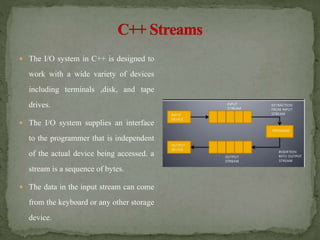
 The I/O system in C++ is designed to
work with a wide variety of devices
including terminals ,disk, and tape
drives.
 The I/O system supplies an interface
to the programmer that is independent
of the actual device being accessed. a
stream is a sequence of bytes.
 The data in the input stream can come
from the keyboard or any other storage
device.
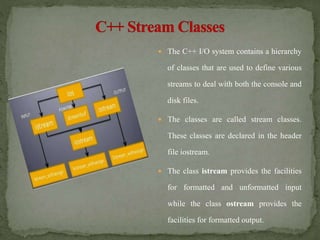
 The C++ I/O system contains a hierarchy
of classes that are used to define various
streams to deal with both the console and
disk files.
 The classes are called stream classes.
These classes are declared in the header
file iostream.
 The class istream provides the facilities
for formatted and unformatted input
while the class ostream provides the
facilities for formatted output.
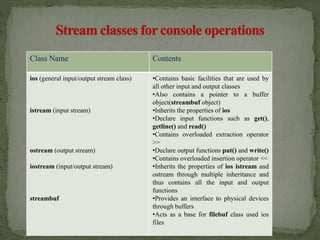
Class Name Contents
ios (general input/output stream class)
istream (input stream)
ostream (output stream)
iostream (input/output stream)
streambuf
•Contains basic facilities that are used by
all other input and output classes
•Also contains a pointer to a buffer
object(streambuf object)
•Inherits the properties of ios
•Declare input functions such as get(),
getline() and read()
•Contains overloaded extraction operator
>>
•Declare output functions put() and write()
•Contains overloaded insertion operator <<
•Inherits the properties of ios istream and
ostream through multiple inheritance and
thus contains all the input and output
functions
•Provides an interface to physical devices
through buffers
•Acts as a base for filebuf class used ios
files
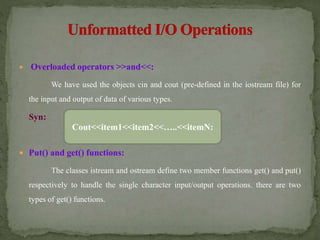
 Overloaded operators >>and<<:
We have used the objects cin and cout (pre-defined in the iostream file) for
the input and output of data of various types.
Syn:
 Put() and get() functions:
The classes istream and ostream define two member functions get() and put()
respectively to handle the single character input/output operations. there are two
types of get() functions.
Cout<<item1<<item2<<…..<<itemN:
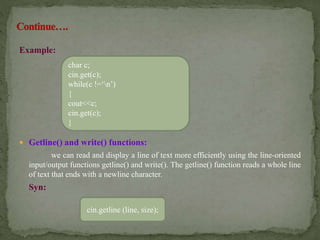
Example:
 Getline() and write() functions:
we can read and display a line of text more efficiently using the line-oriented
input/output functions getline() and write(). The getline() function reads a whole line
of text that ends with a newline character.
Syn:
cin.getline (line, size);
char c;
cin.get(c);
while(c !=‘n’)
{
cout<<c;
cin.get(c);
}
C++ supports a number of features that could be used for formatting the
output. These features include.
 ios class functions and flags.
 Manipulators.
 User-defined output functions.
The ios class contains a large number of member functions that wold help
us to format the ouput in a number of ways.
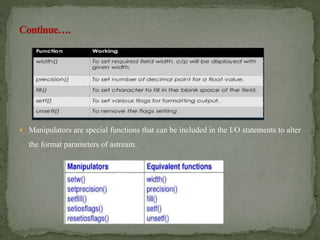
 Manipulators are special functions that can be included in the I/O statements to alter
the format parameters of astream.
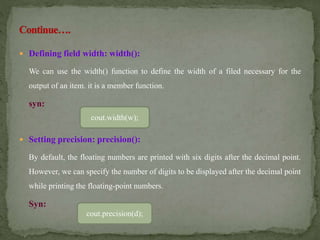
 Defining field width: width():
We can use the width() function to define the width of a filed necessary for the
output of an item. it is a member function.
syn:
 Setting precision: precision():
By default, the floating numbers are printed with six digits after the decimal point.
However, we can specify the number of digits to be displayed after the decimal point
while printing the floating-point numbers.
Syn:
cout.width(w);
cout.precision(d);
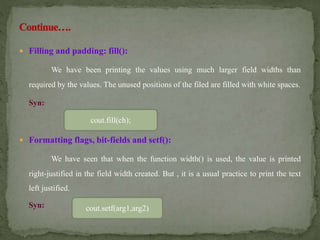
 Filling and padding: fill():
We have been printing the values using much larger field widths than
required by the values. The unused positions of the filed are filled with white spaces.
Syn:
 Formatting flags, bit-fields and setf():
We have seen that when the function width() is used, the value is printed
right-justified in the field width created. But , it is a usual practice to print the text
left justified.
Syn:
cout.fill(ch);
cout.setf(arg1,arg2)
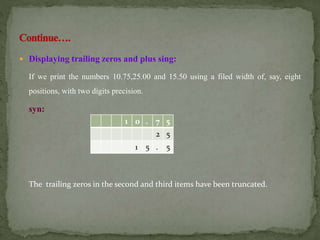
 Displaying trailing zeros and plus sing:
If we print the numbers 10.75,25.00 and 15.50 using a filed width of, say, eight
positions, with two digits precision.
syn:
The trailing zeros in the second and third items have been truncated.
1 0 . 7 5
2 5
1 5 . 5
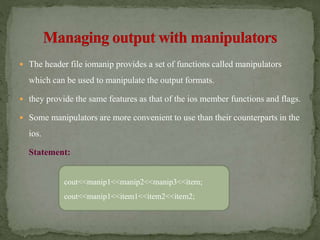
 The header file iomanip provides a set of functions called manipulators
which can be used to manipulate the output formats.
 they provide the same features as that of the ios member functions and flags.
 Some manipulators are more convenient to use than their counterparts in the
ios.
Statement:
cout<<manip1<<manip2<<manip3<<item;
cout<<manip1<<item1<<item2<<item2;
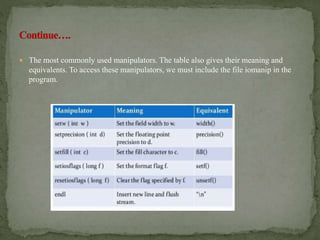
 The most commonly used manipulators. The table also gives their meaning and
equivalents. To access these manipulators, we must include the file iomanip in the
program.
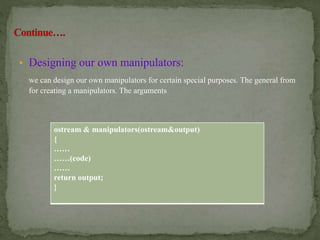
• Designing our own manipulators:
we can design our own manipulators for certain special purposes. The general from
for creating a manipulators. The arguments
ostream & manipulators(ostream&output)
{
……
……(code)
……
return output;
}
Managing console input

Managing console input

  • 1.
  • 2.
     Introduction  C++Streams  C++ Stream Classes  Unformatted I/O Operations  Formatted Console I/O Operations  Managing Output with Manipulators
  • 3.
     Every programtakes some data as input and generates processed data as output following the familiar input-process-output cycle.  C++ supports a rich set of I/O functions.  I/O methods in C++ support the concepts of OOP and I/O methods in C cannot handle the user-defined data types such as class objects.  C++ uses the concept of stream and stream classes to implement its I/O operations with the console and disk files.
  • 4.
     The I/Osystem in C++ is designed to work with a wide variety of devices including terminals ,disk, and tape drives.  The I/O system supplies an interface to the programmer that is independent of the actual device being accessed. a stream is a sequence of bytes.  The data in the input stream can come from the keyboard or any other storage device.
  • 5.
     The C++I/O system contains a hierarchy of classes that are used to define various streams to deal with both the console and disk files.  The classes are called stream classes. These classes are declared in the header file iostream.  The class istream provides the facilities for formatted and unformatted input while the class ostream provides the facilities for formatted output.
  • 6.
    Class Name Contents ios(general input/output stream class) istream (input stream) ostream (output stream) iostream (input/output stream) streambuf •Contains basic facilities that are used by all other input and output classes •Also contains a pointer to a buffer object(streambuf object) •Inherits the properties of ios •Declare input functions such as get(), getline() and read() •Contains overloaded extraction operator >> •Declare output functions put() and write() •Contains overloaded insertion operator << •Inherits the properties of ios istream and ostream through multiple inheritance and thus contains all the input and output functions •Provides an interface to physical devices through buffers •Acts as a base for filebuf class used ios files
  • 7.
     Overloaded operators>>and<<: We have used the objects cin and cout (pre-defined in the iostream file) for the input and output of data of various types. Syn:  Put() and get() functions: The classes istream and ostream define two member functions get() and put() respectively to handle the single character input/output operations. there are two types of get() functions. Cout<<item1<<item2<<…..<<itemN:
  • 8.
    Example:  Getline() andwrite() functions: we can read and display a line of text more efficiently using the line-oriented input/output functions getline() and write(). The getline() function reads a whole line of text that ends with a newline character. Syn: cin.getline (line, size); char c; cin.get(c); while(c !=‘n’) { cout<<c; cin.get(c); }
  • 9.
    C++ supports anumber of features that could be used for formatting the output. These features include.  ios class functions and flags.  Manipulators.  User-defined output functions. The ios class contains a large number of member functions that wold help us to format the ouput in a number of ways.
  • 10.
     Manipulators arespecial functions that can be included in the I/O statements to alter the format parameters of astream.
  • 11.
     Defining fieldwidth: width(): We can use the width() function to define the width of a filed necessary for the output of an item. it is a member function. syn:  Setting precision: precision(): By default, the floating numbers are printed with six digits after the decimal point. However, we can specify the number of digits to be displayed after the decimal point while printing the floating-point numbers. Syn: cout.width(w); cout.precision(d);
  • 12.
     Filling andpadding: fill(): We have been printing the values using much larger field widths than required by the values. The unused positions of the filed are filled with white spaces. Syn:  Formatting flags, bit-fields and setf(): We have seen that when the function width() is used, the value is printed right-justified in the field width created. But , it is a usual practice to print the text left justified. Syn: cout.fill(ch); cout.setf(arg1,arg2)
  • 13.
     Displaying trailingzeros and plus sing: If we print the numbers 10.75,25.00 and 15.50 using a filed width of, say, eight positions, with two digits precision. syn: The trailing zeros in the second and third items have been truncated. 1 0 . 7 5 2 5 1 5 . 5
  • 14.
     The headerfile iomanip provides a set of functions called manipulators which can be used to manipulate the output formats.  they provide the same features as that of the ios member functions and flags.  Some manipulators are more convenient to use than their counterparts in the ios. Statement: cout<<manip1<<manip2<<manip3<<item; cout<<manip1<<item1<<item2<<item2;
  • 15.
     The mostcommonly used manipulators. The table also gives their meaning and equivalents. To access these manipulators, we must include the file iomanip in the program.
  • 16.
    • Designing ourown manipulators: we can design our own manipulators for certain special purposes. The general from for creating a manipulators. The arguments ostream & manipulators(ostream&output) { …… ……(code) …… return output; }