THE DETECTION AND DEFEATING OF
MALWARE IN POPULAR VIRTUAL
MACHINES
1
Objective
 To study the VM detection techniques in popular
Virtual machines.
 Develop strategy to counter the detection.
 Prevent analysis aware malwares from detecting VM.
2
Plan of Action
 Introduction
 VM detection techniques
 Detection techniques in VMware, VirtualBox and VirtualPC.
 Related Work
 Prevent Analysis aware malwares from detecting VM.
 VMDetectGuard – Tool to mask VM detection : Windows
 Optimization of VMDetectGuard
 Results
3
Introduction
4
Malware
 Malware: It is a collective term for any
malicious software which enters the
system without the authorization of the
user of the system.
 Anti-virus/anti-malware products do not
guarantee complete protection.
5
Present Scenario
Security researchers use malware
analysis tools to build defenses against
the unknown malware forms.
They then build patches for the newly
discovered vulnerabilities and exploits.
Virtualization has emerged as a very
promising technology.
Malware analyst use Virtual Machine
Environment (VME), debuggers and
sandboxes in their analysis work.
6
Virtualization
A software based representation of a
computer that executes programs in the same
way as a real computer.
Examples, VMware, Virtual PC, VirtualBox.
Advantages
 Reduced capital and operational costs through
more efficient use of hardware resources.
 Simplifies maintenance .
 Improves scalability and deployment agility.
 Improves reliability.
7
Benefits of Virtualization to
Security Researchers
 Researchers can intrepidly execute potential malware samples
without having their systems affected.
 If a malware destabilizes the OS, analyst just needs to load in a
fresh image on a VM.
 Reduces time and cost.
 Increases productivity.
8
Analysis Awareness
Functionality
 Malware developers have added a new functionality to
malware.
 Detect the presence of analysis tools such as VMs,
debuggers and sandboxes.
 Hide their malicious behavior on detection.
 Analysis Aware / Split Personality malware.
9
Related Work
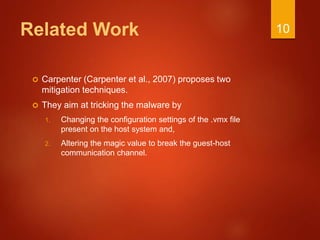
 Carpenter (Carpenter et al., 2007) proposes two
mitigation techniques.
 They aim at tricking the malware by
1. Changing the configuration settings of the .vmx file
present on the host system and,
2. Altering the magic value to break the guest-host
communication channel.
10
Drawbacks of the First
Approach
 The configuration options break the communication
channel between guest and host not just for the
program trying to detect the VM, but for all the
programs.
 Moreover the authors claim that these are
undocumented features and that they are not aware of
any side effects.
11
Related Work
 The work by Guizani (Guizani et al., 2009) provides an
effective solution for Server-Side Dynamic Code
Analysis.
 Small part of the solution deals with tricking the Split
Personality malware that employ Memory Detection
and VM Communication Channel Detection
techniques.
12
Related Work
 Kalpa Vishnani et. al. 2011: Masks all the detection
techniques used in Vmware.
13
Related Work
 Other works concentrate
 Detecting this category of malwares
 Running in host machine
 Save the current state
 quickly restore to previous state
 Virtual machines in the order of market share
 VMware, Virtual PC, and Virtual Box.
14
VM Detection Techniques
 Hardware fingerprinting
 Registry Check
 Process and File Check
 Memory Check
 Timing Analysis
 Communication Channel Check
 Invalid Instruction Check
15
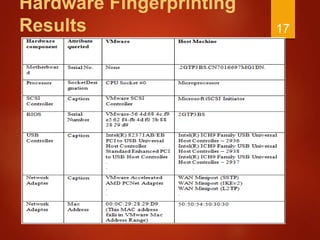
Hardware Fingerprinting
 Involves looking for specific virtualized hardware.
 VMs give an abstracted view of many hardware
components.
 Querying for such components reveals VM presence.
 For Example: BIOS, Motherboard, SCSI Controllers,
USB Controllers, etc.
16
Hardware Fingerprinting
Results 17
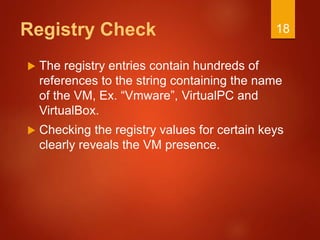
Registry Check
 The registry entries contain hundreds of
references to the string containing the name
of the VM, Ex. “Vmware”, VirtualPC and
VirtualBox.
 Checking the registry values for certain keys
clearly reveals the VM presence.
18
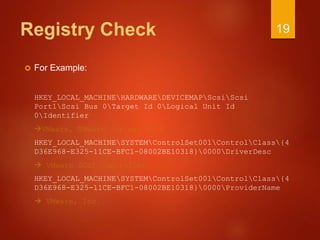
Registry Check
 For Example:
HKEY_LOCAL_MACHINEHARDWAREDEVICEMAPScsiScsi
Port1Scsi Bus 0Target Id 0Logical Unit Id
0Identifier
VMware, VMware Virtual S1.0
HKEY_LOCAL_MACHINESYSTEMControlSet001ControlClass{4
D36E968-E325-11CE-BFC1-08002BE10318}0000DriverDesc
 VMware SCSI Controller
HKEY_LOCAL_MACHINESYSTEMControlSet001ControlClass{4
D36E968-E325-11CE-BFC1-08002BE10318}0000ProviderName
 VMware, Inc.
19
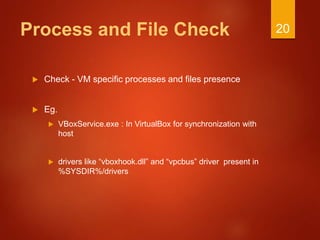
Process and File Check
 Check - VM specific processes and files presence
 Eg.
 VBoxService.exe : In VirtualBox for synchronization with
host
 drivers like “vboxhook.dll” and “vpcbus” driver present in
%SYSDIR%/drivers
20
Memory Check
 This involves looking for values of critical operating system data
structures.
 These data structures are relocated on a virtual machine so that
they do not conflict with the host system's copies.
 Store Interrupt Descriptor Table (SIDT), Store Local Descriptor
Table( SLDT), Store Global Descriptor Table (SGDT), Store Task
Register (STR), Store Machine Status Word (SMSW)
 Redpill.exe, ScoopyNG.exe use this method.
21
Timing Analysis
 Obvious yet rare attack.
 Involves looking at a local Time Stamp Counter (TSC)
value.
 By noting down the time difference VM presence is
detected.
22
VM Communication
Channel Check
 This check involves detecting the presence of a host-
guest communication channel.
 IN instruction and a magic number ‘VMXh’
 VmDetect.exe uses this check.
 Not applicable to VirtualPC and VirtualBox.
 Runs in VMware without exception.
23
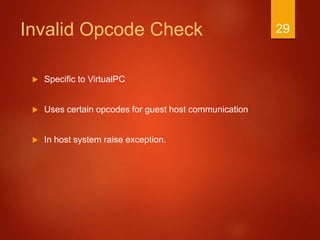
Invalid Opcode Check
 Specific to VirtualPC
 Uses certain opcodes for guest host communication
 In host system raise exception and no exception in
VirtualPC.
24
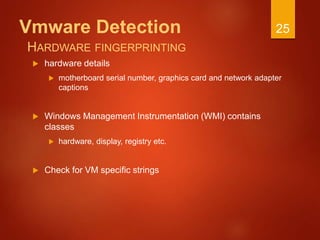
Vmware Detection
 hardware details
 motherboard serial number, graphics card and network adapter
captions
 Windows Management Instrumentation (WMI) contains
classes
 hardware, display, registry etc.
 Check for VM specific strings
25
HARDWARE FINGERPRINTING
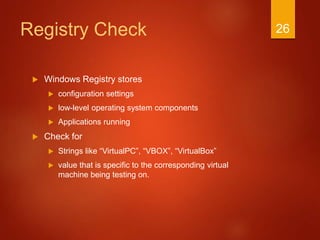
Registry Check
 Windows Registry stores
 configuration settings
 low-level operating system components
 Applications running
 Check for
 Strings like “VirtualPC”, “VBOX”, “VirtualBox”
 value that is specific to the corresponding virtual
machine being testing on.
26
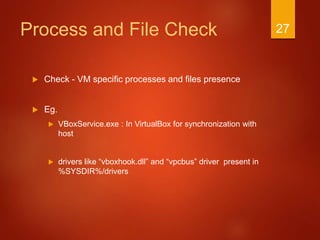
Process and File Check
 Check - VM specific processes and files presence
 Eg.
 VBoxService.exe : In VirtualBox for synchronization with
host
 drivers like “vboxhook.dll” and “vpcbus” driver present in
%SYSDIR%/drivers
27
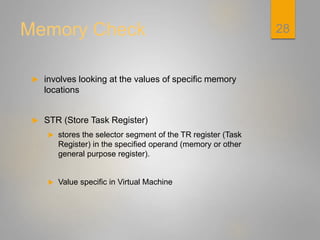
Memory Check
 involves looking at the values of specific memory
locations
 STR (Store Task Register)
 stores the selector segment of the TR register (Task
Register) in the specified operand (memory or other
general purpose register).
 Value specific in Virtual Machine
28
Invalid Opcode Check
 Specific to VirtualPC
 Uses certain opcodes for guest host communication
 In host system raise exception.
29
Detection of VM running
Linux
 Techniques: (tested on Vmware)
 Hardware Fingerprinting
 Dmesg check - prints the message buffer of the kernel
 /proc file system check - interface to internal data
structures in the kernel.
 Communication channel check
30
Dmesg and /proc file
system check
 Dmesg - prints the message buffer of the kernel
 Shows diagnostic message showing presence of
hardware during boot
 contain strings like “VMware”,
 /proc file system - an interface to internal data
structures in the kernel
 Contains system dependent information
31
Communication Channel
Check
 IN instruction
 Raises exception ““EXCEPTION PRIV INSTRUCTION”
in host
 Runs in VMware without exception
 initiates guest to host communication by calling the
“IN” instruction.
32
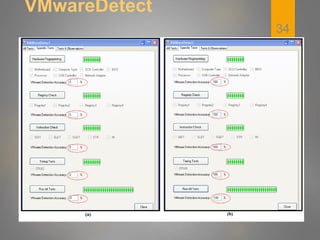
VMwareDetect
 Is the proof of concept tool.
 It employs the various VM detection techniques to
detect the presence of VMware virtual machine.
 Memory Check
 VM Communication Channel Check
 Hardware Fingerprinting
 Registry Check
 Timing Analysis
33
VMwareDetect
34
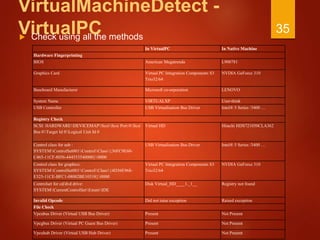
VirtualMachineDetect -
VirtualPC Check using all the methods
35
In VirtualPC In Native Machine
Hardware Fingerprinting
BIOS American Megatrenda L900781
Graphics Card Virtual PC Integration Components S3
Trio32/64
NVDIA GeForce 310
Baseboard Manufacturer Microsoft co-orporation LENOVO
System Name VIRTUALXP User-think
USB Controller USB Virtualisation Bus Driver Intel® 5 Series /3400 …
Registry Check
SCSI: HARDWAREDEVICEMAPScsiScsi Port 0Scsi
Bus 0Target Id 0Logical Unit Id 0
Virtual HD Hitachi HDS721050CLA362
Control class for usb :
SYSTEMControlSet001ControlClass{36FC9E60-
C465-11CF-8056-444553540000}0000
USB Virtualisation Bus Driver Intel® 5 Series /3400 …
Control class for graphics:
SYSTEMControlSet001ControlClass{4D36E968-
E325-11CE-BFC1-08002BE10318}0000
Virtual PC Integration Components S3
Trio32/64
NVDIA GeForce 310
Controlset for cd/dvd drive:
SYSTEMCurrentControlSetEnumIDE
Disk Virtual_HD____1._1__ Registry not found
Invalid Opcode Did not raise exception Raised exception
File Check
Vpcubus Driver (Virtual USB Bus Driver) Present Not Present
Vpcgbus Driver (Virtual PC Guest Bus Driver) Present Not Present
Vpcuhub Driver (Virtual USB Hub Driver) Present Not Present
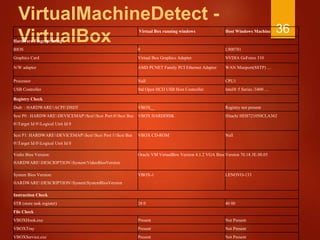
VirtualMachineDetect -
VirtualBox
Virtual Box running windows Host Windows Machine
Hardware Fingerprinting
BIOS 0 L900781
Graphics Card Virtual Box Graphics Adapter NVDIA GeForce 310
N/W adapter AMD PCNET Family PCI Ethernet Adapter WAN Miniport(SSTP) …
Processor Null CPU1
USB Controller Std Open HCD USB Host Controller Intel® 5 Series /3400 …
Registry Check
Dsdt: : HARDWAREACPIDSDT VBOX__ Registry not present
Scsi P0 : HARDWAREDEVICEMAPScsiScsi Port 0Scsi Bus
0Target Id 0Logical Unit Id 0
VBOX HARDDISK Hitachi HDS721050CLA362
Scsi P1: HARDWAREDEVICEMAPScsiScsi Port 1Scsi Bus
0Target Id 0Logical Unit Id 0
VBOX CD-ROM Null
Vedio Bios Version:
HARDWAREDESCRIPTIONSystemVideoBiosVersion
Oracle VM VirtualBox Version 4.1.2 VGA Bios Version 70.18.3E.00.05
System Bios Version:
HARDWAREDESCRIPTIONSystemSystemBiosVersion
VBOX-1 LENOVO-133
Instruction Check
STR (store task register) 28 0 40 00
File Check
VBOXHook.exe Present Not Present
VBOXTray Present Not Present
VBOXService.exe Present Not Present
36
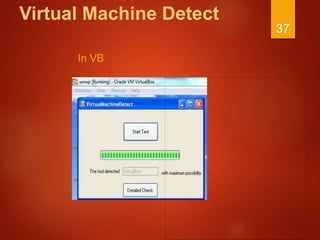
Virtual Machine Detect
In VB
37
Remote Detection
 Scenario
 There is access to the terminal of a system
 need not be administrator access
 WMIC ( Windows management instrumentation
command line) is used
38
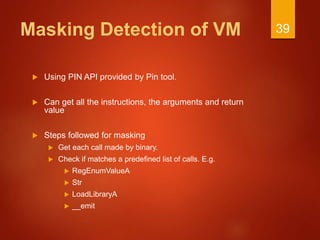
Masking Detection of VM
 Using PIN API provided by Pin tool.
 Can get all the instructions, the arguments and return
value
 Steps followed for masking
 Get each call made by binary.
 Check if matches a predefined list of calls. E.g.
 RegEnumValueA
 Str
 LoadLibraryA
 __emit
39
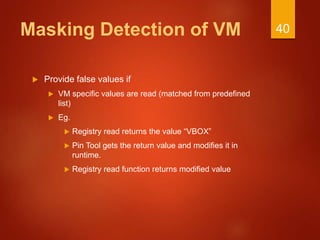
Masking Detection of VM
 Provide false values if
 VM specific values are read (matched from predefined
list)
 Eg.
 Registry read returns the value “VBOX”
 Pin Tool gets the return value and modifies it in
runtime.
 Registry read function returns modified value
40
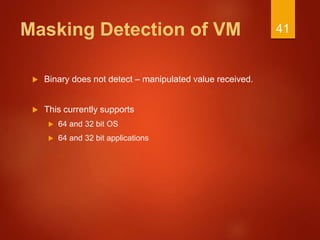
Masking Detection of VM
 Binary does not detect – manipulated value received.
 This currently supports
 64 and 32 bit OS
 64 and 32 bit applications
41
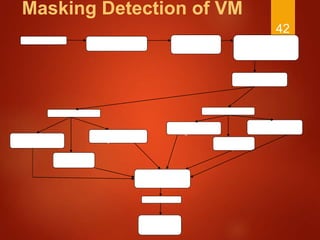
Masking Detection of VM
42
Load Binary Detect if the binary
is 64 or 32 bit.
Display the detection and
give option to user to
change it.
Detect the OS as 64/32
bit.
Detect the Underlying VM
Virtual PC VirtualBox
Register Check
masking
Invalid Opcode Check
Masking
File Check
Masking
File Check
Masking
Register Check
Masking
Instruction Check
Masking
Feedback
Save to db for
further analysis
Execution of loaded
binary completed
Our Approach 43
Our Approach
STEP 1:
Maintain a list of all the hardware as
well as registry querying API calls. Also
maintain a list of all the VM specific
instructions such as SIDT, SLDT,
SGDT, STR, IN.
44
Our Approach
 Following is a partial list of API calls to be monitored.
 Hardware Querying APIs
 SetupDiEnumDeviceInfo
 SetupDiGetDeviceInstanceId
 SetupDiGetDeviceRegistryProperty
 Registry Querying APIs
 RegEnumKey
 RegEnumValue
 RegOpenKey
 RegQueryInfoKeyValue
 RegQueryMultipleValues
 RegQueryValue
45
Our Approach
Step 2:
Perform dynamic binary instrumentation
of the sample under test in order to obtain
its low level information as well as to
intercept all the API calls made by it.
 We hook into the sample under test by
means of .dll injection.
 This is achieved using the pin framework.
46
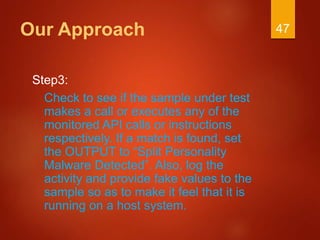
Our Approach
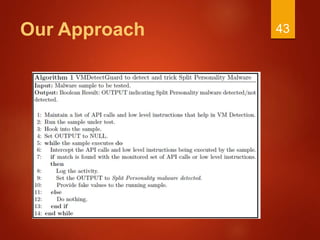
Step3:
Check to see if the sample under test
makes a call or executes any of the
monitored API calls or instructions
respectively. If a match is found, set
the OUTPUT to “Split Personality
Malware Detected”. Also, log the
activity and provide fake values to the
sample so as to make it feel that it is
running on a host system.
47
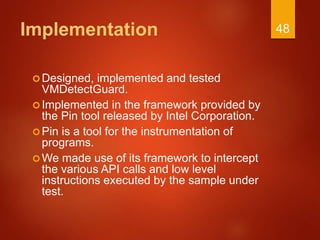
Implementation
Designed, implemented and tested
VMDetectGuard.
Implemented in the framework provided by
the Pin tool released by Intel Corporation.
Pin is a tool for the instrumentation of
programs.
We made use of its framework to intercept
the various API calls and low level
instructions executed by the sample under
test.
48
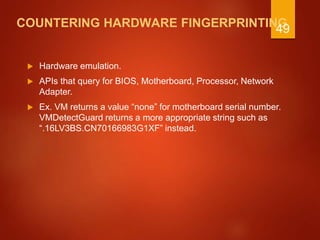
COUNTERING HARDWARE FINGERPRINTING
 Hardware emulation.
 APIs that query for BIOS, Motherboard, Processor, Network
Adapter.
 Ex. VM returns a value “none” for motherboard serial number.
VMDetectGuard returns a more appropriate string such as
“.16LV3BS.CN70166983G1XF” instead.
49
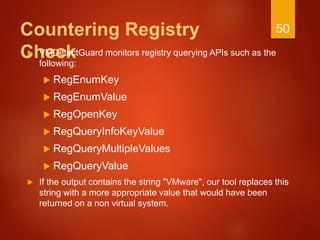
Countering Registry
Check VMDetectGuard monitors registry querying APIs such as the
following:
 RegEnumKey
 RegEnumValue
 RegOpenKey
 RegQueryInfoKeyValue
 RegQueryMultipleValues
 RegQueryValue
 If the output contains the string "VMware", our tool replaces this
string with a more appropriate value that would have been
returned on a non virtual system.
50
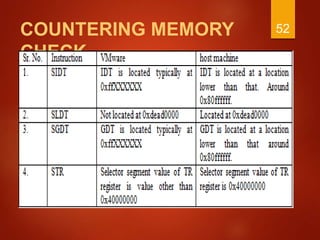
COUNTERING MEMORY CHECK
 SIDT, SLDT, and SGDT and STR instructions are
monitored.
 The values of the target registers are then changed
appropriately with the values that would have been
obtained on a host OS.
51
COUNTERING MEMORY
CHECK
52
COUNTERING VM COMMUNICATION
CHANNEL CHECK
 Monitor execution of the IN instruction.
 We change the value of the magic number .
 This leads to generation of “EXCEPTION PRIV INSTRUCTION”
exception.
53
COUNTERING TIMING ANALYSIS
 Instructions such as CPUID and RDTSC (Read Time
Stamp Counter) are monitored.
 The tool maintains a log of each type of instruction
executed.
 If the threshold value for a particular type of instruction
is exceeded, it logs this activity too.
 Sample is tricked by deleting the CPUID instruction
and modifying the values of ebx, ecx, and edx.
54
VMDetectGuard
 VMDetectGuard is our solution tool to counter Split Personality
Malware.
 VMDetectGuard runs in two different modes.
 VM Guard Mode
 Non VM Guard Mode
55
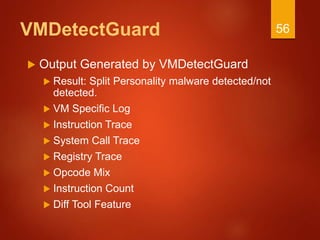
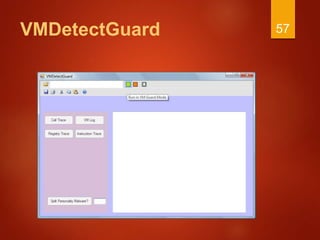
VMDetectGuard
 Output Generated by VMDetectGuard
 Result: Split Personality malware detected/not
detected.
 VM Specific Log
 Instruction Trace
 System Call Trace
 Registry Trace
 Opcode Mix
 Instruction Count
 Diff Tool Feature
56
VMDetectGuard 57
Results & Analysis
58
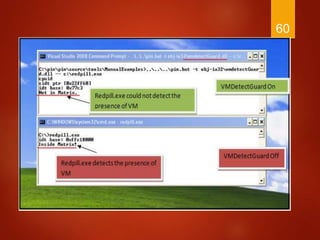
Redpill
 Red Pill is a very well known VM detection tool by
Rutkowska J.
 Runs a single machine language instruction SIDT and
analyses its result.
59
60
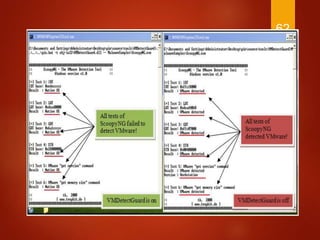
ScoopyNG
 ScoopyNG is a very well known tool for
VM detection developed by Klein T.
 More reliable tool for VM detection in
comparison to Red Pill.
 It performs the following checks
 SIDT check
 SLDT check
 SGDT check
 STR check
 IN check (VMware communication channel)
61
62
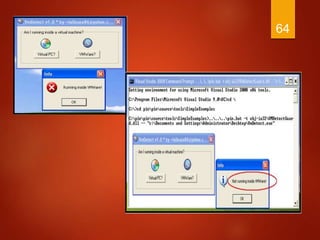
VmDetect
 This is another well known proof of concept VM
detecting sample that makes use of the VMware
communication channel to detect VMware Presence.
63
64
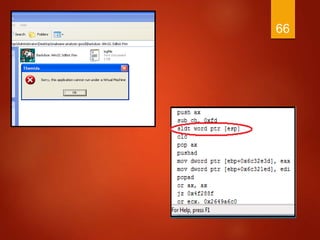
Backdoor.Win32.SdBot.fm
n
 Captured this malware from the
internet.
 Employs Memory check and Timing
Analysis mechanisms .
 In the absence of VMDetectGuard:
“This application cannot run under a
Virtual Machine.”
 In the presence of VMDetectGuard, it
behaved malicious.
65
66
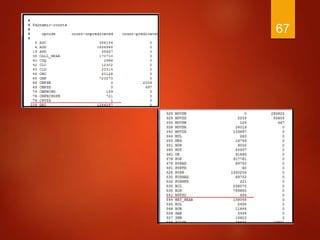
67
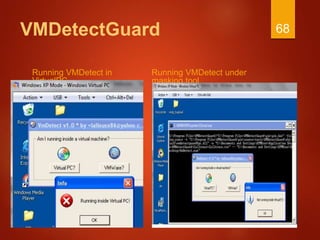
VMDetectGuard
Running VMDetect in
VirtualPC
Running VMDetect under
masking tool
68
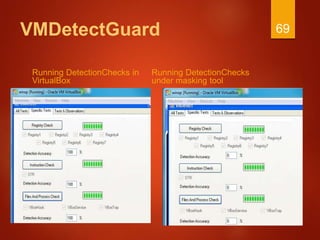
VMDetectGuard
Running DetectionChecks in
VirtualBox
Running DetectionChecks
under masking tool
69
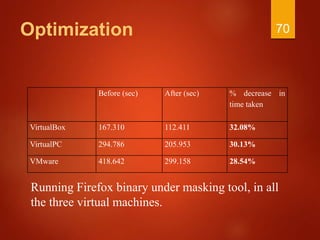
Optimization
Before (sec) After (sec) % decrease in
time taken
VirtualBox 167.310 112.411 32.08%
VirtualPC 294.786 205.953 30.13%
VMware 418.642 299.158 28.54%
70
Running Firefox binary under masking tool, in all
the three virtual machines.
Results
 Tested VMDetectGuard
 Malwares captured from internet
 Proof of concept tools
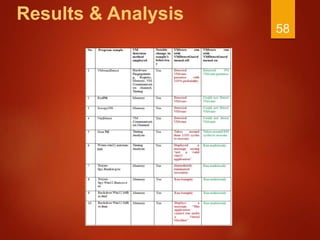
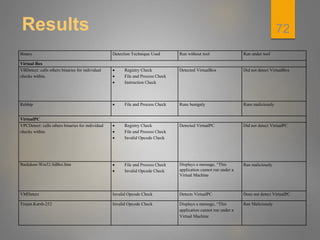
 The results obtained after testing is given in table.
71
Results
Binary Detection Technique Used Run without tool Run under tool
Virtual Box
VBDetect: calls others binaries for individual
checks within.
 Registry Check
 File and Process Check
 Instruction Check
Detected VirtualBox Did not detect VirtualBox
Rebhip  File and Process Check Runs benignly Runs maliciously
VirtualPC
VPCDetect: calls others binaries for individual
checks within.
 Registry Check
 File and Process Check
 Invalid Opcode Check
Detected VirtualPC Did not detect VirtualPC
Backdoor.Win32.SdBot.fmn  File and Process Check
 Invalid Opcode Check
Displays a message, “This
application cannot run under a
Virtual Machine
Ran maliciously
VMDetect Invalid Opcode Check Detects VirtualPC Does not detect VirtualPC
Trojen.Karsh-252 Invalid Opcode Check Displays a message, “This
application cannot run under a
Virtual Machine
Ran Maliciously
72
Conclusion
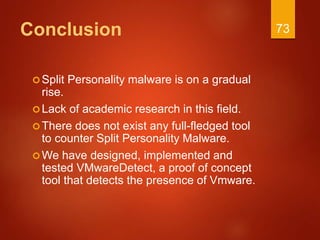
Split Personality malware is on a gradual
rise.
Lack of academic research in this field.
There does not exist any full-fledged tool
to counter Split Personality Malware.
We have designed, implemented and
tested VMwareDetect, a proof of concept
tool that detects the presence of Vmware.
73
Conclusion
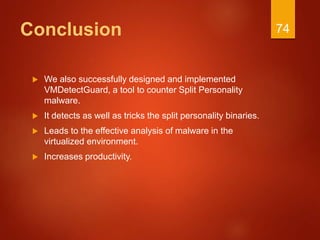
 We also successfully designed and implemented
VMDetectGuard, a tool to counter Split Personality
malware.
 It detects as well as tricks the split personality binaries.
 Leads to the effective analysis of malware in the
virtualized environment.
 Increases productivity.
74

Malware Analysis and Defeating using Virtual Machines

  • 1.
    THE DETECTION ANDDEFEATING OF MALWARE IN POPULAR VIRTUAL MACHINES 1
  • 2.
    Objective  To studythe VM detection techniques in popular Virtual machines.  Develop strategy to counter the detection.  Prevent analysis aware malwares from detecting VM. 2
  • 3.
    Plan of Action Introduction  VM detection techniques  Detection techniques in VMware, VirtualBox and VirtualPC.  Related Work  Prevent Analysis aware malwares from detecting VM.  VMDetectGuard – Tool to mask VM detection : Windows  Optimization of VMDetectGuard  Results 3
  • 4.
  • 5.
    Malware  Malware: Itis a collective term for any malicious software which enters the system without the authorization of the user of the system.  Anti-virus/anti-malware products do not guarantee complete protection. 5
  • 6.
    Present Scenario Security researchersuse malware analysis tools to build defenses against the unknown malware forms. They then build patches for the newly discovered vulnerabilities and exploits. Virtualization has emerged as a very promising technology. Malware analyst use Virtual Machine Environment (VME), debuggers and sandboxes in their analysis work. 6
  • 7.
    Virtualization A software basedrepresentation of a computer that executes programs in the same way as a real computer. Examples, VMware, Virtual PC, VirtualBox. Advantages  Reduced capital and operational costs through more efficient use of hardware resources.  Simplifies maintenance .  Improves scalability and deployment agility.  Improves reliability. 7
  • 8.
    Benefits of Virtualizationto Security Researchers  Researchers can intrepidly execute potential malware samples without having their systems affected.  If a malware destabilizes the OS, analyst just needs to load in a fresh image on a VM.  Reduces time and cost.  Increases productivity. 8
  • 9.
    Analysis Awareness Functionality  Malwaredevelopers have added a new functionality to malware.  Detect the presence of analysis tools such as VMs, debuggers and sandboxes.  Hide their malicious behavior on detection.  Analysis Aware / Split Personality malware. 9
  • 10.
    Related Work  Carpenter(Carpenter et al., 2007) proposes two mitigation techniques.  They aim at tricking the malware by 1. Changing the configuration settings of the .vmx file present on the host system and, 2. Altering the magic value to break the guest-host communication channel. 10
  • 11.
    Drawbacks of theFirst Approach  The configuration options break the communication channel between guest and host not just for the program trying to detect the VM, but for all the programs.  Moreover the authors claim that these are undocumented features and that they are not aware of any side effects. 11
  • 12.
    Related Work  Thework by Guizani (Guizani et al., 2009) provides an effective solution for Server-Side Dynamic Code Analysis.  Small part of the solution deals with tricking the Split Personality malware that employ Memory Detection and VM Communication Channel Detection techniques. 12
  • 13.
    Related Work  KalpaVishnani et. al. 2011: Masks all the detection techniques used in Vmware. 13
  • 14.
    Related Work  Otherworks concentrate  Detecting this category of malwares  Running in host machine  Save the current state  quickly restore to previous state  Virtual machines in the order of market share  VMware, Virtual PC, and Virtual Box. 14
  • 15.
    VM Detection Techniques Hardware fingerprinting  Registry Check  Process and File Check  Memory Check  Timing Analysis  Communication Channel Check  Invalid Instruction Check 15
  • 16.
    Hardware Fingerprinting  Involveslooking for specific virtualized hardware.  VMs give an abstracted view of many hardware components.  Querying for such components reveals VM presence.  For Example: BIOS, Motherboard, SCSI Controllers, USB Controllers, etc. 16
  • 17.
  • 18.
    Registry Check  Theregistry entries contain hundreds of references to the string containing the name of the VM, Ex. “Vmware”, VirtualPC and VirtualBox.  Checking the registry values for certain keys clearly reveals the VM presence. 18
  • 19.
    Registry Check  ForExample: HKEY_LOCAL_MACHINEHARDWAREDEVICEMAPScsiScsi Port1Scsi Bus 0Target Id 0Logical Unit Id 0Identifier VMware, VMware Virtual S1.0 HKEY_LOCAL_MACHINESYSTEMControlSet001ControlClass{4 D36E968-E325-11CE-BFC1-08002BE10318}0000DriverDesc  VMware SCSI Controller HKEY_LOCAL_MACHINESYSTEMControlSet001ControlClass{4 D36E968-E325-11CE-BFC1-08002BE10318}0000ProviderName  VMware, Inc. 19
  • 20.
    Process and FileCheck  Check - VM specific processes and files presence  Eg.  VBoxService.exe : In VirtualBox for synchronization with host  drivers like “vboxhook.dll” and “vpcbus” driver present in %SYSDIR%/drivers 20
  • 21.
    Memory Check  Thisinvolves looking for values of critical operating system data structures.  These data structures are relocated on a virtual machine so that they do not conflict with the host system's copies.  Store Interrupt Descriptor Table (SIDT), Store Local Descriptor Table( SLDT), Store Global Descriptor Table (SGDT), Store Task Register (STR), Store Machine Status Word (SMSW)  Redpill.exe, ScoopyNG.exe use this method. 21
  • 22.
    Timing Analysis  Obviousyet rare attack.  Involves looking at a local Time Stamp Counter (TSC) value.  By noting down the time difference VM presence is detected. 22
  • 23.
    VM Communication Channel Check This check involves detecting the presence of a host- guest communication channel.  IN instruction and a magic number ‘VMXh’  VmDetect.exe uses this check.  Not applicable to VirtualPC and VirtualBox.  Runs in VMware without exception. 23
  • 24.
    Invalid Opcode Check Specific to VirtualPC  Uses certain opcodes for guest host communication  In host system raise exception and no exception in VirtualPC. 24
  • 25.
    Vmware Detection  hardwaredetails  motherboard serial number, graphics card and network adapter captions  Windows Management Instrumentation (WMI) contains classes  hardware, display, registry etc.  Check for VM specific strings 25 HARDWARE FINGERPRINTING
  • 26.
    Registry Check  WindowsRegistry stores  configuration settings  low-level operating system components  Applications running  Check for  Strings like “VirtualPC”, “VBOX”, “VirtualBox”  value that is specific to the corresponding virtual machine being testing on. 26
  • 27.
    Process and FileCheck  Check - VM specific processes and files presence  Eg.  VBoxService.exe : In VirtualBox for synchronization with host  drivers like “vboxhook.dll” and “vpcbus” driver present in %SYSDIR%/drivers 27
  • 28.
    Memory Check  involveslooking at the values of specific memory locations  STR (Store Task Register)  stores the selector segment of the TR register (Task Register) in the specified operand (memory or other general purpose register).  Value specific in Virtual Machine 28
  • 29.
    Invalid Opcode Check Specific to VirtualPC  Uses certain opcodes for guest host communication  In host system raise exception. 29
  • 30.
    Detection of VMrunning Linux  Techniques: (tested on Vmware)  Hardware Fingerprinting  Dmesg check - prints the message buffer of the kernel  /proc file system check - interface to internal data structures in the kernel.  Communication channel check 30
  • 31.
    Dmesg and /procfile system check  Dmesg - prints the message buffer of the kernel  Shows diagnostic message showing presence of hardware during boot  contain strings like “VMware”,  /proc file system - an interface to internal data structures in the kernel  Contains system dependent information 31
  • 32.
    Communication Channel Check  INinstruction  Raises exception ““EXCEPTION PRIV INSTRUCTION” in host  Runs in VMware without exception  initiates guest to host communication by calling the “IN” instruction. 32
  • 33.
    VMwareDetect  Is theproof of concept tool.  It employs the various VM detection techniques to detect the presence of VMware virtual machine.  Memory Check  VM Communication Channel Check  Hardware Fingerprinting  Registry Check  Timing Analysis 33
  • 34.
  • 35.
    VirtualMachineDetect - VirtualPC Checkusing all the methods 35 In VirtualPC In Native Machine Hardware Fingerprinting BIOS American Megatrenda L900781 Graphics Card Virtual PC Integration Components S3 Trio32/64 NVDIA GeForce 310 Baseboard Manufacturer Microsoft co-orporation LENOVO System Name VIRTUALXP User-think USB Controller USB Virtualisation Bus Driver Intel® 5 Series /3400 … Registry Check SCSI: HARDWAREDEVICEMAPScsiScsi Port 0Scsi Bus 0Target Id 0Logical Unit Id 0 Virtual HD Hitachi HDS721050CLA362 Control class for usb : SYSTEMControlSet001ControlClass{36FC9E60- C465-11CF-8056-444553540000}0000 USB Virtualisation Bus Driver Intel® 5 Series /3400 … Control class for graphics: SYSTEMControlSet001ControlClass{4D36E968- E325-11CE-BFC1-08002BE10318}0000 Virtual PC Integration Components S3 Trio32/64 NVDIA GeForce 310 Controlset for cd/dvd drive: SYSTEMCurrentControlSetEnumIDE Disk Virtual_HD____1._1__ Registry not found Invalid Opcode Did not raise exception Raised exception File Check Vpcubus Driver (Virtual USB Bus Driver) Present Not Present Vpcgbus Driver (Virtual PC Guest Bus Driver) Present Not Present Vpcuhub Driver (Virtual USB Hub Driver) Present Not Present
  • 36.
    VirtualMachineDetect - VirtualBox Virtual Boxrunning windows Host Windows Machine Hardware Fingerprinting BIOS 0 L900781 Graphics Card Virtual Box Graphics Adapter NVDIA GeForce 310 N/W adapter AMD PCNET Family PCI Ethernet Adapter WAN Miniport(SSTP) … Processor Null CPU1 USB Controller Std Open HCD USB Host Controller Intel® 5 Series /3400 … Registry Check Dsdt: : HARDWAREACPIDSDT VBOX__ Registry not present Scsi P0 : HARDWAREDEVICEMAPScsiScsi Port 0Scsi Bus 0Target Id 0Logical Unit Id 0 VBOX HARDDISK Hitachi HDS721050CLA362 Scsi P1: HARDWAREDEVICEMAPScsiScsi Port 1Scsi Bus 0Target Id 0Logical Unit Id 0 VBOX CD-ROM Null Vedio Bios Version: HARDWAREDESCRIPTIONSystemVideoBiosVersion Oracle VM VirtualBox Version 4.1.2 VGA Bios Version 70.18.3E.00.05 System Bios Version: HARDWAREDESCRIPTIONSystemSystemBiosVersion VBOX-1 LENOVO-133 Instruction Check STR (store task register) 28 0 40 00 File Check VBOXHook.exe Present Not Present VBOXTray Present Not Present VBOXService.exe Present Not Present 36
  • 37.
  • 38.
    Remote Detection  Scenario There is access to the terminal of a system  need not be administrator access  WMIC ( Windows management instrumentation command line) is used 38
  • 39.
    Masking Detection ofVM  Using PIN API provided by Pin tool.  Can get all the instructions, the arguments and return value  Steps followed for masking  Get each call made by binary.  Check if matches a predefined list of calls. E.g.  RegEnumValueA  Str  LoadLibraryA  __emit 39
  • 40.
    Masking Detection ofVM  Provide false values if  VM specific values are read (matched from predefined list)  Eg.  Registry read returns the value “VBOX”  Pin Tool gets the return value and modifies it in runtime.  Registry read function returns modified value 40
  • 41.
    Masking Detection ofVM  Binary does not detect – manipulated value received.  This currently supports  64 and 32 bit OS  64 and 32 bit applications 41
  • 42.
    Masking Detection ofVM 42 Load Binary Detect if the binary is 64 or 32 bit. Display the detection and give option to user to change it. Detect the OS as 64/32 bit. Detect the Underlying VM Virtual PC VirtualBox Register Check masking Invalid Opcode Check Masking File Check Masking File Check Masking Register Check Masking Instruction Check Masking Feedback Save to db for further analysis Execution of loaded binary completed
  • 43.
  • 44.
    Our Approach STEP 1: Maintaina list of all the hardware as well as registry querying API calls. Also maintain a list of all the VM specific instructions such as SIDT, SLDT, SGDT, STR, IN. 44
  • 45.
    Our Approach  Followingis a partial list of API calls to be monitored.  Hardware Querying APIs  SetupDiEnumDeviceInfo  SetupDiGetDeviceInstanceId  SetupDiGetDeviceRegistryProperty  Registry Querying APIs  RegEnumKey  RegEnumValue  RegOpenKey  RegQueryInfoKeyValue  RegQueryMultipleValues  RegQueryValue 45
  • 46.
    Our Approach Step 2: Performdynamic binary instrumentation of the sample under test in order to obtain its low level information as well as to intercept all the API calls made by it.  We hook into the sample under test by means of .dll injection.  This is achieved using the pin framework. 46
  • 47.
    Our Approach Step3: Check tosee if the sample under test makes a call or executes any of the monitored API calls or instructions respectively. If a match is found, set the OUTPUT to “Split Personality Malware Detected”. Also, log the activity and provide fake values to the sample so as to make it feel that it is running on a host system. 47
  • 48.
    Implementation Designed, implemented andtested VMDetectGuard. Implemented in the framework provided by the Pin tool released by Intel Corporation. Pin is a tool for the instrumentation of programs. We made use of its framework to intercept the various API calls and low level instructions executed by the sample under test. 48
  • 49.
    COUNTERING HARDWARE FINGERPRINTING Hardware emulation.  APIs that query for BIOS, Motherboard, Processor, Network Adapter.  Ex. VM returns a value “none” for motherboard serial number. VMDetectGuard returns a more appropriate string such as “.16LV3BS.CN70166983G1XF” instead. 49
  • 50.
    Countering Registry Check VMDetectGuardmonitors registry querying APIs such as the following:  RegEnumKey  RegEnumValue  RegOpenKey  RegQueryInfoKeyValue  RegQueryMultipleValues  RegQueryValue  If the output contains the string "VMware", our tool replaces this string with a more appropriate value that would have been returned on a non virtual system. 50
  • 51.
    COUNTERING MEMORY CHECK SIDT, SLDT, and SGDT and STR instructions are monitored.  The values of the target registers are then changed appropriately with the values that would have been obtained on a host OS. 51
  • 52.
  • 53.
    COUNTERING VM COMMUNICATION CHANNELCHECK  Monitor execution of the IN instruction.  We change the value of the magic number .  This leads to generation of “EXCEPTION PRIV INSTRUCTION” exception. 53
  • 54.
    COUNTERING TIMING ANALYSIS Instructions such as CPUID and RDTSC (Read Time Stamp Counter) are monitored.  The tool maintains a log of each type of instruction executed.  If the threshold value for a particular type of instruction is exceeded, it logs this activity too.  Sample is tricked by deleting the CPUID instruction and modifying the values of ebx, ecx, and edx. 54
  • 55.
    VMDetectGuard  VMDetectGuard isour solution tool to counter Split Personality Malware.  VMDetectGuard runs in two different modes.  VM Guard Mode  Non VM Guard Mode 55
  • 56.
    VMDetectGuard  Output Generatedby VMDetectGuard  Result: Split Personality malware detected/not detected.  VM Specific Log  Instruction Trace  System Call Trace  Registry Trace  Opcode Mix  Instruction Count  Diff Tool Feature 56
  • 57.
  • 58.
  • 59.
    Redpill  Red Pillis a very well known VM detection tool by Rutkowska J.  Runs a single machine language instruction SIDT and analyses its result. 59
  • 60.
  • 61.
    ScoopyNG  ScoopyNG isa very well known tool for VM detection developed by Klein T.  More reliable tool for VM detection in comparison to Red Pill.  It performs the following checks  SIDT check  SLDT check  SGDT check  STR check  IN check (VMware communication channel) 61
  • 62.
  • 63.
    VmDetect  This isanother well known proof of concept VM detecting sample that makes use of the VMware communication channel to detect VMware Presence. 63
  • 64.
  • 65.
    Backdoor.Win32.SdBot.fm n  Captured thismalware from the internet.  Employs Memory check and Timing Analysis mechanisms .  In the absence of VMDetectGuard: “This application cannot run under a Virtual Machine.”  In the presence of VMDetectGuard, it behaved malicious. 65
  • 66.
  • 67.
  • 68.
  • 69.
  • 70.
    Optimization Before (sec) After(sec) % decrease in time taken VirtualBox 167.310 112.411 32.08% VirtualPC 294.786 205.953 30.13% VMware 418.642 299.158 28.54% 70 Running Firefox binary under masking tool, in all the three virtual machines.
  • 71.
    Results  Tested VMDetectGuard Malwares captured from internet  Proof of concept tools  The results obtained after testing is given in table. 71
  • 72.
    Results Binary Detection TechniqueUsed Run without tool Run under tool Virtual Box VBDetect: calls others binaries for individual checks within.  Registry Check  File and Process Check  Instruction Check Detected VirtualBox Did not detect VirtualBox Rebhip  File and Process Check Runs benignly Runs maliciously VirtualPC VPCDetect: calls others binaries for individual checks within.  Registry Check  File and Process Check  Invalid Opcode Check Detected VirtualPC Did not detect VirtualPC Backdoor.Win32.SdBot.fmn  File and Process Check  Invalid Opcode Check Displays a message, “This application cannot run under a Virtual Machine Ran maliciously VMDetect Invalid Opcode Check Detects VirtualPC Does not detect VirtualPC Trojen.Karsh-252 Invalid Opcode Check Displays a message, “This application cannot run under a Virtual Machine Ran Maliciously 72
  • 73.
    Conclusion Split Personality malwareis on a gradual rise. Lack of academic research in this field. There does not exist any full-fledged tool to counter Split Personality Malware. We have designed, implemented and tested VMwareDetect, a proof of concept tool that detects the presence of Vmware. 73
  • 74.
    Conclusion  We alsosuccessfully designed and implemented VMDetectGuard, a tool to counter Split Personality malware.  It detects as well as tricks the split personality binaries.  Leads to the effective analysis of malware in the virtualized environment.  Increases productivity. 74

Editor's Notes

  • #31 /proc- details of system. Dmesg- when h/w loads writes desc of loaded h/w.