Preliminary Trailer
Experimenting with Adobe Premier Pro
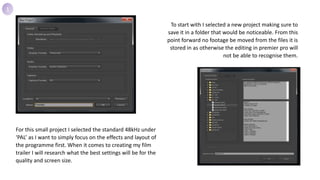
To start with I selected a new project making sure to
save it in a folder that would be noticeable. From this
point forward no footage be moved from the files it is
stored in as otherwise the editing in premier pro will
not be able to recognise them.
For this small project I selected the standard 48kHz under
‘PAL’ as I want to simply focus on the effects and layout of
the programme first. When it comes to creating my film
trailer I will research what the best settings will be for the
quality and screen size.
1
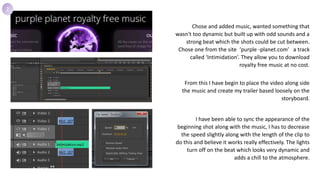
Chose and added music, wanted something that
wasn't too dynamic but built up with odd sounds and a
strong beat which the shots could be cut between.
Chose one from the site ‘purple -planet.com’ a track
called ‘Intimidation’. They allow you to download
royalty free music at no cost.
From this I have begin to place the video along side
the music and create my trailer based loosely on the
storyboard.
I have been able to sync the appearance of the
beginning shot along with the music, I has to decrease
the speed slightly along with the length of the clip to
do this and believe it works really effectively. The lights
turn off on the beat which looks very dynamic and
adds a chill to the atmosphere.
2
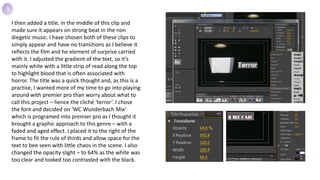
I then added a title, in the middle of this clip and
made sure it appears on strong beat in the non
diegetic music. I have chosen both of these clips to
simply appear and have no transitions as I believe it
reflects the film and he element of surprise carried
with it. I adjusted the gradient of the text, so it’s
mainly white with a little strip of read along the top
to highlight blood that is often associated with
horror. The title was a quick thought and, as this is a
practise, I wanted more of my time to go into playing
around with premier pro than worry about what to
call this project – hence the cliché ‘terror’. I chose
the font and decided on ‘WC Wunderbach Mix’
which is programed into premier pro as I thought it
brought a graphic approach to this genre – with a
faded and aged effect. I placed it to the right of the
frame to fit the rule of thirds and allow space for the
text to bee seen with little chaos in the scene. I also
changed the opacity slight – to 64% as the white was
too clear and looked too contrasted with the black.
3
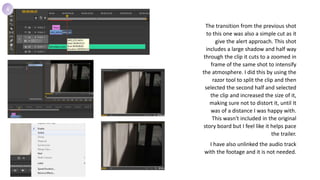
The transition from the previous shot
to this one was also a simple cut as it
give the alert approach. This shot
includes a large shadow and half way
through the clip it cuts to a zoomed in
frame of the same shot to intensify
the atmosphere. I did this by using the
razor tool to split the clip and then
selected the second half and selected
the clip and increased the size of it,
making sure not to distort it, until It
was of a distance I was happy with.
This wasn't included in the original
story board but I feel like it helps pace
the trailer.
I have also unlinked the audio track
with the footage and it is not needed.
4
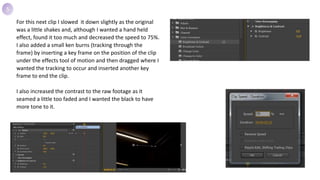
For this next clip I slowed it down slightly as the original
was a little shakes and, although I wanted a hand held
effect, found it too much and decreased the speed to 75%.
I also added a small ken burns (tracking through the
frame) by inserting a key frame on the position of the clip
under the effects tool of motion and then dragged where I
wanted the tracking to occur and inserted another key
frame to end the clip.
I also increased the contrast to the raw footage as it
seamed a little too faded and I wanted the black to have
more tone to it.
5
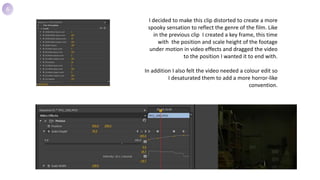
I decided to make this clip distorted to create a more
spooky sensation to reflect the genre of the film. Like
in the previous clip I created a key frame, this time
with the position and scale height of the footage
under motion in video effects and dragged the video
to the position I wanted it to end with.
In addition I also felt the video needed a colour edit so
I desaturated them to add a more horror-like
convention.
6
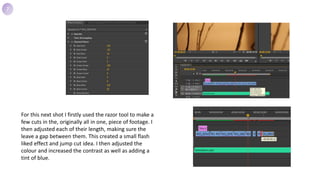
For this next shot I firstly used the razor tool to make a
few cuts in the, originally all in one, piece of footage. I
then adjusted each of their length, making sure the
leave a gap between them. This created a small flash
liked effect and jump cut idea. I then adjusted the
colour and increased the contrast as well as adding a
tint of blue.
7
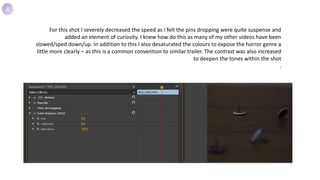
For this shot I severely decreased the speed as I felt the pins dropping were quite suspense and
added an element of curiosity. I knew how do this as many of my other videos have been
slowed/sped down/up. In addition to this I also desaturated the colours to expose the horror genre a
little more clearly – as this is a common convention to similar trailer. The contrast was also increased
to deepen the tones within the shot
.
8
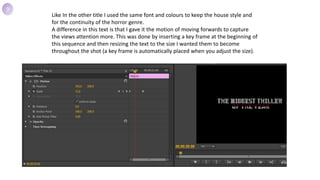
Like In the other title I used the same font and colours to keep the house style and
for the continuity of the horror genre.
A difference in this text is that I gave it the motion of moving forwards to capture
the views attention more. This was done by inserting a key frame at the beginning of
this sequence and then resizing the text to the size I wanted them to become
throughout the shot (a key frame is automatically placed when you adjust the size).
9
I adjusted the colours of this shot to create a more
sinister atmosphere to express the horror theme –
using deep tones and darker shadows. I did this with
the skills I learnt from the previous shots as they had
similar edits too.
10
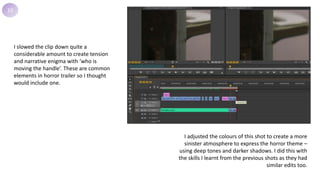
I slowed the clip down quite a
considerable amount to create tension
and narrative enigma with ‘who is
moving the handle’. These are common
elements in horror trailer so I thought
would include one.
11
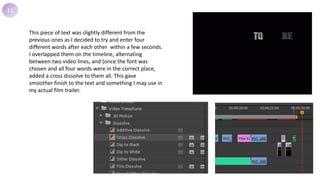
This piece of text was slightly different from the
previous ones as I decided to try and enter four
different words after each other within a few seconds.
I overlapped them on the timeline, alternating
between two video lines, and (once the font was
chosen and all four words were in the correct place,
added a cross dissolve to them all. This gave
smoother finish to the text and something I may use in
my actual film trailer.
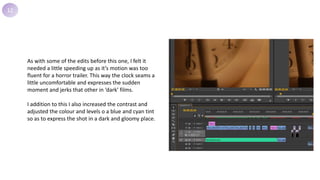
12
As with some of the edits before this one, I felt it
needed a little speeding up as it’s motion was too
fluent for a horror trailer. This way the clock seams a
little uncomfortable and expresses the sudden
moment and jerks that other in ‘dark’ films.
I addition to this I also increased the contrast and
adjusted the colour and levels o a blue and cyan tint
so as to express the shot in a dark and gloomy place.
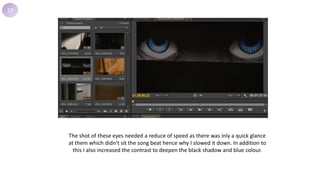
13
The shot of these eyes needed a reduce of speed as there was inly a quick glance
at them which didn’t sit the song beat hence why I slowed it down. In addition to
this I also increased the contrast to deepen the black shadow and blue colour.
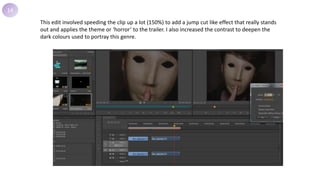
14
This edit involved speeding the clip up a lot (150%) to add a jump cut like effect that really stands
out and applies the theme or ‘horror’ to the trailer. I also increased the contrast to deepen the
dark colours used to portray this genre.
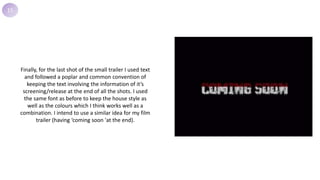
15
Finally, for the last shot of the small trailer I used text
and followed a poplar and common convention of
keeping the text involving the information of it’s
screening/release at the end of all the shots. I used
the same font as before to keep the house style as
well as the colours which I think works well as a
combination. I intend to use a similar idea for my film
trailer (having ‘coming soon 'at the end).

Making the Prelim

  • 1.
  • 2.
    To start withI selected a new project making sure to save it in a folder that would be noticeable. From this point forward no footage be moved from the files it is stored in as otherwise the editing in premier pro will not be able to recognise them. For this small project I selected the standard 48kHz under ‘PAL’ as I want to simply focus on the effects and layout of the programme first. When it comes to creating my film trailer I will research what the best settings will be for the quality and screen size. 1
  • 3.
    Chose and addedmusic, wanted something that wasn't too dynamic but built up with odd sounds and a strong beat which the shots could be cut between. Chose one from the site ‘purple -planet.com’ a track called ‘Intimidation’. They allow you to download royalty free music at no cost. From this I have begin to place the video along side the music and create my trailer based loosely on the storyboard. I have been able to sync the appearance of the beginning shot along with the music, I has to decrease the speed slightly along with the length of the clip to do this and believe it works really effectively. The lights turn off on the beat which looks very dynamic and adds a chill to the atmosphere. 2
  • 4.
    I then addeda title, in the middle of this clip and made sure it appears on strong beat in the non diegetic music. I have chosen both of these clips to simply appear and have no transitions as I believe it reflects the film and he element of surprise carried with it. I adjusted the gradient of the text, so it’s mainly white with a little strip of read along the top to highlight blood that is often associated with horror. The title was a quick thought and, as this is a practise, I wanted more of my time to go into playing around with premier pro than worry about what to call this project – hence the cliché ‘terror’. I chose the font and decided on ‘WC Wunderbach Mix’ which is programed into premier pro as I thought it brought a graphic approach to this genre – with a faded and aged effect. I placed it to the right of the frame to fit the rule of thirds and allow space for the text to bee seen with little chaos in the scene. I also changed the opacity slight – to 64% as the white was too clear and looked too contrasted with the black. 3
  • 5.
    The transition fromthe previous shot to this one was also a simple cut as it give the alert approach. This shot includes a large shadow and half way through the clip it cuts to a zoomed in frame of the same shot to intensify the atmosphere. I did this by using the razor tool to split the clip and then selected the second half and selected the clip and increased the size of it, making sure not to distort it, until It was of a distance I was happy with. This wasn't included in the original story board but I feel like it helps pace the trailer. I have also unlinked the audio track with the footage and it is not needed. 4
  • 6.
    For this nextclip I slowed it down slightly as the original was a little shakes and, although I wanted a hand held effect, found it too much and decreased the speed to 75%. I also added a small ken burns (tracking through the frame) by inserting a key frame on the position of the clip under the effects tool of motion and then dragged where I wanted the tracking to occur and inserted another key frame to end the clip. I also increased the contrast to the raw footage as it seamed a little too faded and I wanted the black to have more tone to it. 5
  • 7.
    I decided tomake this clip distorted to create a more spooky sensation to reflect the genre of the film. Like in the previous clip I created a key frame, this time with the position and scale height of the footage under motion in video effects and dragged the video to the position I wanted it to end with. In addition I also felt the video needed a colour edit so I desaturated them to add a more horror-like convention. 6
  • 8.
    For this nextshot I firstly used the razor tool to make a few cuts in the, originally all in one, piece of footage. I then adjusted each of their length, making sure the leave a gap between them. This created a small flash liked effect and jump cut idea. I then adjusted the colour and increased the contrast as well as adding a tint of blue. 7
  • 9.
    For this shotI severely decreased the speed as I felt the pins dropping were quite suspense and added an element of curiosity. I knew how do this as many of my other videos have been slowed/sped down/up. In addition to this I also desaturated the colours to expose the horror genre a little more clearly – as this is a common convention to similar trailer. The contrast was also increased to deepen the tones within the shot . 8
  • 10.
    Like In theother title I used the same font and colours to keep the house style and for the continuity of the horror genre. A difference in this text is that I gave it the motion of moving forwards to capture the views attention more. This was done by inserting a key frame at the beginning of this sequence and then resizing the text to the size I wanted them to become throughout the shot (a key frame is automatically placed when you adjust the size). 9
  • 11.
    I adjusted thecolours of this shot to create a more sinister atmosphere to express the horror theme – using deep tones and darker shadows. I did this with the skills I learnt from the previous shots as they had similar edits too. 10 I slowed the clip down quite a considerable amount to create tension and narrative enigma with ‘who is moving the handle’. These are common elements in horror trailer so I thought would include one.
  • 12.
    11 This piece oftext was slightly different from the previous ones as I decided to try and enter four different words after each other within a few seconds. I overlapped them on the timeline, alternating between two video lines, and (once the font was chosen and all four words were in the correct place, added a cross dissolve to them all. This gave smoother finish to the text and something I may use in my actual film trailer.
  • 13.
    12 As with someof the edits before this one, I felt it needed a little speeding up as it’s motion was too fluent for a horror trailer. This way the clock seams a little uncomfortable and expresses the sudden moment and jerks that other in ‘dark’ films. I addition to this I also increased the contrast and adjusted the colour and levels o a blue and cyan tint so as to express the shot in a dark and gloomy place.
  • 14.
    13 The shot ofthese eyes needed a reduce of speed as there was inly a quick glance at them which didn’t sit the song beat hence why I slowed it down. In addition to this I also increased the contrast to deepen the black shadow and blue colour.
  • 15.
    14 This edit involvedspeeding the clip up a lot (150%) to add a jump cut like effect that really stands out and applies the theme or ‘horror’ to the trailer. I also increased the contrast to deepen the dark colours used to portray this genre.
  • 16.
    15 Finally, for thelast shot of the small trailer I used text and followed a poplar and common convention of keeping the text involving the information of it’s screening/release at the end of all the shots. I used the same font as before to keep the house style as well as the colours which I think works well as a combination. I intend to use a similar idea for my film trailer (having ‘coming soon 'at the end).

Editor's Notes

  • #7 Light Bar Ken Burns Increase Contrast
  • #8 Cubbord Distorted Levels Change
  • #9 Trees/twigs Colour blue Flashes, razor tool to cut and shortened the length of them = flashes like edit
  • #10 Pin Drops Desaturate colours Slow motion (don’t need to show) – as seen preiosly Contrast up (don’t need to show)
  • #11 Title screenshot of text (not how) Motion of moving forward = key frames
  • #12 Door handle Colour change (n) - slow motion (n)
  • #13 Title of four different seperate text - Layering over the top - Cross dissolve in all
  • #14 Clock Speed up Colour, contrast up, levels
  • #15 Eye Slow Down (n) contrast up
  • #16 Face Speed up (n) contrast up
  • #17 Title, Just image Disolve out (n)