Making research « social »
with LDAP
Stephan Fabel

Logo
Aloha :-)

2

Logo
Situation


University of Hawaii System:
– 10 campuses



UH Manoa campus 20,000 students



Budget cuts across the entire UH System



UHM alone >$24M in 2013





Budget 2014 for the first time 51% based on
student tuition
2014 Budget for Colleges « data informed »

3

Logo
Challenge for our College

How do we capture key performance
metrics for faculty and staff to
support our case?

4

Logo
COE and Symas OpenLDAP (1)




Symas OpenLDAP crucial to College
infrastructure services
Pre-2011:
– user accounts (College-specific)
– groups (College-specific)



2011-2012:
– pass-through authentication to central IT
– groups (POSIX and groupOfNames) local
– authentication and groups in every application
rolled out at the College
5

Logo
COE and Symas OpenLDAP (2)


2013:
– Publications (100%)
– Grants (specification done)
– Service (currently being specified)



No teaching activity stored in our directory
– data available through Banner (Oracle)
– but it's on the list



We run our own Student Information System
which helps
6

Logo
Capturing Research






« pet project »
originally aimed at marketing efforts through
public website
idea was to present college research to
interested third parties
– Legislature
– General public
– Prospective students
– Other researchers
7

Logo
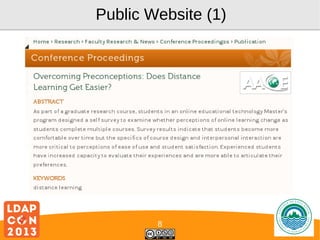
Public Website (1)

8

Logo
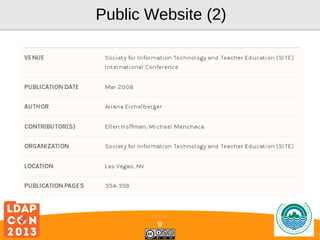
Public Website (2)

9

Logo
Aloha :-)

10

Logo
Schema

11

Logo
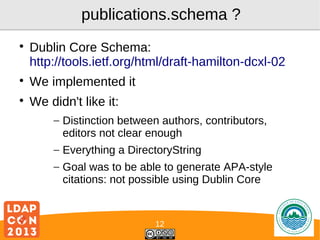
publications.schema ?


Dublin Core Schema:
http://tools.ietf.org/html/draft-hamilton-dcxl-02



We implemented it



We didn't like it:
– Distinction between authors, contributors,
editors not clear enough
– Everything a DirectoryString
– Goal was to be able to generate APA-style
citations: not possible using Dublin Core

12

Logo
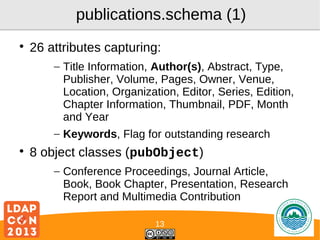
publications.schema (1)


26 attributes capturing:
– Title Information, Author(s), Abstract, Type,
Publisher, Volume, Pages, Owner, Venue,
Location, Organization, Editor, Series, Edition,
Chapter Information, Thumbnail, PDF, Month
and Year
– Keywords, Flag for outstanding research



8 object classes (pubObject)
– Conference Proceedings, Journal Article,
Book, Book Chapter, Presentation, Research
Report and Multimedia Contribution
13

Logo
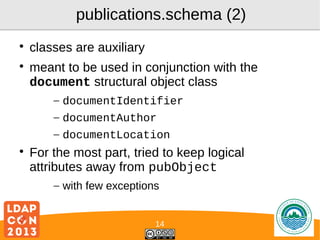
publications.schema (2)




classes are auxiliary
meant to be used in conjunction with the
document structural object class
– documentIdentifier
– documentAuthor
– documentLocation



For the most part, tried to keep logical
attributes away from pubObject
– with few exceptions
14

Logo
Determining Author- and Ownership
pubObject
documentAuthor : uid=firstAuthor
documentAuthor : uid=secondAuthor
cn : [uidNumberFirstAuthor]XXX
pubOwner : uid=firstAuthor

Goal :
- determine authorization to edit
- only first author gets rw, all others only get r
- thankfully first author never changes

XXX is
incrementing
number

Yes
It's redunant
:-/

Show all work from uid=sfabel :
(pubOwner=uid=sfabel)
Show all work where uid=sfabel was involved : (documentAuthor=uid=sfabel)

Logo
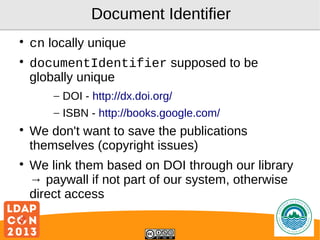
Document Identifier




cn locally unique
documentIdentifier supposed to be
globally unique
– DOI - http://dx.doi.org/
– ISBN - http://books.google.com/





We don't want to save the publications
themselves (copyright issues)
We link them based on DOI through our library
→ paywall if not part of our system, otherwise
direct access
Logo
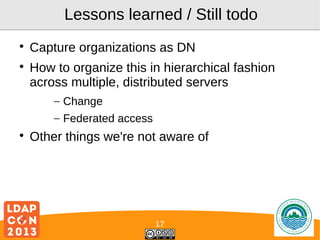
Lessons learned / Still todo



Capture organizations as DN
How to organize this in hierarchical fashion
across multiple, distributed servers
– Change
– Federated access



Other things we're not aware of

17

Logo
Aloha :-)

18

Logo
Reporting API

19

Logo
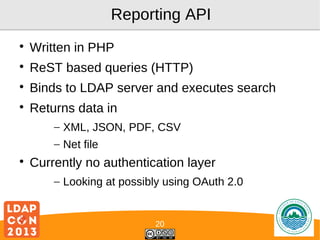
Reporting API


Written in PHP



ReST based queries (HTTP)



Binds to LDAP server and executes search



Returns data in
– XML, JSON, PDF, CSV
– Net file



Currently no authentication layer
– Looking at possibly using OAuth 2.0

20

Logo
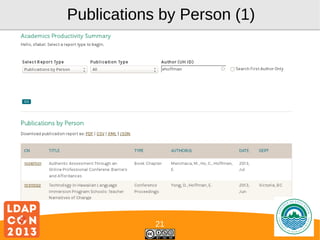
Publications by Person (1)

21

Logo
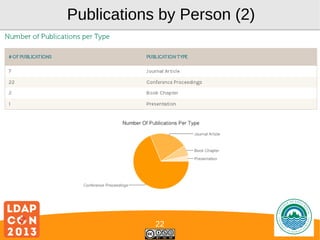
Publications by Person (2)

22

Logo
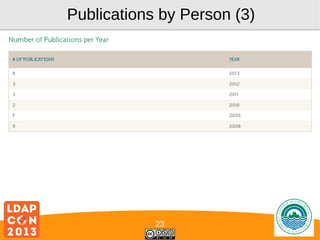
Publications by Person (3)

23

Logo
By Person → By Department


Using groupOfNames



Using slapo-memberof(5)





First Author is member of department →
publications can be aggregated
Relationship is dynamic (author moves to
different department, so do his/her
publications)

24

Logo
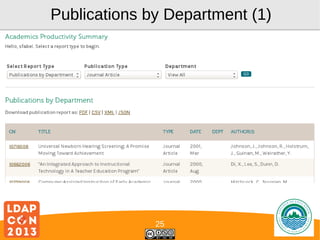
Publications by Department (1)

25

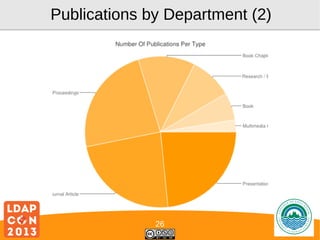
Logo
Publications by Department (2)

26

Logo
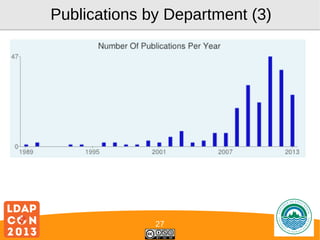
Publications by Department (3)

27

Logo
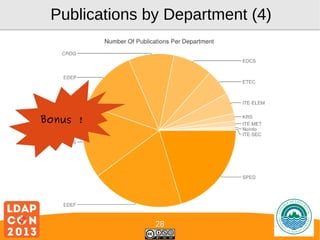
Publications by Department (4)

Bonus !

28

Logo
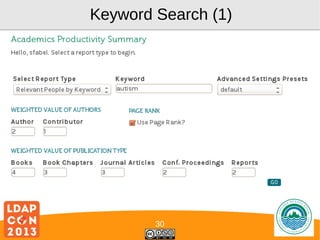
Expert Search


Goal is to find the person with the highest
caliber in publications around a given topic



Based on pubKeyword attribute values



Output is people (not publications!)



Ranking is performed by
– Publication count, type, # of collaborators
– Whether person was first author or not

29

Logo
Keyword Search (1)

30

Logo
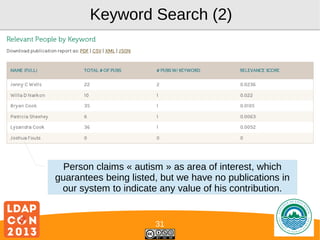
Keyword Search (2)

Person claims « autism » as area of interest, which
guarantees being listed, but we have no publications in
our system to indicate any value of his contribution.

31

Logo
Aloha :-)

32

Logo
So, how is it « social »?

33

Logo
What is « social » ?


Social media:
– share information with networks of people
– interaction based on that shared information
– goal: create « virtual community »

34

Logo
What makes research « social » ?


Social research:
– topically bounded interaction based on shared
information
– networks emerge through work
– communities « pre-defined »:
•
•
•
•

fellow researchers
prospective students
public/legislature
administration

35

Logo
Collaboration ↔ Interaction


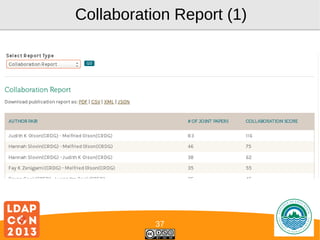
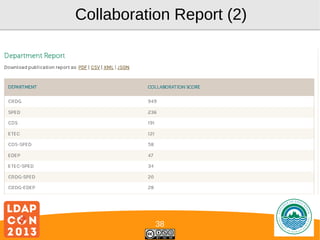
Collaboration Report:
– Find author pairs, calculate their “weight”
– Create score based on these weights





Total relevance score average of all
co-authors importance
Scoped by keyword or global

36

Logo
Collaboration Report (1)

37

Logo
Collaboration Report (2)

38

Logo
Collaboration Networks




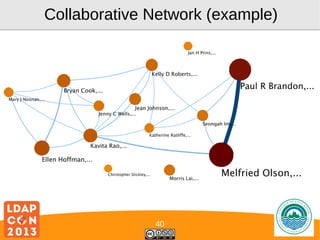
Combination of expert and collaboration
search
Undirected graph:
– Nodes people, size indicating weight
– Vertices collaborative relationship, size
indicating strength of collaborative efforts
(number of publications, kinds of publications,
number of other collaborators, etc.)

39

Logo
Collaborative Network (example)

40

Logo
Outlook / Future Work








Comprehensive Dashboard in planning
Additional institutional research / business
intelligence based on further analysis of
collaboration networks
Web-enabled search interfaces available to
public Q1 2014
Internal reporting to be made available to all
colleges, aggregation of LDAP servers to
provide campus-level reporting

41

Logo
Outlook / Future Work


Organizations:
– Common thread between publications, grants,
awards and service data
– Will be central in future reporting



Portal for researchers:
– Finding other people that you haven't
collaborated with
– Leveraging success of grant applications
through collaboration
– Providing orientation for new hires
42

Logo
Aloha :-)

43

Logo
Thanks!

Logo

Making Research "Social" using LDAP

  • 1.
    Making research «social » with LDAP Stephan Fabel Logo
  • 2.
  • 3.
    Situation  University of HawaiiSystem: – 10 campuses  UH Manoa campus 20,000 students  Budget cuts across the entire UH System  UHM alone >$24M in 2013   Budget 2014 for the first time 51% based on student tuition 2014 Budget for Colleges « data informed » 3 Logo
  • 4.
    Challenge for ourCollege How do we capture key performance metrics for faculty and staff to support our case? 4 Logo
  • 5.
    COE and SymasOpenLDAP (1)   Symas OpenLDAP crucial to College infrastructure services Pre-2011: – user accounts (College-specific) – groups (College-specific)  2011-2012: – pass-through authentication to central IT – groups (POSIX and groupOfNames) local – authentication and groups in every application rolled out at the College 5 Logo
  • 6.
    COE and SymasOpenLDAP (2)  2013: – Publications (100%) – Grants (specification done) – Service (currently being specified)  No teaching activity stored in our directory – data available through Banner (Oracle) – but it's on the list  We run our own Student Information System which helps 6 Logo
  • 7.
    Capturing Research    « petproject » originally aimed at marketing efforts through public website idea was to present college research to interested third parties – Legislature – General public – Prospective students – Other researchers 7 Logo
  • 8.
  • 9.
  • 10.
  • 11.
  • 12.
    publications.schema ?  Dublin CoreSchema: http://tools.ietf.org/html/draft-hamilton-dcxl-02  We implemented it  We didn't like it: – Distinction between authors, contributors, editors not clear enough – Everything a DirectoryString – Goal was to be able to generate APA-style citations: not possible using Dublin Core 12 Logo
  • 13.
    publications.schema (1)  26 attributescapturing: – Title Information, Author(s), Abstract, Type, Publisher, Volume, Pages, Owner, Venue, Location, Organization, Editor, Series, Edition, Chapter Information, Thumbnail, PDF, Month and Year – Keywords, Flag for outstanding research  8 object classes (pubObject) – Conference Proceedings, Journal Article, Book, Book Chapter, Presentation, Research Report and Multimedia Contribution 13 Logo
  • 14.
    publications.schema (2)   classes areauxiliary meant to be used in conjunction with the document structural object class – documentIdentifier – documentAuthor – documentLocation  For the most part, tried to keep logical attributes away from pubObject – with few exceptions 14 Logo
  • 15.
    Determining Author- andOwnership pubObject documentAuthor : uid=firstAuthor documentAuthor : uid=secondAuthor cn : [uidNumberFirstAuthor]XXX pubOwner : uid=firstAuthor Goal : - determine authorization to edit - only first author gets rw, all others only get r - thankfully first author never changes XXX is incrementing number Yes It's redunant :-/ Show all work from uid=sfabel : (pubOwner=uid=sfabel) Show all work where uid=sfabel was involved : (documentAuthor=uid=sfabel) Logo
  • 16.
    Document Identifier   cn locallyunique documentIdentifier supposed to be globally unique – DOI - http://dx.doi.org/ – ISBN - http://books.google.com/   We don't want to save the publications themselves (copyright issues) We link them based on DOI through our library → paywall if not part of our system, otherwise direct access Logo
  • 17.
    Lessons learned /Still todo   Capture organizations as DN How to organize this in hierarchical fashion across multiple, distributed servers – Change – Federated access  Other things we're not aware of 17 Logo
  • 18.
  • 19.
  • 20.
    Reporting API  Written inPHP  ReST based queries (HTTP)  Binds to LDAP server and executes search  Returns data in – XML, JSON, PDF, CSV – Net file  Currently no authentication layer – Looking at possibly using OAuth 2.0 20 Logo
  • 21.
  • 22.
  • 23.
  • 24.
    By Person →By Department  Using groupOfNames  Using slapo-memberof(5)   First Author is member of department → publications can be aggregated Relationship is dynamic (author moves to different department, so do his/her publications) 24 Logo
  • 25.
  • 26.
  • 27.
  • 28.
    Publications by Department(4) Bonus ! 28 Logo
  • 29.
    Expert Search  Goal isto find the person with the highest caliber in publications around a given topic  Based on pubKeyword attribute values  Output is people (not publications!)  Ranking is performed by – Publication count, type, # of collaborators – Whether person was first author or not 29 Logo
  • 30.
  • 31.
    Keyword Search (2) Personclaims « autism » as area of interest, which guarantees being listed, but we have no publications in our system to indicate any value of his contribution. 31 Logo
  • 32.
  • 33.
    So, how isit « social »? 33 Logo
  • 34.
    What is «social » ?  Social media: – share information with networks of people – interaction based on that shared information – goal: create « virtual community » 34 Logo
  • 35.
    What makes research« social » ?  Social research: – topically bounded interaction based on shared information – networks emerge through work – communities « pre-defined »: • • • • fellow researchers prospective students public/legislature administration 35 Logo
  • 36.
    Collaboration ↔ Interaction  CollaborationReport: – Find author pairs, calculate their “weight” – Create score based on these weights   Total relevance score average of all co-authors importance Scoped by keyword or global 36 Logo
  • 37.
  • 38.
  • 39.
    Collaboration Networks   Combination ofexpert and collaboration search Undirected graph: – Nodes people, size indicating weight – Vertices collaborative relationship, size indicating strength of collaborative efforts (number of publications, kinds of publications, number of other collaborators, etc.) 39 Logo
  • 40.
  • 41.
    Outlook / FutureWork     Comprehensive Dashboard in planning Additional institutional research / business intelligence based on further analysis of collaboration networks Web-enabled search interfaces available to public Q1 2014 Internal reporting to be made available to all colleges, aggregation of LDAP servers to provide campus-level reporting 41 Logo
  • 42.
    Outlook / FutureWork  Organizations: – Common thread between publications, grants, awards and service data – Will be central in future reporting  Portal for researchers: – Finding other people that you haven't collaborated with – Leveraging success of grant applications through collaboration – Providing orientation for new hires 42 Logo
  • 43.
  • 44.