Maintenance using Oracle Enterprise Asset Management
Abstract:
This presentation will help audience to understand Oracle’s Enterprise Asset
Management (EAM) modules capability to handle Machine breakdowns, create
repair orders, manage resources and track maintenance costs within an
enterprise. This will also explain how to leverage this module to keep track of the
most common problem codes and their resolution along with ability to assign the
repair jobs to the maintenance personnel and keep track of the progress of a
repair order along with recommended Preventive Maintenance activities that
needs to be carried out on Machines.
Enterprise Asset Management (eAM) Overview:
eAM is part of Oracle’s e-business suite and this module can take care of routine
and scheduled Asset maintenance requirements. It can support multiple assets,
multiple maintenance strategy and maintains asset level maintenance cost and
the work history. It also integrates seamlessly with other oracle ebs modules.
eAM Capabilities:
eAM is an easy to use system and supports all assets types in one single instance.
Multiple maintenance strategies are available and it can also address Preventive
Maintenance requirements of assets. It supports maintenance work order
creation and execution along with quality plans.
eAM Value:
EAM maximizes resource availability including both equipment and labor and also
optimizes scheduling and resource efficiency. Preventive maintenance helps
extending the life of the asset and all maintenance activities can be analyzed at
one place.
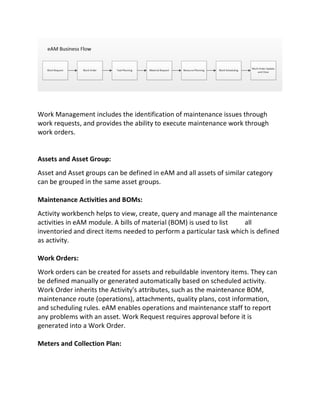
Maintenance Process Flow:
Work Management includes the identification of maintenance issues through
work requests, and provides the ability to execute maintenance work through
work orders.
Assets and Asset Group:
Asset and Asset groups can be defined in eAM and all assets of similar category
can be grouped in the same asset groups.
Maintenance Activities and BOMs:
Activity workbench helps to view, create, query and manage all the maintenance
activities in eAM module. A bills of material (BOM) is used to list all
inventoried and direct items needed to perform a particular task which is defined
as activity.
Work Orders:
Work orders can be created for assets and rebuildable inventory items. They can
be defined manually or generated automatically based on scheduled activity.
Work Order inherits the Activity's attributes, such as the maintenance BOM,
maintenance route (operations), attachments, quality plans, cost information,
and scheduling rules. eAM enables operations and maintenance staff to report
any problems with an asset. Work Request requires approval before it is
generated into a Work Order.
Meters and Collection Plan:
eAM can generate work orders automatically based on meter readings, runtime
and/or calendar days. Quality data collection plan can be enabled and collection
plan appears during the work order completion process.
Maintenance Workbench:
Using Maintenance Workbench can be used to mass release and mass complete
work orders. A Maintenance User can log on to a mobile device and view all work
that is assigned to him/her. He can view work orders for the day, overdue work,
and Work Orders that are assigned to the maintenance in the future.
Scheduler Workbench:
Scheduler Workbench enables a planner to graphically view and reschedule work
orders
It also provides a visual display of work orders, operations, and resources. Planner
can interactively reschedule work orders, operations, and resources by dragging
and dropping them at a new date and time.
Maintenance Cost:
Material, Labor, and Equipment costs of Asset Numbers, Activities, and Work
Orders can be viewed in the actual cost screen and a detailed or summarized
views of actual, estimated, or variance cost information can also be seen. When
viewing the parent Asset Number just the parent Asset Number's costs or the
costs of the parent and child Asset Numbers can be viewed that are rolled up to
the Parent level.
Integration with EBS:
eAM directly integrates with Oracle Manufacturing, Oracle Purchasing, Oracle
Property Management, Oracle Quality, Oracle Inventory, Oracle Human
Resources, Oracle Financials, Oracle Fixed Assets, and Oracle Projects. This
enables strategic resource monitoring and cost planning throughout the
enterprise.

Maintenance using Oracle Enterprise Asset Management

  • 1.
    Maintenance using OracleEnterprise Asset Management Abstract: This presentation will help audience to understand Oracle’s Enterprise Asset Management (EAM) modules capability to handle Machine breakdowns, create repair orders, manage resources and track maintenance costs within an enterprise. This will also explain how to leverage this module to keep track of the most common problem codes and their resolution along with ability to assign the repair jobs to the maintenance personnel and keep track of the progress of a repair order along with recommended Preventive Maintenance activities that needs to be carried out on Machines. Enterprise Asset Management (eAM) Overview: eAM is part of Oracle’s e-business suite and this module can take care of routine and scheduled Asset maintenance requirements. It can support multiple assets, multiple maintenance strategy and maintains asset level maintenance cost and the work history. It also integrates seamlessly with other oracle ebs modules. eAM Capabilities: eAM is an easy to use system and supports all assets types in one single instance. Multiple maintenance strategies are available and it can also address Preventive Maintenance requirements of assets. It supports maintenance work order creation and execution along with quality plans. eAM Value: EAM maximizes resource availability including both equipment and labor and also optimizes scheduling and resource efficiency. Preventive maintenance helps extending the life of the asset and all maintenance activities can be analyzed at one place. Maintenance Process Flow:
  • 2.
    Work Management includesthe identification of maintenance issues through work requests, and provides the ability to execute maintenance work through work orders. Assets and Asset Group: Asset and Asset groups can be defined in eAM and all assets of similar category can be grouped in the same asset groups. Maintenance Activities and BOMs: Activity workbench helps to view, create, query and manage all the maintenance activities in eAM module. A bills of material (BOM) is used to list all inventoried and direct items needed to perform a particular task which is defined as activity. Work Orders: Work orders can be created for assets and rebuildable inventory items. They can be defined manually or generated automatically based on scheduled activity. Work Order inherits the Activity's attributes, such as the maintenance BOM, maintenance route (operations), attachments, quality plans, cost information, and scheduling rules. eAM enables operations and maintenance staff to report any problems with an asset. Work Request requires approval before it is generated into a Work Order. Meters and Collection Plan:
  • 3.
    eAM can generatework orders automatically based on meter readings, runtime and/or calendar days. Quality data collection plan can be enabled and collection plan appears during the work order completion process. Maintenance Workbench: Using Maintenance Workbench can be used to mass release and mass complete work orders. A Maintenance User can log on to a mobile device and view all work that is assigned to him/her. He can view work orders for the day, overdue work, and Work Orders that are assigned to the maintenance in the future. Scheduler Workbench: Scheduler Workbench enables a planner to graphically view and reschedule work orders It also provides a visual display of work orders, operations, and resources. Planner can interactively reschedule work orders, operations, and resources by dragging and dropping them at a new date and time. Maintenance Cost: Material, Labor, and Equipment costs of Asset Numbers, Activities, and Work Orders can be viewed in the actual cost screen and a detailed or summarized views of actual, estimated, or variance cost information can also be seen. When viewing the parent Asset Number just the parent Asset Number's costs or the costs of the parent and child Asset Numbers can be viewed that are rolled up to the Parent level. Integration with EBS: eAM directly integrates with Oracle Manufacturing, Oracle Purchasing, Oracle Property Management, Oracle Quality, Oracle Inventory, Oracle Human Resources, Oracle Financials, Oracle Fixed Assets, and Oracle Projects. This enables strategic resource monitoring and cost planning throughout the enterprise.