
Cross-Platform based mobile
application development
10/29/2015 1
10/29/2015 2
10/29/2015 3
10/29/2015 4
A self-contained program or piece of software
designed to fulfill a particular purpose; an
application, especially as downloaded by a user to
a mobile device.
Native Apps development approaches
cross platform development approaches
Web Approach
• Hybrid Approach
10/29/2015
5
Binary executable files on the device.
Can access all API’s made available by OS vendor.
SDK’s are platform-specific.
Each mobile OS comes with its own unique tools and GUI toolkit.
A native application (native app) is an application
program that has been developed for use on a
particular platform or device.
10/29/2015 6
Easy low-level hardware access services.
Easy access to high level services important to personal mobile
experience.
Full use of all functionalities that modern mobile devices have to
offer.
High usability
 Code Reusability : Low
Development & maintenance: Time-consuming & expensive.
Designers are required to be familiar with different UI
components of each OS.
Upgrade flexibility: Low.
10/29/2015 7
A Web application (Web app) is an
application program that is stored on a
remote server and delivered over the
Internet through a browser interface.
• Use standard web technologies such as HTML 5, CSS 3
& JavaScript.
• Features of HTML 5 - Advanced UI components, access
to rich media types, geolocation services & offline
availability.
• Increasing popularity of HTML 5 in rendering engines
such as WebKit.
• Runs on a standalone mobile web browser.
• Installed shortcut, launched like a native app.10/29/2015 8
10/29/2015 9
Multiplatform support.
Low development cost.
Leverage existing knowledge.
 Limited access to OS API’s.
• Combines native development with web technology.
• The web app runs inside a thin wrapper native app.
• The wrapper native app uses the OS API’s to create an embedded HTML
rendering engine which provides a bridge between the browser and
device API’s.
• The communication between web app and native app normally happens
over JavaScript via custom built API’s.
ADVANTAGES:
• Flexibility of web apps combined with feature richness of native apps.
• Simplified deployment and immediate availability.
• Leverage existing knowledge.
DISADVANTAGES:
• Poorer user experience as compared to native apps.
• Access to advanced device capabilities normally restricted.
10/29/2015 10
Why Cross Platform ?
• Greater Reach
• One Instead of Many - Cost effective
• Easy Marketing
• Uniform Look and Feel
• Use of Known Technologies
• HTML5 vs. Mobile Developers
• Code Is Reusable
• Reduced Development Costs
• Easy access to plugins
10/29/2015 11
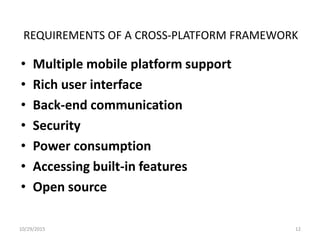
REQUIREMENTS OF A CROSS-PLATFORM FRAMEWORK
• Multiple mobile platform support
• Rich user interface
• Back-end communication
• Security
• Power consumption
• Accessing built-in features
• Open source
10/29/2015 12
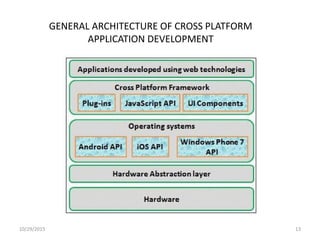
GENERAL ARCHITECTURE OF CROSS PLATFORM
APPLICATION DEVELOPMENT
10/29/2015 13
10/29/2015 14
PhoneGap
• PhoneGap also known as ‘Apache Cordova’
• Developed by Adobe Systems
• Free and opensource
• Apps written in HTML5, CSS3 and Javascript
• Support for Android, iOS, Blackberry, WebOS, Windows
Phone and Symbian
• Apache Cordova is the heart of the backend.
10/29/2015 15
Advantages
• Development skills required only in technologies JavaScript,
HTML5, CSS3
• No need to learn other complicated languages to create mobile
apps
• Existing developers can be a part of PhoneGap and increase the
user base.
• Leverage from tons of libraries.
Disadvantages
• Low performance, if your mobile app includes a lot of graphics
• Documentation is not very descriptive
• Unclear information ,directions and other best practices to
make the app better.
10/29/2015 16
Titanium
• Developed by Appcelerator Inc.
• Titanium is free and opensource
• Web Programming languages such as PHP, JavaScript, HTML, Python and
Ruby.
• Support to build Android, iOS and Blackberry Apps, trying to extend
support for Windows.
• Device Specific Functionality – No built in support for Bluetooth and
NFC.
10/29/2015 17
Advantages:
• Very rapid development
• Best choice for app that not expected to be a graphic
intensive one
• Great for testing prototyping and developing of iOS
and Android apps
• All it takes to start is Javascript
Disadvantages:
• No support for using third party libraries
• Bad documentation
• Loading data from remote sources is very slow
10/29/2015 18
Sencha Touch
• a powerful yet a complex framework
• Apps written in HML5 and CSS3.
• Faster, Cheaper and highly customizable
• More than 500,000 developers
• Rich set of documentation
• Sencha Touch can be used to develop UI’s for mobile web
applications that have a look and feel like those of native
applications
10/29/2015 19
Advantages
• It includes a large library of standard UI components.
• Easy to integrate external Javascript libraries .
• Documentation is very good.
• Comes with a technically mature set of tools development
• Commercial training and support is available.
• 3rd-party extensions available
Disadvantages
• Sencha Touch is not Open Source
• applications are written by using only Javascript
• Some animations are realized using Javascript, rather than CSS
for compatibility reasons.
10/29/2015 20
jQuery Mobile
JQuery Mobile is built on top of JQuery API
Advantages
• Ease of use
• Large library
• Can create our own theme using the ThemeRoller
Disadvantages
• Functionality may be limited
• JQuery javascript file required.
10/29/2015 21
Where the cross platform fails?
• Loss of Flexibility
• Firmware update may not include all supporting
features
• Restrictive tools
10/29/2015 22
10/29/2015 23

Cross Platform Mobile Application Development

  • 1.
  • 2.
  • 3.
  • 4.
  • 5.
    A self-contained programor piece of software designed to fulfill a particular purpose; an application, especially as downloaded by a user to a mobile device. Native Apps development approaches cross platform development approaches Web Approach • Hybrid Approach 10/29/2015 5
  • 6.
    Binary executable fileson the device. Can access all API’s made available by OS vendor. SDK’s are platform-specific. Each mobile OS comes with its own unique tools and GUI toolkit. A native application (native app) is an application program that has been developed for use on a particular platform or device. 10/29/2015 6
  • 7.
    Easy low-level hardwareaccess services. Easy access to high level services important to personal mobile experience. Full use of all functionalities that modern mobile devices have to offer. High usability  Code Reusability : Low Development & maintenance: Time-consuming & expensive. Designers are required to be familiar with different UI components of each OS. Upgrade flexibility: Low. 10/29/2015 7
  • 8.
    A Web application(Web app) is an application program that is stored on a remote server and delivered over the Internet through a browser interface. • Use standard web technologies such as HTML 5, CSS 3 & JavaScript. • Features of HTML 5 - Advanced UI components, access to rich media types, geolocation services & offline availability. • Increasing popularity of HTML 5 in rendering engines such as WebKit. • Runs on a standalone mobile web browser. • Installed shortcut, launched like a native app.10/29/2015 8
  • 9.
    10/29/2015 9 Multiplatform support. Lowdevelopment cost. Leverage existing knowledge.  Limited access to OS API’s.
  • 10.
    • Combines nativedevelopment with web technology. • The web app runs inside a thin wrapper native app. • The wrapper native app uses the OS API’s to create an embedded HTML rendering engine which provides a bridge between the browser and device API’s. • The communication between web app and native app normally happens over JavaScript via custom built API’s. ADVANTAGES: • Flexibility of web apps combined with feature richness of native apps. • Simplified deployment and immediate availability. • Leverage existing knowledge. DISADVANTAGES: • Poorer user experience as compared to native apps. • Access to advanced device capabilities normally restricted. 10/29/2015 10
  • 11.
    Why Cross Platform? • Greater Reach • One Instead of Many - Cost effective • Easy Marketing • Uniform Look and Feel • Use of Known Technologies • HTML5 vs. Mobile Developers • Code Is Reusable • Reduced Development Costs • Easy access to plugins 10/29/2015 11
  • 12.
    REQUIREMENTS OF ACROSS-PLATFORM FRAMEWORK • Multiple mobile platform support • Rich user interface • Back-end communication • Security • Power consumption • Accessing built-in features • Open source 10/29/2015 12
  • 13.
    GENERAL ARCHITECTURE OFCROSS PLATFORM APPLICATION DEVELOPMENT 10/29/2015 13
  • 14.
  • 15.
    PhoneGap • PhoneGap alsoknown as ‘Apache Cordova’ • Developed by Adobe Systems • Free and opensource • Apps written in HTML5, CSS3 and Javascript • Support for Android, iOS, Blackberry, WebOS, Windows Phone and Symbian • Apache Cordova is the heart of the backend. 10/29/2015 15
  • 16.
    Advantages • Development skillsrequired only in technologies JavaScript, HTML5, CSS3 • No need to learn other complicated languages to create mobile apps • Existing developers can be a part of PhoneGap and increase the user base. • Leverage from tons of libraries. Disadvantages • Low performance, if your mobile app includes a lot of graphics • Documentation is not very descriptive • Unclear information ,directions and other best practices to make the app better. 10/29/2015 16
  • 17.
    Titanium • Developed byAppcelerator Inc. • Titanium is free and opensource • Web Programming languages such as PHP, JavaScript, HTML, Python and Ruby. • Support to build Android, iOS and Blackberry Apps, trying to extend support for Windows. • Device Specific Functionality – No built in support for Bluetooth and NFC. 10/29/2015 17
  • 18.
    Advantages: • Very rapiddevelopment • Best choice for app that not expected to be a graphic intensive one • Great for testing prototyping and developing of iOS and Android apps • All it takes to start is Javascript Disadvantages: • No support for using third party libraries • Bad documentation • Loading data from remote sources is very slow 10/29/2015 18
  • 19.
    Sencha Touch • apowerful yet a complex framework • Apps written in HML5 and CSS3. • Faster, Cheaper and highly customizable • More than 500,000 developers • Rich set of documentation • Sencha Touch can be used to develop UI’s for mobile web applications that have a look and feel like those of native applications 10/29/2015 19
  • 20.
    Advantages • It includesa large library of standard UI components. • Easy to integrate external Javascript libraries . • Documentation is very good. • Comes with a technically mature set of tools development • Commercial training and support is available. • 3rd-party extensions available Disadvantages • Sencha Touch is not Open Source • applications are written by using only Javascript • Some animations are realized using Javascript, rather than CSS for compatibility reasons. 10/29/2015 20
  • 21.
    jQuery Mobile JQuery Mobileis built on top of JQuery API Advantages • Ease of use • Large library • Can create our own theme using the ThemeRoller Disadvantages • Functionality may be limited • JQuery javascript file required. 10/29/2015 21
  • 22.
    Where the crossplatform fails? • Loss of Flexibility • Firmware update may not include all supporting features • Restrictive tools 10/29/2015 22
  • 23.

Editor's Notes

  • #16 Apache Cordova is a set of device APIs that allow a mobile app developer to access native device function such as the camera or accelerometer from JavaScript. New Elements New Attributes Full CSS3 Support Video and Audio 2D/3D Graphics Local Storage Local SQL Database Web Applications A foreign function interface (FFI) is a mechanism by which a program written in one programming language can call routines or make use of services written in another. The term comes from the specification for Common Lisp, which explicitly refers to the language features for inter-language calls as such[citation needed]; the term is also used officially by the Haskell programming language. Other languages use other terminology (the Ada programming language talks about "language bindings", while Java refers to its FFI as theJava Native Interface, or JNI). Foreign function interface has become generic terminology for mechanisms which provide such services. Some foreign function interfaces (FFIs) are restricted to free standing functions while others also allows calls of functions embedded in an object or class (often called method calls); some even permit migration of complex datatypes and/or objects across the language boundary.