Low-end Android Cameras and the
Exposure Triangle
Martin Cerman
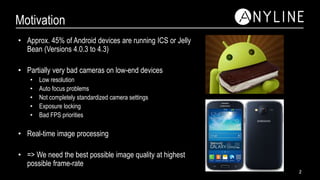
• Approx. 45% of Android devices are running ICS or Jelly
Bean (Versions 4.0.3 to 4.3)
• Partially very bad cameras on low-end devices
• Low resolution
• Auto focus problems
• Not completely standardized camera settings
• Exposure locking
• Bad FPS priorities
• Real-time image processing
• => We need the best possible image quality at highest
possible frame-rate
Motivation
2
1. Take picture and process it offline
• Provides higher quality images (separate preview and capture settings)
• More callback options (shutter callback, raw picture callback,…)
• Take picture and forget, or switch view and process
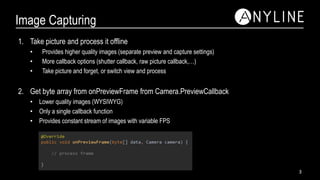
2. Get byte array from onPreviewFrame from Camera.PreviewCallback
• Lower quality images (WYSIWYG)
• Only a single callback function
• Provides constant stream of images with variable FPS
Image Capturing
3
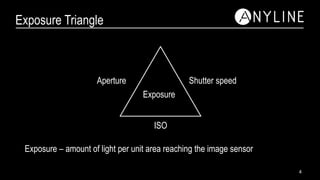
Exposure Triangle
Exposure
ISO
Shutter speedAperture
Exposure – amount of light per unit area reaching the image sensor
4
Aperture
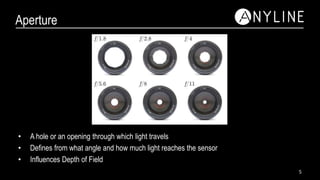
• A hole or an opening through which light travels
• Defines from what angle and how much light reaches the sensor
• Influences Depth of Field
5
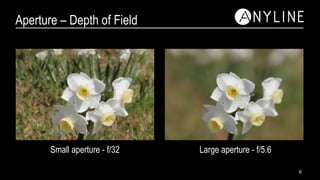
Aperture – Depth of Field
Small aperture - f/32 Large aperture - f/5.6
6
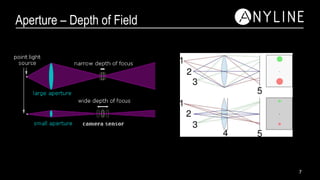
Aperture – Depth of Field
7
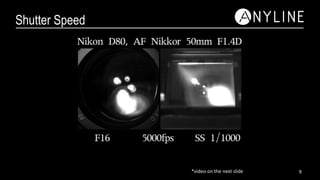
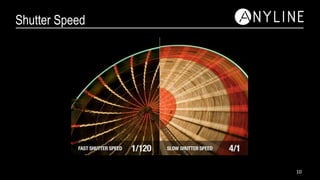
Shutter Speed
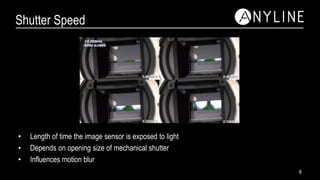
• Length of time the image sensor is exposed to light
• Depends on opening size of mechanical shutter
• Influences motion blur
8
Shutter Speed
9*video on the next slide
Shutter Speed
10
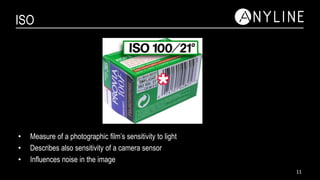
ISO
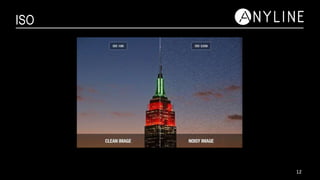
• Measure of a photographic film’s sensitivity to light
• Describes also sensitivity of a camera sensor
• Influences noise in the image
11
ISO
12
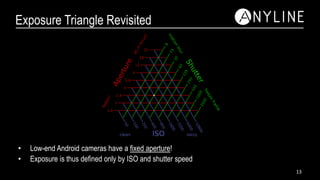
Exposure Triangle Revisited
• Low-end Android cameras have a fixed aperture!
• Exposure is thus defined only by ISO and shutter speed
13
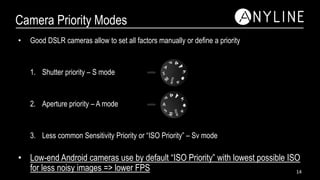
Camera Priority Modes
• Good DSLR cameras allow to set all factors manually or define a priority
1. Shutter priority – S mode
2. Aperture priority – A mode
3. Less common Sensitivity Priority or “ISO Priority” – Sv mode
• Low-end Android cameras use by default “ISO Priority” with lowest possible ISO
for less noisy images => lower FPS 14
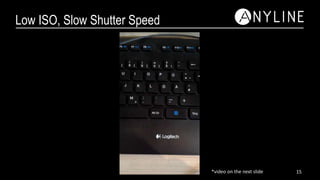
Low ISO, Slow Shutter Speed
15*video on the next slide
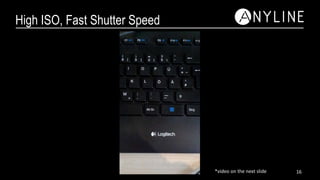
High ISO, Fast Shutter Speed
16*video on the next slide
Android Settings
• Android has “Auto” mode or “Scene” modes
• Auto mode permits change of ISO settings, but supports shutter speed very poorly
• Scene modes have set ISO and shutter speed settings
• Scene modes cannot be obtained by manually changing settings in auto mode
• Android has “ISO priority” mode
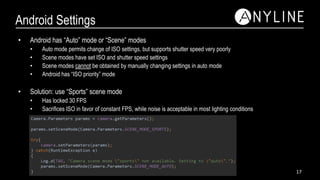
• Solution: use “Sports” scene mode
• Has locked 30 FPS
• Sacrifices ISO in favor of constant FPS, while noise is acceptable in most lighting conditions
17
Auto-focus Problems
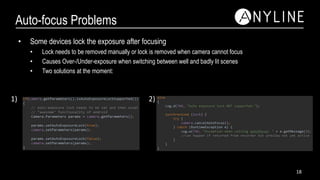
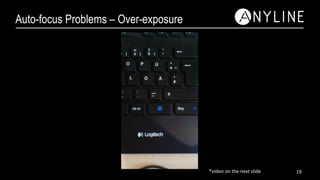
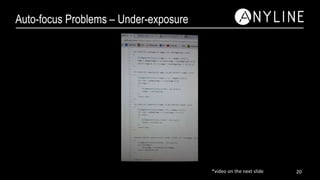
• Some devices lock the exposure after focusing
• Lock needs to be removed manually or lock is removed when camera cannot focus
• Causes Over-/Under-exposure when switching between well and badly lit scenes
• Two solutions at the moment:
1) 2)
18
Auto-focus Problems – Over-exposure
19*video on the next slide
Auto-focus Problems – Under-exposure
20*video on the next slide
Thank you!
Martin Cerman

Low-end Android cameras and the exposure triangle

  • 1.
    Low-end Android Camerasand the Exposure Triangle Martin Cerman
  • 2.
    • Approx. 45%of Android devices are running ICS or Jelly Bean (Versions 4.0.3 to 4.3) • Partially very bad cameras on low-end devices • Low resolution • Auto focus problems • Not completely standardized camera settings • Exposure locking • Bad FPS priorities • Real-time image processing • => We need the best possible image quality at highest possible frame-rate Motivation 2
  • 3.
    1. Take pictureand process it offline • Provides higher quality images (separate preview and capture settings) • More callback options (shutter callback, raw picture callback,…) • Take picture and forget, or switch view and process 2. Get byte array from onPreviewFrame from Camera.PreviewCallback • Lower quality images (WYSIWYG) • Only a single callback function • Provides constant stream of images with variable FPS Image Capturing 3
  • 4.
    Exposure Triangle Exposure ISO Shutter speedAperture Exposure– amount of light per unit area reaching the image sensor 4
  • 5.
    Aperture • A holeor an opening through which light travels • Defines from what angle and how much light reaches the sensor • Influences Depth of Field 5
  • 6.
    Aperture – Depthof Field Small aperture - f/32 Large aperture - f/5.6 6
  • 7.
  • 8.
    Shutter Speed • Lengthof time the image sensor is exposed to light • Depends on opening size of mechanical shutter • Influences motion blur 8
  • 9.
  • 10.
  • 11.
    ISO • Measure ofa photographic film’s sensitivity to light • Describes also sensitivity of a camera sensor • Influences noise in the image 11
  • 12.
  • 13.
    Exposure Triangle Revisited •Low-end Android cameras have a fixed aperture! • Exposure is thus defined only by ISO and shutter speed 13
  • 14.
    Camera Priority Modes •Good DSLR cameras allow to set all factors manually or define a priority 1. Shutter priority – S mode 2. Aperture priority – A mode 3. Less common Sensitivity Priority or “ISO Priority” – Sv mode • Low-end Android cameras use by default “ISO Priority” with lowest possible ISO for less noisy images => lower FPS 14
  • 15.
    Low ISO, SlowShutter Speed 15*video on the next slide
  • 16.
    High ISO, FastShutter Speed 16*video on the next slide
  • 17.
    Android Settings • Androidhas “Auto” mode or “Scene” modes • Auto mode permits change of ISO settings, but supports shutter speed very poorly • Scene modes have set ISO and shutter speed settings • Scene modes cannot be obtained by manually changing settings in auto mode • Android has “ISO priority” mode • Solution: use “Sports” scene mode • Has locked 30 FPS • Sacrifices ISO in favor of constant FPS, while noise is acceptable in most lighting conditions 17
  • 18.
    Auto-focus Problems • Somedevices lock the exposure after focusing • Lock needs to be removed manually or lock is removed when camera cannot focus • Causes Over-/Under-exposure when switching between well and badly lit scenes • Two solutions at the moment: 1) 2) 18
  • 19.
    Auto-focus Problems –Over-exposure 19*video on the next slide
  • 20.
    Auto-focus Problems –Under-exposure 20*video on the next slide
  • 21.

Editor's Notes

  • #2 I assume some of you have already tried developing a camera app on android. It sucks. Why? Support of low-end devices with bad cameras. Explain theory behind camera and show couple of ways how to improve them.
  • #3 Company that does real-time image processing on mobile devices Support iOS, Android, Windows Phone coming soon iOS simple – couple of devices with good camera and good processing power Android – literally hundreds of devices that need to be supported – high variability in camera quality and processing power API level >=15 – Ice Cream Sandwich 5 year old devices from which many were designed as low cost devices Hardware – Software Not a single supported focus area Map with key – value pairs …. “iso=200”, “camera_iso=200”
  • #4 Variable FPS rather bad – More time passes between frames, R and T may be higher
  • #5 Visual representation of which factors contribute to the exposure of a camera
  • #7 Narrow vs. wide DOF
  • #8 Moving image plane equal to moving object in terms of rays through lens Point projected onto image plane as circle – the larger the more blurry the point
  • #10 Mechanical shutter may pass vertically or horizontally Look out of moving car and take picture, image may seem displaced Shutter simulated in mobile devices
  • #13 High ISO is also termed “fast film” – requires less exposure
  • #14 Aperture generally fixed at 2.8 Move along red line and select ISO and shutter speed