ESB APPLICATION Improvement -2024
Slide 1: Title Slide
Title:
Elastic Stack, Filebeat, and Kibana Search
Subtitle:
A Guide to Using Elastic for Log Management and Search
Your Name / Company Name
Date
Slide 2: Overview of Elastic Stack
Title:
What is the Elastic Stack?
Content:
The Elastic Stack (formerly known as the ELK Stack) is a collection of open-source tools for
searching, analyzing, and visualizing data in real-time.
Components:
Elasticsearch – Distributed search and analytics engine.
Logstash – Data processing pipeline for transforming and forwarding logs.
Kibana – Data visualization platform for interacting with Elasticsearch data.
Beats – Lightweight data shippers to forward data from various sources.
Slide 3: Introduction to Filebeat
Title:
What is Filebeat?
Content:
Filebeat is a lightweight shipper for forwarding and centralizing log data.
It is designed to be installed on client machines or servers to collect logs and forward
them to Elasticsearch or Logstash.
Filebeat:
Reads and ships log files to central servers.
Supports various types of log files (e.g., application logs, system logs).
Operates with low resource overhead, ensuring minimal impact on the systems it
monitors.
Slide 4: Filebeat Configuration
Title:
How to Configure Filebeat
Content:
Install Filebeat on the client server (e.g., via a package manager or manually).
Edit the Filebeat configuration file (filebeat.yml):
Specify paths to log files you want to monitor (e.g., application logs, system logs).
Configure the output settings (Elasticsearch or Logstash).
Example configuration snippet:
yaml
Copy
filebeat.inputs:
- type: log
enabled: true
paths:
- /var/log/*.log
output.elasticsearch:
hosts: ["http://localhost:9200"]
Start Filebeat:
bash
Copy
sudo service filebeat start
Slide 5: Sending Logs to Elasticsearch
Title:
Sending Logs to Elasticsearch with Filebeat
Content:
Filebeat reads logs from the configured paths, and forwards them to Elasticsearch for
storage and indexing.
Filebeat modules: Pre-built configurations for popular applications (e.g., Nginx, Apache,
MySQL) to automatically parse and structure log data.
Data flow:
Filebeat reads log files.
Filebeat forwards logs to Elasticsearch.
Elasticsearch stores and indexes log data.
Slide 6: Kibana for Visualizing and Searching Logs
Title:
What is Kibana?
Content:
Kibana is the front-end interface to interact with data stored in Elasticsearch.
It allows you to:
Search and filter logs.
Visualize data through dashboards, charts, and graphs.
Create alerts for specific log patterns or metrics.
Slide 7: Setting Up Kibana for Search
Title:
Using Kibana to Search Logs
Content:
Access Kibana by navigating to its web interface (e.g., http://localhost:5601).
Create an index pattern:
Navigate to the "Management" section.
Under "Kibana Index Patterns", create an index pattern (e.g., filebeat-*) that matches the
index in Elasticsearch where your logs are stored.
Use Kibana’s Discover Page:
Go to the Discover tab in Kibana to search through your log data.
Use the search bar to apply queries (e.g., search for errors, filter by timestamp).
Kibana will display the results and allow you to drill down on specific log entries.
Slide 8: Kibana Query Example
Title:
Example Kibana Queries for Log Search
Content:
Basic Search:
Search for logs with the term "error":
go
Copy
error
Filter by Time Range:
Filter logs in the last 24 hours:
Use the time picker to set the range to the last 24 hours.
Advanced Query:
Use the Lucene query syntax or KQL (Kibana Query Language) to filter logs more
specifically:
lua
Copy
status: "500" AND error: "Database Connection Failed"
Slide 9: Kibana Dashboard
Title:
Creating Dashboards in Kibana
Content:
Kibana dashboards allow you to visualize data in real-time with charts and graphs.
Steps to create a dashboard:
Navigate to the Dashboard tab.
Click Create new dashboard.
Add visualizations (e.g., pie charts, line graphs) that display log data like errors, status
codes, and response times.
Save and share the dashboard.
Slide 10: Filebeat + Kibana: Real-World Example
Title:
Real-World Example: Monitoring Application Logs
Content:
In this example, Filebeat is used to collect logs from a web server (e.g., Apache or Nginx).
The logs are sent to Elasticsearch, and Kibana is used to visualize:
Number of requests over time.
Status codes (e.g., how many 404 errors were logged).
Latency metrics to identify performance bottlenecks.
Actionable Insights:
Detect high error rates.
Monitor system health and server performance.
Slide 11: Use Case: Analyzing Logs in Kibana
Title:
Use Case: Detecting Errors and Anomalies
Content:
Search for Specific Errors:
Use Kibana to search for specific error patterns such as "timeout" or "database failure".
Create Alerts:
Set up alerting in Kibana to notify you if error counts exceed a threshold or if specific log
patterns appear.
Visualize Trends:
Create time-series graphs to track errors over time, helping you identify spikes in issues.
Slide 12: Conclusion and Best Practices
Title:
Conclusion & Best Practices
Content:
Best Practices:
Regularly monitor logs for anomalies and performance issues.
Use Kibana's alerting system to get notified of critical issues.
Leverage Filebeat modules for easy log parsing and configuration.
Ensure data security and compliance by controlling access to Kibana and Elasticsearch.
Next Steps:
Start with setting up Filebeat on your server.
Configure Filebeat to send logs to Elasticsearch and visualize them in Kibana.
Slide 13: Q&A
Title:
Questions & Answers
Content:
Open floor for questions and discussion.
Bonus Content: Elastic Stack Architecture Diagram
For a final slide, you may want to include an architecture diagram showing how the
components interact.
Diagram Description:
Filebeat collects log data from various systems.
Logs are sent to Elasticsearch, where they are indexed and stored.
Kibana provides an interface to search, analyze, and visualize the log data.
Slide 1: Title Slide
Title:
Continuous Integration and Continuous Delivery (CI/CD) Implementation with Jenkins
Subtitle:
A Comprehensive Guide for Automating Builds, Tests, and Deployments
Your Name / Company Name
Date
Slide 2: Overview of CI/CD
Title:
What is CI/CD?
Content:
Continuous Integration (CI): A practice where code changes are automatically integrated
into a shared codebase multiple times a day.
Continuous Delivery (CD): A practice that automates the delivery of applications to
selected environments (e.g., staging, production).
Key Benefits:
Faster development cycles.
Early detection of bugs and issues.
Improved software quality.
Automation of repetitive tasks.
Slide 3: Components of CI/CD Pipeline
Title:
Components of a CI/CD Pipeline
Content:
Source Code Repository (e.g., GitHub, GitLab) – Stores code and tracks changes.
Build Automation (e.g., Jenkins) – Automates the process of compiling and testing the
application.
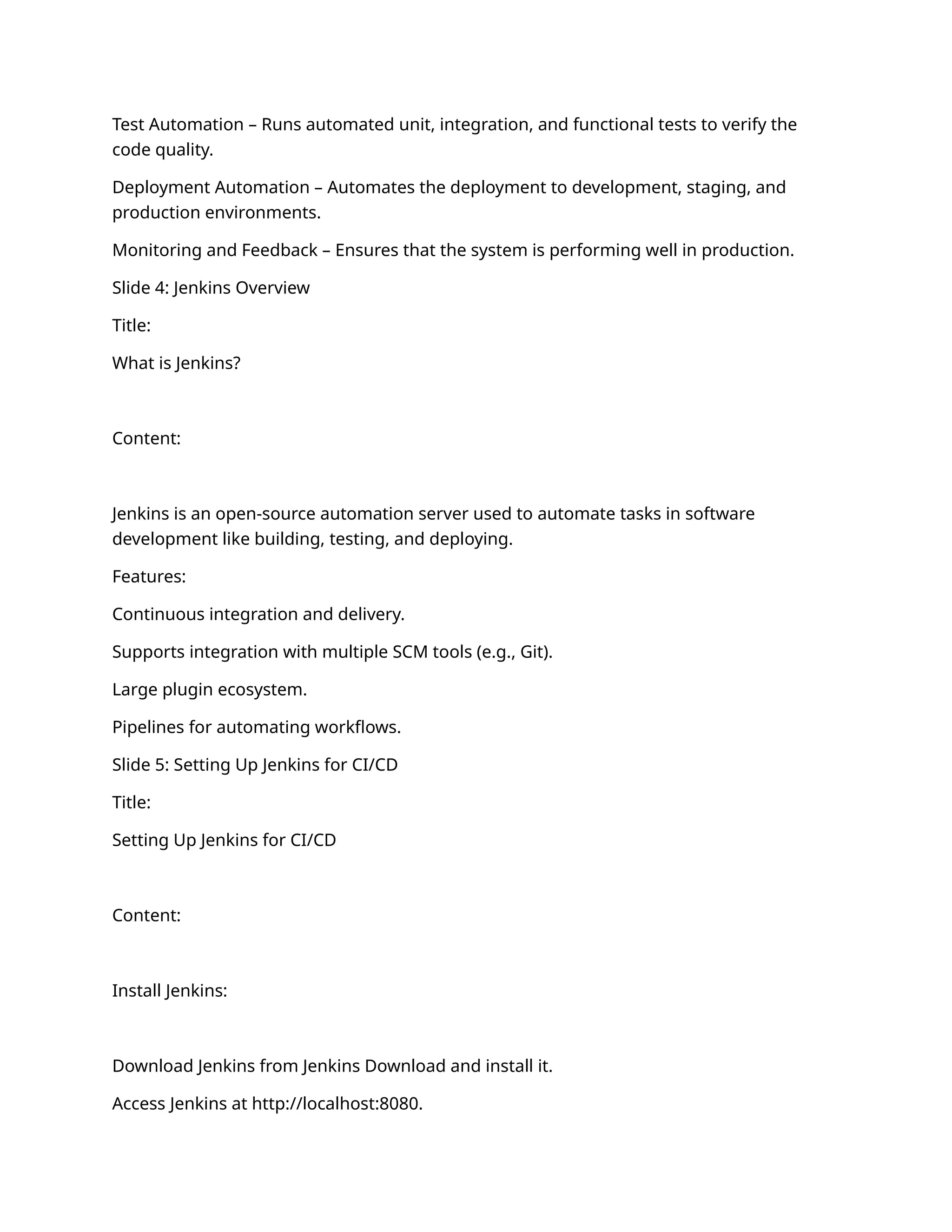
Test Automation – Runs automated unit, integration, and functional tests to verify the
code quality.
Deployment Automation – Automates the deployment to development, staging, and
production environments.
Monitoring and Feedback – Ensures that the system is performing well in production.
Slide 4: Jenkins Overview
Title:
What is Jenkins?
Content:
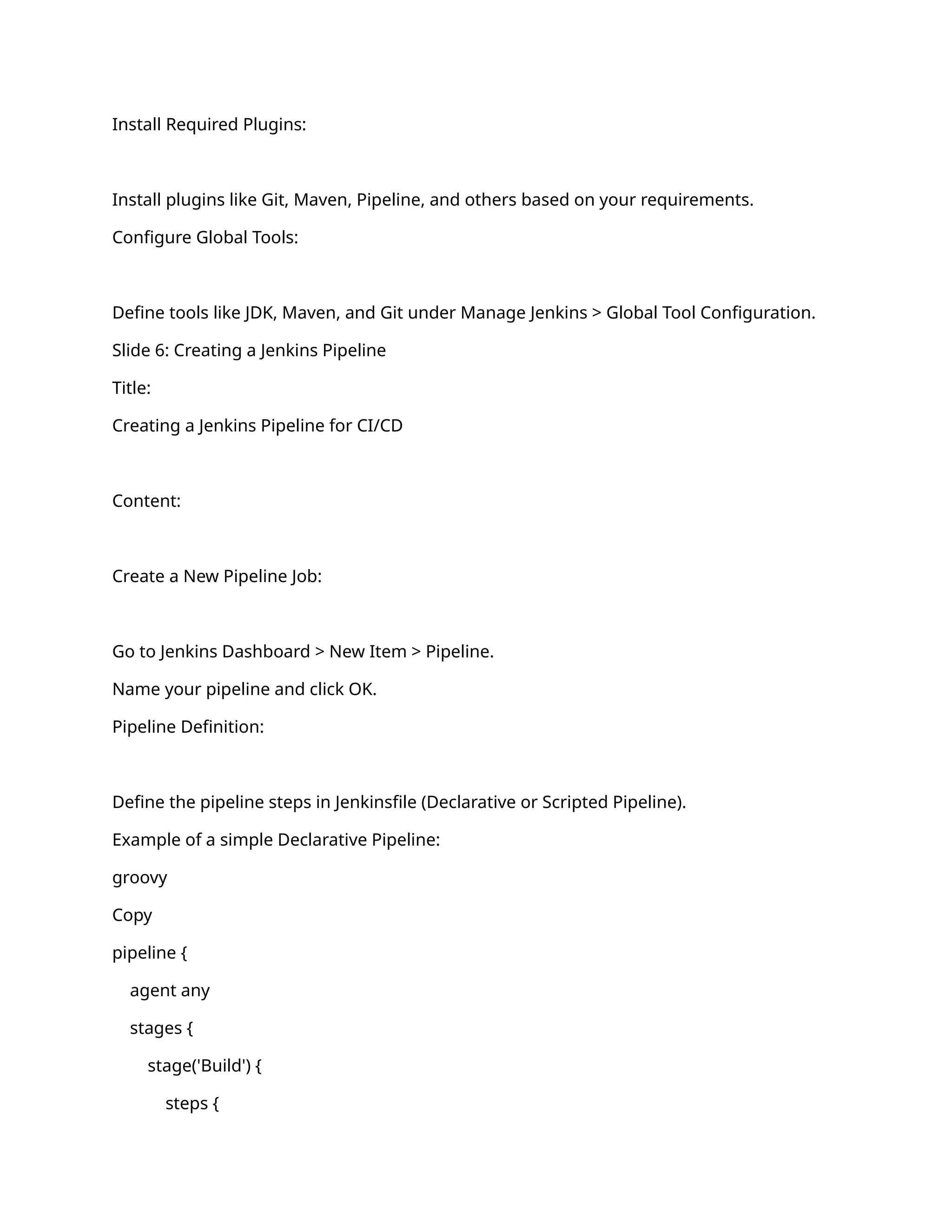
Jenkins is an open-source automation server used to automate tasks in software
development like building, testing, and deploying.
Features:
Continuous integration and delivery.
Supports integration with multiple SCM tools (e.g., Git).
Large plugin ecosystem.
Pipelines for automating workflows.
Slide 5: Setting Up Jenkins for CI/CD
Title:
Setting Up Jenkins for CI/CD
Content:
Install Jenkins:
Download Jenkins from Jenkins Download and install it.
Access Jenkins at http://localhost:8080.
Install Required Plugins:
Install plugins like Git, Maven, Pipeline, and others based on your requirements.
Configure Global Tools:
Define tools like JDK, Maven, and Git under Manage Jenkins > Global Tool Configuration.
Slide 6: Creating a Jenkins Pipeline
Title:
Creating a Jenkins Pipeline for CI/CD
Content:
Create a New Pipeline Job:
Go to Jenkins Dashboard > New Item > Pipeline.
Name your pipeline and click OK.
Pipeline Definition:
Define the pipeline steps in Jenkinsfile (Declarative or Scripted Pipeline).
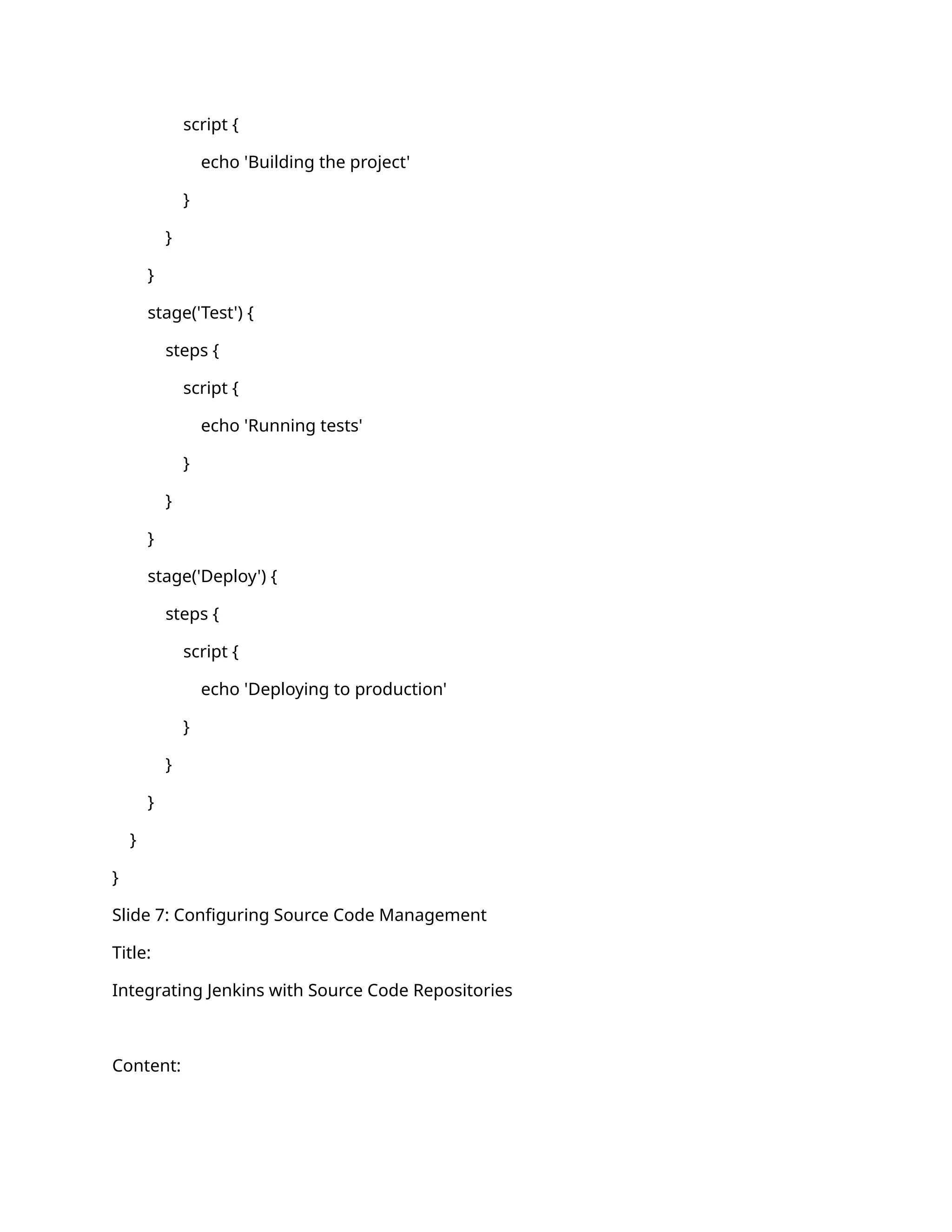
Example of a simple Declarative Pipeline:
groovy
Copy
pipeline {
agent any
stages {
stage('Build') {
steps {
script {
echo 'Building the project'
}
}
}
stage('Test') {
steps {
script {
echo 'Running tests'
}
}
}
stage('Deploy') {
steps {
script {
echo 'Deploying to production'
}
}
}
}
}
Slide 7: Configuring Source Code Management
Title:
Integrating Jenkins with Source Code Repositories
Content:
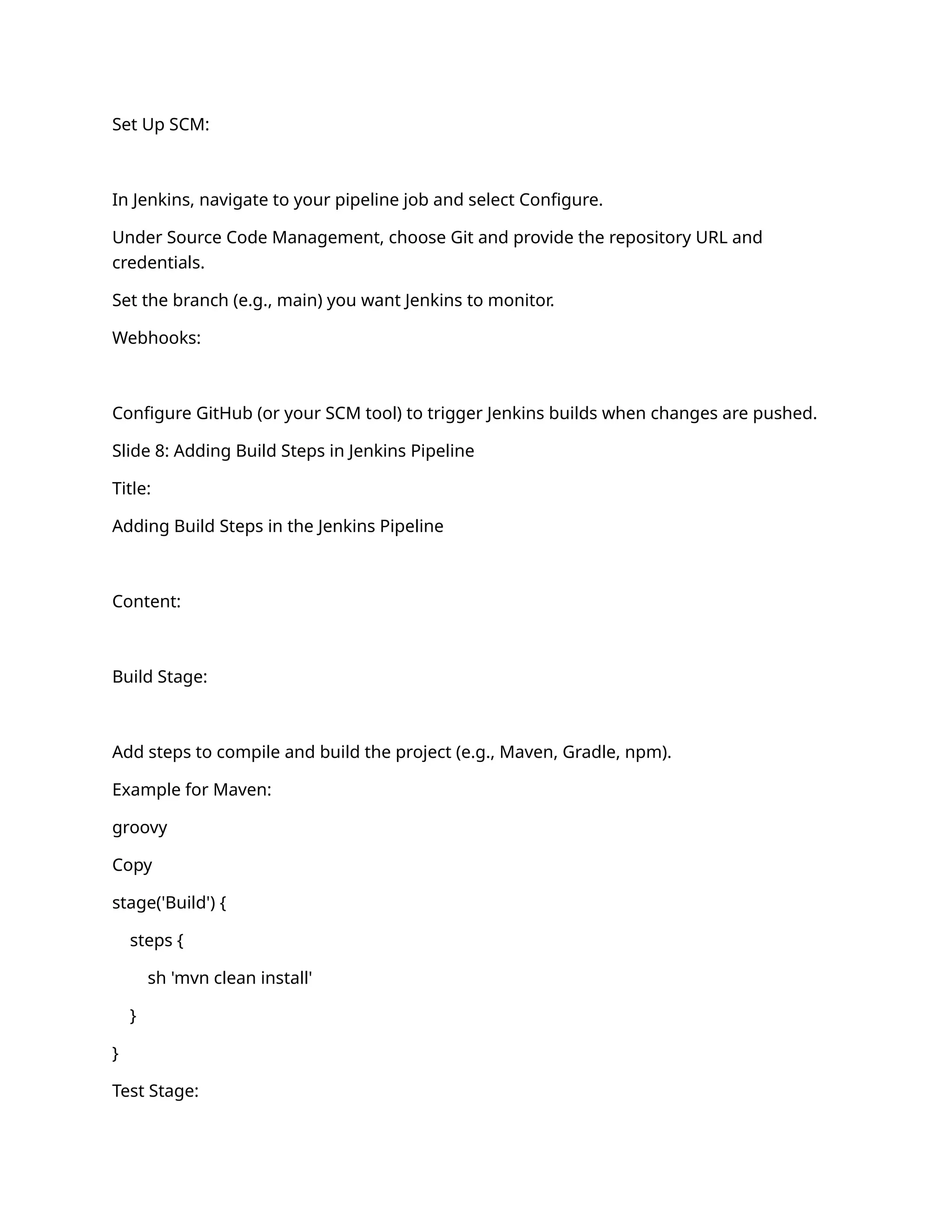
Set Up SCM:
In Jenkins, navigate to your pipeline job and select Configure.
Under Source Code Management, choose Git and provide the repository URL and
credentials.
Set the branch (e.g., main) you want Jenkins to monitor.
Webhooks:
Configure GitHub (or your SCM tool) to trigger Jenkins builds when changes are pushed.
Slide 8: Adding Build Steps in Jenkins Pipeline
Title:
Adding Build Steps in the Jenkins Pipeline
Content:
Build Stage:
Add steps to compile and build the project (e.g., Maven, Gradle, npm).
Example for Maven:
groovy
Copy
stage('Build') {
steps {
sh 'mvn clean install'
}
}
Test Stage:
Add steps for running automated tests (e.g., unit tests, integration tests).
Example for unit tests:
groovy
Copy
stage('Test') {
steps {
sh 'mvn test'
}
}
Slide 9: Deployment Automation
Title:
Automating Deployment in Jenkins
Content:
Deploy to Staging:
Add steps to deploy the application to a staging environment using tools like Kubernetes,
Docker, or traditional server deployment.
Example:
groovy
Copy
stage('Deploy to Staging') {
steps {
sh 'ansible-playbook -i staging deploy.yml'
}
}
Deploy to Production:
Add production deployment steps and make sure to set it up for manual approval or
trigger via conditions.
Example with approval:
groovy
Copy
stage('Deploy to Production') {
steps {
input 'Approve Production Deployment'
sh 'ansible-playbook -i production deploy.yml'
}
}
Slide 10: CI/CD Best Practices
Title:
Best Practices for CI/CD Implementation
Content:
Automate Everything: Automate as many steps as possible, from building to testing and
deployment.
Frequent Integration: Push code to the main branch frequently (multiple times a day) to
minimize integration issues.
Parallel Testing: Run tests in parallel to speed up the pipeline.
Environment Consistency: Ensure that environments (dev, staging, production) are
consistent for predictable builds and deployments.
Rollback Strategy: Implement mechanisms for rolling back deployments in case of failure.
Slide 11: Monitoring and Feedback
Title:
Monitoring and Feedback in CI/CD Pipelines
Content:
Build Notifications:
Set up email or Slack notifications for build statuses (success or failure).
Logging:
Implement logging for detailed insights into the build process (errors, tests, deployment
steps).
Automated Alerts:
Use Jenkins' built-in alert system to notify when builds fail, or use third-party tools for
more advanced monitoring.
Slide 12: CI/CD Pipeline Example
Title:
Example CI/CD Pipeline in Jenkins
Content:
Workflow Example:
Source Code Commit Triggers Jenkins Job.
→
Build Compile the code.
→
Unit Test Run unit tests.
→
Code Analysis Run static code analysis (optional).
→
Integration Test Run integration tests.
→
Deploy to Staging Deploy to a staging environment.
→
Manual Approval Approve deployment to production.
→
Deploy to Production Deploy the application.
→
Slide 13: Conclusion and Next Steps
Title:
Conclusion and Next Steps
Content:
CI/CD Benefits: Streamlined development process, better software quality, and faster
releases.
Next Steps:
Set up Jenkins in your environment.
Integrate with your source code repository.
Start automating the build, test, and deployment pipelines.
Slide 14: Q&A
Title:
Questions & Answers
Content:
Open the floor for questions and discussion on the implementation.
Bonus: CI/CD Pipeline Diagram
You might want to include a diagram of the CI/CD pipeline flow to visually represent the
stages of the pipeline (e.g., from code commit to production deployment). This helps in
explaining the process more clearly.
This outline should give you a comprehensive and well-structured presentation on CI/CD
using Jenkins. Feel free to customize the content and add specific details relevant to your
use case. Let me know if you need further details on any of these points!
To integrate your log format into documentation, such as for monitoring, logging, or
CI/CD workflows, it's essential to break down the key elements of the log and explain how
to capture and use this information effectively. Here’s how you can structure it:
Log Format Integration Documentation
1. Log Format Overview
This log format is used for monitoring transactions and API requests across various stages
in the workflow. It provides comprehensive information on each API request and
response, the application, server details, and transaction-specific data.
2. Log Format Breakdown
The logs are structured in a standardized format to facilitate easy parsing and real-time
monitoring. Here's an explanation of the different log elements:
Log Example (Formatted for Clarity):
csharp
Copy
2025-01-27 17:53:49,235 INFO stni_txns_sync_log
[default task-15]
[APPLICATION: WLESB_WEB_PROFILES_UAT]
[SERVER_IP: 172.16.26.68]
[SERVER_NAME: wl-esbtest02-rhel8.ventureinfotek.com]
[REFERENCE_URL: https://default-host:8443/wlesb_txn/stni]
[REMOTE_ADDR: 10.10.11.230]
[REMOTE_HOST: 10.10.11.230]
[USER_AGENT: WLP FO/1.0]
[EVENT: RECEIVED_DATA_FROM_SOURCE]
[CORRELATION_ID: 20df308f-46db-4a3d-905a-c58995e060f0-037149000330034-44770627-
00031-502712005336]
[RRN: 502712005336]
[MID: 037149000330034]
[TID: 44770627]
[BANK_CODE: 00031]
[API_REQUEST: {...}]
[TIME_TAKEN_MS: 0]
3. Key Fields and Their Purpose
Timestamp (2025-01-27 17:53:49,235):
Indicates the date and time of the log entry, including milliseconds for accurate time
tracking.
Log Level (INFO):
Specifies the severity or importance of the log entry (e.g., INFO, ERROR, WARN).
Logger Name (stni_txns_sync_log):
The name of the logger or the specific log category. This can help differentiate between
different modules or parts of the application.
Thread ([default task-15]):
Identifies the thread that generated the log entry. Useful for debugging multithreaded or
parallel processes.
Application ([APPLICATION: WLESB_WEB_PROFILES_UAT]):
Identifies the application context generating the log. This can be critical for distinguishing
between different environments (e.g., UAT, PROD).
Server Information:
SERVER_IP: The IP address of the server generating the log.
SERVER_NAME: The server name or hostname for traceability in production or
development environments.
URL and IP Information:
REFERENCE_URL: The URL being accessed or processed (e.g., endpoint or API path).
REMOTE_ADDR: The source IP address (can be the client or external service).
REMOTE_HOST: The host for the source of the request.
User Agent ([USER_AGENT: WLP FO/1.0]):
Describes the client or tool making the request (useful for API or service identification).
Event Type ([EVENT: RECEIVED_DATA_FROM_SOURCE]):
Describes the action or event taking place, such as data receipt or a response from a
service.
Correlation ID ([CORRELATION_ID: 20df308f-46db-4a3d-905a-c58995e060f0-
037149000330034-44770627-00031-502712005336]):
A unique identifier for tracing the request flow across various systems or microservices.
Transaction Identifiers:
RRN: Unique reference number for the transaction.
MID: Merchant ID associated with the transaction.
TID: Terminal ID identifying the point-of-sale or system.
BANK_CODE: Bank or financial institution's code associated with the transaction.
API Request/Response:
API_REQUEST: JSON string representing the request data sent to the API.
API_RESPONSE: JSON string representing the API response data.
Performance Metrics ([TIME_TAKEN_MS: 0]):
Time in milliseconds taken to process the request. It helps in performance monitoring and
identifying bottlenecks.
4. Integrating the Log Format in a CI/CD Pipeline
To fully integrate this log format into your CI/CD process, follow these steps:
Set Up Log Collection:
Use centralized logging tools like ELK Stack (Elasticsearch, Logstash, Kibana) or Splunk to
aggregate logs from various services.
Configure the logging system to collect logs from your Jenkins pipeline or your application
directly to a central log repository.
Define Log Parsing Rules:
Create custom log parsers for the specific structure you have. For instance:
Timestamp: Extract and parse the timestamp to sort logs by date/time.
Log Level: Filter logs based on severity to control alerting.
Event Types: Set alerts for specific events like RECEIVED_DATA_FROM_SOURCE or
DATA_INSERTED_TO_DB.
API Request/Response Data: Use log parsers to extract JSON payloads (API
request/response) for more granular analysis.
Monitoring & Alerts:
Use Kibana or another monitoring tool to visualize logs. Set up dashboards that can give
you insights into metrics such as the number of requests, time taken per request, and
error rates.
Implement threshold-based alerts for key performance metrics (e.g., if TIME_TAKEN_MS
exceeds a specific value).
Log Retention and Security:
Set log retention policies to prevent storage bloat. Logs might need to be archived after a
certain period based on company or regulatory requirements.
Ensure sensitive data (e.g., CardNumber, TokenizedCardNumber) is either masked or
excluded from logs if needed.
CI/CD Integration:
Implement Jenkins Pipeline steps that monitor the status of logs in real-time. For example,
Jenkins can check logs for specific error events during each build stage and trigger
appropriate actions if errors or performance issues are detected.
Additionally, include API Health Checks or Regression Tests as part of your pipeline to
ensure that logs contain no unexpected errors.
5. Tools and Technologies for Log Management Integration
Log Aggregators:
ELK Stack (Elasticsearch, Logstash, Kibana)
Splunk
Fluentd
Graylog
CI/CD Integration:
Jenkins (with Log Parser plugins)
GitLab CI/CD (with Log Integration)
CircleCI (using custom logging scripts)
Visualization:
Kibana (for ELK Stack)
Grafana (for visualizing logs along with other metrics)
Splunk Dashboards
Monitoring:
Prometheus (for performance metrics, integrated with log data)
New Relic / Datadog
6. Conclusion
This log format provides a robust structure for monitoring and troubleshooting
application transactions. By integrating it with your CI/CD pipeline and logging
infrastructure, you can achieve real-time observability, proactive issue detection, and
overall system health management.
7. Next Steps
Integrate the logging format into your Jenkins pipeline.
Set up centralized log management with tools like ELK Stack or Splunk.
Create performance monitoring and alerting systems based on the data in the logs.
Continuously review and refine your logging structure as your application evolves.
It sounds like you're working on an application where instead of fetching data directly
from database columns, you're implementing a JSON parser to fetch and process the data
using a mapping or destination request JSON. This approach can be used when you're
dealing with API responses, external data sources, or need to decouple your database
structure from your application's data processing logic.
Here’s how you can implement a JSON parser with mapping and destination requests in
your application:
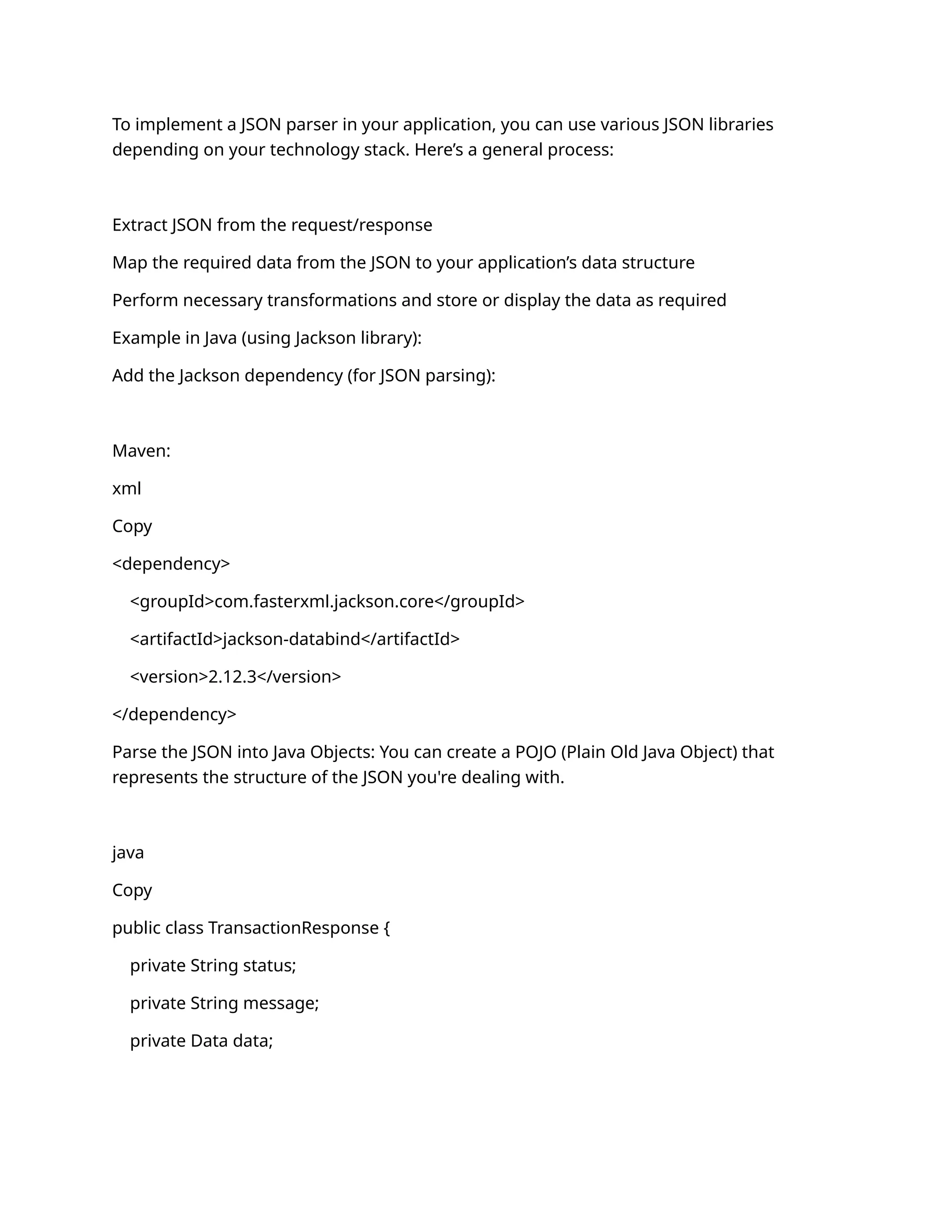
1. Define the Structure of the Request and Response JSON
First, let's start by defining the structure of your request and response JSON. This could be
a mapping between your database columns and the fields in the JSON data.
Example Request JSON:
json
Copy
{
"userId": "12345",
"transactionId": "abcd1234",
"amount": 1000.50,
"transactionDate": "2025-01-27T12:30:00",
"merchantDetails": {
"merchantId": "merchant_01",
"merchantName": "Merchant A"
}
}
Example Response JSON:
json
Copy
{
"status": "SUCCESS",
"message": "Transaction processed successfully",
"data": {
"transactionId": "abcd1234",
"amount": 1000.50,
"currency": "INR",
"status": "APPROVED"
}
}
2. Define the JSON Mapping and Destination Schema
You need to establish a mapping between your database columns (or the expected data in
your system) and the fields in the JSON data you're working with. For example:
Database Column transaction_amount should map to the JSON field data.amount
Database Column transaction_status should map to data.status
Mapping Example:
json
Copy
{
"database_column": {
"transaction_amount": "data.amount",
"transaction_status": "data.status",
"merchant_id": "merchantDetails.merchantId",
"merchant_name": "merchantDetails.merchantName"
}
}
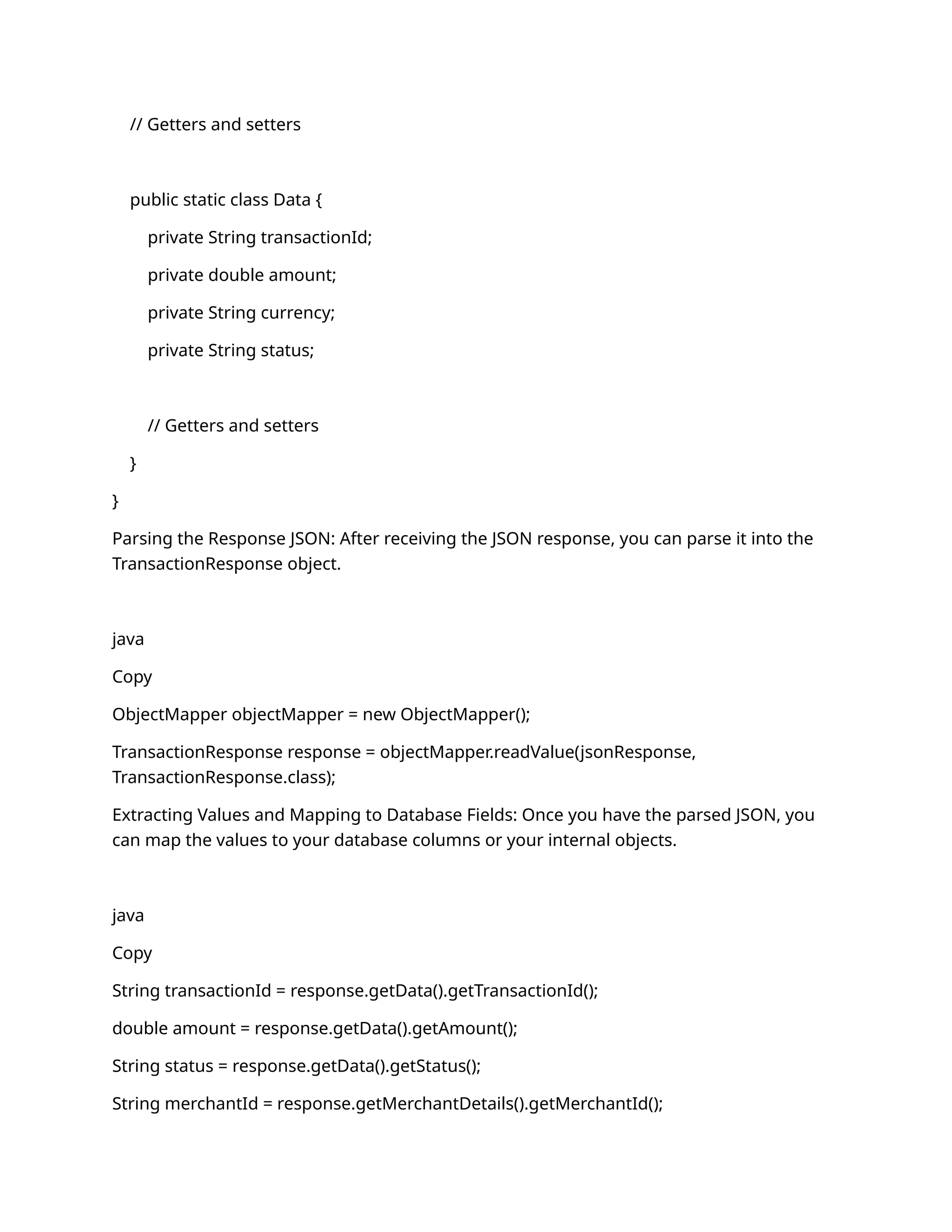
3. Implementing the JSON Parser
To implement a JSON parser in your application, you can use various JSON libraries
depending on your technology stack. Here’s a general process:
Extract JSON from the request/response
Map the required data from the JSON to your application’s data structure
Perform necessary transformations and store or display the data as required
Example in Java (using Jackson library):
Add the Jackson dependency (for JSON parsing):
Maven:
xml
Copy
<dependency>
<groupId>com.fasterxml.jackson.core</groupId>
<artifactId>jackson-databind</artifactId>
<version>2.12.3</version>
</dependency>
Parse the JSON into Java Objects: You can create a POJO (Plain Old Java Object) that
represents the structure of the JSON you're dealing with.
java
Copy
public class TransactionResponse {
private String status;
private String message;
private Data data;
// Getters and setters
public static class Data {
private String transactionId;
private double amount;
private String currency;
private String status;
// Getters and setters
}
}
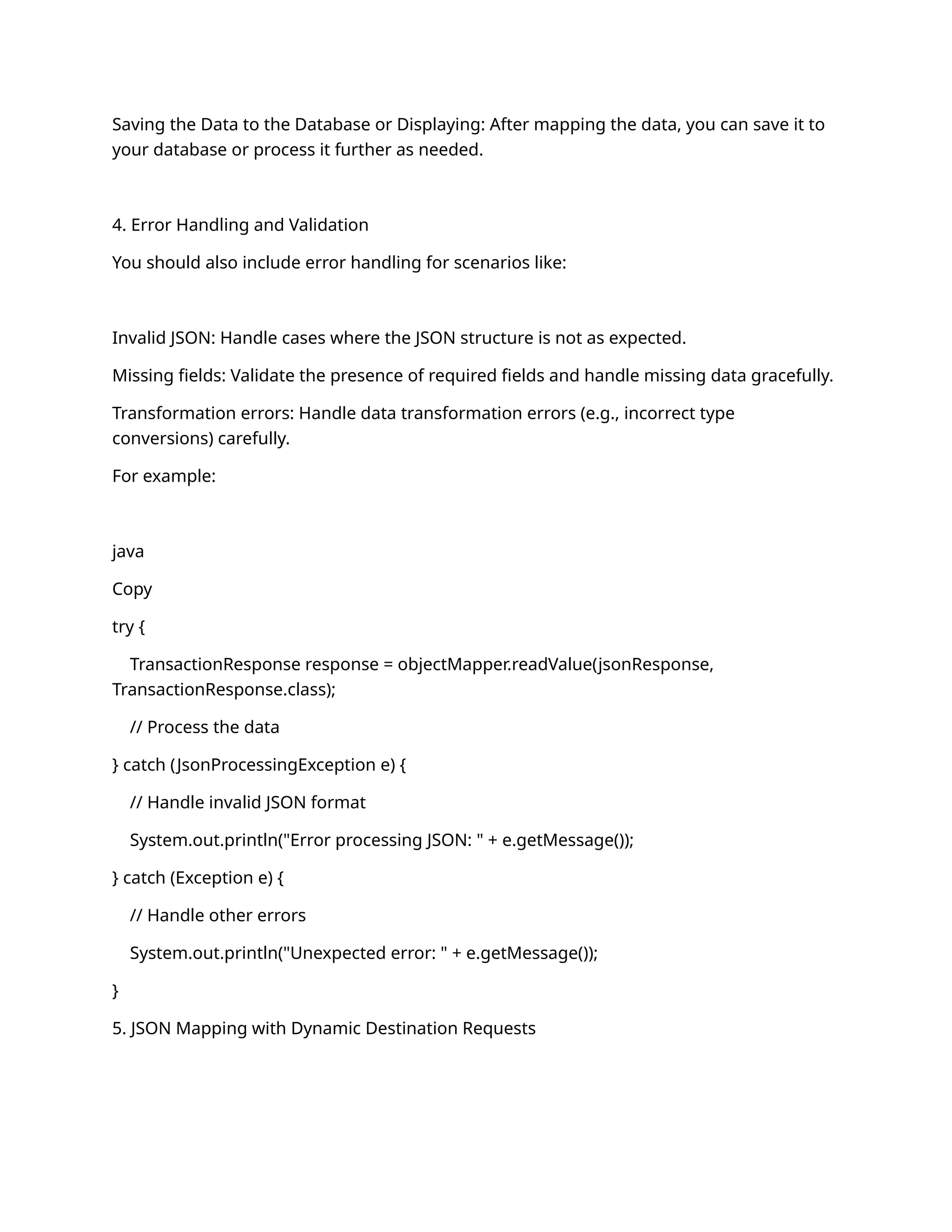
Parsing the Response JSON: After receiving the JSON response, you can parse it into the
TransactionResponse object.
java
Copy
ObjectMapper objectMapper = new ObjectMapper();
TransactionResponse response = objectMapper.readValue(jsonResponse,
TransactionResponse.class);
Extracting Values and Mapping to Database Fields: Once you have the parsed JSON, you
can map the values to your database columns or your internal objects.
java
Copy
String transactionId = response.getData().getTransactionId();
double amount = response.getData().getAmount();
String status = response.getData().getStatus();
String merchantId = response.getMerchantDetails().getMerchantId();
Saving the Data to the Database or Displaying: After mapping the data, you can save it to
your database or process it further as needed.
4. Error Handling and Validation
You should also include error handling for scenarios like:
Invalid JSON: Handle cases where the JSON structure is not as expected.
Missing fields: Validate the presence of required fields and handle missing data gracefully.
Transformation errors: Handle data transformation errors (e.g., incorrect type
conversions) carefully.
For example:
java
Copy
try {
TransactionResponse response = objectMapper.readValue(jsonResponse,
TransactionResponse.class);
// Process the data
} catch (JsonProcessingException e) {
// Handle invalid JSON format
System.out.println("Error processing JSON: " + e.getMessage());
} catch (Exception e) {
// Handle other errors
System.out.println("Unexpected error: " + e.getMessage());
}
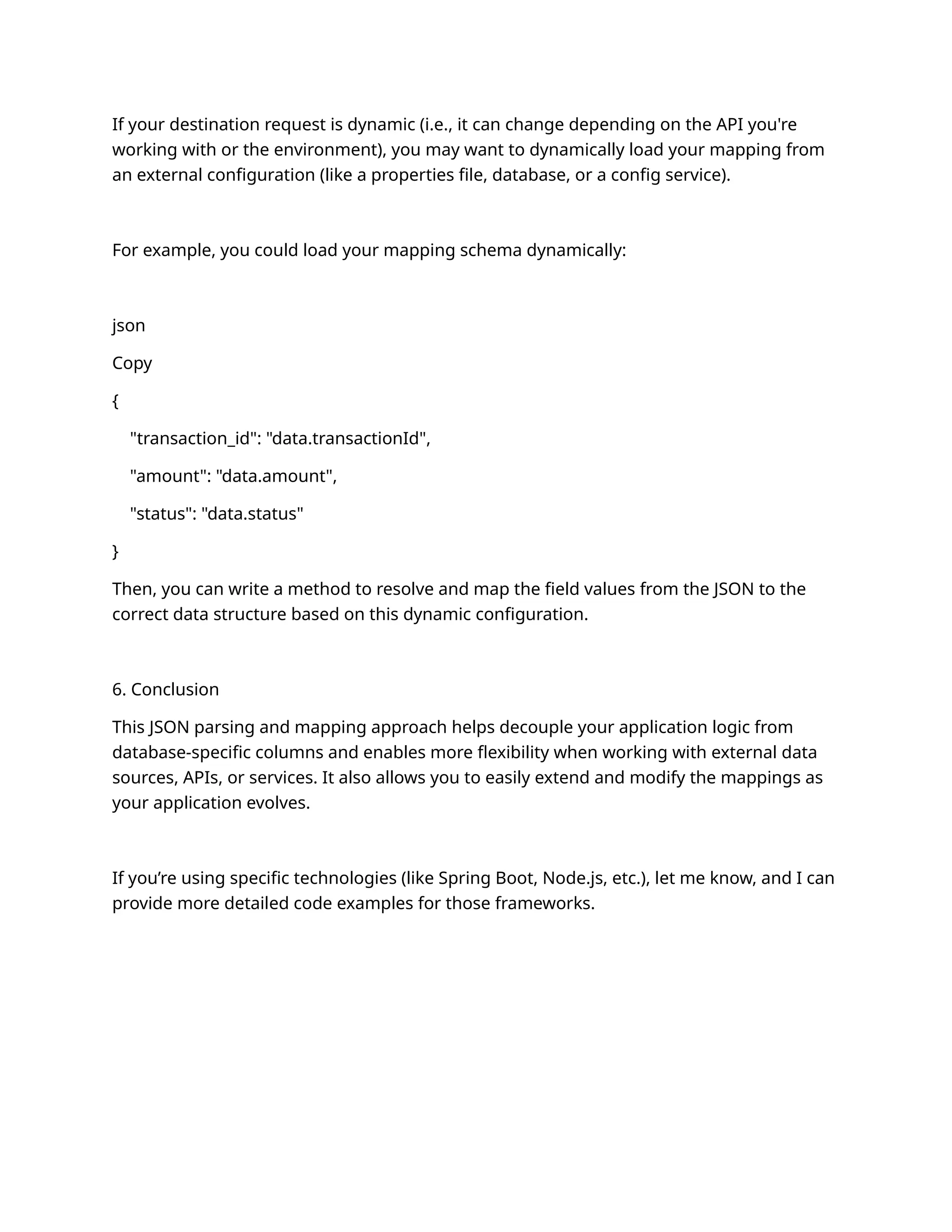
5. JSON Mapping with Dynamic Destination Requests
If your destination request is dynamic (i.e., it can change depending on the API you're
working with or the environment), you may want to dynamically load your mapping from
an external configuration (like a properties file, database, or a config service).
For example, you could load your mapping schema dynamically:
json
Copy
{
"transaction_id": "data.transactionId",
"amount": "data.amount",
"status": "data.status"
}
Then, you can write a method to resolve and map the field values from the JSON to the
correct data structure based on this dynamic configuration.
6. Conclusion
This JSON parsing and mapping approach helps decouple your application logic from
database-specific columns and enables more flexibility when working with external data
sources, APIs, or services. It also allows you to easily extend and modify the mappings as
your application evolves.
If you’re using specific technologies (like Spring Boot, Node.js, etc.), let me know, and I can
provide more detailed code examples for those frameworks.

ESB APPLICTAION IMPROVEMENT -2024 - this

  • 1.
  • 2.
    Slide 1: TitleSlide Title: Elastic Stack, Filebeat, and Kibana Search Subtitle: A Guide to Using Elastic for Log Management and Search Your Name / Company Name Date Slide 2: Overview of Elastic Stack Title: What is the Elastic Stack? Content: The Elastic Stack (formerly known as the ELK Stack) is a collection of open-source tools for searching, analyzing, and visualizing data in real-time. Components: Elasticsearch – Distributed search and analytics engine. Logstash – Data processing pipeline for transforming and forwarding logs. Kibana – Data visualization platform for interacting with Elasticsearch data. Beats – Lightweight data shippers to forward data from various sources. Slide 3: Introduction to Filebeat Title:
  • 3.
    What is Filebeat? Content: Filebeatis a lightweight shipper for forwarding and centralizing log data. It is designed to be installed on client machines or servers to collect logs and forward them to Elasticsearch or Logstash. Filebeat: Reads and ships log files to central servers. Supports various types of log files (e.g., application logs, system logs). Operates with low resource overhead, ensuring minimal impact on the systems it monitors. Slide 4: Filebeat Configuration Title: How to Configure Filebeat Content: Install Filebeat on the client server (e.g., via a package manager or manually). Edit the Filebeat configuration file (filebeat.yml): Specify paths to log files you want to monitor (e.g., application logs, system logs). Configure the output settings (Elasticsearch or Logstash). Example configuration snippet: yaml
  • 4.
    Copy filebeat.inputs: - type: log enabled:true paths: - /var/log/*.log output.elasticsearch: hosts: ["http://localhost:9200"] Start Filebeat: bash Copy sudo service filebeat start Slide 5: Sending Logs to Elasticsearch Title: Sending Logs to Elasticsearch with Filebeat Content: Filebeat reads logs from the configured paths, and forwards them to Elasticsearch for storage and indexing. Filebeat modules: Pre-built configurations for popular applications (e.g., Nginx, Apache, MySQL) to automatically parse and structure log data. Data flow: Filebeat reads log files. Filebeat forwards logs to Elasticsearch.
  • 5.
    Elasticsearch stores andindexes log data. Slide 6: Kibana for Visualizing and Searching Logs Title: What is Kibana? Content: Kibana is the front-end interface to interact with data stored in Elasticsearch. It allows you to: Search and filter logs. Visualize data through dashboards, charts, and graphs. Create alerts for specific log patterns or metrics. Slide 7: Setting Up Kibana for Search Title: Using Kibana to Search Logs Content: Access Kibana by navigating to its web interface (e.g., http://localhost:5601). Create an index pattern: Navigate to the "Management" section. Under "Kibana Index Patterns", create an index pattern (e.g., filebeat-*) that matches the index in Elasticsearch where your logs are stored. Use Kibana’s Discover Page: Go to the Discover tab in Kibana to search through your log data. Use the search bar to apply queries (e.g., search for errors, filter by timestamp). Kibana will display the results and allow you to drill down on specific log entries.
  • 6.
    Slide 8: KibanaQuery Example Title: Example Kibana Queries for Log Search Content: Basic Search: Search for logs with the term "error": go Copy error Filter by Time Range: Filter logs in the last 24 hours: Use the time picker to set the range to the last 24 hours. Advanced Query: Use the Lucene query syntax or KQL (Kibana Query Language) to filter logs more specifically: lua Copy status: "500" AND error: "Database Connection Failed" Slide 9: Kibana Dashboard Title: Creating Dashboards in Kibana
  • 7.
    Content: Kibana dashboards allowyou to visualize data in real-time with charts and graphs. Steps to create a dashboard: Navigate to the Dashboard tab. Click Create new dashboard. Add visualizations (e.g., pie charts, line graphs) that display log data like errors, status codes, and response times. Save and share the dashboard. Slide 10: Filebeat + Kibana: Real-World Example Title: Real-World Example: Monitoring Application Logs Content: In this example, Filebeat is used to collect logs from a web server (e.g., Apache or Nginx). The logs are sent to Elasticsearch, and Kibana is used to visualize: Number of requests over time. Status codes (e.g., how many 404 errors were logged). Latency metrics to identify performance bottlenecks. Actionable Insights: Detect high error rates. Monitor system health and server performance. Slide 11: Use Case: Analyzing Logs in Kibana Title: Use Case: Detecting Errors and Anomalies
  • 8.
    Content: Search for SpecificErrors: Use Kibana to search for specific error patterns such as "timeout" or "database failure". Create Alerts: Set up alerting in Kibana to notify you if error counts exceed a threshold or if specific log patterns appear. Visualize Trends: Create time-series graphs to track errors over time, helping you identify spikes in issues. Slide 12: Conclusion and Best Practices Title: Conclusion & Best Practices Content: Best Practices: Regularly monitor logs for anomalies and performance issues. Use Kibana's alerting system to get notified of critical issues. Leverage Filebeat modules for easy log parsing and configuration. Ensure data security and compliance by controlling access to Kibana and Elasticsearch. Next Steps: Start with setting up Filebeat on your server.
  • 9.
    Configure Filebeat tosend logs to Elasticsearch and visualize them in Kibana. Slide 13: Q&A Title: Questions & Answers Content: Open floor for questions and discussion. Bonus Content: Elastic Stack Architecture Diagram For a final slide, you may want to include an architecture diagram showing how the components interact. Diagram Description: Filebeat collects log data from various systems. Logs are sent to Elasticsearch, where they are indexed and stored. Kibana provides an interface to search, analyze, and visualize the log data. Slide 1: Title Slide Title: Continuous Integration and Continuous Delivery (CI/CD) Implementation with Jenkins Subtitle: A Comprehensive Guide for Automating Builds, Tests, and Deployments Your Name / Company Name
  • 10.
    Date Slide 2: Overviewof CI/CD Title: What is CI/CD? Content: Continuous Integration (CI): A practice where code changes are automatically integrated into a shared codebase multiple times a day. Continuous Delivery (CD): A practice that automates the delivery of applications to selected environments (e.g., staging, production). Key Benefits: Faster development cycles. Early detection of bugs and issues. Improved software quality. Automation of repetitive tasks. Slide 3: Components of CI/CD Pipeline Title: Components of a CI/CD Pipeline Content: Source Code Repository (e.g., GitHub, GitLab) – Stores code and tracks changes. Build Automation (e.g., Jenkins) – Automates the process of compiling and testing the application.
  • 11.
    Test Automation –Runs automated unit, integration, and functional tests to verify the code quality. Deployment Automation – Automates the deployment to development, staging, and production environments. Monitoring and Feedback – Ensures that the system is performing well in production. Slide 4: Jenkins Overview Title: What is Jenkins? Content: Jenkins is an open-source automation server used to automate tasks in software development like building, testing, and deploying. Features: Continuous integration and delivery. Supports integration with multiple SCM tools (e.g., Git). Large plugin ecosystem. Pipelines for automating workflows. Slide 5: Setting Up Jenkins for CI/CD Title: Setting Up Jenkins for CI/CD Content: Install Jenkins: Download Jenkins from Jenkins Download and install it. Access Jenkins at http://localhost:8080.
  • 12.
    Install Required Plugins: Installplugins like Git, Maven, Pipeline, and others based on your requirements. Configure Global Tools: Define tools like JDK, Maven, and Git under Manage Jenkins > Global Tool Configuration. Slide 6: Creating a Jenkins Pipeline Title: Creating a Jenkins Pipeline for CI/CD Content: Create a New Pipeline Job: Go to Jenkins Dashboard > New Item > Pipeline. Name your pipeline and click OK. Pipeline Definition: Define the pipeline steps in Jenkinsfile (Declarative or Scripted Pipeline). Example of a simple Declarative Pipeline: groovy Copy pipeline { agent any stages { stage('Build') { steps {
  • 13.
    script { echo 'Buildingthe project' } } } stage('Test') { steps { script { echo 'Running tests' } } } stage('Deploy') { steps { script { echo 'Deploying to production' } } } } } Slide 7: Configuring Source Code Management Title: Integrating Jenkins with Source Code Repositories Content:
  • 14.
    Set Up SCM: InJenkins, navigate to your pipeline job and select Configure. Under Source Code Management, choose Git and provide the repository URL and credentials. Set the branch (e.g., main) you want Jenkins to monitor. Webhooks: Configure GitHub (or your SCM tool) to trigger Jenkins builds when changes are pushed. Slide 8: Adding Build Steps in Jenkins Pipeline Title: Adding Build Steps in the Jenkins Pipeline Content: Build Stage: Add steps to compile and build the project (e.g., Maven, Gradle, npm). Example for Maven: groovy Copy stage('Build') { steps { sh 'mvn clean install' } } Test Stage:
  • 15.
    Add steps forrunning automated tests (e.g., unit tests, integration tests). Example for unit tests: groovy Copy stage('Test') { steps { sh 'mvn test' } } Slide 9: Deployment Automation Title: Automating Deployment in Jenkins Content: Deploy to Staging: Add steps to deploy the application to a staging environment using tools like Kubernetes, Docker, or traditional server deployment. Example: groovy Copy stage('Deploy to Staging') { steps { sh 'ansible-playbook -i staging deploy.yml' }
  • 16.
    } Deploy to Production: Addproduction deployment steps and make sure to set it up for manual approval or trigger via conditions. Example with approval: groovy Copy stage('Deploy to Production') { steps { input 'Approve Production Deployment' sh 'ansible-playbook -i production deploy.yml' } } Slide 10: CI/CD Best Practices Title: Best Practices for CI/CD Implementation Content: Automate Everything: Automate as many steps as possible, from building to testing and deployment. Frequent Integration: Push code to the main branch frequently (multiple times a day) to minimize integration issues. Parallel Testing: Run tests in parallel to speed up the pipeline. Environment Consistency: Ensure that environments (dev, staging, production) are consistent for predictable builds and deployments. Rollback Strategy: Implement mechanisms for rolling back deployments in case of failure.
  • 17.
    Slide 11: Monitoringand Feedback Title: Monitoring and Feedback in CI/CD Pipelines Content: Build Notifications: Set up email or Slack notifications for build statuses (success or failure). Logging: Implement logging for detailed insights into the build process (errors, tests, deployment steps). Automated Alerts: Use Jenkins' built-in alert system to notify when builds fail, or use third-party tools for more advanced monitoring. Slide 12: CI/CD Pipeline Example Title: Example CI/CD Pipeline in Jenkins Content: Workflow Example: Source Code Commit Triggers Jenkins Job. → Build Compile the code. → Unit Test Run unit tests. →
  • 18.
    Code Analysis Runstatic code analysis (optional). → Integration Test Run integration tests. → Deploy to Staging Deploy to a staging environment. → Manual Approval Approve deployment to production. → Deploy to Production Deploy the application. → Slide 13: Conclusion and Next Steps Title: Conclusion and Next Steps Content: CI/CD Benefits: Streamlined development process, better software quality, and faster releases. Next Steps: Set up Jenkins in your environment. Integrate with your source code repository. Start automating the build, test, and deployment pipelines. Slide 14: Q&A Title: Questions & Answers Content: Open the floor for questions and discussion on the implementation. Bonus: CI/CD Pipeline Diagram You might want to include a diagram of the CI/CD pipeline flow to visually represent the stages of the pipeline (e.g., from code commit to production deployment). This helps in explaining the process more clearly.
  • 19.
    This outline shouldgive you a comprehensive and well-structured presentation on CI/CD using Jenkins. Feel free to customize the content and add specific details relevant to your use case. Let me know if you need further details on any of these points! To integrate your log format into documentation, such as for monitoring, logging, or CI/CD workflows, it's essential to break down the key elements of the log and explain how to capture and use this information effectively. Here’s how you can structure it: Log Format Integration Documentation 1. Log Format Overview This log format is used for monitoring transactions and API requests across various stages in the workflow. It provides comprehensive information on each API request and response, the application, server details, and transaction-specific data. 2. Log Format Breakdown The logs are structured in a standardized format to facilitate easy parsing and real-time monitoring. Here's an explanation of the different log elements: Log Example (Formatted for Clarity): csharp Copy 2025-01-27 17:53:49,235 INFO stni_txns_sync_log [default task-15] [APPLICATION: WLESB_WEB_PROFILES_UAT] [SERVER_IP: 172.16.26.68] [SERVER_NAME: wl-esbtest02-rhel8.ventureinfotek.com] [REFERENCE_URL: https://default-host:8443/wlesb_txn/stni]
  • 20.
    [REMOTE_ADDR: 10.10.11.230] [REMOTE_HOST: 10.10.11.230] [USER_AGENT:WLP FO/1.0] [EVENT: RECEIVED_DATA_FROM_SOURCE] [CORRELATION_ID: 20df308f-46db-4a3d-905a-c58995e060f0-037149000330034-44770627- 00031-502712005336] [RRN: 502712005336] [MID: 037149000330034] [TID: 44770627] [BANK_CODE: 00031] [API_REQUEST: {...}] [TIME_TAKEN_MS: 0] 3. Key Fields and Their Purpose Timestamp (2025-01-27 17:53:49,235): Indicates the date and time of the log entry, including milliseconds for accurate time tracking. Log Level (INFO): Specifies the severity or importance of the log entry (e.g., INFO, ERROR, WARN). Logger Name (stni_txns_sync_log): The name of the logger or the specific log category. This can help differentiate between different modules or parts of the application. Thread ([default task-15]): Identifies the thread that generated the log entry. Useful for debugging multithreaded or parallel processes.
  • 21.
    Application ([APPLICATION: WLESB_WEB_PROFILES_UAT]): Identifiesthe application context generating the log. This can be critical for distinguishing between different environments (e.g., UAT, PROD). Server Information: SERVER_IP: The IP address of the server generating the log. SERVER_NAME: The server name or hostname for traceability in production or development environments. URL and IP Information: REFERENCE_URL: The URL being accessed or processed (e.g., endpoint or API path). REMOTE_ADDR: The source IP address (can be the client or external service). REMOTE_HOST: The host for the source of the request. User Agent ([USER_AGENT: WLP FO/1.0]): Describes the client or tool making the request (useful for API or service identification). Event Type ([EVENT: RECEIVED_DATA_FROM_SOURCE]): Describes the action or event taking place, such as data receipt or a response from a service. Correlation ID ([CORRELATION_ID: 20df308f-46db-4a3d-905a-c58995e060f0- 037149000330034-44770627-00031-502712005336]): A unique identifier for tracing the request flow across various systems or microservices. Transaction Identifiers: RRN: Unique reference number for the transaction.
  • 22.
    MID: Merchant IDassociated with the transaction. TID: Terminal ID identifying the point-of-sale or system. BANK_CODE: Bank or financial institution's code associated with the transaction. API Request/Response: API_REQUEST: JSON string representing the request data sent to the API. API_RESPONSE: JSON string representing the API response data. Performance Metrics ([TIME_TAKEN_MS: 0]): Time in milliseconds taken to process the request. It helps in performance monitoring and identifying bottlenecks. 4. Integrating the Log Format in a CI/CD Pipeline To fully integrate this log format into your CI/CD process, follow these steps: Set Up Log Collection: Use centralized logging tools like ELK Stack (Elasticsearch, Logstash, Kibana) or Splunk to aggregate logs from various services. Configure the logging system to collect logs from your Jenkins pipeline or your application directly to a central log repository. Define Log Parsing Rules: Create custom log parsers for the specific structure you have. For instance: Timestamp: Extract and parse the timestamp to sort logs by date/time. Log Level: Filter logs based on severity to control alerting. Event Types: Set alerts for specific events like RECEIVED_DATA_FROM_SOURCE or DATA_INSERTED_TO_DB.
  • 23.
    API Request/Response Data:Use log parsers to extract JSON payloads (API request/response) for more granular analysis. Monitoring & Alerts: Use Kibana or another monitoring tool to visualize logs. Set up dashboards that can give you insights into metrics such as the number of requests, time taken per request, and error rates. Implement threshold-based alerts for key performance metrics (e.g., if TIME_TAKEN_MS exceeds a specific value). Log Retention and Security: Set log retention policies to prevent storage bloat. Logs might need to be archived after a certain period based on company or regulatory requirements. Ensure sensitive data (e.g., CardNumber, TokenizedCardNumber) is either masked or excluded from logs if needed. CI/CD Integration: Implement Jenkins Pipeline steps that monitor the status of logs in real-time. For example, Jenkins can check logs for specific error events during each build stage and trigger appropriate actions if errors or performance issues are detected. Additionally, include API Health Checks or Regression Tests as part of your pipeline to ensure that logs contain no unexpected errors. 5. Tools and Technologies for Log Management Integration Log Aggregators: ELK Stack (Elasticsearch, Logstash, Kibana) Splunk Fluentd Graylog CI/CD Integration:
  • 24.
    Jenkins (with LogParser plugins) GitLab CI/CD (with Log Integration) CircleCI (using custom logging scripts) Visualization: Kibana (for ELK Stack) Grafana (for visualizing logs along with other metrics) Splunk Dashboards Monitoring: Prometheus (for performance metrics, integrated with log data) New Relic / Datadog 6. Conclusion This log format provides a robust structure for monitoring and troubleshooting application transactions. By integrating it with your CI/CD pipeline and logging infrastructure, you can achieve real-time observability, proactive issue detection, and overall system health management. 7. Next Steps Integrate the logging format into your Jenkins pipeline. Set up centralized log management with tools like ELK Stack or Splunk. Create performance monitoring and alerting systems based on the data in the logs. Continuously review and refine your logging structure as your application evolves. It sounds like you're working on an application where instead of fetching data directly from database columns, you're implementing a JSON parser to fetch and process the data
  • 25.
    using a mappingor destination request JSON. This approach can be used when you're dealing with API responses, external data sources, or need to decouple your database structure from your application's data processing logic. Here’s how you can implement a JSON parser with mapping and destination requests in your application: 1. Define the Structure of the Request and Response JSON First, let's start by defining the structure of your request and response JSON. This could be a mapping between your database columns and the fields in the JSON data. Example Request JSON: json Copy { "userId": "12345", "transactionId": "abcd1234", "amount": 1000.50, "transactionDate": "2025-01-27T12:30:00", "merchantDetails": { "merchantId": "merchant_01", "merchantName": "Merchant A" } } Example Response JSON: json Copy {
  • 26.
    "status": "SUCCESS", "message": "Transactionprocessed successfully", "data": { "transactionId": "abcd1234", "amount": 1000.50, "currency": "INR", "status": "APPROVED" } } 2. Define the JSON Mapping and Destination Schema You need to establish a mapping between your database columns (or the expected data in your system) and the fields in the JSON data you're working with. For example: Database Column transaction_amount should map to the JSON field data.amount Database Column transaction_status should map to data.status Mapping Example: json Copy { "database_column": { "transaction_amount": "data.amount", "transaction_status": "data.status", "merchant_id": "merchantDetails.merchantId", "merchant_name": "merchantDetails.merchantName" } } 3. Implementing the JSON Parser
  • 27.
    To implement aJSON parser in your application, you can use various JSON libraries depending on your technology stack. Here’s a general process: Extract JSON from the request/response Map the required data from the JSON to your application’s data structure Perform necessary transformations and store or display the data as required Example in Java (using Jackson library): Add the Jackson dependency (for JSON parsing): Maven: xml Copy <dependency> <groupId>com.fasterxml.jackson.core</groupId> <artifactId>jackson-databind</artifactId> <version>2.12.3</version> </dependency> Parse the JSON into Java Objects: You can create a POJO (Plain Old Java Object) that represents the structure of the JSON you're dealing with. java Copy public class TransactionResponse { private String status; private String message; private Data data;
  • 28.
    // Getters andsetters public static class Data { private String transactionId; private double amount; private String currency; private String status; // Getters and setters } } Parsing the Response JSON: After receiving the JSON response, you can parse it into the TransactionResponse object. java Copy ObjectMapper objectMapper = new ObjectMapper(); TransactionResponse response = objectMapper.readValue(jsonResponse, TransactionResponse.class); Extracting Values and Mapping to Database Fields: Once you have the parsed JSON, you can map the values to your database columns or your internal objects. java Copy String transactionId = response.getData().getTransactionId(); double amount = response.getData().getAmount(); String status = response.getData().getStatus(); String merchantId = response.getMerchantDetails().getMerchantId();
  • 29.
    Saving the Datato the Database or Displaying: After mapping the data, you can save it to your database or process it further as needed. 4. Error Handling and Validation You should also include error handling for scenarios like: Invalid JSON: Handle cases where the JSON structure is not as expected. Missing fields: Validate the presence of required fields and handle missing data gracefully. Transformation errors: Handle data transformation errors (e.g., incorrect type conversions) carefully. For example: java Copy try { TransactionResponse response = objectMapper.readValue(jsonResponse, TransactionResponse.class); // Process the data } catch (JsonProcessingException e) { // Handle invalid JSON format System.out.println("Error processing JSON: " + e.getMessage()); } catch (Exception e) { // Handle other errors System.out.println("Unexpected error: " + e.getMessage()); } 5. JSON Mapping with Dynamic Destination Requests
  • 30.
    If your destinationrequest is dynamic (i.e., it can change depending on the API you're working with or the environment), you may want to dynamically load your mapping from an external configuration (like a properties file, database, or a config service). For example, you could load your mapping schema dynamically: json Copy { "transaction_id": "data.transactionId", "amount": "data.amount", "status": "data.status" } Then, you can write a method to resolve and map the field values from the JSON to the correct data structure based on this dynamic configuration. 6. Conclusion This JSON parsing and mapping approach helps decouple your application logic from database-specific columns and enables more flexibility when working with external data sources, APIs, or services. It also allows you to easily extend and modify the mappings as your application evolves. If you’re using specific technologies (like Spring Boot, Node.js, etc.), let me know, and I can provide more detailed code examples for those frameworks.