Locating one’s h-index in Google Scholar
By Jen Eidelman
Jen.Eidelman@uct.ac.za
Tel: 021 650 2773
This work is licensed under a Creative Commons Attribution-
NonCommercial-ShareAlike 3.0 Unported License.
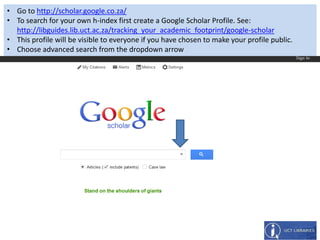
• Go to http://scholar.google.co.za/
• To search for your own h-index first create a Google Scholar Profile. See:
http://libguides.lib.uct.ac.za/tracking_your_academic_footprint/google-scholar
• This profile will be visible to everyone if you have chosen to make your profile public.
• Choose advanced search from the dropdown arrow
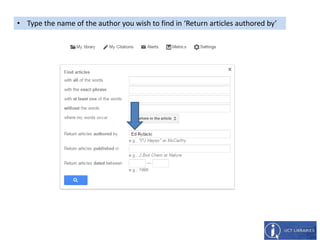
• Type the name of the author you wish to find in ‘Return articles authored by’
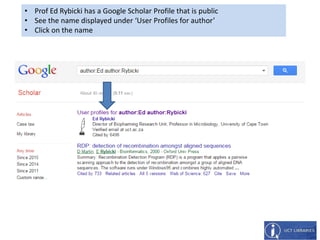
• Prof Ed Rybicki has a Google Scholar Profile that is public
• See the name displayed under ‘User Profiles for author’
• Click on the name
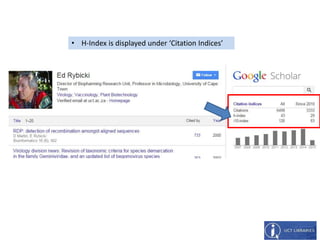
• H-Index is displayed under ‘Citation Indices’

Locating one's h-index in Google Scholar

  • 1.
    Locating one’s h-indexin Google Scholar By Jen Eidelman Jen.Eidelman@uct.ac.za Tel: 021 650 2773 This work is licensed under a Creative Commons Attribution- NonCommercial-ShareAlike 3.0 Unported License.
  • 2.
    • Go tohttp://scholar.google.co.za/ • To search for your own h-index first create a Google Scholar Profile. See: http://libguides.lib.uct.ac.za/tracking_your_academic_footprint/google-scholar • This profile will be visible to everyone if you have chosen to make your profile public. • Choose advanced search from the dropdown arrow
  • 3.
    • Type thename of the author you wish to find in ‘Return articles authored by’
  • 4.
    • Prof EdRybicki has a Google Scholar Profile that is public • See the name displayed under ‘User Profiles for author’ • Click on the name
  • 5.
    • H-Index isdisplayed under ‘Citation Indices’