Virtual and Mobile: How to Create a Portable Virtual PC  John Whaley - Founder and Principal Engineer  Gerald Cheong - Lead Engineer
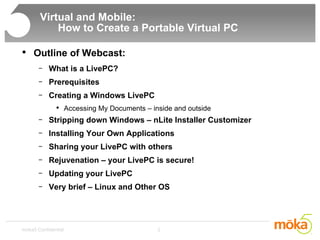
Virtual and Mobile:    How to Create a Portable Virtual PC  Outline of Webcast: What is a LivePC? Prerequisites Creating a Windows LivePC Accessing My Documents – inside and outside Stripping down Windows – nLite Installer Customizer  Installing Your Own Applications Sharing your LivePC with others Rejuvenation – your LivePC is secure! Updating your LivePC Very brief – Linux and Other OS
What is a LivePC? Brief Introduction of LivePCs
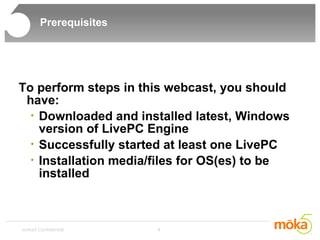
Prerequisites To perform steps in this webcast, you should have: Downloaded and installed latest, Windows version of LivePC Engine Successfully started at least one LivePC Installation media/files for OS(es) to be installed
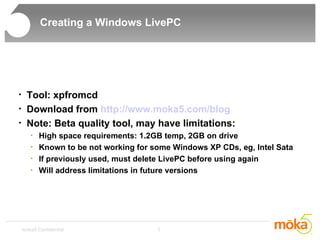
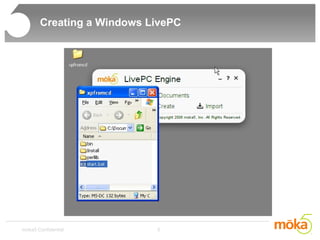
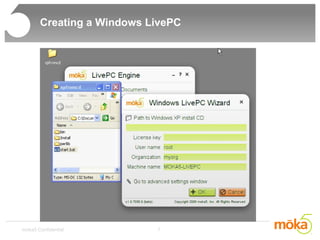
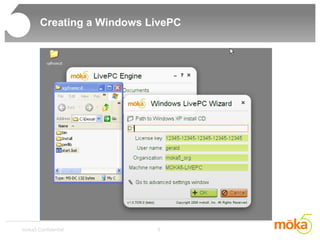
Creating a Windows LivePC Tool: xpfromcd Download from  http://www.moka5.com/blog Note: Beta quality tool, may have limitations: High space requirements: 1.2GB temp, 2GB on drive Known to be not working for some Windows XP CDs, eg, Intel Sata If previously used, must delete LivePC before using again Will address limitations in future versions
Creating a Windows LivePC
Creating a Windows LivePC Wait 30-45 minutes Maybe go get a cup of coffee
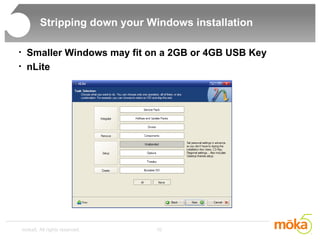
Stripping down your Windows installation Smaller Windows may fit on a 2GB or 4GB USB Key nLite
Creating a Windows LivePC For thought: What if you don't use the tool 'xpfromcd' or somehow it does not work for you?
Creating a Windows LivePC For thought: What if you don't use the tool 'xpfromcd'? 'Let me make changes to this LivePC' Change user profiles to point to the drive for 'local.cdsk' Install moka5tools
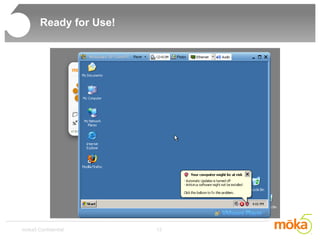
Ready for Use!
Install Your Own Applications At this point, you may choose to install Your Own Applications... Your LivePC is now ready for you to carry around and use! Windows Activation:  Activate when you are satisfied with the LivePC Good idea to make sure this is the LivePC you like before you activate
Accessing My Documents Accessing 'My Documents' From inside LivePC From Outside LivePC
Sharing Your LivePC Package and Upload Your LivePC
Sharing Your LivePC What your friends need to do... Three simple steps: Install LivePC Engine Click on Link from email Start Using LivePC after a brief wait
Rejuvenation A bonus extra: Rejuvenation for Better Security
Creating a Linux or other OS LivePC Create a LivePC based on Linux or other Operating Systems Just like installing the Operating System on a machine Use 'Create' in the UI
Virtual and Mobile:    How to Create a Portable Virtual PC  Conclusions Use the no-hassle xpfromcd tool and make your own Windows LivePC today! Go to  www.moka5.com/blog  today! Share your LivePCs, and get Security (rejuvenation) as a bonus! LivePC Engine allows you to carry your Windows, Linux and any other OS environments around whereever you go
Virtual and Mobile:    How to Create a Portable Virtual PC  Questions and Answers

LivePC creation webcast

  • 1.
    Virtual and Mobile:How to Create a Portable Virtual PC John Whaley - Founder and Principal Engineer Gerald Cheong - Lead Engineer
  • 2.
    Virtual and Mobile: How to Create a Portable Virtual PC Outline of Webcast: What is a LivePC? Prerequisites Creating a Windows LivePC Accessing My Documents – inside and outside Stripping down Windows – nLite Installer Customizer Installing Your Own Applications Sharing your LivePC with others Rejuvenation – your LivePC is secure! Updating your LivePC Very brief – Linux and Other OS
  • 3.
    What is aLivePC? Brief Introduction of LivePCs
  • 4.
    Prerequisites To performsteps in this webcast, you should have: Downloaded and installed latest, Windows version of LivePC Engine Successfully started at least one LivePC Installation media/files for OS(es) to be installed
  • 5.
    Creating a WindowsLivePC Tool: xpfromcd Download from http://www.moka5.com/blog Note: Beta quality tool, may have limitations: High space requirements: 1.2GB temp, 2GB on drive Known to be not working for some Windows XP CDs, eg, Intel Sata If previously used, must delete LivePC before using again Will address limitations in future versions
  • 6.
  • 7.
  • 8.
  • 9.
    Creating a WindowsLivePC Wait 30-45 minutes Maybe go get a cup of coffee
  • 10.
    Stripping down yourWindows installation Smaller Windows may fit on a 2GB or 4GB USB Key nLite
  • 11.
    Creating a WindowsLivePC For thought: What if you don't use the tool 'xpfromcd' or somehow it does not work for you?
  • 12.
    Creating a WindowsLivePC For thought: What if you don't use the tool 'xpfromcd'? 'Let me make changes to this LivePC' Change user profiles to point to the drive for 'local.cdsk' Install moka5tools
  • 13.
  • 14.
    Install Your OwnApplications At this point, you may choose to install Your Own Applications... Your LivePC is now ready for you to carry around and use! Windows Activation: Activate when you are satisfied with the LivePC Good idea to make sure this is the LivePC you like before you activate
  • 15.
    Accessing My DocumentsAccessing 'My Documents' From inside LivePC From Outside LivePC
  • 16.
    Sharing Your LivePCPackage and Upload Your LivePC
  • 17.
    Sharing Your LivePCWhat your friends need to do... Three simple steps: Install LivePC Engine Click on Link from email Start Using LivePC after a brief wait
  • 18.
    Rejuvenation A bonusextra: Rejuvenation for Better Security
  • 19.
    Creating a Linuxor other OS LivePC Create a LivePC based on Linux or other Operating Systems Just like installing the Operating System on a machine Use 'Create' in the UI
  • 20.
    Virtual and Mobile: How to Create a Portable Virtual PC Conclusions Use the no-hassle xpfromcd tool and make your own Windows LivePC today! Go to www.moka5.com/blog today! Share your LivePCs, and get Security (rejuvenation) as a bonus! LivePC Engine allows you to carry your Windows, Linux and any other OS environments around whereever you go
  • 21.
    Virtual and Mobile: How to Create a Portable Virtual PC Questions and Answers

Editor's Notes

  • #2 Thanks Ardi. I’m John Whaley, one of the founders and a principal engineer here at moka5, and I’m here with Gerald, a lead engineer at moka5. We’re going to show you how you can build and publish your own Windows LivePC using this tool that we just released today. Again, you can download the tool from our website, at www.moka5.com/blog.