LXC, Docker,
and the future of
software delivery
Linuxcon – New Orleans, 2013
Jérôme Petazzoni, dotCloud Inc.
Outline
● Why Linux Containers?
● What are Linux Containers exactly?
● What do we need on top of LXC?
● Why Docker?
● What is Docker exactly?
● Where is it going?
Why Linux Containers?
What are
we trying
to solve?
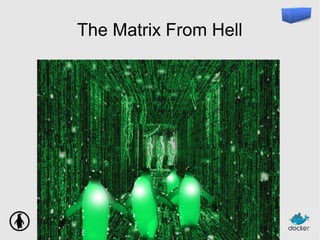
The Matrix From Hell
Many payloads
● backend services (API)
● databases
● distributed stores
● webapps
Many payloads
● Go
● Java
● Node.js
● PHP
● Python
● Ruby
● …
Many payloads
● CherryPy
● Django
● Flask
● Plone
● ...
Many payloads
● Apache
● Gunicorn
● uWSGI
● ...
Many payloads
+ your code
Many targets
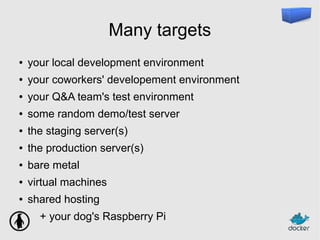
● your local development environment
● your coworkers' developement environment
● your Q&A team's test environment
● some random demo/test server
● the staging server(s)
● the production server(s)
● bare metal
● virtual machines
● shared hosting
+ your dog's Raspberry Pi
Many targets
● BSD
● Linux
● OS X
● Windows
Many targets
● BSD
● Linux
● OS X
● Windows
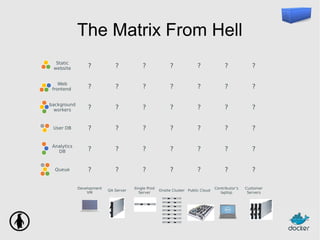
The Matrix From Hell
Static
website ? ? ? ? ? ? ?
Web
frontend ? ? ? ? ? ? ?
background
workers ? ? ? ? ? ? ?
User DB ? ? ? ? ? ? ?
Analytics
DB ? ? ? ? ? ? ?
Queue ? ? ? ? ? ? ?
Development
VM
QA Server
Single Prod
Server
Onsite Cluster Public Cloud
Contributor’s
laptop
Customer
Servers
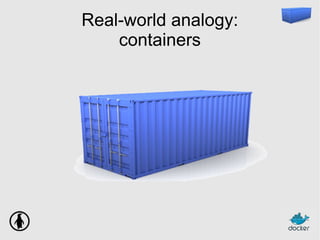
Real-world analogy:
containers
Many products
● clothes
● electronics
● raw materials
● wine
● …
Many transportation methods
● ships
● trains
● trucks
● ...
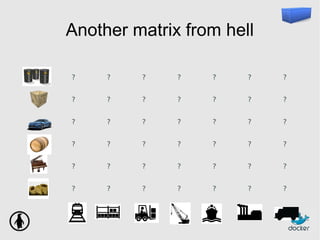
Another matrix from hell
? ? ? ? ? ? ?
? ? ? ? ? ? ?
? ? ? ? ? ? ?
? ? ? ? ? ? ?
? ? ? ? ? ? ?
? ? ? ? ? ? ?
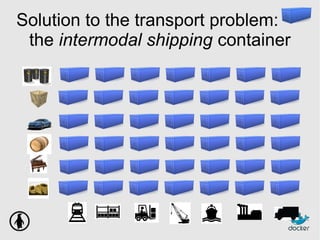
Solution to the transport problem:
the intermodal shipping container
Solution to the transport problem:
the intermodal shipping container
● 90% of all cargo now shipped in a standard container
● faster and cheaper to load and unload on ships
(by an order of magnitude)
● less theft, less damage
● freight cost used to be >25% of final goods cost,
now <3%
● 5000 ships deliver 200M containers per year
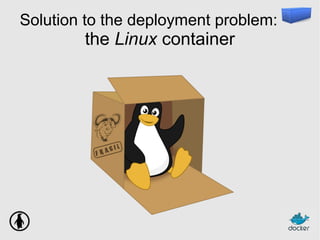
Solution to the deployment problem:
the Linux container
Linux containers...
● run everywhere
– regardless of kernel version
– regardless of host distro
– (but container and host architecture must match)
● run anything
– if it can run on the host, it can run in the container
– i.e., if it can run on a Linux kernel, it can run
What are Linux Containers exactly?
High level approach:
it's a lightweight VM
● own process space
● own network interface
● can run stuff as root
● can have its own /sbin/init
(different from the host)
Low level approach:
it's chroot on steroids
● can also not have its own /sbin/init
● container = isolated process(es)
● share kernel with host
● no device emulation (neither HVM nor PV)
Separation of concerns:
Dave the Developer
● inside my container:
– my code
– my libraries
– my package manager
– my app
– my data
Separation of concerns:
Oscar the Ops guy
● outside the container:
– logging
– remote access
– network configuration
– monitoring
How does it work?
Isolation with namespaces
● pid
● mnt
● net
● uts
● ipc
● user
How does it work?
Isolation with cgroups
● memory
● cpu
● blkio
● devices
Efficiency: almost no overhead
● processes are isolated,
but run straight on the host
● CPU performance = native performance
● memory performance = a few % shaved off for
(optional) accounting
● network performance = small overhead; can
be optimized to zero overhead
Efficiency: storage-friendly
● unioning filesystems
(AUFS, overlayfs)
● snapshotting filesystems
(BTRFS, ZFS)
● copy-on-write
(thin snapshots with LVM or device-mapper)
This wasn't part of LXC at first; but you definitely want it!
Efficiency: storage-friendly
● provisioning now takes a few milliseconds
● … and a few kilobytes
● creating a new base/image/whateveryoucallit
takes a few seconds
Docker
What's Docker?
● Open Source engine to commoditize LXC
● using copy-on-write for quick provisioning
● allowing to create and share images
● propose a standard format for containers
Yes, but...
● « I don't need Docker; I can do all that stuff
with LXC tools, rsync, some scripts! »
● correct on all accounts; but it's also true for
apt, dpkg, rpm, yum, etc.
● the whole point is to commoditize,
i.e. make it ridiculously easy to use
Docker: authoring images
● you can author « images »
– either with « run+commit » cycles, taking
snapshots
– or with a Dockerfile (=source code for a container)
– both ways, it's ridiculously easy
● you can run them
– anywhere
– multiple times
Dockerfile example
FROM ubuntu
RUN apt-get -y update
RUN apt-get install -y g++
RUN apt-get install -y erlang-dev erlang-manpages erlang-base-hipe ...
RUN apt-get install -y libmozjs185-dev libicu-dev libtool ...
RUN apt-get install -y make wget
RUN wget http://.../apache-couchdb-1.3.1.tar.gz | tar -C /tmp -zxf-
RUN cd /tmp/apache-couchdb-* && ./configure && make install
RUN printf "[httpd]nport = 8101nbind_address = 0.0.0.0" >
/usr/local/etc/couchdb/local.d/docker.ini
EXPOSE 8101
CMD ["/usr/local/bin/couchdb"]
Docker: sharing images
● you can push/pull images to/from a registry
(public or private)
● you can search images through a public index
● dotCloud maintains a collection of base
images
(Ubuntu, Fedora...)
● satisfaction guaranteed or your money back
Docker: not sharing images
● private registry
– for proprietary code
– or security credentials
– or fast local access
Typical workflow
● code in local environment
(« dockerized » or not)
● each push to the git repo triggers a hook
● the hook tells a build server to clone the code and run
« docker build » (using the Dockerfile)
● the containers are tested (nosetests, Jenkins...),
and if the tests pass, pushed to the registry
● production servers pull the containers and run them
● for network services, load balancers are updated
Hybrid clouds
● Docker is part of OpenStack « Havana »,
as a Nova driver + Glance translator
● typical workflow:
– code on local environment
– push container to Glance-backed registry
– run and manage containers using OpenStack APIs
● Docker confirmed to work with:
Digital Ocean, EC2, Joyent, Linode, and many more
(not praising a specific vendor, just pointing that it « just works »)
Docker: the community
● Docker: >160 contributors
● latest milestone (0.6): 40 contributors
● GitHub repository: >600 forks
Docker: the ecosystem
● CoreOS (full distro based on Docker)
● Deis (PAAS; available)
● Dokku (mini-Heroku in 100 lines of bash)
● Flynn (PAAS; in development)
● Maestro (orchestration from a simple YAML file)
● OpenStack integration
● Shipper (fabric-like orchestration)
And many more
Docker roadmap
● Today: Docker 0.6
– LXC
– AUFS
● Tomorrow: Docker 0.7
– LXC
– device-mapper thin snapshots (target: RHEL)
● The day after: Docker 1.0
– LXC, libvirt, qemu, KVM, OpenVZ, chroot…
– multiple storage back-ends
– plugins
Thank you! Questions?
http://docker.io/
https://github.com/dotcloud/docker
@docker
@jpetazzo

LXC Docker and the Future of Software Delivery

  • 1.
    LXC, Docker, and thefuture of software delivery Linuxcon – New Orleans, 2013 Jérôme Petazzoni, dotCloud Inc.
  • 2.
    Outline ● Why LinuxContainers? ● What are Linux Containers exactly? ● What do we need on top of LXC? ● Why Docker? ● What is Docker exactly? ● Where is it going?
  • 3.
    Why Linux Containers? Whatare we trying to solve?
  • 4.
  • 5.
  • 6.
    Many payloads ● backendservices (API) ● databases ● distributed stores ● webapps
  • 7.
    Many payloads ● Go ●Java ● Node.js ● PHP ● Python ● Ruby ● …
  • 8.
    Many payloads ● CherryPy ●Django ● Flask ● Plone ● ...
  • 9.
    Many payloads ● Apache ●Gunicorn ● uWSGI ● ...
  • 10.
  • 11.
    Many targets ● yourlocal development environment ● your coworkers' developement environment ● your Q&A team's test environment ● some random demo/test server ● the staging server(s) ● the production server(s) ● bare metal ● virtual machines ● shared hosting + your dog's Raspberry Pi
  • 12.
    Many targets ● BSD ●Linux ● OS X ● Windows
  • 13.
    Many targets ● BSD ●Linux ● OS X ● Windows
  • 14.
    The Matrix FromHell Static website ? ? ? ? ? ? ? Web frontend ? ? ? ? ? ? ? background workers ? ? ? ? ? ? ? User DB ? ? ? ? ? ? ? Analytics DB ? ? ? ? ? ? ? Queue ? ? ? ? ? ? ? Development VM QA Server Single Prod Server Onsite Cluster Public Cloud Contributor’s laptop Customer Servers
  • 15.
  • 16.
    Many products ● clothes ●electronics ● raw materials ● wine ● …
  • 17.
    Many transportation methods ●ships ● trains ● trucks ● ...
  • 18.
    Another matrix fromhell ? ? ? ? ? ? ? ? ? ? ? ? ? ? ? ? ? ? ? ? ? ? ? ? ? ? ? ? ? ? ? ? ? ? ? ? ? ? ? ? ? ?
  • 19.
    Solution to thetransport problem: the intermodal shipping container
  • 20.
    Solution to thetransport problem: the intermodal shipping container ● 90% of all cargo now shipped in a standard container ● faster and cheaper to load and unload on ships (by an order of magnitude) ● less theft, less damage ● freight cost used to be >25% of final goods cost, now <3% ● 5000 ships deliver 200M containers per year
  • 21.
    Solution to thedeployment problem: the Linux container
  • 22.
    Linux containers... ● runeverywhere – regardless of kernel version – regardless of host distro – (but container and host architecture must match) ● run anything – if it can run on the host, it can run in the container – i.e., if it can run on a Linux kernel, it can run
  • 23.
    What are LinuxContainers exactly?
  • 24.
    High level approach: it'sa lightweight VM ● own process space ● own network interface ● can run stuff as root ● can have its own /sbin/init (different from the host)
  • 25.
    Low level approach: it'schroot on steroids ● can also not have its own /sbin/init ● container = isolated process(es) ● share kernel with host ● no device emulation (neither HVM nor PV)
  • 26.
    Separation of concerns: Davethe Developer ● inside my container: – my code – my libraries – my package manager – my app – my data
  • 27.
    Separation of concerns: Oscarthe Ops guy ● outside the container: – logging – remote access – network configuration – monitoring
  • 28.
    How does itwork? Isolation with namespaces ● pid ● mnt ● net ● uts ● ipc ● user
  • 29.
    How does itwork? Isolation with cgroups ● memory ● cpu ● blkio ● devices
  • 30.
    Efficiency: almost nooverhead ● processes are isolated, but run straight on the host ● CPU performance = native performance ● memory performance = a few % shaved off for (optional) accounting ● network performance = small overhead; can be optimized to zero overhead
  • 31.
    Efficiency: storage-friendly ● unioningfilesystems (AUFS, overlayfs) ● snapshotting filesystems (BTRFS, ZFS) ● copy-on-write (thin snapshots with LVM or device-mapper) This wasn't part of LXC at first; but you definitely want it!
  • 32.
    Efficiency: storage-friendly ● provisioningnow takes a few milliseconds ● … and a few kilobytes ● creating a new base/image/whateveryoucallit takes a few seconds
  • 33.
  • 34.
    What's Docker? ● OpenSource engine to commoditize LXC ● using copy-on-write for quick provisioning ● allowing to create and share images ● propose a standard format for containers
  • 35.
    Yes, but... ● «I don't need Docker; I can do all that stuff with LXC tools, rsync, some scripts! » ● correct on all accounts; but it's also true for apt, dpkg, rpm, yum, etc. ● the whole point is to commoditize, i.e. make it ridiculously easy to use
  • 36.
    Docker: authoring images ●you can author « images » – either with « run+commit » cycles, taking snapshots – or with a Dockerfile (=source code for a container) – both ways, it's ridiculously easy ● you can run them – anywhere – multiple times
  • 37.
    Dockerfile example FROM ubuntu RUNapt-get -y update RUN apt-get install -y g++ RUN apt-get install -y erlang-dev erlang-manpages erlang-base-hipe ... RUN apt-get install -y libmozjs185-dev libicu-dev libtool ... RUN apt-get install -y make wget RUN wget http://.../apache-couchdb-1.3.1.tar.gz | tar -C /tmp -zxf- RUN cd /tmp/apache-couchdb-* && ./configure && make install RUN printf "[httpd]nport = 8101nbind_address = 0.0.0.0" > /usr/local/etc/couchdb/local.d/docker.ini EXPOSE 8101 CMD ["/usr/local/bin/couchdb"]
  • 38.
    Docker: sharing images ●you can push/pull images to/from a registry (public or private) ● you can search images through a public index ● dotCloud maintains a collection of base images (Ubuntu, Fedora...) ● satisfaction guaranteed or your money back
  • 39.
    Docker: not sharingimages ● private registry – for proprietary code – or security credentials – or fast local access
  • 40.
    Typical workflow ● codein local environment (« dockerized » or not) ● each push to the git repo triggers a hook ● the hook tells a build server to clone the code and run « docker build » (using the Dockerfile) ● the containers are tested (nosetests, Jenkins...), and if the tests pass, pushed to the registry ● production servers pull the containers and run them ● for network services, load balancers are updated
  • 41.
    Hybrid clouds ● Dockeris part of OpenStack « Havana », as a Nova driver + Glance translator ● typical workflow: – code on local environment – push container to Glance-backed registry – run and manage containers using OpenStack APIs ● Docker confirmed to work with: Digital Ocean, EC2, Joyent, Linode, and many more (not praising a specific vendor, just pointing that it « just works »)
  • 42.
    Docker: the community ●Docker: >160 contributors ● latest milestone (0.6): 40 contributors ● GitHub repository: >600 forks
  • 43.
    Docker: the ecosystem ●CoreOS (full distro based on Docker) ● Deis (PAAS; available) ● Dokku (mini-Heroku in 100 lines of bash) ● Flynn (PAAS; in development) ● Maestro (orchestration from a simple YAML file) ● OpenStack integration ● Shipper (fabric-like orchestration) And many more
  • 44.
    Docker roadmap ● Today:Docker 0.6 – LXC – AUFS ● Tomorrow: Docker 0.7 – LXC – device-mapper thin snapshots (target: RHEL) ● The day after: Docker 1.0 – LXC, libvirt, qemu, KVM, OpenVZ, chroot… – multiple storage back-ends – plugins
  • 45.