The$Linux$Command$Line$Interface 
(Bash&Shell) 
Part%2 
Part%1%is%available%as%a%pdf%file%at%h2p://www.slideshare.net/corriewa29/linux=cli=1 
Prepared'for'the'Nova'Sco0a'Linux'Users'Group'by'Corrie'Wa=,'Fall'2014 
h"p://www.corriewa".com/
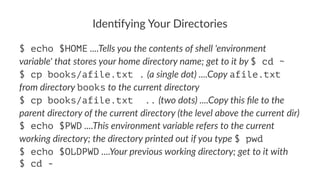
Iden%fying*Your*Directories 
$ echo $HOME!....Tells&you&the&contents&of&shell&'environment& 
variable'&that&stores&your&home&directory&name;&get&to&it&by&$ cd ~ 
$ cp books/afile.txt .!(a&single&dot)&....Copy&afile.txt& 
from&directory&books&to&the&current&directory 
$ cp books/afile.txt ..!(two&dots)&....Copy&this&file&to&the& 
parent&directory&of&the&current&directory&(the&level&above&the&current&dir) 
$ echo $PWD!....This&environment&variable&refers&to&the&current& 
working&directory;&the&directory&printed&out&if&you&type&$ pwd 
$ echo $OLDPWD!....Your&previous&working&directory;&get&to&it&with 
$ cd -
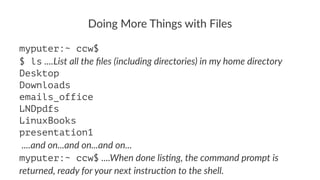
Doing&More&Things&with&Files 
myputer:~ ccw$ 
$ ls!....List&all&the&files&(including&directories)&in&my&home&directory 
Desktop 
Downloads 
emails_office 
LNDpdfs 
LinuxBooks 
presentation1 
!....and&on...and&on...and&on... 
myputer:~ ccw$!....When&done&lis8ng,&the&command&prompt&is& 
returned,&ready&for&your&next&instruc8on&to&the&shell.
Command'Op*ons 
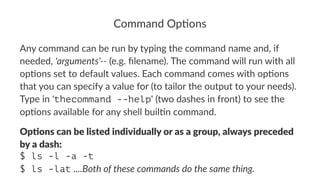
Any$command$can$be$run$by$typing$the$command$name$and,$if$ 
needed,$'arguments'++$(e.g.$filename).$The$command$will$run$with$all$ 
op<ons$set$to$default$values.$Each$command$comes$with$op<ons$ 
that$you$can$specify$a$value$for$(to$tailor$the$output$to$your$needs).$ 
Type$in$'thecommand --help'$(two$dashes$in$front)$to$see$the$ 
op<ons$available$for$any$shell$buil<n$command. 
Op#ons'can'be'listed'individually'or'as'a'group,'always'preceded' 
by'a'dash: 
$ ls -l -a -t 
$ ls -lat!....Both&of&these&commands&do&the&same&thing.
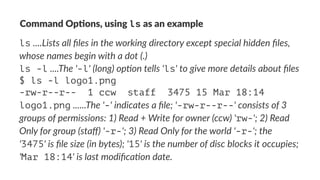
Command'Op*ons,'using'ls'as'an'example 
ls!....Lists&all&files&in&the&working&directory&except&special&hidden&files,& 
whose&names&begin&with&a&dot&(.) 
ls -l!....The&'-l'&(long)&op>on&tells&'ls'&to&give&more&details&about&files 
$ ls -l logo1.png 
-rw-r--r-- 1 ccw staff 3475 15 Mar 18:14 
logo1.png!......The&'-'&indicates&a&file;&'-rw-r--r--'&consists&of&3& 
groups&of&permissions:&1)&Read&+&Write&for&owner&(ccw)&'rw-';&2)&Read& 
Only&for&group&(staff)&'-r-';&3)&Read&Only&for&the&world&'-r-';&the& 
'3475'&is&file&size&(in&bytes);&'15'&is&the&number&of&disc&blocks&it&occupies;& 
'Mar 18:14'&is&last&modifica>on&date.
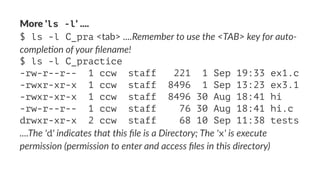
More%'ls -l'%.... 
$ ls -l C_pra!<tab>!....Remember'to'use'the'<TAB>'key'for'auto6 
comple:on'of'your'filename! 
$ ls -l C_practice 
-rw-r--r-- 1 ccw staff 221 1 Sep 19:33 ex1.c 
-rwxr-xr-x 1 ccw staff 8496 1 Sep 13:23 ex3.1 
-rwxr-xr-x 1 ccw staff 8496 30 Aug 18:41 hi 
-rw-r--r-- 1 ccw staff 76 30 Aug 18:41 hi.c 
drwxr-xr-x 2 ccw staff 68 10 Sep 11:38 tests 
....The''d''indicates'that'this'file'is'a'Directory;'The''x''is'execute' 
permission'(permission'to'enter'and'access'files'in'this'directory)
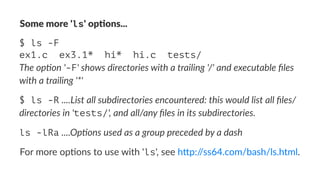
Some%more%'ls'%op)ons... 
$ ls -F 
ex1.c ex3.1* hi* hi.c tests/ 
The$op'on$'-F'$shows$directories$with$a$trailing$'/'$and$executable$files$ 
with$a$trailing$'*' 
$ ls -R!....List&all&subdirectories&encountered:&this&would&list&all&files/ 
directories&in&'tests/',&and&all/any&files&in&its&subdirectories. 
ls -lRa!....Op$ons(used(as(a(group(preceded(by(a(dash 
For$more$op(ons$to$use$with$'ls',$see$h2p://ss64.com/bash/ls.html.
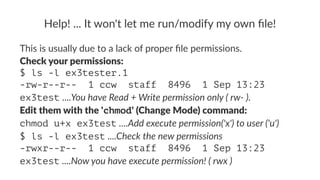
Help!&...&It&won't&let&me&run/modify&my&own&file! 
This%is%usually%due%to%a%lack%of%proper%file%permissions. 
Check&your&permissions: 
$ ls -l ex3tester.1 
-rw-r--r-- 1 ccw staff 8496 1 Sep 13:23 
ex3test%....You$have$Read$+$Write$permission$only$($rw8$). 
Edit&them&with&the&'chmod'&(Change&Mode)&command: 
chmod u+x ex3test%....Add$execute$permission('x')$to$user$('u') 
$ ls -l ex3test%....Check$the$new$permissions 
-rwxr--r-- 1 ccw staff 8496 1 Sep 13:23 
ex3test%....Now$you$have$execute$permission!$($rwx$)
The$'chmod'$command$has$several$op0ons,$of$course. 
A$very$useful$one$is$'-R'$(Recursive),$which$lets$you$modify$the$ 
permissions$for$an$en0re$directory$(it$makes$the$requested$ 
permission$changes$in$all$subdirectories$and$files$of$the$directory),$ 
i.e.$'change$mode$on$files$and$directories$recursively'. 
For$a$good$introduc-on$to$'chmod',$see: 
h"p://catcode.com/teachmod/chmod_1.html1(Tutorial) 
h"p://ss64.com/bash/chmod.html 
“It's&easier&to&ask&forgiveness&than&it&is&to&get&permission” 
~"Rear%Admiral%Grace%Hopper"(A%pioneering%20th%century%computer% 
geek;%check%her%out%on%YouTube!)
Wildcards)(file-matching)with)metacharacters) 
Wildcard(characters(used(with(shell(commands(can(save(you(major( 
typing/searching(8me(by(le:ng(you(specify(in(one(short(character( 
sequence(that('This&is&the&sort&of&thing&I&am&looking&for'. 
The$shell$will$'expand'$your$wildcard$characters,$then$find$ 
everything$that$matches$your$request.$Your$command$(such$as$'mv',$ 
'cp',$'rm'$and$many$others)$can$use$wildcards$to$perform$ac@ons$on$ 
more$than$one$file$at$a$@me,$to$find$all$files$with$certain$ 
characteris@cs,$and$more.$Useful$stuff!
Wildcards:*the*ques0on*mark 
• ?"(ques(on"mark)"....represents(any(single(character. 
Ex.$1:"$ rm hd??"....would(do(a(search(for(all(four3character( 
filenames(star6ng(with('hd'. 
It(would(find"hda1,"hdbd,"hdct"and(every(other(le<er/number( 
between(a3z,(039,(then(remove((delete)(them.
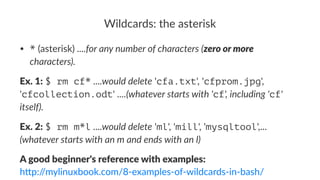
Wildcards:*the*asterisk 
• *"(asterisk)"....for%any%number%of%characters%(zero%or%more% 
characters). 
Ex.$1:!$ rm cf*!....would'delete!'cfa.txt',!'cfprom.jpg',! 
'cfcollection.odt'!....(whatever'starts'with''cf','including''cf'' 
itself). 
Ex.$2:!$ rm m*l!....would'delete!'ml',!'mill',!'mysqltool',...! 
(whatever'starts'with'an'm'and'ends'with'an'l) 
A"good"beginner's"reference"with"examples: 
h"p://mylinuxbook.com/83examples3of3wildcards3in3bash/
Wildcards:*square*brackets 
• [ ]"(square"brackets)"....specifies(one(of(this(range(of(values. 
Ex#1:"Ask(for"m[aou]m"....you(could(get:(mam,(mum,(mom 
Ex#2:"Ask(for"m+([a/d])m"....(it(can(become(anything(that(starts(and( 
ends(with(m(and(has(any(character((+(means('one(or(more(of')(a(to(d( 
inbetween,(such(as(madam,(madm,(mdm,(mbabcm. 
In#other#words:!....Find&me&anything&that&(in&Ex&1):contains&an&**a**&or& 
**o**&or&**u**,&or&(in&Ex&2):&starts&with&m&and&then&contains&any&of&the& 
characters&from&a#to#d&(one&or&more&occurrence&of&them),&and&ends&with& 
m.
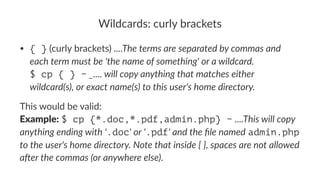
Wildcards:*curly*brackets 
• { }"(curly"brackets)"....The%terms%are%separated%by%commas%and% 
each%term%must%be%'the%name%of%something'%or%a%wildcard. 
$ cp { } ~%_....%will%copy%anything%that%matches%either% 
wildcard(s),%or%exact%name(s)%to%this%user's%home%directory. 
This%would%be%valid: 
Example:%$ cp {*.doc,*.pdf,admin.php} ~%....This&will&copy& 
anything&ending&with&'.doc'&or&'.pdf'&and&the&file&named%admin.php% 
to&the&user's&home&directory.&Note&that&inside&{&},&spaces&are&not&allowed& 
a<er&the&commas&(or&anywhere&else).
Wildcards:*'{ }'*con.nued,*and*'[! ]' 
$ touch course{1,2,3,4,5}!....create'mul+ple'new'files 
$ ls 
course1 course2 course3 course4 course5 
[! ]!(square'brackets'containing'exclama3on'mark)!....specifies(a( 
range(of(values(to(EXCLUDE. 
!....Similar(to(the([(],(but(it(says("Accept(as(a(match(anything(that(does) 
not)contain(the(characters/range(listed(between(the('['(and(']'. 
Ex.'1:!'$ ls course[!4]'!....will(list(all(course?((ie.(course1,( 
course2,(course3,(etc),(EXCEPT(for(a(file(with(the(number(4(terminaOng( 
its(name.
Command'Line'History'00'use'it'to'work'faster 
The$Bash$history$func,on$runs$behind$the$scenes,$adding$each$ 
command$you$run$into$the$equivalent$of$a$linear$database. 
You$can$then$scroll$through$it$using$the$up$and$down$arrow$keys$or$ 
display$in$its$en5rety$by$typing$in$history$at$the$command$ 
prompt. 
By#default#it#saves#your#last#500#commands.
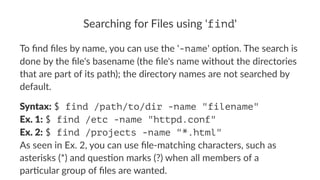
Searching*for*Files*using*'find' 
To#find#files#by#name,#you#can#use#the#'-name'#op5on.#The#search#is# 
done#by#the#file's#basename#(the#file's#name#without#the#directories# 
that#are#part#of#its#path);#the#directory#names#are#not#searched#by# 
default. 
Syntax:!$ find /path/to/dir -name "filename" 
Ex.*1:!$ find /etc -name "httpd.conf" 
Ex.*2:!$ find /projects -name "*.html" 
As!seen!in!Ex.!2,!you!can!use!file3matching!characters,!such!as! 
asterisks!(*)!and!ques?on!marks!(?)!when!all!members!of!a! 
par?cular!group!of!files!are!wanted.
Searching*in*Files 
For$searching$in$files$for$a$search$phrase$or$term,$you$can$use$the$ 
grep$command.$With$grep,$it$is$easy$to$search$a$single$file$or$to$ 
search$a$whole$directory$structure$of$files$(a$recursive$search). 
$ grep "thisword" /Documents/CS-Books 
$ grep -i "thisword" /Documents/CS-Books!....The!'-i'! 
makes)the)search)case-insensi0ve. 
There%is%a%LOT%more%to%'grep'%than%this,%enough%for%another% 
presenta5on!
Tips 
• Un$l&you&know&how&to&deal&with&them,&do&not&use&Bash&'special& 
characters'&or&blank&spaces&in&filenames. 
• Use&the&TAB&key&for&filename'auto+comple.on&(prevents& 
filename&errors,&speeds&things&up).&If&you&hear&a&beep,&press&TAB& 
again:&a&list&of&possible&comple$ons&is&returned.&Type&in&more& 
characters&of&your&filename&$ll&it&becomes&'the&only&choice'&leF.& 
Press&TAB&again. 
• Use&wildcard&characters&(with&care,&if&using&rm!!!)&to&speed&up& 
your&work.
Tips,&con*nued 
• Use%the%up%and%down%arrow%keys%to%scroll%through%previous% 
commands,%stop%on%the%command%you%want%(edit%it%if%you%like),% 
press%ENTER%to%run%it. 
• If%a%command%is%returning%a%tooBlong%list%of%results,%use%ControlBC% 
to%stop%the%command%from%conDnuing%to%spew%forth.%Your% 
command%prompt%will%reappear. 
• If%you%type%a%command,%hit%Enter,%and%get%the%shell%prompt%back% 
without'anything'appearing'to'happen,%it%means%your%command% 
executed%successfully.%If%there%was%a%problem,%you%will%get%an%
So#what#is#the#command#line#really#good#for? 
How$about$doing$arithme1c? 
$ echo $((31+11)) 
42!....The%Answer%to%Life,%the%Universe%and%Everything 
Next%Up%(possibly):%Create%your%own%commands%using!'alias',%as%well% 
as%the%coolest%CLI%feature%ever:%I/O%RedirecDon

Linux Command Line Introduction for total beginners, Part 2

  • 1.
    The$Linux$Command$Line$Interface (Bash&Shell) Part%2 Part%1%is%available%as%a%pdf%file%at%h2p://www.slideshare.net/corriewa29/linux=cli=1 Prepared'for'the'Nova'Sco0a'Linux'Users'Group'by'Corrie'Wa=,'Fall'2014 h"p://www.corriewa".com/
  • 2.
    Iden%fying*Your*Directories $ echo$HOME!....Tells&you&the&contents&of&shell&'environment& variable'&that&stores&your&home&directory&name;&get&to&it&by&$ cd ~ $ cp books/afile.txt .!(a&single&dot)&....Copy&afile.txt& from&directory&books&to&the&current&directory $ cp books/afile.txt ..!(two&dots)&....Copy&this&file&to&the& parent&directory&of&the&current&directory&(the&level&above&the&current&dir) $ echo $PWD!....This&environment&variable&refers&to&the&current& working&directory;&the&directory&printed&out&if&you&type&$ pwd $ echo $OLDPWD!....Your&previous&working&directory;&get&to&it&with $ cd -
  • 3.
    Doing&More&Things&with&Files myputer:~ ccw$ $ ls!....List&all&the&files&(including&directories)&in&my&home&directory Desktop Downloads emails_office LNDpdfs LinuxBooks presentation1 !....and&on...and&on...and&on... myputer:~ ccw$!....When&done&lis8ng,&the&command&prompt&is& returned,&ready&for&your&next&instruc8on&to&the&shell.
  • 4.
    Command'Op*ons Any$command$can$be$run$by$typing$the$command$name$and,$if$ needed,$'arguments'++$(e.g.$filename).$The$command$will$run$with$all$ op<ons$set$to$default$values.$Each$command$comes$with$op<ons$ that$you$can$specify$a$value$for$(to$tailor$the$output$to$your$needs).$ Type$in$'thecommand --help'$(two$dashes$in$front)$to$see$the$ op<ons$available$for$any$shell$buil<n$command. Op#ons'can'be'listed'individually'or'as'a'group,'always'preceded' by'a'dash: $ ls -l -a -t $ ls -lat!....Both&of&these&commands&do&the&same&thing.
  • 5.
    Command'Op*ons,'using'ls'as'an'example ls!....Lists&all&files&in&the&working&directory&except&special&hidden&files,& whose&names&begin&with&a&dot&(.) ls -l!....The&'-l'&(long)&op>on&tells&'ls'&to&give&more&details&about&files $ ls -l logo1.png -rw-r--r-- 1 ccw staff 3475 15 Mar 18:14 logo1.png!......The&'-'&indicates&a&file;&'-rw-r--r--'&consists&of&3& groups&of&permissions:&1)&Read&+&Write&for&owner&(ccw)&'rw-';&2)&Read& Only&for&group&(staff)&'-r-';&3)&Read&Only&for&the&world&'-r-';&the& '3475'&is&file&size&(in&bytes);&'15'&is&the&number&of&disc&blocks&it&occupies;& 'Mar 18:14'&is&last&modifica>on&date.
  • 6.
    More%'ls -l'%.... $ls -l C_pra!<tab>!....Remember'to'use'the'<TAB>'key'for'auto6 comple:on'of'your'filename! $ ls -l C_practice -rw-r--r-- 1 ccw staff 221 1 Sep 19:33 ex1.c -rwxr-xr-x 1 ccw staff 8496 1 Sep 13:23 ex3.1 -rwxr-xr-x 1 ccw staff 8496 30 Aug 18:41 hi -rw-r--r-- 1 ccw staff 76 30 Aug 18:41 hi.c drwxr-xr-x 2 ccw staff 68 10 Sep 11:38 tests ....The''d''indicates'that'this'file'is'a'Directory;'The''x''is'execute' permission'(permission'to'enter'and'access'files'in'this'directory)
  • 7.
    Some%more%'ls'%op)ons... $ ls-F ex1.c ex3.1* hi* hi.c tests/ The$op'on$'-F'$shows$directories$with$a$trailing$'/'$and$executable$files$ with$a$trailing$'*' $ ls -R!....List&all&subdirectories&encountered:&this&would&list&all&files/ directories&in&'tests/',&and&all/any&files&in&its&subdirectories. ls -lRa!....Op$ons(used(as(a(group(preceded(by(a(dash For$more$op(ons$to$use$with$'ls',$see$h2p://ss64.com/bash/ls.html.
  • 8.
    Help!&...&It&won't&let&me&run/modify&my&own&file! This%is%usually%due%to%a%lack%of%proper%file%permissions. Check&your&permissions: $ ls -l ex3tester.1 -rw-r--r-- 1 ccw staff 8496 1 Sep 13:23 ex3test%....You$have$Read$+$Write$permission$only$($rw8$). Edit&them&with&the&'chmod'&(Change&Mode)&command: chmod u+x ex3test%....Add$execute$permission('x')$to$user$('u') $ ls -l ex3test%....Check$the$new$permissions -rwxr--r-- 1 ccw staff 8496 1 Sep 13:23 ex3test%....Now$you$have$execute$permission!$($rwx$)
  • 9.
    The$'chmod'$command$has$several$op0ons,$of$course. A$very$useful$one$is$'-R'$(Recursive),$which$lets$you$modify$the$ permissions$for$an$en0re$directory$(it$makes$the$requested$ permission$changes$in$all$subdirectories$and$files$of$the$directory),$ i.e.$'change$mode$on$files$and$directories$recursively'. For$a$good$introduc-on$to$'chmod',$see: h"p://catcode.com/teachmod/chmod_1.html1(Tutorial) h"p://ss64.com/bash/chmod.html “It's&easier&to&ask&forgiveness&than&it&is&to&get&permission” ~"Rear%Admiral%Grace%Hopper"(A%pioneering%20th%century%computer% geek;%check%her%out%on%YouTube!)
  • 10.
    Wildcards)(file-matching)with)metacharacters) Wildcard(characters(used(with(shell(commands(can(save(you(major( typing/searching(8me(by(le:ng(you(specify(in(one(short(character( sequence(that('This&is&the&sort&of&thing&I&am&looking&for'. The$shell$will$'expand'$your$wildcard$characters,$then$find$ everything$that$matches$your$request.$Your$command$(such$as$'mv',$ 'cp',$'rm'$and$many$others)$can$use$wildcards$to$perform$ac@ons$on$ more$than$one$file$at$a$@me,$to$find$all$files$with$certain$ characteris@cs,$and$more.$Useful$stuff!
  • 11.
    Wildcards:*the*ques0on*mark • ?"(ques(on"mark)"....represents(any(single(character. Ex.$1:"$ rm hd??"....would(do(a(search(for(all(four3character( filenames(star6ng(with('hd'. It(would(find"hda1,"hdbd,"hdct"and(every(other(le<er/number( between(a3z,(039,(then(remove((delete)(them.
  • 12.
    Wildcards:*the*asterisk • *"(asterisk)"....for%any%number%of%characters%(zero%or%more% characters). Ex.$1:!$ rm cf*!....would'delete!'cfa.txt',!'cfprom.jpg',! 'cfcollection.odt'!....(whatever'starts'with''cf','including''cf'' itself). Ex.$2:!$ rm m*l!....would'delete!'ml',!'mill',!'mysqltool',...! (whatever'starts'with'an'm'and'ends'with'an'l) A"good"beginner's"reference"with"examples: h"p://mylinuxbook.com/83examples3of3wildcards3in3bash/
  • 13.
    Wildcards:*square*brackets • []"(square"brackets)"....specifies(one(of(this(range(of(values. Ex#1:"Ask(for"m[aou]m"....you(could(get:(mam,(mum,(mom Ex#2:"Ask(for"m+([a/d])m"....(it(can(become(anything(that(starts(and( ends(with(m(and(has(any(character((+(means('one(or(more(of')(a(to(d( inbetween,(such(as(madam,(madm,(mdm,(mbabcm. In#other#words:!....Find&me&anything&that&(in&Ex&1):contains&an&**a**&or& **o**&or&**u**,&or&(in&Ex&2):&starts&with&m&and&then&contains&any&of&the& characters&from&a#to#d&(one&or&more&occurrence&of&them),&and&ends&with& m.
  • 14.
    Wildcards:*curly*brackets • {}"(curly"brackets)"....The%terms%are%separated%by%commas%and% each%term%must%be%'the%name%of%something'%or%a%wildcard. $ cp { } ~%_....%will%copy%anything%that%matches%either% wildcard(s),%or%exact%name(s)%to%this%user's%home%directory. This%would%be%valid: Example:%$ cp {*.doc,*.pdf,admin.php} ~%....This&will&copy& anything&ending&with&'.doc'&or&'.pdf'&and&the&file&named%admin.php% to&the&user's&home&directory.&Note&that&inside&{&},&spaces&are&not&allowed& a<er&the&commas&(or&anywhere&else).
  • 15.
    Wildcards:*'{ }'*con.nued,*and*'[! ]' $ touch course{1,2,3,4,5}!....create'mul+ple'new'files $ ls course1 course2 course3 course4 course5 [! ]!(square'brackets'containing'exclama3on'mark)!....specifies(a( range(of(values(to(EXCLUDE. !....Similar(to(the([(],(but(it(says("Accept(as(a(match(anything(that(does) not)contain(the(characters/range(listed(between(the('['(and(']'. Ex.'1:!'$ ls course[!4]'!....will(list(all(course?((ie.(course1,( course2,(course3,(etc),(EXCEPT(for(a(file(with(the(number(4(terminaOng( its(name.
  • 16.
    Command'Line'History'00'use'it'to'work'faster The$Bash$history$func,on$runs$behind$the$scenes,$adding$each$ command$you$run$into$the$equivalent$of$a$linear$database. You$can$then$scroll$through$it$using$the$up$and$down$arrow$keys$or$ display$in$its$en5rety$by$typing$in$history$at$the$command$ prompt. By#default#it#saves#your#last#500#commands.
  • 17.
    Searching*for*Files*using*'find' To#find#files#by#name,#you#can#use#the#'-name'#op5on.#The#search#is# done#by#the#file's#basename#(the#file's#name#without#the#directories# that#are#part#of#its#path);#the#directory#names#are#not#searched#by# default. Syntax:!$ find /path/to/dir -name "filename" Ex.*1:!$ find /etc -name "httpd.conf" Ex.*2:!$ find /projects -name "*.html" As!seen!in!Ex.!2,!you!can!use!file3matching!characters,!such!as! asterisks!(*)!and!ques?on!marks!(?)!when!all!members!of!a! par?cular!group!of!files!are!wanted.
  • 18.
    Searching*in*Files For$searching$in$files$for$a$search$phrase$or$term,$you$can$use$the$ grep$command.$With$grep,$it$is$easy$to$search$a$single$file$or$to$ search$a$whole$directory$structure$of$files$(a$recursive$search). $ grep "thisword" /Documents/CS-Books $ grep -i "thisword" /Documents/CS-Books!....The!'-i'! makes)the)search)case-insensi0ve. There%is%a%LOT%more%to%'grep'%than%this,%enough%for%another% presenta5on!
  • 19.
    Tips • Un$l&you&know&how&to&deal&with&them,&do&not&use&Bash&'special& characters'&or&blank&spaces&in&filenames. • Use&the&TAB&key&for&filename'auto+comple.on&(prevents& filename&errors,&speeds&things&up).&If&you&hear&a&beep,&press&TAB& again:&a&list&of&possible&comple$ons&is&returned.&Type&in&more& characters&of&your&filename&$ll&it&becomes&'the&only&choice'&leF.& Press&TAB&again. • Use&wildcard&characters&(with&care,&if&using&rm!!!)&to&speed&up& your&work.
  • 20.
    Tips,&con*nued • Use%the%up%and%down%arrow%keys%to%scroll%through%previous% commands,%stop%on%the%command%you%want%(edit%it%if%you%like),% press%ENTER%to%run%it. • If%a%command%is%returning%a%tooBlong%list%of%results,%use%ControlBC% to%stop%the%command%from%conDnuing%to%spew%forth.%Your% command%prompt%will%reappear. • If%you%type%a%command,%hit%Enter,%and%get%the%shell%prompt%back% without'anything'appearing'to'happen,%it%means%your%command% executed%successfully.%If%there%was%a%problem,%you%will%get%an%
  • 21.
    So#what#is#the#command#line#really#good#for? How$about$doing$arithme1c? $echo $((31+11)) 42!....The%Answer%to%Life,%the%Universe%and%Everything Next%Up%(possibly):%Create%your%own%commands%using!'alias',%as%well% as%the%coolest%CLI%feature%ever:%I/O%RedirecDon