What is this Presentation allWhat is this Presentation allWhat is this Presentation allWhat is this Presentation allWhat is this Presentation allWhat is this Presentation allWhat is this Presentation allWhat is this Presentation all
about?about?about?about?about?about?about?about?
What is this Presentation allWhat is this Presentation allWhat is this Presentation allWhat is this Presentation allWhat is this Presentation allWhat is this Presentation allWhat is this Presentation allWhat is this Presentation all
about?about?about?about?about?about?about?about?
Recruitment throughRecruitment throughRecruitment throughRecruitment throughRecruitment throughRecruitment throughRecruitment throughRecruitment throughRecruitment throughRecruitment throughRecruitment throughRecruitment throughRecruitment throughRecruitment throughRecruitment throughRecruitment throughRecruitment throughRecruitment throughRecruitment throughRecruitment throughRecruitment throughRecruitment throughRecruitment throughRecruitment through
Social NetworkingSocial NetworkingSocial NetworkingSocial NetworkingSocial NetworkingSocial NetworkingSocial NetworkingSocial Networking
Recruitment throughRecruitment throughRecruitment throughRecruitment throughRecruitment throughRecruitment throughRecruitment throughRecruitment through
Social NetworkingSocial NetworkingSocial NetworkingSocial NetworkingSocial NetworkingSocial NetworkingSocial NetworkingSocial Networking
RecruitmentRecruitmentRecruitmentRecruitmentRecruitmentRecruitmentRecruitmentRecruitment
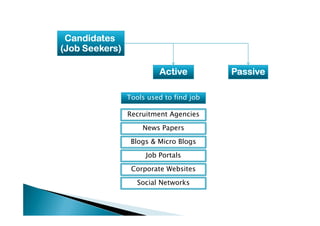
CandidatesCandidatesCandidatesCandidatesCandidatesCandidatesCandidatesCandidates
(Job Seekers)(Job Seekers)(Job Seekers)(Job Seekers)(Job Seekers)(Job Seekers)(Job Seekers)(Job Seekers)
PassivePassivePassivePassivePassivePassivePassivePassiveActiveActiveActiveActiveActiveActiveActiveActive
Tools used to find job
Recruitment AgenciesRecruitment Agencies
News Papers
Blogs & Micro Blogs
Job Portals
Social Networks
Corporate Websites
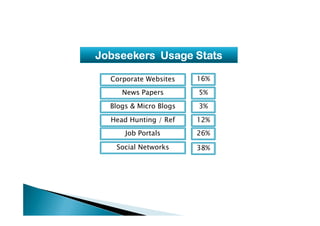
Jobseekers Usage StatsJobseekers Usage StatsJobseekers Usage StatsJobseekers Usage StatsJobseekers Usage StatsJobseekers Usage StatsJobseekers Usage StatsJobseekers Usage Stats
News Papers
Blogs & Micro Blogs
Corporate Websites 16%
5%
3%
Head Hunting / Ref
Job Portals
Social Networks 38%
26%
12%
What is our Future inWhat is our Future inWhat is our Future inWhat is our Future inWhat is our Future inWhat is our Future inWhat is our Future inWhat is our Future in
Recruitment?Recruitment?Recruitment?Recruitment?Recruitment?Recruitment?Recruitment?Recruitment?
What is our Future inWhat is our Future inWhat is our Future inWhat is our Future inWhat is our Future inWhat is our Future inWhat is our Future inWhat is our Future in
Recruitment?Recruitment?Recruitment?Recruitment?Recruitment?Recruitment?Recruitment?Recruitment?
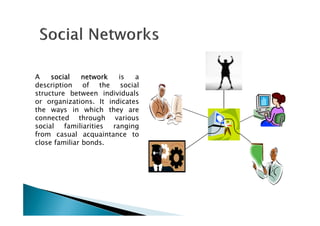
A socialsocialsocialsocial networknetworknetworknetwork is a
description of the social
structure between individuals
or organizations. It indicates
the ways in which they arethe ways in which they are
connected through various
social familiarities ranging
from casual acquaintance to
close familiar bonds.
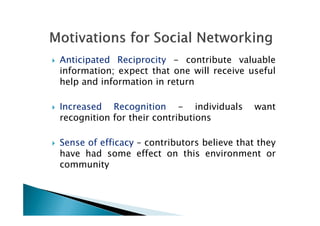
Anticipated Reciprocity - contribute valuable
information; expect that one will receive useful
help and information in return
Increased Recognition - individuals want
recognition for their contributionsrecognition for their contributions
Sense of efficacy – contributors believe that they
have had some effect on this environment or
community
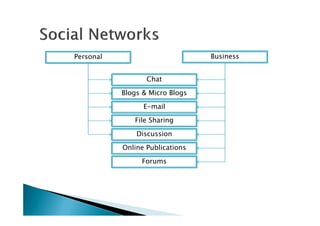
E-mail
Chat
Blogs & Micro Blogs
Personal Business
Forums
File Sharing
Discussion
Online Publications
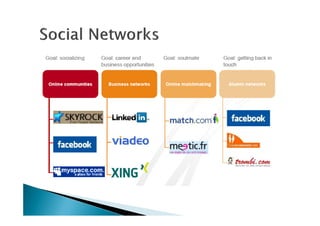
Virtual Communities:
o Friendster – http://www.friendster.com
($13 million venture funding, Oct. 2003)
oo LinkedInLinkedIn -- httphttp:://www//www..linkedinlinkedin..comcom
(($$44..77 millionmillion VentureVenture Funding,Funding, NovNov.. 20032003))
o http://www.ryze.como http://www.ryze.com
o http://www.tribe.net
($6.3 million in venture funding)
o http://www.orkut.com (in affiliation with Google)
o http://www.siliconindia.com
o http://www.facebook.com
LinkedInLinkedInLinkedInLinkedIn isisisis anananan onlineonlineonlineonline networknetworknetworknetwork ofofofof
moremoremoremore thanthanthanthan 25252525 millionmillionmillionmillion experiencedexperiencedexperiencedexperienced
professionalsprofessionalsprofessionalsprofessionals fromfromfromfrom aroundaroundaroundaround thethethethe world,world,world,world,
representingrepresentingrepresentingrepresenting 150150150150 industriesindustriesindustriesindustries....
Web Site link: http://www.linkedin.com/
About 25 million users total
130k+ newnewnewnew users each week
12.5% are senior management
About 50% select ‘career
opportunities’
About 300,000 recruiters use
LinkedIn
LinkedInLinkedInLinkedInLinkedIn foundedfoundedfoundedfounded inininin DecemberDecemberDecemberDecember 2002200220022002
andandandand launchedlaunchedlaunchedlaunched inininin MayMayMayMay 2003200320032003 bybybyby ReidReidReidReid
HoffmanHoffmanHoffmanHoffman....
LinkedIn
There are 150 industries
And 420 geographic locations
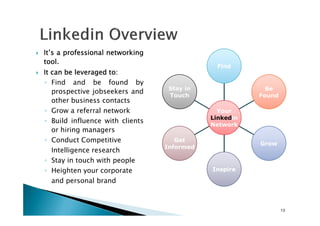
It’sIt’sIt’sIt’s aaaa professionalprofessionalprofessionalprofessional networkingnetworkingnetworkingnetworking
tooltooltooltool....
ItItItIt cancancancan bebebebe leveragedleveragedleveragedleveraged totototo::::
◦ Find and be found by
prospective jobseekers and
other business contacts
◦ Grow a referral network
Stay in
Touch
Be
Found
Find
Your◦ Grow a referral network
◦ Build influence with clients
or hiring managers
◦ Conduct Competitive
Intelligence research
◦ Stay in touch with people
◦ Heighten your corporate
and personal brand
Get
Informed
Inspire
Grow
Your
Linkedin
Network
13
What LinkedIn can do for us?
Building a public profile/resume
Search Your Network
Recommendations
Managing your contactsManaging your contacts
Growing Your Network
What Top Recruiters do on LinkedIn
Be Warned-Consequences
Privacy and Safety
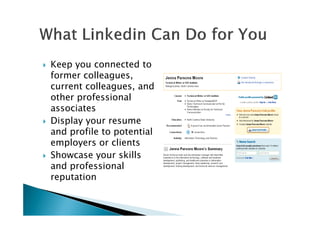
Keep you connected to
former colleagues,
current colleagues, and
other professional
associatesassociates
Display your resume
and profile to potential
employers or clients
Showcase your skills
and professional
reputation
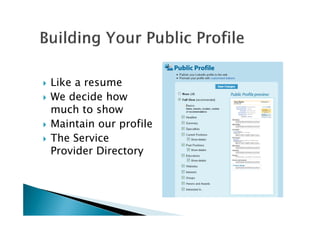
Like a resume
We decide how
much to showmuch to show
Maintain our profile
The Service
Provider Directory
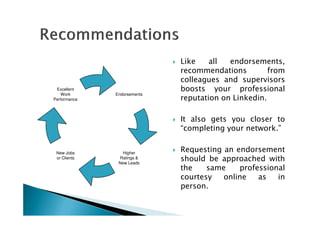
Like all endorsements,
recommendations from
colleagues and supervisors
boosts your professional
reputation on Linkedin.
Endorsements
Excellent
Work
Performance
It also gets you closer to
“completing your network.”
Requesting an endorsement
should be approached with
the same professional
courtesy online as in
person.
Higher
Ratings &
New Leads
New Jobs
or Clients
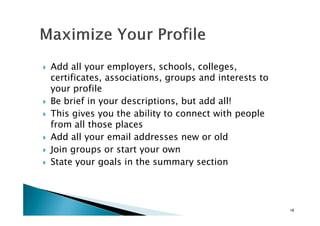
Add all your employers, schools, colleges,
certificates, associations, groups and interests to
your profile
Be brief in your descriptions, but add all!
This gives you the ability to connect with peopleThis gives you the ability to connect with people
from all those places
Add all your email addresses new or old
Join groups or start your own
State your goals in the summary section
18
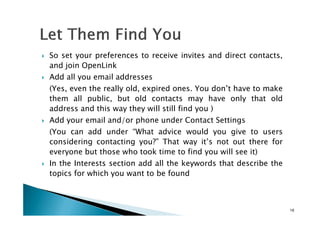
So set your preferences to receive invites and direct contacts,
and join OpenLink
Add all you email addresses
(Yes, even the really old, expired ones. You don’t have to make
them all public, but old contacts may have only that old
address and this way they will still find you )
Add your email and/or phone under Contact Settings
(You can add under “What advice would you give to users
considering contacting you?” That way it’s not out there for
everyone but those who took time to find you will see it)
In the Interests section add all the keywords that describe the
topics for which you want to be found
19
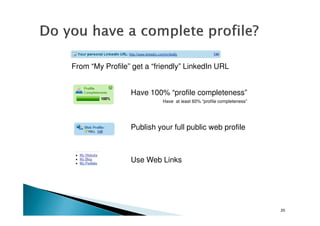
From “My Profile” get a “friendly” LinkedIn URL
Have 100% “profile completeness”
Have at least 60% “profile completeness”
20
Publish your full public web profile
Use Web Links
21
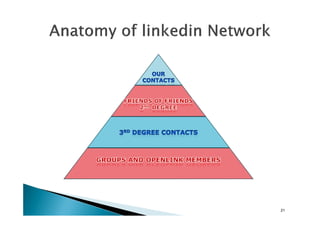
The bigger your network the more leads you can generate.
Don’t invite people via requests to connect
To add someone click on their profile then click “Add [name] to
your network”
If in doubt, email a note before inviting
Get all the business cards you’ve ever collected out of that dusty
drawer and put them into your Outlook (or Excel)
22
drawer and put them into your Outlook (or Excel)
Gather all your old contact databases (Act!, Goldmine, old
worksheets) – anything with email addresses
Merge all the above into one Excel sheet
Save it as a CSV and import that into LinkedIn
Or copy and paste addresses separated by commas
Once uploaded you’ll notice many people already have accounts.
Invite them all – you already know them!
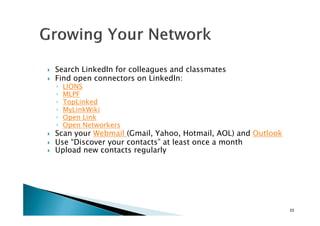
Search LinkedIn for colleagues and classmates
Find open connectors on LinkedIn:
◦ LIONS
◦ MLPF
◦ TopLinked
◦ MyLinkWiki
◦ Open Link
◦ MyLinkWiki
◦ Open Link
◦ Open Networkers
Scan your Webmail (Gmail, Yahoo, Hotmail, AOL) and Outlook
Use “Discover your contacts” at least once a month
Upload new contacts regularly
23
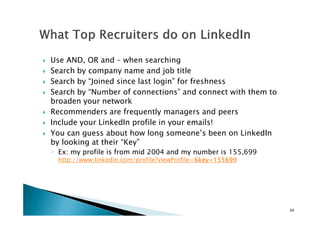
Use AND, OR and – when searching
Search by company name and job title
Search by “Joined since last login” for freshness
Search by “Number of connections” and connect with them to
broaden your network
Recommenders are frequently managers and peersRecommenders are frequently managers and peers
Include your LinkedIn profile in your emails!
You can guess about how long someone’s been on LinkedIn
by looking at their “Key”
◦ Ex: my profile is from mid 2004 and my number is 155,699
http://www.linkedin.com/profile?viewProfile=&key=155699key=155699key=155699key=155699
24
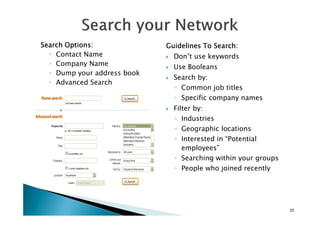
Guidelines To Search:Guidelines To Search:Guidelines To Search:Guidelines To Search:
Don’t use keywords
Use Booleans
Search by:
◦ Common job titles
◦ Specific company names
Filter by:
Search Options:Search Options:Search Options:Search Options:
◦ Contact Name
◦ Company Name
◦ Dump your address book
◦ Advanced Search
◦ Industries
◦ Geographic locations
◦ Interested in “Potential
employees”
◦ Searching within your groups
◦ People who joined recently
25
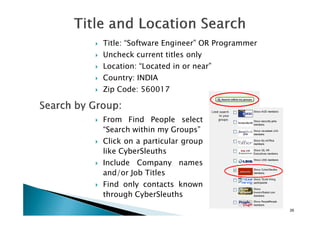
Title: “Software Engineer” OR Programmer
Uncheck current titles only
Location: “Located in or near”
Country: INDIA
Zip Code: 560017
26
From Find People select
“Search within my Groups”
Click on a particular group
like CyberSleuths
Include Company names
and/or Job Titles
Find only contacts known
through CyberSleuths
Try searching by company and keywords:
◦ Company: Google
◦ Uncheck current company only
◦ Sort by: Keyword relevance
Try searching by industries and titles:Try searching by industries and titles:
◦ Industry: IT Software
◦ Title: Manager (HR)
◦ Check current titles only
◦ Location: Located in or Near INDIA
◦ Sort by: Degrees and endorsers
27
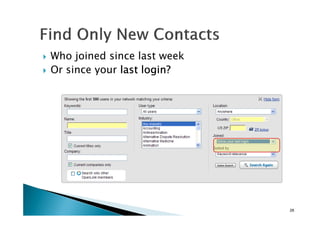
Who joined since last week
Or since your last login?last login?last login?last login?
28
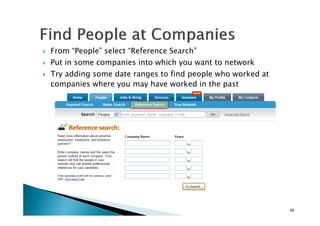
From “People” select “Reference Search”
Put in some companies into which you want to network
Try adding some date ranges to find people who worked at
companies where you may have worked in the past
29
Right below their name is…
◦ Their title
◦ Their employer
◦ Their City and State
So you could…
◦ Google “Company, City, State” for work numbers
◦ Google “Firstname Lastname @company.com”
◦ Or you can use LinkedIn’s InMail◦ Or you can use LinkedIn’s InMail
30
You know they work…
So find their company and then contact number
call them at work
Customized offerings for staffing departments using LinkedIn to
source and manager passive and active candidates
Based on the number of recruiters and positions, and overall
recruiting objectives, the following features are available:
◦ Premium search and InMail for each recruiter
◦ Job posting subscriptions
◦ Streaming video advertising on job listings◦ Streaming video advertising on job listings
◦ LinkedIn Project – a project management toolbar that lets you
organize and track LinkedIn candidates
◦ Sponsored InMail – a highly targeted advertising opportunity that
allows corporate customers to reach certain candidates by
geography/experience
◦ Corporate Alumni Groups – pre-approved membership and up-to-
date access to a unique type of referral network
◦ Premium level support and training
31
Warnings and ConsequencesWarnings and ConsequencesWarnings and ConsequencesWarnings and ConsequencesWarnings and ConsequencesWarnings and ConsequencesWarnings and ConsequencesWarnings and Consequences
Keep it professional
Keep it updated-An
outdated profile is a bad as
an outdated resume,
especially when everyoneespecially when everyone
can see it.
Know your connections
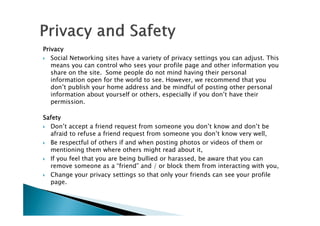
PrivacyPrivacyPrivacyPrivacy
Social Networking sites have a variety of privacy settings you can adjust. This
means you can control who sees your profile page and other information you
share on the site. Some people do not mind having their personal
information open for the world to see. However, we recommend that you
don’t publish your home address and be mindful of posting other personal
information about yourself or others, especially if you don’t have their
permission.
SafetySafetySafetySafety
Don’t accept a friend request from someone you don’t know and don’t be
afraid to refuse a friend request from someone you don’t know very well,
Be respectful of others if and when posting photos or videos of them or
mentioning them where others might read about it,
If you feel that you are being bullied or harassed, be aware that you can
remove someone as a “friend” and / or block them from interacting with you,
Change your privacy settings so that only your friends can see your profile
page.
Networking & Recruitment

Networking & Recruitment

  • 2.
    What is thisPresentation allWhat is this Presentation allWhat is this Presentation allWhat is this Presentation allWhat is this Presentation allWhat is this Presentation allWhat is this Presentation allWhat is this Presentation all about?about?about?about?about?about?about?about? What is this Presentation allWhat is this Presentation allWhat is this Presentation allWhat is this Presentation allWhat is this Presentation allWhat is this Presentation allWhat is this Presentation allWhat is this Presentation all about?about?about?about?about?about?about?about? Recruitment throughRecruitment throughRecruitment throughRecruitment throughRecruitment throughRecruitment throughRecruitment throughRecruitment throughRecruitment throughRecruitment throughRecruitment throughRecruitment throughRecruitment throughRecruitment throughRecruitment throughRecruitment throughRecruitment throughRecruitment throughRecruitment throughRecruitment throughRecruitment throughRecruitment throughRecruitment throughRecruitment through Social NetworkingSocial NetworkingSocial NetworkingSocial NetworkingSocial NetworkingSocial NetworkingSocial NetworkingSocial Networking Recruitment throughRecruitment throughRecruitment throughRecruitment throughRecruitment throughRecruitment throughRecruitment throughRecruitment through Social NetworkingSocial NetworkingSocial NetworkingSocial NetworkingSocial NetworkingSocial NetworkingSocial NetworkingSocial Networking
  • 3.
  • 4.
    CandidatesCandidatesCandidatesCandidatesCandidatesCandidatesCandidatesCandidates (Job Seekers)(Job Seekers)(JobSeekers)(Job Seekers)(Job Seekers)(Job Seekers)(Job Seekers)(Job Seekers) PassivePassivePassivePassivePassivePassivePassivePassiveActiveActiveActiveActiveActiveActiveActiveActive Tools used to find job Recruitment AgenciesRecruitment Agencies News Papers Blogs & Micro Blogs Job Portals Social Networks Corporate Websites
  • 5.
    Jobseekers Usage StatsJobseekersUsage StatsJobseekers Usage StatsJobseekers Usage StatsJobseekers Usage StatsJobseekers Usage StatsJobseekers Usage StatsJobseekers Usage Stats News Papers Blogs & Micro Blogs Corporate Websites 16% 5% 3% Head Hunting / Ref Job Portals Social Networks 38% 26% 12%
  • 6.
    What is ourFuture inWhat is our Future inWhat is our Future inWhat is our Future inWhat is our Future inWhat is our Future inWhat is our Future inWhat is our Future in Recruitment?Recruitment?Recruitment?Recruitment?Recruitment?Recruitment?Recruitment?Recruitment? What is our Future inWhat is our Future inWhat is our Future inWhat is our Future inWhat is our Future inWhat is our Future inWhat is our Future inWhat is our Future in Recruitment?Recruitment?Recruitment?Recruitment?Recruitment?Recruitment?Recruitment?Recruitment?
  • 7.
    A socialsocialsocialsocial networknetworknetworknetworkis a description of the social structure between individuals or organizations. It indicates the ways in which they arethe ways in which they are connected through various social familiarities ranging from casual acquaintance to close familiar bonds.
  • 8.
    Anticipated Reciprocity -contribute valuable information; expect that one will receive useful help and information in return Increased Recognition - individuals want recognition for their contributionsrecognition for their contributions Sense of efficacy – contributors believe that they have had some effect on this environment or community
  • 10.
    E-mail Chat Blogs & MicroBlogs Personal Business Forums File Sharing Discussion Online Publications
  • 11.
    Virtual Communities: o Friendster– http://www.friendster.com ($13 million venture funding, Oct. 2003) oo LinkedInLinkedIn -- httphttp:://www//www..linkedinlinkedin..comcom (($$44..77 millionmillion VentureVenture Funding,Funding, NovNov.. 20032003)) o http://www.ryze.como http://www.ryze.com o http://www.tribe.net ($6.3 million in venture funding) o http://www.orkut.com (in affiliation with Google) o http://www.siliconindia.com o http://www.facebook.com
  • 12.
    LinkedInLinkedInLinkedInLinkedIn isisisis ananananonlineonlineonlineonline networknetworknetworknetwork ofofofof moremoremoremore thanthanthanthan 25252525 millionmillionmillionmillion experiencedexperiencedexperiencedexperienced professionalsprofessionalsprofessionalsprofessionals fromfromfromfrom aroundaroundaroundaround thethethethe world,world,world,world, representingrepresentingrepresentingrepresenting 150150150150 industriesindustriesindustriesindustries.... Web Site link: http://www.linkedin.com/ About 25 million users total 130k+ newnewnewnew users each week 12.5% are senior management About 50% select ‘career opportunities’ About 300,000 recruiters use LinkedIn LinkedInLinkedInLinkedInLinkedIn foundedfoundedfoundedfounded inininin DecemberDecemberDecemberDecember 2002200220022002 andandandand launchedlaunchedlaunchedlaunched inininin MayMayMayMay 2003200320032003 bybybyby ReidReidReidReid HoffmanHoffmanHoffmanHoffman.... LinkedIn There are 150 industries And 420 geographic locations
  • 13.
    It’sIt’sIt’sIt’s aaaa professionalprofessionalprofessionalprofessionalnetworkingnetworkingnetworkingnetworking tooltooltooltool.... ItItItIt cancancancan bebebebe leveragedleveragedleveragedleveraged totototo:::: ◦ Find and be found by prospective jobseekers and other business contacts ◦ Grow a referral network Stay in Touch Be Found Find Your◦ Grow a referral network ◦ Build influence with clients or hiring managers ◦ Conduct Competitive Intelligence research ◦ Stay in touch with people ◦ Heighten your corporate and personal brand Get Informed Inspire Grow Your Linkedin Network 13
  • 14.
    What LinkedIn cando for us? Building a public profile/resume Search Your Network Recommendations Managing your contactsManaging your contacts Growing Your Network What Top Recruiters do on LinkedIn Be Warned-Consequences Privacy and Safety
  • 15.
    Keep you connectedto former colleagues, current colleagues, and other professional associatesassociates Display your resume and profile to potential employers or clients Showcase your skills and professional reputation
  • 16.
    Like a resume Wedecide how much to showmuch to show Maintain our profile The Service Provider Directory
  • 17.
    Like all endorsements, recommendationsfrom colleagues and supervisors boosts your professional reputation on Linkedin. Endorsements Excellent Work Performance It also gets you closer to “completing your network.” Requesting an endorsement should be approached with the same professional courtesy online as in person. Higher Ratings & New Leads New Jobs or Clients
  • 18.
    Add all youremployers, schools, colleges, certificates, associations, groups and interests to your profile Be brief in your descriptions, but add all! This gives you the ability to connect with peopleThis gives you the ability to connect with people from all those places Add all your email addresses new or old Join groups or start your own State your goals in the summary section 18
  • 19.
    So set yourpreferences to receive invites and direct contacts, and join OpenLink Add all you email addresses (Yes, even the really old, expired ones. You don’t have to make them all public, but old contacts may have only that old address and this way they will still find you ) Add your email and/or phone under Contact Settings (You can add under “What advice would you give to users considering contacting you?” That way it’s not out there for everyone but those who took time to find you will see it) In the Interests section add all the keywords that describe the topics for which you want to be found 19
  • 20.
    From “My Profile”get a “friendly” LinkedIn URL Have 100% “profile completeness” Have at least 60% “profile completeness” 20 Publish your full public web profile Use Web Links
  • 21.
  • 22.
    The bigger yournetwork the more leads you can generate. Don’t invite people via requests to connect To add someone click on their profile then click “Add [name] to your network” If in doubt, email a note before inviting Get all the business cards you’ve ever collected out of that dusty drawer and put them into your Outlook (or Excel) 22 drawer and put them into your Outlook (or Excel) Gather all your old contact databases (Act!, Goldmine, old worksheets) – anything with email addresses Merge all the above into one Excel sheet Save it as a CSV and import that into LinkedIn Or copy and paste addresses separated by commas Once uploaded you’ll notice many people already have accounts. Invite them all – you already know them!
  • 23.
    Search LinkedIn forcolleagues and classmates Find open connectors on LinkedIn: ◦ LIONS ◦ MLPF ◦ TopLinked ◦ MyLinkWiki ◦ Open Link ◦ MyLinkWiki ◦ Open Link ◦ Open Networkers Scan your Webmail (Gmail, Yahoo, Hotmail, AOL) and Outlook Use “Discover your contacts” at least once a month Upload new contacts regularly 23
  • 24.
    Use AND, ORand – when searching Search by company name and job title Search by “Joined since last login” for freshness Search by “Number of connections” and connect with them to broaden your network Recommenders are frequently managers and peersRecommenders are frequently managers and peers Include your LinkedIn profile in your emails! You can guess about how long someone’s been on LinkedIn by looking at their “Key” ◦ Ex: my profile is from mid 2004 and my number is 155,699 http://www.linkedin.com/profile?viewProfile=&key=155699key=155699key=155699key=155699 24
  • 25.
    Guidelines To Search:GuidelinesTo Search:Guidelines To Search:Guidelines To Search: Don’t use keywords Use Booleans Search by: ◦ Common job titles ◦ Specific company names Filter by: Search Options:Search Options:Search Options:Search Options: ◦ Contact Name ◦ Company Name ◦ Dump your address book ◦ Advanced Search ◦ Industries ◦ Geographic locations ◦ Interested in “Potential employees” ◦ Searching within your groups ◦ People who joined recently 25
  • 26.
    Title: “Software Engineer”OR Programmer Uncheck current titles only Location: “Located in or near” Country: INDIA Zip Code: 560017 26 From Find People select “Search within my Groups” Click on a particular group like CyberSleuths Include Company names and/or Job Titles Find only contacts known through CyberSleuths
  • 27.
    Try searching bycompany and keywords: ◦ Company: Google ◦ Uncheck current company only ◦ Sort by: Keyword relevance Try searching by industries and titles:Try searching by industries and titles: ◦ Industry: IT Software ◦ Title: Manager (HR) ◦ Check current titles only ◦ Location: Located in or Near INDIA ◦ Sort by: Degrees and endorsers 27
  • 28.
    Who joined sincelast week Or since your last login?last login?last login?last login? 28
  • 29.
    From “People” select“Reference Search” Put in some companies into which you want to network Try adding some date ranges to find people who worked at companies where you may have worked in the past 29
  • 30.
    Right below theirname is… ◦ Their title ◦ Their employer ◦ Their City and State So you could… ◦ Google “Company, City, State” for work numbers ◦ Google “Firstname Lastname @company.com” ◦ Or you can use LinkedIn’s InMail◦ Or you can use LinkedIn’s InMail 30 You know they work… So find their company and then contact number call them at work
  • 31.
    Customized offerings forstaffing departments using LinkedIn to source and manager passive and active candidates Based on the number of recruiters and positions, and overall recruiting objectives, the following features are available: ◦ Premium search and InMail for each recruiter ◦ Job posting subscriptions ◦ Streaming video advertising on job listings◦ Streaming video advertising on job listings ◦ LinkedIn Project – a project management toolbar that lets you organize and track LinkedIn candidates ◦ Sponsored InMail – a highly targeted advertising opportunity that allows corporate customers to reach certain candidates by geography/experience ◦ Corporate Alumni Groups – pre-approved membership and up-to- date access to a unique type of referral network ◦ Premium level support and training 31
  • 32.
    Warnings and ConsequencesWarningsand ConsequencesWarnings and ConsequencesWarnings and ConsequencesWarnings and ConsequencesWarnings and ConsequencesWarnings and ConsequencesWarnings and Consequences Keep it professional Keep it updated-An outdated profile is a bad as an outdated resume, especially when everyoneespecially when everyone can see it. Know your connections
  • 33.
    PrivacyPrivacyPrivacyPrivacy Social Networking siteshave a variety of privacy settings you can adjust. This means you can control who sees your profile page and other information you share on the site. Some people do not mind having their personal information open for the world to see. However, we recommend that you don’t publish your home address and be mindful of posting other personal information about yourself or others, especially if you don’t have their permission. SafetySafetySafetySafety Don’t accept a friend request from someone you don’t know and don’t be afraid to refuse a friend request from someone you don’t know very well, Be respectful of others if and when posting photos or videos of them or mentioning them where others might read about it, If you feel that you are being bullied or harassed, be aware that you can remove someone as a “friend” and / or block them from interacting with you, Change your privacy settings so that only your friends can see your profile page.