Consistent Android testing
environments using Gradle
Drew Hannay (@drewhannay)
Project Voyager
● Recently released
LinkedIn app rewrite
● 140+ committers
● 50+ regular committers
● ~1 year of development
3x3
● 3 releases per day
● No more than 3 hours from commit to publish
● Heavy focus on automation to increase confidence in releases
● Needs to be FAST - but also reliable
● Big investment in Espresso and Android Testing Support Library
UI Testing is Hard
● Android Emulator, Genymotion, physical devices
● Practically infinite number of screen sizes
● Different configs; RAM, heap size, hardware features…
● Tests passed locally, but failed on the build server or other dev machines
● Developers were unhappy
Enter Gradle
● Script to start emulators was deployed to each build machine
● Creating a new emulator from scratch every time = SLOW
● Only capable of starting a single emulator at a time
● Already using Gradle to get consistent builds across machines
● Why should tests be different?
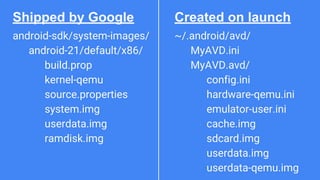
What’s an emulator/AVD?
~/.android/avd/
MyAVD.ini
MyAVD.avd/
config.ini
hardware-qemu.ini
emulator-user.ini
cache.img
sdcard.img
userdata.img
userdata-qemu.img
android-sdk/system-images/
android-21/default/x86/
build.prop
kernel-qemu
source.properties
system.img
userdata.img
ramdisk.img
Shipped by Google Created on launch
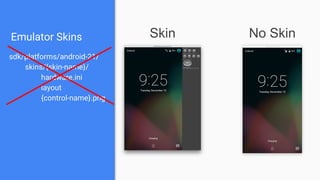
Emulator Skins Skin No Skin
sdk/platforms/android-21/
skins/{skin-name}/
hardware.ini
layout
{control-name}.png
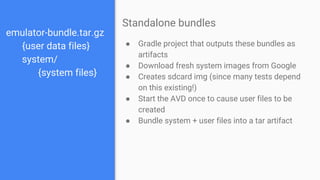
emulator-bundle.tar.gz
{user data files}
system/
{system files}
● Gradle project that outputs these bundles as
artifacts
● Download fresh system images from Google
● Creates sdcard img (since many tests depend
on this existing!)
● Start the AVD once to cause user files to be
created
● Bundle system + user files into a tar artifact
Standalone bundles
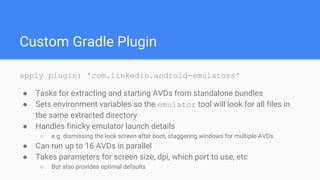
Custom Gradle Plugin
apply plugin: 'com.linkedin.android-emulators'
● Tasks for extracting and starting AVDs from standalone bundles
● Sets environment variables so the emulator tool will look for all files in
the same extracted directory
● Handles finicky emulator launch details
○ e.g. dismissing the lock screen after boot, staggering windows for multiple AVDs
● Can run up to 16 AVDs in parallel
● Takes parameters for screen size, dpi, which port to use, etc
○ But also provides optimal defaults
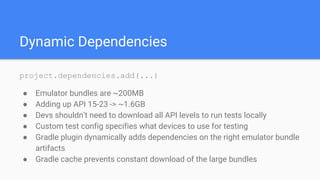
Dynamic Dependencies
project.dependencies.add(...)
● Emulator bundles are ~200MB
● Adding up API 15-23 -> ~1.6GB
● Devs shouldn’t need to download all API levels to run tests locally
● Custom test config specifies what devices to use for testing
● Gradle plugin dynamically adds dependencies on the right emulator bundle
artifacts
● Gradle cache prevents constant download of the large bundles
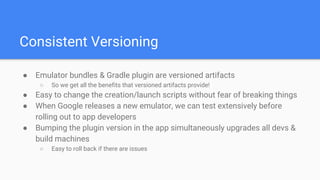
Consistent Versioning
● Emulator bundles & Gradle plugin are versioned artifacts
○ So we get all the benefits that versioned artifacts provide!
● Easy to change the creation/launch scripts without fear of breaking things
● When Google releases a new emulator, we can test extensively before
rolling out to app developers
● Bumping the plugin version in the app simultaneously upgrades all devs &
build machines
○ Easy to roll back if there are issues
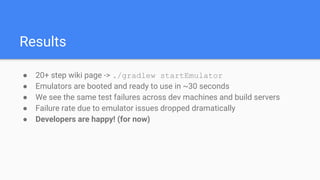
Results
● 20+ step wiki page -> ./gradlew startEmulator
● Emulators are booted and ready to use in ~30 seconds
● We see the same test failures across dev machines and build servers
● Failure rate due to emulator issues dropped dramatically
● Developers are happy! (for now)

LinkedIn's Consistent Android Testing Environments Using Gradle

  • 1.
    Consistent Android testing environmentsusing Gradle Drew Hannay (@drewhannay)
  • 2.
    Project Voyager ● Recentlyreleased LinkedIn app rewrite ● 140+ committers ● 50+ regular committers ● ~1 year of development
  • 3.
    3x3 ● 3 releasesper day ● No more than 3 hours from commit to publish ● Heavy focus on automation to increase confidence in releases ● Needs to be FAST - but also reliable ● Big investment in Espresso and Android Testing Support Library
  • 4.
    UI Testing isHard ● Android Emulator, Genymotion, physical devices ● Practically infinite number of screen sizes ● Different configs; RAM, heap size, hardware features… ● Tests passed locally, but failed on the build server or other dev machines ● Developers were unhappy
  • 5.
    Enter Gradle ● Scriptto start emulators was deployed to each build machine ● Creating a new emulator from scratch every time = SLOW ● Only capable of starting a single emulator at a time ● Already using Gradle to get consistent builds across machines ● Why should tests be different?
  • 6.
  • 7.
  • 8.
    Emulator Skins SkinNo Skin sdk/platforms/android-21/ skins/{skin-name}/ hardware.ini layout {control-name}.png
  • 9.
    emulator-bundle.tar.gz {user data files} system/ {systemfiles} ● Gradle project that outputs these bundles as artifacts ● Download fresh system images from Google ● Creates sdcard img (since many tests depend on this existing!) ● Start the AVD once to cause user files to be created ● Bundle system + user files into a tar artifact Standalone bundles
  • 10.
    Custom Gradle Plugin applyplugin: 'com.linkedin.android-emulators' ● Tasks for extracting and starting AVDs from standalone bundles ● Sets environment variables so the emulator tool will look for all files in the same extracted directory ● Handles finicky emulator launch details ○ e.g. dismissing the lock screen after boot, staggering windows for multiple AVDs ● Can run up to 16 AVDs in parallel ● Takes parameters for screen size, dpi, which port to use, etc ○ But also provides optimal defaults
  • 11.
    Dynamic Dependencies project.dependencies.add(...) ● Emulatorbundles are ~200MB ● Adding up API 15-23 -> ~1.6GB ● Devs shouldn’t need to download all API levels to run tests locally ● Custom test config specifies what devices to use for testing ● Gradle plugin dynamically adds dependencies on the right emulator bundle artifacts ● Gradle cache prevents constant download of the large bundles
  • 12.
    Consistent Versioning ● Emulatorbundles & Gradle plugin are versioned artifacts ○ So we get all the benefits that versioned artifacts provide! ● Easy to change the creation/launch scripts without fear of breaking things ● When Google releases a new emulator, we can test extensively before rolling out to app developers ● Bumping the plugin version in the app simultaneously upgrades all devs & build machines ○ Easy to roll back if there are issues
  • 13.
    Results ● 20+ stepwiki page -> ./gradlew startEmulator ● Emulators are booted and ready to use in ~30 seconds ● We see the same test failures across dev machines and build servers ● Failure rate due to emulator issues dropped dramatically ● Developers are happy! (for now)