Distance Education (DE) is NOT for My
Discipline!!!!
Strategies to Help Faculty in All Disciplines Get Started with DE
Lilly Conference- Miami University
Saturday, November 23, 2013 8:15- 8:55 AM

Nancy Broughton, Ph.D.

Elfe Dona, Ph.D.

Wright State University
Associate Professor
Modern Languages
Professor of Spanish
nancy.broughton@wright.edu
(937) 775-2153

Wright State University
Associate Professor
Modern Languages
Professor of German
and Teacher Education
elfe.dona@wright.edu
(937) 775-2600

Sheri Stover, Ph.D.
Wright State University
Assistant Professor
College of Education and Human Services
Leadership Studies
IDOL Program Director,
(Instructional Design for Online Learning)
sheri.stover@wright.edu
(937) 775-3008
CoI Framework
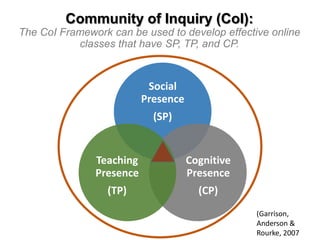
Community of Inquiry (CoI):
The CoI Framework can be used to develop effective online
classes that have SP, TP, and CP.

Social
Presence
(SP)

Teaching
Presence

Cognitive
Presence

(TP)

(CP)
(Garrison,
Anderson &
Rourke, 2007
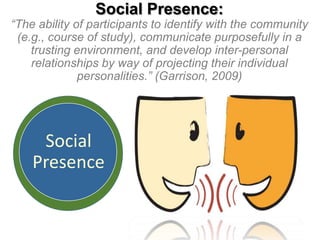
Social Presence:

“The ability of participants to identify with the community
(e.g., course of study), communicate purposefully in a
trusting environment, and develop inter-personal
relationships by way of projecting their individual
personalities.” (Garrison, 2009)

Social
Presence
Teaching Presence:

“Is the design, facilitation, and direction of cognitive and
social processes for the purpose of realizing personally
meaningful and educationally worthwhile learning
outcomes” (Anderson, Rourke, Garrison &Archer, 2001).

Teaching
Presence
Cognitive Presence:

“Is the extent to which learners are able to construct and
confirm meaning through sustained reflection and
discourse (Garrison, Anderson & Archer, 2001)

Cognitive
Presence
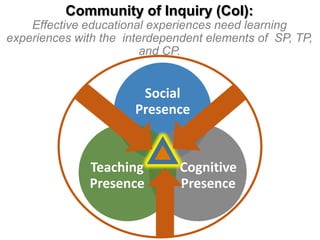
Community of Inquiry (CoI):
Effective educational experiences need learning
experiences with the interdependent elements of SP, TP,
and CP.

Social
Presence

Teaching
Presence

Cognitive
Presence
Survey Results
Modern Languages Faculty Survey on DE:
We conducted a survey with our colleagues and found they had
reservations about the use of DE to teach Modern Languages.
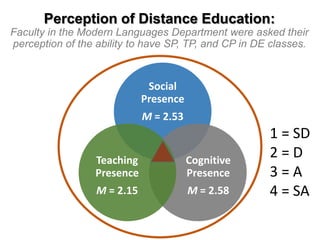
Perception of Distance Education:
Faculty in the Modern Languages Department were asked their
perception of the ability to have SP, TP, and CP in DE classes.

Social
Presence
M = 2.53

Teaching
Presence

Cognitive
Presence

M = 2.15

M = 2.58

1 = SD
2=D
3=A
4 = SA
Elfe & Nancy’s Digital
Journey
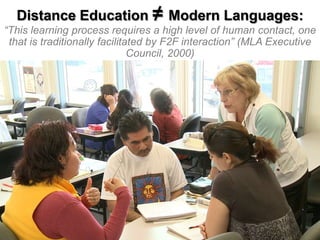
Distance Education ≠ Modern Languages:

“This learning process requires a high level of human contact, one
that is traditionally facilitated by F2F interaction” (MLA Executive
Council, 2000)
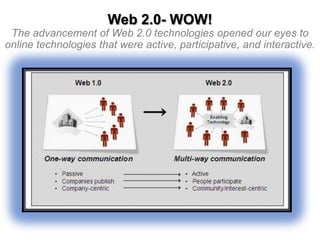
Web 2.0- WOW!
The advancement of Web 2.0 technologies opened our eyes to
online technologies that were active, participative, and interactive.
Web 2.0 Advancements:
Interactive Web 2.0 technologies are developing that now allow
for our students to be able to speak, write, and listen- ONLINE!
Modern Languages Thirteen Days in the
Cloud:
This presentation will share how the faculty members
implemented a Modern Languages DE class utilizing Web 2.0
technologies.
Free Web 2.0
Technologies
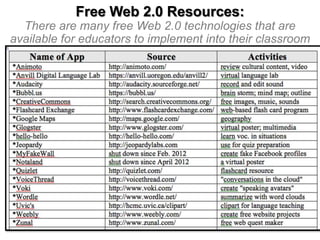
Free Web 2.0 Resources:
There are many free Web 2.0 technologies that are
available for educators to implement into their classroom
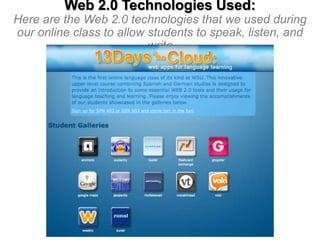
Web 2.0 Technologies Used:
Here are the Web 2.0 technologies that we used during
our online class to allow students to speak, listen, and
write
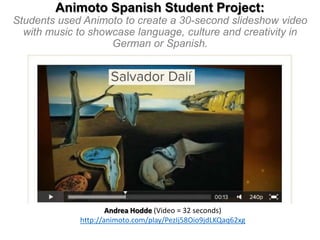
Animoto Spanish Student Project:
Students used Animoto to create a 30-second slideshow video
with music to showcase language, culture and creativity in
German or Spanish.

Andrea Hodde (Video = 32 seconds)
http://animoto.com/play/PezIj58Oio9jdLKQaq62xg
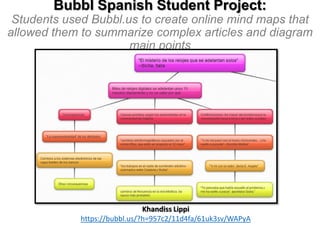
Bubbl Spanish Student Project:
Students used Bubbl.us to create online mind maps that
allowed them to summarize complex articles and diagram
main points

Khandiss Lippi
https://bubbl.us/?h=957c2/11d4fa/61uk3sv/WAPyA
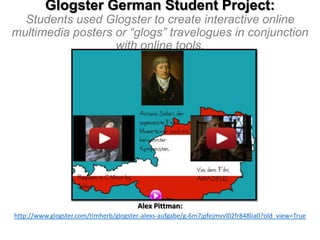
Glogster German Student Project:
Students used Glogster to create interactive online
multimedia posters or “glogs” travelogues in conjunction
with online tools.

Alex Pittman:
http://www.glogster.com/timherb/glogster-alexs-aufgabe/g-6m7jpfejmvvl02fr848lia0?old_view=True
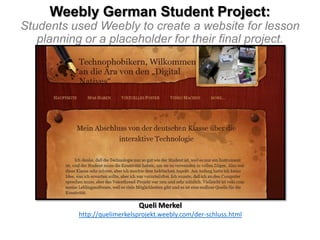
Weebly German Student Project:
Students used Weebly to create a website for lesson
planning or a placeholder for their final project.

Queli Merkel
http://quelimerkelsprojekt.weebly.com/der-schluss.html
Voice Thread:
Media aggregator that allows people to post media
artifacts for community feedback.

VoiceThread Web Site:
http://voicethread.com/
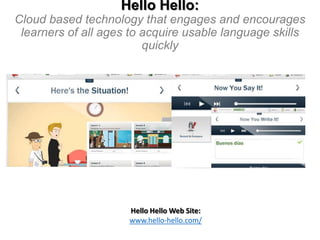
Hello Hello:
Cloud based technology that engages and encourages
learners of all ages to acquire usable language skills
quickly

Hello Hello Web Site:
www.hello-hello.com/
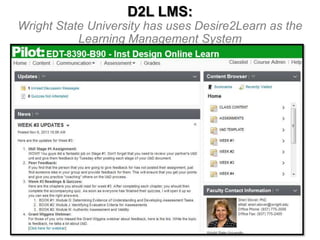
D2L LMS:
Wright State University has uses Desire2Learn as the
Learning Management System
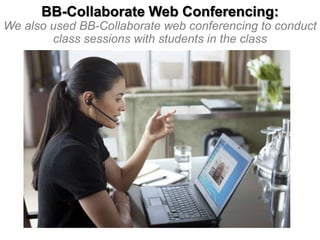
BB-Collaborate Web Conferencing:
We also used BB-Collaborate web conferencing to conduct
class sessions with students in the class
Recommendations
Suggestion #1- Establish Desired
Results:
Identify your Learning Objective and then find the
Web 2.0 technology that will help students meet the
Objective
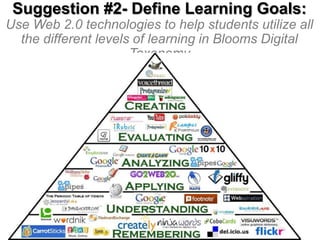
Suggestion #2- Define Learning Goals:
Use Web 2.0 technologies to help students utilize all
the different levels of learning in Blooms Digital
Taxonomy
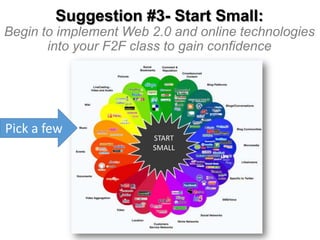
Suggestion #3- Start Small:
Begin to implement Web 2.0 and online technologies
into your F2F class to gain confidence

Pick a few

START
SMALL
Suggestion #4- Find a Friend:
Convince another colleague to implement Web 2.0
technologies to work collaboratively to share best
practices.
Suggestion #5- Don’t Wait!
DO IT NOW!!! Future employers want to hire people with
skills and knowledge we do not even anticipate yet.
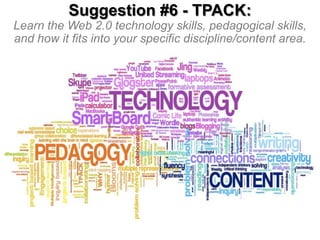
Suggestion #6 - TPACK:
Learn the Web 2.0 technology skills, pedagogical skills,
and how it fits into your specific discipline/content area.
Suggestion #7-Become a Student:
Take classes to get experience learning how to implement
Web 2.0 technologies

Instructional Design for Online Learning
References
References
Doyle, T. (2011). Learner-centered teaching: Putting the research on learning
into practice. Sterling, VA: Stylus Publishing.
Fink, D. L. (2003). Creating significant learning experiences: An integrated
approach to designing college courses. San Francisco, CA: Jossey-Bass
Publishing.
Garrison, D. R. (2011). E-Learning in the 21st Century: A framework for
Research and practice. Routledge.
Prensky, Marc. (October, 2001). Digital natives, digital immigrants. Retrieved
from www.marcprensky.com/writing/Prensky - Digital Natives, Digital
Immigrants - Part1.pdf
Robinson, V. M. (2011). Student-centered leadership / Viviane M.J. Robinson.
San Francisco : Jossey-Bass, 2011.
TPACK web site. Retrieved @ http://www.tpack.org/
Weimer, M. (2013). Learner-centered teaching: Five key changes to practice.
San Francisco, CA: Jossey-Bass Publishing.
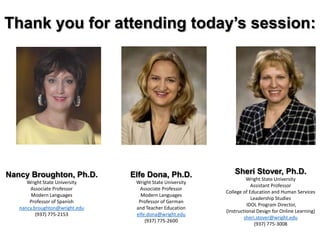
Thank you for attending today’s session:

Nancy Broughton, Ph.D.

Elfe Dona, Ph.D.

Wright State University
Associate Professor
Modern Languages
Professor of Spanish
nancy.broughton@wright.edu
(937) 775-2153

Wright State University
Associate Professor
Modern Languages
Professor of German
and Teacher Education
elfe.dona@wright.edu
(937) 775-2600

Sheri Stover, Ph.D.
Wright State University
Assistant Professor
College of Education and Human Services
Leadership Studies
IDOL Program Director,
(Instructional Design for Online Learning)
sheri.stover@wright.edu
(937) 775-3008
Questions or Comments

Lilly

  • 1.
    Distance Education (DE)is NOT for My Discipline!!!! Strategies to Help Faculty in All Disciplines Get Started with DE Lilly Conference- Miami University Saturday, November 23, 2013 8:15- 8:55 AM Nancy Broughton, Ph.D. Elfe Dona, Ph.D. Wright State University Associate Professor Modern Languages Professor of Spanish nancy.broughton@wright.edu (937) 775-2153 Wright State University Associate Professor Modern Languages Professor of German and Teacher Education elfe.dona@wright.edu (937) 775-2600 Sheri Stover, Ph.D. Wright State University Assistant Professor College of Education and Human Services Leadership Studies IDOL Program Director, (Instructional Design for Online Learning) sheri.stover@wright.edu (937) 775-3008
  • 3.
  • 4.
    Community of Inquiry(CoI): The CoI Framework can be used to develop effective online classes that have SP, TP, and CP. Social Presence (SP) Teaching Presence Cognitive Presence (TP) (CP) (Garrison, Anderson & Rourke, 2007
  • 5.
    Social Presence: “The abilityof participants to identify with the community (e.g., course of study), communicate purposefully in a trusting environment, and develop inter-personal relationships by way of projecting their individual personalities.” (Garrison, 2009) Social Presence
  • 6.
    Teaching Presence: “Is thedesign, facilitation, and direction of cognitive and social processes for the purpose of realizing personally meaningful and educationally worthwhile learning outcomes” (Anderson, Rourke, Garrison &Archer, 2001). Teaching Presence
  • 7.
    Cognitive Presence: “Is theextent to which learners are able to construct and confirm meaning through sustained reflection and discourse (Garrison, Anderson & Archer, 2001) Cognitive Presence
  • 8.
    Community of Inquiry(CoI): Effective educational experiences need learning experiences with the interdependent elements of SP, TP, and CP. Social Presence Teaching Presence Cognitive Presence
  • 9.
  • 10.
    Modern Languages FacultySurvey on DE: We conducted a survey with our colleagues and found they had reservations about the use of DE to teach Modern Languages.
  • 11.
    Perception of DistanceEducation: Faculty in the Modern Languages Department were asked their perception of the ability to have SP, TP, and CP in DE classes. Social Presence M = 2.53 Teaching Presence Cognitive Presence M = 2.15 M = 2.58 1 = SD 2=D 3=A 4 = SA
  • 12.
    Elfe & Nancy’sDigital Journey
  • 13.
    Distance Education ≠Modern Languages: “This learning process requires a high level of human contact, one that is traditionally facilitated by F2F interaction” (MLA Executive Council, 2000)
  • 14.
    Web 2.0- WOW! Theadvancement of Web 2.0 technologies opened our eyes to online technologies that were active, participative, and interactive.
  • 15.
    Web 2.0 Advancements: InteractiveWeb 2.0 technologies are developing that now allow for our students to be able to speak, write, and listen- ONLINE!
  • 16.
    Modern Languages ThirteenDays in the Cloud: This presentation will share how the faculty members implemented a Modern Languages DE class utilizing Web 2.0 technologies.
  • 17.
  • 18.
    Free Web 2.0Resources: There are many free Web 2.0 technologies that are available for educators to implement into their classroom
  • 19.
    Web 2.0 TechnologiesUsed: Here are the Web 2.0 technologies that we used during our online class to allow students to speak, listen, and write
  • 20.
    Animoto Spanish StudentProject: Students used Animoto to create a 30-second slideshow video with music to showcase language, culture and creativity in German or Spanish. Andrea Hodde (Video = 32 seconds) http://animoto.com/play/PezIj58Oio9jdLKQaq62xg
  • 21.
    Bubbl Spanish StudentProject: Students used Bubbl.us to create online mind maps that allowed them to summarize complex articles and diagram main points Khandiss Lippi https://bubbl.us/?h=957c2/11d4fa/61uk3sv/WAPyA
  • 22.
    Glogster German StudentProject: Students used Glogster to create interactive online multimedia posters or “glogs” travelogues in conjunction with online tools. Alex Pittman: http://www.glogster.com/timherb/glogster-alexs-aufgabe/g-6m7jpfejmvvl02fr848lia0?old_view=True
  • 23.
    Weebly German StudentProject: Students used Weebly to create a website for lesson planning or a placeholder for their final project. Queli Merkel http://quelimerkelsprojekt.weebly.com/der-schluss.html
  • 24.
    Voice Thread: Media aggregatorthat allows people to post media artifacts for community feedback. VoiceThread Web Site: http://voicethread.com/
  • 25.
    Hello Hello: Cloud basedtechnology that engages and encourages learners of all ages to acquire usable language skills quickly Hello Hello Web Site: www.hello-hello.com/
  • 26.
    D2L LMS: Wright StateUniversity has uses Desire2Learn as the Learning Management System
  • 27.
    BB-Collaborate Web Conferencing: Wealso used BB-Collaborate web conferencing to conduct class sessions with students in the class
  • 28.
  • 29.
    Suggestion #1- EstablishDesired Results: Identify your Learning Objective and then find the Web 2.0 technology that will help students meet the Objective
  • 30.
    Suggestion #2- DefineLearning Goals: Use Web 2.0 technologies to help students utilize all the different levels of learning in Blooms Digital Taxonomy
  • 31.
    Suggestion #3- StartSmall: Begin to implement Web 2.0 and online technologies into your F2F class to gain confidence Pick a few START SMALL
  • 32.
    Suggestion #4- Finda Friend: Convince another colleague to implement Web 2.0 technologies to work collaboratively to share best practices.
  • 33.
    Suggestion #5- Don’tWait! DO IT NOW!!! Future employers want to hire people with skills and knowledge we do not even anticipate yet.
  • 34.
    Suggestion #6 -TPACK: Learn the Web 2.0 technology skills, pedagogical skills, and how it fits into your specific discipline/content area.
  • 35.
    Suggestion #7-Become aStudent: Take classes to get experience learning how to implement Web 2.0 technologies Instructional Design for Online Learning
  • 36.
  • 37.
    References Doyle, T. (2011).Learner-centered teaching: Putting the research on learning into practice. Sterling, VA: Stylus Publishing. Fink, D. L. (2003). Creating significant learning experiences: An integrated approach to designing college courses. San Francisco, CA: Jossey-Bass Publishing. Garrison, D. R. (2011). E-Learning in the 21st Century: A framework for Research and practice. Routledge. Prensky, Marc. (October, 2001). Digital natives, digital immigrants. Retrieved from www.marcprensky.com/writing/Prensky - Digital Natives, Digital Immigrants - Part1.pdf Robinson, V. M. (2011). Student-centered leadership / Viviane M.J. Robinson. San Francisco : Jossey-Bass, 2011. TPACK web site. Retrieved @ http://www.tpack.org/ Weimer, M. (2013). Learner-centered teaching: Five key changes to practice. San Francisco, CA: Jossey-Bass Publishing.
  • 38.
    Thank you forattending today’s session: Nancy Broughton, Ph.D. Elfe Dona, Ph.D. Wright State University Associate Professor Modern Languages Professor of Spanish nancy.broughton@wright.edu (937) 775-2153 Wright State University Associate Professor Modern Languages Professor of German and Teacher Education elfe.dona@wright.edu (937) 775-2600 Sheri Stover, Ph.D. Wright State University Assistant Professor College of Education and Human Services Leadership Studies IDOL Program Director, (Instructional Design for Online Learning) sheri.stover@wright.edu (937) 775-3008
  • 39.

Editor's Notes

  • #2 The presenters for today’s presentation are: Nancy Broughton, Ph.D.Wright State UniversityAssociate Professor Modern Languages Professor of SpanishEmail:nancy.broughton@wright.edu Phone:(937) 775-2153Elfe Dona, Ph.D.Wright State University Associate Professor Modern Languages Professor of German and Teacher EducationEmail:elfe.dona@wright.edu Phone:(937) 775-2600Sheri Stover, Ph.D.Wright State University Assistant Professor College of Education and Human Services Leadership Studies IDOL Program Director, (Instructional Design for Online Learning)Email: sheri.stover@wright.edu Phone: (937) 775-3008
  • #3 Modern Languages: Thirteen Days in the CloudDistance Education Is Not for My Discipline: Strategies to Help Faculty in All Disciplines Get Started With Distance EducationSaturday, 8:15 am–8:55 amNancy Broughton, Modern Languages, Wright State UniversityElfe Dona, Modern Languages, Wright State UniversitySheri Stover, Education and Human Services, Wright State UniversityWhile Distance Education (DE) is growing, many faculty feel it will not work for their discipline. This presentation will review a survey conducted with faculty in Modern Languages that shows there are still many faculty who question the viability of using DE. It will also review how two faculty members in Modern Languages made the journey from believing DE was not for them to the incorporation of Web 2.0 and DE technologies.
  • #4 Community of Inquiry (CoI) Framework
  • #5 Community of Inquiry (COI) Model:The CoI Framework can be used to develop effective online classes that have SP, TP, and CP.
  • #6 Community of Inquiry (COI) Model:Social Presence:“The ability of participants to identify with the community (e.g., course of study), communicate purposefully in a trusting environment, and develop inter-personal relationships by way of projecting their individual personalities.” (Garrison, 2009)
  • #7 Community of Inquiry (COI) Model: Teaching Presence: “Is the design, facilitation, and direction of cognitive and social processes for the purpose of realizing personally meaningful and educationally worthwhile learning outcomes” (Anderson, Rourke, Garrison &Archer, 2001).
  • #8 Community of Inquiry (COI) Model Cognitive Presence: “Is the extent to which learners are able to construct and confirm meaning through sustained reflection and discourse (Garrison, Anderson & Archer, 2001)
  • #9 Community of Inquiry (COI) Model:Effective educational experiences need learning experiences with the interdependent elements of SP, TP, and CP.
  • #10 Survey Results
  • #11 Modern Languages Faculty Survey on DE: We conducted a survey with our colleagues and found they had reservations about the use of DE to teach Modern Languages. The faculty were a little surprised because they got fairly strong negative feedback from their colleagues where they felt it is impossible to teach modern languages in a distance education environment.
  • #12 Perception of Distance Education: Faculty in the Modern Languages Department were asked their perception of the ability to have SP, TP, and CP in DE classes.
  • #13 Introduction
  • #14 Distance Education ≠ Modern Languages: “This learning process requires a high level of human contact, one that is traditionally facilitated by F2F interaction” (MLA Executive Council, 2000)This is the story of two faculty teaching Modern Languages. Both faculty were excellent faculty and used active, interactive technologies with their students. They both felt the only way to teach languages was in a F2F environment because of the unique pedagogical requirements of teaching a foreign language where it is necessary to have students speak, listen, and write to learn the new language. MLA Executives Council recommends F2F because “This learning process requires a high level of human contact, one that is traditionally facilitated by F2F interaction.
  • #15 Web 2.0- WOW!The advancement of Web 2.0 technologies opened our eyes to online technologies that were active, participative, and interactive.
  • #16 Web 2.0 Advancements: Interactive Web 2.0 technologies are developing that now allow for our students to be able to speak, write, and listen- ONLINE! We began to become intrigued with some of the new Web 2.0 technologies that now allow for students to go online and speak, write, and listen interactively with people all over the world.

  • #17 Modern Languages Faculty Survey on DE: We conducted a survey with our colleagues and found they had reservations about the use of DE to teach Modern Languages. The faculty were a little surprised because they got fairly strong negative feedback from their colleagues where they felt it is impossible to teach modern languages in a distance education environment.

  • #18 Web 2.0 Technologies:
  • #19 The Connected Generation“Students bring their own technology knowledge to class”and according to Doyle, we need to set aside the time to get to know our students. (Doyle, 2011, 63).Our students already come to class with exposure to technology. We can use their connectivity to our advantage in the learning process.They listen, talk, and watch simultaneously to retain new concepts and knowledge (Doyle, 2011, 108-114).We can embrace their familiarity with digital tools and guide them in the learning process.We need to “Engage students by allowing them to create with it.”Not the tools are important but what facilitator-teacherand their student can do with the tools the students are ALREADY using.
  • #20 The Connected Generation“Students bring their own technology knowledge to class”and according to Doyle, we need to set aside the time to get to know our students. (Doyle, 2011, 63).Our students already come to class with exposure to technology. We can use their connectivity to our advantage in the learning process.They listen, talk, and watch simultaneously to retain new concepts and knowledge (Doyle, 2011, 108-114).We can embrace their familiarity with digital tools and guide them in the learning process.We need to “Engage students by allowing them to create with it.”Not the tools are important but what facilitator-teacherand their student can do with the tools the students are ALREADY using.
  • #21 The Connected Generation“Students bring their own technology knowledge to class”and according to Doyle, we need to set aside the time to get to know our students. (Doyle, 2011, 63).Our students already come to class with exposure to technology. We can use their connectivity to our advantage in the learning process.They listen, talk, and watch simultaneously to retain new concepts and knowledge (Doyle, 2011, 108-114).We can embrace their familiarity with digital tools and guide them in the learning process.We need to “Engage students by allowing them to create with it.”Not the tools are important but what facilitator-teacherand their student can do with the tools the students are ALREADY using.
  • #22 The Connected Generation“Students bring their own technology knowledge to class”and according to Doyle, we need to set aside the time to get to know our students. (Doyle, 2011, 63).Our students already come to class with exposure to technology. We can use their connectivity to our advantage in the learning process.They listen, talk, and watch simultaneously to retain new concepts and knowledge (Doyle, 2011, 108-114).We can embrace their familiarity with digital tools and guide them in the learning process.We need to “Engage students by allowing them to create with it.”Not the tools are important but what facilitator-teacherand their student can do with the tools the students are ALREADY using.
  • #23 The Connected Generation“Students bring their own technology knowledge to class”and according to Doyle, we need to set aside the time to get to know our students. (Doyle, 2011, 63).Our students already come to class with exposure to technology. We can use their connectivity to our advantage in the learning process.They listen, talk, and watch simultaneously to retain new concepts and knowledge (Doyle, 2011, 108-114).We can embrace their familiarity with digital tools and guide them in the learning process.We need to “Engage students by allowing them to create with it.”Not the tools are important but what facilitator-teacherand their student can do with the tools the students are ALREADY using.
  • #24 The Connected Generation“Students bring their own technology knowledge to class”and according to Doyle, we need to set aside the time to get to know our students. (Doyle, 2011, 63).Our students already come to class with exposure to technology. We can use their connectivity to our advantage in the learning process.They listen, talk, and watch simultaneously to retain new concepts and knowledge (Doyle, 2011, 108-114).We can embrace their familiarity with digital tools and guide them in the learning process.We need to “Engage students by allowing them to create with it.”Not the tools are important but what facilitator-teacherand their student can do with the tools the students are ALREADY using.
  • #25 The Connected Generation“Students bring their own technology knowledge to class”and according to Doyle, we need to set aside the time to get to know our students. (Doyle, 2011, 63).Our students already come to class with exposure to technology. We can use their connectivity to our advantage in the learning process.They listen, talk, and watch simultaneously to retain new concepts and knowledge (Doyle, 2011, 108-114).We can embrace their familiarity with digital tools and guide them in the learning process.We need to “Engage students by allowing them to create with it.”Not the tools are important but what facilitator-teacherand their student can do with the tools the students are ALREADY using.
  • #26 The Connected Generation“Students bring their own technology knowledge to class”and according to Doyle, we need to set aside the time to get to know our students. (Doyle, 2011, 63).Our students already come to class with exposure to technology. We can use their connectivity to our advantage in the learning process.They listen, talk, and watch simultaneously to retain new concepts and knowledge (Doyle, 2011, 108-114).We can embrace their familiarity with digital tools and guide them in the learning process.We need to “Engage students by allowing them to create with it.”Not the tools are important but what facilitator-teacherand their student can do with the tools the students are ALREADY using.
  • #27 The Connected Generation“Students bring their own technology knowledge to class”and according to Doyle, we need to set aside the time to get to know our students. (Doyle, 2011, 63).Our students already come to class with exposure to technology. We can use their connectivity to our advantage in the learning process.They listen, talk, and watch simultaneously to retain new concepts and knowledge (Doyle, 2011, 108-114).We can embrace their familiarity with digital tools and guide them in the learning process.We need to “Engage students by allowing them to create with it.”Not the tools are important but what facilitator-teacherand their student can do with the tools the students are ALREADY using.
  • #28 The Connected Generation“Students bring their own technology knowledge to class”and according to Doyle, we need to set aside the time to get to know our students. (Doyle, 2011, 63).Our students already come to class with exposure to technology. We can use their connectivity to our advantage in the learning process.They listen, talk, and watch simultaneously to retain new concepts and knowledge (Doyle, 2011, 108-114).We can embrace their familiarity with digital tools and guide them in the learning process.We need to “Engage students by allowing them to create with it.”Not the tools are important but what facilitator-teacherand their student can do with the tools the students are ALREADY using.
  • #30 Community of Inquiry (COI) Model:IDOL classes are designed using the COI which emphasizes the importance of developing a community of learners.
  • #31 Community of Inquiry (COI) Model:IDOL classes are designed using the COI which emphasizes the importance of developing a community of learners.
  • #32 Community of Inquiry (COI) Model:IDOL classes are designed using the COI which emphasizes the importance of developing a community of learners.
  • #33 Community of Inquiry (COI) Model:IDOL classes are designed using the COI which emphasizes the importance of developing a community of learners.
  • #34 To summarize: How can we prepare students for the future?The answer is: By creating a classroom for the future generation.Future employers want to hire people with skills and knowledge we do not even anticipate yet. Incorporating smart technologies, such as online gaming platforms, augmented realities, and web 2.0 apps, and allowing students to utilized those technologies when creating their projects, will contribute to a student-centered classroom. Students will be eager to learn in such an environment.By preparing students with ideas how to analyze and evaluate Internet resources, handle themselves in a virtual space, connect with people and businessesin other countries, create and present with multi-media tools, we are preparing young men and women who will be successful in any future work force.
  • #35 To summarize: How can we prepare students for the future?The answer is: By creating a classroom for the future generation.Future employers want to hire people with skills and knowledge we do not even anticipate yet. Incorporating smart technologies, such as online gaming platforms, augmented realities, and web 2.0 apps, and allowing students to utilized those technologies when creating their projects, will contribute to a student-centered classroom. Students will be eager to learn in such an environment.By preparing students with ideas how to analyze and evaluate Internet resources, handle themselves in a virtual space, connect with people and businessesin other countries, create and present with multi-media tools, we are preparing young men and women who will be successful in any future work force.
  • #36 To summarize: How can we prepare students for the future?The answer is: By creating a classroom for the future generation.Future employers want to hire people with skills and knowledge we do not even anticipate yet. Incorporating smart technologies, such as online gaming platforms, augmented realities, and web 2.0 apps, and allowing students to utilized those technologies when creating their projects, will contribute to a student-centered classroom. Students will be eager to learn in such an environment.By preparing students with ideas how to analyze and evaluate Internet resources, handle themselves in a virtual space, connect with people and businessesin other countries, create and present with multi-media tools, we are preparing young men and women who will be successful in any future work force.
  • #38 Gamershttp://www.wired.com/gamelife/2012/09/gamelife-podcast-episode-47/Woman in helmethttp://comicspaladin.blogspot.com/2012/12/woman-writes-post-on-video-games.htmlConnected Generation – girl textinghttps://www.google.com/search?q=connected+generation&client=firefox-a&hs=DrN&rls=org.mozilla:en-US:official&source=lnms&tbm=isch&sa=X&ei=oENHUrWOF4isyAGv4oHoCQ&ved=0CAkQ_AUoAQ&biw=1173&bih=567&dpr=1.09#q=connected+generation&rls=org.mozilla:en-US:official&tbm=isch&tbs=isz:lt,islt:xga&facrc=_&imgdii=hluUvpz8EEKfWM%3A%3B3dhgn0_vEgDhqM%3BhluUvpz8EEKfWM%3A&imgrc=hluUvpz8EEKfWM%3A%3BdnvRFFWbvt9NKM%3Bhttp%253A%252F%252F216.70.82.181%252Fnew-blog%252Fwp-content%252Fuploads%252F2010%252F04%252Fstudents-texting-sm.jpg%3Bhttp%253A%252F%252Fgrowingleaders.com%252Fblog%252Fleading-the-next-generation-well-over-connected-2%252F%3B1698%3B1131Foto: Uploadhttp://ec.europa.eu/digital-agenda/en/content-distributionConnect game imagehttp://www.marketwallpapers.com/wallpapers/18/wallpaper-102707.jpg