lifeScroll

your health in your hands

JEN BRISELLI . SL RAO . KATY TSAI . BRIAN YEE
DIAL 411 | GRADUATE STUDIO II | SPRING 2012

1
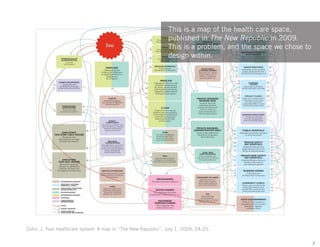
This is a map of the health care space,
published in The New Republic in 2009.
This is a problem, and the space we chose to
design within.

Cohn, J. Your healthcare system: A map in “The New Republic”. July 1, 2009, 24-25.
2
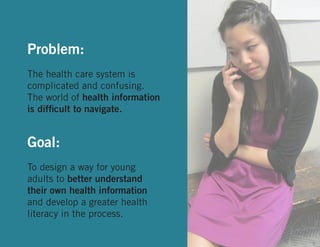
We begin with the story of Angela, a
young woman who, like most of us, has
encountered the confusing problem space
that is health information.

Angela Chen
3
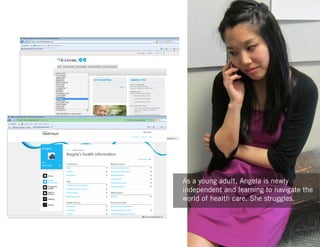
As a young adult, Angela is newly
independent and learning to navigate the
world of health care. She struggles.

4
Problem:
The health care system is
complicated and confusing.
The world of health information
is difficult to navigate.

Goal:
To design a way for young
adults to better understand
their own health information
and develop a greater health
literacy in the process.
5
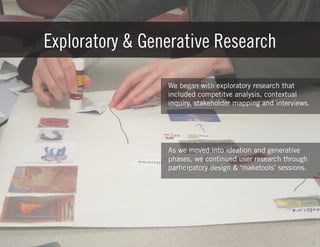
Exploratory & Generative Research
We began with exploratory research that
included competitve analysis, contextual
inquiry, stakeholder mapping and interviews.

As we moved into ideation and generative
phases, we continued user research through
participatory design & ‘maketools’ sessions.

6
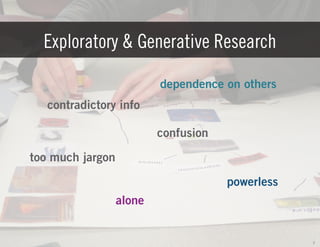
Exploratory & Generative Research
dependence on others
contradictory info
confusion
too much jargon
powerless
alone

7
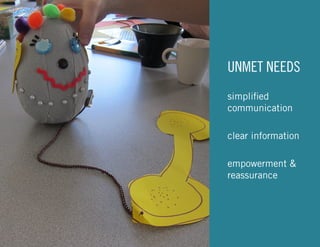
UNMET NEEDS
simplified
communication
clear information
empowerment &
reassurance

8
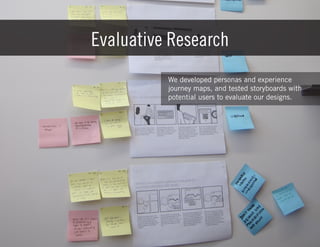
Evaluative Research
We developed personas and experience
journey maps, and tested storyboards with
potential users to evaluate our designs.

9
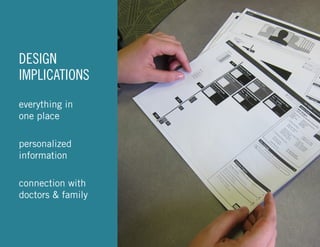
DESIGN
IMPLICATIONS
everything in
one place
personalized
information
connection with
doctors & family

10
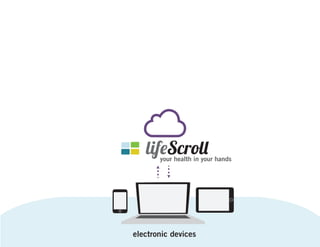
your health in your hands

11
your health in your hands

electronic devices
12
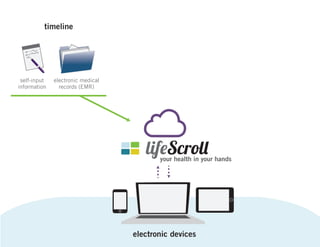
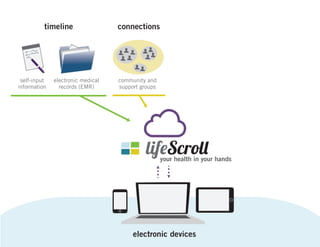
timeline

self-input
information

electronic medical
records (EMR)

your health in your hands

electronic devices
13
timeline

self-input
information

electronic medical
records (EMR)

connections

community and
support groups

your health in your hands

electronic devices
14
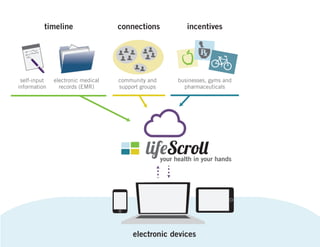
timeline

self-input
information

electronic medical
records (EMR)

connections

incentives

community and
support groups

businesses, gyms and
pharmaceuticals

your health in your hands

electronic devices
15
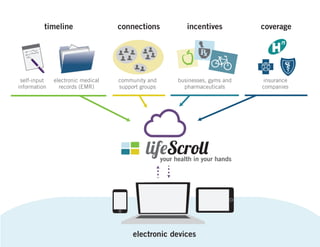
timeline

self-input
information

electronic medical
records (EMR)

connections

incentives

coverage

community and
support groups

businesses, gyms and
pharmaceuticals

insurance
companies

your health in your hands

electronic devices
16
lifeScroll
User Experience Video

17
18
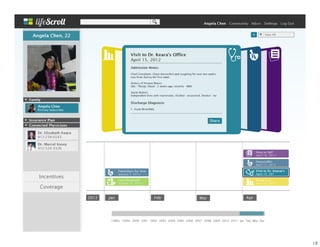
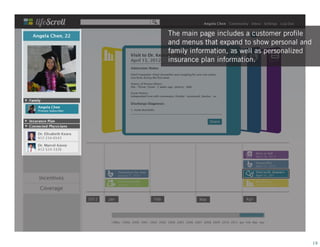
The main page includes a customer profile
and menus that expand to show personal and
family information, as well as personalized
insurance plan information.

19
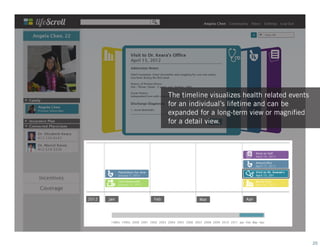
The timeline visualizes health related events
for an individual’s lifetime and can be
expanded for a long-term view or magnified
for a detail view.

20
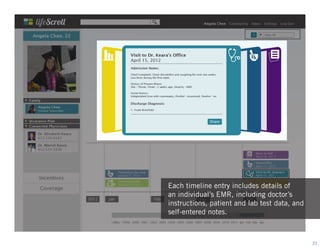
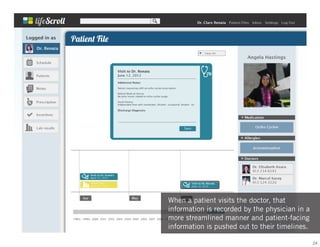
Each timeline entry includes details of
an individual’s EMR, including doctor’s
instructions, patient and lab test data, and
self-entered notes.

21
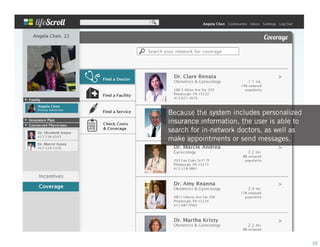
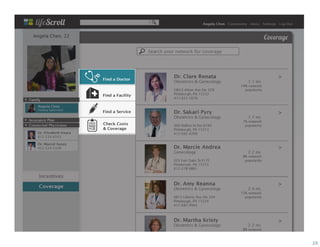
Because the system includes personalized
insurance information, the user is able to
search for in-network doctors, as well as
make appointments or send messages.

22
23
When a patient visits the doctor, that
information is recorded by the physician in a
more streamlined manner and patient-facing
information is pushed out to their timelines.
24
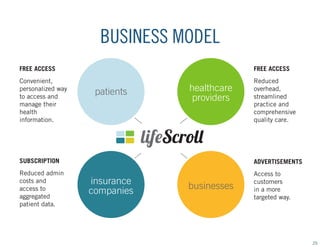
BUSINESS MODEL
FREE ACCESS

FREE ACCESS

Convenient,
personalized way
to access and
manage their
health
information.

Reduced
overhead,
streamlined
practice and
comprehensive
quality care.

patients

healthcare
providers

SUBSCRIPTION

ADVERTISEMENTS

Reduced admin
costs and
access to
aggregated
patient data.

Access to
customers
in a more
targeted way.

insurance
companies

businesses

25
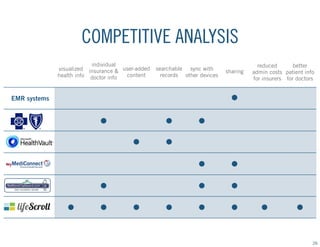
COMPETITIVE ANALYSIS
individual
visualized insurance & user-added
content
health info doctor info

searchable sync with
records other devices

sharing

reduced
better
admin costs patient info
for insurers for doctors

EMR systems

26
lifeScroll allows people to visualize their
health history, access personalized medical
information, and manage their healthcare in
a comprehensive cloud-based system.

27
THANK YOU.

28
The appendix includes key research artifacts
and intermediate design artifacts that
illustrate the process and were instrumental
in the development of our final product.

APPENDIX

29
Interview with Dr. Russell S. Phillips,
April 16, 2012, www.boston.com

“A Doctor’s Primary Concern”

Relevant Insights:
•	 Q. What do you plan to address first as the new head of the primary care center?
•	 A. “The four major areas in which we’re looking to create redesign is around: enhancing teambased care, population management for patients with chronic disease, management of patients
at high risk, and to improve patient engagement and empowerment.”
•	 Q. What role do patients themselves have to play?
•	 A. “Patients who are more involved in their care also have better outcomes. Part of what we’re
trying to do is use information technology, counseling, health educators, other resources, to
try to get patients as informed and engaged as they might be in their [own] care. Some of it
is doctor time, some of it is spending time with other members of the care team, some of it is
improving Web-based interfaces.”
“Usability Guidance for Improving the User Interface and Adoption of
Online Personal Health Records”
(Usability study on Google Health and Microsoft HealthVault)
Kirsten Peters, M.S., Michael Niebling, M.S., Cassandra Slimmer, B.S., Thomas Green, M.S., Jayson M. Webb, Ph.D., Robert Schumacher, Ph.D., User Centric, Inc., February 2009

Relevant Insights:
•	 Since perceived simplicity and ease of use are keys to user preference, a PHR home page
should avoid unnecessary visual complexity.
•	 Users should be able to add details about a health item immediately after entering its name.
•	 Medical information should be presented without technical jargon.
•	 Multiple methods of data entry and search (e.g., text entry field, A-Z list) should be supported.
•	 Most participants thought PHRs would be beneficial for tracking a chronic condition.
•	 Ability to store health information for family members was highly valued.
•	 Participants wanted to link PHR health information with their physician’s records.
•	 Google Health’s Drug Interactions feature was perceived as very helpful.
•	 Find a Doctor feature was valued, especially when limited to the participant’s insurance plan.
•	 Ability to share a personal PHR with family members and physicians was important for some
•	 Uploading information from a medical device to Microsoft HealthVault was considered useful.
31
32
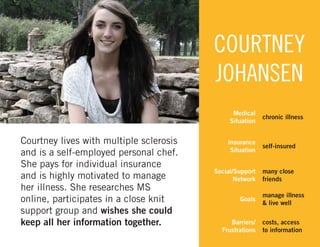
COURTNEY
JOHANSEN
Medical
Situation

Courtney lives with multiple sclerosis
and is a self-employed personal chef.
She pays for individual insurance
and is highly motivated to manage
her illness. She researches MS
online, participates in a close knit
support group and wishes she could
keep all her information together.

chronic illness

Insurance
Situation

self-insured

Social/Support
Network

many close
friends

Goals
Barriers/
Frustrations

manage illness
& live well
costs, access
to information
33
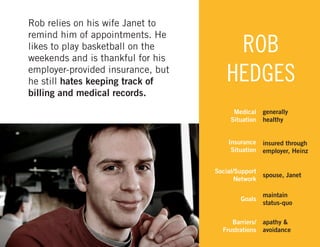
Rob relies on his wife Janet to
remind him of appointments. He
likes to play basketball on the
weekends and is thankful for his
employer-provided insurance, but
he still hates keeping track of
billing and medical records.

ROB
HEDGES
Medical
Situation
Insurance
Situation
Social/Support
Network

generally
healthy
insured through
employer, Heinz

spouse, Janet

Goals

maintain
status-quo

Barriers/
Frustrations

apathy &
avoidance
34
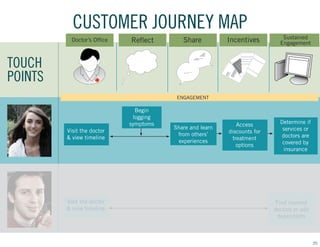
CUSTOMER JOURNEY MAP
Doctor’s Office

Reflect

Share

Incentives

Sustained
Engagement

Access
discounts for
treatment
options

Determine if
services or
doctors are
covered by
insurance

TOUCH
POINTS
ENGAGEMENT

Begin
logging
symptoms
Visit the doctor
& view timeline

Visit the doctor
& view timeline

Share and learn
from others’
experiences

Find covered
doctors or add
dependents

35
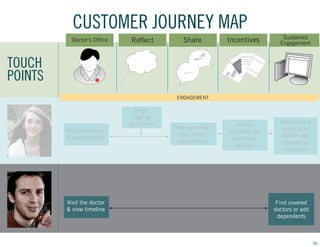
CUSTOMER JOURNEY MAP
Doctor’s Office

Reflect

Share

Incentives

Sustained
Engagement

Access
discounts for
treatment
options

Determine if
services or
doctors are
covered by
insurance

TOUCH
POINTS
ENGAGEMENT

Begin
logging
symptoms
Visit the doctor
& view timeline

Visit the doctor
& view timeline

Share and learn
from others’
experiences

Find covered
doctors or add
dependents

36

Lifescroll Presentation: Design Process

  • 1.
    lifeScroll your health inyour hands JEN BRISELLI . SL RAO . KATY TSAI . BRIAN YEE DIAL 411 | GRADUATE STUDIO II | SPRING 2012 1
  • 2.
    This is amap of the health care space, published in The New Republic in 2009. This is a problem, and the space we chose to design within. Cohn, J. Your healthcare system: A map in “The New Republic”. July 1, 2009, 24-25. 2
  • 3.
    We begin withthe story of Angela, a young woman who, like most of us, has encountered the confusing problem space that is health information. Angela Chen 3
  • 4.
    As a youngadult, Angela is newly independent and learning to navigate the world of health care. She struggles. 4
  • 5.
    Problem: The health caresystem is complicated and confusing. The world of health information is difficult to navigate. Goal: To design a way for young adults to better understand their own health information and develop a greater health literacy in the process. 5
  • 6.
    Exploratory & GenerativeResearch We began with exploratory research that included competitve analysis, contextual inquiry, stakeholder mapping and interviews. As we moved into ideation and generative phases, we continued user research through participatory design & ‘maketools’ sessions. 6
  • 7.
    Exploratory & GenerativeResearch dependence on others contradictory info confusion too much jargon powerless alone 7
  • 8.
  • 9.
    Evaluative Research We developedpersonas and experience journey maps, and tested storyboards with potential users to evaluate our designs. 9
  • 10.
  • 11.
    your health inyour hands 11
  • 12.
    your health inyour hands electronic devices 12
  • 13.
  • 14.
    timeline self-input information electronic medical records (EMR) connections communityand support groups your health in your hands electronic devices 14
  • 15.
    timeline self-input information electronic medical records (EMR) connections incentives communityand support groups businesses, gyms and pharmaceuticals your health in your hands electronic devices 15
  • 16.
    timeline self-input information electronic medical records (EMR) connections incentives coverage communityand support groups businesses, gyms and pharmaceuticals insurance companies your health in your hands electronic devices 16
  • 17.
  • 18.
  • 19.
    The main pageincludes a customer profile and menus that expand to show personal and family information, as well as personalized insurance plan information. 19
  • 20.
    The timeline visualizeshealth related events for an individual’s lifetime and can be expanded for a long-term view or magnified for a detail view. 20
  • 21.
    Each timeline entryincludes details of an individual’s EMR, including doctor’s instructions, patient and lab test data, and self-entered notes. 21
  • 22.
    Because the systemincludes personalized insurance information, the user is able to search for in-network doctors, as well as make appointments or send messages. 22
  • 23.
  • 24.
    When a patientvisits the doctor, that information is recorded by the physician in a more streamlined manner and patient-facing information is pushed out to their timelines. 24
  • 25.
    BUSINESS MODEL FREE ACCESS FREEACCESS Convenient, personalized way to access and manage their health information. Reduced overhead, streamlined practice and comprehensive quality care. patients healthcare providers SUBSCRIPTION ADVERTISEMENTS Reduced admin costs and access to aggregated patient data. Access to customers in a more targeted way. insurance companies businesses 25
  • 26.
    COMPETITIVE ANALYSIS individual visualized insurance& user-added content health info doctor info searchable sync with records other devices sharing reduced better admin costs patient info for insurers for doctors EMR systems 26
  • 27.
    lifeScroll allows peopleto visualize their health history, access personalized medical information, and manage their healthcare in a comprehensive cloud-based system. 27
  • 28.
  • 29.
    The appendix includeskey research artifacts and intermediate design artifacts that illustrate the process and were instrumental in the development of our final product. APPENDIX 29
  • 30.
    Interview with Dr.Russell S. Phillips, April 16, 2012, www.boston.com “A Doctor’s Primary Concern” Relevant Insights: • Q. What do you plan to address first as the new head of the primary care center? • A. “The four major areas in which we’re looking to create redesign is around: enhancing teambased care, population management for patients with chronic disease, management of patients at high risk, and to improve patient engagement and empowerment.” • Q. What role do patients themselves have to play? • A. “Patients who are more involved in their care also have better outcomes. Part of what we’re trying to do is use information technology, counseling, health educators, other resources, to try to get patients as informed and engaged as they might be in their [own] care. Some of it is doctor time, some of it is spending time with other members of the care team, some of it is improving Web-based interfaces.”
  • 31.
    “Usability Guidance forImproving the User Interface and Adoption of Online Personal Health Records” (Usability study on Google Health and Microsoft HealthVault) Kirsten Peters, M.S., Michael Niebling, M.S., Cassandra Slimmer, B.S., Thomas Green, M.S., Jayson M. Webb, Ph.D., Robert Schumacher, Ph.D., User Centric, Inc., February 2009 Relevant Insights: • Since perceived simplicity and ease of use are keys to user preference, a PHR home page should avoid unnecessary visual complexity. • Users should be able to add details about a health item immediately after entering its name. • Medical information should be presented without technical jargon. • Multiple methods of data entry and search (e.g., text entry field, A-Z list) should be supported. • Most participants thought PHRs would be beneficial for tracking a chronic condition. • Ability to store health information for family members was highly valued. • Participants wanted to link PHR health information with their physician’s records. • Google Health’s Drug Interactions feature was perceived as very helpful. • Find a Doctor feature was valued, especially when limited to the participant’s insurance plan. • Ability to share a personal PHR with family members and physicians was important for some • Uploading information from a medical device to Microsoft HealthVault was considered useful. 31
  • 32.
  • 33.
    COURTNEY JOHANSEN Medical Situation Courtney lives withmultiple sclerosis and is a self-employed personal chef. She pays for individual insurance and is highly motivated to manage her illness. She researches MS online, participates in a close knit support group and wishes she could keep all her information together. chronic illness Insurance Situation self-insured Social/Support Network many close friends Goals Barriers/ Frustrations manage illness & live well costs, access to information 33
  • 34.
    Rob relies onhis wife Janet to remind him of appointments. He likes to play basketball on the weekends and is thankful for his employer-provided insurance, but he still hates keeping track of billing and medical records. ROB HEDGES Medical Situation Insurance Situation Social/Support Network generally healthy insured through employer, Heinz spouse, Janet Goals maintain status-quo Barriers/ Frustrations apathy & avoidance 34
  • 35.
    CUSTOMER JOURNEY MAP Doctor’sOffice Reflect Share Incentives Sustained Engagement Access discounts for treatment options Determine if services or doctors are covered by insurance TOUCH POINTS ENGAGEMENT Begin logging symptoms Visit the doctor & view timeline Visit the doctor & view timeline Share and learn from others’ experiences Find covered doctors or add dependents 35
  • 36.
    CUSTOMER JOURNEY MAP Doctor’sOffice Reflect Share Incentives Sustained Engagement Access discounts for treatment options Determine if services or doctors are covered by insurance TOUCH POINTS ENGAGEMENT Begin logging symptoms Visit the doctor & view timeline Visit the doctor & view timeline Share and learn from others’ experiences Find covered doctors or add dependents 36