
Learning Maven by
example
Hsi-Kai Wang
Outline
• Introduction to Maven
• Example 1 - simple case
– build jar with command
– build jar with maven
• Example 2 - complex case
– optimize POM
• Maven Repository
• Maven Project on Jenkins
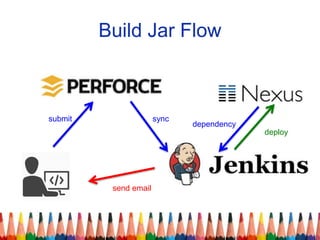
Build Jar Flow
submit sync
send email
deploy
dependency
Introduction to Maven
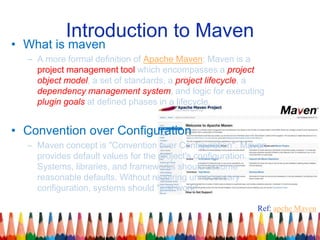
• What is maven
– A more formal definition of Apache Maven: Maven is a
project management tool which encompasses a project
object model, a set of standards, a project lifecycle, a
dependency management system, and logic for executing
plugin goals at defined phases in a lifecycle.
• Convention over Configuration
– Maven concept is "Convention over Configuration". Maven
provides default values for the project's configuration.
Systems, libraries, and frameworks should assume
reasonable defaults. Without requiring unnecessary
configuration, systems should "just work"
Ref: apche Maven
Installation
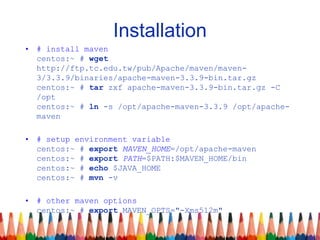
• # install maven
centos:~ # wget
http://ftp.tc.edu.tw/pub/Apache/maven/maven-
3/3.3.9/binaries/apache-maven-3.3.9-bin.tar.gz
centos:~ # tar zxf apache-maven-3.3.9-bin.tar.gz -C
/opt
centos:~ # ln -s /opt/apache-maven-3.3.9 /opt/apache-
maven
• # setup environment variable
centos:~ # export MAVEN_HOME=/opt/apache-maven
centos:~ # export PATH=$PATH:$MAVEN_HOME/bin
centos:~ # echo $JAVA_HOME
centos:~ # mvn -v
• # other maven options
centos:~ # export MAVEN_OPTS="-Xms512m"
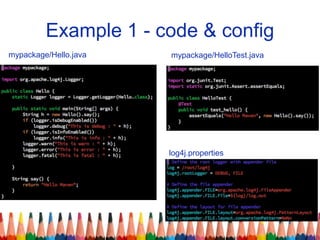
Example 1 - code & config
mypackage/Hello.java
log4j.properties
mypackage/HelloTest.java
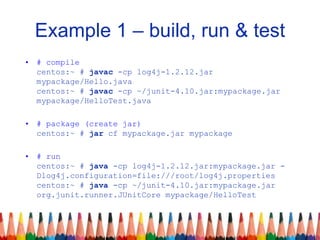
Example 1 – build, run & test
• # compile
centos:~ # javac -cp log4j-1.2.12.jar
mypackage/Hello.java
centos:~ # javac -cp ~/junit-4.10.jar:mypackage.jar
mypackage/HelloTest.java
• # package (create jar)
centos:~ # jar cf mypackage.jar mypackage
• # run
centos:~ # java -cp log4j-1.2.12.jar:mypackage.jar -
Dlog4j.configuration=file:///root/log4j.properties
centos:~ # java -cp ~/junit-4.10.jar:mypackage.jar
org.junit.runner.JUnitCore mypackage/HelloTest
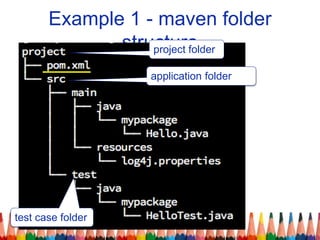
Example 1 - maven folder
structureproject folder
test case folder
application folder
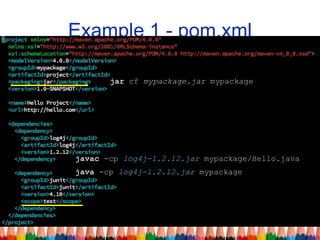
Example 1 - pom.xml
jar cf mypackage.jar mypackage
javac -cp log4j-1.2.12.jar mypackage/Hello.java
java -cp log4j-1.2.12.jar mypackage
Example 1 - maven command
• # help
centos:~/project # mvn help:describe -Dplugin=clean [-
Dfull]
• # compile
centos:~/project # mvn clean compile
• # run test case
centos:~/project # mvn clean test [-
Dmaven.test.failure.ignore=true]
• # package
centos:~/project # mvn clean package
• # install module
centos:~/project # mvn clean install [-DskipTests]
• # run
centos:~/project # mvn exec:java [-
Dexec.mainClass=mypackage.Hello]
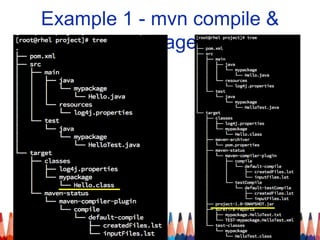
Example 1 - mvn compile &
package
Maven Core Concept
• Coordinates
• Plugins and Goals
• Lifecycle
• Repositories
• Dependency Management
• Site Generation and Reporting
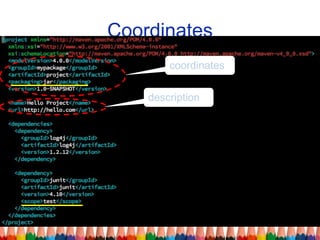
Coordinates
coordinates
description
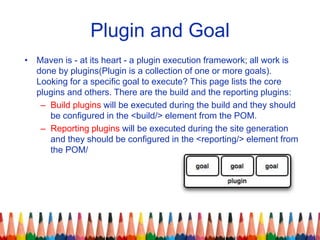
Plugin and Goal
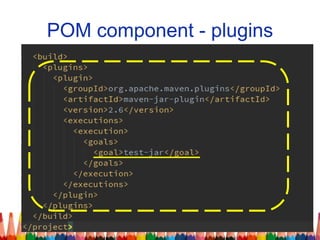
• Maven is - at its heart - a plugin execution framework; all work is
done by plugins(Plugin is a collection of one or more goals).
Looking for a specific goal to execute? This page lists the core
plugins and others. There are the build and the reporting plugins:
– Build plugins will be executed during the build and they should
be configured in the <build/> element from the POM.
– Reporting plugins will be executed during the site generation
and they should be configured in the <reporting/> element from
the POM/
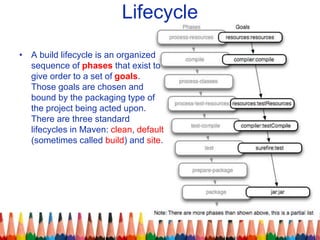
Lifecycle
• A build lifecycle is an organized
sequence of phases that exist to
give order to a set of goals.
Those goals are chosen and
bound by the packaging type of
the project being acted upon.
There are three standard
lifecycles in Maven: clean, default
(sometimes called build) and site.
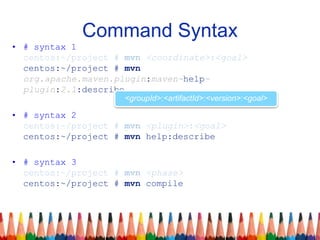
Command Syntax
• # syntax 1
centos:~/project # mvn <coordinate>:<goal>
centos:~/project # mvn
org.apache.maven.plugin:maven-help-
plugin:2.1:describe
• # syntax 2
centos:~/project # mvn <plugin>:<goal>
centos:~/project # mvn help:describe
• # syntax 3
centos:~/project # mvn <phase>
centos:~/project # mvn compile
<groupId>:<artifactId>:<version>:<goal>
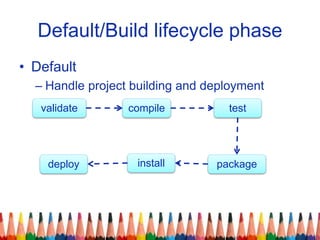
Default/Build lifecycle phase
• Default
– Handle project building and deployment
validate compile test
packagedeploy install
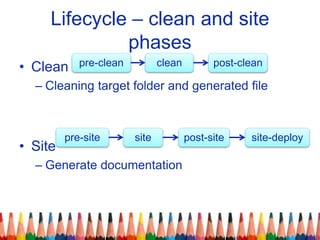
Lifecycle – clean and site
phases
• Clean
– Cleaning target folder and generated file
• Site
– Generate documentation
pre-clean clean post-clean
pre-site site post-site site-deploy
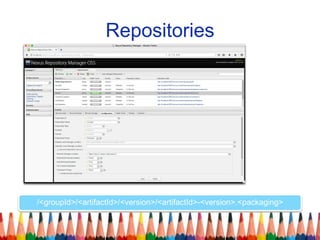
Repositories
/<groupId>/<artifactId>/<version>/<artifactId>-<version>.<packaging>
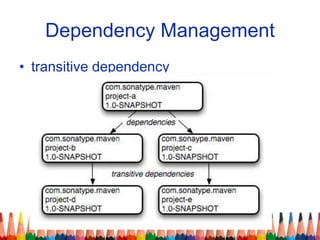
Dependency Management
• transitive dependency
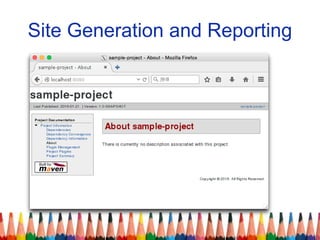
Site Generation and Reporting
POM component
• properties
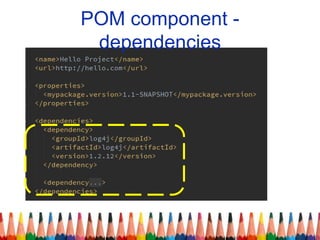
• dependencies
• plugins
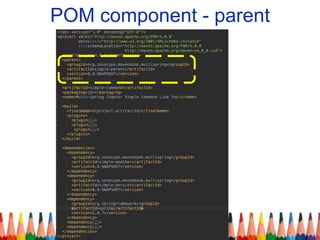
• parent
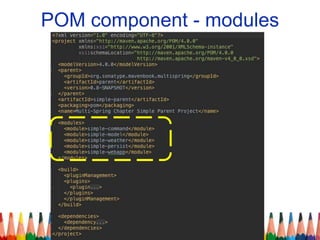
• modules
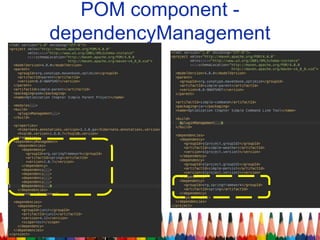
• dependencyManagement
• pluginManagement
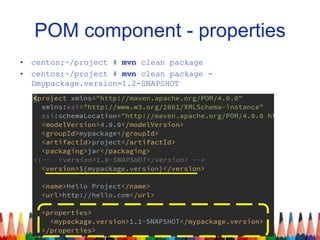
POM component - properties
• centos:~/project # mvn clean package
• centos:~/project # mvn clean package -
Dmypackage.version=1.2-SNAPSHOT
POM component -
dependencies
POM component - plugins
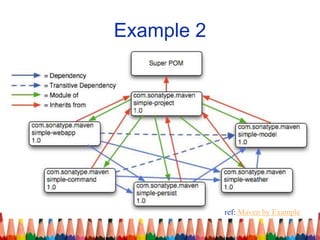
Example 2
ref: Maven by Example
POM component - modules
POM component - parent
Optimize POM
POM component -
dependencyManagement
Maven repository
• Open Source:
– Apache Archiva
– JFrog Artifactory Open Source
– Sonatype Nexus OSS
• Commercial:
– JFrog Artifactory Pro
– Sonatype Nexus Pro
Ref: Best Practice - Using a Repository Manager
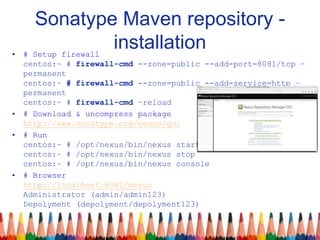
Sonatype Maven repository -
installation• # Setup firewall
centos:~ # firewall-cmd --zone=public --add-port=8081/tcp –
permanent
centos:~ # firewall-cmd --zone=public --add-service=http –
permanent
centos:~ # firewall-cmd –reload
• # Download & uncompress package
http://www.sonatype.org/nexus/go/
• # Run
centos:~ # /opt/nexus/bin/nexus start
centos:~ # /opt/nexus/bin/nexus stop
centos:~ # /opt/nexus/bin/nexus console
• # Browser
http://localhost:8081/nexus
Administrator (admin/admin123)
Depolyment (depolyment/depolyment123)
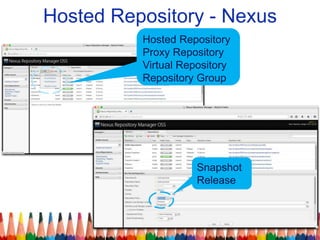
Hosted Repository - Nexus
Hosted Repository
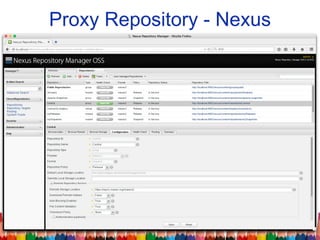
Proxy Repository
Virtual Repository
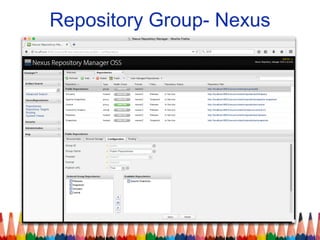
Repository Group
Snapshot
Release
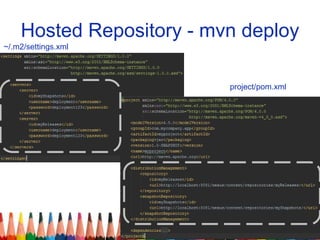
Hosted Repository - mvn deploy
~/.m2/settings.xml
project/pom.xml
Proxy Repository - Nexus
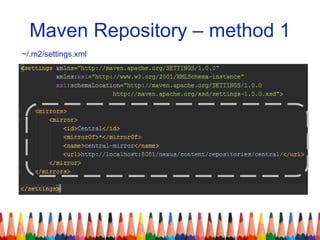
Maven Repository – method 1
~/.m2/settings.xml
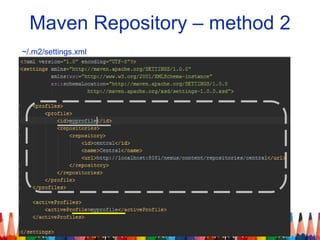
Maven Repository – method 2
~/.m2/settings.xml
Repository Group- Nexus
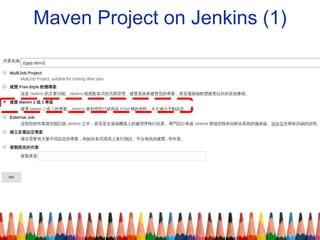
Maven Project on Jenkins (1)
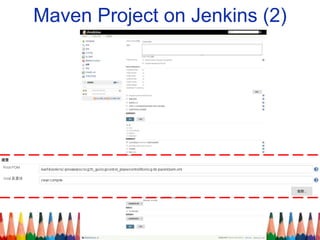
Maven Project on Jenkins (2)
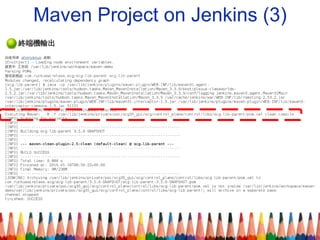
Maven Project on Jenkins (3)
reference
• Apache Maven Project
• Maven by Example
• Maven Tutorial - TutorialsPoint

Learning Maven by Example

  • 1.
  • 2.
    Outline • Introduction toMaven • Example 1 - simple case – build jar with command – build jar with maven • Example 2 - complex case – optimize POM • Maven Repository • Maven Project on Jenkins
  • 3.
    Build Jar Flow submitsync send email deploy dependency
  • 4.
    Introduction to Maven •What is maven – A more formal definition of Apache Maven: Maven is a project management tool which encompasses a project object model, a set of standards, a project lifecycle, a dependency management system, and logic for executing plugin goals at defined phases in a lifecycle. • Convention over Configuration – Maven concept is "Convention over Configuration". Maven provides default values for the project's configuration. Systems, libraries, and frameworks should assume reasonable defaults. Without requiring unnecessary configuration, systems should "just work" Ref: apche Maven
  • 5.
    Installation • # installmaven centos:~ # wget http://ftp.tc.edu.tw/pub/Apache/maven/maven- 3/3.3.9/binaries/apache-maven-3.3.9-bin.tar.gz centos:~ # tar zxf apache-maven-3.3.9-bin.tar.gz -C /opt centos:~ # ln -s /opt/apache-maven-3.3.9 /opt/apache- maven • # setup environment variable centos:~ # export MAVEN_HOME=/opt/apache-maven centos:~ # export PATH=$PATH:$MAVEN_HOME/bin centos:~ # echo $JAVA_HOME centos:~ # mvn -v • # other maven options centos:~ # export MAVEN_OPTS="-Xms512m"
  • 6.
    Example 1 -code & config mypackage/Hello.java log4j.properties mypackage/HelloTest.java
  • 7.
    Example 1 –build, run & test • # compile centos:~ # javac -cp log4j-1.2.12.jar mypackage/Hello.java centos:~ # javac -cp ~/junit-4.10.jar:mypackage.jar mypackage/HelloTest.java • # package (create jar) centos:~ # jar cf mypackage.jar mypackage • # run centos:~ # java -cp log4j-1.2.12.jar:mypackage.jar - Dlog4j.configuration=file:///root/log4j.properties centos:~ # java -cp ~/junit-4.10.jar:mypackage.jar org.junit.runner.JUnitCore mypackage/HelloTest
  • 8.
    Example 1 -maven folder structureproject folder test case folder application folder
  • 9.
    Example 1 -pom.xml jar cf mypackage.jar mypackage javac -cp log4j-1.2.12.jar mypackage/Hello.java java -cp log4j-1.2.12.jar mypackage
  • 10.
    Example 1 -maven command • # help centos:~/project # mvn help:describe -Dplugin=clean [- Dfull] • # compile centos:~/project # mvn clean compile • # run test case centos:~/project # mvn clean test [- Dmaven.test.failure.ignore=true] • # package centos:~/project # mvn clean package • # install module centos:~/project # mvn clean install [-DskipTests] • # run centos:~/project # mvn exec:java [- Dexec.mainClass=mypackage.Hello]
  • 11.
    Example 1 -mvn compile & package
  • 12.
    Maven Core Concept •Coordinates • Plugins and Goals • Lifecycle • Repositories • Dependency Management • Site Generation and Reporting
  • 13.
  • 14.
    Plugin and Goal •Maven is - at its heart - a plugin execution framework; all work is done by plugins(Plugin is a collection of one or more goals). Looking for a specific goal to execute? This page lists the core plugins and others. There are the build and the reporting plugins: – Build plugins will be executed during the build and they should be configured in the <build/> element from the POM. – Reporting plugins will be executed during the site generation and they should be configured in the <reporting/> element from the POM/
  • 15.
    Lifecycle • A buildlifecycle is an organized sequence of phases that exist to give order to a set of goals. Those goals are chosen and bound by the packaging type of the project being acted upon. There are three standard lifecycles in Maven: clean, default (sometimes called build) and site.
  • 16.
    Command Syntax • #syntax 1 centos:~/project # mvn <coordinate>:<goal> centos:~/project # mvn org.apache.maven.plugin:maven-help- plugin:2.1:describe • # syntax 2 centos:~/project # mvn <plugin>:<goal> centos:~/project # mvn help:describe • # syntax 3 centos:~/project # mvn <phase> centos:~/project # mvn compile <groupId>:<artifactId>:<version>:<goal>
  • 17.
    Default/Build lifecycle phase •Default – Handle project building and deployment validate compile test packagedeploy install
  • 18.
    Lifecycle – cleanand site phases • Clean – Cleaning target folder and generated file • Site – Generate documentation pre-clean clean post-clean pre-site site post-site site-deploy
  • 19.
  • 20.
  • 21.
  • 22.
    POM component • properties •dependencies • plugins • parent • modules • dependencyManagement • pluginManagement
  • 23.
    POM component -properties • centos:~/project # mvn clean package • centos:~/project # mvn clean package - Dmypackage.version=1.2-SNAPSHOT
  • 24.
  • 25.
  • 26.
  • 27.
  • 28.
  • 29.
  • 30.
  • 31.
    Maven repository • OpenSource: – Apache Archiva – JFrog Artifactory Open Source – Sonatype Nexus OSS • Commercial: – JFrog Artifactory Pro – Sonatype Nexus Pro Ref: Best Practice - Using a Repository Manager
  • 32.
    Sonatype Maven repository- installation• # Setup firewall centos:~ # firewall-cmd --zone=public --add-port=8081/tcp – permanent centos:~ # firewall-cmd --zone=public --add-service=http – permanent centos:~ # firewall-cmd –reload • # Download & uncompress package http://www.sonatype.org/nexus/go/ • # Run centos:~ # /opt/nexus/bin/nexus start centos:~ # /opt/nexus/bin/nexus stop centos:~ # /opt/nexus/bin/nexus console • # Browser http://localhost:8081/nexus Administrator (admin/admin123) Depolyment (depolyment/depolyment123)
  • 33.
    Hosted Repository -Nexus Hosted Repository Proxy Repository Virtual Repository Repository Group Snapshot Release
  • 34.
    Hosted Repository -mvn deploy ~/.m2/settings.xml project/pom.xml
  • 35.
  • 36.
    Maven Repository –method 1 ~/.m2/settings.xml
  • 37.
    Maven Repository –method 2 ~/.m2/settings.xml
  • 38.
  • 39.
    Maven Project onJenkins (1)
  • 40.
    Maven Project onJenkins (2)
  • 41.
    Maven Project onJenkins (3)
  • 42.
    reference • Apache MavenProject • Maven by Example • Maven Tutorial - TutorialsPoint

Editor's Notes

  • #17 在 coordinate 可以省略成 下面 plugin 模式
  • #37 Download and Upload
  • #43 https://github.com/sonatype/maven-example-en