1
From:
Mrs. Shilpa Prashant Kate (IT Teacher)
S.B.Patil college of Science & Commerce,Ravet
2. INTRODUCTION TO DBMS
PIMPRI CHINCHWAD EDUCATION TRUST’S
S.B.PATIL COLLEGE OF
Science and Commerce, Ravet
Index:
• Concept of Database.
• Introduction to DBMS and RDBMS
• Advantages of using database management system.
• Type for storage of data in a database.
• Introduction of RDBMS
2
DEFINITION OF DBMS
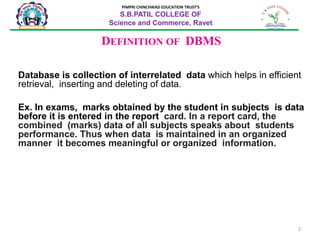
Database is collection of interrelated data which helps in efficient
retrieval, inserting and deleting of data.
Ex. In exams, marks obtained by the student in subjects is data
before it is entered in the report card. In a report card, the
combined (marks) data of all subjects speaks about students
performance. Thus when data is maintained in an organized
manner it becomes meaningful or organized information.
PIMPRI CHINCHWAD EDUCATION TRUST’S
S.B.PATIL COLLEGE OF
Science and Commerce, Ravet
3
PIMPRI CHINCHWAD EDUCATION TRUST’S
S.B.PATIL COLLEGE OF
Science and Commerce, Ravet
4
PIMPRI CHINCHWAD EDUCATION TRUST’S
S.B.PATIL COLLEGE OF
Science and Commerce, Ravet
Introduction to Database Management
System (DBMS)
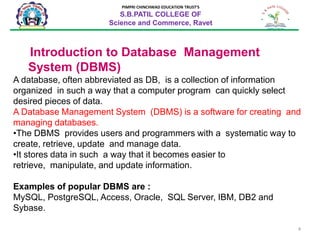
A database, often abbreviated as DB, is a collection of information
organized in such a way that a computer program can quickly select
desired pieces of data.
A Database Management System (DBMS) is a software for creating and
managing databases.
•The DBMS provides users and programmers with a systematic way to
create, retrieve, update and manage data.
•It stores data in such a way that it becomes easier to
retrieve, manipulate, and update information.
Examples of popular DBMS are :
MySQL, PostgreSQL, Access, Oracle, SQL Server, IBM, DB2 and
Sybase.
5
PIMPRI CHINCHWAD EDUCATION TRUST’S
S.B.PATIL COLLEGE OF
Science and Commerce, Ravet
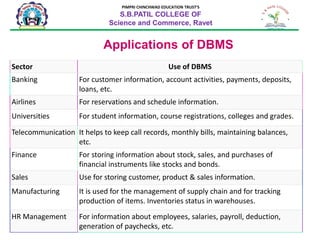
Applications of DBMS
Sector Use of DBMS
Banking For customer information, account activities, payments, deposits,
loans, etc.
Airlines For reservations and schedule information.
Universities For student information, course registrations, colleges and grades.
Telecommunication It helps to keep call records, monthly bills, maintaining balances,
etc.
Finance For storing information about stock, sales, and purchases of
financial instruments like stocks and bonds.
Sales Use for storing customer, product & sales information.
Manufacturing It is used for the management of supply chain and for tracking
production of items. Inventories status in warehouses.
HR Management For information about employees, salaries, payroll, deduction,
generation of paychecks, etc.
6
PIMPRI CHINCHWAD EDUCATION TRUST’S
S.B.PATIL COLLEGE OF
Science and Commerce, Ravet
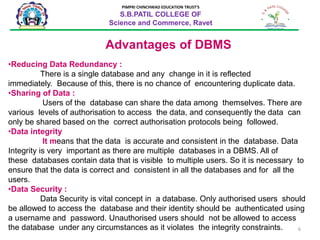
Advantages of DBMS
•Reducing Data Redundancy :
There is a single database and any change in it is reflected
immediately. Because of this, there is no chance of encountering duplicate data.
•Sharing of Data :
Users of the database can share the data among themselves. There are
various levels of authorisation to access the data, and consequently the data can
only be shared based on the correct authorisation protocols being followed.
•Data integrity
It means that the data is accurate and consistent in the database. Data
Integrity is very important as there are multiple databases in a DBMS. All of
these databases contain data that is visible to multiple users. So it is necessary to
ensure that the data is correct and consistent in all the databases and for all the
users.
•Data Security :
Data Security is vital concept in a database. Only authorised users should
be allowed to access the database and their identity should be authenticated using
a username and password. Unauthorised users should not be allowed to access
the database under any circumstances as it violates the integrity constraints.
7
PIMPRI CHINCHWAD EDUCATION TRUST’S
S.B.PATIL COLLEGE OF
Science and Commerce, Ravet
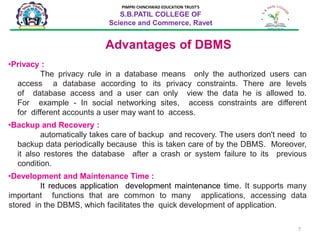
Advantages of DBMS
•Privacy :
The privacy rule in a database means only the authorized users can
access a database according to its privacy constraints. There are levels
of database access and a user can only view the data he is allowed to.
For example - In social networking sites, access constraints are different
for different accounts a user may want to access.
•Backup and Recovery :
automatically takes care of backup and recovery. The users don't need to
backup data periodically because this is taken care of by the DBMS. Moreover,
it also restores the database after a crash or system failure to its previous
condition.
•Development and Maintenance Time :
It reduces application development maintenance time. It supports many
important functions that are common to many applications, accessing data
stored in the DBMS, which facilitates the quick development of application.
8
PIMPRI CHINCHWAD EDUCATION TRUST’S
S.B.PATIL COLLEGE OF
Science and Commerce, Ravet
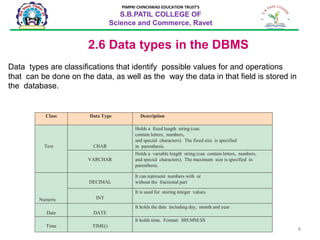
2.6 Data types in the DBMS
Class Data Type Description
Text CHAR
Holds a fixed length string (can
contain letters, numbers,
and special characters). The fixed size is specified
in parenthesis.
VARCHAR
Holds a variable length string (can contain letters, numbers,
and special characters). The maximum size is specified in
parenthesis.
Numeric
DECIMAL
It can represent numbers with or
without the fractional part
INT
It is used for storing integer values.
Date DATE
It holds the date including day, month and year
Time TIME()
It holds time. Format: HH:MM:SS
Data types are classifications that identify possible values for and operations
that can be done on the data, as well as the way the data in that field is stored in
the database.
9
PIMPRI CHINCHWAD EDUCATION TRUST’S
S.B.PATIL COLLEGE OF
Science and Commerce, Ravet
2.8 Introduction to RDBMS
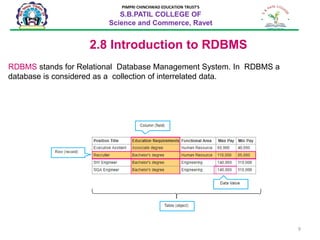
RDBMS stands for Relational Database Management System. In RDBMS a
database is considered as a collection of interrelated data.
10
PIMPRI CHINCHWAD EDUCATION TRUST’S
S.B.PATIL COLLEGE OF
Science and Commerce, Ravet
Introduction to RDBMS
RDBMS stands for Relational Database Management System. In RDBMS a
database is considered as a collection of interrelated data.
11
PIMPRI CHINCHWAD EDUCATION TRUST’S
S.B.PATIL COLLEGE OF
Science and Commerce, Ravet
2.8 Introduction to RDBMS
RDBMS stands for Relational Database Management System. In RDBMS a
database is considered as a collection of interrelated data.
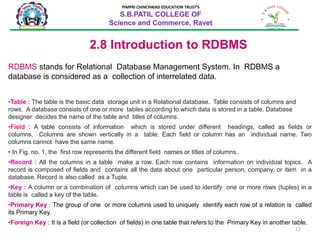
•Table : The table is the basic data storage unit in a Relational database. Table consists of columns and
rows. A database consists of one or more tables according to which data is stored in a table. Database
designer decides the name of the table and titles of columns.
•Field : A table consists of information which is stored under different headings, called as fields or
columns. Columns are shown vertically in a table. Each field or column has an individual name. Two
columns cannot have the same name.
• In Fig. no. 1, the first row represents the different field names or titles of columns.
•Record : All the columns in a table make a row. Each row contains information on individual topics. A
record is composed of fields and contains all the data about one particular person, company, or item in a
database. Record is also called as a Tuple.
•Key : A column or a combination of columns which can be used to identify one or more rows (tuples) in a
table is called a key of the table.
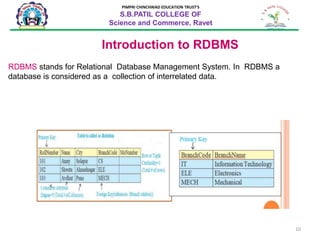
•Primary Key : The group of one or more columns used to uniquely identify each row of a relation is called
its Primary Key.
•Foreign Key : It is a field (or collection of fields) in one table that refers to the Primary Key in another table.
12
PIMPRI CHINCHWAD EDUCATION TRUST’S
S.B.PATIL COLLEGE OF
Science and Commerce, Ravet
Relationships in database
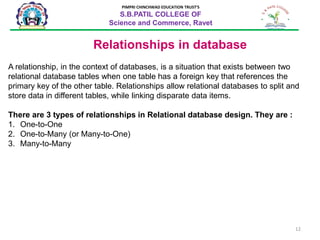
A relationship, in the context of databases, is a situation that exists between two
relational database tables when one table has a foreign key that references the
primary key of the other table. Relationships allow relational databases to split and
store data in different tables, while linking disparate data items.
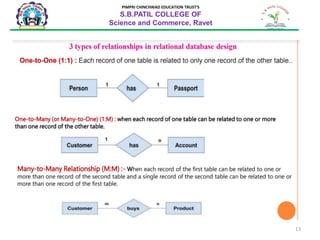
There are 3 types of relationships in Relational database design. They are :
1. One-to-One
2. One-to-Many (or Many-to-One)
3. Many-to-Many
13
PIMPRI CHINCHWAD EDUCATION TRUST’S
S.B.PATIL COLLEGE OF
Science and Commerce, Ravet
14
PIMPRI CHINCHWAD EDUCATION TRUST’S
S.B.PATIL COLLEGE OF
Science and Commerce, Ravet
Relationships in database
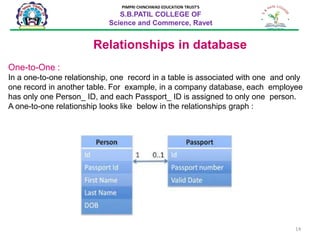
One-to-One :
In a one-to-one relationship, one record in a table is associated with one and only
one record in another table. For example, in a company database, each employee
has only one Person_ ID, and each Passport_ ID is assigned to only one person.
A one-to-one relationship looks like below in the relationships graph :
15
PIMPRI CHINCHWAD EDUCATION TRUST’S
S.B.PATIL COLLEGE OF
Science and Commerce, Ravet
Relationships in database
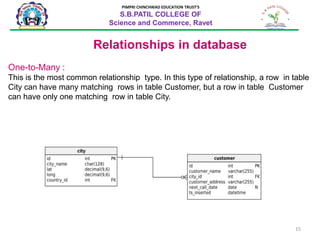
One-to-Many :
This is the most common relationship type. In this type of relationship, a row in table
City can have many matching rows in table Customer, but a row in table Customer
can have only one matching row in table City.
16
PIMPRI CHINCHWAD EDUCATION TRUST’S
S.B.PATIL COLLEGE OF
Science and Commerce, Ravet
Relationships in database
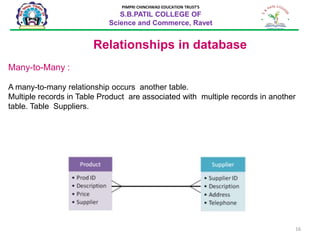
Many-to-Many :
A many-to-many relationship occurs another table.
Multiple records in Table Product are associated with multiple records in another
table. Table Suppliers.
17
PIMPRI CHINCHWAD EDUCATION TRUST’S
S.B.PATIL COLLEGE OF
Science and Commerce, Ravet
Summary
•Basic concepts of database.
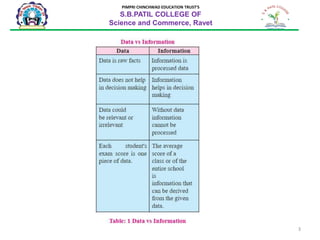
•We get to know difference between Data and Information.
•Database management system(DBMS) is used to create, manipulate and
retrieve database.
•DBMS is used in various fields like railway, library, schools, colleges, credit
transactions, banking.
•Benefits of DBMS are data sharing, data integrity, security,
consistency, recovery.
•RDBMS means relational database management system.
•Relations in database are one to one, one to many or (many to one) and
many to many.

Lesson2 dbms

  • 1.
    1 From: Mrs. Shilpa PrashantKate (IT Teacher) S.B.Patil college of Science & Commerce,Ravet 2. INTRODUCTION TO DBMS PIMPRI CHINCHWAD EDUCATION TRUST’S S.B.PATIL COLLEGE OF Science and Commerce, Ravet Index: • Concept of Database. • Introduction to DBMS and RDBMS • Advantages of using database management system. • Type for storage of data in a database. • Introduction of RDBMS
  • 2.
    2 DEFINITION OF DBMS Databaseis collection of interrelated data which helps in efficient retrieval, inserting and deleting of data. Ex. In exams, marks obtained by the student in subjects is data before it is entered in the report card. In a report card, the combined (marks) data of all subjects speaks about students performance. Thus when data is maintained in an organized manner it becomes meaningful or organized information. PIMPRI CHINCHWAD EDUCATION TRUST’S S.B.PATIL COLLEGE OF Science and Commerce, Ravet
  • 3.
    3 PIMPRI CHINCHWAD EDUCATIONTRUST’S S.B.PATIL COLLEGE OF Science and Commerce, Ravet
  • 4.
    4 PIMPRI CHINCHWAD EDUCATIONTRUST’S S.B.PATIL COLLEGE OF Science and Commerce, Ravet Introduction to Database Management System (DBMS) A database, often abbreviated as DB, is a collection of information organized in such a way that a computer program can quickly select desired pieces of data. A Database Management System (DBMS) is a software for creating and managing databases. •The DBMS provides users and programmers with a systematic way to create, retrieve, update and manage data. •It stores data in such a way that it becomes easier to retrieve, manipulate, and update information. Examples of popular DBMS are : MySQL, PostgreSQL, Access, Oracle, SQL Server, IBM, DB2 and Sybase.
  • 5.
    5 PIMPRI CHINCHWAD EDUCATIONTRUST’S S.B.PATIL COLLEGE OF Science and Commerce, Ravet Applications of DBMS Sector Use of DBMS Banking For customer information, account activities, payments, deposits, loans, etc. Airlines For reservations and schedule information. Universities For student information, course registrations, colleges and grades. Telecommunication It helps to keep call records, monthly bills, maintaining balances, etc. Finance For storing information about stock, sales, and purchases of financial instruments like stocks and bonds. Sales Use for storing customer, product & sales information. Manufacturing It is used for the management of supply chain and for tracking production of items. Inventories status in warehouses. HR Management For information about employees, salaries, payroll, deduction, generation of paychecks, etc.
  • 6.
    6 PIMPRI CHINCHWAD EDUCATIONTRUST’S S.B.PATIL COLLEGE OF Science and Commerce, Ravet Advantages of DBMS •Reducing Data Redundancy : There is a single database and any change in it is reflected immediately. Because of this, there is no chance of encountering duplicate data. •Sharing of Data : Users of the database can share the data among themselves. There are various levels of authorisation to access the data, and consequently the data can only be shared based on the correct authorisation protocols being followed. •Data integrity It means that the data is accurate and consistent in the database. Data Integrity is very important as there are multiple databases in a DBMS. All of these databases contain data that is visible to multiple users. So it is necessary to ensure that the data is correct and consistent in all the databases and for all the users. •Data Security : Data Security is vital concept in a database. Only authorised users should be allowed to access the database and their identity should be authenticated using a username and password. Unauthorised users should not be allowed to access the database under any circumstances as it violates the integrity constraints.
  • 7.
    7 PIMPRI CHINCHWAD EDUCATIONTRUST’S S.B.PATIL COLLEGE OF Science and Commerce, Ravet Advantages of DBMS •Privacy : The privacy rule in a database means only the authorized users can access a database according to its privacy constraints. There are levels of database access and a user can only view the data he is allowed to. For example - In social networking sites, access constraints are different for different accounts a user may want to access. •Backup and Recovery : automatically takes care of backup and recovery. The users don't need to backup data periodically because this is taken care of by the DBMS. Moreover, it also restores the database after a crash or system failure to its previous condition. •Development and Maintenance Time : It reduces application development maintenance time. It supports many important functions that are common to many applications, accessing data stored in the DBMS, which facilitates the quick development of application.
  • 8.
    8 PIMPRI CHINCHWAD EDUCATIONTRUST’S S.B.PATIL COLLEGE OF Science and Commerce, Ravet 2.6 Data types in the DBMS Class Data Type Description Text CHAR Holds a fixed length string (can contain letters, numbers, and special characters). The fixed size is specified in parenthesis. VARCHAR Holds a variable length string (can contain letters, numbers, and special characters). The maximum size is specified in parenthesis. Numeric DECIMAL It can represent numbers with or without the fractional part INT It is used for storing integer values. Date DATE It holds the date including day, month and year Time TIME() It holds time. Format: HH:MM:SS Data types are classifications that identify possible values for and operations that can be done on the data, as well as the way the data in that field is stored in the database.
  • 9.
    9 PIMPRI CHINCHWAD EDUCATIONTRUST’S S.B.PATIL COLLEGE OF Science and Commerce, Ravet 2.8 Introduction to RDBMS RDBMS stands for Relational Database Management System. In RDBMS a database is considered as a collection of interrelated data.
  • 10.
    10 PIMPRI CHINCHWAD EDUCATIONTRUST’S S.B.PATIL COLLEGE OF Science and Commerce, Ravet Introduction to RDBMS RDBMS stands for Relational Database Management System. In RDBMS a database is considered as a collection of interrelated data.
  • 11.
    11 PIMPRI CHINCHWAD EDUCATIONTRUST’S S.B.PATIL COLLEGE OF Science and Commerce, Ravet 2.8 Introduction to RDBMS RDBMS stands for Relational Database Management System. In RDBMS a database is considered as a collection of interrelated data. •Table : The table is the basic data storage unit in a Relational database. Table consists of columns and rows. A database consists of one or more tables according to which data is stored in a table. Database designer decides the name of the table and titles of columns. •Field : A table consists of information which is stored under different headings, called as fields or columns. Columns are shown vertically in a table. Each field or column has an individual name. Two columns cannot have the same name. • In Fig. no. 1, the first row represents the different field names or titles of columns. •Record : All the columns in a table make a row. Each row contains information on individual topics. A record is composed of fields and contains all the data about one particular person, company, or item in a database. Record is also called as a Tuple. •Key : A column or a combination of columns which can be used to identify one or more rows (tuples) in a table is called a key of the table. •Primary Key : The group of one or more columns used to uniquely identify each row of a relation is called its Primary Key. •Foreign Key : It is a field (or collection of fields) in one table that refers to the Primary Key in another table.
  • 12.
    12 PIMPRI CHINCHWAD EDUCATIONTRUST’S S.B.PATIL COLLEGE OF Science and Commerce, Ravet Relationships in database A relationship, in the context of databases, is a situation that exists between two relational database tables when one table has a foreign key that references the primary key of the other table. Relationships allow relational databases to split and store data in different tables, while linking disparate data items. There are 3 types of relationships in Relational database design. They are : 1. One-to-One 2. One-to-Many (or Many-to-One) 3. Many-to-Many
  • 13.
    13 PIMPRI CHINCHWAD EDUCATIONTRUST’S S.B.PATIL COLLEGE OF Science and Commerce, Ravet
  • 14.
    14 PIMPRI CHINCHWAD EDUCATIONTRUST’S S.B.PATIL COLLEGE OF Science and Commerce, Ravet Relationships in database One-to-One : In a one-to-one relationship, one record in a table is associated with one and only one record in another table. For example, in a company database, each employee has only one Person_ ID, and each Passport_ ID is assigned to only one person. A one-to-one relationship looks like below in the relationships graph :
  • 15.
    15 PIMPRI CHINCHWAD EDUCATIONTRUST’S S.B.PATIL COLLEGE OF Science and Commerce, Ravet Relationships in database One-to-Many : This is the most common relationship type. In this type of relationship, a row in table City can have many matching rows in table Customer, but a row in table Customer can have only one matching row in table City.
  • 16.
    16 PIMPRI CHINCHWAD EDUCATIONTRUST’S S.B.PATIL COLLEGE OF Science and Commerce, Ravet Relationships in database Many-to-Many : A many-to-many relationship occurs another table. Multiple records in Table Product are associated with multiple records in another table. Table Suppliers.
  • 17.
    17 PIMPRI CHINCHWAD EDUCATIONTRUST’S S.B.PATIL COLLEGE OF Science and Commerce, Ravet Summary •Basic concepts of database. •We get to know difference between Data and Information. •Database management system(DBMS) is used to create, manipulate and retrieve database. •DBMS is used in various fields like railway, library, schools, colleges, credit transactions, banking. •Benefits of DBMS are data sharing, data integrity, security, consistency, recovery. •RDBMS means relational database management system. •Relations in database are one to one, one to many or (many to one) and many to many.