CLOUD STORAGE
Quick Survey
• Does anyone have a lot of files on their
computer but dosen’t have the space to
store them?
• Do you worry about losing files?
• Do you want your files to be secure and
easily accessible?
WHAT IS CLOUD STORAGE?
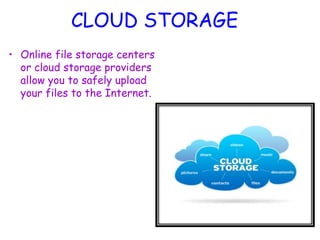
CLOUD STORAGE
• Online file storage centers
or cloud storage providers
allow you to safely upload
your files to the Internet.
Cloud Providers
• There are various providers of cloud storage
• Examples:
– Apple iCloud
– Dropbox
– Google Drive
– Amazon Cloud Drive
– Microsoft SkyDrive
Apple iCloud
• Gives 5GB of free storage (if you want
more, you have to pay for it yearly)
• Allows you to sync all your idevices to iCloud
• Anything you have stored in the iCloud can
be accessed from any idevice
– For example, a document typed on an iPad and
saved to the iCloud can be accessed from an
iPhone.
Dropbox
• Gives you 2GB of free storage
• Allows you to get more free space by
completing certain tasks
• Available in the App Store and Android
Market
• For example, a file uploaded to Dropbox
from a MacBook can be accessed from a
Samsung phone.
Google Drive
• Gives you 15GB of free storage
• Requires a G-mail account to be accessed
• Individuals can buy more storage for themselves
(Google Apps for Business Administrators can buy
storage licenses)
• Allows you to type documents, make
spreadsheets/presentations, etc., and then save
them to your drive.
Amazon Cloud Drive
• Gives you 5GB of free storage (additional
storage is available for $10 a year)
• Available for download on Kindle Fire(HD)
• A Save to CloudDrive app is available in the
App Store for $1.99 and an Amazon Cloud
Pictures is in the Android Market for free.
Microsoft SkyDrive
• Gives you 7GB of free storage (additional
storage can be bought)
• Requires a Windows Live account to be
accessed
• Can be saved to a Windows computer as a
mapped drive.
Which One Should I Pick?
• The cloud provider you pick should fulfill all
your needs as the consumer
• If you need a lot of space, choose a
provider that allows you to get the space
you need
• If you don’t need a lot of space, choose a
provider that you can use for storing files
that don’t take up a lot of space.
The Cloud Universe
• There are tons of different
cloud storage providers in the
world today!!!
Google File System
The Need
• Component failures normal
– Due to clustered computing
• Files are huge
– By traditional standards (many TB)
• Most mutations are mutations
– Not random access overwrite
• Co-Designing apps & file system
• Typical: 1000 nodes & 300 TB
Desiderata
• Must monitor & recover from comp failures
• Modest number of large files
• Workload
– Large streaming reads + small random reads
– Many large sequential writes
• Random access overwrites don’t need to be efficient
• Need semantics for concurrent appends
• High sustained bandwidth
– More important than low latency
Interface
• Familiar
– Create, delete, open, close, read, write
• Novel(Special operations)
– Snapshot
• Create a coy of file or directory tree at Low cost
– Record append
• Allows clients to add information to an existing file
without overwriting previously written data.
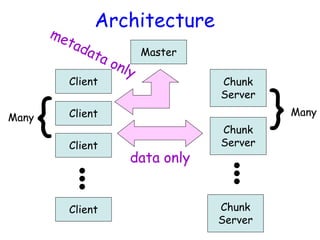
Architecture
Client
Client
Client
Client
Master
Many
Many
{
Chunk
Server
Chunk
Server
Chunk
Server
}
data only
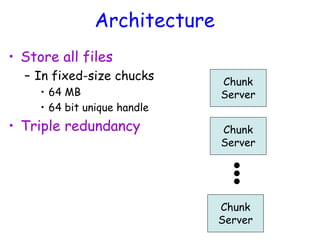
Architecture
• Store all files
– In fixed-size chucks
• 64 MB
• 64 bit unique handle
• Triple redundancy
Chunk
Server
Chunk
Server
Chunk
Server
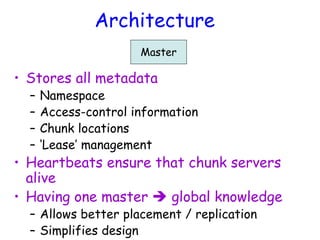
Architecture
Master
• Stores all metadata
– Namespace
– Access-control information
– Chunk locations
– ‘Lease’ management
• Heartbeats ensure that chunk servers
alive
• Having one master  global knowledge
– Allows better placement / replication
– Simplifies design
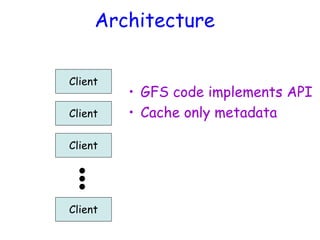
Architecture
Client
Client
Client
Client
• GFS code implements API
• Cache only metadata
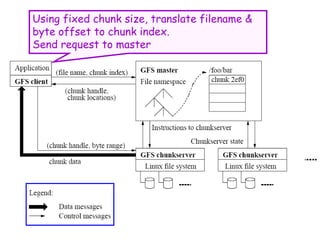
Using fixed chunk size, translate filename &
byte offset to chunk index.
Send request to master
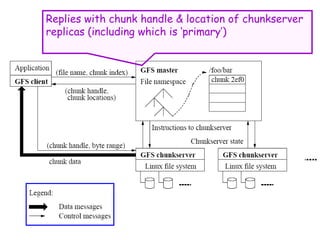
Replies with chunk handle & location of chunkserver
replicas (including which is ‘primary’)
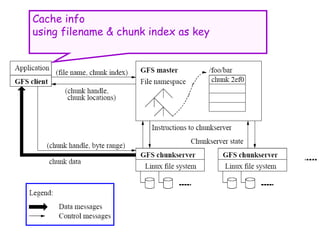
Cache info
using filename & chunk index as key
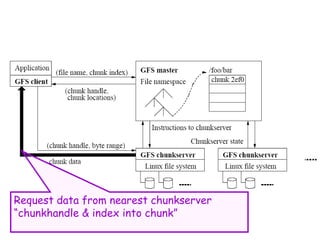
Request data from nearest chunkserver
“chunkhandle & index into chunk”
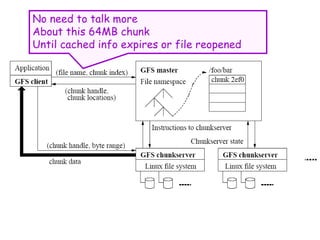
No need to talk more
About this 64MB chunk
Until cached info expires or file reopened
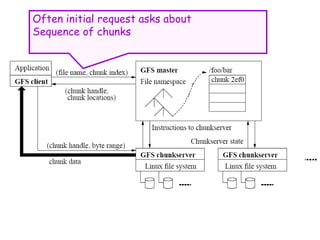
Often initial request asks about
Sequence of chunks
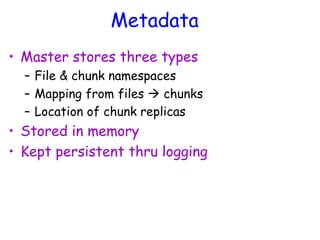
Metadata
• Master stores three types
– File & chunk namespaces
– Mapping from files  chunks
– Location of chunk replicas
• Stored in memory
• Kept persistent thru logging
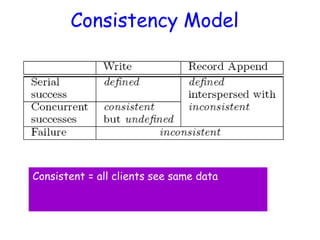
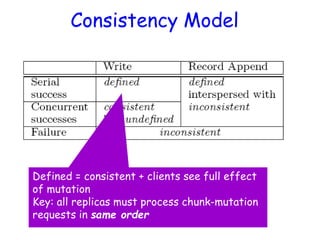
Consistency Model
Consistent = all clients see same data
Consistency Model
Defined = consistent + clients see full effect
of mutation
Key: all replicas must process chunk-mutation
requests in same order
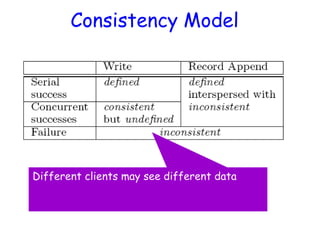
Consistency Model
Different clients may see different data
Implications
• Apps must rely on appends, not overwrites
• Must write records that
– Self-validate
– Self-identify
• Typical uses
– Single writer writes file from beginning to end,
then renames file (or checkpoints along way)
– Many writers concurrently append
• At-least-once semantics ok
• Reader deal with padding & duplicates
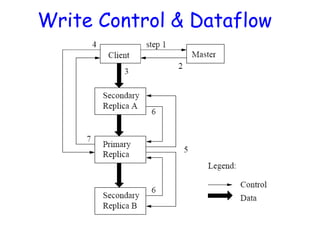
Leases & Mutation Order
• Objective
– Ensure data consistent & defined
– Minimize load on master
• Master grants ‘lease’ to one replica
– Called ‘primary’ chunkserver
• Primary serializes all mutation requests
– Communicates order to replicas
Write Control & Dataflow
Atomic Appends
• As in last slide, but…
• Primary also checks to see if append spills
over into new chunk
– If so, pads old chunk to full extent
– Tells secondary chunk-servers to do the same
– Tells client to try append again on next chunk
• Usually works because
– max(append-size) < ¼ chunk-size [API rule]
– (meanwhile other clients may be appending)
Other Issues
• Fast snapshot
• Master operation
– Namespace management & locking
– Replica placement & rebalancing
– Garbage collection (deleted / stale files)
– Detecting stale replicas
Master Replication
• Master log & checkpoints replicated
• Outside monitor watches master livelihood
– Starts new master process as needed
• Shadow masters
– Provide read-access when primary is down
– Lag state of true master
B. Ramamurthy
Hadoop File System
4/17/2024 37
Reference
• The Hadoop Distributed File System:
Architecture and Design by Apache
Foundation Inc.
4/17/2024 38
Basic Features: HDFS
• Highly fault-tolerant
• High throughput
• Suitable for applications with large data
sets
• Streaming access to file system data
• Can be built out of commodity hardware
4/17/2024 39
Fault tolerance
• Failure is the norm rather than exception
• A HDFS instance may consist of
thousands of server machines, each
storing part of the file system’s data.
• Since we have huge number of
components and that each component has
non-trivial probability of failure means
that there is always some component that
is non-functional.
• Detection of faults and quick, automatic
4/17/2024 40
Data Characteristics
 Streaming data access
 Applications need streaming access to data
 Batch processing rather than interactive user access.
 Large data sets and files: gigabytes to terabytes size
 High aggregate data bandwidth
 Scale to hundreds of nodes in a cluster
 Tens of millions of files in a single instance
 Write-once-read-many: a file once created, written
and closed need not be changed – this assumption
simplifies coherency
 A map-reduce application or web-crawler application
fits perfectly with this model.
4/17/2024 41
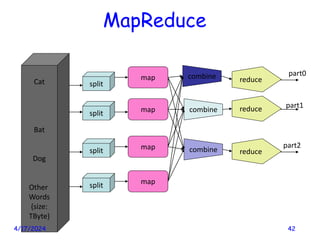
Cat
Bat
Dog
Other
Words
(size:
TByte)
map
map
map
map
split
split
split
split
combine
combine
combine
reduce
reduce
reduce
part0
part1
part2
MapReduce
4/17/2024 42
ARCHITECTURE
4/17/2024 43
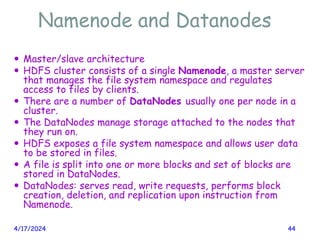
Namenode and Datanodes
 Master/slave architecture
 HDFS cluster consists of a single Namenode, a master server
that manages the file system namespace and regulates
access to files by clients.
 There are a number of DataNodes usually one per node in a
cluster.
 The DataNodes manage storage attached to the nodes that
they run on.
 HDFS exposes a file system namespace and allows user data
to be stored in files.
 A file is split into one or more blocks and set of blocks are
stored in DataNodes.
 DataNodes: serves read, write requests, performs block
creation, deletion, and replication upon instruction from
Namenode.
4/17/2024 44
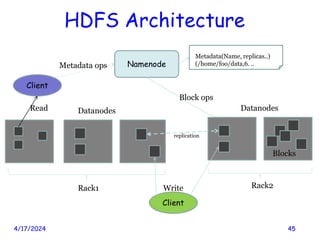
HDFS Architecture
4/17/2024 45
Namenode
B
replication
Rack1 Rack2
Client
Blocks
Datanodes Datanodes
Client
Write
Read
Metadata ops
Metadata(Name, replicas..)
(/home/foo/data,6. ..
Block ops
File system Namespace
4/17/2024 46
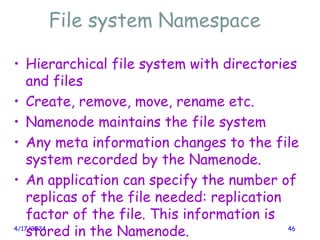
• Hierarchical file system with directories
and files
• Create, remove, move, rename etc.
• Namenode maintains the file system
• Any meta information changes to the file
system recorded by the Namenode.
• An application can specify the number of
replicas of the file needed: replication
factor of the file. This information is
stored in the Namenode.
Data Replication
4/17/2024 47
 HDFS is designed to store very large files across
machines in a large cluster.
 Each file is a sequence of blocks.
 All blocks in the file except the last are of the
same size.
 Blocks are replicated for fault tolerance.
 Block size and replicas are configurable per file.
 The Namenode receives a Heartbeat and a
BlockReport from each DataNode in the cluster.
 BlockReport contains all the blocks on a Datanode.
Replica Placement
4/17/2024 48
 The placement of the replicas is critical to HDFS reliability and performance.
 Optimizing replica placement distinguishes HDFS from other distributed file systems.
 Rack-aware replica placement:
 Goal: improve reliability, availability and network bandwidth utilization
 Research topic
 Many racks, communication between racks are through switches.
 Network bandwidth between machines on the same rack is greater than those in
different racks.
 Namenode determines the rack id for each DataNode.
 Replicas are typically placed on unique racks
 Simple but non-optimal
 Writes are expensive
 Replication factor is 3
 Another research topic?
 Replicas are placed: one on a node in a local rack, one on a different node in the local rack
and one on a node in a different rack.
 1/3 of the replica on a node, 2/3 on a rack and 1/3 distributed evenly across remaining
racks.
Replica Selection
4/17/2024 49
• Replica selection for READ operation:
HDFS tries to minimize the bandwidth
consumption and latency.
• If there is a replica on the Reader node
then that is preferred.
• HDFS cluster may span multiple data
centers: replica in the local data center is
preferred over the remote one.
Safemode Startup
4/17/2024 50
 On startup Namenode enters Safemode.
 Replication of data blocks do not occur in Safemode.
 Each DataNode checks in with Heartbeat and
BlockReport.
 Namenode verifies that each block has acceptable
number of replicas
 After a configurable percentage of safely replicated
blocks check in with the Namenode, Namenode exits
Safemode.
 It then makes the list of blocks that need to be
replicated.
 Namenode then proceeds to replicate these blocks to
other Datanodes.
Filesystem Metadata
4/17/2024 51
• The HDFS namespace is stored by
Namenode.
• Namenode uses a transaction log called
the EditLog to record every change that
occurs to the filesystem meta data.
– For example, creating a new file.
– Change replication factor of a file
– EditLog is stored in the Namenode’s local
filesystem
• Entire filesystem namespace including
Namenode
4/17/2024 52
 Keeps image of entire file system namespace and file
Blockmap in memory.
 4GB of local RAM is sufficient to support the above
data structures that represent the huge number of
files and directories.
 When the Namenode starts up it gets the FsImage
and Editlog from its local file system, update FsImage
with EditLog information and then stores a copy of
the FsImage on the filesytstem as a checkpoint.
 Periodic checkpointing is done. So that the system
can recover back to the last checkpointed state in
case of a crash.
Datanode
4/17/2024 53
 A Datanode stores data in files in its local file
system.
 Datanode has no knowledge about HDFS filesystem
 It stores each block of HDFS data in a separate file.
 Datanode does not create all files in the same
directory.
 It uses heuristics to determine optimal number of
files per directory and creates directories
appropriately:
Research issue?
 When the filesystem starts up it generates a list of
all HDFS blocks and send this report to Namenode:
Blockreport.
PROTOCOL
4/17/2024 54
The Communication Protocol
4/17/2024 55
 All HDFS communication protocols are layered on
top of the TCP/IP protocol
 A client establishes a connection to a
configurable TCP port on the Namenode machine.
It talks ClientProtocol with the Namenode.
 The Datanodes talk to the Namenode using
Datanode protocol.
 RPC abstraction wraps both ClientProtocol and
Datanode protocol.
 Namenode is simply a server and never initiates a
request; it only responds to RPC requests issued
by DataNodes or clients.
ROBUSTNESS
4/17/2024 56
Objectives
• Primary objective of HDFS is to store
data reliably in the presence of failures.
• Three common failures are: Namenode
failure, Datanode failure and network
partition.
4/17/2024 57
DataNode failure and
heartbeat
• A network partition can cause a subset of
Datanodes to lose connectivity with the
Namenode.
• Namenode detects this condition by the
absence of a Heartbeat message.
• Namenode marks Datanodes without
Hearbeat and does not send any IO
requests to them.
• Any data registered to the failed
Datanode is not available to the HDFS.
4/17/2024 58
Re-replication
• The necessity for re-replication may
arise due to:
– A Datanode may become unavailable,
– A replica may become corrupted,
– A hard disk on a Datanode may fail, or
– The replication factor on the block may be
increased.
4/17/2024 59
Cluster Rebalancing
• HDFS architecture is compatible with
data rebalancing schemes.
• A scheme might move data from one
Datanode to another if the free space on
a Datanode falls below a certain
threshold.
• In the event of a sudden high demand for
a particular file, a scheme might
dynamically create additional replicas and
rebalance other data in the cluster.
4/17/2024 60
Data Integrity
• Consider a situation: a block of data
fetched from Datanode arrives
corrupted.
• This corruption may occur because of
faults in a storage device, network faults,
or buggy software.
• A HDFS client creates the checksum of
every block of its file and stores it in
hidden files in the HDFS namespace.
• When a clients retrieves the contents of
4/17/2024 61
Metadata Disk Failure
• FsImage and EditLog are central data structures of
HDFS.
• A corruption of these files can cause a HDFS instance
to be non-functional.
• For this reason, a Namenode can be configured to
maintain multiple copies of the FsImage and EditLog.
• Multiple copies of the FsImage and EditLog files are
updated synchronously.
• Meta-data is not data-intensive.
• The Namenode could be single point failure: automatic
failover is NOT supported! Another research topic.
4/17/2024 62
DATA ORGANIZATION
4/17/2024 63
Data Blocks
• HDFS support write-once-read-many with
reads at streaming speeds.
• A typical block size is 64MB (or even 128
MB).
• A file is chopped into 64MB chunks and
stored.
4/17/2024 64
Staging
• A client request to create a file does not
reach Namenode immediately.
• HDFS client caches the data into a
temporary file. When the data reached a
HDFS block size the client contacts the
Namenode.
• Namenode inserts the filename into its
hierarchy and allocates a data block for
it.
• The Namenode responds to the client
4/17/2024 65
Staging (contd.)
• The client sends a message that the file
is closed.
• Namenode proceeds to commit the file
for creation operation into the persistent
store.
• If the Namenode dies before file is
closed, the file is lost.
• This client side caching is required to
avoid network congestion; also it has
precedence is AFS (Andrew file system).
4/17/2024 66
Replication Pipelining
• When the client receives response from
Namenode, it flushes its block in small
pieces (4K) to the first replica, that in
turn copies it to the next replica and so
on.
• Thus data is pipelined from Datanode to
the next.
4/17/2024 67
API (ACCESSIBILITY)
4/17/2024 68
Application Programming
Interface
• HDFS provides Java API for application
to use.
• Python access is also used in many
applications.
• A C language wrapper for Java API is also
available.
• A HTTP browser can be used to browse
the files of a HDFS instance.
4/17/2024 69
FS Shell, Admin and Browser
Interface
• HDFS organizes its data in files and
directories.
• It provides a command line interface
called the FS shell that lets the user
interact with data in the HDFS.
• The syntax of the commands is similar to
bash and csh.
• Example: to create a directory /foodir
/bin/hadoop dfs –mkdir /foodir
• There is also DFSAdmin interface
4/17/2024 70
Space Reclamation
• When a file is deleted by a client, HDFS
renames file to a file in be the /trash
directory for a configurable amount of
time.
• A client can request for an undelete in
this allowed time.
• After the specified time the file is
deleted and the space is reclaimed.
• When the replication factor is reduced,
the Namenode selects excess replicas
4/17/2024 71
Summary
• We discussed the features of the
Hadoop File System, a peta-scale file
system to handle big-data sets.
• What discussed: Architecture, Protocol,
API, etc.
• Missing element: Implementation
– The Hadoop file system (internals)
– An implementation of an instance of the
HDFS (for use by applications such as web
crawlers).
4/17/2024 72
BigTable: A Distributed
Storage System for
Structured Data
Fay Chang, Jeffrey Dean, Sanjay Ghemawat, Wilson
C. Hsieh, Deborah A. Wallach, Mike Burrows, Tushar
Chandra, Andrew Fikes, Robert E. Gruber @ Google
Presented by Richard Venutolo
Introduction
• BigTable is a distributed storage system for
managing structured data.
• Designed to scale to a very large size
– Petabytes of data across thousands of servers
• Used for many Google projects
– Web indexing, Personalized Search, Google Earth,
Google Analytics, Google Finance, …
• Flexible, high-performance solution for all of
Google’s products
Motivation
• Lots of (semi-)structured data at Google
– URLs:
• Contents, crawl metadata, links, anchors, pagerank, …
– Per-user data:
• User preference settings, recent queries/search results, …
– Geographic locations:
• Physical entities (shops, restaurants, etc.), roads, satellite
image data, user annotations, …
• Scale is large
– Billions of URLs, many versions/page (~20K/version)
– Hundreds of millions of users, thousands or q/sec
– 100TB+ of satellite image data
Why not just use commercial DB?
• Scale is too large for most commercial databases
• Even if it weren’t, cost would be very high
– Building internally means system can be applied across
many projects for low incremental cost
• Low-level storage optimizations help performance
significantly
– Much harder to do when running on top of a database
layer
Goals
• Want asynchronous processes to be continuously
updating different pieces of data
– Want access to most current data at any time
• Need to support:
– Very high read/write rates (millions of ops per second)
– Efficient scans over all or interesting subsets of data
– Efficient joins of large one-to-one and one-to-many
datasets
• Often want to examine data changes over time
– E.g. Contents of a web page over multiple crawls
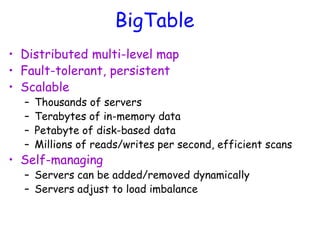
BigTable
• Distributed multi-level map
• Fault-tolerant, persistent
• Scalable
– Thousands of servers
– Terabytes of in-memory data
– Petabyte of disk-based data
– Millions of reads/writes per second, efficient scans
• Self-managing
– Servers can be added/removed dynamically
– Servers adjust to load imbalance
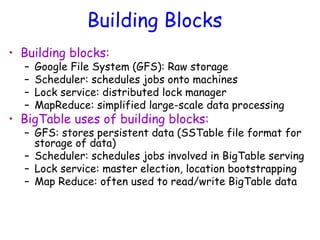
Building Blocks
• Building blocks:
– Google File System (GFS): Raw storage
– Scheduler: schedules jobs onto machines
– Lock service: distributed lock manager
– MapReduce: simplified large-scale data processing
• BigTable uses of building blocks:
– GFS: stores persistent data (SSTable file format for
storage of data)
– Scheduler: schedules jobs involved in BigTable serving
– Lock service: master election, location bootstrapping
– Map Reduce: often used to read/write BigTable data
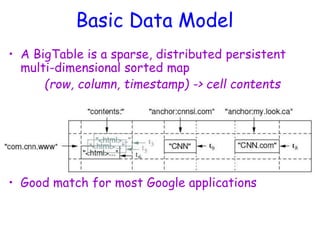
Basic Data Model
• A BigTable is a sparse, distributed persistent
multi-dimensional sorted map
(row, column, timestamp) -> cell contents
• Good match for most Google applications
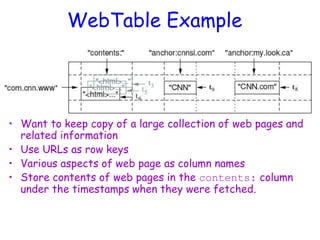
WebTable Example
• Want to keep copy of a large collection of web pages and
related information
• Use URLs as row keys
• Various aspects of web page as column names
• Store contents of web pages in the contents: column
under the timestamps when they were fetched.
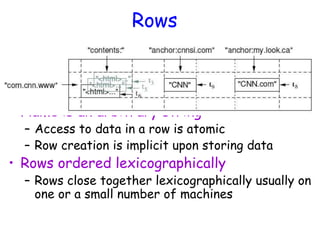
Rows
• Name is an arbitrary string
– Access to data in a row is atomic
– Row creation is implicit upon storing data
• Rows ordered lexicographically
– Rows close together lexicographically usually on
one or a small number of machines
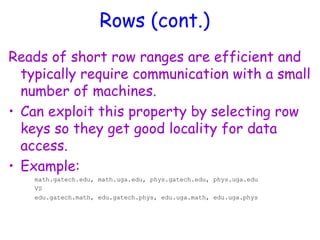
Rows (cont.)
Reads of short row ranges are efficient and
typically require communication with a small
number of machines.
• Can exploit this property by selecting row
keys so they get good locality for data
access.
• Example:
math.gatech.edu, math.uga.edu, phys.gatech.edu, phys.uga.edu
VS
edu.gatech.math, edu.gatech.phys, edu.uga.math, edu.uga.phys
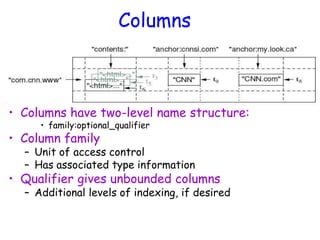
Columns
• Columns have two-level name structure:
• family:optional_qualifier
• Column family
– Unit of access control
– Has associated type information
• Qualifier gives unbounded columns
– Additional levels of indexing, if desired
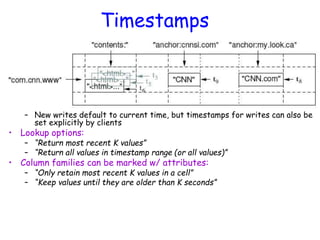
Timestamps
• Used to store different versions of data in a cell
– New writes default to current time, but timestamps for writes can also be
set explicitly by clients
• Lookup options:
– “Return most recent K values”
– “Return all values in timestamp range (or all values)”
• Column families can be marked w/ attributes:
– “Only retain most recent K values in a cell”
– “Keep values until they are older than K seconds”
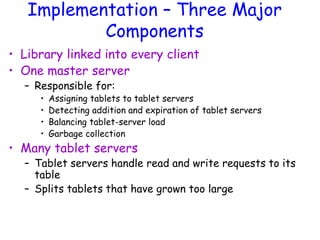
Implementation – Three Major
Components
• Library linked into every client
• One master server
– Responsible for:
• Assigning tablets to tablet servers
• Detecting addition and expiration of tablet servers
• Balancing tablet-server load
• Garbage collection
• Many tablet servers
– Tablet servers handle read and write requests to its
table
– Splits tablets that have grown too large
Implementation (cont.)
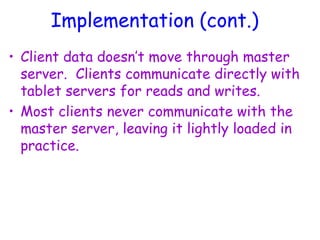
• Client data doesn’t move through master
server. Clients communicate directly with
tablet servers for reads and writes.
• Most clients never communicate with the
master server, leaving it lightly loaded in
practice.
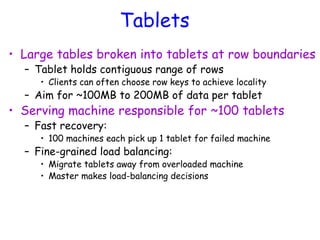
Tablets
• Large tables broken into tablets at row boundaries
– Tablet holds contiguous range of rows
• Clients can often choose row keys to achieve locality
– Aim for ~100MB to 200MB of data per tablet
• Serving machine responsible for ~100 tablets
– Fast recovery:
• 100 machines each pick up 1 tablet for failed machine
– Fine-grained load balancing:
• Migrate tablets away from overloaded machine
• Master makes load-balancing decisions
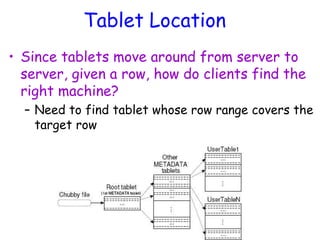
Tablet Location
• Since tablets move around from server to
server, given a row, how do clients find the
right machine?
– Need to find tablet whose row range covers the
target row
Tablet Assignment
• Each tablet is assigned to one tablet
server at a time.
• Master server keeps track of the set of
live tablet servers and current
assignments of tablets to servers. Also
keeps track of unassigned tablets.
• When a tablet is unassigned, master
assigns the tablet to an tablet server
with sufficient room.
API
• Metadata operations
– Create/delete tables, column families, change metadata
• Writes (atomic)
– Set(): write cells in a row
– DeleteCells(): delete cells in a row
– DeleteRow(): delete all cells in a row
• Reads
– Scanner: read arbitrary cells in a bigtable
• Each row read is atomic
• Can restrict returned rows to a particular range
• Can ask for just data from 1 row, all rows, etc.
• Can ask for all columns, just certain column families, or specific columns
Refinements: Locality Groups
• Can group multiple column families into a
locality group
– Separate SSTable is created for each locality
group in each tablet.
• Segregating columns families that are not
typically accessed together enables more
efficient reads.
– In WebTable, page metadata can be in one
group and contents of the page in another
group.
Refinements: Compression
• Many opportunities for compression
– Similar values in the same row/column at different
timestamps
– Similar values in different columns
– Similar values across adjacent rows
• Two-pass custom compressions scheme
– First pass: compress long common strings across a large
window
– Second pass: look for repetitions in small window
• Speed emphasized, but good space reduction (10-
to-1)
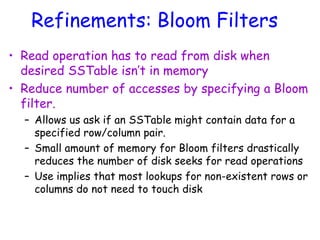
Refinements: Bloom Filters
• Read operation has to read from disk when
desired SSTable isn’t in memory
• Reduce number of accesses by specifying a Bloom
filter.
– Allows us ask if an SSTable might contain data for a
specified row/column pair.
– Small amount of memory for Bloom filters drastically
reduces the number of disk seeks for read operations
– Use implies that most lookups for non-existent rows or
columns do not need to touch disk
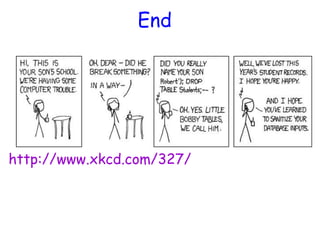
End
http://www.xkcd.com/327/
CS525: Special Topics in DBs
Large-Scale Data
Management
HBase
Spring 2013
WPI, Mohamed Eltabakh
96
HBase: Overview
• HBase is a distributed column-oriented
data store built on top of HDFS
• HBase is an Apache open source project
whose goal is to provide storage for the
Hadoop Distributed Computing
• Data is logically organized into tables,
rows and columns
97
HBase: Part of Hadoop’s
Ecosystem
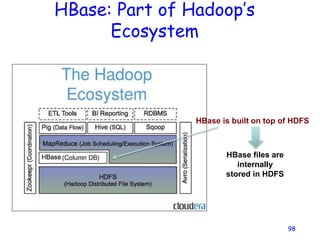
98
HBase is built on top of HDFS
HBase files are
internally
stored in HDFS
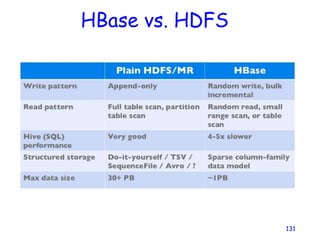
HBase vs. HDFS
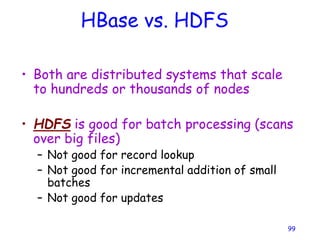
• Both are distributed systems that scale
to hundreds or thousands of nodes
• HDFS is good for batch processing (scans
over big files)
– Not good for record lookup
– Not good for incremental addition of small
batches
– Not good for updates
99
HBase vs. HDFS (Cont’d)
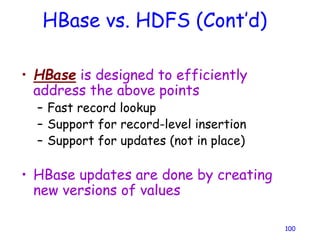
• HBase is designed to efficiently
address the above points
– Fast record lookup
– Support for record-level insertion
– Support for updates (not in place)
• HBase updates are done by creating
new versions of values
100
HBase vs. HDFS (Cont’d)
101
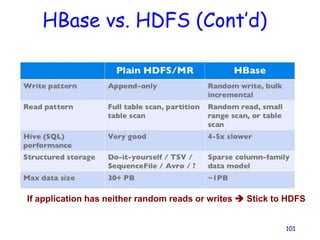
If application has neither random reads or writes  Stick to HDFS
HBase Data Model
102
HBase Data Model
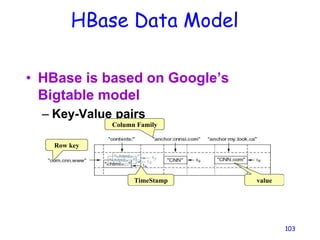
• HBase is based on Google’s
Bigtable model
– Key-Value pairs
103
Row key
Column Family
value
TimeStamp
HBase Logical View
104
HBase: Keys and Column Families
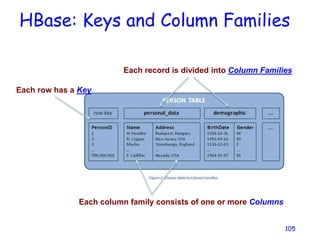
105
Each row has a Key
Each record is divided into Column Families
Each column family consists of one or more Columns
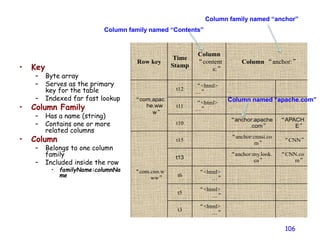
• Key
– Byte array
– Serves as the primary
key for the table
– Indexed far fast lookup
• Column Family
– Has a name (string)
– Contains one or more
related columns
• Column
– Belongs to one column
family
– Included inside the row
• familyName:columnNa
me
106
Row key
Time
Stamp
Column
“content
s:”
Column “anchor:”
“com.apac
he.ww
w”
t12
“<html>
…”
t11
“<html>
…”
t10
“anchor:apache
.com”
“APACH
E”
“com.cnn.w
ww”
t15
“anchor:cnnsi.co
m”
“CNN”
t13
“anchor:my.look.
ca”
“CNN.co
m”
t6
“<html>
…”
t5
“<html>
…”
t3
“<html>
…”
Column family named “Contents”
Column family named “anchor”
Column named “apache.com”
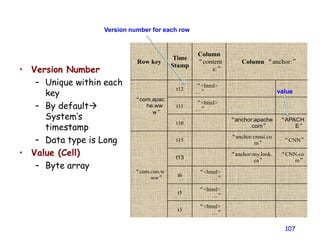
• Version Number
– Unique within each
key
– By default
System’s
timestamp
– Data type is Long
• Value (Cell)
– Byte array
107
Row key
Time
Stamp
Column
“content
s:”
Column “anchor:”
“com.apac
he.ww
w”
t12
“<html>
…”
t11
“<html>
…”
t10
“anchor:apache
.com”
“APACH
E”
“com.cnn.w
ww”
t15
“anchor:cnnsi.co
m”
“CNN”
t13
“anchor:my.look.
ca”
“CNN.co
m”
t6
“<html>
…”
t5
“<html>
…”
t3
“<html>
…”
Version number for each row
value
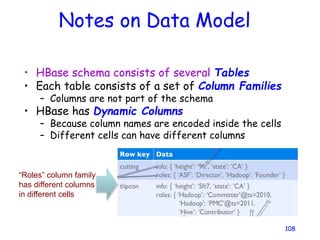
Notes on Data Model
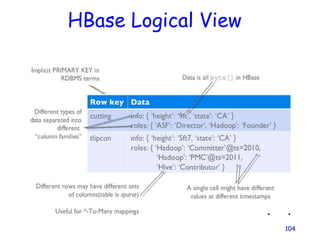
• HBase schema consists of several Tables
• Each table consists of a set of Column Families
– Columns are not part of the schema
• HBase has Dynamic Columns
– Because column names are encoded inside the cells
– Different cells can have different columns
108
“Roles” column family
has different columns
in different cells
Notes on Data Model (Cont’d)
• The version number can be user-supplied
– Even does not have to be inserted in increasing order
– Version number are unique within each key
• Table can be very sparse
– Many cells are empty
• Keys are indexed as the primary key
Has two columns
[cnnsi.com & my.look.ca]
HBase Physical Model
110
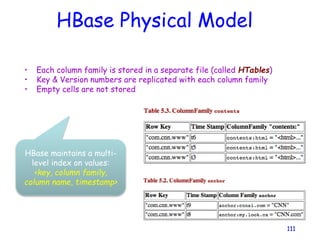
HBase Physical Model
• Each column family is stored in a separate file (called HTables)
• Key & Version numbers are replicated with each column family
• Empty cells are not stored
111
HBase maintains a multi-
level index on values:
<key, column family,
column name, timestamp>
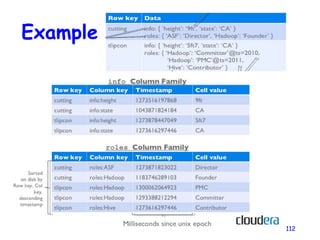
Example
112
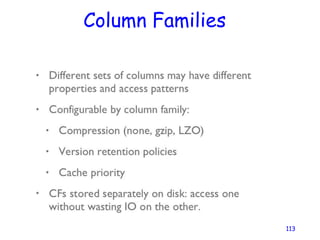
Column Families
113
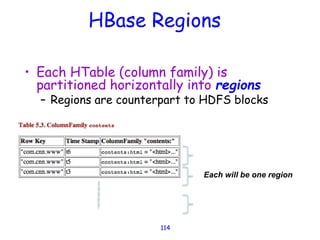
HBase Regions
• Each HTable (column family) is
partitioned horizontally into regions
– Regions are counterpart to HDFS blocks
114
Each will be one region
HBase Architecture
115
Three Major Components
116
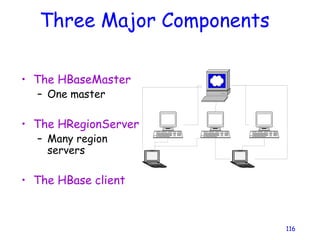
• The HBaseMaster
– One master
• The HRegionServer
– Many region
servers
• The HBase client
HBase Components
• Region
– A subset of a table’s rows, like horizontal
range partitioning
– Automatically done
• RegionServer (many slaves)
– Manages data regions
– Serves data for reads and writes (using a log)
• Master
– Responsible for coordinating the slaves
– Assigns regions, detects failures
– Admin functions
117
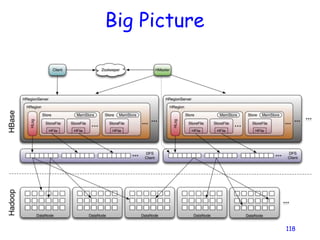
Big Picture
118
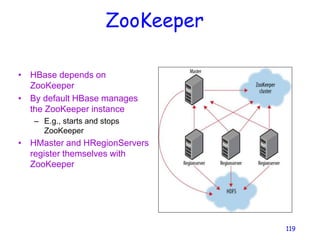
ZooKeeper
• HBase depends on
ZooKeeper
• By default HBase manages
the ZooKeeper instance
– E.g., starts and stops
ZooKeeper
• HMaster and HRegionServers
register themselves with
ZooKeeper
119
Creating a Table
HBaseAdmin admin= new
HBaseAdmin(config);
HColumnDescriptor []column;
column= new HColumnDescriptor[2];
column[0]=new
HColumnDescriptor("columnFamily1:");
column[1]=new
HColumnDescriptor("columnFamily2:");
HTableDescriptor desc= new
HTableDescriptor(Bytes.toBytes("MyTable"));
desc.addFamily(column[0]);
desc.addFamily(column[1]);
admin.createTable(desc);
120
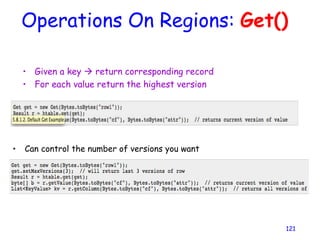
Operations On Regions: Get()
• Given a key  return corresponding record
• For each value return the highest version
121
• Can control the number of versions you want
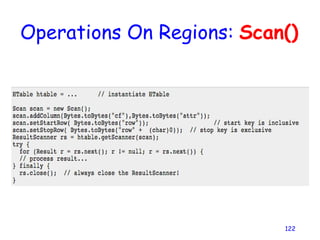
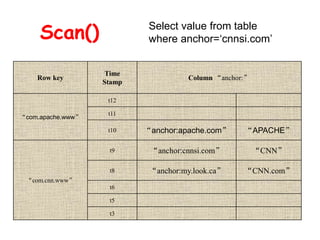
Operations On Regions: Scan()
122
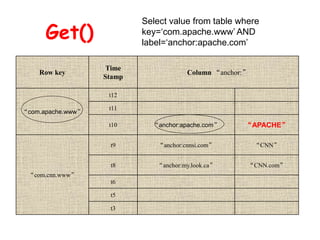
Get()
Row key
Time
Stamp
Column “anchor:”
“com.apache.www”
t12
t11
t10 “anchor:apache.com” “APACHE”
“com.cnn.www”
t9 “anchor:cnnsi.com” “CNN”
t8 “anchor:my.look.ca” “CNN.com”
t6
t5
t3
Select value from table where
key=‘com.apache.www’ AND
label=‘anchor:apache.com’
Scan() Select value from table
where anchor=‘cnnsi.com’
Row key
Time
Stamp
Column “anchor:”
“com.apache.www”
t12
t11
t10 “anchor:apache.com” “APACHE”
“com.cnn.www”
t9 “anchor:cnnsi.com” “CNN”
t8 “anchor:my.look.ca” “CNN.com”
t6
t5
t3
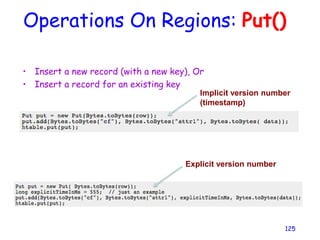
Operations On Regions: Put()
• Insert a new record (with a new key), Or
• Insert a record for an existing key
125
Implicit version number
(timestamp)
Explicit version number
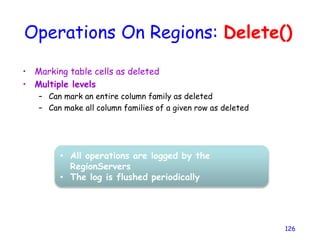
Operations On Regions: Delete()
• Marking table cells as deleted
• Multiple levels
– Can mark an entire column family as deleted
– Can make all column families of a given row as deleted
126
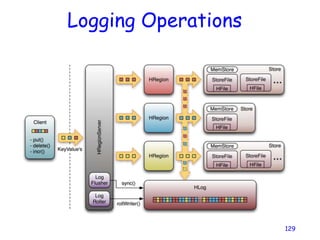
• All operations are logged by the
RegionServers
• The log is flushed periodically
HBase: Joins
• HBase does not support joins
• Can be done in the application layer
– Using scan() and get() operations
127
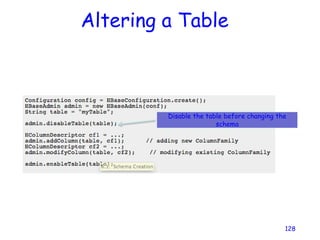
Altering a Table
128
Disable the table before changing the
schema
Logging Operations
129
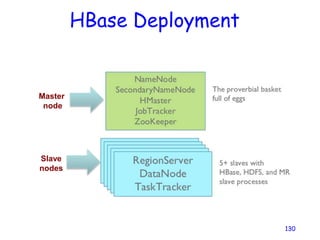
HBase Deployment
130
Master
node
Slave
nodes
HBase vs. HDFS
131
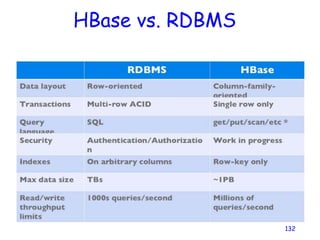
HBase vs. RDBMS
132
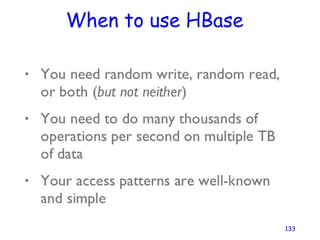
When to use HBase
133
Cloud Storage – A look at
Amazon’s Dyanmo
A presentation that look’s at Amazon’s Dynamo service (based
on a research paper published by Amazon.com) as well as
related cloud storage implementations
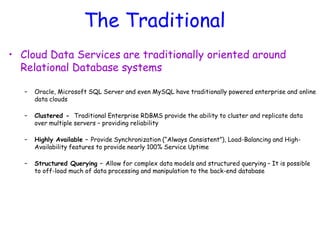
The Traditional
• Cloud Data Services are traditionally oriented around
Relational Database systems
– Oracle, Microsoft SQL Server and even MySQL have traditionally powered enterprise and online
data clouds
– Clustered - Traditional Enterprise RDBMS provide the ability to cluster and replicate data
over multiple servers – providing reliability
– Highly Available – Provide Synchronization (“Always Consistent”), Load-Balancing and High-
Availability features to provide nearly 100% Service Uptime
– Structured Querying – Allow for complex data models and structured querying – It is possible
to off-load much of data processing and manipulation to the back-end database
The Traditional
• However, Traditional RDBMS clouds are:
EXPENSIVE!
To maintain, license and store large amounts of data
• The service guarantees of traditional enterprise relational databases like Oracle, put
high overheads on the cloud
• Complex data models make the cloud more expensive to maintain, update and keep
synchronized
• Load distribution often requires expensive networking equipment
• To maintain the “elasticity” of the cloud, often requires expensive upgrades to the
network
The Solution
• Downgrade some of the service guarantees of traditional
RDBMS
– Replace the highly complex data models Oracle and SQL Server offer, with a simpler one – This
means classifying service data models based on the complexity of the data model they may
required
– Replace the “Always Consistent” guarantee synchronization model with an “Eventually Consistent”
model – This means classifying services based on how “updated” its data set must be
Redesign or distinguish between services that require a simpler data model and
lower expectations on consistency.
We could then offer something different from traditional RDBMS!
The Solution
• Amazon’s Dynamo – Used by Amazon’s EC2 Cloud Hosting Service. Powers their Elastic
Storage Service called S2 as well as their E-commerce platform
Offers a simple Primary-key based data model. Stores vast amounts of information on distributed,
low-cost virtualized nodes
• Google’s BigTable – Google’s principle data cloud, for their services – Uses a more complex
column-family data model compared to Dynamo, yet much simpler than traditional RMDBS
Google’s underlying file-system provides the distributed architecture on low-cost nodes
• Facebook’s Cassandra – Facebook’s principle data cloud, for their services.
This project was recently open-sourced. Provides a data-model similar to Google’s BigTable, but the
distributed characteristics of Amazon’s Dynamo
Dynamo - Motivation
• Build a distributed storage system:
– Scale
– Simple: key-value
– Highly available
– Guarantee Service Level Agreements (SLA)
System Assumptions and Requirements
• Query Model: simple read and write operations to a data item
that is uniquely identified by a key.
• ACID Properties: Atomicity, Consistency, Isolation,
Durability.
• Efficiency: latency requirements which are in general measured
at the 99.9th percentile of the distribution.
• Other Assumptions: operation environment is assumed to
be non-hostile and there are no security related requirements such as
authentication and authorization.
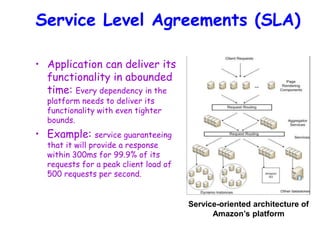
Service Level Agreements (SLA)
• Application can deliver its
functionality in abounded
time: Every dependency in the
platform needs to deliver its
functionality with even tighter
bounds.
• Example: service guaranteeing
that it will provide a response
within 300ms for 99.9% of its
requests for a peak client load of
500 requests per second.
Service-oriented architecture of
Amazon’s platform
Design Consideration
• Sacrifice strong consistency for availability
• Conflict resolution is executed during read
instead of write, i.e. “always writeable”.
• Other principles:
– Incremental scalability.
– Symmetry.
– Decentralization.
– Heterogeneity.
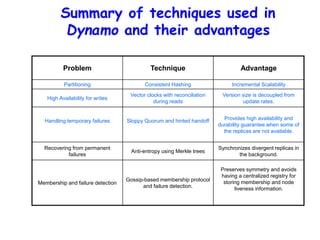
Summary of techniques used in
Dynamo and their advantages
Problem Technique Advantage
Partitioning Consistent Hashing Incremental Scalability
High Availability for writes
Vector clocks with reconciliation
during reads
Version size is decoupled from
update rates.
Handling temporary failures Sloppy Quorum and hinted handoff Provides high availability and
durability guarantee when some of
the replicas are not available.
Recovering from permanent
failures
Anti-entropy using Merkle trees
Synchronizes divergent replicas in
the background.
Membership and failure detection
Gossip-based membership protocol
and failure detection.
Preserves symmetry and avoids
having a centralized registry for
storing membership and node
liveness information.
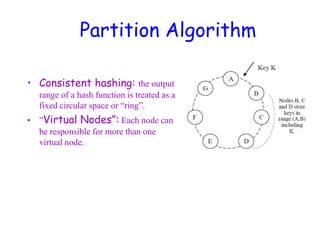
Partition Algorithm
• Consistent hashing: the output
range of a hash function is treated as a
fixed circular space or “ring”.
• ”Virtual Nodes”: Each node can
be responsible for more than one
virtual node.
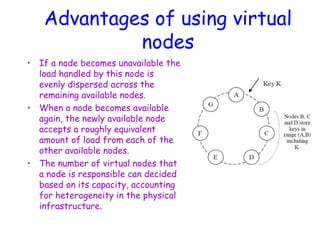
Advantages of using virtual
nodes
• If a node becomes unavailable the
load handled by this node is
evenly dispersed across the
remaining available nodes.
• When a node becomes available
again, the newly available node
accepts a roughly equivalent
amount of load from each of the
other available nodes.
• The number of virtual nodes that
a node is responsible can decided
based on its capacity, accounting
for heterogeneity in the physical
infrastructure.
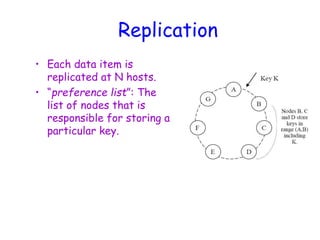
Replication
• Each data item is
replicated at N hosts.
• “preference list”: The
list of nodes that is
responsible for storing a
particular key.
Data Versioning
• A put() call may return to its caller before
the update has been applied at all the
replicas
• A get() call may return many versions of the
same object.
• Challenge: an object having distinct version sub-histories, which
the system will need to reconcile in the future.
• Solution: uses vector clocks in order to capture causality
between different versions of the same object.
Vector Clock
• A vector clock is a list of (node, counter)
pairs.
• Every version of every object is associated
with one vector clock.
• If the counters on the first object’s clock
are less-than-or-equal to all of the nodes in
the second clock, then the first is an
ancestor of the second and can be
forgotten.
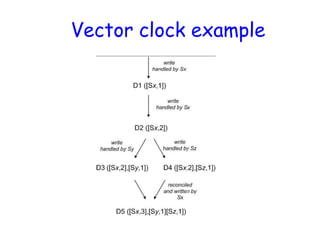
Vector clock example
Execution of get () and put ()
operations
1. Route its request through a generic load
balancer that will select a node based on
load information.
2. Use a partition-aware client library that
routes requests directly to the appropriate
coordinator nodes.
Sloppy Quorum
• R/W is the minimum number of nodes that
must participate in a successful read/write
operation.
• Setting R + W > N yields a quorum-like
system.
• In this model, the latency of a get (or put)
operation is dictated by the slowest of the
R (or W) replicas. For this reason, R and W
are usually configured to be less than N, to
provide better latency.
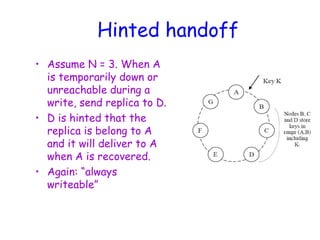
Hinted handoff
• Assume N = 3. When A
is temporarily down or
unreachable during a
write, send replica to D.
• D is hinted that the
replica is belong to A
and it will deliver to A
when A is recovered.
• Again: “always
writeable”
Other techniques
• Replica synchronization:
– Merkle hash tree.
• Membership and Failure Detection:
– Gossip
Implementation
• Java
• Local persistence component allows for
different storage engines to be plugged in:
– Berkeley Database (BDB) Transactional Data
Store: object of tens of kilobytes
– MySQL: object of > tens of kilobytes
– BDB Java Edition, etc.
Cloud Storage Security
Cloud Computing
Advantages:
•Security
•Privacy
Disadvantages
:
• Backup and Recovery
• Almost Unlimited Storage
• Efficiency and Performance
Increasing
Cloud Computing Storage
Security Issues:
1.Traditional Security problems
2. Law Issue
3. Third party Issue
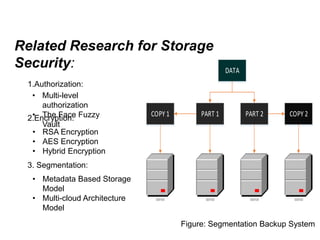
Related Research for Storage
Security:
1.Authorization:
2.Encryption:
3. Segmentation:
• Multi-level
authorization
• The Face Fuzzy
Vault
• RSA Encryption
• AES Encryption
• Hybrid Encryption
• Metadata Based Storage
Model
• Multi-cloud Architecture
Model
DATA
PART 1 PART 2
COPY 1 COPY 2
SERVER SERVER SERVER SERVER
Figure: Segmentation Backup System
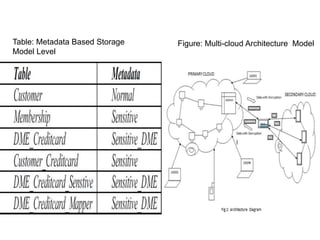
Figure: Multi-cloud Architecture Model
Table: Metadata Based Storage
Model Level

Cloud computing UNIT 2.1 presentation in

  • 1.
  • 2.
    Quick Survey • Doesanyone have a lot of files on their computer but dosen’t have the space to store them? • Do you worry about losing files? • Do you want your files to be secure and easily accessible?
  • 3.
    WHAT IS CLOUDSTORAGE?
  • 4.
    CLOUD STORAGE • Onlinefile storage centers or cloud storage providers allow you to safely upload your files to the Internet.
  • 5.
    Cloud Providers • Thereare various providers of cloud storage • Examples: – Apple iCloud – Dropbox – Google Drive – Amazon Cloud Drive – Microsoft SkyDrive
  • 6.
    Apple iCloud • Gives5GB of free storage (if you want more, you have to pay for it yearly) • Allows you to sync all your idevices to iCloud • Anything you have stored in the iCloud can be accessed from any idevice – For example, a document typed on an iPad and saved to the iCloud can be accessed from an iPhone.
  • 7.
    Dropbox • Gives you2GB of free storage • Allows you to get more free space by completing certain tasks • Available in the App Store and Android Market • For example, a file uploaded to Dropbox from a MacBook can be accessed from a Samsung phone.
  • 8.
    Google Drive • Givesyou 15GB of free storage • Requires a G-mail account to be accessed • Individuals can buy more storage for themselves (Google Apps for Business Administrators can buy storage licenses) • Allows you to type documents, make spreadsheets/presentations, etc., and then save them to your drive.
  • 9.
    Amazon Cloud Drive •Gives you 5GB of free storage (additional storage is available for $10 a year) • Available for download on Kindle Fire(HD) • A Save to CloudDrive app is available in the App Store for $1.99 and an Amazon Cloud Pictures is in the Android Market for free.
  • 10.
    Microsoft SkyDrive • Givesyou 7GB of free storage (additional storage can be bought) • Requires a Windows Live account to be accessed • Can be saved to a Windows computer as a mapped drive.
  • 11.
    Which One ShouldI Pick? • The cloud provider you pick should fulfill all your needs as the consumer • If you need a lot of space, choose a provider that allows you to get the space you need • If you don’t need a lot of space, choose a provider that you can use for storing files that don’t take up a lot of space.
  • 12.
    The Cloud Universe •There are tons of different cloud storage providers in the world today!!!
  • 13.
  • 14.
    The Need • Componentfailures normal – Due to clustered computing • Files are huge – By traditional standards (many TB) • Most mutations are mutations – Not random access overwrite • Co-Designing apps & file system • Typical: 1000 nodes & 300 TB
  • 15.
    Desiderata • Must monitor& recover from comp failures • Modest number of large files • Workload – Large streaming reads + small random reads – Many large sequential writes • Random access overwrites don’t need to be efficient • Need semantics for concurrent appends • High sustained bandwidth – More important than low latency
  • 16.
    Interface • Familiar – Create,delete, open, close, read, write • Novel(Special operations) – Snapshot • Create a coy of file or directory tree at Low cost – Record append • Allows clients to add information to an existing file without overwriting previously written data.
  • 17.
  • 18.
    Architecture • Store allfiles – In fixed-size chucks • 64 MB • 64 bit unique handle • Triple redundancy Chunk Server Chunk Server Chunk Server
  • 19.
    Architecture Master • Stores allmetadata – Namespace – Access-control information – Chunk locations – ‘Lease’ management • Heartbeats ensure that chunk servers alive • Having one master  global knowledge – Allows better placement / replication – Simplifies design
  • 20.
    Architecture Client Client Client Client • GFS codeimplements API • Cache only metadata
  • 21.
    Using fixed chunksize, translate filename & byte offset to chunk index. Send request to master
  • 22.
    Replies with chunkhandle & location of chunkserver replicas (including which is ‘primary’)
  • 23.
    Cache info using filename& chunk index as key
  • 24.
    Request data fromnearest chunkserver “chunkhandle & index into chunk”
  • 25.
    No need totalk more About this 64MB chunk Until cached info expires or file reopened
  • 26.
    Often initial requestasks about Sequence of chunks
  • 27.
    Metadata • Master storesthree types – File & chunk namespaces – Mapping from files  chunks – Location of chunk replicas • Stored in memory • Kept persistent thru logging
  • 28.
    Consistency Model Consistent =all clients see same data
  • 29.
    Consistency Model Defined =consistent + clients see full effect of mutation Key: all replicas must process chunk-mutation requests in same order
  • 30.
  • 31.
    Implications • Apps mustrely on appends, not overwrites • Must write records that – Self-validate – Self-identify • Typical uses – Single writer writes file from beginning to end, then renames file (or checkpoints along way) – Many writers concurrently append • At-least-once semantics ok • Reader deal with padding & duplicates
  • 32.
    Leases & MutationOrder • Objective – Ensure data consistent & defined – Minimize load on master • Master grants ‘lease’ to one replica – Called ‘primary’ chunkserver • Primary serializes all mutation requests – Communicates order to replicas
  • 33.
  • 34.
    Atomic Appends • Asin last slide, but… • Primary also checks to see if append spills over into new chunk – If so, pads old chunk to full extent – Tells secondary chunk-servers to do the same – Tells client to try append again on next chunk • Usually works because – max(append-size) < ¼ chunk-size [API rule] – (meanwhile other clients may be appending)
  • 35.
    Other Issues • Fastsnapshot • Master operation – Namespace management & locking – Replica placement & rebalancing – Garbage collection (deleted / stale files) – Detecting stale replicas
  • 36.
    Master Replication • Masterlog & checkpoints replicated • Outside monitor watches master livelihood – Starts new master process as needed • Shadow masters – Provide read-access when primary is down – Lag state of true master
  • 37.
    B. Ramamurthy Hadoop FileSystem 4/17/2024 37
  • 38.
    Reference • The HadoopDistributed File System: Architecture and Design by Apache Foundation Inc. 4/17/2024 38
  • 39.
    Basic Features: HDFS •Highly fault-tolerant • High throughput • Suitable for applications with large data sets • Streaming access to file system data • Can be built out of commodity hardware 4/17/2024 39
  • 40.
    Fault tolerance • Failureis the norm rather than exception • A HDFS instance may consist of thousands of server machines, each storing part of the file system’s data. • Since we have huge number of components and that each component has non-trivial probability of failure means that there is always some component that is non-functional. • Detection of faults and quick, automatic 4/17/2024 40
  • 41.
    Data Characteristics  Streamingdata access  Applications need streaming access to data  Batch processing rather than interactive user access.  Large data sets and files: gigabytes to terabytes size  High aggregate data bandwidth  Scale to hundreds of nodes in a cluster  Tens of millions of files in a single instance  Write-once-read-many: a file once created, written and closed need not be changed – this assumption simplifies coherency  A map-reduce application or web-crawler application fits perfectly with this model. 4/17/2024 41
  • 42.
  • 43.
  • 44.
    Namenode and Datanodes Master/slave architecture  HDFS cluster consists of a single Namenode, a master server that manages the file system namespace and regulates access to files by clients.  There are a number of DataNodes usually one per node in a cluster.  The DataNodes manage storage attached to the nodes that they run on.  HDFS exposes a file system namespace and allows user data to be stored in files.  A file is split into one or more blocks and set of blocks are stored in DataNodes.  DataNodes: serves read, write requests, performs block creation, deletion, and replication upon instruction from Namenode. 4/17/2024 44
  • 45.
    HDFS Architecture 4/17/2024 45 Namenode B replication Rack1Rack2 Client Blocks Datanodes Datanodes Client Write Read Metadata ops Metadata(Name, replicas..) (/home/foo/data,6. .. Block ops
  • 46.
    File system Namespace 4/17/202446 • Hierarchical file system with directories and files • Create, remove, move, rename etc. • Namenode maintains the file system • Any meta information changes to the file system recorded by the Namenode. • An application can specify the number of replicas of the file needed: replication factor of the file. This information is stored in the Namenode.
  • 47.
    Data Replication 4/17/2024 47 HDFS is designed to store very large files across machines in a large cluster.  Each file is a sequence of blocks.  All blocks in the file except the last are of the same size.  Blocks are replicated for fault tolerance.  Block size and replicas are configurable per file.  The Namenode receives a Heartbeat and a BlockReport from each DataNode in the cluster.  BlockReport contains all the blocks on a Datanode.
  • 48.
    Replica Placement 4/17/2024 48 The placement of the replicas is critical to HDFS reliability and performance.  Optimizing replica placement distinguishes HDFS from other distributed file systems.  Rack-aware replica placement:  Goal: improve reliability, availability and network bandwidth utilization  Research topic  Many racks, communication between racks are through switches.  Network bandwidth between machines on the same rack is greater than those in different racks.  Namenode determines the rack id for each DataNode.  Replicas are typically placed on unique racks  Simple but non-optimal  Writes are expensive  Replication factor is 3  Another research topic?  Replicas are placed: one on a node in a local rack, one on a different node in the local rack and one on a node in a different rack.  1/3 of the replica on a node, 2/3 on a rack and 1/3 distributed evenly across remaining racks.
  • 49.
    Replica Selection 4/17/2024 49 •Replica selection for READ operation: HDFS tries to minimize the bandwidth consumption and latency. • If there is a replica on the Reader node then that is preferred. • HDFS cluster may span multiple data centers: replica in the local data center is preferred over the remote one.
  • 50.
    Safemode Startup 4/17/2024 50 On startup Namenode enters Safemode.  Replication of data blocks do not occur in Safemode.  Each DataNode checks in with Heartbeat and BlockReport.  Namenode verifies that each block has acceptable number of replicas  After a configurable percentage of safely replicated blocks check in with the Namenode, Namenode exits Safemode.  It then makes the list of blocks that need to be replicated.  Namenode then proceeds to replicate these blocks to other Datanodes.
  • 51.
    Filesystem Metadata 4/17/2024 51 •The HDFS namespace is stored by Namenode. • Namenode uses a transaction log called the EditLog to record every change that occurs to the filesystem meta data. – For example, creating a new file. – Change replication factor of a file – EditLog is stored in the Namenode’s local filesystem • Entire filesystem namespace including
  • 52.
    Namenode 4/17/2024 52  Keepsimage of entire file system namespace and file Blockmap in memory.  4GB of local RAM is sufficient to support the above data structures that represent the huge number of files and directories.  When the Namenode starts up it gets the FsImage and Editlog from its local file system, update FsImage with EditLog information and then stores a copy of the FsImage on the filesytstem as a checkpoint.  Periodic checkpointing is done. So that the system can recover back to the last checkpointed state in case of a crash.
  • 53.
    Datanode 4/17/2024 53  ADatanode stores data in files in its local file system.  Datanode has no knowledge about HDFS filesystem  It stores each block of HDFS data in a separate file.  Datanode does not create all files in the same directory.  It uses heuristics to determine optimal number of files per directory and creates directories appropriately: Research issue?  When the filesystem starts up it generates a list of all HDFS blocks and send this report to Namenode: Blockreport.
  • 54.
  • 55.
    The Communication Protocol 4/17/202455  All HDFS communication protocols are layered on top of the TCP/IP protocol  A client establishes a connection to a configurable TCP port on the Namenode machine. It talks ClientProtocol with the Namenode.  The Datanodes talk to the Namenode using Datanode protocol.  RPC abstraction wraps both ClientProtocol and Datanode protocol.  Namenode is simply a server and never initiates a request; it only responds to RPC requests issued by DataNodes or clients.
  • 56.
  • 57.
    Objectives • Primary objectiveof HDFS is to store data reliably in the presence of failures. • Three common failures are: Namenode failure, Datanode failure and network partition. 4/17/2024 57
  • 58.
    DataNode failure and heartbeat •A network partition can cause a subset of Datanodes to lose connectivity with the Namenode. • Namenode detects this condition by the absence of a Heartbeat message. • Namenode marks Datanodes without Hearbeat and does not send any IO requests to them. • Any data registered to the failed Datanode is not available to the HDFS. 4/17/2024 58
  • 59.
    Re-replication • The necessityfor re-replication may arise due to: – A Datanode may become unavailable, – A replica may become corrupted, – A hard disk on a Datanode may fail, or – The replication factor on the block may be increased. 4/17/2024 59
  • 60.
    Cluster Rebalancing • HDFSarchitecture is compatible with data rebalancing schemes. • A scheme might move data from one Datanode to another if the free space on a Datanode falls below a certain threshold. • In the event of a sudden high demand for a particular file, a scheme might dynamically create additional replicas and rebalance other data in the cluster. 4/17/2024 60
  • 61.
    Data Integrity • Considera situation: a block of data fetched from Datanode arrives corrupted. • This corruption may occur because of faults in a storage device, network faults, or buggy software. • A HDFS client creates the checksum of every block of its file and stores it in hidden files in the HDFS namespace. • When a clients retrieves the contents of 4/17/2024 61
  • 62.
    Metadata Disk Failure •FsImage and EditLog are central data structures of HDFS. • A corruption of these files can cause a HDFS instance to be non-functional. • For this reason, a Namenode can be configured to maintain multiple copies of the FsImage and EditLog. • Multiple copies of the FsImage and EditLog files are updated synchronously. • Meta-data is not data-intensive. • The Namenode could be single point failure: automatic failover is NOT supported! Another research topic. 4/17/2024 62
  • 63.
  • 64.
    Data Blocks • HDFSsupport write-once-read-many with reads at streaming speeds. • A typical block size is 64MB (or even 128 MB). • A file is chopped into 64MB chunks and stored. 4/17/2024 64
  • 65.
    Staging • A clientrequest to create a file does not reach Namenode immediately. • HDFS client caches the data into a temporary file. When the data reached a HDFS block size the client contacts the Namenode. • Namenode inserts the filename into its hierarchy and allocates a data block for it. • The Namenode responds to the client 4/17/2024 65
  • 66.
    Staging (contd.) • Theclient sends a message that the file is closed. • Namenode proceeds to commit the file for creation operation into the persistent store. • If the Namenode dies before file is closed, the file is lost. • This client side caching is required to avoid network congestion; also it has precedence is AFS (Andrew file system). 4/17/2024 66
  • 67.
    Replication Pipelining • Whenthe client receives response from Namenode, it flushes its block in small pieces (4K) to the first replica, that in turn copies it to the next replica and so on. • Thus data is pipelined from Datanode to the next. 4/17/2024 67
  • 68.
  • 69.
    Application Programming Interface • HDFSprovides Java API for application to use. • Python access is also used in many applications. • A C language wrapper for Java API is also available. • A HTTP browser can be used to browse the files of a HDFS instance. 4/17/2024 69
  • 70.
    FS Shell, Adminand Browser Interface • HDFS organizes its data in files and directories. • It provides a command line interface called the FS shell that lets the user interact with data in the HDFS. • The syntax of the commands is similar to bash and csh. • Example: to create a directory /foodir /bin/hadoop dfs –mkdir /foodir • There is also DFSAdmin interface 4/17/2024 70
  • 71.
    Space Reclamation • Whena file is deleted by a client, HDFS renames file to a file in be the /trash directory for a configurable amount of time. • A client can request for an undelete in this allowed time. • After the specified time the file is deleted and the space is reclaimed. • When the replication factor is reduced, the Namenode selects excess replicas 4/17/2024 71
  • 72.
    Summary • We discussedthe features of the Hadoop File System, a peta-scale file system to handle big-data sets. • What discussed: Architecture, Protocol, API, etc. • Missing element: Implementation – The Hadoop file system (internals) – An implementation of an instance of the HDFS (for use by applications such as web crawlers). 4/17/2024 72
  • 73.
    BigTable: A Distributed StorageSystem for Structured Data Fay Chang, Jeffrey Dean, Sanjay Ghemawat, Wilson C. Hsieh, Deborah A. Wallach, Mike Burrows, Tushar Chandra, Andrew Fikes, Robert E. Gruber @ Google Presented by Richard Venutolo
  • 74.
    Introduction • BigTable isa distributed storage system for managing structured data. • Designed to scale to a very large size – Petabytes of data across thousands of servers • Used for many Google projects – Web indexing, Personalized Search, Google Earth, Google Analytics, Google Finance, … • Flexible, high-performance solution for all of Google’s products
  • 75.
    Motivation • Lots of(semi-)structured data at Google – URLs: • Contents, crawl metadata, links, anchors, pagerank, … – Per-user data: • User preference settings, recent queries/search results, … – Geographic locations: • Physical entities (shops, restaurants, etc.), roads, satellite image data, user annotations, … • Scale is large – Billions of URLs, many versions/page (~20K/version) – Hundreds of millions of users, thousands or q/sec – 100TB+ of satellite image data
  • 76.
    Why not justuse commercial DB? • Scale is too large for most commercial databases • Even if it weren’t, cost would be very high – Building internally means system can be applied across many projects for low incremental cost • Low-level storage optimizations help performance significantly – Much harder to do when running on top of a database layer
  • 77.
    Goals • Want asynchronousprocesses to be continuously updating different pieces of data – Want access to most current data at any time • Need to support: – Very high read/write rates (millions of ops per second) – Efficient scans over all or interesting subsets of data – Efficient joins of large one-to-one and one-to-many datasets • Often want to examine data changes over time – E.g. Contents of a web page over multiple crawls
  • 78.
    BigTable • Distributed multi-levelmap • Fault-tolerant, persistent • Scalable – Thousands of servers – Terabytes of in-memory data – Petabyte of disk-based data – Millions of reads/writes per second, efficient scans • Self-managing – Servers can be added/removed dynamically – Servers adjust to load imbalance
  • 79.
    Building Blocks • Buildingblocks: – Google File System (GFS): Raw storage – Scheduler: schedules jobs onto machines – Lock service: distributed lock manager – MapReduce: simplified large-scale data processing • BigTable uses of building blocks: – GFS: stores persistent data (SSTable file format for storage of data) – Scheduler: schedules jobs involved in BigTable serving – Lock service: master election, location bootstrapping – Map Reduce: often used to read/write BigTable data
  • 80.
    Basic Data Model •A BigTable is a sparse, distributed persistent multi-dimensional sorted map (row, column, timestamp) -> cell contents • Good match for most Google applications
  • 81.
    WebTable Example • Wantto keep copy of a large collection of web pages and related information • Use URLs as row keys • Various aspects of web page as column names • Store contents of web pages in the contents: column under the timestamps when they were fetched.
  • 82.
    Rows • Name isan arbitrary string – Access to data in a row is atomic – Row creation is implicit upon storing data • Rows ordered lexicographically – Rows close together lexicographically usually on one or a small number of machines
  • 83.
    Rows (cont.) Reads ofshort row ranges are efficient and typically require communication with a small number of machines. • Can exploit this property by selecting row keys so they get good locality for data access. • Example: math.gatech.edu, math.uga.edu, phys.gatech.edu, phys.uga.edu VS edu.gatech.math, edu.gatech.phys, edu.uga.math, edu.uga.phys
  • 84.
    Columns • Columns havetwo-level name structure: • family:optional_qualifier • Column family – Unit of access control – Has associated type information • Qualifier gives unbounded columns – Additional levels of indexing, if desired
  • 85.
    Timestamps • Used tostore different versions of data in a cell – New writes default to current time, but timestamps for writes can also be set explicitly by clients • Lookup options: – “Return most recent K values” – “Return all values in timestamp range (or all values)” • Column families can be marked w/ attributes: – “Only retain most recent K values in a cell” – “Keep values until they are older than K seconds”
  • 86.
    Implementation – ThreeMajor Components • Library linked into every client • One master server – Responsible for: • Assigning tablets to tablet servers • Detecting addition and expiration of tablet servers • Balancing tablet-server load • Garbage collection • Many tablet servers – Tablet servers handle read and write requests to its table – Splits tablets that have grown too large
  • 87.
    Implementation (cont.) • Clientdata doesn’t move through master server. Clients communicate directly with tablet servers for reads and writes. • Most clients never communicate with the master server, leaving it lightly loaded in practice.
  • 88.
    Tablets • Large tablesbroken into tablets at row boundaries – Tablet holds contiguous range of rows • Clients can often choose row keys to achieve locality – Aim for ~100MB to 200MB of data per tablet • Serving machine responsible for ~100 tablets – Fast recovery: • 100 machines each pick up 1 tablet for failed machine – Fine-grained load balancing: • Migrate tablets away from overloaded machine • Master makes load-balancing decisions
  • 89.
    Tablet Location • Sincetablets move around from server to server, given a row, how do clients find the right machine? – Need to find tablet whose row range covers the target row
  • 90.
    Tablet Assignment • Eachtablet is assigned to one tablet server at a time. • Master server keeps track of the set of live tablet servers and current assignments of tablets to servers. Also keeps track of unassigned tablets. • When a tablet is unassigned, master assigns the tablet to an tablet server with sufficient room.
  • 91.
    API • Metadata operations –Create/delete tables, column families, change metadata • Writes (atomic) – Set(): write cells in a row – DeleteCells(): delete cells in a row – DeleteRow(): delete all cells in a row • Reads – Scanner: read arbitrary cells in a bigtable • Each row read is atomic • Can restrict returned rows to a particular range • Can ask for just data from 1 row, all rows, etc. • Can ask for all columns, just certain column families, or specific columns
  • 92.
    Refinements: Locality Groups •Can group multiple column families into a locality group – Separate SSTable is created for each locality group in each tablet. • Segregating columns families that are not typically accessed together enables more efficient reads. – In WebTable, page metadata can be in one group and contents of the page in another group.
  • 93.
    Refinements: Compression • Manyopportunities for compression – Similar values in the same row/column at different timestamps – Similar values in different columns – Similar values across adjacent rows • Two-pass custom compressions scheme – First pass: compress long common strings across a large window – Second pass: look for repetitions in small window • Speed emphasized, but good space reduction (10- to-1)
  • 94.
    Refinements: Bloom Filters •Read operation has to read from disk when desired SSTable isn’t in memory • Reduce number of accesses by specifying a Bloom filter. – Allows us ask if an SSTable might contain data for a specified row/column pair. – Small amount of memory for Bloom filters drastically reduces the number of disk seeks for read operations – Use implies that most lookups for non-existent rows or columns do not need to touch disk
  • 95.
  • 96.
    CS525: Special Topicsin DBs Large-Scale Data Management HBase Spring 2013 WPI, Mohamed Eltabakh 96
  • 97.
    HBase: Overview • HBaseis a distributed column-oriented data store built on top of HDFS • HBase is an Apache open source project whose goal is to provide storage for the Hadoop Distributed Computing • Data is logically organized into tables, rows and columns 97
  • 98.
    HBase: Part ofHadoop’s Ecosystem 98 HBase is built on top of HDFS HBase files are internally stored in HDFS
  • 99.
    HBase vs. HDFS •Both are distributed systems that scale to hundreds or thousands of nodes • HDFS is good for batch processing (scans over big files) – Not good for record lookup – Not good for incremental addition of small batches – Not good for updates 99
  • 100.
    HBase vs. HDFS(Cont’d) • HBase is designed to efficiently address the above points – Fast record lookup – Support for record-level insertion – Support for updates (not in place) • HBase updates are done by creating new versions of values 100
  • 101.
    HBase vs. HDFS(Cont’d) 101 If application has neither random reads or writes  Stick to HDFS
  • 102.
  • 103.
    HBase Data Model •HBase is based on Google’s Bigtable model – Key-Value pairs 103 Row key Column Family value TimeStamp
  • 104.
  • 105.
    HBase: Keys andColumn Families 105 Each row has a Key Each record is divided into Column Families Each column family consists of one or more Columns
  • 106.
    • Key – Bytearray – Serves as the primary key for the table – Indexed far fast lookup • Column Family – Has a name (string) – Contains one or more related columns • Column – Belongs to one column family – Included inside the row • familyName:columnNa me 106 Row key Time Stamp Column “content s:” Column “anchor:” “com.apac he.ww w” t12 “<html> …” t11 “<html> …” t10 “anchor:apache .com” “APACH E” “com.cnn.w ww” t15 “anchor:cnnsi.co m” “CNN” t13 “anchor:my.look. ca” “CNN.co m” t6 “<html> …” t5 “<html> …” t3 “<html> …” Column family named “Contents” Column family named “anchor” Column named “apache.com”
  • 107.
    • Version Number –Unique within each key – By default System’s timestamp – Data type is Long • Value (Cell) – Byte array 107 Row key Time Stamp Column “content s:” Column “anchor:” “com.apac he.ww w” t12 “<html> …” t11 “<html> …” t10 “anchor:apache .com” “APACH E” “com.cnn.w ww” t15 “anchor:cnnsi.co m” “CNN” t13 “anchor:my.look. ca” “CNN.co m” t6 “<html> …” t5 “<html> …” t3 “<html> …” Version number for each row value
  • 108.
    Notes on DataModel • HBase schema consists of several Tables • Each table consists of a set of Column Families – Columns are not part of the schema • HBase has Dynamic Columns – Because column names are encoded inside the cells – Different cells can have different columns 108 “Roles” column family has different columns in different cells
  • 109.
    Notes on DataModel (Cont’d) • The version number can be user-supplied – Even does not have to be inserted in increasing order – Version number are unique within each key • Table can be very sparse – Many cells are empty • Keys are indexed as the primary key Has two columns [cnnsi.com & my.look.ca]
  • 110.
  • 111.
    HBase Physical Model •Each column family is stored in a separate file (called HTables) • Key & Version numbers are replicated with each column family • Empty cells are not stored 111 HBase maintains a multi- level index on values: <key, column family, column name, timestamp>
  • 112.
  • 113.
  • 114.
    HBase Regions • EachHTable (column family) is partitioned horizontally into regions – Regions are counterpart to HDFS blocks 114 Each will be one region
  • 115.
  • 116.
    Three Major Components 116 •The HBaseMaster – One master • The HRegionServer – Many region servers • The HBase client
  • 117.
    HBase Components • Region –A subset of a table’s rows, like horizontal range partitioning – Automatically done • RegionServer (many slaves) – Manages data regions – Serves data for reads and writes (using a log) • Master – Responsible for coordinating the slaves – Assigns regions, detects failures – Admin functions 117
  • 118.
  • 119.
    ZooKeeper • HBase dependson ZooKeeper • By default HBase manages the ZooKeeper instance – E.g., starts and stops ZooKeeper • HMaster and HRegionServers register themselves with ZooKeeper 119
  • 120.
    Creating a Table HBaseAdminadmin= new HBaseAdmin(config); HColumnDescriptor []column; column= new HColumnDescriptor[2]; column[0]=new HColumnDescriptor("columnFamily1:"); column[1]=new HColumnDescriptor("columnFamily2:"); HTableDescriptor desc= new HTableDescriptor(Bytes.toBytes("MyTable")); desc.addFamily(column[0]); desc.addFamily(column[1]); admin.createTable(desc); 120
  • 121.
    Operations On Regions:Get() • Given a key  return corresponding record • For each value return the highest version 121 • Can control the number of versions you want
  • 122.
  • 123.
    Get() Row key Time Stamp Column “anchor:” “com.apache.www” t12 t11 t10“anchor:apache.com” “APACHE” “com.cnn.www” t9 “anchor:cnnsi.com” “CNN” t8 “anchor:my.look.ca” “CNN.com” t6 t5 t3 Select value from table where key=‘com.apache.www’ AND label=‘anchor:apache.com’
  • 124.
    Scan() Select valuefrom table where anchor=‘cnnsi.com’ Row key Time Stamp Column “anchor:” “com.apache.www” t12 t11 t10 “anchor:apache.com” “APACHE” “com.cnn.www” t9 “anchor:cnnsi.com” “CNN” t8 “anchor:my.look.ca” “CNN.com” t6 t5 t3
  • 125.
    Operations On Regions:Put() • Insert a new record (with a new key), Or • Insert a record for an existing key 125 Implicit version number (timestamp) Explicit version number
  • 126.
    Operations On Regions:Delete() • Marking table cells as deleted • Multiple levels – Can mark an entire column family as deleted – Can make all column families of a given row as deleted 126 • All operations are logged by the RegionServers • The log is flushed periodically
  • 127.
    HBase: Joins • HBasedoes not support joins • Can be done in the application layer – Using scan() and get() operations 127
  • 128.
    Altering a Table 128 Disablethe table before changing the schema
  • 129.
  • 130.
  • 131.
  • 132.
  • 133.
    When to useHBase 133
  • 134.
    Cloud Storage –A look at Amazon’s Dyanmo A presentation that look’s at Amazon’s Dynamo service (based on a research paper published by Amazon.com) as well as related cloud storage implementations
  • 135.
    The Traditional • CloudData Services are traditionally oriented around Relational Database systems – Oracle, Microsoft SQL Server and even MySQL have traditionally powered enterprise and online data clouds – Clustered - Traditional Enterprise RDBMS provide the ability to cluster and replicate data over multiple servers – providing reliability – Highly Available – Provide Synchronization (“Always Consistent”), Load-Balancing and High- Availability features to provide nearly 100% Service Uptime – Structured Querying – Allow for complex data models and structured querying – It is possible to off-load much of data processing and manipulation to the back-end database
  • 136.
    The Traditional • However,Traditional RDBMS clouds are: EXPENSIVE! To maintain, license and store large amounts of data • The service guarantees of traditional enterprise relational databases like Oracle, put high overheads on the cloud • Complex data models make the cloud more expensive to maintain, update and keep synchronized • Load distribution often requires expensive networking equipment • To maintain the “elasticity” of the cloud, often requires expensive upgrades to the network
  • 137.
    The Solution • Downgradesome of the service guarantees of traditional RDBMS – Replace the highly complex data models Oracle and SQL Server offer, with a simpler one – This means classifying service data models based on the complexity of the data model they may required – Replace the “Always Consistent” guarantee synchronization model with an “Eventually Consistent” model – This means classifying services based on how “updated” its data set must be Redesign or distinguish between services that require a simpler data model and lower expectations on consistency. We could then offer something different from traditional RDBMS!
  • 138.
    The Solution • Amazon’sDynamo – Used by Amazon’s EC2 Cloud Hosting Service. Powers their Elastic Storage Service called S2 as well as their E-commerce platform Offers a simple Primary-key based data model. Stores vast amounts of information on distributed, low-cost virtualized nodes • Google’s BigTable – Google’s principle data cloud, for their services – Uses a more complex column-family data model compared to Dynamo, yet much simpler than traditional RMDBS Google’s underlying file-system provides the distributed architecture on low-cost nodes • Facebook’s Cassandra – Facebook’s principle data cloud, for their services. This project was recently open-sourced. Provides a data-model similar to Google’s BigTable, but the distributed characteristics of Amazon’s Dynamo
  • 139.
    Dynamo - Motivation •Build a distributed storage system: – Scale – Simple: key-value – Highly available – Guarantee Service Level Agreements (SLA)
  • 140.
    System Assumptions andRequirements • Query Model: simple read and write operations to a data item that is uniquely identified by a key. • ACID Properties: Atomicity, Consistency, Isolation, Durability. • Efficiency: latency requirements which are in general measured at the 99.9th percentile of the distribution. • Other Assumptions: operation environment is assumed to be non-hostile and there are no security related requirements such as authentication and authorization.
  • 141.
    Service Level Agreements(SLA) • Application can deliver its functionality in abounded time: Every dependency in the platform needs to deliver its functionality with even tighter bounds. • Example: service guaranteeing that it will provide a response within 300ms for 99.9% of its requests for a peak client load of 500 requests per second. Service-oriented architecture of Amazon’s platform
  • 142.
    Design Consideration • Sacrificestrong consistency for availability • Conflict resolution is executed during read instead of write, i.e. “always writeable”. • Other principles: – Incremental scalability. – Symmetry. – Decentralization. – Heterogeneity.
  • 143.
    Summary of techniquesused in Dynamo and their advantages Problem Technique Advantage Partitioning Consistent Hashing Incremental Scalability High Availability for writes Vector clocks with reconciliation during reads Version size is decoupled from update rates. Handling temporary failures Sloppy Quorum and hinted handoff Provides high availability and durability guarantee when some of the replicas are not available. Recovering from permanent failures Anti-entropy using Merkle trees Synchronizes divergent replicas in the background. Membership and failure detection Gossip-based membership protocol and failure detection. Preserves symmetry and avoids having a centralized registry for storing membership and node liveness information.
  • 144.
    Partition Algorithm • Consistenthashing: the output range of a hash function is treated as a fixed circular space or “ring”. • ”Virtual Nodes”: Each node can be responsible for more than one virtual node.
  • 145.
    Advantages of usingvirtual nodes • If a node becomes unavailable the load handled by this node is evenly dispersed across the remaining available nodes. • When a node becomes available again, the newly available node accepts a roughly equivalent amount of load from each of the other available nodes. • The number of virtual nodes that a node is responsible can decided based on its capacity, accounting for heterogeneity in the physical infrastructure.
  • 146.
    Replication • Each dataitem is replicated at N hosts. • “preference list”: The list of nodes that is responsible for storing a particular key.
  • 147.
    Data Versioning • Aput() call may return to its caller before the update has been applied at all the replicas • A get() call may return many versions of the same object. • Challenge: an object having distinct version sub-histories, which the system will need to reconcile in the future. • Solution: uses vector clocks in order to capture causality between different versions of the same object.
  • 148.
    Vector Clock • Avector clock is a list of (node, counter) pairs. • Every version of every object is associated with one vector clock. • If the counters on the first object’s clock are less-than-or-equal to all of the nodes in the second clock, then the first is an ancestor of the second and can be forgotten.
  • 149.
  • 150.
    Execution of get() and put () operations 1. Route its request through a generic load balancer that will select a node based on load information. 2. Use a partition-aware client library that routes requests directly to the appropriate coordinator nodes.
  • 151.
    Sloppy Quorum • R/Wis the minimum number of nodes that must participate in a successful read/write operation. • Setting R + W > N yields a quorum-like system. • In this model, the latency of a get (or put) operation is dictated by the slowest of the R (or W) replicas. For this reason, R and W are usually configured to be less than N, to provide better latency.
  • 152.
    Hinted handoff • AssumeN = 3. When A is temporarily down or unreachable during a write, send replica to D. • D is hinted that the replica is belong to A and it will deliver to A when A is recovered. • Again: “always writeable”
  • 153.
    Other techniques • Replicasynchronization: – Merkle hash tree. • Membership and Failure Detection: – Gossip
  • 154.
    Implementation • Java • Localpersistence component allows for different storage engines to be plugged in: – Berkeley Database (BDB) Transactional Data Store: object of tens of kilobytes – MySQL: object of > tens of kilobytes – BDB Java Edition, etc.
  • 155.
  • 156.
    Cloud Computing Advantages: •Security •Privacy Disadvantages : • Backupand Recovery • Almost Unlimited Storage • Efficiency and Performance Increasing
  • 157.
    Cloud Computing Storage SecurityIssues: 1.Traditional Security problems 2. Law Issue 3. Third party Issue
  • 158.
    Related Research forStorage Security: 1.Authorization: 2.Encryption: 3. Segmentation: • Multi-level authorization • The Face Fuzzy Vault • RSA Encryption • AES Encryption • Hybrid Encryption • Metadata Based Storage Model • Multi-cloud Architecture Model DATA PART 1 PART 2 COPY 1 COPY 2 SERVER SERVER SERVER SERVER Figure: Segmentation Backup System
  • 159.
    Figure: Multi-cloud ArchitectureModel Table: Metadata Based Storage Model Level