1. Tasks to be undertaken are properly identified
LESSON 2: PERFORM
MENSURATION AND
CALCULATION
LO2. CARRY OUT MEASUREMENTS AND CALCULATION
1. Calculation needed to complete work tasks are performed
using the four fundamentals operations (addition,
subtractions, multiplication and division)
2. Numerical computation is self-checked and corrected for
accuracy
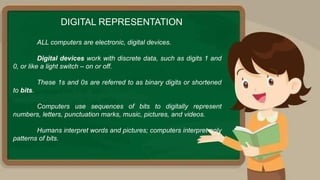
ALL computers are electronic, digital devices.
Digital devices work with discrete data, such as digits 1 and
0, or like a light switch – on or off.
These 1s and 0s are referred to as binary digits or shortened
to bits.
Computers use sequences of bits to digitally represent
numbers, letters, punctuation marks, music, pictures, and videos.
Humans interpret words and pictures; computers interpret only
patterns of bits.
DIGITAL REPRESENTATION
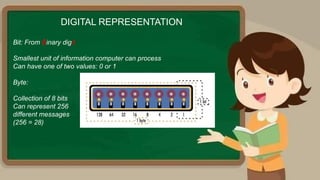
Bit: From Binary digit
Smallest unit of information computer can process
Can have one of two values: 0 or 1
Byte:
Collection of 8 bits
Can represent 256
different messages
(256 = 28)
DIGITAL REPRESENTATION
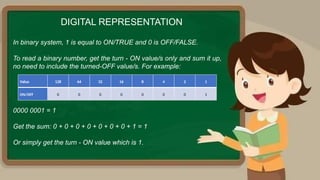
In binary system, 1 is equal to ON/TRUE and 0 is OFF/FALSE.
To read a binary number, get the turn - ON value/s only and sum it up,
no need to include the turned-OFF value/s. For example:
DIGITAL REPRESENTATION
Value 128 64 32 16 8 4 2 1
ON/OFF 0 0 0 0 0 0 0 1
0000 0001 = 1
Get the sum: 0 + 0 + 0 + 0 + 0 + 0 + 0 + 1 = 1
Or simply get the turn - ON value which is 1.
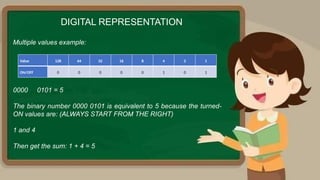
Multiple values example:
DIGITAL REPRESENTATION
0000 0101 = 5
The binary number 0000 0101 is equivalent to 5 because the turned-
ON values are: (ALWAYS START FROM THE RIGHT)
1 and 4
Then get the sum: 1 + 4 = 5
Value 128 64 32 16 8 4 2 1
ON/OFF 0 0 0 0 0 1 0 1
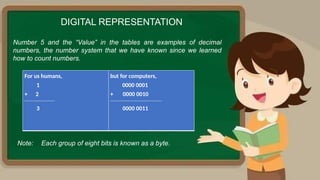
Number 5 and the “Value” in the tables are examples of decimal
numbers, the number system that we have known since we learned
how to count numbers.
DIGITAL REPRESENTATION
Note: Each group of eight bits is known as a byte.
For us humans,
1
+ 2
----------------------------
3
but for computers,
0000 0001
+ 0000 0010
------------------------------------------------
0000 0011
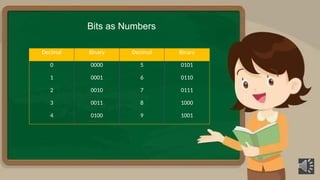
Bits as Numbers
Decimal Binary Decimal Binary
0 0000 5 0101
1 0001 6 0110
2 0010 7 0111
3 0011 8 1000
4 0100 9 1001
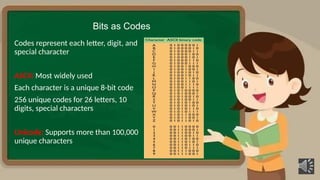
Bits as Codes
Codes represent each letter, digit, and
special character
ASCII: Most widely used
Each character is a unique 8-­
bit code
256 unique codes for 26 letters, 10
digits, special characters
Unicode: Supports more than 100,000
unique characters
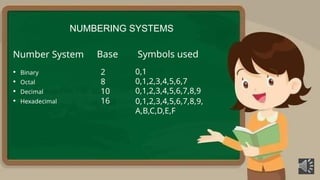
NUMBERING SYSTEMS
Number System
• Binary
• Octal
• Decimal
• Hexadecimal
2
8
10
16
Base Symbols used
0,1
0,1,2,3,4,5,6,7
0,1,2,3,4,5,6,7,8,9
0,1,2,3,4,5,6,7,8,9,
A,B,C,D,E,F
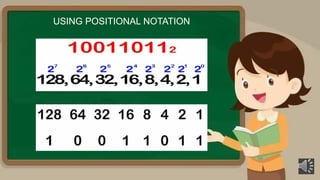
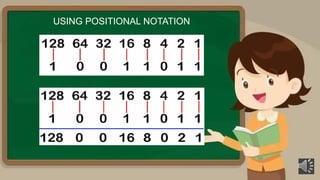
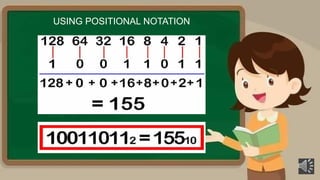
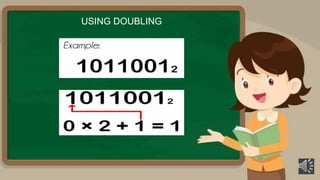
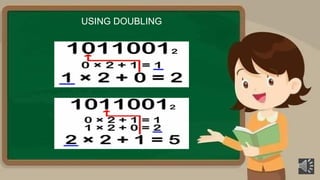
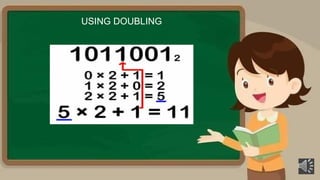
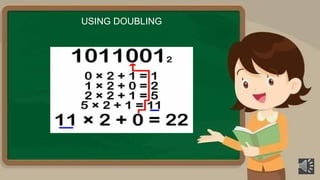
USING POSITIONAL NOTATION
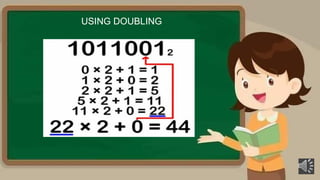
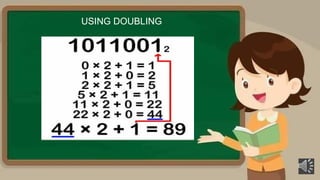
USING DOUBLING
USING DOUBLING
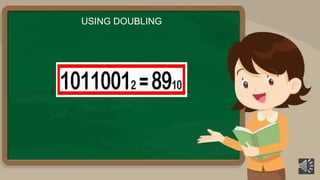
USING DOUBLING
USING DOUBLING
USING DOUBLING
USING DOUBLING
USING DOUBLING
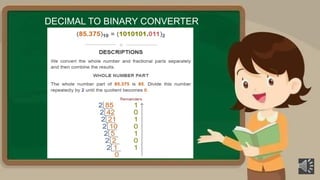
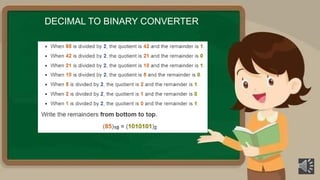
DECIMAL TO BINARY CONVERTER
EVALUATION…….
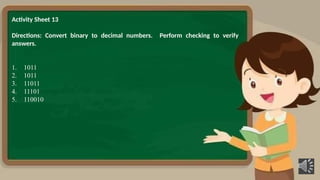
Activity Sheet 13
Directions: Convert binary to decimal numbers. Perform checking to verify
answers.
1. 1011
2. 1011
3. 11011
4. 11101
5. 110010
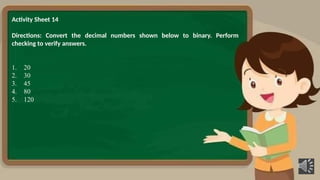
Activity Sheet 14
Directions: Convert the decimal numbers shown below to binary. Perform
checking to verify answers.
1. 20
2. 30
3. 45
4. 80
5. 120
References
• K to 12 TLE Information and Communications Technology – Computer Hardware
Servicing Curriculum Guide December 2013
• K to 12 – Technology and Livelihood Education - COMPUTER HARDWARE SERVICING LM
• Department of Education – Region X - TLE – CSS7&8 SLM
• Department of Education – SOCCSKSARGEN Region - TLE – CSS7&8 SLM
• Department of Education – SDO Manila - TLE – CSS7&8 SLM
Lesson 2 - PERFORM MENSURATION AND CALCULATION - LO2 binary.pptx

  • 1.
    1. Tasks tobe undertaken are properly identified
  • 2.
    LESSON 2: PERFORM MENSURATIONAND CALCULATION LO2. CARRY OUT MEASUREMENTS AND CALCULATION 1. Calculation needed to complete work tasks are performed using the four fundamentals operations (addition, subtractions, multiplication and division) 2. Numerical computation is self-checked and corrected for accuracy
  • 3.
    ALL computers areelectronic, digital devices. Digital devices work with discrete data, such as digits 1 and 0, or like a light switch – on or off. These 1s and 0s are referred to as binary digits or shortened to bits. Computers use sequences of bits to digitally represent numbers, letters, punctuation marks, music, pictures, and videos. Humans interpret words and pictures; computers interpret only patterns of bits. DIGITAL REPRESENTATION
  • 4.
    Bit: From Binarydigit Smallest unit of information computer can process Can have one of two values: 0 or 1 Byte: Collection of 8 bits Can represent 256 different messages (256 = 28) DIGITAL REPRESENTATION
  • 5.
    In binary system,1 is equal to ON/TRUE and 0 is OFF/FALSE. To read a binary number, get the turn - ON value/s only and sum it up, no need to include the turned-OFF value/s. For example: DIGITAL REPRESENTATION Value 128 64 32 16 8 4 2 1 ON/OFF 0 0 0 0 0 0 0 1 0000 0001 = 1 Get the sum: 0 + 0 + 0 + 0 + 0 + 0 + 0 + 1 = 1 Or simply get the turn - ON value which is 1.
  • 6.
    Multiple values example: DIGITALREPRESENTATION 0000 0101 = 5 The binary number 0000 0101 is equivalent to 5 because the turned- ON values are: (ALWAYS START FROM THE RIGHT) 1 and 4 Then get the sum: 1 + 4 = 5 Value 128 64 32 16 8 4 2 1 ON/OFF 0 0 0 0 0 1 0 1
  • 7.
    Number 5 andthe “Value” in the tables are examples of decimal numbers, the number system that we have known since we learned how to count numbers. DIGITAL REPRESENTATION Note: Each group of eight bits is known as a byte. For us humans, 1 + 2 ---------------------------- 3 but for computers, 0000 0001 + 0000 0010 ------------------------------------------------ 0000 0011
  • 9.
    Bits as Numbers DecimalBinary Decimal Binary 0 0000 5 0101 1 0001 6 0110 2 0010 7 0111 3 0011 8 1000 4 0100 9 1001
  • 10.
    Bits as Codes Codesrepresent each letter, digit, and special character ASCII: Most widely used Each character is a unique 8-­ bit code 256 unique codes for 26 letters, 10 digits, special characters Unicode: Supports more than 100,000 unique characters
  • 11.
    NUMBERING SYSTEMS Number System •Binary • Octal • Decimal • Hexadecimal 2 8 10 16 Base Symbols used 0,1 0,1,2,3,4,5,6,7 0,1,2,3,4,5,6,7,8,9 0,1,2,3,4,5,6,7,8,9, A,B,C,D,E,F
  • 12.
  • 13.
  • 14.
  • 15.
  • 16.
  • 17.
  • 18.
  • 19.
  • 20.
  • 21.
  • 22.
  • 23.
  • 24.
  • 25.
    Activity Sheet 13 Directions:Convert binary to decimal numbers. Perform checking to verify answers. 1. 1011 2. 1011 3. 11011 4. 11101 5. 110010
  • 26.
    Activity Sheet 14 Directions:Convert the decimal numbers shown below to binary. Perform checking to verify answers. 1. 20 2. 30 3. 45 4. 80 5. 120
  • 27.
    References • K to12 TLE Information and Communications Technology – Computer Hardware Servicing Curriculum Guide December 2013 • K to 12 – Technology and Livelihood Education - COMPUTER HARDWARE SERVICING LM • Department of Education – Region X - TLE – CSS7&8 SLM • Department of Education – SOCCSKSARGEN Region - TLE – CSS7&8 SLM • Department of Education – SDO Manila - TLE – CSS7&8 SLM