Hierarchical Retrieval
Objectives After completing this lesson, you should be able  to do the following: Interpret the concept of a hierarchical query Create a tree-structured report Format hierarchical data Exclude branches from the tree structure
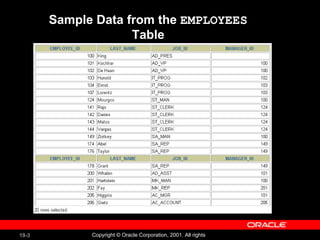
Sample Data from the  EMPLOYEES  Table
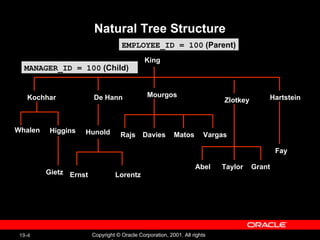
Natural Tree Structure De Hann King Hunold EMPLOYEE_ID = 100  (Parent) MANAGER_ID = 100  (Child) Whalen Kochhar Higgins Mourgos Zlotkey Rajs Davies Matos Gietz Ernst Lorentz Hartstein Fay  Abel Taylor Grant Vargas
Hierarchical Queries WHERE   condition : expr comparison_operator expr SELECT [LEVEL],  column ,  expr ... FROM  table [WHERE  condition(s) ] [START WITH  condition(s) ] [CONNECT BY PRIOR  condition(s) ] ;
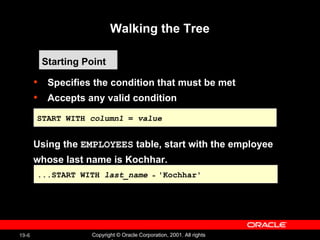
Walking the Tree Specifies the condition that must be met Accepts any valid condition Using the  EMPLOYEES  table, start with the employee  whose last name is Kochhar. Starting Point ...START WITH  last_name   =  'Kochhar' START WITH  column1  =  value
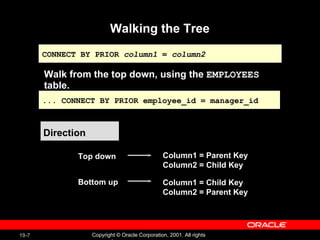
Walking the Tree Direction Top down  Column1 = Parent Key Column2 = Child Key Bottom up  Column1 = Child Key Column2 = Parent Key Walk from the top down, using the  EMPLOYEES  table. CONNECT BY PRIOR  column1  =  column2 ... CONNECT BY PRIOR employee_id = manager_id
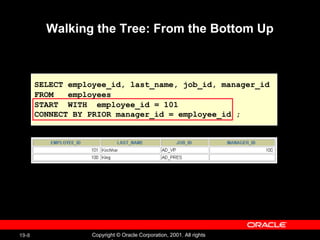
Walking the Tree: From the Bottom Up SELECT employee_id, last_name, job_id, manager_id FROM  employees START  WITH  employee_id = 101 CONNECT BY PRIOR manager_id = employee_id ;
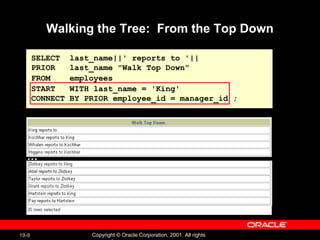
Walking the Tree:  From the Top Down SELECT  last_name||' reports to '||  PRIOR  last_name "Walk Top Down" FROM  employees START  WITH last_name = 'King' CONNECT BY PRIOR employee_id = manager_id ; …
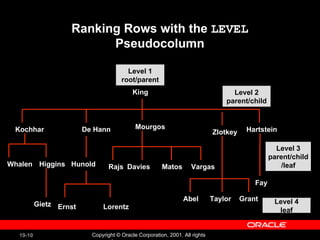
Ranking Rows with the  LEVEL  Pseudocolumn De Hann King Hunold Whalen Kochhar Higgins Mourgos Zlotkey Rajs Davies Matos Gietz Ernst Lorentz Hartstein Fay  Abel Taylor Grant Vargas Level 1 root/parent Level 2 parent/child Level 3 parent/child /leaf Level 4 leaf
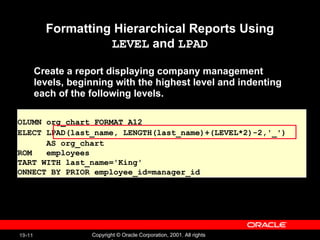
Formatting Hierarchical Reports Using  LEVEL  and  LPAD Create a report displaying company management  levels, beginning with the highest level and indenting  each of the following levels. COLUMN org_chart FORMAT A12 SELECT LPAD(last_name, LENGTH(last_name)+(LEVEL*2)-2,'_')  AS org_chart FROM  employees  START WITH last_name='King'  CONNECT BY PRIOR employee_id=manager_id
Hidden Slide
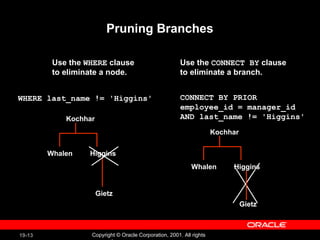
Pruning Branches Use the  WHERE  clause  to eliminate a node. Use the  CONNECT BY  clause to eliminate a branch. WHERE last_name != 'Higgins' CONNECT BY PRIOR  employee_id = manager_id  AND last_name != 'Higgins' Kochhar Higgins Gietz Whalen Kochhar Higgins Whalen Gietz
Summary In this lesson, you should have learned the following:  You can use hierarchical queries to view a hierarchical relationship between rows in a table. You specify the direction and starting point of the query.  You can eliminate nodes or branches by pruning.
Practice 19 Overview This practice covers the following topics: Distinguishing hierarchical queries from nonhierarchical queries Walking through a tree Producing an indented report by using the  LEVEL  pseudocolumn Pruning the tree structure Sorting the output
Hidden Slide
Hidden Slide
Hidden Slide

Les19

  • 1.
  • 2.
    Objectives After completingthis lesson, you should be able to do the following: Interpret the concept of a hierarchical query Create a tree-structured report Format hierarchical data Exclude branches from the tree structure
  • 3.
    Sample Data fromthe EMPLOYEES Table
  • 4.
    Natural Tree StructureDe Hann King Hunold EMPLOYEE_ID = 100 (Parent) MANAGER_ID = 100 (Child) Whalen Kochhar Higgins Mourgos Zlotkey Rajs Davies Matos Gietz Ernst Lorentz Hartstein Fay Abel Taylor Grant Vargas
  • 5.
    Hierarchical Queries WHERE condition : expr comparison_operator expr SELECT [LEVEL], column , expr ... FROM table [WHERE condition(s) ] [START WITH condition(s) ] [CONNECT BY PRIOR condition(s) ] ;
  • 6.
    Walking the TreeSpecifies the condition that must be met Accepts any valid condition Using the EMPLOYEES table, start with the employee whose last name is Kochhar. Starting Point ...START WITH last_name = 'Kochhar' START WITH column1 = value
  • 7.
    Walking the TreeDirection Top down Column1 = Parent Key Column2 = Child Key Bottom up Column1 = Child Key Column2 = Parent Key Walk from the top down, using the EMPLOYEES table. CONNECT BY PRIOR column1 = column2 ... CONNECT BY PRIOR employee_id = manager_id
  • 8.
    Walking the Tree:From the Bottom Up SELECT employee_id, last_name, job_id, manager_id FROM employees START WITH employee_id = 101 CONNECT BY PRIOR manager_id = employee_id ;
  • 9.
    Walking the Tree: From the Top Down SELECT last_name||' reports to '|| PRIOR last_name "Walk Top Down" FROM employees START WITH last_name = 'King' CONNECT BY PRIOR employee_id = manager_id ; …
  • 10.
    Ranking Rows withthe LEVEL Pseudocolumn De Hann King Hunold Whalen Kochhar Higgins Mourgos Zlotkey Rajs Davies Matos Gietz Ernst Lorentz Hartstein Fay Abel Taylor Grant Vargas Level 1 root/parent Level 2 parent/child Level 3 parent/child /leaf Level 4 leaf
  • 11.
    Formatting Hierarchical ReportsUsing LEVEL and LPAD Create a report displaying company management levels, beginning with the highest level and indenting each of the following levels. COLUMN org_chart FORMAT A12 SELECT LPAD(last_name, LENGTH(last_name)+(LEVEL*2)-2,'_') AS org_chart FROM employees START WITH last_name='King' CONNECT BY PRIOR employee_id=manager_id
  • 12.
  • 13.
    Pruning Branches Usethe WHERE clause to eliminate a node. Use the CONNECT BY clause to eliminate a branch. WHERE last_name != 'Higgins' CONNECT BY PRIOR employee_id = manager_id AND last_name != 'Higgins' Kochhar Higgins Gietz Whalen Kochhar Higgins Whalen Gietz
  • 14.
    Summary In thislesson, you should have learned the following: You can use hierarchical queries to view a hierarchical relationship between rows in a table. You specify the direction and starting point of the query. You can eliminate nodes or branches by pruning.
  • 15.
    Practice 19 OverviewThis practice covers the following topics: Distinguishing hierarchical queries from nonhierarchical queries Walking through a tree Producing an indented report by using the LEVEL pseudocolumn Pruning the tree structure Sorting the output
  • 16.
  • 17.
  • 18.

Editor's Notes

  • #2 Schedule: Timing Topic 30 minutes Lecture 20 minutes Practice 50 minutes Total