Advanced Subqueries
Objectives After completing this lesson, you should be able  to do the following: Write a multiple-column subquery Describe and explain the behavior of subqueries when null values are retrieved Write a subquery in a  FROM  clause Use scalar subqueries in SQL Describe the types of problems that can be solved with correlated subqueries Write correlated subqueries Update and delete rows using correlated subqueries Use the  EXISTS  and  NOT EXISTS  operators Use the  WITH  clause
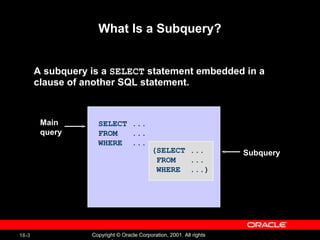
What Is a Subquery? A subquery is a  SELECT  statement embedded in a  clause of another SQL statement. SELECT ...  FROM  ... WHERE  ... (SELECT ... FROM  ... WHERE  ...) Main query Subquery
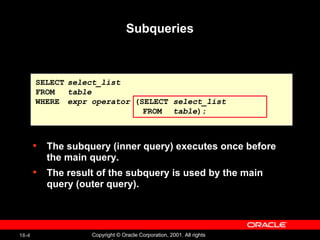
Subqueries The subquery (inner query) executes once before the main query. The result of the subquery is used by the main query (outer query). SELECT select_list FROM table WHERE expr operator  (SELECT  select_list   FROM   table );
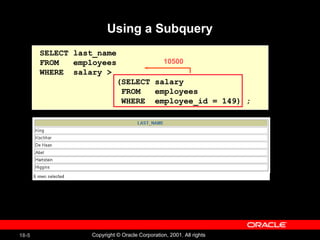
Using a Subquery SELECT last_name FROM  employees WHERE  salary >  (SELECT salary FROM  employees WHERE  employee_id = 149) ; 10500
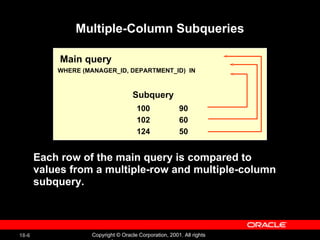
Multiple-Column Subqueries Main query WHERE (MANAGER_ID, DEPARTMENT_ID)  IN Subquery 100  90 102  60 124  50 Each row of the main query is compared to values from a multiple-row and multiple-column subquery.
Column Comparisons Column comparisons in a multiple-column subquery  can be: Pairwise comparisons Nonpairwise comparisons
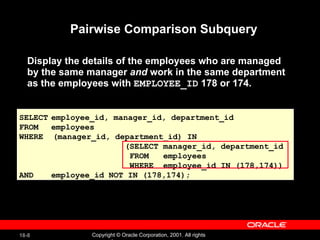
Pairwise Comparison Subquery Display the details of the employees who are managed by the same manager  and  work in the same department as the employees with  EMPLOYEE_ID  178 or 174. SELECT employee_id, manager_id, department_id FROM employees WHERE  (manager_id, department_id) IN (SELECT manager_id, department_id FROM  employees WHERE  employee_id IN (178,174)) AND employee_id NOT IN (178,174);
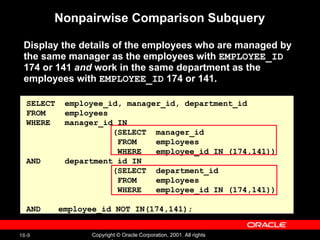
Nonpairwise Comparison Subquery Display the details of the employees who are managed by the same manager as the employees with  EMPLOYEE_ID  174 or 141  and  work in the same department as the employees with  EMPLOYEE_ID  174 or 141. SELECT  employee_id, manager_id, department_id FROM  employees WHERE  manager_id IN    (SELECT  manager_id FROM  employees WHERE  employee_id IN (174,141)) AND  department_id IN    (SELECT  department_id FROM  employees WHERE  employee_id IN (174,141)) AND employee_id NOT IN(174,141);
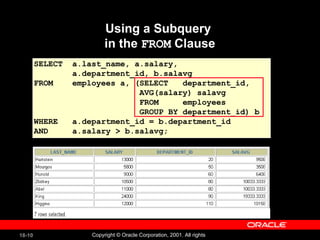
Using a Subquery  in the  FROM  Clause SELECT  a.last_name, a.salary,  a.department_id, b.salavg FROM  employees a, (SELECT  department_id,  AVG(salary) salavg FROM  employees GROUP BY department_id) b WHERE  a.department_id = b.department_id AND  a.salary > b.salavg;
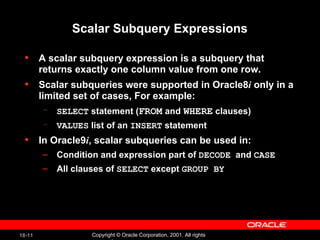
Scalar Subquery Expressions A scalar subquery expression is a subquery that returns exactly one column value from one row. Scalar subqueries were supported in Oracle8 i  only in a limited set of cases, For example: SELECT  statement ( FROM   and   WHERE  clauses) VALUES  list of an  INSERT  statement In Oracle9 i , scalar subqueries can be used in: Condition and expression part of  DECODE   and  CASE All clauses of  SELECT  except  GROUP BY
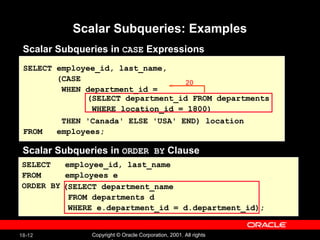
Scalar Subqueries: Examples Scalar Subqueries in  CASE  Expressions SELECT employee_id, last_name, (CASE WHEN department_id = THEN 'Canada' ELSE 'USA' END) location FROM  employees; (SELECT department_id FROM departments WHERE location_id = 1800) Scalar Subqueries in  ORDER BY  Clause SELECT  employee_id, last_name FROM  employees e ORDER BY (SELECT department_name FROM departments d WHERE e.department_id = d.department_id); 20
Hidden Slide
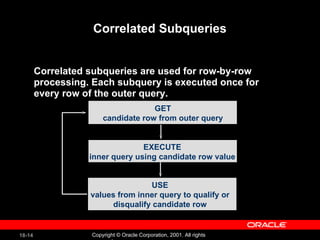
Correlated Subqueries Correlated subqueries are used for row-by-row processing. Each subquery is executed once for every row of the outer query. GET candidate row from outer query EXECUTE inner query using candidate row value USE values from inner query to qualify or disqualify candidate row
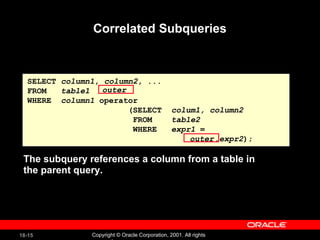
Correlated Subqueries SELECT  column1 ,  column2 , ... FROM  table1 WHERE  column1  operator    (SELECT  colum1, column2 FROM  table2 WHERE  expr1  =  .expr2 ); The subquery references a column from a table in the parent query. outer outer
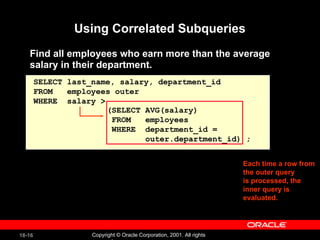
Using Correlated Subqueries Find all employees who earn more than the average salary in their department. SELECT last_name, salary, department_id FROM  employees outer WHERE  salary > Each time a row from  the outer query is processed, the inner query is evaluated. (SELECT AVG(salary) FROM  employees WHERE  department_id =  outer.department_id) ;
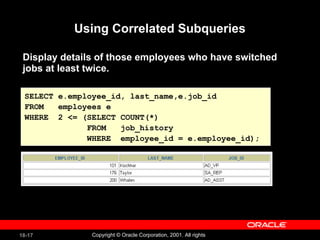
Using Correlated Subqueries SELECT e.employee_id, last_name,e.job_id FROM  employees e  WHERE  2 <= (SELECT COUNT(*) FROM  job_history  WHERE  employee_id = e.employee_id); Display details of those employees who have switched jobs at least twice.
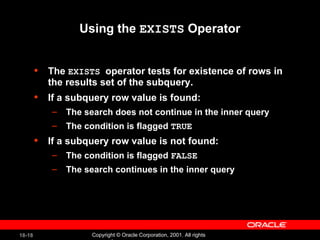
Using the  EXISTS  Operator The  EXISTS  operator tests for existence of rows in the results set of the subquery. If a subquery row value is found: The search does not continue in the inner query The condition is flagged  TRUE If a subquery row value is not found: The condition is flagged  FALSE The search continues in the inner query
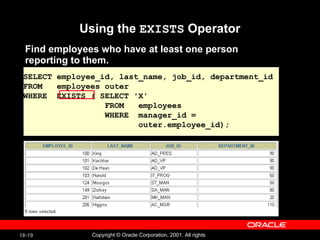
Using the  EXISTS  Operator Find employees who have at least one person reporting to them. SELECT employee_id, last_name, job_id, department_id FROM  employees outer WHERE  EXISTS ( SELECT 'X' FROM  employees WHERE  manager_id =  outer.employee_id);
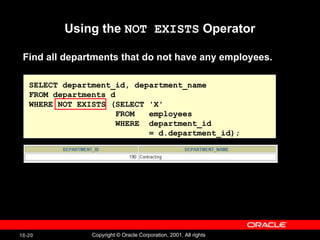
Using the  NOT EXISTS  Operator SELECT department_id, department_name FROM departments d WHERE NOT EXISTS (SELECT 'X' FROM  employees WHERE  department_id  = d.department_id); Find all departments that do not have any employees.

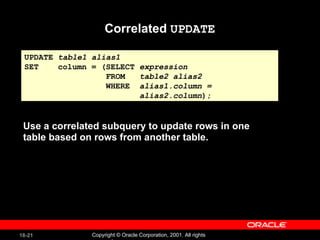
Correlated  UPDATE Use a correlated subquery to update rows in one table based on rows from another table. UPDATE  table1 alias1 SET  column = (SELECT  expression FROM  table2 alias2 WHERE  alias1.column =  alias2.column );
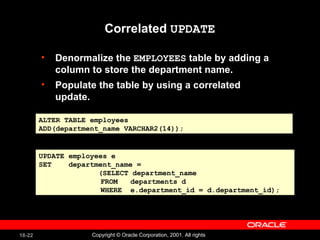
Correlated  UPDATE Denormalize the  EMPLOYEES  table by adding a column to store the department name.  Populate the table by using a correlated update. ALTER TABLE employees ADD(department_name VARCHAR2(14)); UPDATE employees e SET  department_name =  (SELECT department_name    FROM  departments d   WHERE  e.department_id = d.department_id);
Hidden Slide
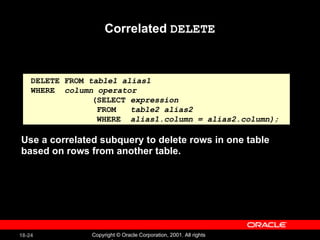
Correlated  DELETE DELETE FROM  table1 alias1 WHERE  column operator   (SELECT  expression   FROM  table2 alias2   WHERE  alias1.column = alias2.column); Use a correlated subquery to delete rows in one table based on rows from another table.
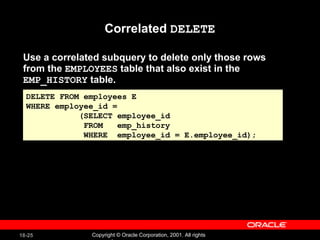
Use a correlated subquery to delete only those rows from the  EMPLOYEES  table that also exist in the  EMP_HISTORY  table. Correlated  DELETE DELETE FROM employees E WHERE employee_id =  (SELECT employee_id FROM  emp_history  WHERE  employee_id = E.employee_id);
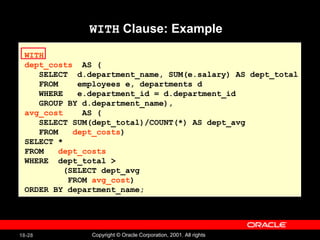
The  WITH  Clause Using the  WITH  clause, you can use the same query block in a  SELECT  statement when it occurs more than once within a complex query. The  WITH  clause retrieves the results of a query block and stores it in the user's temporary tablespace. The  WITH  clause improves performance
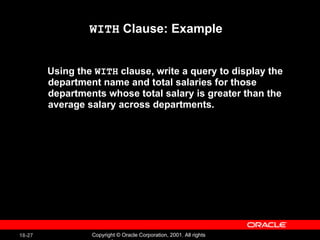
WITH  Clause: Example Using the  WITH  clause, write a query to display the department name and total salaries for those departments whose total salary is greater than the average salary across departments.
WITH  Clause: Example WITH  dept_costs   AS ( SELECT  d.department_name, SUM(e.salary) AS dept_total FROM  employees e, departments d WHERE  e.department_id = d.department_id GROUP BY d.department_name), avg_cost   AS ( SELECT SUM(dept_total)/COUNT(*) AS dept_avg FROM  dept_costs ) SELECT *  FROM  dept_costs   WHERE  dept_total > (SELECT dept_avg  FROM  avg_cost ) ORDER BY department_name;
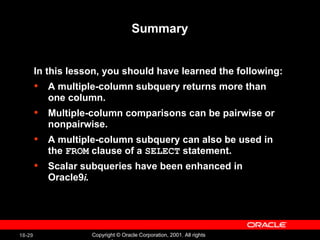
Summary In this lesson, you should have learned the following:  A multiple-column subquery returns more than one column. Multiple-column comparisons can be pairwise or nonpairwise. A multiple-column subquery can also be used in the  FROM  clause of a  SELECT  statement. Scalar subqueries have been enhanced in Oracle9 i.
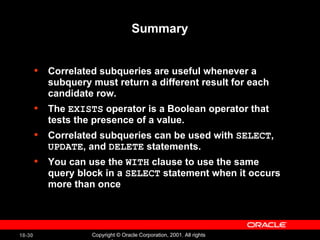
Summary Correlated subqueries are useful whenever a subquery must return a different result for each candidate row. The  EXISTS  operator is a Boolean operator that tests the presence of a value. Correlated subqueries can be used with  SELECT ,  UPDATE , and  DELETE  statements. You can use the  WITH  clause to use the same query block in a  SELECT  statement when it occurs more than once
Practice 18 Overview This practice covers the following topics: Creating multiple-column subqueries Writing correlated subqueries Using the  EXISTS  operator Using scalar subqueries Using the  WITH  clause
Hidden Slide
Hidden Slide
Hidden Slide
Hidden Slide
Hidden Slide

Les18

  • 1.
  • 2.
    Objectives After completingthis lesson, you should be able to do the following: Write a multiple-column subquery Describe and explain the behavior of subqueries when null values are retrieved Write a subquery in a FROM clause Use scalar subqueries in SQL Describe the types of problems that can be solved with correlated subqueries Write correlated subqueries Update and delete rows using correlated subqueries Use the EXISTS and NOT EXISTS operators Use the WITH clause
  • 3.
    What Is aSubquery? A subquery is a SELECT statement embedded in a clause of another SQL statement. SELECT ... FROM ... WHERE ... (SELECT ... FROM ... WHERE ...) Main query Subquery
  • 4.
    Subqueries The subquery(inner query) executes once before the main query. The result of the subquery is used by the main query (outer query). SELECT select_list FROM table WHERE expr operator (SELECT select_list FROM table );
  • 5.
    Using a SubquerySELECT last_name FROM employees WHERE salary > (SELECT salary FROM employees WHERE employee_id = 149) ; 10500
  • 6.
    Multiple-Column Subqueries Mainquery WHERE (MANAGER_ID, DEPARTMENT_ID) IN Subquery 100 90 102 60 124 50 Each row of the main query is compared to values from a multiple-row and multiple-column subquery.
  • 7.
    Column Comparisons Columncomparisons in a multiple-column subquery can be: Pairwise comparisons Nonpairwise comparisons
  • 8.
    Pairwise Comparison SubqueryDisplay the details of the employees who are managed by the same manager and work in the same department as the employees with EMPLOYEE_ID 178 or 174. SELECT employee_id, manager_id, department_id FROM employees WHERE (manager_id, department_id) IN (SELECT manager_id, department_id FROM employees WHERE employee_id IN (178,174)) AND employee_id NOT IN (178,174);
  • 9.
    Nonpairwise Comparison SubqueryDisplay the details of the employees who are managed by the same manager as the employees with EMPLOYEE_ID 174 or 141 and work in the same department as the employees with EMPLOYEE_ID 174 or 141. SELECT employee_id, manager_id, department_id FROM employees WHERE manager_id IN (SELECT manager_id FROM employees WHERE employee_id IN (174,141)) AND department_id IN (SELECT department_id FROM employees WHERE employee_id IN (174,141)) AND employee_id NOT IN(174,141);
  • 10.
    Using a Subquery in the FROM Clause SELECT a.last_name, a.salary, a.department_id, b.salavg FROM employees a, (SELECT department_id, AVG(salary) salavg FROM employees GROUP BY department_id) b WHERE a.department_id = b.department_id AND a.salary > b.salavg;
  • 11.
    Scalar Subquery ExpressionsA scalar subquery expression is a subquery that returns exactly one column value from one row. Scalar subqueries were supported in Oracle8 i only in a limited set of cases, For example: SELECT statement ( FROM and WHERE clauses) VALUES list of an INSERT statement In Oracle9 i , scalar subqueries can be used in: Condition and expression part of DECODE and CASE All clauses of SELECT except GROUP BY
  • 12.
    Scalar Subqueries: ExamplesScalar Subqueries in CASE Expressions SELECT employee_id, last_name, (CASE WHEN department_id = THEN 'Canada' ELSE 'USA' END) location FROM employees; (SELECT department_id FROM departments WHERE location_id = 1800) Scalar Subqueries in ORDER BY Clause SELECT employee_id, last_name FROM employees e ORDER BY (SELECT department_name FROM departments d WHERE e.department_id = d.department_id); 20
  • 13.
  • 14.
    Correlated Subqueries Correlatedsubqueries are used for row-by-row processing. Each subquery is executed once for every row of the outer query. GET candidate row from outer query EXECUTE inner query using candidate row value USE values from inner query to qualify or disqualify candidate row
  • 15.
    Correlated Subqueries SELECT column1 , column2 , ... FROM table1 WHERE column1 operator (SELECT colum1, column2 FROM table2 WHERE expr1 = .expr2 ); The subquery references a column from a table in the parent query. outer outer
  • 16.
    Using Correlated SubqueriesFind all employees who earn more than the average salary in their department. SELECT last_name, salary, department_id FROM employees outer WHERE salary > Each time a row from the outer query is processed, the inner query is evaluated. (SELECT AVG(salary) FROM employees WHERE department_id = outer.department_id) ;
  • 17.
    Using Correlated SubqueriesSELECT e.employee_id, last_name,e.job_id FROM employees e WHERE 2 <= (SELECT COUNT(*) FROM job_history WHERE employee_id = e.employee_id); Display details of those employees who have switched jobs at least twice.
  • 18.
    Using the EXISTS Operator The EXISTS operator tests for existence of rows in the results set of the subquery. If a subquery row value is found: The search does not continue in the inner query The condition is flagged TRUE If a subquery row value is not found: The condition is flagged FALSE The search continues in the inner query
  • 19.
    Using the EXISTS Operator Find employees who have at least one person reporting to them. SELECT employee_id, last_name, job_id, department_id FROM employees outer WHERE EXISTS ( SELECT 'X' FROM employees WHERE manager_id = outer.employee_id);
  • 20.
    Using the NOT EXISTS Operator SELECT department_id, department_name FROM departments d WHERE NOT EXISTS (SELECT 'X' FROM employees WHERE department_id = d.department_id); Find all departments that do not have any employees.
  • 21.
    Correlated UPDATEUse a correlated subquery to update rows in one table based on rows from another table. UPDATE table1 alias1 SET column = (SELECT expression FROM table2 alias2 WHERE alias1.column = alias2.column );
  • 22.
    Correlated UPDATEDenormalize the EMPLOYEES table by adding a column to store the department name. Populate the table by using a correlated update. ALTER TABLE employees ADD(department_name VARCHAR2(14)); UPDATE employees e SET department_name = (SELECT department_name FROM departments d WHERE e.department_id = d.department_id);
  • 23.
  • 24.
    Correlated DELETEDELETE FROM table1 alias1 WHERE column operator (SELECT expression FROM table2 alias2 WHERE alias1.column = alias2.column); Use a correlated subquery to delete rows in one table based on rows from another table.
  • 25.
    Use a correlatedsubquery to delete only those rows from the EMPLOYEES table that also exist in the EMP_HISTORY table. Correlated DELETE DELETE FROM employees E WHERE employee_id = (SELECT employee_id FROM emp_history WHERE employee_id = E.employee_id);
  • 26.
    The WITH Clause Using the WITH clause, you can use the same query block in a SELECT statement when it occurs more than once within a complex query. The WITH clause retrieves the results of a query block and stores it in the user's temporary tablespace. The WITH clause improves performance
  • 27.
    WITH Clause:Example Using the WITH clause, write a query to display the department name and total salaries for those departments whose total salary is greater than the average salary across departments.
  • 28.
    WITH Clause:Example WITH dept_costs AS ( SELECT d.department_name, SUM(e.salary) AS dept_total FROM employees e, departments d WHERE e.department_id = d.department_id GROUP BY d.department_name), avg_cost AS ( SELECT SUM(dept_total)/COUNT(*) AS dept_avg FROM dept_costs ) SELECT * FROM dept_costs WHERE dept_total > (SELECT dept_avg FROM avg_cost ) ORDER BY department_name;
  • 29.
    Summary In thislesson, you should have learned the following: A multiple-column subquery returns more than one column. Multiple-column comparisons can be pairwise or nonpairwise. A multiple-column subquery can also be used in the FROM clause of a SELECT statement. Scalar subqueries have been enhanced in Oracle9 i.
  • 30.
    Summary Correlated subqueriesare useful whenever a subquery must return a different result for each candidate row. The EXISTS operator is a Boolean operator that tests the presence of a value. Correlated subqueries can be used with SELECT , UPDATE , and DELETE statements. You can use the WITH clause to use the same query block in a SELECT statement when it occurs more than once
  • 31.
    Practice 18 OverviewThis practice covers the following topics: Creating multiple-column subqueries Writing correlated subqueries Using the EXISTS operator Using scalar subqueries Using the WITH clause
  • 32.
  • 33.
  • 34.
  • 35.
  • 36.

Editor's Notes

  • #2 Schedule: Timing Topic 60 minutes Lecture 50 minutes Practice 110 minutes Total