SQL & ADVANCEDSQL
Marcin Blaszczyk (CERN IT-DB)
marcin.blaszczyk@cern.ch
2.
Goal ofthis tutorial:
Present the overview of basic SQL capabilities
Explain several selected advanced SQL features
Outline
Introduction
SQL basics
Joins & Complex queries
Analytical functions & Set operators
Other DB objects (Sequences, Synonyms, DBlinks, Views & Mviews)
Indexes & IOTs
Partitioning
Undo & Flashback technologies
AGENDA
Oracle Tutorials 5th of May 2012
3.
Objective: beable to perform the basic operation of the
RDBMS data model
create, modify the layout of a table
remove a table from the user schema
insert data into the table
retrieve and manipulate data from one or more tables
update/ delete data in a table
+
Some more advanced modifications
SQL LANGUAGE
Oracle Tutorials 5th of May 2012
4.
Structured QueryLanguage
Programing language
Designed to mange data in relational databases
DDL Data Definition Language
Creating, replacing, altering, and dropping objects
Example: DROP TABLE [TABLE];
DML Data Modification Language
Inserting, updating, and deleting rows in a table
Example: DELETE FROM [TABLE];
DCL Data Control Language
Controlling access to the database and its objects
Example: GRANT SELECT ON [TABLE] TO [USER];
SQL LANGUAGE (2)
Oracle Tutorials 5th of May 2012
5.
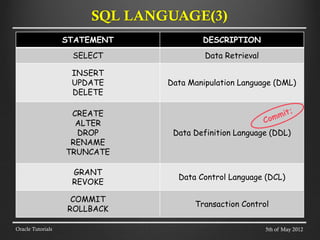
STATEMENT DESCRIPTION
SELECT DataRetrieval
INSERT
UPDATE
DELETE
Data Manipulation Language (DML)
CREATE
ALTER
DROP
RENAME
TRUNCATE
Data Definition Language (DDL)
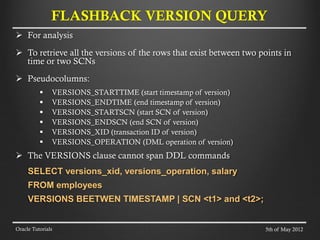
GRANT
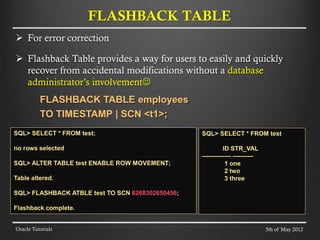
REVOKE
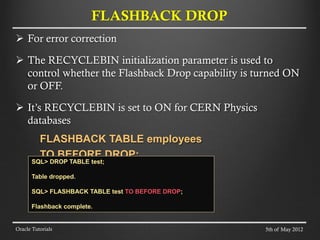
Data Control Language (DCL)
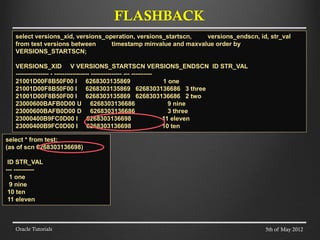
COMMIT
ROLLBACK
Transaction Control
Oracle Tutorials
SQL LANGUAGE(3)
5th of May 2012
6.
A transactionis a sequence of SQL Statements that Oracle treats
as a single unit of work
A transaction must be commited or rolled back:
COMMIT; - makes permanent the database changes you made during the
transaction.
ROLLBACK; - ends the current transaction and undoes any changes
made since the transaction began.
Check COMMIT settings in your Client Tool (eg
AUTOCOMMIT, EXITCOMMIT in SQL*Plus)
UNDO tablespace:
circular buffer
records all actions of transactions
used when rolling back a transaction
Oracle Tutorials
TRANSACTION & UNDO
5th of May 2012
7.
STATEMENT DESCRIPTION
SELECT DataRetrieval
INSERT
UPDATE
DELETE
Data Manipulation Language (DML)
CREATE
ALTER
DROP
RENAME
TRUNCATE
Data Definition Language (DDL)
GRANT
REVOKE
Data Control Language (DCL)
COMMIT
ROLLBACK
Transaction Control
Oracle Tutorials
SQL LANGUAGE(3)
5th of May 2012
8.
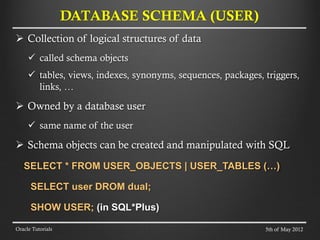
Collection oflogical structures of data
called schema objects
tables, views, indexes, synonyms, sequences, packages, triggers,
links, …
Owned by a database user
same name of the user
Schema objects can be created and manipulated with SQL
SELECT * FROM USER_OBJECTS | USER_TABLES (…)
SELECT user DROM dual;
SHOW USER; (in SQL*Plus)
DATABASE SCHEMA (USER)
Oracle Tutorials 5th of May 2012
9.
Define thetable layout:
table identifier
column identifiers and data types
column constraints,
default values
integrity constraints
relational constraints
CREATE A TABLE
Oracle Tutorials
CREATE TABLE employees (
employee_id NUMBER(6) NOT NULL,
first_name VARCHAR2(20),
last_name VARCHAR2(25),
hire_date DATE DEFAULT SYSDATE,
department_id NUMBER(4),
salary NUMBER(8,2) CHECK (salary > 0));
SQL> describe employees
Name Null? Type
----------------- -------- ------------
EMPLOYEE_ID NOT NULL NUMBER(6)
FIRST_NAME VARCHAR2(20)
LAST_NAME VARCHAR2(25)
HIRE_DATE DATE
DEPARTMENT_ID NUMBER(4)
SALARY NUMBER(8,2)
5th of May 2012
10.
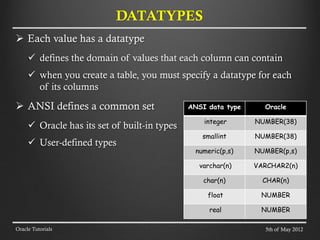
Each valuehas a datatype
defines the domain of values that each column can contain
when you create a table, you must specify a datatype for each
of its columns
ANSI defines a common set
Oracle has its set of built-in types
User-defined types
DATATYPES
Oracle Tutorials
ANSI data type Oracle
integer NUMBER(38)
smallint NUMBER(38)
numeric(p,s) NUMBER(p,s)
varchar(n) VARCHAR2(n)
char(n) CHAR(n)
float NUMBER
real NUMBER
5th of May 2012
11.
SELECT [ALL |DISTINCT] column1[,column2]
FROM table1[,table2]
[WHERE "conditions"]
[GROUP BY "column-list"]
[HAVING "conditions]
[ORDER BY "column-list" [ASC | DESC] ]
Oracle Tutorials
SELECT STATEMENT
SELECT d.department_name,
sum(e.salary)as DEPT_AL
FROM departments d, employees e
WHERE d.department_id = e.department_id
GROUP BY d.department_name
HAVING SUM(e.salary) > 10000
ORDER BY department_name;
DEPARTMENT_NAME DEPT_SAL
-------------------- ----------
Accounting 20300
Executive 58000
Finance 51600
IT 28800
Marketing 19000
Purchasing 24900
Sales 304500
Shipping 156400
5th of May 2012
12.
Insert somedata
INSERT INTO table1 values(value-list) ;
INSERT INTO table1(column-list) values(value-list);
INSERT INTO table1(column-list)
SELECT values(value-list);
COMMIT;
Update
UPDATE table1 SET column = value;
COMMIT;
Delete
DELETE FROM table1;
COMMIT;
INSERT, UPDATE, DELETE (DML)
Oracle Tutorials 5th of May 2012
13.
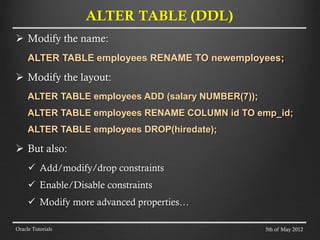
Modify thename:
ALTER TABLE employees RENAME TO newemployees;
Modify the layout:
ALTER TABLE employees ADD (salary NUMBER(7));
ALTER TABLE employees RENAME COLUMN id TO emp_id;
ALTER TABLE employees DROP(hiredate);
But also:
Add/modify/drop constraints
Enable/Disable constraints
Modify more advanced properties…
ALTER TABLE (DDL)
Oracle Tutorials 5th of May 2012
14.
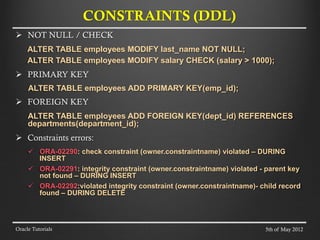
NOT NULL/ CHECK
ALTER TABLE employees MODIFY last_name NOT NULL;
ALTER TABLE employees MODIFY salary CHECK (salary > 1000);
PRIMARY KEY
ALTER TABLE employees ADD PRIMARY KEY(emp_id);
FOREIGN KEY
ALTER TABLE employees ADD FOREIGN KEY(dept_id) REFERENCES
departments(department_id);
Constraints errors:
ORA-02290: check constraint (owner.constraintname) violated – DURING
INSERT
ORA-02291: integrity constraint (owner.constraintname) violated - parent key
not found – DURING INSERT
ORA-02292:violated integrity constraint (owner.constraintname)- child record
found – DURING DELETE
CONSTRAINTS (DDL)
Oracle Tutorials 5th of May 2012
15.
special valuethat means
unavailable
unassigned
unknown
inapplicable
not equivalent to
zero
blank space
SELECT * FROM [TABLE] where id = 0;
SELECT * FROM [TABLE] where id IS NULL;
Often used as default
NULL VALUE
Oracle Tutorials 5th of May 2012
16.
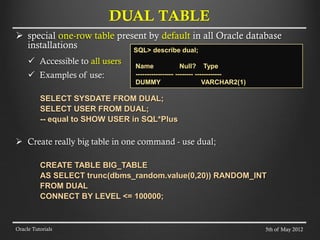
special one-rowtable present by default in all Oracle database
installations
Accessible to all users
Examples of use:
SELECT SYSDATE FROM DUAL;
SELECT USER FROM DUAL;
-- equal to SHOW USER in SQL*Plus
Create really big table in one command - use dual;
CREATE TABLE BIG_TABLE
AS SELECT trunc(dbms_random.value(0,20)) RANDOM_INT
FROM DUAL
CONNECT BY LEVEL <= 100000;
DUAL TABLE
Oracle Tutorials
SQL> describe dual;
Name Null? Type
----------------- -------- ------------
DUMMY VARCHAR2(1)
5th of May 2012
17.
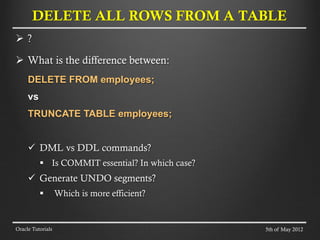
?
Whatis the difference between:
DELETE FROM employees;
vs
TRUNCATE TABLE employees;
DML vs DDL commands?
Is COMMIT essential? In which case?
Generate UNDO segments?
Which is more efficient?
DELETE ALL ROWS FROM A TABLE
Oracle Tutorials 5th of May 2012
18.
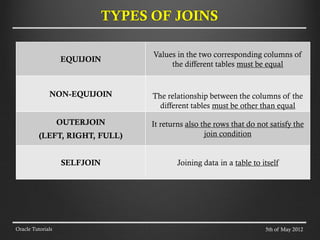
EQUIJOIN
Values in thetwo corresponding columns of
the different tables must be equal
NON-EQUIJOIN The relationship between the columns of the
different tables must be other than equal
OUTERJOIN
(LEFT, RIGHT, FULL)
It returns also the rows that do not satisfy the
join condition
SELFJOIN Joining data in a table to itself
TYPES OF JOINS
Oracle Tutorials 5th of May 2012
19.
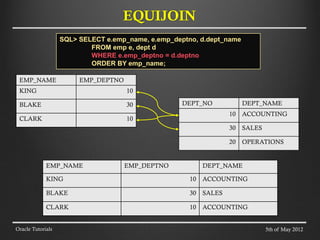
EQUIJOIN
Oracle Tutorials
EMP_NAME EMP_DEPTNO
KING10
BLAKE 30
CLARK 10
DEPT_NO DEPT_NAME
10 ACCOUNTING
30 SALES
20 OPERATIONS
EMP_NAME EMP_DEPTNO DEPT_NAME
KING 10 ACCOUNTING
BLAKE 30 SALES
CLARK 10 ACCOUNTING
5th of May 2012
SQL> SELECT e.emp_name, e.emp_deptno, d.dept_name
FROM emp e, dept d
WHERE e.emp_deptno = d.deptno
ORDER BY emp_name;
20.
OUTERJOIN
Oracle Tutorials
EMP_NAME EMP_DEPTNO
KING10
BLAKE NULL
CLARK 10
MARTIN 20
TURNER 10
JONES NULL
DEPT_NO DEPT_NAME
10 ACCOUNTING
30 SALES
20 OPERATIONS
EMP_NAME EMP_DEPTNO DEPT_NAME
KING 10 ACCOUNTING
BLAKE NULL NULL
CLARK 10 ACCOUNTING
MARTIN 20 OPERATIONS
TURNER 10 ACCOUNTING
JONES NULL NULL
5th of May 2012
SQL> SELECT e.emp_name, e.emp_deptno, d.dept_name
FROM emp e, dept d
WHERE e.emp_deptno = d.deptno(+)
ORDER BY emp_name;
21.
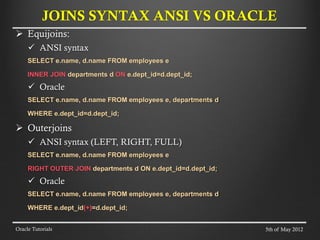
Equijoins:
ANSIsyntax
SELECT e.name, d.name FROM employees e
INNER JOIN departments d ON e.dept_id=d.dept_id;
Oracle
SELECT e.name, d.name FROM employees e, departments d
WHERE e.dept_id=d.dept_id;
Outerjoins
ANSI syntax (LEFT, RIGHT, FULL)
SELECT e.name, d.name FROM employees e
RIGHT OUTER JOIN departments d ON e.dept_id=d.dept_id;
Oracle
SELECT e.name, d.name FROM employees e, departments d
WHERE e.dept_id(+)=d.dept_id;
JOINS SYNTAX ANSI VS ORACLE
Oracle Tutorials 5th of May 2012
22.
Types Question
SUBQUERIES
Who worksin the same department as
Clark?
Correlated SUBQUERIES
Who are the employees that receive more
than the average salary of their
department?
Inline Views
What are the employees salary and the
minimum salary in their department?
Top-N QUERIES
What are the 5 most well paid
employees?
Hierarchical QUERIES
What is the hierarchy of management in
my enterprise?
ADVANCED SQL QUERIES
Oracle Tutorials 5th of May 2012
23.
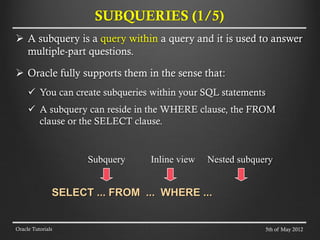
A subqueryis a query within a query and it is used to answer
multiple-part questions.
Oracle fully supports them in the sense that:
You can create subqueries within your SQL statements
A subquery can reside in the WHERE clause, the FROM
clause or the SELECT clause.
Subquery Inline view Nested subquery
SELECT ... FROM ... WHERE ...
SUBQUERIES (1/5)
Oracle Tutorials 5th of May 2012
24.
SUBQUERIES (2/5)
Oracle Tutorials
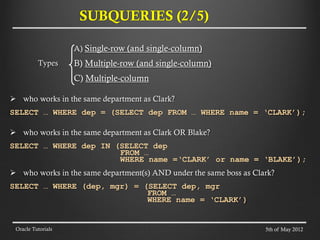
A)Single-row (and single-column)
B) Multiple-row (and single-column)
C) Multiple-column
who works in the same department as Clark?
SELECT … WHERE dep = (SELECT dep FROM … WHERE name = ‘CLARK’);
who works in the same department as Clark OR Blake?
SELECT … WHERE dep IN (SELECT dep
FROM …
WHERE name =‘CLARK’ or name = ‘BLAKE’);
who works in the same department(s) AND under the same boss as Clark?
SELECT … WHERE (dep, mgr) = (SELECT dep, mgr
FROM …
WHERE name = ‘CLARK’)
Types
5th of May 2012
25.
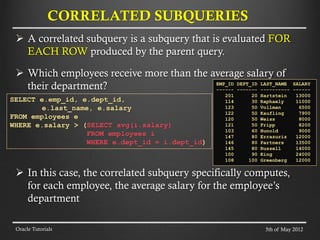
A correlatedsubquery is a subquery that is evaluated FOR
EACH ROW produced by the parent query.
Which employees receive more than the average salary of
their department?
In this case, the correlated subquery specifically computes,
for each employee, the average salary for the employee’s
department
CORRELATED SUBQUERIES
Oracle Tutorials
SELECT e.emp_id, e.dept_id,
e.last_name, e.salary
FROM employees e
WHERE e.salary > (SELECT avg(i.salary)
FROM employees i
WHERE e.dept_id = i.dept_id)
EMP_ID DEPT_ID LAST_NAME SALARY
------ ------- ---------- ------
201 20 Hartstein 13000
114 30 Raphaely 11000
123 50 Vollman 6500
122 50 Kaufling 7900
120 50 Weiss 8000
121 50 Fripp 8200
103 60 Hunold 9000
147 80 Errazuriz 12000
146 80 Partners 13500
145 80 Russell 14000
100 90 King 24000
108 100 Greenberg 12000
5th of May 2012
26.
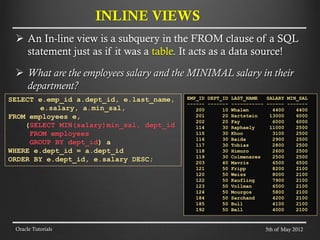
An In-lineview is a subquery in the FROM clause of a SQL
statement just as if it was a table. It acts as a data source!
What are the employees salary and the MINIMAL salary in their
department?
INLINE VIEWS
Oracle Tutorials
SELECT e.emp_id a.dept_id, e.last_name,
e.salary, a.min_sal,
FROM employees e,
(SELECT MIN(salary)min_sal, dept_id
FROM employees
GROUP BY dept_id) a
WHERE e.dept_id = a.dept_id
ORDER BY e.dept_id, e.salary DESC;
EMP_ID DEPT_ID LAST_NAME SALARY MIN_SAL
------ ------- ----------- ------ -------
200 10 Whalen 4400 4400
201 20 Hartstein 13000 6000
202 20 Fay 6000 6000
114 30 Raphaely 11000 2500
115 30 Khoo 3100 2500
116 30 Baida 2900 2500
117 30 Tobias 2800 2500
118 30 Himuro 2600 2500
119 30 Colmenares 2500 2500
203 40 Mavris 6500 6500
121 50 Fripp 8200 2100
120 50 Weiss 8000 2100
122 50 Kaufling 7900 2100
123 50 Vollman 6500 2100
124 50 Mourgos 5800 2100
184 50 Sarchand 4200 2100
185 50 Bull 4100 2100
192 50 Bell 4000 2100
5th of May 2012
27.
We needto use “in-line view” together with the ROWNUM
pseudocolumn
What are the top 5 most well paid employees?
What are the next 5 most well paid employees?
TOP-N QUERIES
Oracle Tutorials
SELECT * FROM
(SELECT emp_id, last_name, salary
FROM employees
ORDER BY salary desc)
WHERE rownum < 6
EMP_ID LAST_NAME SALARY
------ ---------- ------
100 King 24000
101 Kochhar 17000
102 De Haan 17000
145 Russell 14000
146 Partners 13500
SELECT emp_id, last_name, salary FROM (
SELECT emp_id,last_name, salary,
rownum as rnum
FROM employees
ORDER BY salary desc)
WHERE rnum between 6 and 10;
EMP_ID LAST_NAME SALARY
------ ---------- ------
108 Greenberg 12000
109 Faviet 9000
106 Pataballa 4800
105 Austin 4800
107 Lorentz 4200
5th of May 2012
28.
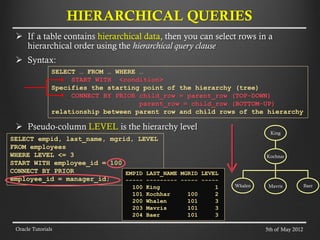
If atable contains hierarchical data, then you can select rows in a
hierarchical order using the hierarchical query clause
Syntax:
Pseudo-column LEVEL is the hierarchy level
HIERARCHICAL QUERIES
Oracle Tutorials
SELECT … FROM … WHERE …
START WITH <condition>
Specifies the starting point of the hierarchy (tree)
CONNECT BY PRIOR child_row = parent_row (TOP-DOWN)
parent_row = child_row (BOTTOM-UP)
relationship between parent row and child rows of the hierarchy
SELECT empid, last_name, mgrid, LEVEL
FROM employees
WHERE LEVEL <= 3
START WITH employee_id = 100
CONNECT BY PRIOR
employee_id = manager_id;
EMPID LAST_NAME MGRID LEVEL
----- --------- ----- -----
100 King 1
101 Kochhar 100 2
200 Whalen 101 3
203 Mavris 101 3
204 Baer 101 3
Mavris
King
Kochnar
Whalen Baer
5th of May 2012
29.
If atable contains hierarchical data, then you can select rows in a
hierarchical order using the hierarchical query clause
Syntax:
Pseudo-column LEVEL is the hierarchy level
HIERARCHICAL QUERIES
Oracle Tutorials
SELECT … FROM … WHERE …
START WITH <condition>
Specifies the starting point of the hierarchy (tree)
CONNECT BY PRIOR child_row = parent_row (TOP-DOWN)
parent_row = child_row (BOTTOM-UP)
relationship between parent row and child rows of the hierarchy
SELECT empid, last_name, mgrid, LEVEL
FROM employees
START WITH employee_id = 204
CONNECT BY PRIOR
manager_id = employee_id; EMPID LAST_NAM MGR_ID LEVEL
----- -------- ------ ------
204 Baer 101 1
101 Kochhar 100 2
100 King 3
Baer
King
Kochnar
5th of May 2012
30.
General syntaxof analytical function:
SELECT analytical-function(col-expr)
OVER (window-spec) [AS col-alias]
FROM [TABLE];
Window specification syntax
[PARTITION BY [expr list]]
ORDER BY [sort spec] [range spec]
Example for range specification (for more check oracle docs)
ROWS UNBOUNDED PRECEDING AND CURRENT ROW (default)
ROWS BETWEEN CURRENT ROW AND UNBOUNDED FOLLOWING
RANGE BETWEEN 2 PRECEDING AND 2 FOLLOWING
ANALYTICAL FUNCTIONS
Oracle Tutorials
EWWEQEWQEQ
ASDASSDA
CURRENT ROW
WINDOW
TABLE
5th of May 2012
31.
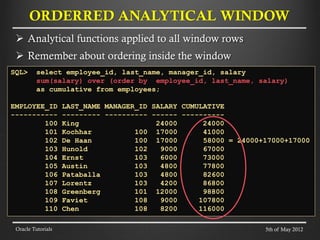
Analytical functionsapplied to all window rows
Remember about ordering inside the window
ORDERRED ANALYTICAL WINDOW
Oracle Tutorials
SQL> select employee_id, last_name, manager_id, salary
sum(salary) over (order by employee_id, last_name, salary)
as cumulative from employees;
EMPLOYEE_ID LAST_NAME MANAGER_ID SALARY CUMULATIVE
----------- --------- ---------- ------ ----------
100 King 24000 24000
101 Kochhar 100 17000 41000
102 De Haan 100 17000 58000 = 24000+17000+17000
103 Hunold 102 9000 67000
104 Ernst 103 6000 73000
105 Austin 103 4800 77800
106 Pataballa 103 4800 82600
107 Lorentz 103 4200 86800
108 Greenberg 101 12000 98800
109 Faviet 108 9000 107800
110 Chen 108 8200 116000
5th of May 2012
32.
RANGE SPECIFICATION (1/2)
OracleTutorials
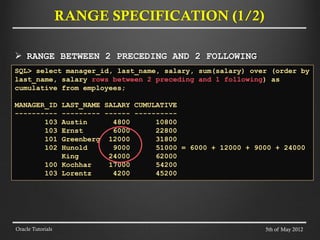
RANGE BETWEEN 2 PRECEDING AND 2 FOLLOWING
SQL> select manager_id, last_name, salary, sum(salary) over (order by
last_name, salary rows between 2 preceding and 1 following) as
cumulative from employees;
MANAGER_ID LAST_NAME SALARY CUMULATIVE
---------- --------- ------ ----------
103 Austin 4800 10800
103 Ernst 6000 22800
101 Greenberg 12000 31800
102 Hunold 9000 51000 = 6000 + 12000 + 9000 + 24000
King 24000 62000
100 Kochhar 17000 54200
103 Lorentz 4200 45200
5th of May 2012
33.
RANGE SPECIFICATION (2/2)
OracleTutorials
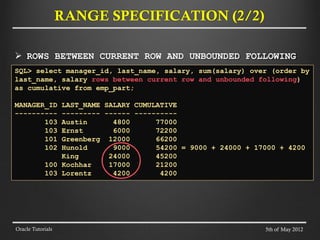
ROWS BETWEEN CURRENT ROW AND UNBOUNDED FOLLOWING
SQL> select manager_id, last_name, salary, sum(salary) over (order by
last_name, salary rows between current row and unbounded following)
as cumulative from emp_part;
MANAGER_ID LAST_NAME SALARY CUMULATIVE
---------- --------- ------ ----------
103 Austin 4800 77000
103 Ernst 6000 72200
101 Greenberg 12000 66200
102 Hunold 9000 54200 = 9000 + 24000 + 17000 + 4200
King 24000 45200
100 Kochhar 17000 21200
103 Lorentz 4200 4200
5th of May 2012
34.
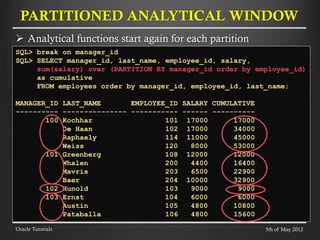
Analytical functionsstart again for each partition
PARTITIONED ANALYTICAL WINDOW
Oracle Tutorials
SQL> break on manager_id
SQL> SELECT manager_id, last_name, employee_id, salary,
sum(salary) over (PARTITION BY manager_id order by employee_id)
as cumulative
FROM employees order by manager_id, employee_id, last_name;
MANAGER_ID LAST_NAME EMPLOYEE_ID SALARY CUMULATIVE
---------- --------------- ----------- ------ ----------
100 Kochhar 101 17000 17000
De Haan 102 17000 34000
Raphaely 114 11000 45000
Weiss 120 8000 53000
101 Greenberg 108 12000 12000
Whalen 200 4400 16400
Mavris 203 6500 22900
Baer 204 10000 32900
102 Hunold 103 9000 9000
103 Ernst 104 6000 6000
Austin 105 4800 10800
Pataballa 106 4800 15600
5th of May 2012
35.
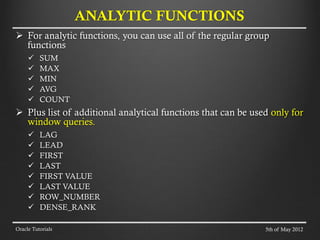
For analyticfunctions, you can use all of the regular group
functions
SUM
MAX
MIN
AVG
COUNT
Plus list of additional analytical functions that can be used only for
window queries.
LAG
LEAD
FIRST
LAST
FIRST VALUE
LAST VALUE
ROW_NUMBER
DENSE_RANK
ANALYTIC FUNCTIONS
Oracle Tutorials 5th of May 2012
36.
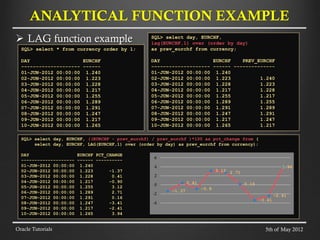
LAG functionexample
ANALYTICAL FUNCTION EXAMPLE
Oracle Tutorials
SQL> select * from currency order by 1;
DAY EURCHF
-------------------- ------
01-JUN-2012 00:00:00 1.240
02-JUN-2012 00:00:00 1.223
03-JUN-2012 00:00:00 1.228
04-JUN-2012 00:00:00 1.217
05-JUN-2012 00:00:00 1.255
06-JUN-2012 00:00:00 1.289
07-JUN-2012 00:00:00 1.291
08-JUN-2012 00:00:00 1.247
09-JUN-2012 00:00:00 1.217
10-JUN-2012 00:00:00 1.265
SQL> select day, EURCHF,
lag(EURCHF,1) over (order by day)
as prev_eurchf from currency;
DAY EURCHF PREV_EURCHF
-------------------- ------ --------------
01-JUN-2012 00:00:00 1.240
02-JUN-2012 00:00:00 1.223 1.240
03-JUN-2012 00:00:00 1.228 1.223
04-JUN-2012 00:00:00 1.217 1.228
05-JUN-2012 00:00:00 1.255 1.217
06-JUN-2012 00:00:00 1.289 1.255
07-JUN-2012 00:00:00 1.291 1.289
08-JUN-2012 00:00:00 1.247 1.291
09-JUN-2012 00:00:00 1.217 1.247
10-JUN-2012 00:00:00 1.265 1.217
SQL> select day, EURCHF, ((EURCHF - prev_eurchf) / prev_eurchf )*100 as pct_change from (
select day, EURCHF, LAG(EURCHF,1) over (order by day) as prev_eurchf from currency);
DAY EURCHF PCT_CHANGE
-------------------- ------ ----------
01-JUN-2012 00:00:00 1.240
02-JUN-2012 00:00:00 1.223 -1.37
03-JUN-2012 00:00:00 1.228 0.41
04-JUN-2012 00:00:00 1.217 -0.90
05-JUN-2012 00:00:00 1.255 3.12
06-JUN-2012 00:00:00 1.289 2.71
07-JUN-2012 00:00:00 1.291 0.16
08-JUN-2012 00:00:00 1.247 -3.41
09-JUN-2012 00:00:00 1.217 -2.41
10-JUN-2012 00:00:00 1.265 3.94
-1.37
0.41
-0.9
3.12 2.71
0.16
-3.41
-2.41
3.94
-4
-2
0
2
4
6
5th of May 2012
37.
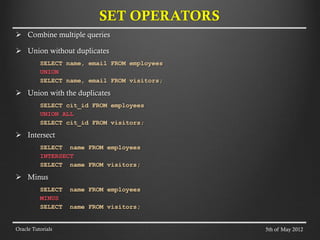
Combine multiplequeries
Union without duplicates
SELECT name, email FROM employees
UNION
SELECT name, email FROM visitors;
Union with the duplicates
SELECT cit_id FROM employees
UNION ALL
SELECT cit_id FROM visitors;
Intersect
SELECT name FROM employees
INTERSECT
SELECT name FROM visitors;
Minus
SELECT name FROM employees
MINUS
SELECT name FROM visitors;
SET OPERATORS
Oracle Tutorials 5th of May 2012
38.
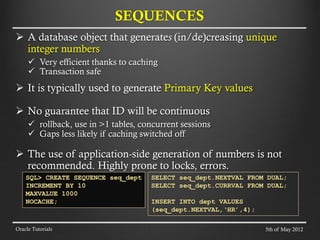
A databaseobject that generates (in/de)creasing unique
integer numbers
Very efficient thanks to caching
Transaction safe
It is typically used to generate Primary Key values
No guarantee that ID will be continuous
rollback, use in >1 tables, concurrent sessions
Gaps less likely if caching switched off
The use of application-side generation of numbers is not
recommended. Highly prone to locks, errors.
SEQUENCES
Oracle Tutorials
SQL> CREATE SEQUENCE seq_dept
INCREMENT BY 10
MAXVALUE 1000
NOCACHE;
SELECT seq_dept.NEXTVAL FROM DUAL;
SELECT seq_dept.CURRVAL FROM DUAL;
INSERT INTO dept VALUES
(seq_dept.NEXTVAL,‘HR’,4);
5th of May 2012
39.
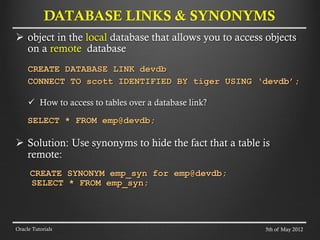
object inthe local database that allows you to access objects
on a remote database
CREATE DATABASE LINK devdb
CONNECT TO scott IDENTIFIED BY tiger USING ‘devdb’;
How to access to tables over a database link?
SELECT * FROM emp@devdb;
Solution: Use synonyms to hide the fact that a table is
remote:
CREATE SYNONYM emp_syn for emp@devdb;
SELECT * FROM emp_syn;
DATABASE LINKS & SYNONYMS
Oracle Tutorials 5th of May 2012
40.
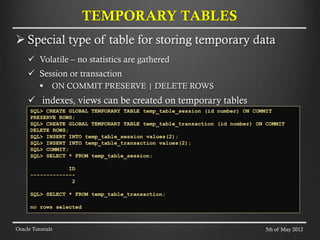
Special typeof table for storing temporary data
Volatile – no statistics are gathered
Session or transaction
ON COMMIT PRESERVE | DELETE ROWS
indexes, views can be created on temporary tables
TEMPORARY TABLES
Oracle Tutorials
SQL> CREATE GLOBAL TEMPORARY TABLE temp_table_session (id number) ON COMMIT
PRESERVE ROWS;
SQL> CREATE GLOBAL TEMPORARY TABLE temp_table_transaction (id number) ON COMMIT
DELETE ROWS;
SQL> INSERT INTO temp_table_session values(2);
SQL> INSERT INTO temp_table_transaction values(2);
SQL> COMMIT;
SQL> SELECT * FROM temp_table_session;
ID
--------------
2
SQL> SELECT * FROM temp_table_transaction;
no rows selected
5th of May 2012
41.
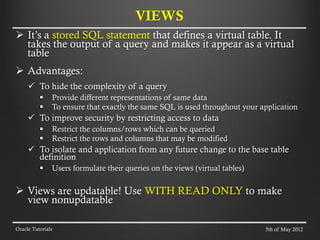
It’s astored SQL statement that defines a virtual table. It
takes the output of a query and makes it appear as a virtual
table
Advantages:
To hide the complexity of a query
Provide different representations of same data
To ensure that exactly the same SQL is used throughout your application
To improve security by restricting access to data
Restrict the columns/rows which can be queried
Restrict the rows and columns that may be modified
To isolate and application from any future change to the base table
definition
Users formulate their queries on the views (virtual tables)
Views are updatable! Use WITH READ ONLY to make
view nonupdatable
VIEWS
Oracle Tutorials 5th of May 2012
42.
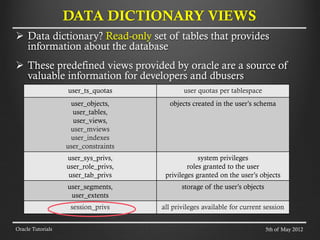
Data dictionary?Read-only set of tables that provides
information about the database
These predefined views provided by oracle are a source of
valuable information for developers and dbusers
DATA DICTIONARY VIEWS
Oracle Tutorials
user_ts_quotas user quotas per tablespace
user_objects,
user_tables,
user_views,
user_mviews
user_indexes
user_constraints
objects created in the user’s schema
user_sys_privs,
user_role_privs,
user_tab_privs
system privileges
roles granted to the user
privileges granted on the user’s objects
user_segments,
user_extents
storage of the user’s objects
session_privs all privileges available for current session
5th of May 2012
43.
A databaseobject that stores the result of a query
A hybrid of view and table
Advantages
Useful for summarizing, pre-computing, replicating and
distributing data
Faster access for expensive and complex joins
Transparent to end-users
Especially useful for heavy queries and big tables
Disadvantages
Storage costs of maintaining the views
configuration for refresh
MATERIALIZED VIEWS (1/2)
Oracle Tutorials 5th of May 2012
44.
Syntax ofmaterialized views:
CREATE MATERIALIZED VIEW mv
BUILD IMMEDIATE | DEFFERED | ON PREBUILT TABLE
REFRESH COMPLETE | FAST | FORCE
ON COMMIT | ON DEMAND | START WITH
ENABLE QUERY REWRITE
AS (SELECT… FROM tab1e);
The “query rewrite” feature – the ability of database engine to
silently rewrites the query and executes it against MV.
Controlled by following Oracle parameters:
QUERY_REWRITE_ENABLED
QUERY_REWRITE_INTEGRITY
MATERIALIZED VIEWS (2/2)
Oracle Tutorials 5th of May 2012
45.
Index witha balanced tree
When to use?
1. OLTP systems
2. High cardinality columns (primary key columns)
3. Size: B-tree index will be signifficantly smaller than Bitmap index for high
cardinality column.
B-TREE INDEX
Oracle Tutorials
SELECT *
FROM employee
WHERE empid < 73
CREATE INDEX
i_employee_id ON
employee (empid);
5th of May 2012
46.
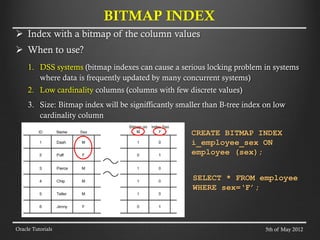
Index witha bitmap of the column values
When to use?
1. DSS systems (bitmap indexes can cause a serious locking problem in systems
where data is frequently updated by many concurrent systems)
2. Low cardinality columns (columns with few discrete values)
3. Size: Bitmap index will be signifficantly smaller than B-tree index on low
cardinality column
BITMAP INDEX
Oracle Tutorials
SELECT * FROM employee
WHERE sex=‘F’;
CREATE BITMAP INDEX
i_employee_sex ON
employee (sex);
5th of May 2012
47.
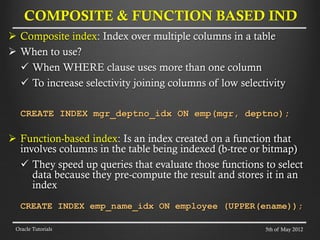
Composite index:Index over multiple columns in a table
When to use?
When WHERE clause uses more than one column
To increase selectivity joining columns of low selectivity
CREATE INDEX mgr_deptno_idx ON emp(mgr, deptno);
Function-based index: Is an index created on a function that
involves columns in the table being indexed (b-tree or bitmap)
They speed up queries that evaluate those functions to select
data because they pre-compute the result and stores it in an
index
CREATE INDEX emp_name_idx ON employee (UPPER(ename));
COMPOSITE & FUNCTION BASED IND
Oracle Tutorials 5th of May 2012
48.
IOT storesall of the table’s data in the B-tree index structure
CREATE TABLE orders (
order_id NUMBER(10),
…, …, …
CONSTRAINT pk_orders PRIMARY KEY
(order_id)
)
ORGANIZATION INDEX;
Efficient when:
table is usually accessed by the primary key
Inefficient when:
there’s a heavy DML activity especially not primary key based
access to table’s data not via primary key is slower comparing to a cheap table
INDEX ORGANIZED TABLES
Oracle Tutorials 5th of May 2012
49.
Tables andindexes can be divided into smaller and more
manageable physical pieces called partitions which are
treated as a single logical unit
Advantages:
Manageability: data management operations at the
partition level (data load, index creation,
backup/recovery, etc)
Performance: Improves query performance, possibility of
concurrent maintenance operations on different partitions
of the same table/index.
Partitioning can be implemented without requiring any
modifications to your applications.
ORACLE PARTITIONING
Oracle Tutorials 5th of May 2012
50.
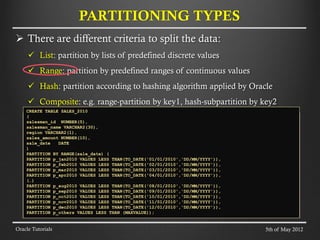
There aredifferent criteria to split the data:
List: partition by lists of predefined discrete values
Range: partition by predefined ranges of continuous values
Hash: partition according to hashing algorithm applied by Oracle
Composite: e.g. range-partition by key1, hash-subpartition by key2
PARTITIONING TYPES
Oracle Tutorials
CREATE TABLE SALES_2010
(
salesman_id NUMBER(5),
salesman_name VARCHAR2(30),
region VARCHAR2(1),
sales_amount NUMBER(10),
sale_date DATE
)
PARTITION BY RANGE(sale_date) (
PARTITION p_jan2010 VALUES LESS THAN(TO_DATE('01/01/2010','DD/MM/YYYY')),
PARTITION p_feb2010 VALUES LESS THAN(TO_DATE('02/01/2010','DD/MM/YYYY')),
PARTITION p_mar2010 VALUES LESS THAN(TO_DATE('03/01/2010','DD/MM/YYYY')),
PARTITION p_apr2010 VALUES LESS THAN(TO_DATE('04/01/2010','DD/MM/YYYY')),
(…)
PARTITION p_aug2010 VALUES LESS THAN(TO_DATE('08/01/2010','DD/MM/YYYY')),
PARTITION p_sep2010 VALUES LESS THAN(TO_DATE('09/01/2010','DD/MM/YYYY')),
PARTITION p_oct2010 VALUES LESS THAN(TO_DATE('10/01/2010','DD/MM/YYYY')),
PARTITION p_nov2010 VALUES LESS THAN(TO_DATE('11/01/2010','DD/MM/YYYY')),
PARTITION p_dec2010 VALUES LESS THAN(TO_DATE('12/01/2010','DD/MM/YYYY')),
PARTITION p_others VALUES LESS THAN (MAXVALUE));
5th of May 2012
51.
There aredifferent criteria to split the data:
List: partition by lists of predefined discrete values
Range: partition by predefined ranges of continuous values
Hash: partition according to hashing algorithm applied by Oracle
Composite: e.g. range-partition by key1, hash-subpartition by key2
PARTITIONING TYPES
Oracle Tutorials
CREATE TABLE SALES_REGIONS_2010
(
salesman_id NUMBER(5),
salesman_name VARCHAR2(30),
region VARCHAR2(1),
sales_amount NUMBER(10),
sale_date DATE
)
PARTITION BY RANGE(sale_date)
SUBPARTITION BY LIST(region)
SUBPARTITION TEMPLATE (
SUBPARTITION p_emea VALUES ('E'),
SUBPARTITION p_asia VALUES ('A'),
SUBPARTITION p_nala VALUES ('N')) (
PARTITION p_jan2010 VALUES LESS THAN(TO_DATE('01/01/2010','DD/MM/YYYY')),
PARTITION p_feb2010 VALUES LESS THAN(TO_DATE('02/01/2010','DD/MM/YYYY')),
PARTITION p_mar2010 VALUES LESS THAN(TO_DATE('03/01/2010','DD/MM/YYYY')),
(…)
PARTITION p_nov2010 VALUES LESS THAN(TO_DATE('11/01/2010','DD/MM/YYYY')),
PARTITION p_dec2010 VALUES LESS THAN(TO_DATE('12/01/2010','DD/MM/YYYY')),
PARTITION p_others VALUES LESS THAN (MAXVALUE));
5th of May 2012
52.
Table partitionedby date
INSERT INTO table … VALUES(’MAR 2010’);
SELECT * FROM table WHERE key = (’DEC 2010’);
PARTITION PRUNNING
Oracle Tutorials
JAN2010 FEB2010 MAR2010 DEC2010
…
JAN2010 FEB2010 MAR2010 DEC2010
…
5th of May 2012
53.
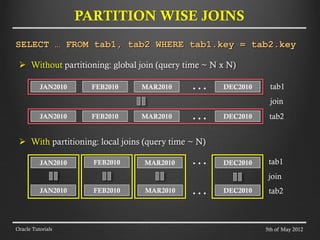
PARTITION WISE JOINS
OracleTutorials
Without partitioning: global join (query time ~ N x N)
With partitioning: local joins (query time ~ N)
SELECT … FROM tab1, tab2 WHERE tab1.key = tab2.key
JAN2010 FEB2010 MAR2010 DEC2010
…
JAN2010 FEB2010 MAR2010 DEC2010
…
tab1
JAN2010 FEB2010 MAR2010 DEC2010
…
JAN2010 FEB2010 MAR2010 DEC2010
… tab2
tab1
tab2
join
join
5th of May 2012
54.
Local index:partitioned on the same key as table
CREATE INDEX day_idx ON table (day) LOCAL;
Global index: not partitioned on the same key as table
CREATE INDEX day_idx ON table (day) GLOBAL;
Combine the advantages of partitioning and indexing:
Partitioning improves query performance by pruning
Local index improves performance on full scan of partition
Bitmap indexes on partitioned tables are always local
The concept of global index only applies to B*-tree indexes
PARTITIONED INDEXES
Oracle Tutorials 5th of May 2012
55.
For COMMITEDdata
Flashback technologies support recovery at all levels:
Row
Table
Transaction (this is not in the scope of this tutorial)
Entire Database (this is not in the scope of this tutorial)
We DO NOT GUARANTEE that past data will be always
accessible (UNDO is a circular buffer)
SCN System Change Number - is an ever-increasing value
that uniquely identifies a committed version of the database.
In simple words: “it’s an Oracle's clock - every time we commit,
the clock increments.” – Tom Kyte
Oracle Tutorials
FLASHBACK TECHNOLOGIES
5th of May 2012
56.
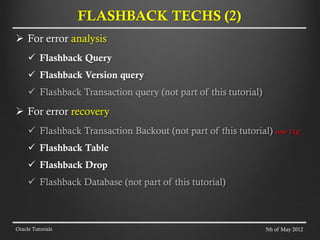
For erroranalysis
Flashback Query
Flashback Version query
Flashback Transaction query (not part of this tutorial)
For error recovery
Flashback Transaction Backout (not part of this tutorial) new 11g!
Flashback Table
Flashback Drop
Flashback Database (not part of this tutorial)
Oracle Tutorials
FLASHBACK TECHS (2)
5th of May 2012
57.
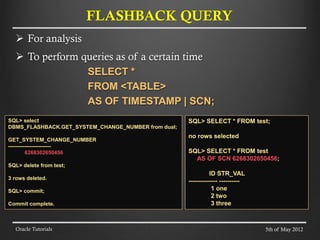
For analysis
To perform queries as of a certain time
SELECT *
FROM <TABLE>
AS OF TIMESTAMP | SCN;
Oracle Tutorials
FLASHBACK QUERY
SQL> SELECT * FROM test;
no rows selected
SQL> SELECT * FROM test
AS OF SCN 6268302650456;
ID STR_VAL
-------------- ----------
1 one
2 two
3 three
SQL> select
DBMS_FLASHBACK.GET_SYSTEM_CHANGE_NUMBER from dual;
GET_SYSTEM_CHANGE_NUMBER
------------------------
6268302650456
SQL> delete from test;
3 rows deleted.
SQL> commit;
Commit complete.
5th of May 2012
58.
For analysis
To retrieve all the versions of the rows that exist between two points in
time or two SCNs
Pseudocolumns:
VERSIONS_STARTTIME (start timestamp of version)
VERSIONS_ENDTIME (end timestamp of version)
VERSIONS_STARTSCN (start SCN of version)
VERSIONS_ENDSCN (end SCN of version)
VERSIONS_XID (transaction ID of version)
VERSIONS_OPERATION (DML operation of version)
The VERSIONS clause cannot span DDL commands
SELECT versions_xid, versions_operation, salary
FROM employees
VERSIONS BEETWEN TIMESTAMP | SCN <t1> and <t2>;
Oracle Tutorials
FLASHBACK VERSION QUERY
5th of May 2012
59.
For errorcorrection
Flashback Table provides a way for users to easily and quickly
recover from accidental modifications without a database
administrator’s involvement
FLASHBACK TABLE employees
TO TIMESTAMP | SCN <t1>;
Oracle Tutorials
FLASHBACK TABLE
5th of May 2012
SQL> SELECT * FROM test;
no rows selected
SQL> ALTER TABLE test ENABLE ROW MOVEMENT;
Table altered.
SQL> FLASHBACK ATBLE test TO SCN 6268302650456;
Flashback complete.
SQL> SELECT * FROM test
ID STR_VAL
-------------- ----------
1 one
2 two
3 three
60.
For errorcorrection
The RECYCLEBIN initialization parameter is used to
control whether the Flashback Drop capability is turned ON
or OFF.
It’s RECYCLEBIN is set to ON for CERN Physics
databases
FLASHBACK TABLE employees
TO BEFORE DROP;
Oracle Tutorials
FLASHBACK DROP
5th of May 2012
SQL> DROP TABLE test;
Table dropped.
SQL> FLASHBACK TABLE test TO BEFORE DROP;
Flashback complete.
61.
FLASHBACK
Oracle Tutorials
select versions_xid,versions_operation, versions_startscn, versions_endscn, id, str_val
from test versions between timestamp minvalue and maxvalue order by
VERSIONS_STARTSCN;
VERSIONS_XID V VERSIONS_STARTSCN VERSIONS_ENDSCN ID STR_VAL
---------------- - ----------------- --------------- --- ----------
21001D00F8B50F00 I 6268303135869 1 one
21001D00F8B50F00 I 6268303135869 6268303136686 3 three
21001D00F8B50F00 I 6268303135869 6268303136686 2 two
23000600BAFB0D00 U 6268303136686 9 nine
23000600BAFB0D00 D 6268303136686 3 three
23000400B9FC0D00 I 6268303136698 11 eleven
23000400B9FC0D00 I 6268303136698 10 ten
select * from test;
(as of scn 6268303136698)
ID STR_VAL
--- ----------
1 one
9 nine
10 ten
11 eleven
5th of May 2012
62.
FLASHBACK
Oracle Tutorials
select versions_xid,versions_operation, versions_startscn, versions_endscn, id, str_val
from test versions between timestamp minvalue and maxvalue order by
VERSIONS_STARTSCN;
VERSIONS_XID V VERSIONS_STARTSCN VERSIONS_ENDSCN ID STR_VAL
---------------- - ----------------- --------------- --- ----------
21001D00F8B50F00 I 6268303135869 1 one
21001D00F8B50F00 I 6268303135869 6268303136686 3 three
21001D00F8B50F00 I 6268303135869 6268303136686 2 two
23000600BAFB0D00 U 6268303136686 9 nine
23000600BAFB0D00 D 6268303136686 3 three
23000400B9FC0D00 I 6268303136698 11 eleven
23000400B9FC0D00 I 6268303136698 10 ten
select * from test;
(as of scn 6268303136698)
ID STR_VAL
--- ----------
1 one
9 nine
10 ten
11 eleven
select * from test as of scn
6268303136686;
ID STR_VAL
--- ----------
1 one
9 nine
5th of May 2012
63.
FLASHBACK
Oracle Tutorials
select versions_xid,versions_operation, versions_startscn, versions_endscn, id, str_val
from test versions between timestamp minvalue and maxvalue order by
VERSIONS_STARTSCN;
VERSIONS_XID V VERSIONS_STARTSCN VERSIONS_ENDSCN ID STR_VAL
---------------- - ----------------- --------------- --- ----------
21001D00F8B50F00 I 6268303135869 1 one
21001D00F8B50F00 I 6268303135869 6268303136686 3 three
21001D00F8B50F00 I 6268303135869 6268303136686 2 two
23000600BAFB0D00 U 6268303136686 9 nine
23000600BAFB0D00 D 6268303136686 3 three
23000400B9FC0D00 I 6268303136698 11 eleven
23000400B9FC0D00 I 6268303136698 10 ten
select * from test;
(as of scn 6268303136698)
ID STR_VAL
--- ----------
1 one
9 nine
10 ten
11 eleven
select * from test
as of scn 6268303135869;
ID STR_VAL
--- ----------
1 one
2 two
3 three
select * from test as of scn
6268303136686;
ID STR_VAL
--- ----------
1 one
9 nine
5th of May 2012
64.
FLASHBACK
Oracle Tutorials
select versions_xid,versions_operation, versions_startscn, versions_endscn, id, str_val
from test versions between timestamp minvalue and maxvalue order by
VERSIONS_STARTSCN;
VERSIONS_XID V VERSIONS_STARTSCN VERSIONS_ENDSCN ID STR_VAL
---------------- - ----------------- --------------- --- ----------
21001D00F8B50F00 I 6268303135869 1 one
21001D00F8B50F00 I 6268303135869 6268303136686 3 three
21001D00F8B50F00 I 6268303135869 6268303136686 2 two
23000600BAFB0D00 U 6268303136686 9 nine
23000600BAFB0D00 D 6268303136686 3 three
23000400B9FC0D00 I 6268303136698 11 eleven
23000400B9FC0D00 I 6268303136698 10 ten
select * from test
as of scn 6268303135869;
ID STR_VAL
--- ----------
1 one
2 two
3 three
create table test
(id number(5), str_val varchar2(10));
insert into test values(1, 'one');
insert into test values(2, 'two');
insert into test values(3, 'three');
commit;
5th of May 2012
65.
FLASHBACK
Oracle Tutorials
select versions_xid,versions_operation, versions_startscn, versions_endscn, id, str_val
from test versions between timestamp minvalue and maxvalue order by
VERSIONS_STARTSCN;
VERSIONS_XID V VERSIONS_STARTSCN VERSIONS_ENDSCN ID STR_VAL
---------------- - ----------------- --------------- --- ----------
21001D00F8B50F00 I 6268303135869 1 one
21001D00F8B50F00 I 6268303135869 6268303136686 3 three
21001D00F8B50F00 I 6268303135869 6268303136686 2 two
23000600BAFB0D00 U 6268303136686 9 nine
23000600BAFB0D00 D 6268303136686 3 three
23000400B9FC0D00 I 6268303136698 11 eleven
23000400B9FC0D00 I 6268303136698 10 ten
update test set id = 9, str_val = 'nine'
where id =2;
delete from test where id = 3;
commit;
select * from test as of scn
6268303136686;
ID STR_VAL
--- ----------
1 one
9 nine
5th of May 2012
66.
FLASHBACK
Oracle Tutorials
select versions_xid,versions_operation, versions_startscn, versions_endscn, id, str_val
from test versions between timestamp minvalue and maxvalue order by
VERSIONS_STARTSCN;
VERSIONS_XID V VERSIONS_STARTSCN VERSIONS_ENDSCN ID STR_VAL
---------------- - ----------------- --------------- --- ----------
21001D00F8B50F00 I 6268303135869 1 one
21001D00F8B50F00 I 6268303135869 6268303136686 3 three
21001D00F8B50F00 I 6268303135869 6268303136686 2 two
23000600BAFB0D00 U 6268303136686 9 nine
23000600BAFB0D00 D 6268303136686 3 three
23000400B9FC0D00 I 6268303136698 11 eleven
23000400B9FC0D00 I 6268303136698 10 ten
insert into test values(10, 'ten');
insert into test values(11, 'eleven');
commit;
select * from test;
(as of scn 6268303136698)
ID STR_VAL
--- ----------
1 one
9 nine
10 ten
11 eleven
5th of May 2012
67.
Oracle Documentation
http://www.oracle.com/pls/db112/homepage
SQL language reference
http://docs.oracle.com/cd/E11882_01/server.112/e26088/toc.htm
Mastering Oracle SQL and SQL*Plus, Lex De Haan
Oracle SQL Recipes, Allen Grant
Mastering Oracle SQL, Mishra Sanjay
Expert One on One Oracle, Thomas Kyte (more advanced
topics than SQL)
REFERENCES
5th of May 2012
Oracle Tutorials

![ Structured Query Language
Programing language
Designed to mange data in relational databases
DDL Data Definition Language
Creating, replacing, altering, and dropping objects
Example: DROP TABLE [TABLE];
DML Data Modification Language
Inserting, updating, and deleting rows in a table
Example: DELETE FROM [TABLE];
DCL Data Control Language
Controlling access to the database and its objects
Example: GRANT SELECT ON [TABLE] TO [USER];
SQL LANGUAGE (2)
Oracle Tutorials 5th of May 2012](https://image.slidesharecdn.com/sqladvsql-250721001357-d7e88e4c/85/SQL-Adv-SQL-Basics-and-Advanced-for-Beginners-4-320.jpg)



![SELECT [ALL | DISTINCT] column1[,column2]
FROM table1[,table2]
[WHERE "conditions"]
[GROUP BY "column-list"]
[HAVING "conditions]
[ORDER BY "column-list" [ASC | DESC] ]
Oracle Tutorials
SELECT STATEMENT
SELECT d.department_name,
sum(e.salary)as DEPT_AL
FROM departments d, employees e
WHERE d.department_id = e.department_id
GROUP BY d.department_name
HAVING SUM(e.salary) > 10000
ORDER BY department_name;
DEPARTMENT_NAME DEPT_SAL
-------------------- ----------
Accounting 20300
Executive 58000
Finance 51600
IT 28800
Marketing 19000
Purchasing 24900
Sales 304500
Shipping 156400
5th of May 2012](https://image.slidesharecdn.com/sqladvsql-250721001357-d7e88e4c/85/SQL-Adv-SQL-Basics-and-Advanced-for-Beginners-11-320.jpg)

![ special value that means
unavailable
unassigned
unknown
inapplicable
not equivalent to
zero
blank space
SELECT * FROM [TABLE] where id = 0;
SELECT * FROM [TABLE] where id IS NULL;
Often used as default
NULL VALUE
Oracle Tutorials 5th of May 2012](https://image.slidesharecdn.com/sqladvsql-250721001357-d7e88e4c/85/SQL-Adv-SQL-Basics-and-Advanced-for-Beginners-15-320.jpg)




![ General syntax of analytical function:
SELECT analytical-function(col-expr)
OVER (window-spec) [AS col-alias]
FROM [TABLE];
Window specification syntax
[PARTITION BY [expr list]]
ORDER BY [sort spec] [range spec]
Example for range specification (for more check oracle docs)
ROWS UNBOUNDED PRECEDING AND CURRENT ROW (default)
ROWS BETWEEN CURRENT ROW AND UNBOUNDED FOLLOWING
RANGE BETWEEN 2 PRECEDING AND 2 FOLLOWING
ANALYTICAL FUNCTIONS
Oracle Tutorials
EWWEQEWQEQ
ASDASSDA
CURRENT ROW
WINDOW
TABLE
5th of May 2012](https://image.slidesharecdn.com/sqladvsql-250721001357-d7e88e4c/85/SQL-Adv-SQL-Basics-and-Advanced-for-Beginners-30-320.jpg)











![Les09[1]Manipulating Data](https://cdn.slidesharecdn.com/ss_thumbnails/les091-220214151006-thumbnail.jpg?width=640&height=640&fit=bounds)


![Les01[1]Writing Basic SQL Statements](https://cdn.slidesharecdn.com/ss_thumbnails/les011-220214133635-thumbnail.jpg?width=640&height=640&fit=bounds)


