1
Computer Organization & Architecture
2
Lecture Objectives
• Discuss I/O data transfer techniques
• Interrupt driven I/O
• Direct Memory Access (DMA)
• Input Output Processor (IOP)
3
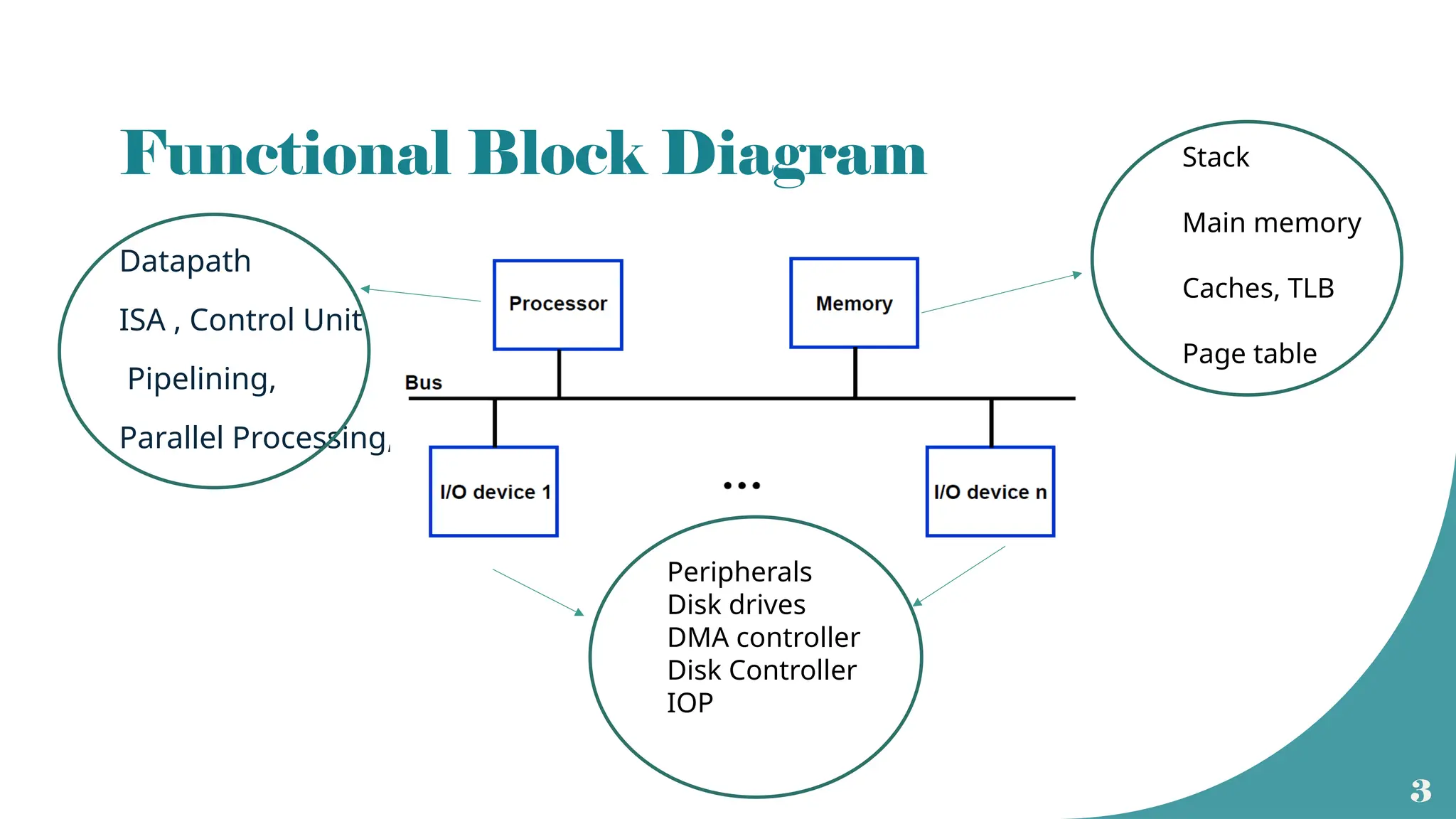
Functional Block Diagram
Datapath
ISA , Control Unit
Pipelining,
Parallel Processing,
Stack
Main memory
Caches, TLB
Page table
Peripherals
Disk drives
DMA controller
Disk Controller
IOP
4
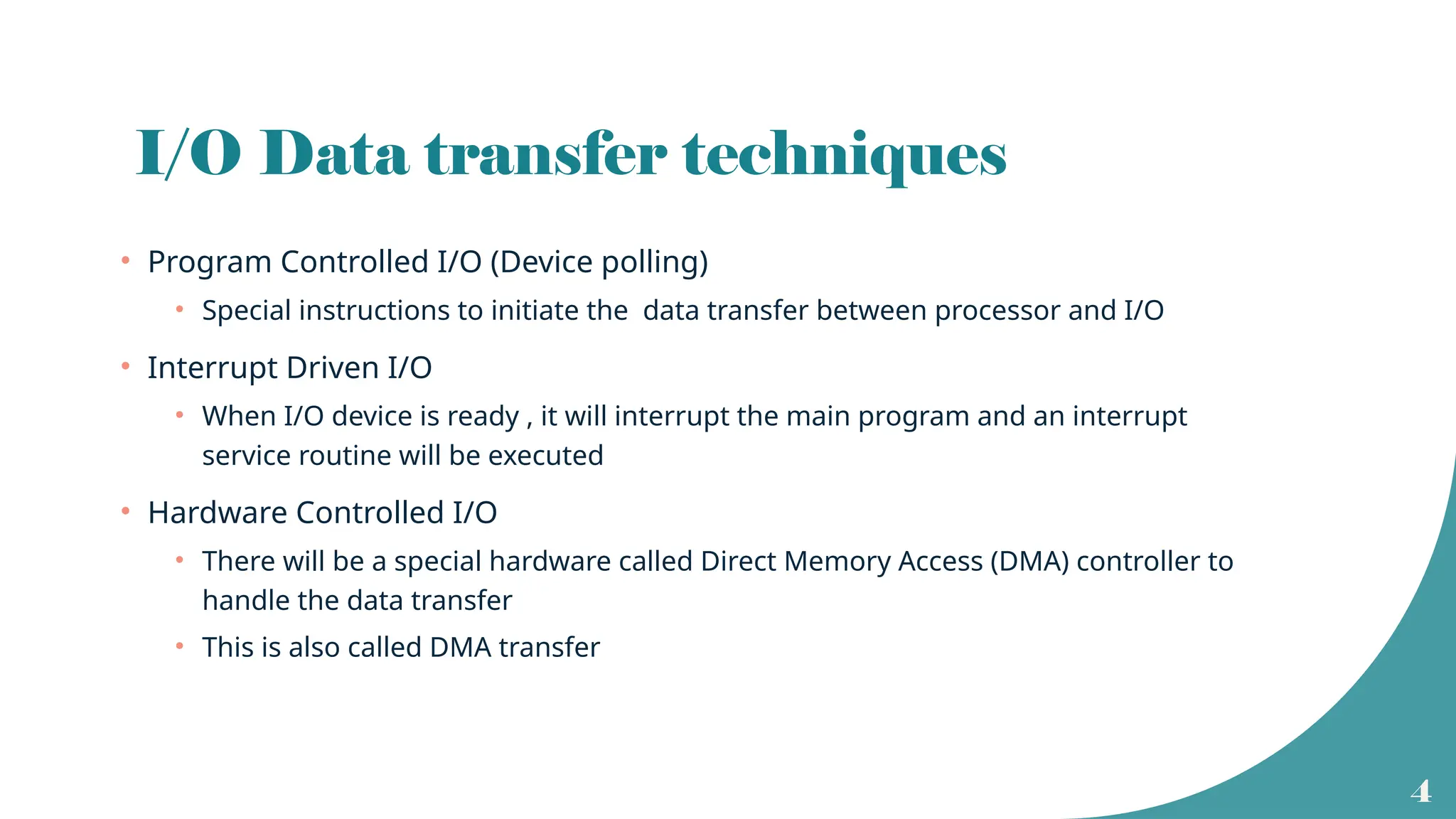
I/O Data transfer techniques
• Program Controlled I/O (Device polling)
• Special instructions to initiate the data transfer between processor and I/O
• Interrupt Driven I/O
• When I/O device is ready , it will interrupt the main program and an interrupt
service routine will be executed
• Hardware Controlled I/O
• There will be a special hardware called Direct Memory Access (DMA) controller to
handle the data transfer
• This is also called DMA transfer
5
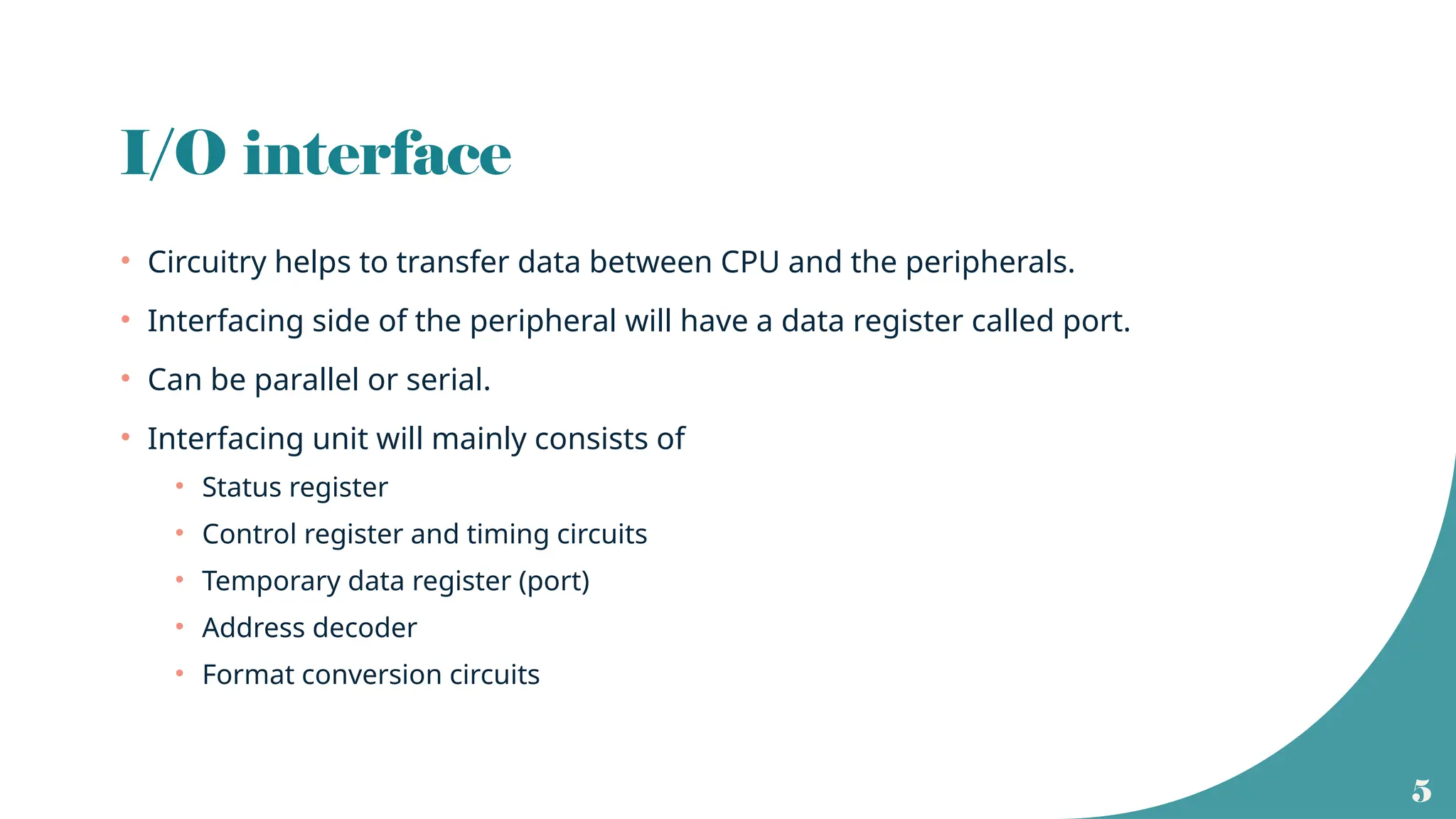
I/O interface
• Circuitry helps to transfer data between CPU and the peripherals.
• Interfacing side of the peripheral will have a data register called port.
• Can be parallel or serial.
• Interfacing unit will mainly consists of
• Status register
• Control register and timing circuits
• Temporary data register (port)
• Address decoder
• Format conversion circuits
6
I/O Interface
7
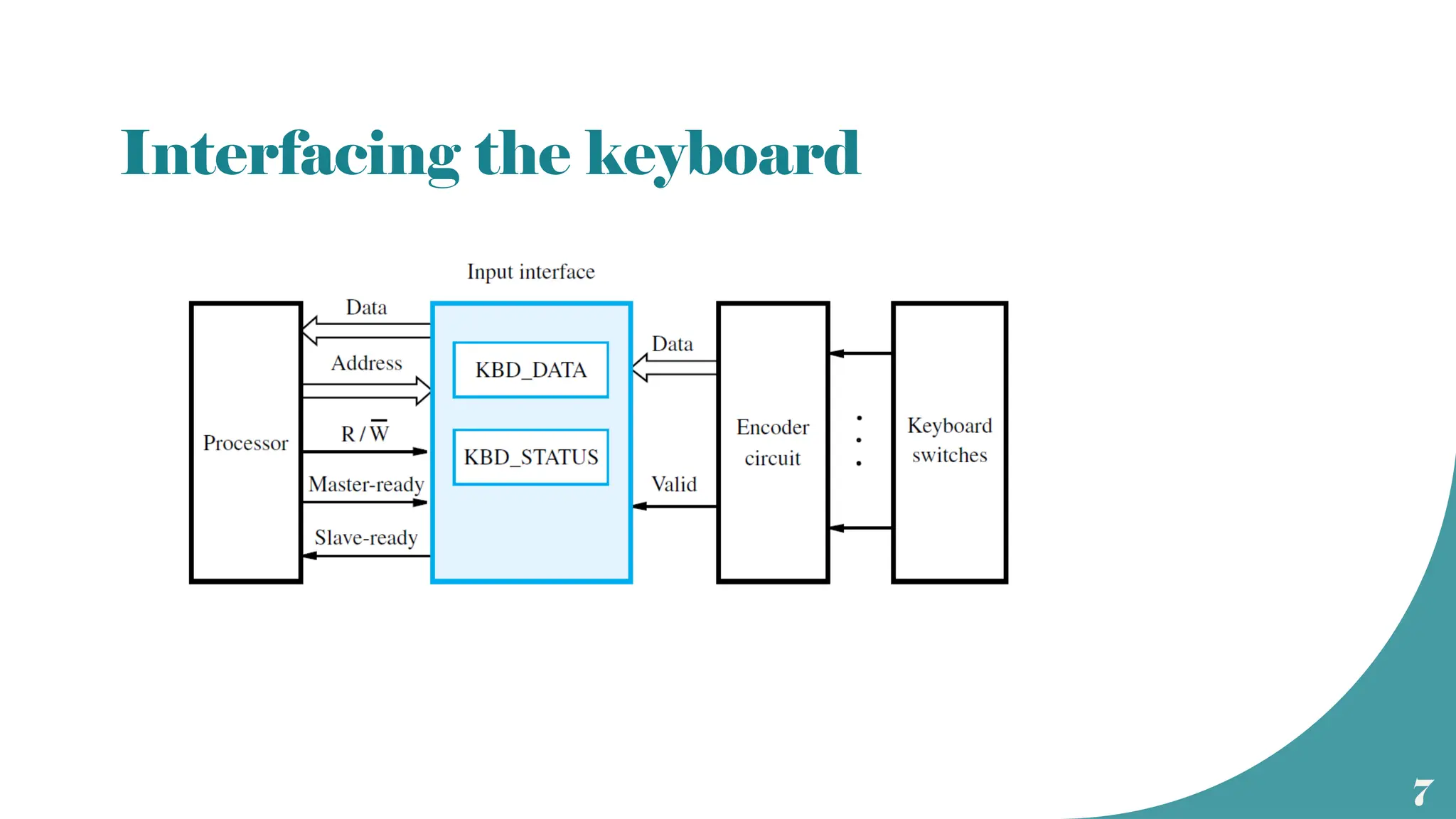
Interfacing the keyboard
8
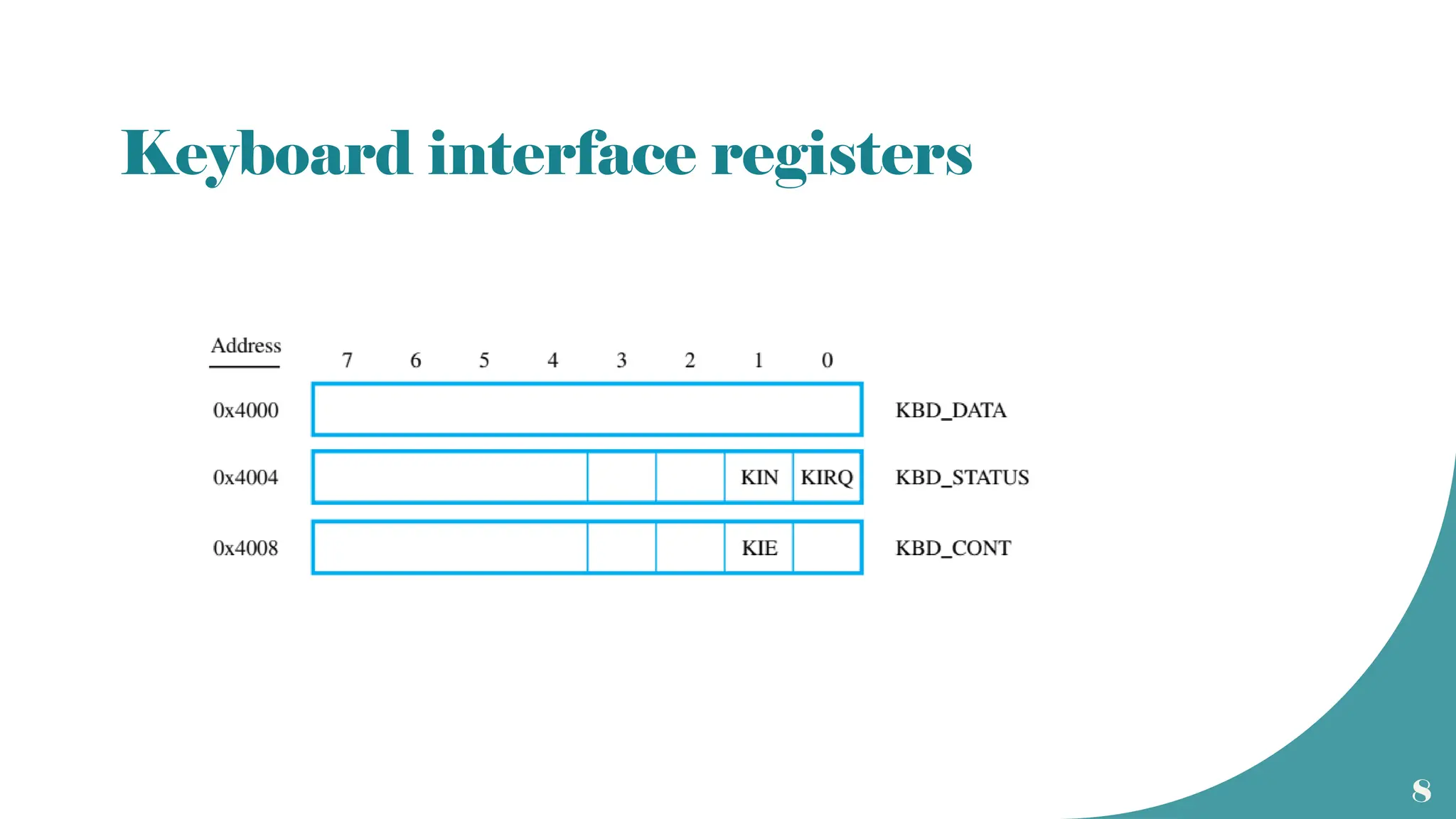
Keyboard interface registers
9
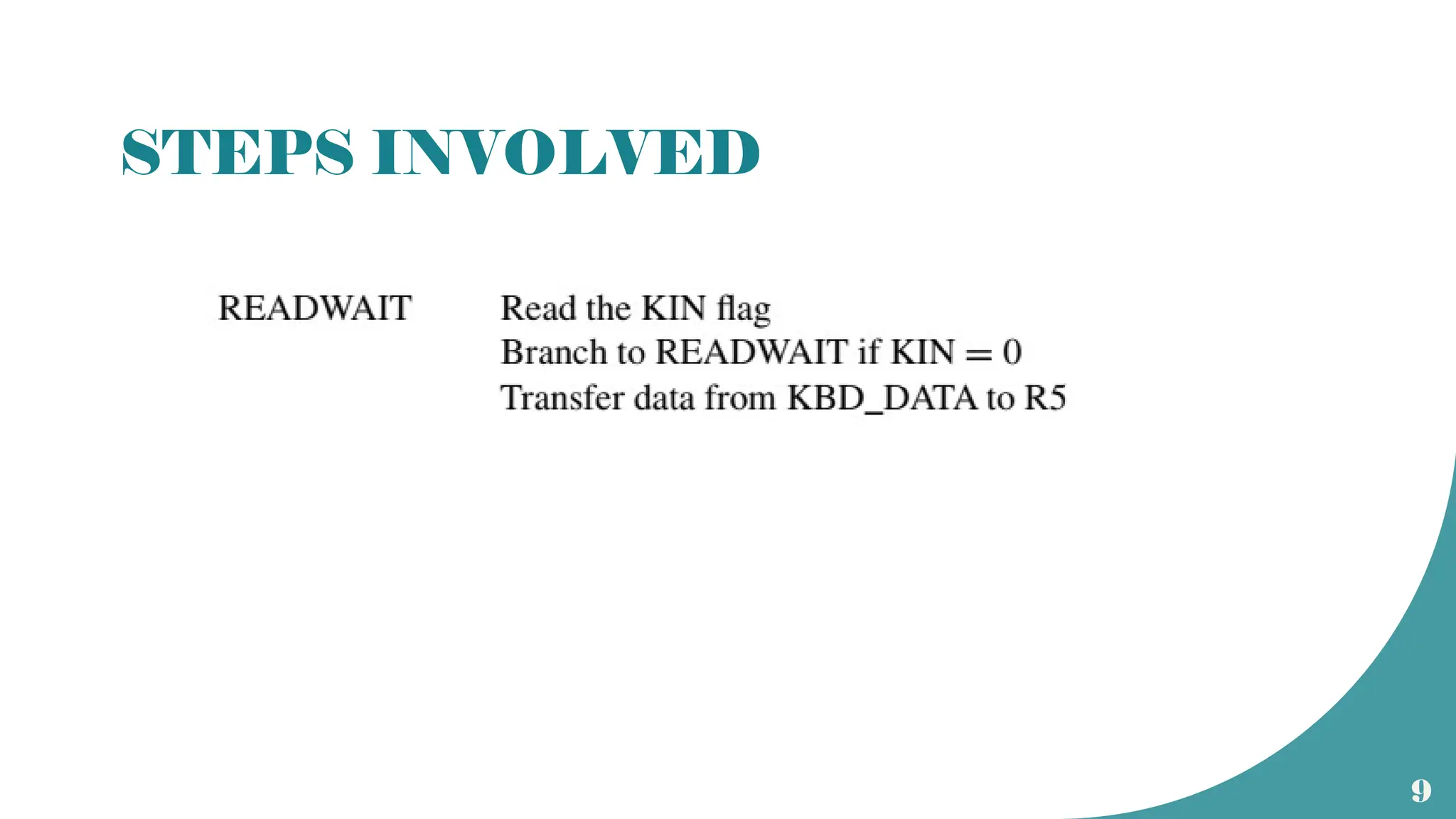
STEPS INVOLVED
10
RISC programming for keyboard
wait: loadbyte R4, K_STATUS ( content of status register is loaded to processor reg
R4)
AND R4, R4, #2 ( Logical AND operation with 00000010 to check whether KIN
=1)
branch if R4 ==0, wait
( if KIN is not set, result of AND would be zero, so CPU has to wait and constantly check
the status register until KIN =1)
loadbyte R5, K_DATA (when R4 !=0, data is entered through keyboard and is
available in data register of the keyboard)
11
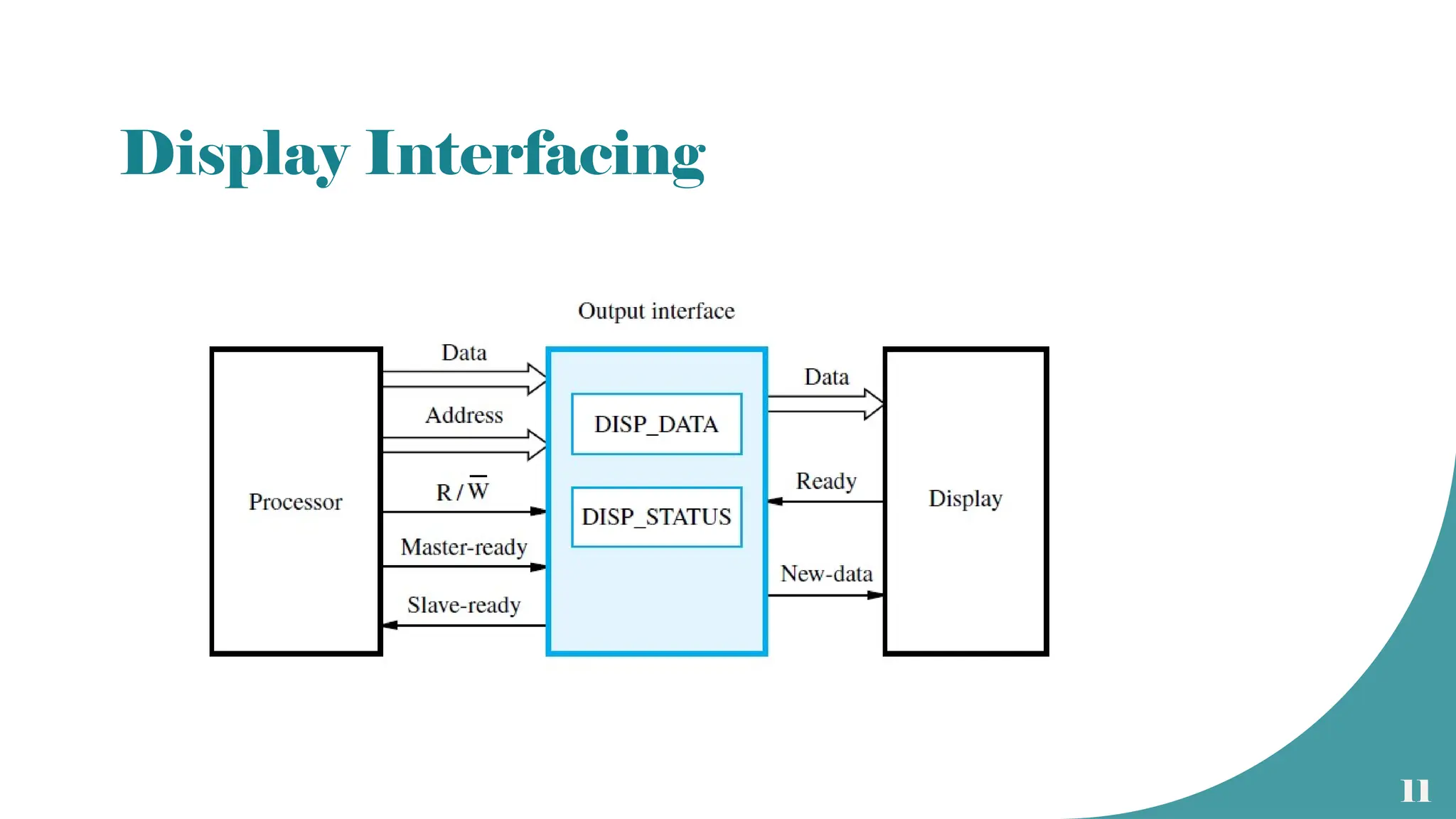
Display Interfacing
12
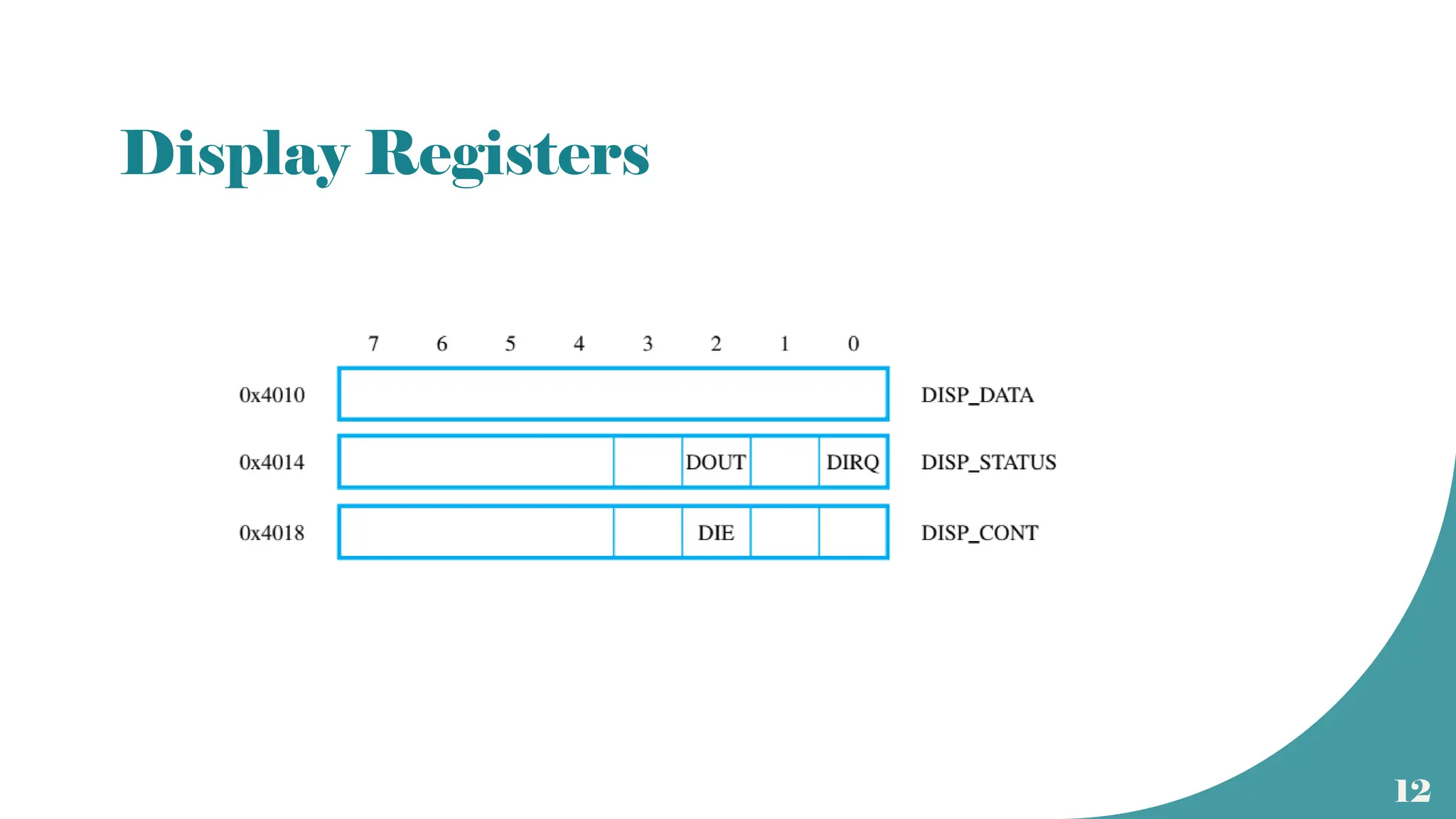
Display Registers
13
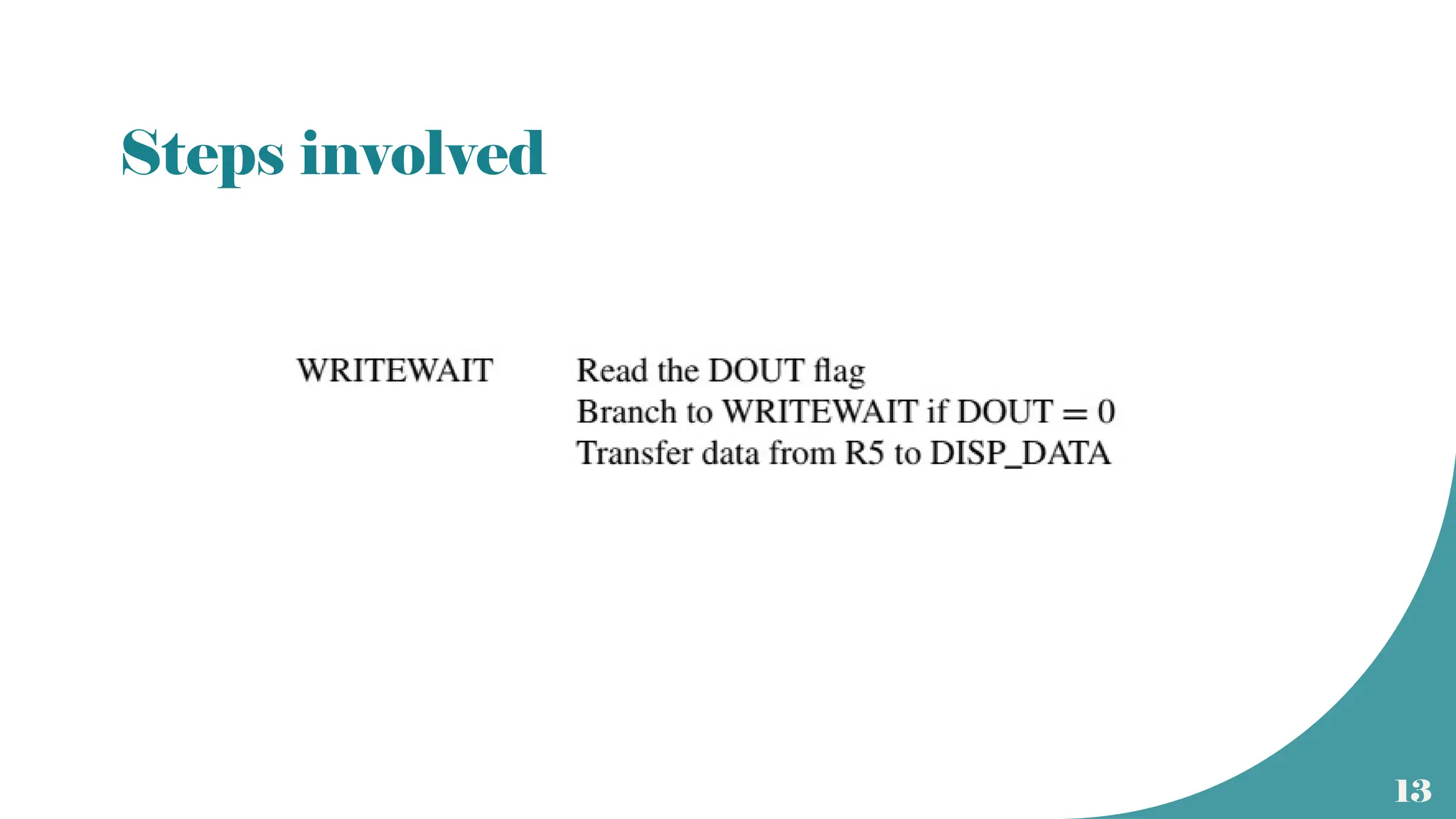
Steps involved
14
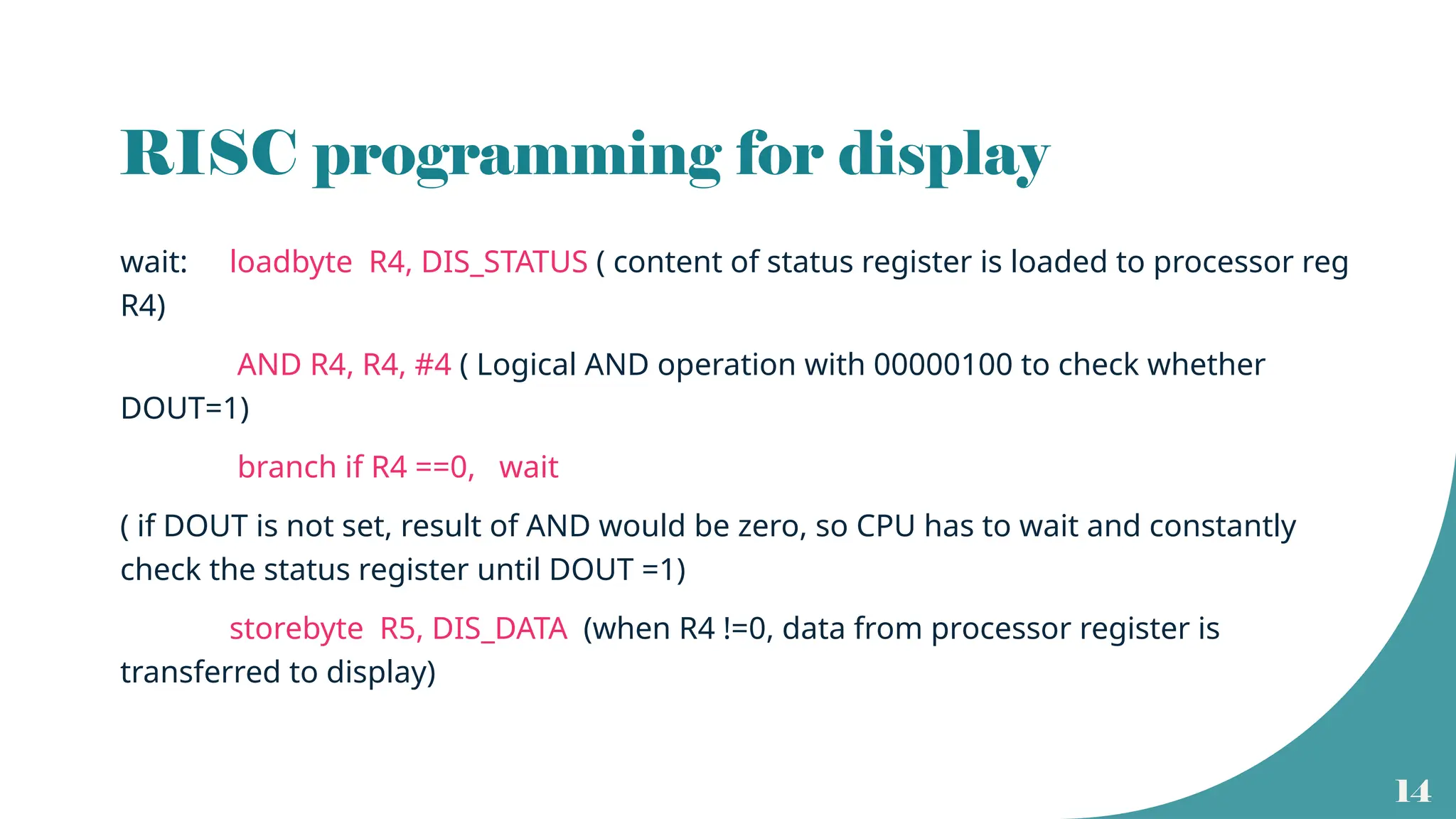
RISC programming for display
wait: loadbyte R4, DIS_STATUS ( content of status register is loaded to processor reg
R4)
AND R4, R4, #4 ( Logical AND operation with 00000100 to check whether
DOUT=1)
branch if R4 ==0, wait
( if DOUT is not set, result of AND would be zero, so CPU has to wait and constantly
check the status register until DOUT =1)
storebyte R5, DIS_DATA (when R4 !=0, data from processor register is
transferred to display)
15
Interrupt driven I/O
• In device polling, CPU has to check for the peripheral to be ready.
• Wastage of CPU time.
• Alternative method is to let the CPU to go ahead with its normal operations and
inform the CPU when the peripheral is ready.
• A hardware control signal is sent by the peripheral to the CPU to alert the processor
• It is called an interrupt request since it interrupts the CPU operations.
• Upon receiving the interrupt request, CPU will stop the ongoing task and will take
care of the interrupt.
• The I/O operation is handled as a subroutine call.
16
Interrupts
• Interrupt is a signal that invites the attention of the processor to suspend its current
program.
• In response to the interrupt, CPU will stop the execution of the running program and will
service the interrupt.
• Can be of two types
• Hardware interrupts – signals generated by the peripherals directly.
- also called device driver
• Software – signals generated by system software due to some temporary errors or exceptions
- software interrupts can happen during instruction execution
- also called trap
17
Maskable and non maskable
• Hardware interrupts can be of two types
• Maskable interrupt : If the service to an interrupt can be delayed or ignored
due to the priority of the user program, it s a maskable interrupt.
• Non maskable interrupt: If the interrupt is of higher priority and if it cannot be
delayed or ignored, it is a non maskable interrupt.
• The priority of the interrupt is checked during interrupt cycle
18
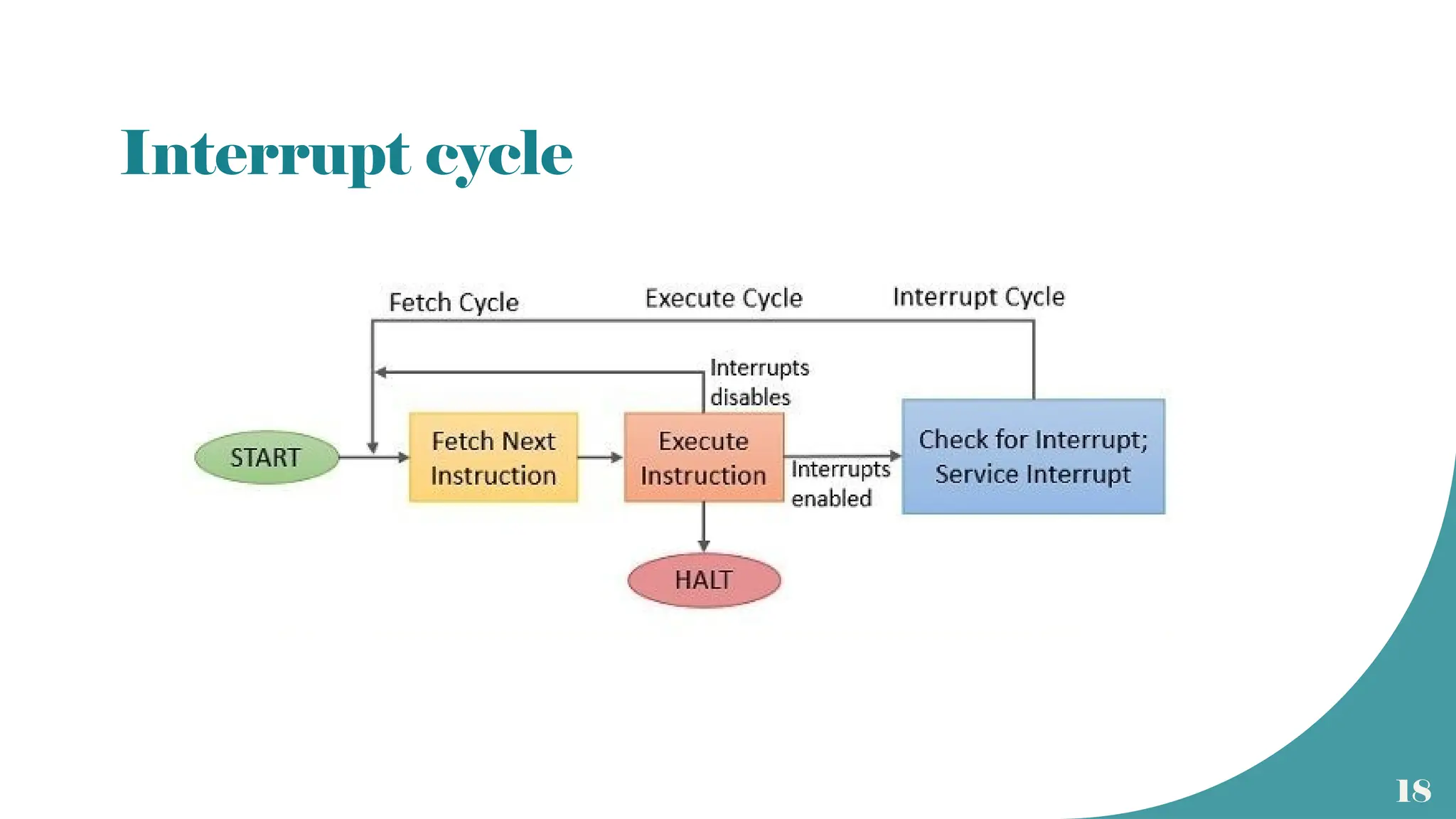
Interrupt cycle
19
Interrupt cycle
• At the end of execution of each instruction, CPU will check for pending
interrupts.
• If a non maskable interrupt request is present, CPU will suspend its current
program
and will service the interrupt.
• If the interrupt is maskable, CPU will resume its current program.
• Servicing the interrupt can be considered as a special cycle called interrupt
cycle.
• At the end of interrupt cycle, execution of the next instruction resumes
20
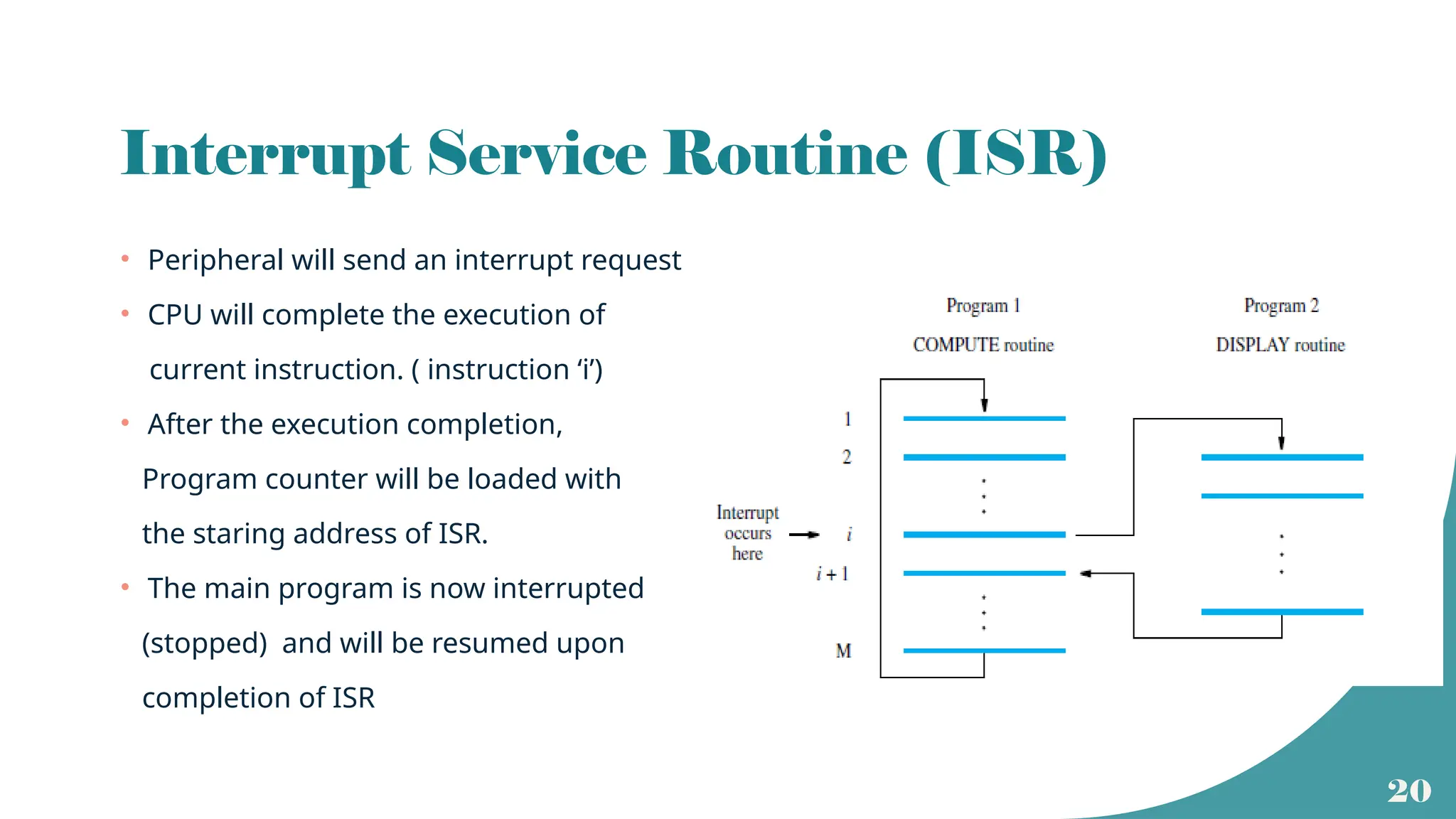
Interrupt Service Routine (ISR)
• Peripheral will send an interrupt request
• CPU will complete the execution of
current instruction. ( instruction ‘i’)
• After the execution completion,
Program counter will be loaded with
the staring address of ISR.
• The main program is now interrupted
(stopped) and will be resumed upon
completion of ISR
21
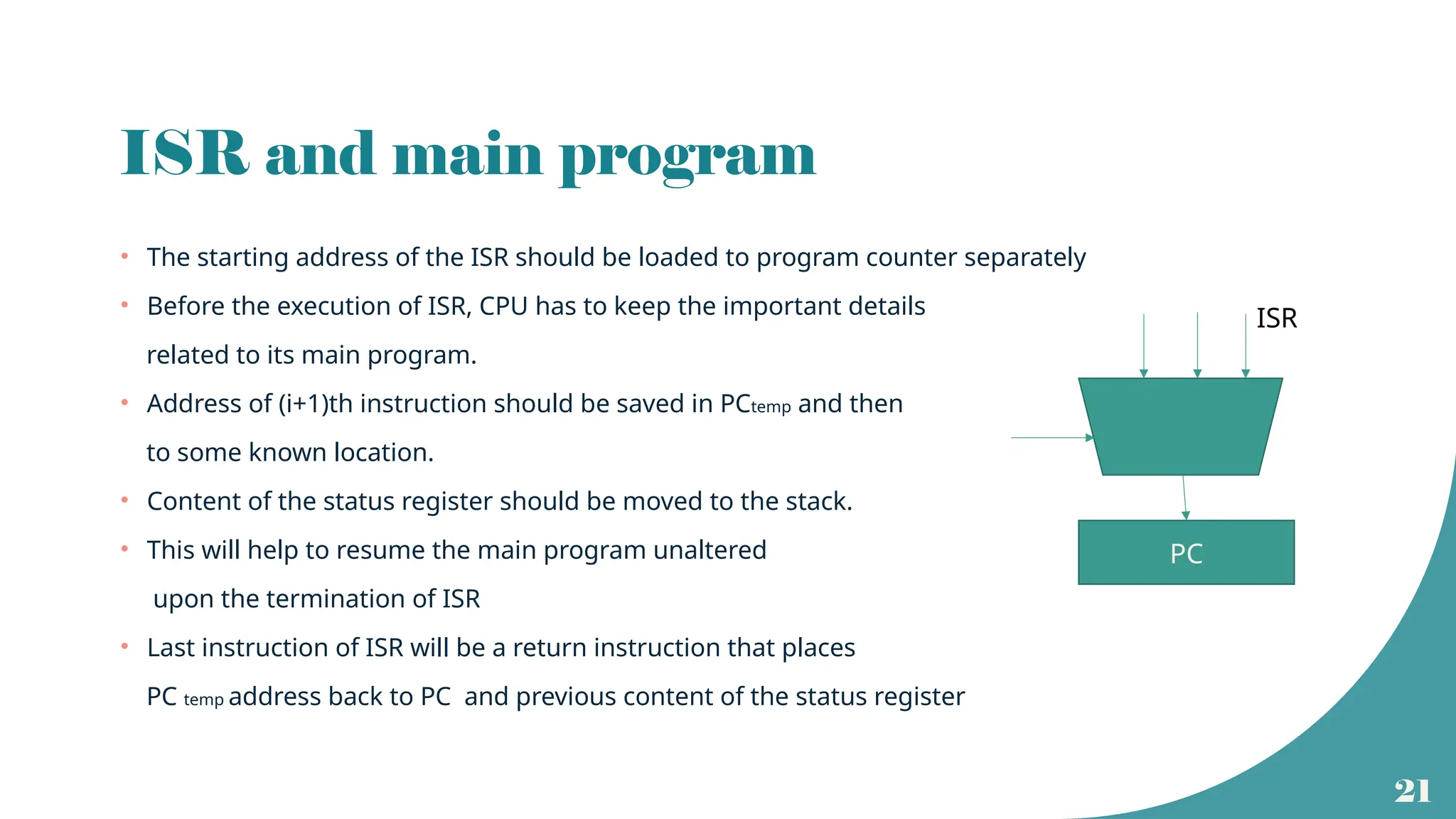
ISR and main program
• The starting address of the ISR should be loaded to program counter separately
• Before the execution of ISR, CPU has to keep the important details
related to its main program.
• Address of (i+1)th instruction should be saved in PCtemp and then
to some known location.
• Content of the status register should be moved to the stack.
• This will help to resume the main program unaltered
upon the termination of ISR
• Last instruction of ISR will be a return instruction that places
PC temp address back to PC and previous content of the status register
PC
ISR
22
Interrupt latency
• Time delay between the reception of an interrupt request signal and the
beginning of ISR execution is termed as interrupt latency.
• Latency occurs due to
• Memory operations involved to store the next instruction address and the status
register contents.
• Memory operations involved in loading PC with starting address of ISR.
23
Design issues
• Identification of the device that raised the interrupt
• Identification of the type of interrupt to be serviced.
• Managing the newly raised interrupt at the time of servicing an already raised
interrupt
• Handling of interrupts raised by multiple peripherals simultaneously
24
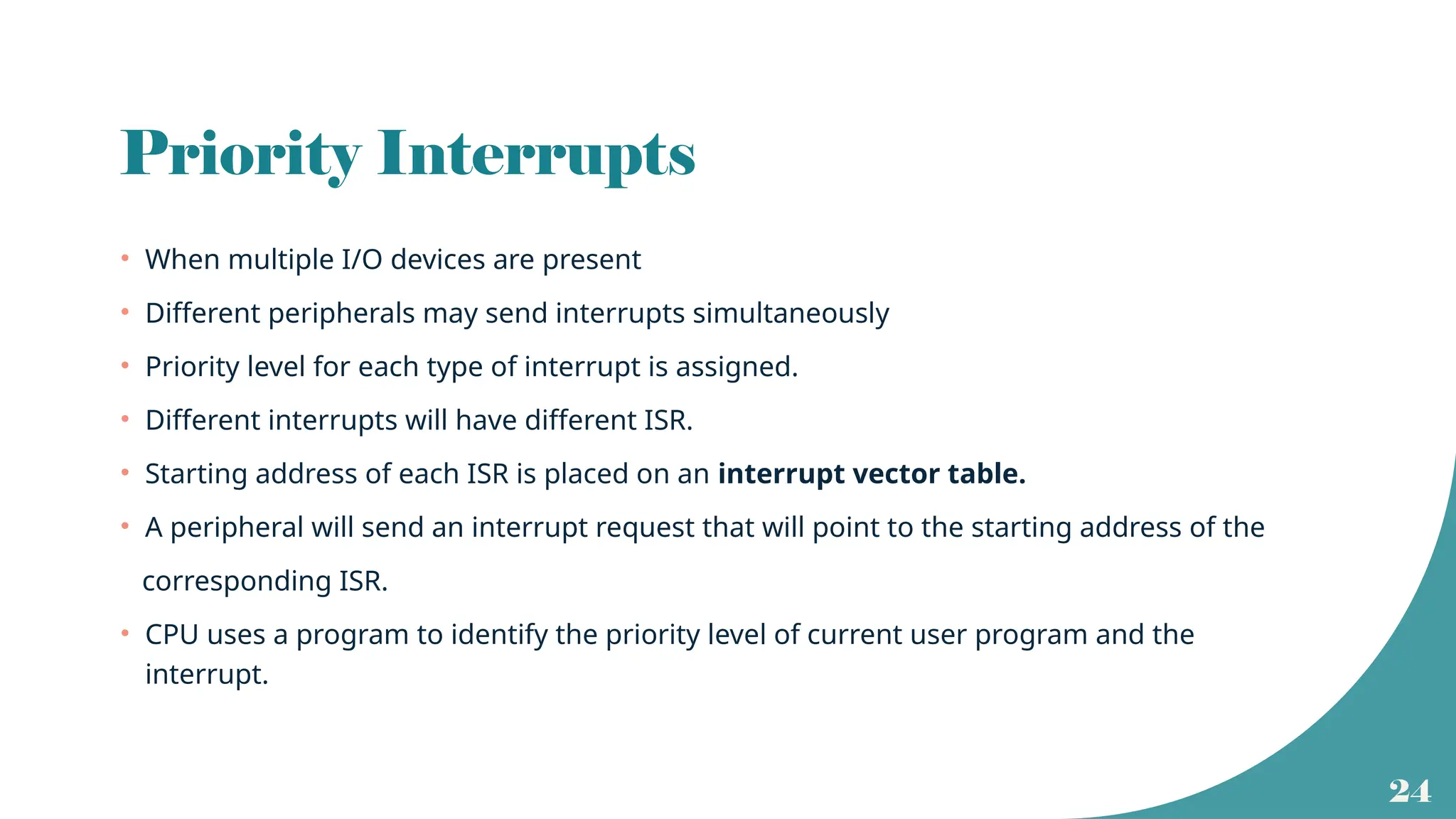
Priority Interrupts
• When multiple I/O devices are present
• Different peripherals may send interrupts simultaneously
• Priority level for each type of interrupt is assigned.
• Different interrupts will have different ISR.
• Starting address of each ISR is placed on an interrupt vector table.
• A peripheral will send an interrupt request that will point to the starting address of the
corresponding ISR.
• CPU uses a program to identify the priority level of current user program and the
interrupt.
25
Enabling and disabling of interrupts
• When an interrupt request is raised, interrupt enable bit of the peripheral is set.
• This will be reset upon successful completion of the ISR.
• There will be a separate instruction at the end of ISR to update the status and
control register of the peripheral.
26
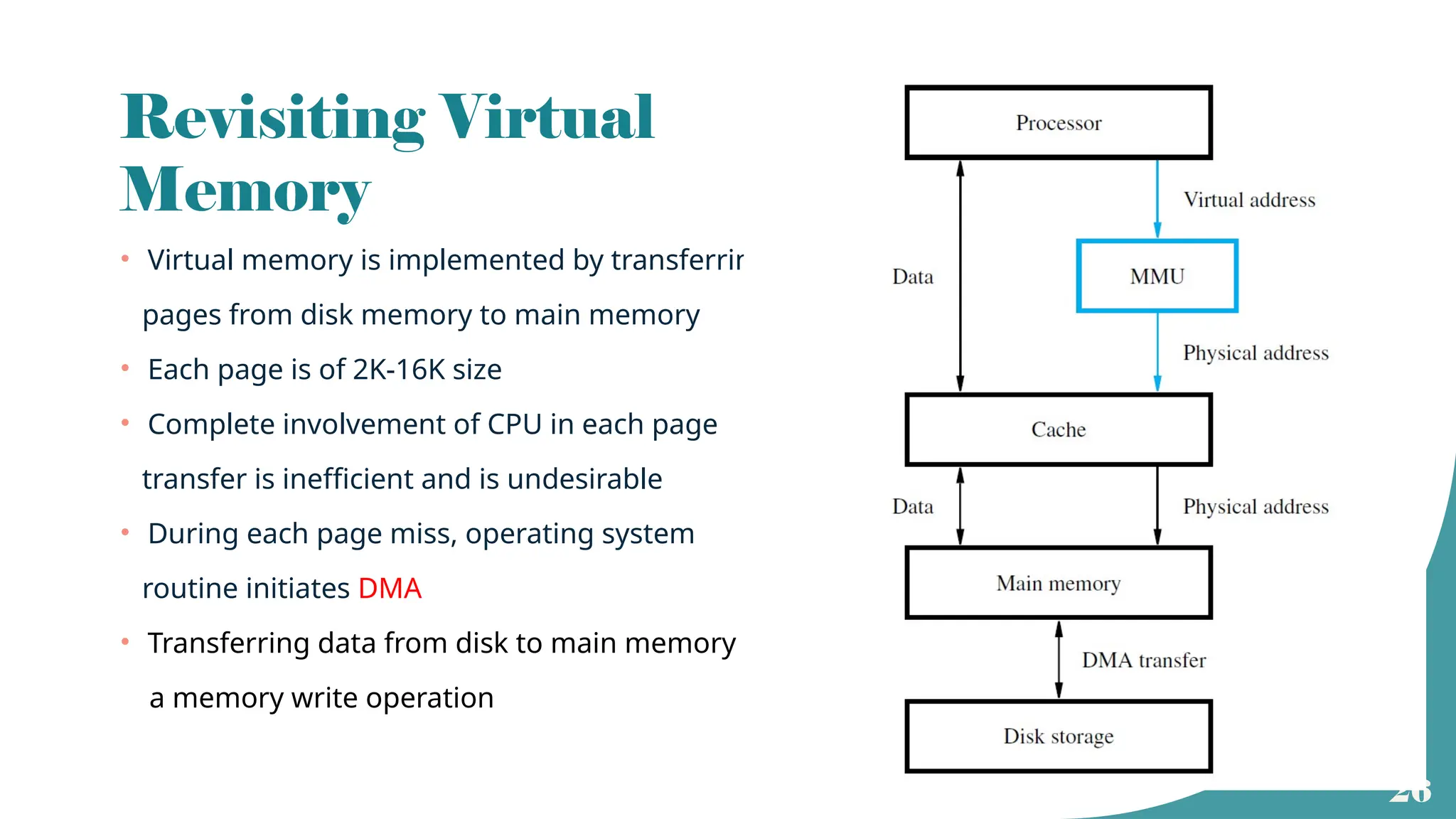
Revisiting Virtual
Memory
• Virtual memory is implemented by transferring
pages from disk memory to main memory
• Each page is of 2K-16K size
• Complete involvement of CPU in each page
transfer is inefficient and is undesirable
• During each page miss, operating system
routine initiates DMA
• Transferring data from disk to main memory is
a memory write operation
27
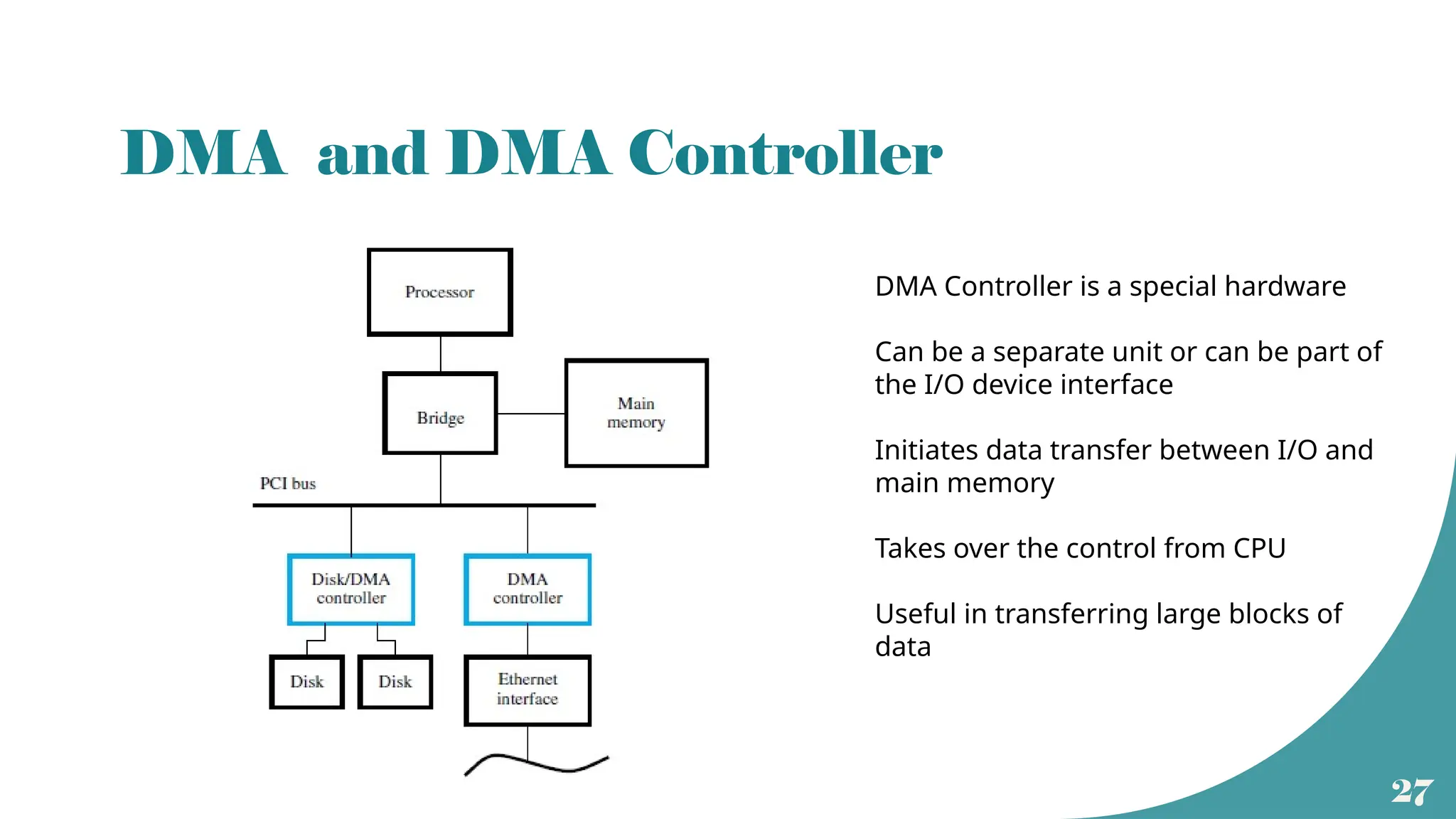
DMA and DMA Controller
DMA Controller is a special hardware
Can be a separate unit or can be part of
the I/O device interface
Initiates data transfer between I/O and
main memory
Takes over the control from CPU
Useful in transferring large blocks of
data
28
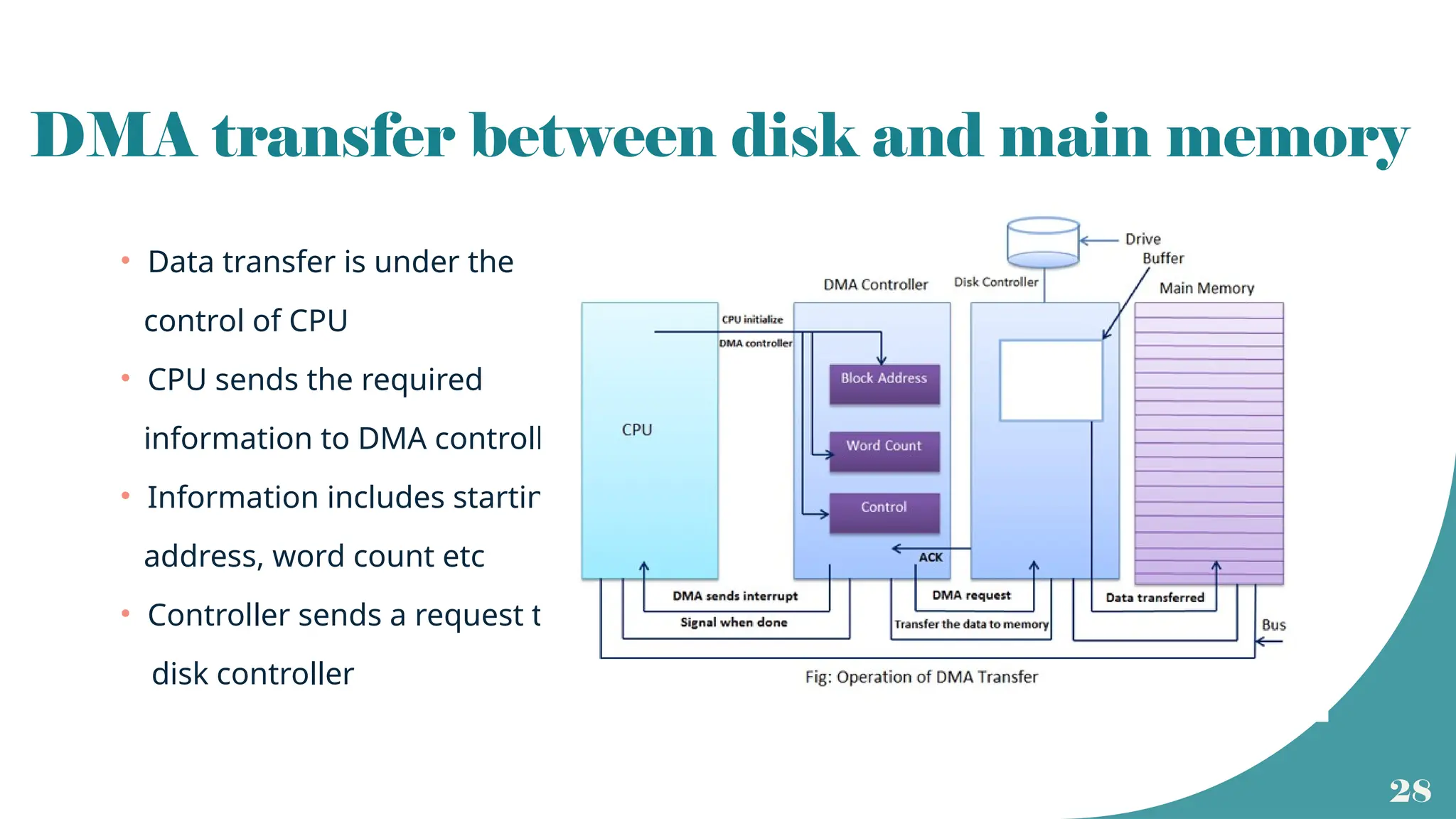
DMA transfer between disk and main memory
• Data transfer is under the
control of CPU
• CPU sends the required
information to DMA controller
• Information includes starting
address, word count etc
• Controller sends a request to
disk controller
29
Read/ Write operation
• Memory read operation using DMA takes place at the time of replacement of a modified page or at
the time of transferring a block of data to an output device.
• More common is writing into main memory from disk ( external or internal).
• Before memory write, data residing in disk will be transferred to a buffer in the disk drive controller.
• This process is initiated by the operating system.
• Once data is in the buffer, CPU sends the necessary details to DMA.
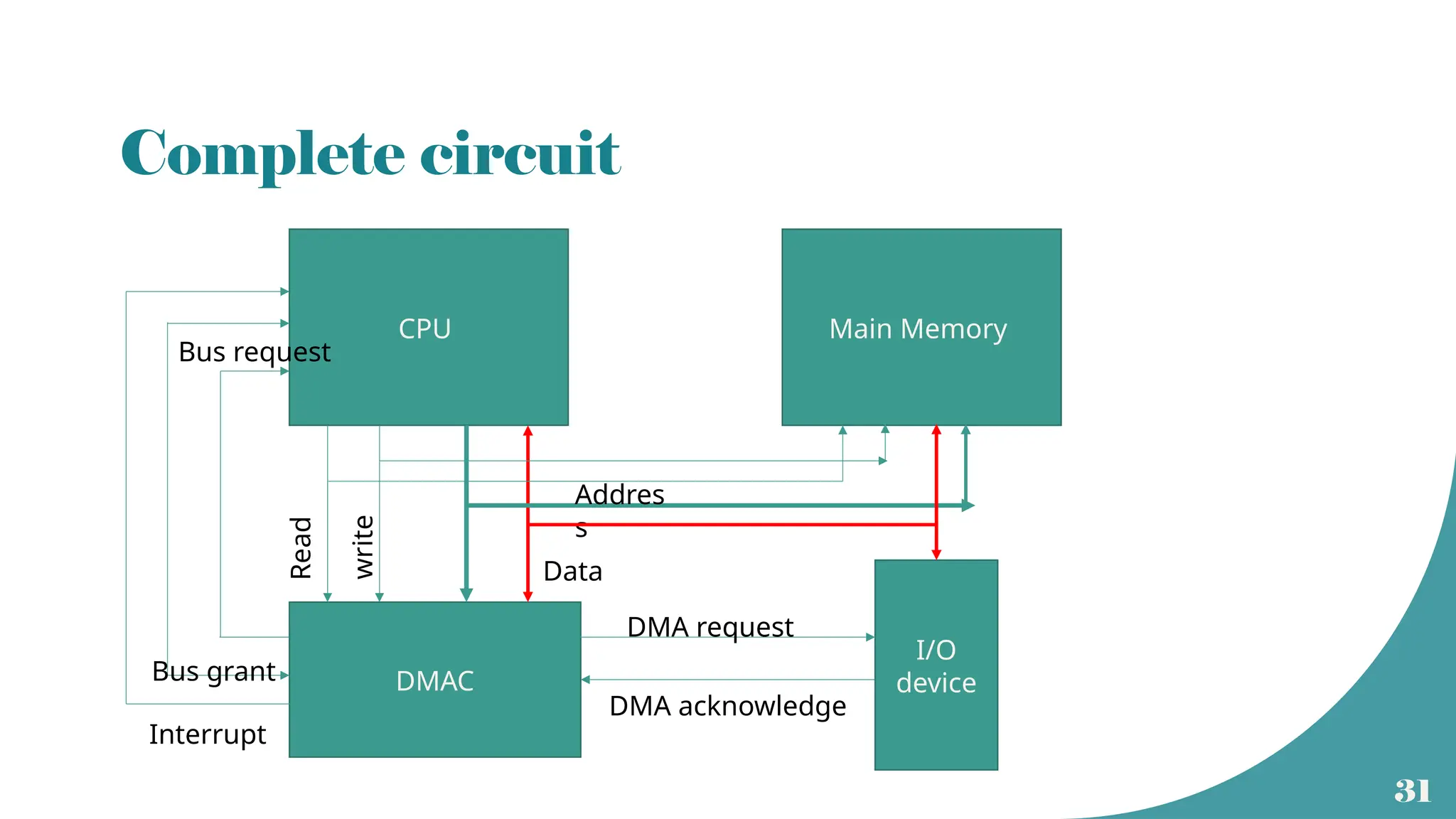
• DMA takes over the control of system bus.( Bus Request and Bus Grant signals)
• Data from buffer will be transferred to the specified location in main memory.
• Once the writing operation is complete ( word count ==0), DMAC sends an interrupt to CPU.
• CPU takes the control of system bus
30
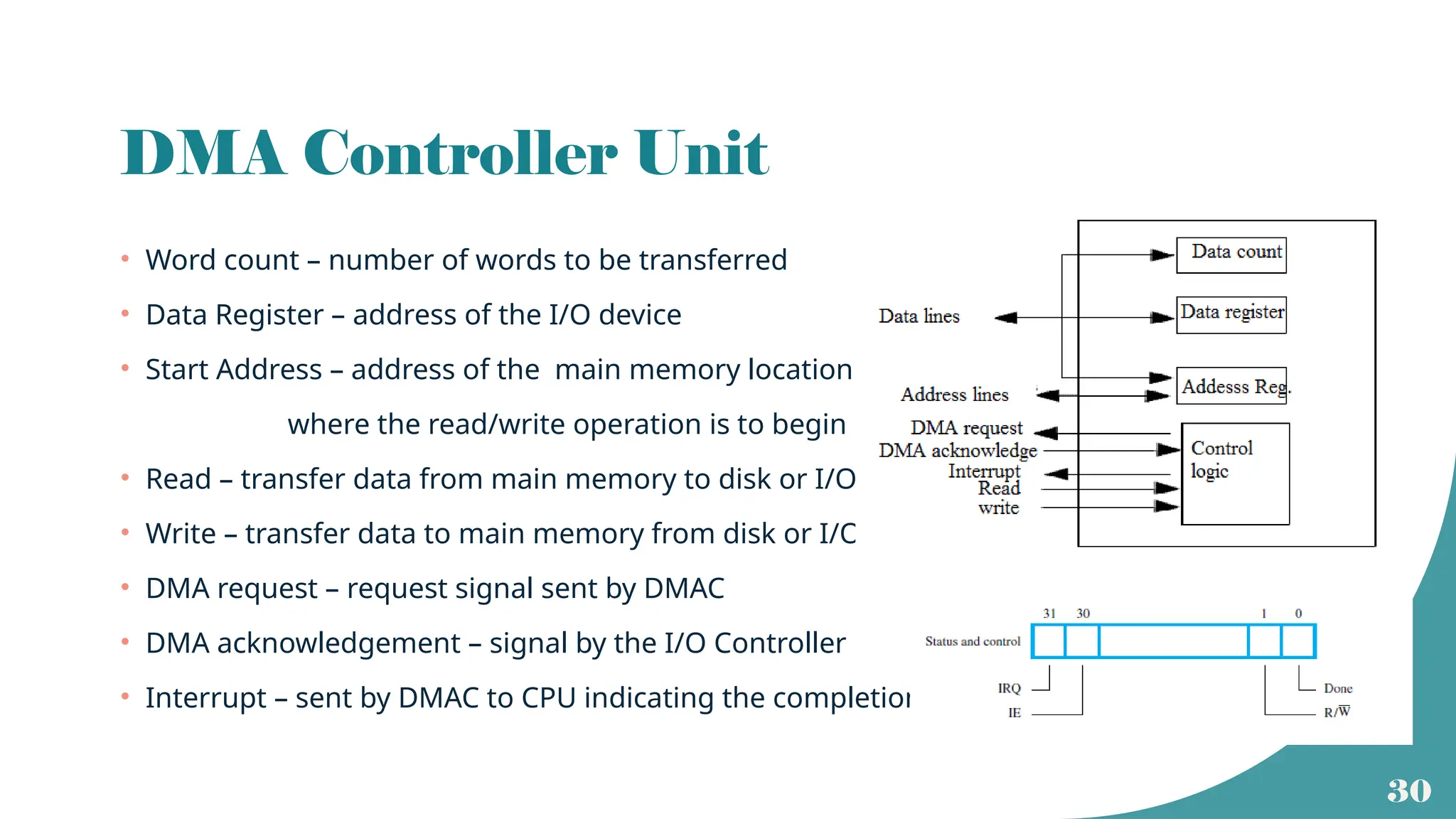
DMA Controller Unit
• Word count – number of words to be transferred
• Data Register – address of the I/O device
• Start Address – address of the main memory location
where the read/write operation is to begin
• Read – transfer data from main memory to disk or I/O
• Write – transfer data to main memory from disk or I/O
• DMA request – request signal sent by DMAC
• DMA acknowledgement – signal by the I/O Controller
• Interrupt – sent by DMAC to CPU indicating the completion
31
Complete circuit
CPU Main Memory
DMAC
I/O
device
Interrupt
Bus grant
Bus request
Addres
s
Data
Read
write
DMA request
DMA acknowledge
32
Different types of DMA transfer
• Burst Mode :
• Here the control of buses are transferred back to CPU only at the end of data
transfer
• Cycle Stealing Mode :
• Here the control of buses are transferred back to CPU at the end of each word
transfer.
• Transparent Mode:
• Here the DMA takes the control of buses only when it is not in use by CPU
33
Input Output Processor (IOP)
• DMAC works as per the instructions given by CPU
• It does not have any instructions within it.
• To speed up the data processing of I/O devices without using CPU, special
processors called IOP can be used.
• IOP is similar to CPU but takes care of only I/O processing.
• Unlike DMAC, it can fetch and execute its own instructions.
• IOP also has DMA capability
34
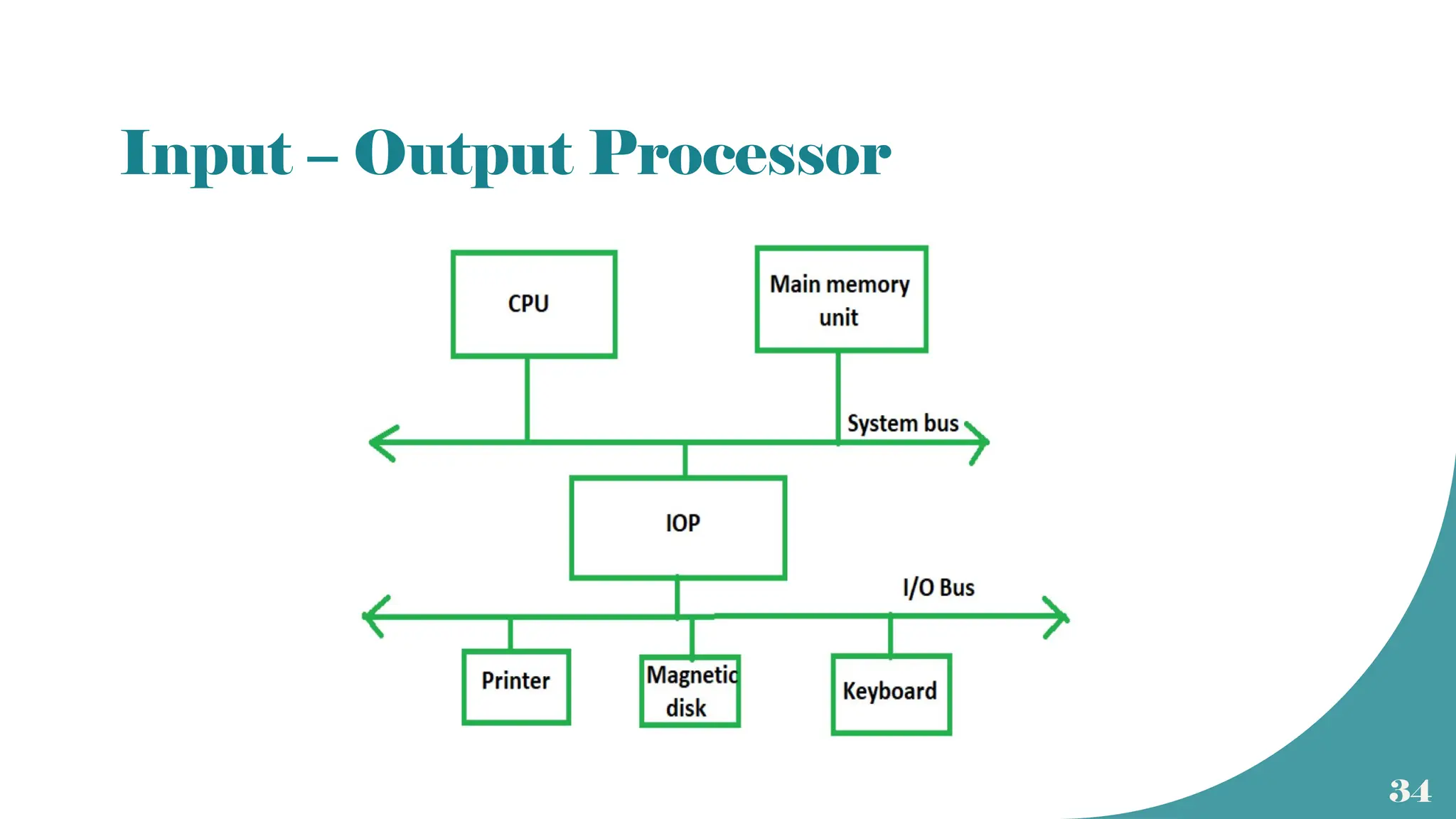
Input – Output Processor
35
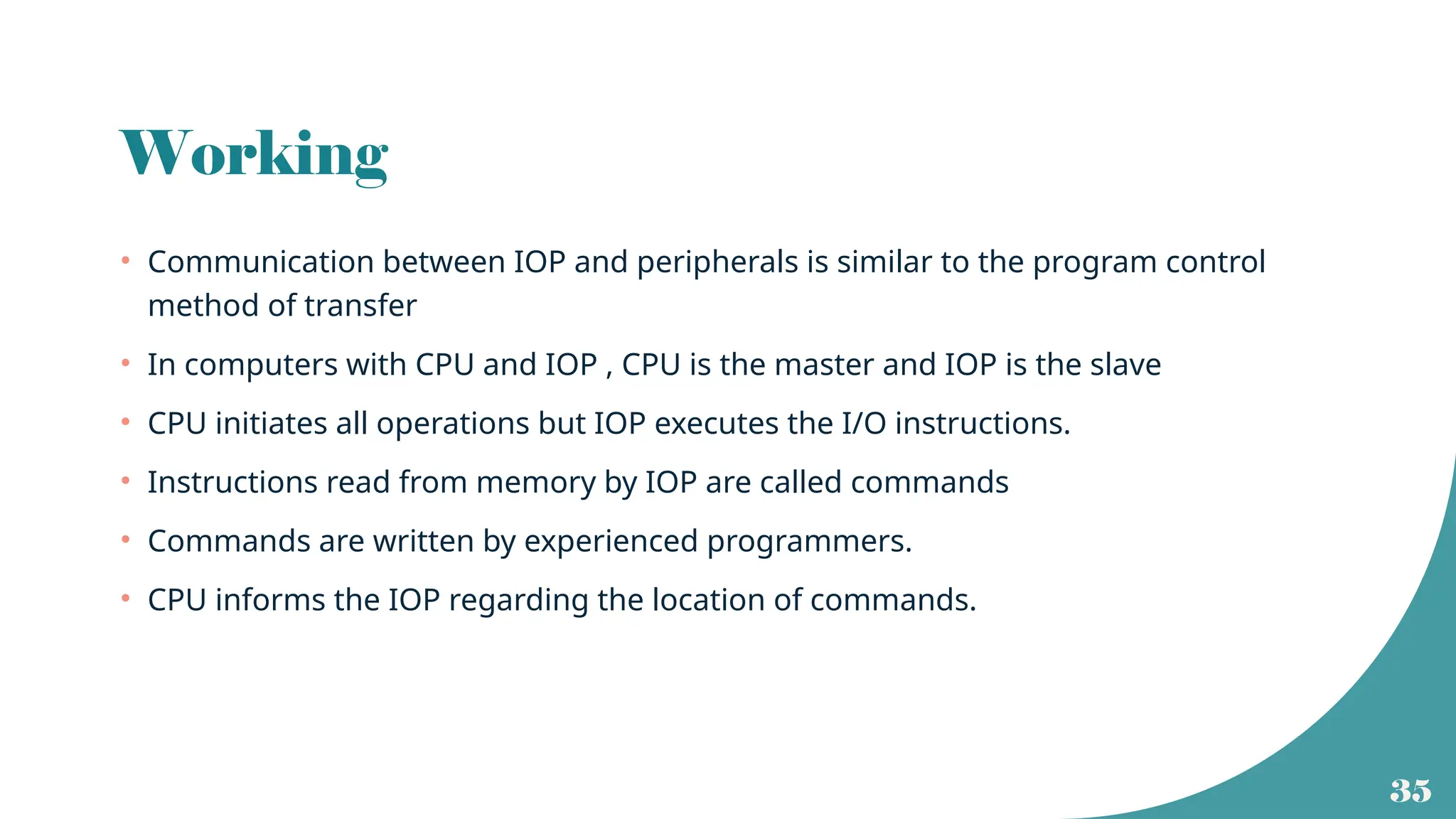
Working
• Communication between IOP and peripherals is similar to the program control
method of transfer
• In computers with CPU and IOP , CPU is the master and IOP is the slave
• CPU initiates all operations but IOP executes the I/O instructions.
• Instructions read from memory by IOP are called commands
• Commands are written by experienced programmers.
• CPU informs the IOP regarding the location of commands.
36
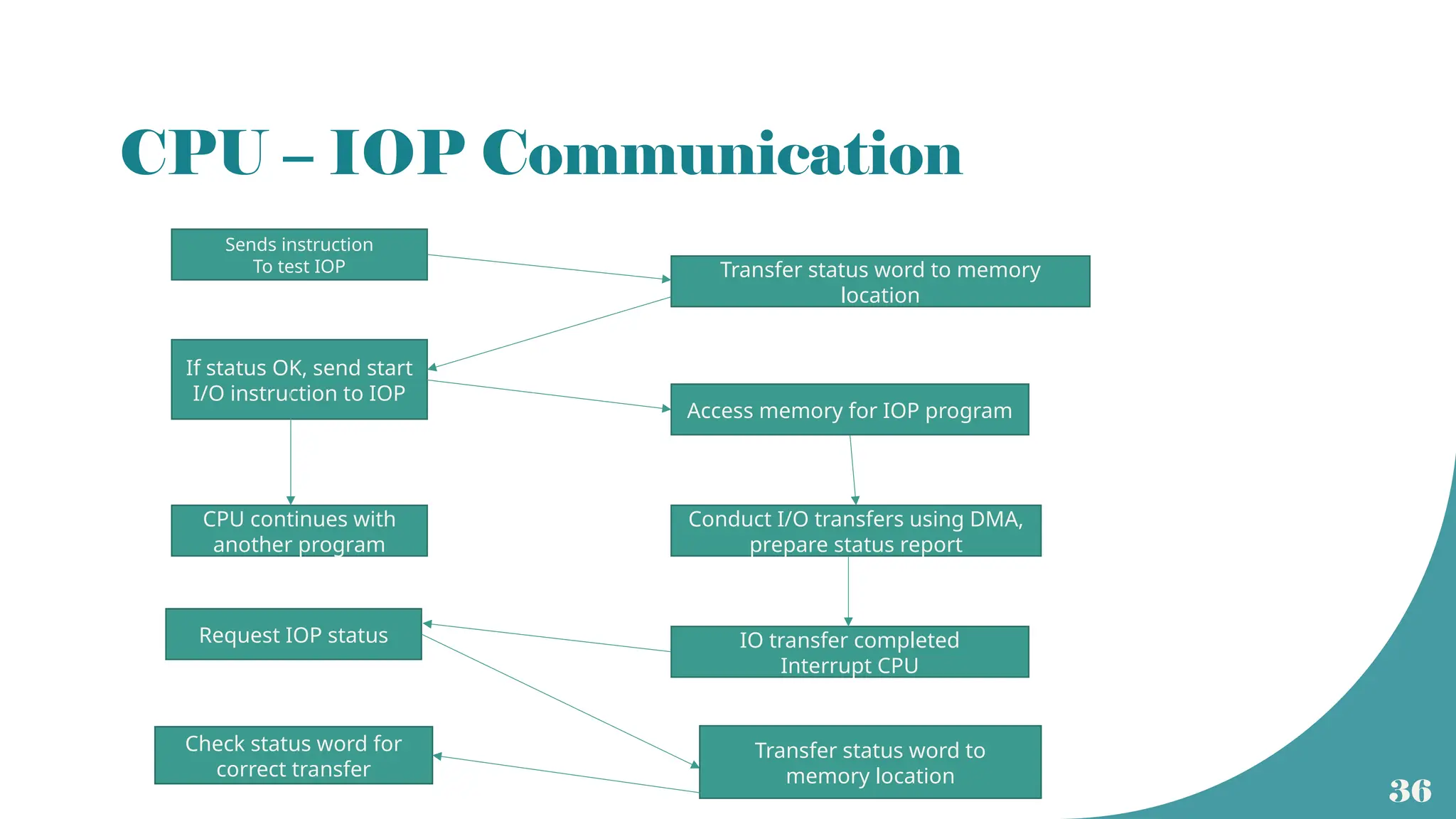
CPU – IOP Communication
Sends instruction
To test IOP Transfer status word to memory
location
If status OK, send start
I/O instruction to IOP
Access memory for IOP program
CPU continues with
another program
Conduct I/O transfers using DMA,
prepare status report
IO transfer completed
Interrupt CPU
Request IOP status
Transfer status word to
memory location
Check status word for
correct transfer

37
8089 IOP

Lecture22_New2024 (1).pptx lecture numbere one h yeh

  • 1.
  • 2.
    2 Lecture Objectives • DiscussI/O data transfer techniques • Interrupt driven I/O • Direct Memory Access (DMA) • Input Output Processor (IOP)
  • 3.
    3 Functional Block Diagram Datapath ISA, Control Unit Pipelining, Parallel Processing, Stack Main memory Caches, TLB Page table Peripherals Disk drives DMA controller Disk Controller IOP
  • 4.
    4 I/O Data transfertechniques • Program Controlled I/O (Device polling) • Special instructions to initiate the data transfer between processor and I/O • Interrupt Driven I/O • When I/O device is ready , it will interrupt the main program and an interrupt service routine will be executed • Hardware Controlled I/O • There will be a special hardware called Direct Memory Access (DMA) controller to handle the data transfer • This is also called DMA transfer
  • 5.
    5 I/O interface • Circuitryhelps to transfer data between CPU and the peripherals. • Interfacing side of the peripheral will have a data register called port. • Can be parallel or serial. • Interfacing unit will mainly consists of • Status register • Control register and timing circuits • Temporary data register (port) • Address decoder • Format conversion circuits
  • 6.
  • 7.
  • 8.
  • 9.
  • 10.
    10 RISC programming forkeyboard wait: loadbyte R4, K_STATUS ( content of status register is loaded to processor reg R4) AND R4, R4, #2 ( Logical AND operation with 00000010 to check whether KIN =1) branch if R4 ==0, wait ( if KIN is not set, result of AND would be zero, so CPU has to wait and constantly check the status register until KIN =1) loadbyte R5, K_DATA (when R4 !=0, data is entered through keyboard and is available in data register of the keyboard)
  • 11.
  • 12.
  • 13.
  • 14.
    14 RISC programming fordisplay wait: loadbyte R4, DIS_STATUS ( content of status register is loaded to processor reg R4) AND R4, R4, #4 ( Logical AND operation with 00000100 to check whether DOUT=1) branch if R4 ==0, wait ( if DOUT is not set, result of AND would be zero, so CPU has to wait and constantly check the status register until DOUT =1) storebyte R5, DIS_DATA (when R4 !=0, data from processor register is transferred to display)
  • 15.
    15 Interrupt driven I/O •In device polling, CPU has to check for the peripheral to be ready. • Wastage of CPU time. • Alternative method is to let the CPU to go ahead with its normal operations and inform the CPU when the peripheral is ready. • A hardware control signal is sent by the peripheral to the CPU to alert the processor • It is called an interrupt request since it interrupts the CPU operations. • Upon receiving the interrupt request, CPU will stop the ongoing task and will take care of the interrupt. • The I/O operation is handled as a subroutine call.
  • 16.
    16 Interrupts • Interrupt isa signal that invites the attention of the processor to suspend its current program. • In response to the interrupt, CPU will stop the execution of the running program and will service the interrupt. • Can be of two types • Hardware interrupts – signals generated by the peripherals directly. - also called device driver • Software – signals generated by system software due to some temporary errors or exceptions - software interrupts can happen during instruction execution - also called trap
  • 17.
    17 Maskable and nonmaskable • Hardware interrupts can be of two types • Maskable interrupt : If the service to an interrupt can be delayed or ignored due to the priority of the user program, it s a maskable interrupt. • Non maskable interrupt: If the interrupt is of higher priority and if it cannot be delayed or ignored, it is a non maskable interrupt. • The priority of the interrupt is checked during interrupt cycle
  • 18.
  • 19.
    19 Interrupt cycle • Atthe end of execution of each instruction, CPU will check for pending interrupts. • If a non maskable interrupt request is present, CPU will suspend its current program and will service the interrupt. • If the interrupt is maskable, CPU will resume its current program. • Servicing the interrupt can be considered as a special cycle called interrupt cycle. • At the end of interrupt cycle, execution of the next instruction resumes
  • 20.
    20 Interrupt Service Routine(ISR) • Peripheral will send an interrupt request • CPU will complete the execution of current instruction. ( instruction ‘i’) • After the execution completion, Program counter will be loaded with the staring address of ISR. • The main program is now interrupted (stopped) and will be resumed upon completion of ISR
  • 21.
    21 ISR and mainprogram • The starting address of the ISR should be loaded to program counter separately • Before the execution of ISR, CPU has to keep the important details related to its main program. • Address of (i+1)th instruction should be saved in PCtemp and then to some known location. • Content of the status register should be moved to the stack. • This will help to resume the main program unaltered upon the termination of ISR • Last instruction of ISR will be a return instruction that places PC temp address back to PC and previous content of the status register PC ISR
  • 22.
    22 Interrupt latency • Timedelay between the reception of an interrupt request signal and the beginning of ISR execution is termed as interrupt latency. • Latency occurs due to • Memory operations involved to store the next instruction address and the status register contents. • Memory operations involved in loading PC with starting address of ISR.
  • 23.
    23 Design issues • Identificationof the device that raised the interrupt • Identification of the type of interrupt to be serviced. • Managing the newly raised interrupt at the time of servicing an already raised interrupt • Handling of interrupts raised by multiple peripherals simultaneously
  • 24.
    24 Priority Interrupts • Whenmultiple I/O devices are present • Different peripherals may send interrupts simultaneously • Priority level for each type of interrupt is assigned. • Different interrupts will have different ISR. • Starting address of each ISR is placed on an interrupt vector table. • A peripheral will send an interrupt request that will point to the starting address of the corresponding ISR. • CPU uses a program to identify the priority level of current user program and the interrupt.
  • 25.
    25 Enabling and disablingof interrupts • When an interrupt request is raised, interrupt enable bit of the peripheral is set. • This will be reset upon successful completion of the ISR. • There will be a separate instruction at the end of ISR to update the status and control register of the peripheral.
  • 26.
    26 Revisiting Virtual Memory • Virtualmemory is implemented by transferring pages from disk memory to main memory • Each page is of 2K-16K size • Complete involvement of CPU in each page transfer is inefficient and is undesirable • During each page miss, operating system routine initiates DMA • Transferring data from disk to main memory is a memory write operation
  • 27.
    27 DMA and DMAController DMA Controller is a special hardware Can be a separate unit or can be part of the I/O device interface Initiates data transfer between I/O and main memory Takes over the control from CPU Useful in transferring large blocks of data
  • 28.
    28 DMA transfer betweendisk and main memory • Data transfer is under the control of CPU • CPU sends the required information to DMA controller • Information includes starting address, word count etc • Controller sends a request to disk controller
  • 29.
    29 Read/ Write operation •Memory read operation using DMA takes place at the time of replacement of a modified page or at the time of transferring a block of data to an output device. • More common is writing into main memory from disk ( external or internal). • Before memory write, data residing in disk will be transferred to a buffer in the disk drive controller. • This process is initiated by the operating system. • Once data is in the buffer, CPU sends the necessary details to DMA. • DMA takes over the control of system bus.( Bus Request and Bus Grant signals) • Data from buffer will be transferred to the specified location in main memory. • Once the writing operation is complete ( word count ==0), DMAC sends an interrupt to CPU. • CPU takes the control of system bus
  • 30.
    30 DMA Controller Unit •Word count – number of words to be transferred • Data Register – address of the I/O device • Start Address – address of the main memory location where the read/write operation is to begin • Read – transfer data from main memory to disk or I/O • Write – transfer data to main memory from disk or I/O • DMA request – request signal sent by DMAC • DMA acknowledgement – signal by the I/O Controller • Interrupt – sent by DMAC to CPU indicating the completion
  • 31.
    31 Complete circuit CPU MainMemory DMAC I/O device Interrupt Bus grant Bus request Addres s Data Read write DMA request DMA acknowledge
  • 32.
    32 Different types ofDMA transfer • Burst Mode : • Here the control of buses are transferred back to CPU only at the end of data transfer • Cycle Stealing Mode : • Here the control of buses are transferred back to CPU at the end of each word transfer. • Transparent Mode: • Here the DMA takes the control of buses only when it is not in use by CPU
  • 33.
    33 Input Output Processor(IOP) • DMAC works as per the instructions given by CPU • It does not have any instructions within it. • To speed up the data processing of I/O devices without using CPU, special processors called IOP can be used. • IOP is similar to CPU but takes care of only I/O processing. • Unlike DMAC, it can fetch and execute its own instructions. • IOP also has DMA capability
  • 34.
  • 35.
    35 Working • Communication betweenIOP and peripherals is similar to the program control method of transfer • In computers with CPU and IOP , CPU is the master and IOP is the slave • CPU initiates all operations but IOP executes the I/O instructions. • Instructions read from memory by IOP are called commands • Commands are written by experienced programmers. • CPU informs the IOP regarding the location of commands.
  • 36.
    36 CPU – IOPCommunication Sends instruction To test IOP Transfer status word to memory location If status OK, send start I/O instruction to IOP Access memory for IOP program CPU continues with another program Conduct I/O transfers using DMA, prepare status report IO transfer completed Interrupt CPU Request IOP status Transfer status word to memory location Check status word for correct transfer
  • 37.