Introduction to the Web and Web Applications Teaching Presentation  at Georgia Gwinnett College Jack G. Zheng Feb 20 th  2009
Agenda What is the web? What is web application? How does it work? Evolution of the web and web applications Pre-web (before 1990) Early web (1990s) Dynamic web (since second-half 1990s) Current web (21 st  century)
Pre-Web Before there was the Web, there was the  Internet  Internet Applications Usenet, BBS, Telnet Email, FTP Web (More recently) P2P Video streaming Instant messaging, VoIP Gaming Which one generates the most traffic volume on the Internet? Answer form:  ipoque ,  Cisco ,  Sandvine
Early Web, Simple Web Sir  Tim Berners-Lee, 1989 A client/server application for information and other services Fundamental elements of web applications Web server Web client: browser Web content: HTML (hypertext markup language) Web protocol: HTTP (hypertext transfer protocol) Web address: URL (uniform resource locator)
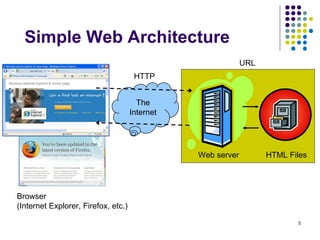
Simple Web Architecture The Internet HTTP URL Browser  (Internet Explorer, Firefox, etc.) Web server  HTML Files
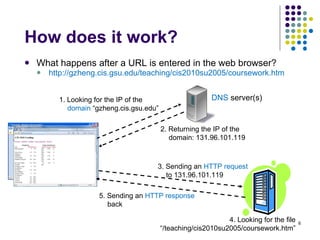
How does it work? What happens after a URL is entered in the web browser? http://gzheng.cis.gsu.edu/teaching/cis2010su2005/coursework.htm   DNS  server(s) 1. Looking for the IP of the  domain  “gzheng.cis.gsu.edu” 2. Returning the IP of the domain: 131.96.101.119  3. Sending an  HTTP request  to 131.96.101.119 5. Sending an  HTTP response  back 4. Looking for the file “/teaching/cis2010su2005/coursework.htm”
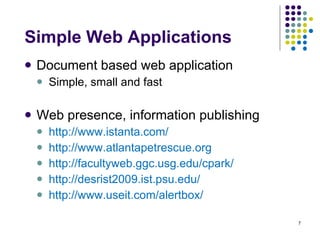
Simple Web Applications Document based web application Simple, small and fast Web presence, information publishing http://www.istanta.com/ http://www.atlantapetrescue.org   http://facultyweb.ggc.usg.edu/cpark/ http://desrist2009.ist.psu.edu/ http://www.useit.com/alertbox/
Dynamic Web  Static    dynamic Web pages are constructed at design time    at run time HTML files    a mixture of HTML, scripts,  programming codes, executable programs, etc.  Content is from a single source    multiple sources (HTML files, XML files, other files, databases, other websites) Simple    complex Interaction mode: click and read    write/type, choose, move, slide, drag and drop, expand, draw, listen, speak, etc.  Development: Webpage authoring    web application development (web engineering)
Dynamic Web Technology:  Client Side (DHTML) Style sheet ( CSS ) Page style (color, size, position, etc.):  website themes Style change on events:  link hover Scripting (JavaScript) Dynamic content:  calendar Dynamically changing content:  dropdown menu  Simple animations:  text animation Plug-ins Flash, Sliverlight, Java Applets http://kartoo.com
Dynamic Web Technology:  Server Side Specialized servers Web server extensions or application servers Adding programming capabilities: ASP, ASP.Net, JSP, JSF, Servlet, PHP, ColdFusion, etc. Database servers Complementing file systems for content management Dynamic pages: no longer stored in pure html Database populated: news site, portal, product catalog, directory, etc. URL query string:  product data Acting on user input: web search, forum post, log in, etc.
Dynamic Web Applications E-Commerce Shopping, banking, bidding, trading, etc. Dot-com bubble Web search engine Online news and magazines Web portal E-government …
Current Web Web as a platform/infrastructure For enterprises and other organizations, web is becoming a fundamental piece of their information system Web 2.0 A general and loose concept for recent advancements of the World Wide Web
Web as a Platform A fundamental platform for organizational information systems (company, enterprise, non-profit, government, college, community, etc.) Add-on    infrastructure/platform Separate    integrated Enabling technologies Web services Security infrastructure: SSL, PKI Matured web application servers and frameworks: SharePoint, DotNetNuke, Drupal, Structs, CommunityServer, etc.
Web 2.0 Applications Examples youtube.com, myspace.com, ireport.com,  blogspot.com, yelp.com,  wikipedia.org delicious.com housingmaps.com maps.google.com, Photoshop express, eyeos.info Buzz words Blog, Wiki, SNS, folksonomy, mash-up, web desktop
Web 2.0 Technologies AJAX Enables new interaction model:  Yahoo Finance Enables new navigation model: Yahoo Mail, MyYahoo XML (family) Bringing structure and meaning, for easy aggregation and integration RSS:  ZDNet News  to MyYahoo Web services and APIs Distributed, but integrated Example:  Google search API
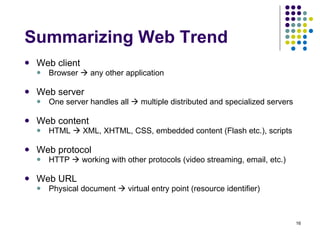
Summarizing Web Trend Web client Browser    any other application Web server One server handles all    multiple distributed and specialized servers Web content HTML    XML, XHTML, CSS, embedded content (Flash etc.), scripts Web protocol HTTP    working with other protocols (video streaming, email, etc.) Web URL Physical document    virtual entry point (resource identifier)
Future … What do you anticipate? If you are a user … If you are a developer …
Summary Back to the opening What is the web (WWW)? What is a web application? How do you classify an application as web application?
Key Concepts Internet, web, web application HTML, HTTP, URL Web server, browser Domain, IP, DNS XML, CSS, DHTML, AJAX Web service, API SSL, PKI Web 2.0

Ggc

  • 1.
    Introduction to theWeb and Web Applications Teaching Presentation at Georgia Gwinnett College Jack G. Zheng Feb 20 th 2009
  • 2.
    Agenda What isthe web? What is web application? How does it work? Evolution of the web and web applications Pre-web (before 1990) Early web (1990s) Dynamic web (since second-half 1990s) Current web (21 st century)
  • 3.
    Pre-Web Before therewas the Web, there was the Internet Internet Applications Usenet, BBS, Telnet Email, FTP Web (More recently) P2P Video streaming Instant messaging, VoIP Gaming Which one generates the most traffic volume on the Internet? Answer form: ipoque , Cisco , Sandvine
  • 4.
    Early Web, SimpleWeb Sir Tim Berners-Lee, 1989 A client/server application for information and other services Fundamental elements of web applications Web server Web client: browser Web content: HTML (hypertext markup language) Web protocol: HTTP (hypertext transfer protocol) Web address: URL (uniform resource locator)
  • 5.
    Simple Web ArchitectureThe Internet HTTP URL Browser (Internet Explorer, Firefox, etc.) Web server HTML Files
  • 6.
    How does itwork? What happens after a URL is entered in the web browser? http://gzheng.cis.gsu.edu/teaching/cis2010su2005/coursework.htm DNS server(s) 1. Looking for the IP of the domain “gzheng.cis.gsu.edu” 2. Returning the IP of the domain: 131.96.101.119 3. Sending an HTTP request to 131.96.101.119 5. Sending an HTTP response back 4. Looking for the file “/teaching/cis2010su2005/coursework.htm”
  • 7.
    Simple Web ApplicationsDocument based web application Simple, small and fast Web presence, information publishing http://www.istanta.com/ http://www.atlantapetrescue.org http://facultyweb.ggc.usg.edu/cpark/ http://desrist2009.ist.psu.edu/ http://www.useit.com/alertbox/
  • 8.
    Dynamic Web Static  dynamic Web pages are constructed at design time  at run time HTML files  a mixture of HTML, scripts, programming codes, executable programs, etc. Content is from a single source  multiple sources (HTML files, XML files, other files, databases, other websites) Simple  complex Interaction mode: click and read  write/type, choose, move, slide, drag and drop, expand, draw, listen, speak, etc. Development: Webpage authoring  web application development (web engineering)
  • 9.
    Dynamic Web Technology: Client Side (DHTML) Style sheet ( CSS ) Page style (color, size, position, etc.): website themes Style change on events: link hover Scripting (JavaScript) Dynamic content: calendar Dynamically changing content: dropdown menu Simple animations: text animation Plug-ins Flash, Sliverlight, Java Applets http://kartoo.com
  • 10.
    Dynamic Web Technology: Server Side Specialized servers Web server extensions or application servers Adding programming capabilities: ASP, ASP.Net, JSP, JSF, Servlet, PHP, ColdFusion, etc. Database servers Complementing file systems for content management Dynamic pages: no longer stored in pure html Database populated: news site, portal, product catalog, directory, etc. URL query string: product data Acting on user input: web search, forum post, log in, etc.
  • 11.
    Dynamic Web ApplicationsE-Commerce Shopping, banking, bidding, trading, etc. Dot-com bubble Web search engine Online news and magazines Web portal E-government …
  • 12.
    Current Web Webas a platform/infrastructure For enterprises and other organizations, web is becoming a fundamental piece of their information system Web 2.0 A general and loose concept for recent advancements of the World Wide Web
  • 13.
    Web as aPlatform A fundamental platform for organizational information systems (company, enterprise, non-profit, government, college, community, etc.) Add-on  infrastructure/platform Separate  integrated Enabling technologies Web services Security infrastructure: SSL, PKI Matured web application servers and frameworks: SharePoint, DotNetNuke, Drupal, Structs, CommunityServer, etc.
  • 14.
    Web 2.0 ApplicationsExamples youtube.com, myspace.com, ireport.com, blogspot.com, yelp.com, wikipedia.org delicious.com housingmaps.com maps.google.com, Photoshop express, eyeos.info Buzz words Blog, Wiki, SNS, folksonomy, mash-up, web desktop
  • 15.
    Web 2.0 TechnologiesAJAX Enables new interaction model: Yahoo Finance Enables new navigation model: Yahoo Mail, MyYahoo XML (family) Bringing structure and meaning, for easy aggregation and integration RSS: ZDNet News to MyYahoo Web services and APIs Distributed, but integrated Example: Google search API
  • 16.
    Summarizing Web TrendWeb client Browser  any other application Web server One server handles all  multiple distributed and specialized servers Web content HTML  XML, XHTML, CSS, embedded content (Flash etc.), scripts Web protocol HTTP  working with other protocols (video streaming, email, etc.) Web URL Physical document  virtual entry point (resource identifier)
  • 17.
    Future … Whatdo you anticipate? If you are a user … If you are a developer …
  • 18.
    Summary Back tothe opening What is the web (WWW)? What is a web application? How do you classify an application as web application?
  • 19.
    Key Concepts Internet,web, web application HTML, HTTP, URL Web server, browser Domain, IP, DNS XML, CSS, DHTML, AJAX Web service, API SSL, PKI Web 2.0

Editor's Notes

  • #4 http://www.ipoque.com/resources/internet-studies/internet-study-2007
  • #6 As a developer, which browser do you prefer?
  • #7 As a developer, which browser do you prefer?
  • #13 Web 2.0 http://www.oreillynet.com/pub/a/oreilly/tim/news/2005/09/30/what-is-web-20.html http://en.wikipedia.org/wiki/Web_2 http://news.zdnet.com/2036-2_22-6103931.html
  • #15 Massive participation, sharing and collaboration Content created by users; Content from multiple sources;
  • #18 Social websites will be united Browser can become more versatile More gadgets than pages 3D Fusion with other software and hardware Web in TV, video, game, etc. More applications will become a mixture of online and offline