Mobile devices have the potential to be powerful learning vehicles and real-time
decision-making support devices.
ATUM LMS exploits this potential to deliver effective learning to workforce a mobile and
Laptop/Desktop workforce by:
• Integrating SCORM
• Automatically resizing display and intuitive navigation on any device
• Requiring you to author just once, irrespective of the delivery platform
• Syncing learning progress and score with your existing LMS
• Providing offline access on your device through the ATUM app, allowing syncing of
progress and results with your LMS
• Providing in-process, on-demand performance support for sales, marketing and
other processes
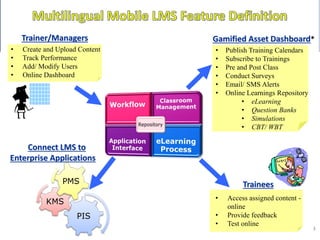
Trainees
• Create and Upload Content
• Track Performance
• Add/ Modify Users
• Online Dashboard
Trainer/Managers
PIS
KMS
PMS
3
Connect LMS to
Enterprise Applications
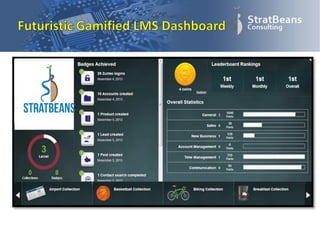
Gamified Asset Dashboard*
• Publish Training Calendars
• Subscribe to Trainings
• Pre and Post Class
• Conduct Surveys
• Email/ SMS Alerts
• Online Learnings Repository
• eLearning
• Question Banks
• Simulations
• CBT/ WBT
• Access assigned content -
online
• Provide feedback
• Test online
• Allows Evaluation and certification of users
• User groups can be created by L&D teams to support highly
granular course administration and tracking
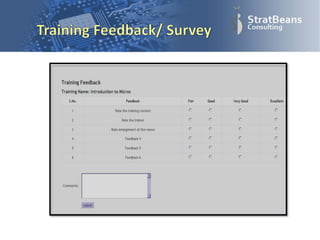
• Collection of feedback from trainees
• Linkage with Other Enterprise System
• Development and deployment of e-enabled training modules
• Hosting advanced audio visual content or legacy content (power
points, pdfs, flash videos), including third-party SCORM compliant
content
• Automated Alerts (on email and SMS)
• Integration of social content such as hyperlinks and third party
videos
• Optimized for superior performance at heavy loads
• Fully SCORM Compliant
• Integrates with Adobe Captivate, Articulate, Epiplex and many other
market leading content development technologies
• Built in Audit mechanism
• Secure access
• Multiple redundancy supported
• Data Security using limited access of information
• Mobile Handset support (beta) – all operating systems including
simple basic models
• Indic language support including Tamil, Punjabi , Urdu , Hindi etc.
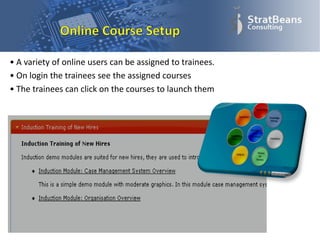
• A variety of online users can be assigned to trainees.
• On login the trainees see the assigned courses
• The trainees can click on the courses to launch them
• Mapping of business units for reporting hierarchy
• Online Role based access
• Management of Employee Databank and performance
• Identification of function specific training needs
• Flow of data between different organizational units
(branches, HO, Franchisee, etc.)
• Coordination and automation of work-flows, data
maintenance
• Calendaring of class room training, mapping resources to
classroom and tracking of class-room training
• Resource management – facilities, equipment, meeting
rooms, projection equipment, trainers, etc.
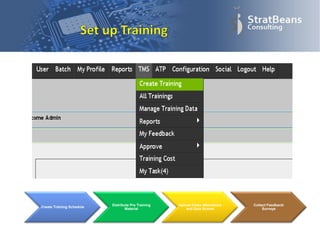
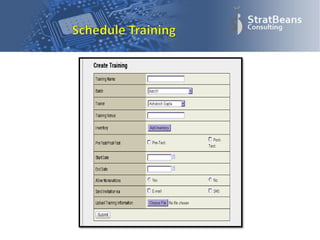
Create Training Schedule
Distribute Pre Training
Material
Upload Class Attendance
and Quiz Scores
Collect Feedback/
Surveys
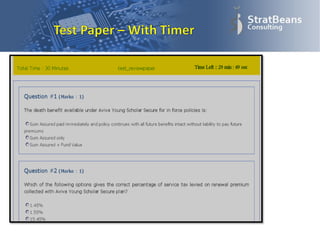
• Supports variety of question types including
Audio/Video questions
• Generates random questions with randomization of
options
• Creates questions in 5 difficulty levels and allows
moderator to create tests of different difficulty levels
• Allows bulk uploading of questions and IDs
• Approval of requests by Reporting Managers
• Uploading of training data
• Various formats of reports
• A user batch can be created for In Class Training (ILT) or for Online
Training
• Users can be assigned to a batch
• A course or a training can be assigned to a batch
– Upon assignment the login and timing information is automatically
passed on to the assigned users
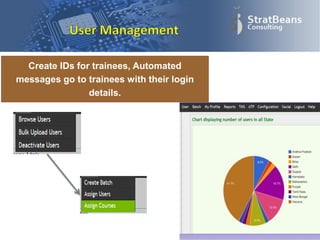
Create IDs for trainees, Automated
messages go to trainees with their login
details.
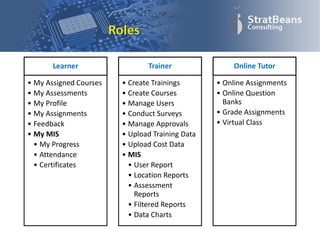
Learner
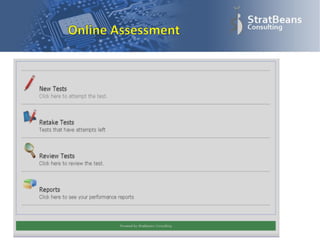
• My Assigned Courses
• My Assessments
• My Profile
• My Assignments
• Feedback
• My MIS
• My Progress
• Attendance
• Certificates
Trainer
• Create Trainings
• Create Courses
• Manage Users
• Conduct Surveys
• Manage Approvals
• Upload Training Data
• Upload Cost Data
• MIS
• User Report
• Location Reports
• Assessment
Reports
• Filtered Reports
• Data Charts
Online Tutor
• Online Assignments
• Online Question
Banks
• Grade Assignments
• Virtual Class
• Create extensive surveys
• Attach survey to training situations
– Such as post training feedback
• Run independent anonymous surveys across
organisation
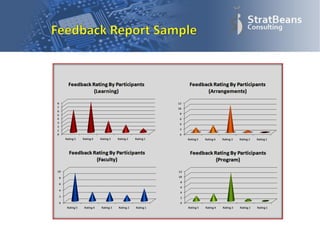
• Report the survey data into neat aggregated
reports
• Show significant features of the surveys into
charts
• Reports can be generated to investigate many
aspects of training and assessment
– User Activity Reports
– Score Reports
– Location wise Reports
– Chronological Reports
– Cumulative Reports
• Reports may be timed or trigger based
– Automatic report generation
• Integration with a variety of Mailing systems
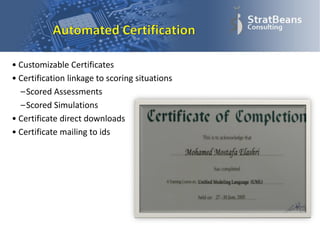
• Customizable Certificates
• Certification linkage to scoring situations
–Scored Assessments
–Scored Simulations
• Certificate direct downloads
• Certificate mailing to ids
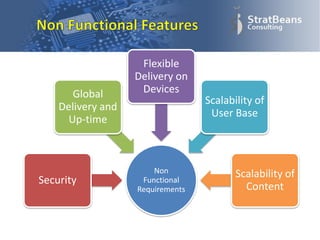
Non
Functional
Requirements
Security
Global
Delivery and
Up-time
Flexible
Delivery on
Devices
Scalability of
User Base
Scalability of
Content
For a demo or any queries feel free to drop it at:
james@stratbeans.com

What is a Learning Management System?

  • 2.
    Mobile devices havethe potential to be powerful learning vehicles and real-time decision-making support devices. ATUM LMS exploits this potential to deliver effective learning to workforce a mobile and Laptop/Desktop workforce by: • Integrating SCORM • Automatically resizing display and intuitive navigation on any device • Requiring you to author just once, irrespective of the delivery platform • Syncing learning progress and score with your existing LMS • Providing offline access on your device through the ATUM app, allowing syncing of progress and results with your LMS • Providing in-process, on-demand performance support for sales, marketing and other processes
  • 3.
    Trainees • Create andUpload Content • Track Performance • Add/ Modify Users • Online Dashboard Trainer/Managers PIS KMS PMS 3 Connect LMS to Enterprise Applications Gamified Asset Dashboard* • Publish Training Calendars • Subscribe to Trainings • Pre and Post Class • Conduct Surveys • Email/ SMS Alerts • Online Learnings Repository • eLearning • Question Banks • Simulations • CBT/ WBT • Access assigned content - online • Provide feedback • Test online
  • 4.
    • Allows Evaluationand certification of users • User groups can be created by L&D teams to support highly granular course administration and tracking • Collection of feedback from trainees • Linkage with Other Enterprise System • Development and deployment of e-enabled training modules • Hosting advanced audio visual content or legacy content (power points, pdfs, flash videos), including third-party SCORM compliant content • Automated Alerts (on email and SMS) • Integration of social content such as hyperlinks and third party videos
  • 5.
    • Optimized forsuperior performance at heavy loads • Fully SCORM Compliant • Integrates with Adobe Captivate, Articulate, Epiplex and many other market leading content development technologies • Built in Audit mechanism • Secure access • Multiple redundancy supported • Data Security using limited access of information • Mobile Handset support (beta) – all operating systems including simple basic models • Indic language support including Tamil, Punjabi , Urdu , Hindi etc.
  • 6.
    • A varietyof online users can be assigned to trainees. • On login the trainees see the assigned courses • The trainees can click on the courses to launch them
  • 7.
    • Mapping ofbusiness units for reporting hierarchy • Online Role based access • Management of Employee Databank and performance • Identification of function specific training needs • Flow of data between different organizational units (branches, HO, Franchisee, etc.) • Coordination and automation of work-flows, data maintenance • Calendaring of class room training, mapping resources to classroom and tracking of class-room training • Resource management – facilities, equipment, meeting rooms, projection equipment, trainers, etc.
  • 8.
    Create Training Schedule DistributePre Training Material Upload Class Attendance and Quiz Scores Collect Feedback/ Surveys
  • 10.
    • Supports varietyof question types including Audio/Video questions • Generates random questions with randomization of options • Creates questions in 5 difficulty levels and allows moderator to create tests of different difficulty levels • Allows bulk uploading of questions and IDs • Approval of requests by Reporting Managers • Uploading of training data • Various formats of reports
  • 14.
    • A userbatch can be created for In Class Training (ILT) or for Online Training • Users can be assigned to a batch • A course or a training can be assigned to a batch – Upon assignment the login and timing information is automatically passed on to the assigned users
  • 15.
    Create IDs fortrainees, Automated messages go to trainees with their login details.
  • 16.
    Learner • My AssignedCourses • My Assessments • My Profile • My Assignments • Feedback • My MIS • My Progress • Attendance • Certificates Trainer • Create Trainings • Create Courses • Manage Users • Conduct Surveys • Manage Approvals • Upload Training Data • Upload Cost Data • MIS • User Report • Location Reports • Assessment Reports • Filtered Reports • Data Charts Online Tutor • Online Assignments • Online Question Banks • Grade Assignments • Virtual Class
  • 17.
    • Create extensivesurveys • Attach survey to training situations – Such as post training feedback • Run independent anonymous surveys across organisation • Report the survey data into neat aggregated reports • Show significant features of the surveys into charts
  • 20.
    • Reports canbe generated to investigate many aspects of training and assessment – User Activity Reports – Score Reports – Location wise Reports – Chronological Reports – Cumulative Reports • Reports may be timed or trigger based – Automatic report generation • Integration with a variety of Mailing systems
  • 21.
    • Customizable Certificates •Certification linkage to scoring situations –Scored Assessments –Scored Simulations • Certificate direct downloads • Certificate mailing to ids
  • 23.
  • 26.
    For a demoor any queries feel free to drop it at: james@stratbeans.com