Adding an Infusionsoft Landing Page to Facebook and
           Promoting it with Facebook Ads
By the end of this module, you should be able
  to do the following:
 Add an Facebook app landing page using an
  Infusionsoft web form
 Promote the landing page using Facebook Ads
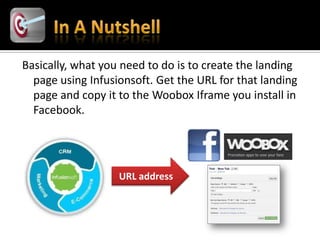
Basically, what you need to do is to create the landing
  page using Infusionsoft. Get the URL for that landing
  page and copy it to the Woobox Iframe you install in
  Facebook.


                   URL address
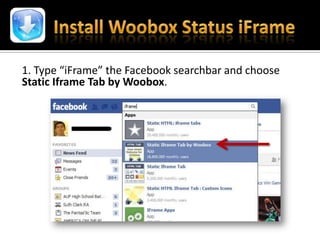
1. Type “iFrame” the Facebook searchbar and choose
Static Iframe Tab by Woobox.
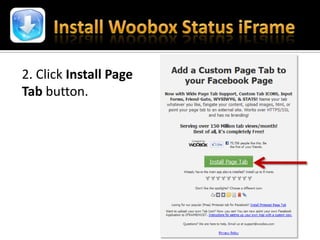
2. Click Install Page
Tab button.
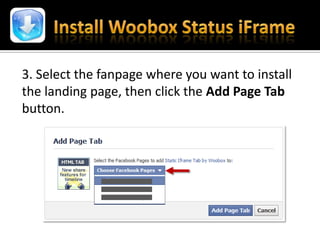
3. Select the fanpage where you want to install
the landing page, then click the Add Page Tab
button.
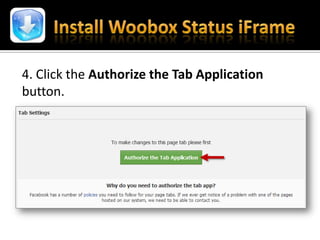
4. Click the Authorize the Tab Application
button.
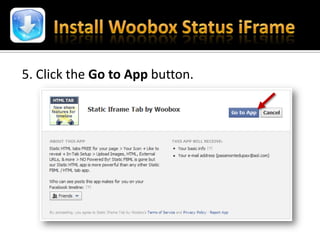
5. Click the Go to App button.
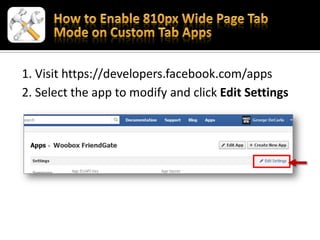
1. Visit https://developers.facebook.com/apps
2. Select the app to modify and click Edit Settings
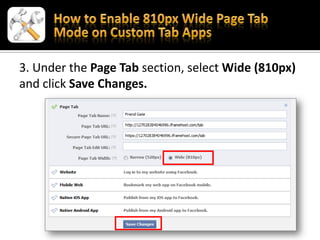
3. Under the Page Tab section, select Wide (810px)
and click Save Changes.
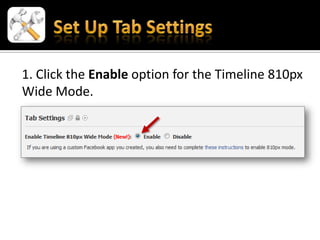
1. Click the Enable option for the Timeline 810px
Wide Mode.
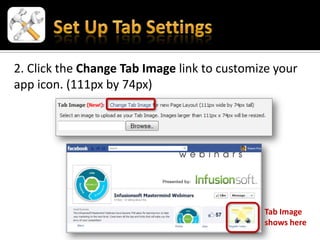
2. Click the Change Tab Image link to customize your
app icon. (111px by 74px)


                                             Tab Image
                                             shows here
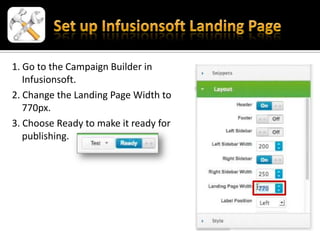
1. Go to the Campaign Builder in
   Infusionsoft.
2. Change the Landing Page Width to
   770px.
3. Choose Ready to make it ready for
   publishing.
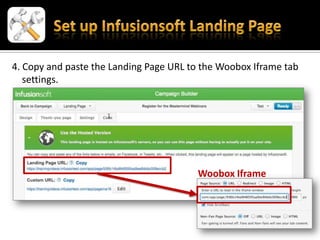
4. Copy and paste the Landing Page URL to the Woobox Iframe tab
   settings.


                                        Woobox Iframe
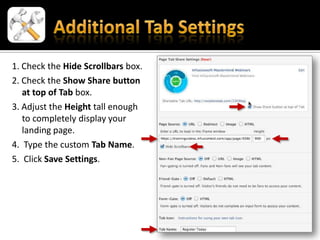
1. Check the Hide Scrollbars box.
2. Check the Show Share button
   at top of Tab box.
3. Adjust the Height tall enough
   to completely display your
   landing page.
4. Type the custom Tab Name.
5. Click Save Settings.
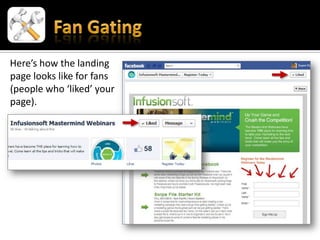
Here’s how the landing
page looks like for fans
(people who ‘liked’ your
page).
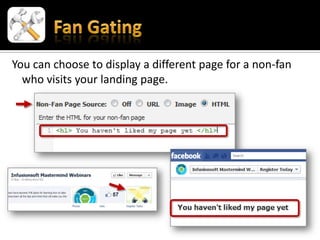
You can choose to display a different page for a non-fan
  who visits your landing page.
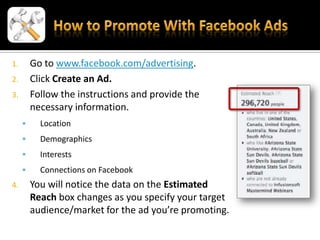
1.       Go to www.facebook.com/advertising.
2.       Click Create an Ad.
3.       Follow the instructions and provide the
         necessary information.
          Location
          Demographics
          Interests
          Connections on Facebook
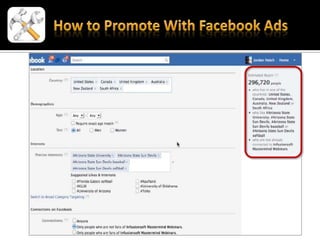
4.       You will notice the data on the Estimated
         Reach box changes as you specify your target
         audience/market for the ad you’re promoting.
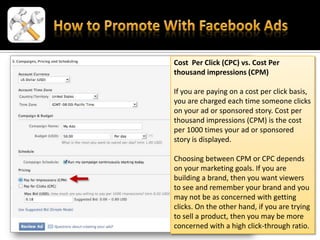
Cost Per Click (CPC) vs. Cost Per
thousand impressions (CPM)

If you are paying on a cost per click basis,
you are charged each time someone clicks
on your ad or sponsored story. Cost per
thousand impressions (CPM) is the cost
per 1000 times your ad or sponsored
story is displayed.

Choosing between CPM or CPC depends
on your marketing goals. If you are
building a brand, then you want viewers
to see and remember your brand and you
may not be as concerned with getting
clicks. On the other hand, if you are trying
to sell a product, then you may be more
concerned with a high click-through ratio.
   Suggested Best Practices for Advertising on
    Facebook
    https://www.facebook.com/ads/best_practices
    .php
   Campaign Cost and Budgeting
    https://www.facebook.com/help/?page=21979
    1638048948

Landing Pages and Facebook

  • 1.
    Adding an InfusionsoftLanding Page to Facebook and Promoting it with Facebook Ads
  • 2.
    By the endof this module, you should be able to do the following:  Add an Facebook app landing page using an Infusionsoft web form  Promote the landing page using Facebook Ads
  • 3.
    Basically, what youneed to do is to create the landing page using Infusionsoft. Get the URL for that landing page and copy it to the Woobox Iframe you install in Facebook. URL address
  • 4.
    1. Type “iFrame”the Facebook searchbar and choose Static Iframe Tab by Woobox.
  • 5.
    2. Click InstallPage Tab button.
  • 6.
    3. Select thefanpage where you want to install the landing page, then click the Add Page Tab button.
  • 7.
    4. Click theAuthorize the Tab Application button.
  • 8.
    5. Click theGo to App button.
  • 9.
    1. Visit https://developers.facebook.com/apps 2.Select the app to modify and click Edit Settings
  • 10.
    3. Under thePage Tab section, select Wide (810px) and click Save Changes.
  • 11.
    1. Click theEnable option for the Timeline 810px Wide Mode.
  • 12.
    2. Click theChange Tab Image link to customize your app icon. (111px by 74px) Tab Image shows here
  • 13.
    1. Go tothe Campaign Builder in Infusionsoft. 2. Change the Landing Page Width to 770px. 3. Choose Ready to make it ready for publishing.
  • 14.
    4. Copy andpaste the Landing Page URL to the Woobox Iframe tab settings. Woobox Iframe
  • 15.
    1. Check theHide Scrollbars box. 2. Check the Show Share button at top of Tab box. 3. Adjust the Height tall enough to completely display your landing page. 4. Type the custom Tab Name. 5. Click Save Settings.
  • 16.
    Here’s how thelanding page looks like for fans (people who ‘liked’ your page).
  • 17.
    You can chooseto display a different page for a non-fan who visits your landing page.
  • 18.
    1. Go to www.facebook.com/advertising. 2. Click Create an Ad. 3. Follow the instructions and provide the necessary information.  Location  Demographics  Interests  Connections on Facebook 4. You will notice the data on the Estimated Reach box changes as you specify your target audience/market for the ad you’re promoting.
  • 20.
    Cost Per Click(CPC) vs. Cost Per thousand impressions (CPM) If you are paying on a cost per click basis, you are charged each time someone clicks on your ad or sponsored story. Cost per thousand impressions (CPM) is the cost per 1000 times your ad or sponsored story is displayed. Choosing between CPM or CPC depends on your marketing goals. If you are building a brand, then you want viewers to see and remember your brand and you may not be as concerned with getting clicks. On the other hand, if you are trying to sell a product, then you may be more concerned with a high click-through ratio.
  • 21.
    Suggested Best Practices for Advertising on Facebook https://www.facebook.com/ads/best_practices .php  Campaign Cost and Budgeting https://www.facebook.com/help/?page=21979 1638048948