Creating a content
managed facebook app


Integrating a content managed
    website with Facebook
What you will need to get
started
   A facebook account, with either a cell phone
    number or a valid attached credit card.
   A facebook PAGE for your site (This is no longer
    required)
   A developer API Key
   A suitable content management platform (this
    example uses DotNetNuke)
   A place to host your website
   Preferably a secure certificate
   A skin (or as they are called on other platforms,
    a template)
   Some jscript integration knowhow
Facebook Account
   One facebook account is responsible for
    creating and logging into the Developer API key
    configuration.
   While an individual may own this, it should be
    someone whom you trust and who will have
    longevity with your company, or it should be a
    generic account set up for this specific purpose
   After the site is created you may add additional
    administrators or content editors to the site.
    After the app is created your editors will do all
    the content editing on the CMS system so they
    don‟t need facebook administrator privileges at
    all to change the app content
Facebook Page (This is no
longer required!)
   The content managed portion of your facebook site
    will be hosted on a Facebook APP (not page)
   Create the page using the same account you are
    going to use for the API key. If the page is already
    created have them add that account as an admin.
   It‟s important not to duplicate content between your
    app and the facebook page. Carefully consider
    where you want information to go
   Get enough friends to “like” the page that you get
    your own vanity URL for it.
   Create a page here
    https://www.facebook.com/pages/create.php?ref=ts
    and be sure to select the correct category for your
    page.
Facebook APP
   Think of the page as a presence for your
    new “app” which will be your content
    managed site
   The app and Facebook site page are now
    completely separate.
   You should specifically decide what content
    you want on facebook (timely, updated
    frequently etc) and what you want on the
    app (permanent, interactive, etc.).
The Developer API Key
   The developer API key and the APP name are determined when
    you create a developer account in Facebook. Again – use the
    same facebook profile for this.
   To create an API key go to:
    https://developers.facebook.com/
        Click on Apps (far right)
        Click on Create New App
        Name your app (this name is how it will appear on your PAGE)
        App Namespace – use a short name which will be used for opengraph
         if you implement it.
        DO NOT check web hosting
        Enter your password and Captcha. The system will text you a code or
         check your credit card before proceeding


   Fill in the form, and the system will generate a key. This key is
    used to authenticate your app with Facebook, for sharing
    comments, and for creating a more interactive experience
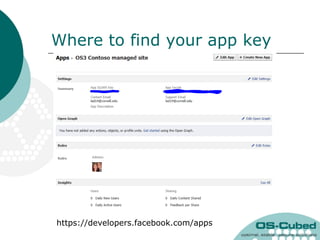
Where to find your app key


https://developers.facebook.com/apps
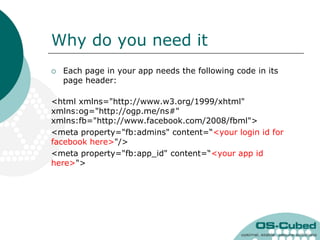
Why do you need it
   Each page in your app needs the following code in its
    page header:

<html xmlns="http://www.w3.org/1999/xhtml"
xmlns:og="http://ogp.me/ns#"
xmlns:fb="http://www.facebook.com/2008/fbml">
<meta property="fb:admins" content=“<your login id for
facebook here>"/>
<meta property="fb:app_id" content=“<your app id
here>">
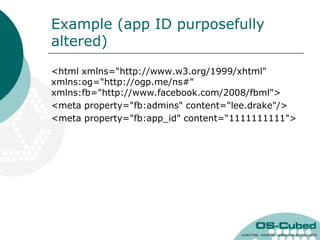
Example (app ID purposefully
altered)
<html xmlns="http://www.w3.org/1999/xhtml"
xmlns:og="http://ogp.me/ns#"
xmlns:fb="http://www.facebook.com/2008/fbml">
<meta property="fb:admins" content="lee.drake"/>
<meta property="fb:app_id" content=“1111111111">
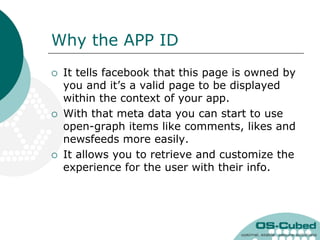
Why the APP ID
   It tells facebook that this page is owned by
    you and it‟s a valid page to be displayed
    within the context of your app.
   With that meta data you can start to use
    open-graph items like comments, likes and
    newsfeeds more easily.
   It allows you to retrieve and customize the
    experience for the user with their info.
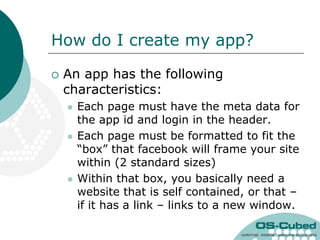
How do I create my app?

   An app has the following
    characteristics:
       Each page must have the meta data for
        the app id and login in the header.
       Each page must be formatted to fit the
        “box” that facebook will frame your site
        within (2 standard sizes)
       Within that box, you basically need a
        website that is self contained, or that –
        if it has a link – links to a new window.
How does a Content managed
system help?
   In a CMS we can just load up a skin or
    template that is the right size to fit the
    requirements for size
   In a CMS we can put the meta data in as
    a parameter in the page definition – no
    coding required
   In a CMS we can add/remove/modify any
    content without needing to know or
    understand facebook or it‟s programming
    language
   In a CMS we can use Facebooks code
    widgets to implement specific features
Skin design requirements
   Besides typical design requirements for
    look and feel the skin should have:
       520px width (there is an alternate width of 810px
        for “wide applications), but 520 is preferred
       A fixed height at a specific number of PX or a
        fluid height, with the awareness that you will lose
        the scroll bar on the right side of the screen
       Some sort of content (either full page, or tabbed
        within the site)
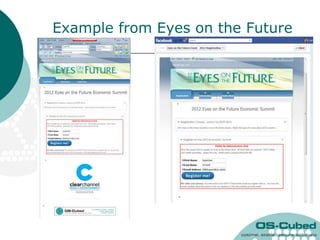
Example from Eyes on the Future
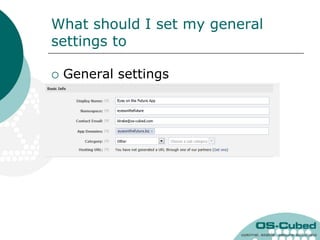
What should I set my general
settings to

   General settings
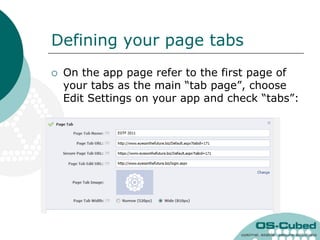
Defining your page tabs
   On the app page refer to the first page of
    your tabs as the main “tab page”, choose
    Edit Settings on your app and check “tabs”:
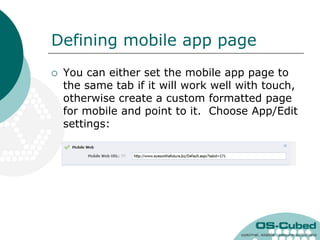
Defining mobile app page
   You can either set the mobile app page to
    the same tab if it will work well with touch,
    otherwise create a custom formatted page
    for mobile and point to it. Choose App/Edit
    settings:
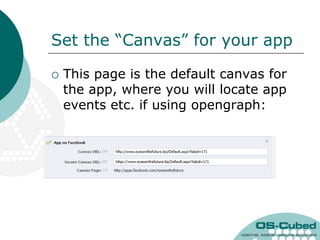
Set the “Canvas” for your app

   This page is the default canvas for
    the app, where you will locate app
    events etc. if using opengraph:
That‟s it!
   Those are all the main settings for your
    app.
   There is a lot more you can do once your
    app is set up with opengraph, showing
    the wall on your page, integrating likes
    and recommendations, and other cool
    things.
   Once this basic setup is done, content on
    your pages, and other modifications to
    the tabs within your app are all handled
    inside your CMS
Additional CMS advantages

   Have a registration form? Reformat
    it to fit the narrower screen and
    drop it into your app – now people
    can register from inside FB for your
    event or product
   Have an ecommerce section? You
    can create link-out‟s that will
    advertise a product on the FB app
    and link to a place to go buy them
    in a new window.
Additional CMS advantages

   You can place duplicate modules
    from your website on the facebook
    CMS pages – so that when you
    change content in one place, you
    change it in both places
   Integrate commenting and walls
    deeply into your application to
    enhance the social experience of
    your site.
Advanced topics

   Adding like buttons
   Adding a wall to your facebook page
   Future add-ons – opengraph api
Likes
   Likes can be added to any CMS page without an
    app, however if you have an app it adds the
    app id and associates the like‟s with the app
   There is a page to generate the code to insert:
       https://developers.facebook.com/docs/reference/pl
        ugins/like/
       Example code:
        <div id="fb-root"></div><script>(function(d, s, id)
        { var js, fjs = d.getElementsByTagName(s)[0]; if
        (d.getElementById(id)) return; js =
        d.createElement(s); js.id = id; js.src =
        "//connect.facebook.net/en_US/all.js#xfbml=1&app
        Id=<yourappidhere>";
        fjs.parentNode.insertBefore(js, fjs);}(document,
        'script', 'facebook-jssdk'));</script>
Adding your page‟s wall
   You can show comments from your page or app within your apps other pages or on
    separate web pages inside your website – this improves customer engagement, just
    add the following jscript to a text/html element.
   Facebook generates a channel.html file at this web page which must be uploaded to
    your site:

   In the module or page header
     <script>window.fbAsyncInit = function () {FB.init({appId: „<your app id here>', // App ID
     channelUrl: '//yourwebsitename/channel.html', // Channel File – must be uploaded from FB
     status: true, // check login status
     cookie: true, // enable cookies to allow the server to access the session
     xfbml: true // parse XFBML
     });
     // Additional initialization code here
     };
     // Load the SDK Asynchronously
     (function (d) {var js, id = 'facebook-jssdk', ref = d.getElementsByTagName('script')[0]; if
     (d.getElementById(id)) { return; } js = d.createElement('script'); js.id = id; js.async = true; js.src =
     "//connect.facebook.net/en_US/all.js"; ref.parentNode.insertBefore(js, ref);} (document));</script>
   In the content where you want the wall
    <div id="fb-root"></div>
    <script>(function(d, s, id) { var js, fjs = d.getElementsByTagName(s)[0]; if (d.getElementById(id))
    return; js = d.createElement(s); js.id = id; js.src = "//connect.facebook.net/en_US/all.js#xfbml=1";
    fjs.parentNode.insertBefore(js, fjs);}(document, 'script', 'facebook-jssdk'));</script>
    <div class="fb-comments" data-href="http://yourwebsitehere.com" data-num-posts="3" data-
    width="300">&#160;</div>
Words of wisdom
   If you‟re not a designer either buy a custom design from a
    store, or have someone customize one for you.
   You must be at least basically familiar with html/jscript to
    be able to easily debug these
   READ THE INSTRUCTIONS, while not CMS specific
    Facebook actually has pretty good instructions for how to
    do all this on their help pages
   Have a professional available, and be prepared to
    reimburse them for their service, to assist with things like
    opengraph and advanced debugging
   Get a secure certificate for your site – these days many of
    the people using your app will be using SSL – if you have
    a secure certificate you avoid having them be forced to
    authenticate the unsecure info every time they browse the
    app
OS-Cubed

   Experts at Social Media integration
    on DotNetNuke platforms
   Contact info: ldrake@os-cubed.com
   Phone: 585-756-2444
   Twitter @leedrake and @oscubed

Creating a content managed facebook app

  • 1.
    Creating a content managedfacebook app Integrating a content managed website with Facebook
  • 2.
    What you willneed to get started  A facebook account, with either a cell phone number or a valid attached credit card.  A facebook PAGE for your site (This is no longer required)  A developer API Key  A suitable content management platform (this example uses DotNetNuke)  A place to host your website  Preferably a secure certificate  A skin (or as they are called on other platforms, a template)  Some jscript integration knowhow
  • 3.
    Facebook Account  One facebook account is responsible for creating and logging into the Developer API key configuration.  While an individual may own this, it should be someone whom you trust and who will have longevity with your company, or it should be a generic account set up for this specific purpose  After the site is created you may add additional administrators or content editors to the site. After the app is created your editors will do all the content editing on the CMS system so they don‟t need facebook administrator privileges at all to change the app content
  • 4.
    Facebook Page (Thisis no longer required!)  The content managed portion of your facebook site will be hosted on a Facebook APP (not page)  Create the page using the same account you are going to use for the API key. If the page is already created have them add that account as an admin.  It‟s important not to duplicate content between your app and the facebook page. Carefully consider where you want information to go  Get enough friends to “like” the page that you get your own vanity URL for it.  Create a page here https://www.facebook.com/pages/create.php?ref=ts and be sure to select the correct category for your page.
  • 5.
    Facebook APP  Think of the page as a presence for your new “app” which will be your content managed site  The app and Facebook site page are now completely separate.  You should specifically decide what content you want on facebook (timely, updated frequently etc) and what you want on the app (permanent, interactive, etc.).
  • 6.
    The Developer APIKey  The developer API key and the APP name are determined when you create a developer account in Facebook. Again – use the same facebook profile for this.  To create an API key go to: https://developers.facebook.com/  Click on Apps (far right)  Click on Create New App  Name your app (this name is how it will appear on your PAGE)  App Namespace – use a short name which will be used for opengraph if you implement it.  DO NOT check web hosting  Enter your password and Captcha. The system will text you a code or check your credit card before proceeding  Fill in the form, and the system will generate a key. This key is used to authenticate your app with Facebook, for sharing comments, and for creating a more interactive experience
  • 7.
    Where to findyour app key https://developers.facebook.com/apps
  • 8.
    Why do youneed it  Each page in your app needs the following code in its page header: <html xmlns="http://www.w3.org/1999/xhtml" xmlns:og="http://ogp.me/ns#" xmlns:fb="http://www.facebook.com/2008/fbml"> <meta property="fb:admins" content=“<your login id for facebook here>"/> <meta property="fb:app_id" content=“<your app id here>">
  • 9.
    Example (app IDpurposefully altered) <html xmlns="http://www.w3.org/1999/xhtml" xmlns:og="http://ogp.me/ns#" xmlns:fb="http://www.facebook.com/2008/fbml"> <meta property="fb:admins" content="lee.drake"/> <meta property="fb:app_id" content=“1111111111">
  • 10.
    Why the APPID  It tells facebook that this page is owned by you and it‟s a valid page to be displayed within the context of your app.  With that meta data you can start to use open-graph items like comments, likes and newsfeeds more easily.  It allows you to retrieve and customize the experience for the user with their info.
  • 11.
    How do Icreate my app?  An app has the following characteristics:  Each page must have the meta data for the app id and login in the header.  Each page must be formatted to fit the “box” that facebook will frame your site within (2 standard sizes)  Within that box, you basically need a website that is self contained, or that – if it has a link – links to a new window.
  • 12.
    How does aContent managed system help?  In a CMS we can just load up a skin or template that is the right size to fit the requirements for size  In a CMS we can put the meta data in as a parameter in the page definition – no coding required  In a CMS we can add/remove/modify any content without needing to know or understand facebook or it‟s programming language  In a CMS we can use Facebooks code widgets to implement specific features
  • 13.
    Skin design requirements  Besides typical design requirements for look and feel the skin should have:  520px width (there is an alternate width of 810px for “wide applications), but 520 is preferred  A fixed height at a specific number of PX or a fluid height, with the awareness that you will lose the scroll bar on the right side of the screen  Some sort of content (either full page, or tabbed within the site)
  • 14.
    Example from Eyeson the Future
  • 15.
    What should Iset my general settings to  General settings
  • 16.
    Defining your pagetabs  On the app page refer to the first page of your tabs as the main “tab page”, choose Edit Settings on your app and check “tabs”:
  • 17.
    Defining mobile apppage  You can either set the mobile app page to the same tab if it will work well with touch, otherwise create a custom formatted page for mobile and point to it. Choose App/Edit settings:
  • 18.
    Set the “Canvas”for your app  This page is the default canvas for the app, where you will locate app events etc. if using opengraph:
  • 19.
    That‟s it!  Those are all the main settings for your app.  There is a lot more you can do once your app is set up with opengraph, showing the wall on your page, integrating likes and recommendations, and other cool things.  Once this basic setup is done, content on your pages, and other modifications to the tabs within your app are all handled inside your CMS
  • 20.
    Additional CMS advantages  Have a registration form? Reformat it to fit the narrower screen and drop it into your app – now people can register from inside FB for your event or product  Have an ecommerce section? You can create link-out‟s that will advertise a product on the FB app and link to a place to go buy them in a new window.
  • 21.
    Additional CMS advantages  You can place duplicate modules from your website on the facebook CMS pages – so that when you change content in one place, you change it in both places  Integrate commenting and walls deeply into your application to enhance the social experience of your site.
  • 22.
    Advanced topics  Adding like buttons  Adding a wall to your facebook page  Future add-ons – opengraph api
  • 23.
    Likes  Likes can be added to any CMS page without an app, however if you have an app it adds the app id and associates the like‟s with the app  There is a page to generate the code to insert:  https://developers.facebook.com/docs/reference/pl ugins/like/  Example code: <div id="fb-root"></div><script>(function(d, s, id) { var js, fjs = d.getElementsByTagName(s)[0]; if (d.getElementById(id)) return; js = d.createElement(s); js.id = id; js.src = "//connect.facebook.net/en_US/all.js#xfbml=1&app Id=<yourappidhere>"; fjs.parentNode.insertBefore(js, fjs);}(document, 'script', 'facebook-jssdk'));</script>
  • 24.
    Adding your page‟swall  You can show comments from your page or app within your apps other pages or on separate web pages inside your website – this improves customer engagement, just add the following jscript to a text/html element.  Facebook generates a channel.html file at this web page which must be uploaded to your site:  In the module or page header <script>window.fbAsyncInit = function () {FB.init({appId: „<your app id here>', // App ID channelUrl: '//yourwebsitename/channel.html', // Channel File – must be uploaded from FB status: true, // check login status cookie: true, // enable cookies to allow the server to access the session xfbml: true // parse XFBML }); // Additional initialization code here }; // Load the SDK Asynchronously (function (d) {var js, id = 'facebook-jssdk', ref = d.getElementsByTagName('script')[0]; if (d.getElementById(id)) { return; } js = d.createElement('script'); js.id = id; js.async = true; js.src = "//connect.facebook.net/en_US/all.js"; ref.parentNode.insertBefore(js, ref);} (document));</script>  In the content where you want the wall <div id="fb-root"></div> <script>(function(d, s, id) { var js, fjs = d.getElementsByTagName(s)[0]; if (d.getElementById(id)) return; js = d.createElement(s); js.id = id; js.src = "//connect.facebook.net/en_US/all.js#xfbml=1"; fjs.parentNode.insertBefore(js, fjs);}(document, 'script', 'facebook-jssdk'));</script> <div class="fb-comments" data-href="http://yourwebsitehere.com" data-num-posts="3" data- width="300">&#160;</div>
  • 25.
    Words of wisdom  If you‟re not a designer either buy a custom design from a store, or have someone customize one for you.  You must be at least basically familiar with html/jscript to be able to easily debug these  READ THE INSTRUCTIONS, while not CMS specific Facebook actually has pretty good instructions for how to do all this on their help pages  Have a professional available, and be prepared to reimburse them for their service, to assist with things like opengraph and advanced debugging  Get a secure certificate for your site – these days many of the people using your app will be using SSL – if you have a secure certificate you avoid having them be forced to authenticate the unsecure info every time they browse the app
  • 26.
    OS-Cubed  Experts at Social Media integration on DotNetNuke platforms  Contact info: ldrake@os-cubed.com  Phone: 585-756-2444  Twitter @leedrake and @oscubed