Dana Albano
708/926-5877
dana.albanomarketing@gmail.com
albanomarketing.com
 Profile is your Personal Persona
 Limit 5,000 Friends
 Subscribe button
 Any post is public
 Public figures, or if you are your own brand
 Cannot use for monetary gain
 Page is for your Business
 No fan limit
 Can use custom applications
 Can use Facebook ads
 Can provide more information about your business
 There are over 40 million active small business
Pages on Facebook and the company is more
committed than ever to helping these small
businesses to grow and succeed
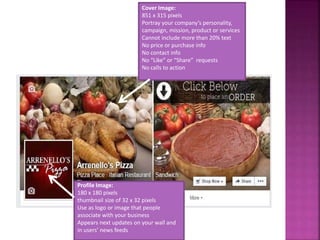
Cover Image:
851 x 315 pixels
Portray your company’s personality,
campaign, mission, product or services
Cannot include more than 20% text
No price or purchase info
No contact info
No “Like” or “Share” requests
No calls to action
Profile Image:
180 x 180 pixels
thumbnail size of 32 x 32 pixels
Use as logo or image that people
associate with your business
Appears next updates on your wall and
in users’ news feeds
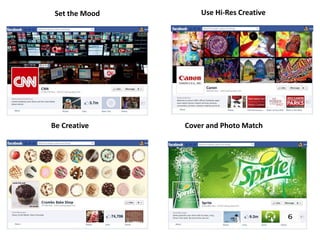
Be Creative
Set the Mood Use Hi-Res Creative
Cover and Photo Match
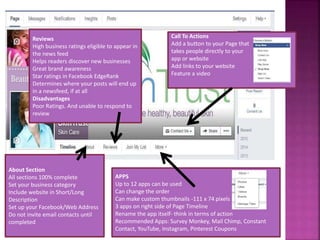
About Section
All sections 100% complete
Set your business category
Include website in Short/Long
Description
Set up your Facebook/Web Address
Do not invite email contacts until
completed
Reviews
High business ratings eligible to appear in
the news feed
Helps readers discover new businesses
Great brand awareness
Star ratings in Facebook EdgeRank
Determines where your posts will end up
in a newsfeed, if at all
Disadvantages
Poor Ratings. And unable to respond to
review
APPS
Up to 12 apps can be used
Can change the order
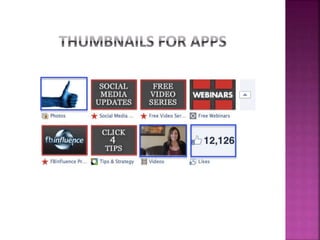
Can make custom thumbnails -111 x 74 pixels
3 apps on right side of Page Timeline
Rename the app itself- think in terms of action
Recommended Apps: Survey Monkey, Mail Chimp, Constant
Contact, YouTube, Instagram, Pinterest Coupons
Call To Actions
Add a button to your Page that
takes people directly to your
app or website
Add links to your website
Feature a video
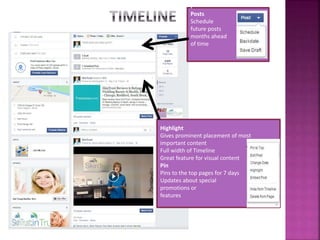
Highlight
Gives prominent placement of most
important content
Full width of Timeline
Great feature for visual content
Pin
Pins to the top pages for 7 days
Updates about special
promotions or
features
P
Posts
Schedule
future posts
months ahead
of time
 Start with who you know
 Upload existing lists, personal contacts
 Utilize Facebook Ads in News Feed
 Place “Follow Us” links everywhere- emails, newsletter,
websites
 Refer a friend Programs
 Create a compelling offer for both the referrers and
referees
 Contests and promotions
 Most “Shares” get free facial or product
 Partner with other brands or local organizations
 Create co-promotions and encourage viral sharing with
incentives
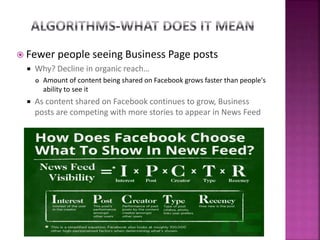
 Fewer people seeing Business Page posts
 Why? Decline in organic reach…
 Amount of content being shared on Facebook grows faster than people's
ability to see it
 As content shared on Facebook continues to grow, Business
posts are competing with more stories to appear in News Feed
 Post more often to stay top of mind with your followers
 Publish every day…Up to three types of posts
 Photos, Videos, Links to other sites, Text updates
 Engage with your audience
 80% content should be for audience/20% for business
 Collect testimonials and reviews
 Take advantage of news feed ad placement/Facebook
Offers
 Bring people to your business with an offer they can claim and
share with their friends
 Survey
 Encourages Fans to engage with your page
 Encourage fan participation
 Create fun, engaging conversations with clear calls-to-action
 Fill in the Blank
 My favorite team is_____
 Questions- Poll of the day
 Ask for feedback
 Get your fans involved about your products or services
 Emotional/Provocative
 Value Added
 Who wants a free ____
 Fun and fast
 "Quick: Sox or Cubs?“
 Testimonies
 Hot tips or tip of the day
 Ask Questions
 20 Tips for Healthier Skin >> Which ones do you follow?
 Did you know
 Guess the caption - great to get people involved Fridays
 Deal of the day or flash deal(time limit to a deal)
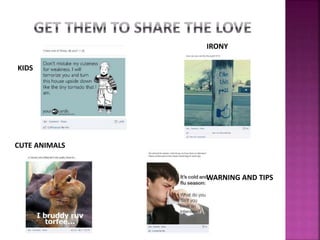
KIDS
IRONY
WARNING AND TIPS
CUTE ANIMALS
 Facebook encourages pages to post videos directly to
the platform-Called a Native Video
 Native Videos get higher organic reach
 Users can automatically view video in newsfeed
 Make it interesting and engaging
 Make first few frames stand out
 Create interesting text to go with video
 Create a video playlist
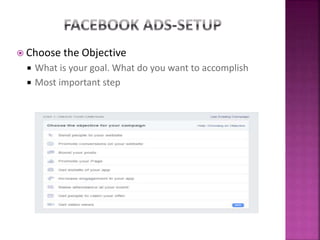
 Choose the Objective
 What is your goal. What do you want to accomplish
 Most important step
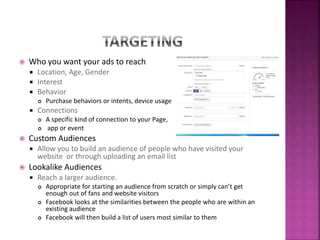
 Who you want your ads to reach
 Location, Age, Gender
 Interest
 Behavior
 Purchase behaviors or intents, device usage
 Connections
 A specific kind of connection to your Page,
 app or event
 Custom Audiences
 Allow you to build an audience of people who have visited your
website or through uploading an email list
 Lookalike Audiences
 Reach a larger audience.
 Appropriate for starting an audience from scratch or simply can’t get
enough out of fans and website visitors
 Facebook looks at the similarities between the people who are within an
existing audience
 Facebook will then build a list of users most similar to them
 How much do you want to spend
 Per Day- Can go as low as a $1
 Lifetime Budget-A set amount for the duration of ad
 Choose to bid for your objective, clicks or impressions
 CPC-You only pay when someone clicks on your ad. The more clicks
you receive, the lower your cost per click
 Facebook will show your ad to people within your target audience most
likely to click
 CPC is more effective when you want a specific click or response
 CPM- Pay for ad views/Impressions (measured in multiples of 1,000 )
 Facebook will show your ad to people within your target audience as many
times as possible
 CPM better for raising awareness because you’re paying for the people who
are shown the ad
 Do not overuse
 Combine with other posts, ads, etc
 Boost Posts to Fans
 Gives more visibility, focus on your Fans
 It doesn’t do you any good to have someone like your post if they’re not
connected to your page.
 It may help with awareness you’re better off having a focused goal for those
types of ads (e.g., such as growing your email list).
Facebook for business 2015

Facebook for business 2015

  • 1.
  • 2.
     Profile isyour Personal Persona  Limit 5,000 Friends  Subscribe button  Any post is public  Public figures, or if you are your own brand  Cannot use for monetary gain  Page is for your Business  No fan limit  Can use custom applications  Can use Facebook ads  Can provide more information about your business
  • 3.
     There areover 40 million active small business Pages on Facebook and the company is more committed than ever to helping these small businesses to grow and succeed
  • 5.
    Cover Image: 851 x315 pixels Portray your company’s personality, campaign, mission, product or services Cannot include more than 20% text No price or purchase info No contact info No “Like” or “Share” requests No calls to action Profile Image: 180 x 180 pixels thumbnail size of 32 x 32 pixels Use as logo or image that people associate with your business Appears next updates on your wall and in users’ news feeds
  • 6.
    Be Creative Set theMood Use Hi-Res Creative Cover and Photo Match
  • 7.
    About Section All sections100% complete Set your business category Include website in Short/Long Description Set up your Facebook/Web Address Do not invite email contacts until completed Reviews High business ratings eligible to appear in the news feed Helps readers discover new businesses Great brand awareness Star ratings in Facebook EdgeRank Determines where your posts will end up in a newsfeed, if at all Disadvantages Poor Ratings. And unable to respond to review APPS Up to 12 apps can be used Can change the order Can make custom thumbnails -111 x 74 pixels 3 apps on right side of Page Timeline Rename the app itself- think in terms of action Recommended Apps: Survey Monkey, Mail Chimp, Constant Contact, YouTube, Instagram, Pinterest Coupons Call To Actions Add a button to your Page that takes people directly to your app or website Add links to your website Feature a video
  • 9.
    Highlight Gives prominent placementof most important content Full width of Timeline Great feature for visual content Pin Pins to the top pages for 7 days Updates about special promotions or features P Posts Schedule future posts months ahead of time
  • 10.
     Start withwho you know  Upload existing lists, personal contacts  Utilize Facebook Ads in News Feed  Place “Follow Us” links everywhere- emails, newsletter, websites  Refer a friend Programs  Create a compelling offer for both the referrers and referees  Contests and promotions  Most “Shares” get free facial or product  Partner with other brands or local organizations  Create co-promotions and encourage viral sharing with incentives
  • 11.
     Fewer peopleseeing Business Page posts  Why? Decline in organic reach…  Amount of content being shared on Facebook grows faster than people's ability to see it  As content shared on Facebook continues to grow, Business posts are competing with more stories to appear in News Feed
  • 12.
     Post moreoften to stay top of mind with your followers  Publish every day…Up to three types of posts  Photos, Videos, Links to other sites, Text updates  Engage with your audience  80% content should be for audience/20% for business  Collect testimonials and reviews  Take advantage of news feed ad placement/Facebook Offers  Bring people to your business with an offer they can claim and share with their friends  Survey  Encourages Fans to engage with your page  Encourage fan participation  Create fun, engaging conversations with clear calls-to-action
  • 13.
     Fill inthe Blank  My favorite team is_____  Questions- Poll of the day  Ask for feedback  Get your fans involved about your products or services  Emotional/Provocative  Value Added  Who wants a free ____  Fun and fast  "Quick: Sox or Cubs?“  Testimonies  Hot tips or tip of the day  Ask Questions  20 Tips for Healthier Skin >> Which ones do you follow?  Did you know  Guess the caption - great to get people involved Fridays  Deal of the day or flash deal(time limit to a deal)
  • 14.
  • 15.
     Facebook encouragespages to post videos directly to the platform-Called a Native Video  Native Videos get higher organic reach  Users can automatically view video in newsfeed  Make it interesting and engaging  Make first few frames stand out  Create interesting text to go with video  Create a video playlist
  • 16.
     Choose theObjective  What is your goal. What do you want to accomplish  Most important step
  • 17.
     Who youwant your ads to reach  Location, Age, Gender  Interest  Behavior  Purchase behaviors or intents, device usage  Connections  A specific kind of connection to your Page,  app or event  Custom Audiences  Allow you to build an audience of people who have visited your website or through uploading an email list  Lookalike Audiences  Reach a larger audience.  Appropriate for starting an audience from scratch or simply can’t get enough out of fans and website visitors  Facebook looks at the similarities between the people who are within an existing audience  Facebook will then build a list of users most similar to them
  • 18.
     How muchdo you want to spend  Per Day- Can go as low as a $1  Lifetime Budget-A set amount for the duration of ad  Choose to bid for your objective, clicks or impressions  CPC-You only pay when someone clicks on your ad. The more clicks you receive, the lower your cost per click  Facebook will show your ad to people within your target audience most likely to click  CPC is more effective when you want a specific click or response  CPM- Pay for ad views/Impressions (measured in multiples of 1,000 )  Facebook will show your ad to people within your target audience as many times as possible  CPM better for raising awareness because you’re paying for the people who are shown the ad
  • 19.
     Do notoveruse  Combine with other posts, ads, etc  Boost Posts to Fans  Gives more visibility, focus on your Fans  It doesn’t do you any good to have someone like your post if they’re not connected to your page.  It may help with awareness you’re better off having a focused goal for those types of ads (e.g., such as growing your email list).

Editor's Notes

  • #5 Cover: 851 x 315 pixels. Profile: Choose an image that fits 180 x 180 pixels and also looks good when scaled down to a thumbnail size of 32 x 32 pixels.