1
1
Killer Reporting with JIRA Dashboards
From “useful” to “essential”!


Nick Menere, JIRA Tech Lead, Atlassian

Charlie Bar - Friday 3pm - 4pm


                                         2
                                             2
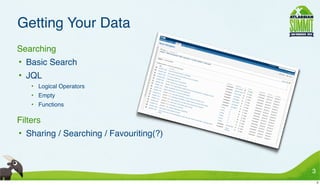
Getting Your Data
• Searching
  • Basic Search
  • JQL
      • Logical Operators
      • Empty
      • Functions

• Filters
  • Sharing / Searching / Favouriting(?)


                                           3
                                               3
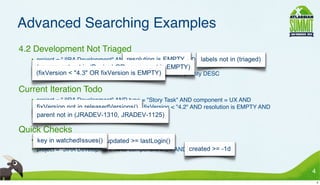
Advanced Searching Examples
• 4.2 Development Not Triaged
     • project = "JIRA Development" AND resolution is EMPTY AND labels not in (triaged) AND
       (component not in (Design) OR component is EMPTY) AND
       (fixVersion < "4.3" OR fixVersion is EMPTY) ORDER BY priority DESC

• Current Iteration Todo
     • project = "JIRA Development" AND type = "Story Task" AND component = UX AND
       fixVersion not in releasedVersions() AND fixVersion < "4.2" AND resolution is EMPTY AND
       parent not in (JRADEV-1310, JRADEV-1125)

• Quick Checks
     • key in watchedIssues() AND updated >= lastLogin()
     • project = "JIRA Development" AND component = UX AND created >= -1d


                                                                                               4
                                                                                                   4
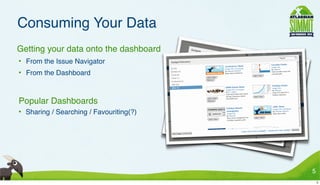
Consuming Your Data
• Getting your data onto the dashboard
 • From the Issue Navigator
 • From the Dashboard


• Popular Dashboards
 • Sharing / Searching / Favouriting(?)


                                          5
                                              5
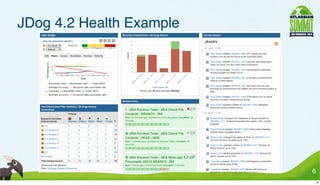
JDog 4.2 Health Example

•


                              6
                                  6
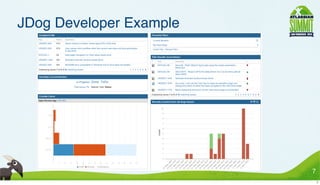
JDog Developer Example

•


                             7
                                 7
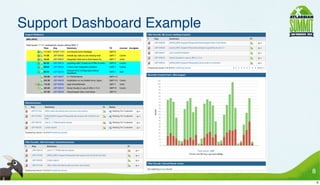
Support Dashboard Example

•


                                8
                                    8
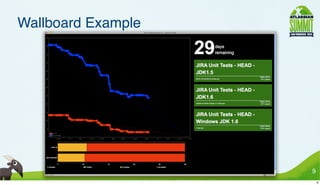
Wallboard Example

•


                        9
                            9
And It Will Only Get Better!
• New Functions
 • componentsLeadByUser(), projectsLeadByUser()
 • Third Party Plugins
 • Write Your Own!


• New Gadgets
 •   GreenHopper Gadgets
 •   Other Atlassian Product Gadgets
 •   Pub/Sub
 •   Third party gadgets
 •   Write Your Own!
                                                  10
                                                   10

Killer Reporting with JIRA Dashboards - Atlassian Summit 2010 - Lightning Talks

  • 1.
  • 2.
    Killer Reporting withJIRA Dashboards From “useful” to “essential”! Nick Menere, JIRA Tech Lead, Atlassian Charlie Bar - Friday 3pm - 4pm 2 2
  • 3.
    Getting Your Data •Searching • Basic Search • JQL • Logical Operators • Empty • Functions • Filters • Sharing / Searching / Favouriting(?) 3 3
  • 4.
    Advanced Searching Examples •4.2 Development Not Triaged • project = "JIRA Development" AND resolution is EMPTY AND labels not in (triaged) AND (component not in (Design) OR component is EMPTY) AND (fixVersion < "4.3" OR fixVersion is EMPTY) ORDER BY priority DESC • Current Iteration Todo • project = "JIRA Development" AND type = "Story Task" AND component = UX AND fixVersion not in releasedVersions() AND fixVersion < "4.2" AND resolution is EMPTY AND parent not in (JRADEV-1310, JRADEV-1125) • Quick Checks • key in watchedIssues() AND updated >= lastLogin() • project = "JIRA Development" AND component = UX AND created >= -1d 4 4
  • 5.
    Consuming Your Data •Getting your data onto the dashboard • From the Issue Navigator • From the Dashboard • Popular Dashboards • Sharing / Searching / Favouriting(?) 5 5
  • 6.
    JDog 4.2 HealthExample • 6 6
  • 7.
  • 8.
  • 9.
  • 10.
    And It WillOnly Get Better! • New Functions • componentsLeadByUser(), projectsLeadByUser() • Third Party Plugins • Write Your Own! • New Gadgets • GreenHopper Gadgets • Other Atlassian Product Gadgets • Pub/Sub • Third party gadgets • Write Your Own! 10 10