®
IT Support that Puts the Ops into
DevOps
®
Introducing ALM & DevOps
®
®
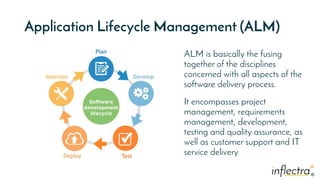
Application Lifecycle Management (ALM)
ALM is basically the fusing
together of the disciplines
concerned with all aspects of the
software delivery process.
It encompasses project
management, requirements
management, development,
testing and quality assurance, as
well as customer support and IT
service delivery
®
®
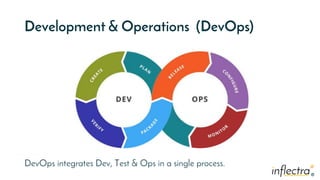
Development & Operations (DevOps)
DevOps integrates Dev, Test & Ops in a single process.
®
®
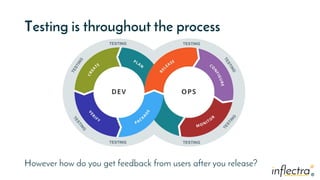
Testing is throughout the process
However how do you get feedback from users after you release?
TESTING
TESTING
TESTING
TESTING
®
®
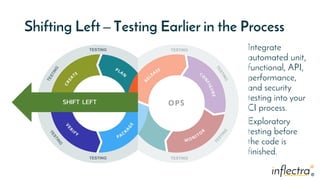
Shifting Left – Testing Earlier in the Process
Integrate
automated unit,
functional, API,
performance,
and security
testing into your
CI process.
Exploratory
testing before
the code is
finished.
TESTING
TESTING
TESTING
TESTING
SHIFT LEFT
®
®
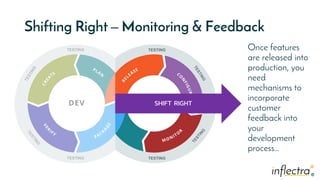
Shifting Right – Monitoring & Feedback
Once features
are released into
production, you
need
mechanisms to
incorporate
customer
feedback into
your
development
process…
TESTING
TESTING
TESTING
TESTING
SHIFT RIGHT
®
Introducing KronoDesk
Manage customer support and incorporate feedback into development
®
The KronoDesk Difference
How are we different and what our customers say
®
®
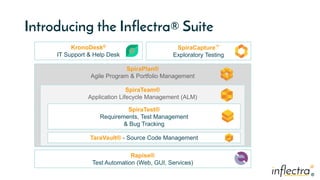
SpiraPlan®
Agile Program & Portfolio Management
SpiraTeam®
Application Lifecycle Management (ALM)
Introducing the Inflectra® Suite
SpiraTest®
Requirements, Test Management
& Bug Tracking
KronoDesk®
IT Support & Help Desk
Rapise®
Test Automation (Web, GUI, Services)
TaraVault® - Source Code Management
SpiraCapture™
Exploratory Testing
®
®
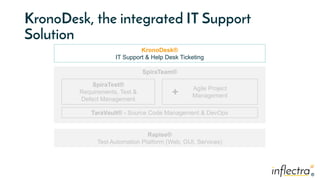
KronoDesk, the integrated IT Support
Solution
SpiraTeam®
SpiraTest®
Requirements, Test &
Defect Management
Agile Project
Management
KronoDesk®
IT Support & Help Desk Ticketing
Rapise®
Test Automation Platform (Web, GUI, Services)
TaraVault® - Source Code Management & DevOps
+
®
®
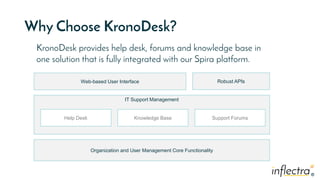
Why Choose KronoDesk?
IT Support Management
Web-based User Interface
Organization and User Management Core Functionality
Robust APIs
Help Desk Knowledge Base Support Forums
KronoDesk provides help desk, forums and knowledge base in
one solution that is fully integrated with our Spira platform.
®
®
harmony
®
®
How Do We Foster Harmony?
1. Across Disciplines
2.Through Simplicity
3.Across Ecosystems
®
®
Harmony Across the Disciplines
Testers Developers Managers
We consider each of these three stakeholders groups when
designing features for our platform, so that everyone in teams can
get the most out of our systems working together.
®
Simplicity = Productivity from Day One
• Less Time Doing: • More Time Doing:
No plugins, customization or
configuration needed day one
®
®
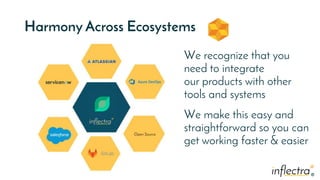
Harmony Across Ecosystems
We recognize that you
need to integrate
our products with other
tools and systems
We make this easy and
straightforward so you can
get working faster & easier
®
®
Representative Customers by Industry
 We have ~ 80,000 users in 5,000+ companies worldwide:
Energy & Industrial
Government & Defense
Retail & Consumer Goods
Healthcare & Bio-Technology
Financial & Business Services
Information Technology
Transportation & Hospitality
Telecommunications
®
®
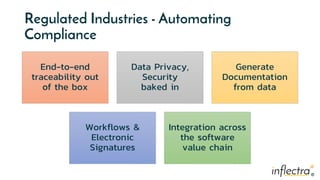
Regulated Industries - Automating
Compliance
End-to-end
traceability out
of the box
Data Privacy,
Security
baked in
Generate
Documentation
from data
Workflows &
Electronic
Signatures
Integration across
the software
value chain
®
®
Global Partner Network
Page: 20
North America
Asia
Australia
South America & Mexico
Europe
Middle East & Africa
®
®
Customer Testimonials
It provides all the functionality that is needed to run a helpdesk off of and for the tracking, assigning, and
communication of problems for customers. It also provides forums and a knowledge base so customers may
browse similar or the same problem and find a solution before the helpdesk is required.
- Eric Bailey, Strategic Manufacturing Solutions.
“
“
“
The best part about KronoDesk is its helpdesk ticketing which agents can check and serve the customers
well. Moreover, I find that their customer support forums helps users to check and learn the other features of
KronoDesk that will increase their knowledge and understanding about the software platform.
- Eunice Joy T, Support Technician
®
®
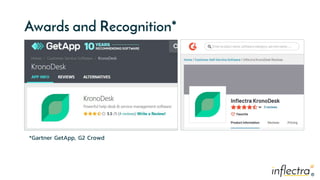
Awards and Recognition*
*Gartner GetApp, G2 Crowd
®
Feature Overview
Lets Look at the Key Features in KronoDesk
®
®
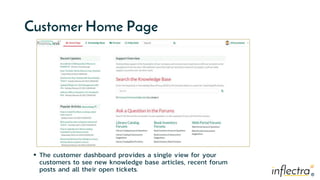
Customer Home Page
 The customer dashboard provides a single view for your
customers to see new knowledge base articles, recent forum
posts and all their open tickets.
®
®
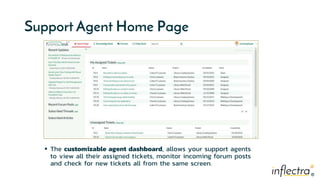
Support Agent Home Page
 The customizable agent dashboard, allows your support agents
to view all their assigned tickets, monitor incoming forum posts
and check for new tickets all from the same screen.
®
Help Desk
®
®
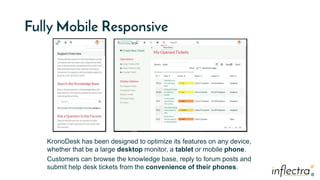
Fully Mobile Responsive
KronoDesk has been designed to optimize its features on any device,
whether that be a large desktop monitor, a tablet or mobile phone.
Customers can browse the knowledge base, reply to forum posts and
submit help desk tickets from the convenience of their phones.
®
®
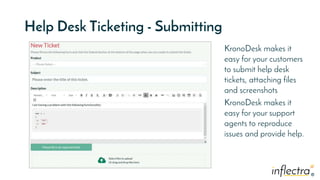
Help Desk Ticketing - Submitting
KronoDesk makes it
easy for your customers
to submit help desk
tickets, attaching files
and screenshots
KronoDesk makes it
easy for your support
agents to reproduce
issues and provide help.
®
®
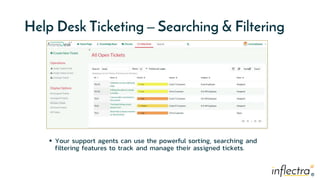
Help Desk Ticketing – Searching & Filtering
 Your support agents can use the powerful sorting, searching and
filtering features to track and manage their assigned tickets.
®
®
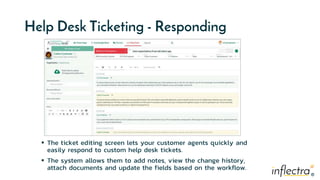
Help Desk Ticketing - Responding
 The ticket editing screen lets your customer agents quickly and
easily respond to custom help desk tickets.
 The system allows them to add notes, view the change history,
attach documents and update the fields based on the workflow.
®
®
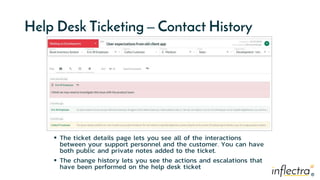
Help Desk Ticketing – Contact History
 The ticket details page lets you see all of the interactions
between your support personnel and the customer. You can have
both public and private notes added to the ticket.
 The change history lets you see the actions and escalations that
have been performed on the help desk ticket
®
Knowledge
Base
®
®
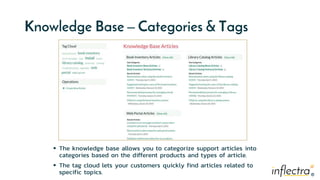
Knowledge Base – Categories & Tags
 The knowledge base allows you to categorize support articles into
categories based on the different products and types of article.
 The tag cloud lets your customers quickly find articles related to
specific topics.
®
®
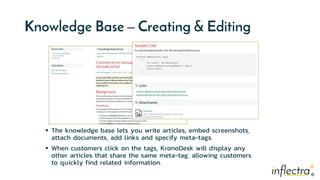
Knowledge Base – Creating & Editing
 The knowledge base lets you write articles, embed screenshots,
attach documents, add links and specify meta-tags.
 When customers click on the tags, KronoDesk will display any
other articles that share the same meta-tag, allowing customers
to quickly find related information.
®
®
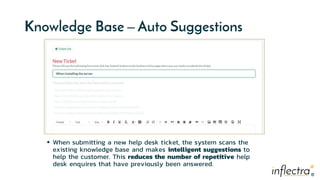
Knowledge Base – Auto Suggestions
 When submitting a new help desk ticket, the system scans the
existing knowledge base and makes intelligent suggestions to
help the customer. This reduces the number of repetitive help
desk enquires that have previously been answered.
®
Support
Forums
®
®
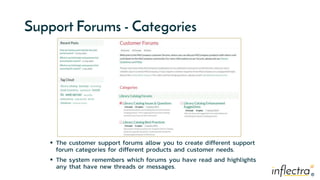
Support Forums - Categories
 The customer support forums allow you to create different support
forum categories for different products and customer needs.
 The system remembers which forums you have read and highlights
any that have new threads or messages.
®
®
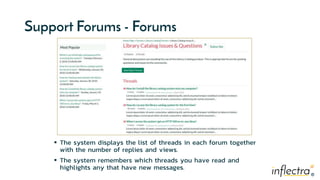
Support Forums - Forums
 The system displays the list of threads in each forum together
with the number of replies and views.
 The system remembers which threads you have read and
highlights any that have new messages.
®
®
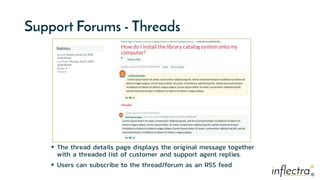
Support Forums - Threads
 The thread details page displays the original message together
with a threaded list of customer and support agent replies.
 Users can subscribe to the thread/forum as an RSS feed
®
Other
Features
®
®
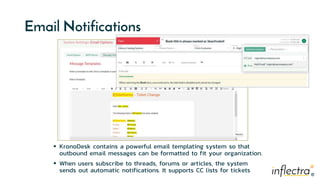
Email Notifications
 KronoDesk contains a powerful email templating system so that
outbound email messages can be formatted to fit your organization.
 When users subscribe to threads, forums or articles, the system
sends out automatic notifications. It supports CC lists for tickets
®
®
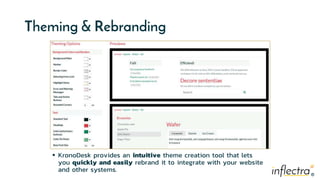
Theming & Rebranding
 KronoDesk provides an intuitive theme creation tool that lets
you quickly and easily rebrand it to integrate with your website
and other systems.
®
®
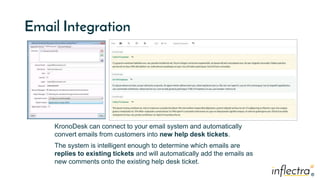
Email Integration
KronoDesk can connect to your email system and automatically
convert emails from customers into new help desk tickets.
The system is intelligent enough to determine which emails are

replies to existing tickets and will automatically add the emails as
new comments onto the existing help desk ticket.
®
®
Subscribe to Threads/Articles
 Users can subscribe to specific articles, threads and forums
 When changes are made to an article, new threads are posted in
a forum or new replies are added to a thread, the user will be
notified
®
®
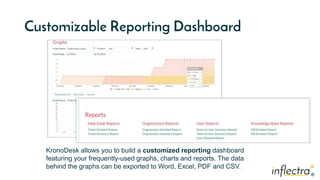
Customizable Reporting Dashboard
KronoDesk allows you to build a customized reporting dashboard
featuring your frequently-used graphs, charts and reports. The data
behind the graphs can be exported to Word, Excel, PDF and CSV.
®
®
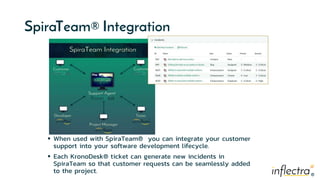
SpiraTeam® Integration
 When used with SpiraTeam® you can integrate your customer
support into your software development lifecycle.
 Each KronoDesk® ticket can generate new incidents in
SpiraTeam so that customer requests can be seamlessly added
to the project.
®
®
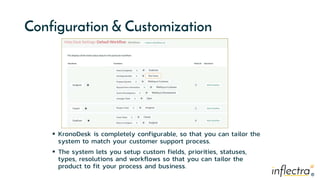
Configuration & Customization
 KronoDesk is completely configurable, so that you can tailor the
system to match your customer support process.
 The system lets you setup custom fields, priorities, statuses,
types, resolutions and workflows so that you can tailor the
product to fit your process and business.
®
48 | 2/9/2021 © Copyright 2006-2019 Inflectra Corporation
Questions?

KronoDesk Overview Presentation (2021)

  • 1.
    ® IT Support thatPuts the Ops into DevOps
  • 2.
  • 3.
    ® ® Application Lifecycle Management(ALM) ALM is basically the fusing together of the disciplines concerned with all aspects of the software delivery process. It encompasses project management, requirements management, development, testing and quality assurance, as well as customer support and IT service delivery
  • 4.
    ® ® Development & Operations(DevOps) DevOps integrates Dev, Test & Ops in a single process.
  • 5.
    ® ® Testing is throughoutthe process However how do you get feedback from users after you release? TESTING TESTING TESTING TESTING
  • 6.
    ® ® Shifting Left –Testing Earlier in the Process Integrate automated unit, functional, API, performance, and security testing into your CI process. Exploratory testing before the code is finished. TESTING TESTING TESTING TESTING SHIFT LEFT
  • 7.
    ® ® Shifting Right –Monitoring & Feedback Once features are released into production, you need mechanisms to incorporate customer feedback into your development process… TESTING TESTING TESTING TESTING SHIFT RIGHT
  • 8.
    ® Introducing KronoDesk Manage customersupport and incorporate feedback into development
  • 9.
    ® The KronoDesk Difference Howare we different and what our customers say
  • 10.
    ® ® SpiraPlan® Agile Program &Portfolio Management SpiraTeam® Application Lifecycle Management (ALM) Introducing the Inflectra® Suite SpiraTest® Requirements, Test Management & Bug Tracking KronoDesk® IT Support & Help Desk Rapise® Test Automation (Web, GUI, Services) TaraVault® - Source Code Management SpiraCapture™ Exploratory Testing
  • 11.
    ® ® KronoDesk, the integratedIT Support Solution SpiraTeam® SpiraTest® Requirements, Test & Defect Management Agile Project Management KronoDesk® IT Support & Help Desk Ticketing Rapise® Test Automation Platform (Web, GUI, Services) TaraVault® - Source Code Management & DevOps +
  • 12.
    ® ® Why Choose KronoDesk? ITSupport Management Web-based User Interface Organization and User Management Core Functionality Robust APIs Help Desk Knowledge Base Support Forums KronoDesk provides help desk, forums and knowledge base in one solution that is fully integrated with our Spira platform.
  • 13.
  • 14.
    ® ® How Do WeFoster Harmony? 1. Across Disciplines 2.Through Simplicity 3.Across Ecosystems
  • 15.
    ® ® Harmony Across theDisciplines Testers Developers Managers We consider each of these three stakeholders groups when designing features for our platform, so that everyone in teams can get the most out of our systems working together.
  • 16.
    ® Simplicity = Productivityfrom Day One • Less Time Doing: • More Time Doing: No plugins, customization or configuration needed day one
  • 17.
    ® ® Harmony Across Ecosystems Werecognize that you need to integrate our products with other tools and systems We make this easy and straightforward so you can get working faster & easier
  • 18.
    ® ® Representative Customers byIndustry  We have ~ 80,000 users in 5,000+ companies worldwide: Energy & Industrial Government & Defense Retail & Consumer Goods Healthcare & Bio-Technology Financial & Business Services Information Technology Transportation & Hospitality Telecommunications
  • 19.
    ® ® Regulated Industries -Automating Compliance End-to-end traceability out of the box Data Privacy, Security baked in Generate Documentation from data Workflows & Electronic Signatures Integration across the software value chain
  • 20.
    ® ® Global Partner Network Page:20 North America Asia Australia South America & Mexico Europe Middle East & Africa
  • 21.
    ® ® Customer Testimonials It providesall the functionality that is needed to run a helpdesk off of and for the tracking, assigning, and communication of problems for customers. It also provides forums and a knowledge base so customers may browse similar or the same problem and find a solution before the helpdesk is required. - Eric Bailey, Strategic Manufacturing Solutions. “ “ “ The best part about KronoDesk is its helpdesk ticketing which agents can check and serve the customers well. Moreover, I find that their customer support forums helps users to check and learn the other features of KronoDesk that will increase their knowledge and understanding about the software platform. - Eunice Joy T, Support Technician
  • 22.
  • 23.
    ® Feature Overview Lets Lookat the Key Features in KronoDesk
  • 24.
    ® ® Customer Home Page The customer dashboard provides a single view for your customers to see new knowledge base articles, recent forum posts and all their open tickets.
  • 25.
    ® ® Support Agent HomePage  The customizable agent dashboard, allows your support agents to view all their assigned tickets, monitor incoming forum posts and check for new tickets all from the same screen.
  • 26.
  • 27.
    ® ® Fully Mobile Responsive KronoDeskhas been designed to optimize its features on any device, whether that be a large desktop monitor, a tablet or mobile phone. Customers can browse the knowledge base, reply to forum posts and submit help desk tickets from the convenience of their phones.
  • 28.
    ® ® Help Desk Ticketing- Submitting KronoDesk makes it easy for your customers to submit help desk tickets, attaching files and screenshots KronoDesk makes it easy for your support agents to reproduce issues and provide help.
  • 29.
    ® ® Help Desk Ticketing– Searching & Filtering  Your support agents can use the powerful sorting, searching and filtering features to track and manage their assigned tickets.
  • 30.
    ® ® Help Desk Ticketing- Responding  The ticket editing screen lets your customer agents quickly and easily respond to custom help desk tickets.  The system allows them to add notes, view the change history, attach documents and update the fields based on the workflow.
  • 31.
    ® ® Help Desk Ticketing– Contact History  The ticket details page lets you see all of the interactions between your support personnel and the customer. You can have both public and private notes added to the ticket.  The change history lets you see the actions and escalations that have been performed on the help desk ticket
  • 32.
  • 33.
    ® ® Knowledge Base –Categories & Tags  The knowledge base allows you to categorize support articles into categories based on the different products and types of article.  The tag cloud lets your customers quickly find articles related to specific topics.
  • 34.
    ® ® Knowledge Base –Creating & Editing  The knowledge base lets you write articles, embed screenshots, attach documents, add links and specify meta-tags.  When customers click on the tags, KronoDesk will display any other articles that share the same meta-tag, allowing customers to quickly find related information.
  • 35.
    ® ® Knowledge Base –Auto Suggestions  When submitting a new help desk ticket, the system scans the existing knowledge base and makes intelligent suggestions to help the customer. This reduces the number of repetitive help desk enquires that have previously been answered.
  • 36.
  • 37.
    ® ® Support Forums -Categories  The customer support forums allow you to create different support forum categories for different products and customer needs.  The system remembers which forums you have read and highlights any that have new threads or messages.
  • 38.
    ® ® Support Forums -Forums  The system displays the list of threads in each forum together with the number of replies and views.  The system remembers which threads you have read and highlights any that have new messages.
  • 39.
    ® ® Support Forums -Threads  The thread details page displays the original message together with a threaded list of customer and support agent replies.  Users can subscribe to the thread/forum as an RSS feed
  • 40.
  • 41.
    ® ® Email Notifications  KronoDeskcontains a powerful email templating system so that outbound email messages can be formatted to fit your organization.  When users subscribe to threads, forums or articles, the system sends out automatic notifications. It supports CC lists for tickets
  • 42.
    ® ® Theming & Rebranding KronoDesk provides an intuitive theme creation tool that lets you quickly and easily rebrand it to integrate with your website and other systems.
  • 43.
    ® ® Email Integration KronoDesk canconnect to your email system and automatically convert emails from customers into new help desk tickets. The system is intelligent enough to determine which emails are replies to existing tickets and will automatically add the emails as new comments onto the existing help desk ticket.
  • 44.
    ® ® Subscribe to Threads/Articles Users can subscribe to specific articles, threads and forums  When changes are made to an article, new threads are posted in a forum or new replies are added to a thread, the user will be notified
  • 45.
    ® ® Customizable Reporting Dashboard KronoDeskallows you to build a customized reporting dashboard featuring your frequently-used graphs, charts and reports. The data behind the graphs can be exported to Word, Excel, PDF and CSV.
  • 46.
    ® ® SpiraTeam® Integration  Whenused with SpiraTeam® you can integrate your customer support into your software development lifecycle.  Each KronoDesk® ticket can generate new incidents in SpiraTeam so that customer requests can be seamlessly added to the project.
  • 47.
    ® ® Configuration & Customization KronoDesk is completely configurable, so that you can tailor the system to match your customer support process.  The system lets you setup custom fields, priorities, statuses, types, resolutions and workflows so that you can tailor the product to fit your process and business.
  • 48.
    ® 48 | 2/9/2021© Copyright 2006-2019 Inflectra Corporation Questions?

Editor's Notes

  • #14 Make great products Help you work together Help you deliver your products faster, more easily, with less pain, and less stress At a grand scale – we’re passionate about making products that you will find transformative to how you work. We both want to use our tools every day to help you do a whole number of complex things, and at the same time get out of your way so you don’t need to worry about SpiraTeam and can instead focus on helping your own customers
  • #27 Managers, our third pillar, could always take advantage of our reporting, dashboards, and traceability features. But we knew we could do a lot more to help managers – both senior leaders and those in other roles like BI
  • #33 That’s the very high level, but what does this mean in detail for you? What have we or are we about to release that can help you? Let’s talk testers first
  • #37 Let’s talk next about developers
  • #41 Let’s talk next about developers