
Opensource Automation
Tool Comparison
QA Or The Highway
05/30/2023
Krishna Bandarupalli
Selenium | Playwright | Cypress |
TestCafé
About
Me
Krishna
Chaitanya
Bandarupalli
Team Lead
Quality
Assurance
Divya,
Nidhi (18
mo.),
Sathvik (3
mo.) &
Tiger (2 yo.)
Gardening,
researchin
g/ DIY &
Cooking
Love the
family,
work &
helping
Agenda
About Me
Why this topic?
Why these four tools? & Introduction
Comparison Matrices
Charts
Conclusion
Questions
Why
this
Topic?
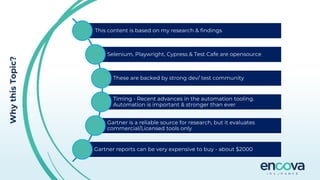
This content is based on my research & findings
Selenium, Playwright, Cypress & Test Cafe are opensource
These are backed by strong dev/ test community
Timing - Recent advances in the automation tooling.
Automation is important & stronger than ever
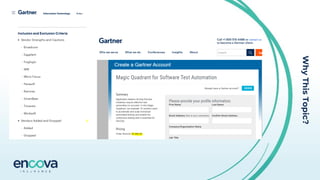
Gartner is a reliable source for research, but it evaluates
commercial/Licensed tools only
Gartner reports can be very expensive to buy - about $2000
Why
This
Topic?
Why
these
four
tools?
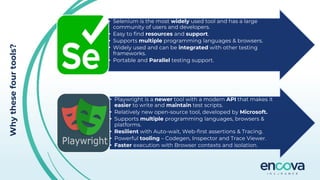
• Selenium is the most widely used tool and has a large
community of users and developers.
• Easy to find resources and support.
• Supports multiple programming languages & browsers.
• Widely used and can be integrated with other testing
frameworks.
• Portable and Parallel testing support.
• Playwright is a newer tool with a modern API that makes it
easier to write and maintain test scripts.
• Relatively new open-source tool, developed by Microsoft.
• Supports multiple programming languages, browsers &
platforms.
• Resilient with Auto-wait, Web-first assertions & Tracing.
• Powerful tooling – Codegen, Inspector and Trace Viewer.
• Faster execution with Browser contexts and isolation.
Why
These
Four
Tools?
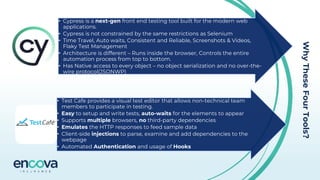
• Cypress is a next-gen front end testing tool built for the modern web
applications.
• Cypress is not constrained by the same restrictions as Selenium
• Time Travel, Auto waits, Consistent and Reliable, Screenshots & Videos,
Flaky Test Management
• Architecture is different – Runs inside the browser, Controls the entire
automation process from top to bottom.
• Has Native access to every object – no object serialization and no over-the-
wire protocol(JSONWP)
• Test Cafe provides a visual test editor that allows non-technical team
members to participate in testing.
• Easy to setup and write tests, auto-waits for the elements to appear
• Supports multiple browsers, no third-party dependencies
• Emulates the HTTP responses to feed sample data
• Client-side injections to parse, examine and add dependencies to the
webpage
• Automated Authentication and usage of Hooks
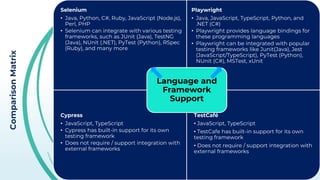
Comparison
Matrix
Selenium
• Java, Python, C#, Ruby, JavaScript (Node.js),
Perl, PHP
• Selenium can integrate with various testing
frameworks, such as JUnit (Java), TestNG
(Java), NUnit (.NET), PyTest (Python), RSpec
(Ruby), and many more
Playwright
• Java, JavaScript, TypeScript, Python, and
.NET (C#)
• Playwright provides language bindings for
these programming languages
• Playwright can be integrated with popular
testing frameworks like Junit(Java), Jest
(JavaScript/TypeScript), PyTest (Python),
NUnit (C#), MSTest, xUnit
Cypress
• JavaScript, TypeScript
• Cypress has built-in support for its own
testing framework
• Does not require / support integration with
external frameworks
TestCafé
• JavaScript, TypeScript
• TestCafe has built-in support for its own
testing framework
• Does not require / support integration with
external frameworks
Language and
Framework
Support
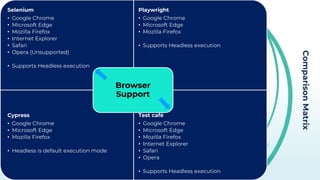
Comparison
Matrix
Selenium
• Google Chrome
• Microsoft Edge
• Mozilla Firefox
• Internet Explorer
• Safari
• Opera (Unsupported)
• Supports Headless execution
Playwright
• Google Chrome
• Microsoft Edge
• Mozilla Firefox
• Supports Headless execution
Cypress
• Google Chrome
• Microsoft Edge
• Mozilla Firefox
• Headless is default execution mode
Test café
• Google Chrome
• Microsoft Edge
• Mozilla Firefox
• Internet Explorer
• Safari
• Opera
• Supports Headless execution
Browser
Support
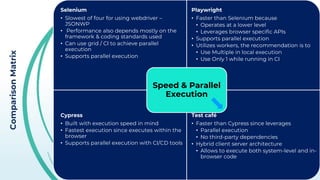
Comparison
Matrix
Selenium
• Slowest of four for using webdriver –
JSONWP
• Performance also depends mostly on the
framework & coding standards used
• Can use grid / CI to achieve parallel
execution
• Supports parallel execution
Playwright
• Faster than Selenium because
• Operates at a lower level
• Leverages browser specific APIs
• Supports parallel execution
• Utilizes workers, the recommendation is to
• Use Multiple in local execution
• Use Only 1 while running in CI
Cypress
• Built with execution speed in mind
• Fastest execution since executes within the
browser
• Supports parallel execution with CI/CD tools
Test café
• Faster than Cypress since leverages
• Parallel execution
• No third-party dependencies
• Hybrid client server architecture
• Allows to execute both system-level and in-
browser code
Speed & Parallel
Execution
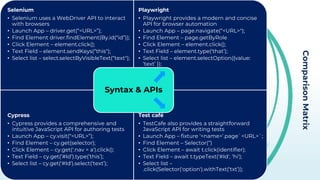
Comparison
Matrix
Selenium
• Selenium uses a WebDriver API to interact
with browsers
• Launch App – driver.get(“<URL>”);
• Find Element driver.findElement(By.id(“id”));
• Click Element – element.click();
• Text Field – element.sendKeys(“this");
• Select list – select.selectByVisibleText(“text");
Playwright
• Playwright provides a modern and concise
API for browser automation
• Launch App – page.navigate(“<URL>");
• Find Element – page.getByRole
• Click Element – element.click();
• Text Field – element.type(‘that’);
• Select list – element.selectOption({value:
‘text’ });
Cypress
• Cypress provides a comprehensive and
intuitive JavaScript API for authoring tests
• Launch App – cy.visit(“<URL>”);
• Find Element – cy.get(selector);
• Click Element – cy.get('.nav > a').click();
• Text Field – cy.get(’#Id’).type(’this’);
• Select list – cy.get('#Id').select(‘text’);
Test café
• TestCafe also provides a straightforward
JavaScript API for writing tests
• Launch App – fixture ‘<name>’.page`<URL>`;
• Find Element – Selector(‘’)
• Click Element – await t.click(identifier);
• Text Field – await t.typeText('#Id', ‘hi');
• Select list –
.click(Selector('option').withText(‘txt’));
Syntax & APIs
Comparison
Matrix
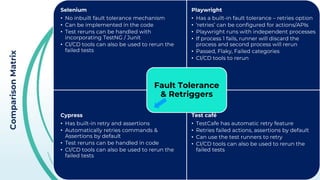
Selenium
• No inbuilt fault tolerance mechanism
• Can be implemented in the code
• Test reruns can be handled with
incorporating TestNG / Junit
• CI/CD tools can also be used to rerun the
failed tests
Playwright
• Has a built-in fault tolerance – retries option
• ‘retries’ can be configured for actions/APIs
• Playwright runs with independent processes
• If process 1 fails, runner will discard the
process and second process will rerun
• Passed, Flaky, Failed categories
• CI/CD tools to rerun
Cypress
• Has built-in retry and assertions
• Automatically retries commands &
Assertions by default
• Test reruns can be handled in code
• CI/CD tools can also be used to rerun the
failed tests
Test café
• TestCafe has automatic retry feature
• Retries failed actions, assertions by default
• Can use the test runners to retry
• CI/CD tools can also be used to rerun the
failed tests
Fault Tolerance
& Retriggers
Comparison
Matrix
Selenium
• Multiple ways to integrate with Jenkins
• Depends on the framework and build tool
used in the project
• Freestyle projects use run.bat files / Shell
scripts to execute
• Maven project use pom.xml
• Test schedules, automatic test runs on a
code version
Playwright
• Playwright Docker Image / Install
dependencies using CLI
• npx playwright install --with-deps
• npx playwright test
• Recommended setting workers to 1
• Recommends to use Docker agents for
pipeline in Jenkins
Cypress
• NodeJS plugin is required in Jenkins
• Config to install cypress automatically
• Freestyle project – Execute NodeJS script –
cypress run
• Needs a separate config for different
features
• cypress run --record --key=abc123 --parallel
Test café
• Extensive CLI to integrate with CI tools
• NodeJS plugin is required in Jenkins
• Execute shell for macOS & Linux
• Execute Windows Batch for windows
• npm install testcafe testcafe-reporter-xunit
• node_modules/.bin/testcafe chrome tests/**/*
-r xunit:res.xml
CI / CD
(Jenkins)
Comparison
Matrix
Selenium
• Selenium IDE supports the debugging
• If using the webdriver, debugging depends
on the IDE we implement
• Selenium does not have built-in reporting
features
• Can be integrated with testing frameworks
with reporting capabilities
• Junit, TestNG+ReportNG
Playwright
• Can debug with console.log / in IDE
• VS Code with VS Code Extension
• Playwright inspector allows to step through
the API calls and see their logs, locators
• Debug all tests - npx playwright test –debug
• HTML report is available by default
• Can be integrated with Junit, TestNG for
advanced reporting
• npx playwright show-report
Cypress
• Can have access to things like document,
window and debugger – runs in same loop
• Use .debug() to quickly inspect any (or
many!) part(s) of your application during the
test
• Has built in Mocha reporters, teamcity, junit
• You can load custom Mocha reporters
• It generates detailed HTML reports with test
results, screenshots, video recordings & logs
Test café
• debugger keyword
• Debug in VS Code, IDE
• Visual Selector Debugger to interactively
debug & t.debug, --debug-mode
• TestCafe Live Mode
• Following reporters ootb–spec, list, xunit,
json, minimal
• Community reporters – Nunit, Slack,
TeamCity, Tesults
Test Debugging
& Reporting
Comparison
Matrix
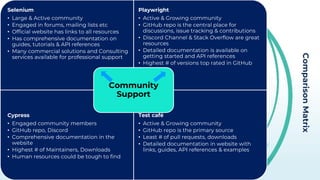
Selenium
• Large & Active community
• Engaged in forums, mailing lists etc
• Official website has links to all resources
• Has comprehensive documentation on
guides, tutorials & API references
• Many commercial solutions and Consulting
services available for professional support
Playwright
• Active & Growing community
• GitHub repo is the central place for
discussions, issue tracking & contributions
• Discord Channel & Stack Overflow are great
resources
• Detailed documentation is available on
getting started and API references
• Highest # of versions top rated in GitHub
Cypress
• Engaged community members
• GitHub repo, Discord
• Comprehensive documentation in the
website
• Highest # of Maintainers, Downloads
• Human resources could be tough to find
Test café
• Active & Growing community
• GitHub repo is the primary source
• Least # of pull requests, downloads
• Detailed documentation in website with
links, guides, API references & examples
Community
Support
Comparison
Matrix
Selenium
• Test Framework Support – TestNG, JUnit,
NUnit
• Build Tool Integration – Maven, Gradle
• Test Data Generation – Faker, DataFactory
• Browser Drivers – Enable working with
multiple browsers
• Readily integrates with CI/CD tools
Playwright
• Test Framework Support – Jest, Mocha,
Jasmine, TestNG
• Build Tool Integration – Jest, Gradle
• Test Data Generation – Faker, Chance.js
• Browser Contexts – Context isolation to
create multiple independent instances for
parallel runs
Cypress
• Test Framework Support – Built in
framework with rich set of APIs & Assertions
• Plugins – Various plugins are available to be
added
• Test Libraries – jQuery, Lodash
• Network & API Testing – Cypress Testing
Library, Cypress Axios
Test café
• Test Framework Support – Built in
Framework with APIs
• TestCafe Live Mode – test automatically runs
after saving changes to test
• Integrates with many CI/CD tools
Test Ecosystem
Comparison
Matrix
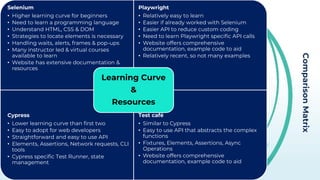
Selenium
• Higher learning curve for beginners
• Need to learn a programming language
• Understand HTML, CSS & DOM
• Strategies to locate elements is necessary
• Handling waits, alerts, frames & pop-ups
• Many instructor led & virtual courses
available to learn
• Website has extensive documentation &
resources
Playwright
• Relatively easy to learn
• Easier if already worked with Selenium
• Easier API to reduce custom coding
• Need to learn Playwright specific API calls
• Website offers comprehensive
documentation, example code to aid
• Relatively recent, so not many examples
Cypress
• Lower learning curve than first two
• Easy to adopt for web developers
• Straightforward and easy to use API
• Elements, Assertions, Network requests, CLI
tools
• Cypress specific Test Runner, state
management
Test café
• Similar to Cypress
• Easy to use API that abstracts the complex
functions
• Fixtures, Elements, Assertions, Async
Operations
• Website offers comprehensive
documentation, example code to aid
Learning Curve
&
Resources
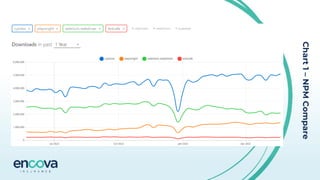
Chart
1
–
NPM
Compare
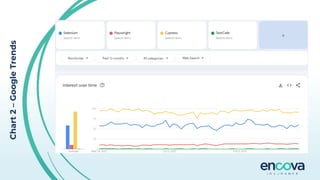
Chart
2
–
Google
Trends
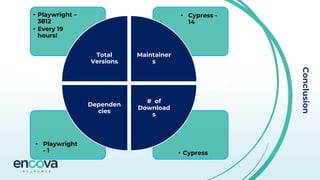
Conclusion
• Cypress
• Playwright
- 1
• Cypress -
14
• Playwright –
3812
• Every 19
hours!
Total
Versions
Maintainer
s
# of
Download
s
Dependen
cies
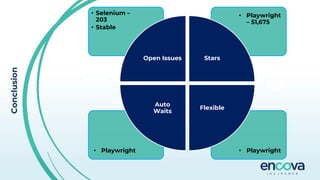
Conclusion
• Playwright
• Playwright
• Playwright
– 51,675
• Selenium –
203
• Stable
Open Issues Stars
Flexible
Auto
Waits
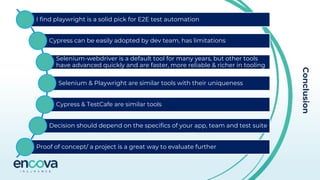
Conclusion
I find playwright is a solid pick for E2E test automation
Cypress can be easily adopted by dev team, has limitations
Selenium-webdriver is a default tool for many years, but other tools
have advanced quickly and are faster, more reliable & richer in tooling
Selenium & Playwright are similar tools with their uniqueness
Cypress & TestCafe are similar tools
Decision should depend on the specifics of your app, team and test suite
Proof of concept/ a project is a great way to evaluate further
KrishnaToolComparisionPPT.pdf

KrishnaToolComparisionPPT.pdf

  • 1.
    Opensource Automation Tool Comparison QAOr The Highway 05/30/2023 Krishna Bandarupalli Selenium | Playwright | Cypress | TestCafé
  • 2.
    About Me Krishna Chaitanya Bandarupalli Team Lead Quality Assurance Divya, Nidhi (18 mo.), Sathvik(3 mo.) & Tiger (2 yo.) Gardening, researchin g/ DIY & Cooking Love the family, work & helping
  • 3.
    Agenda About Me Why thistopic? Why these four tools? & Introduction Comparison Matrices Charts Conclusion Questions
  • 4.
    Why this Topic? This content isbased on my research & findings Selenium, Playwright, Cypress & Test Cafe are opensource These are backed by strong dev/ test community Timing - Recent advances in the automation tooling. Automation is important & stronger than ever Gartner is a reliable source for research, but it evaluates commercial/Licensed tools only Gartner reports can be very expensive to buy - about $2000
  • 5.
  • 6.
    Why these four tools? • Selenium isthe most widely used tool and has a large community of users and developers. • Easy to find resources and support. • Supports multiple programming languages & browsers. • Widely used and can be integrated with other testing frameworks. • Portable and Parallel testing support. • Playwright is a newer tool with a modern API that makes it easier to write and maintain test scripts. • Relatively new open-source tool, developed by Microsoft. • Supports multiple programming languages, browsers & platforms. • Resilient with Auto-wait, Web-first assertions & Tracing. • Powerful tooling – Codegen, Inspector and Trace Viewer. • Faster execution with Browser contexts and isolation.
  • 7.
    Why These Four Tools? • Cypress isa next-gen front end testing tool built for the modern web applications. • Cypress is not constrained by the same restrictions as Selenium • Time Travel, Auto waits, Consistent and Reliable, Screenshots & Videos, Flaky Test Management • Architecture is different – Runs inside the browser, Controls the entire automation process from top to bottom. • Has Native access to every object – no object serialization and no over-the- wire protocol(JSONWP) • Test Cafe provides a visual test editor that allows non-technical team members to participate in testing. • Easy to setup and write tests, auto-waits for the elements to appear • Supports multiple browsers, no third-party dependencies • Emulates the HTTP responses to feed sample data • Client-side injections to parse, examine and add dependencies to the webpage • Automated Authentication and usage of Hooks
  • 8.
    Comparison Matrix Selenium • Java, Python,C#, Ruby, JavaScript (Node.js), Perl, PHP • Selenium can integrate with various testing frameworks, such as JUnit (Java), TestNG (Java), NUnit (.NET), PyTest (Python), RSpec (Ruby), and many more Playwright • Java, JavaScript, TypeScript, Python, and .NET (C#) • Playwright provides language bindings for these programming languages • Playwright can be integrated with popular testing frameworks like Junit(Java), Jest (JavaScript/TypeScript), PyTest (Python), NUnit (C#), MSTest, xUnit Cypress • JavaScript, TypeScript • Cypress has built-in support for its own testing framework • Does not require / support integration with external frameworks TestCafé • JavaScript, TypeScript • TestCafe has built-in support for its own testing framework • Does not require / support integration with external frameworks Language and Framework Support
  • 9.
    Comparison Matrix Selenium • Google Chrome •Microsoft Edge • Mozilla Firefox • Internet Explorer • Safari • Opera (Unsupported) • Supports Headless execution Playwright • Google Chrome • Microsoft Edge • Mozilla Firefox • Supports Headless execution Cypress • Google Chrome • Microsoft Edge • Mozilla Firefox • Headless is default execution mode Test café • Google Chrome • Microsoft Edge • Mozilla Firefox • Internet Explorer • Safari • Opera • Supports Headless execution Browser Support
  • 10.
    Comparison Matrix Selenium • Slowest offour for using webdriver – JSONWP • Performance also depends mostly on the framework & coding standards used • Can use grid / CI to achieve parallel execution • Supports parallel execution Playwright • Faster than Selenium because • Operates at a lower level • Leverages browser specific APIs • Supports parallel execution • Utilizes workers, the recommendation is to • Use Multiple in local execution • Use Only 1 while running in CI Cypress • Built with execution speed in mind • Fastest execution since executes within the browser • Supports parallel execution with CI/CD tools Test café • Faster than Cypress since leverages • Parallel execution • No third-party dependencies • Hybrid client server architecture • Allows to execute both system-level and in- browser code Speed & Parallel Execution
  • 11.
    Comparison Matrix Selenium • Selenium usesa WebDriver API to interact with browsers • Launch App – driver.get(“<URL>”); • Find Element driver.findElement(By.id(“id”)); • Click Element – element.click(); • Text Field – element.sendKeys(“this"); • Select list – select.selectByVisibleText(“text"); Playwright • Playwright provides a modern and concise API for browser automation • Launch App – page.navigate(“<URL>"); • Find Element – page.getByRole • Click Element – element.click(); • Text Field – element.type(‘that’); • Select list – element.selectOption({value: ‘text’ }); Cypress • Cypress provides a comprehensive and intuitive JavaScript API for authoring tests • Launch App – cy.visit(“<URL>”); • Find Element – cy.get(selector); • Click Element – cy.get('.nav > a').click(); • Text Field – cy.get(’#Id’).type(’this’); • Select list – cy.get('#Id').select(‘text’); Test café • TestCafe also provides a straightforward JavaScript API for writing tests • Launch App – fixture ‘<name>’.page`<URL>`; • Find Element – Selector(‘’) • Click Element – await t.click(identifier); • Text Field – await t.typeText('#Id', ‘hi'); • Select list – .click(Selector('option').withText(‘txt’)); Syntax & APIs
  • 12.
    Comparison Matrix Selenium • No inbuiltfault tolerance mechanism • Can be implemented in the code • Test reruns can be handled with incorporating TestNG / Junit • CI/CD tools can also be used to rerun the failed tests Playwright • Has a built-in fault tolerance – retries option • ‘retries’ can be configured for actions/APIs • Playwright runs with independent processes • If process 1 fails, runner will discard the process and second process will rerun • Passed, Flaky, Failed categories • CI/CD tools to rerun Cypress • Has built-in retry and assertions • Automatically retries commands & Assertions by default • Test reruns can be handled in code • CI/CD tools can also be used to rerun the failed tests Test café • TestCafe has automatic retry feature • Retries failed actions, assertions by default • Can use the test runners to retry • CI/CD tools can also be used to rerun the failed tests Fault Tolerance & Retriggers
  • 13.
    Comparison Matrix Selenium • Multiple waysto integrate with Jenkins • Depends on the framework and build tool used in the project • Freestyle projects use run.bat files / Shell scripts to execute • Maven project use pom.xml • Test schedules, automatic test runs on a code version Playwright • Playwright Docker Image / Install dependencies using CLI • npx playwright install --with-deps • npx playwright test • Recommended setting workers to 1 • Recommends to use Docker agents for pipeline in Jenkins Cypress • NodeJS plugin is required in Jenkins • Config to install cypress automatically • Freestyle project – Execute NodeJS script – cypress run • Needs a separate config for different features • cypress run --record --key=abc123 --parallel Test café • Extensive CLI to integrate with CI tools • NodeJS plugin is required in Jenkins • Execute shell for macOS & Linux • Execute Windows Batch for windows • npm install testcafe testcafe-reporter-xunit • node_modules/.bin/testcafe chrome tests/**/* -r xunit:res.xml CI / CD (Jenkins)
  • 14.
    Comparison Matrix Selenium • Selenium IDEsupports the debugging • If using the webdriver, debugging depends on the IDE we implement • Selenium does not have built-in reporting features • Can be integrated with testing frameworks with reporting capabilities • Junit, TestNG+ReportNG Playwright • Can debug with console.log / in IDE • VS Code with VS Code Extension • Playwright inspector allows to step through the API calls and see their logs, locators • Debug all tests - npx playwright test –debug • HTML report is available by default • Can be integrated with Junit, TestNG for advanced reporting • npx playwright show-report Cypress • Can have access to things like document, window and debugger – runs in same loop • Use .debug() to quickly inspect any (or many!) part(s) of your application during the test • Has built in Mocha reporters, teamcity, junit • You can load custom Mocha reporters • It generates detailed HTML reports with test results, screenshots, video recordings & logs Test café • debugger keyword • Debug in VS Code, IDE • Visual Selector Debugger to interactively debug & t.debug, --debug-mode • TestCafe Live Mode • Following reporters ootb–spec, list, xunit, json, minimal • Community reporters – Nunit, Slack, TeamCity, Tesults Test Debugging & Reporting
  • 15.
    Comparison Matrix Selenium • Large &Active community • Engaged in forums, mailing lists etc • Official website has links to all resources • Has comprehensive documentation on guides, tutorials & API references • Many commercial solutions and Consulting services available for professional support Playwright • Active & Growing community • GitHub repo is the central place for discussions, issue tracking & contributions • Discord Channel & Stack Overflow are great resources • Detailed documentation is available on getting started and API references • Highest # of versions top rated in GitHub Cypress • Engaged community members • GitHub repo, Discord • Comprehensive documentation in the website • Highest # of Maintainers, Downloads • Human resources could be tough to find Test café • Active & Growing community • GitHub repo is the primary source • Least # of pull requests, downloads • Detailed documentation in website with links, guides, API references & examples Community Support
  • 16.
    Comparison Matrix Selenium • Test FrameworkSupport – TestNG, JUnit, NUnit • Build Tool Integration – Maven, Gradle • Test Data Generation – Faker, DataFactory • Browser Drivers – Enable working with multiple browsers • Readily integrates with CI/CD tools Playwright • Test Framework Support – Jest, Mocha, Jasmine, TestNG • Build Tool Integration – Jest, Gradle • Test Data Generation – Faker, Chance.js • Browser Contexts – Context isolation to create multiple independent instances for parallel runs Cypress • Test Framework Support – Built in framework with rich set of APIs & Assertions • Plugins – Various plugins are available to be added • Test Libraries – jQuery, Lodash • Network & API Testing – Cypress Testing Library, Cypress Axios Test café • Test Framework Support – Built in Framework with APIs • TestCafe Live Mode – test automatically runs after saving changes to test • Integrates with many CI/CD tools Test Ecosystem
  • 17.
    Comparison Matrix Selenium • Higher learningcurve for beginners • Need to learn a programming language • Understand HTML, CSS & DOM • Strategies to locate elements is necessary • Handling waits, alerts, frames & pop-ups • Many instructor led & virtual courses available to learn • Website has extensive documentation & resources Playwright • Relatively easy to learn • Easier if already worked with Selenium • Easier API to reduce custom coding • Need to learn Playwright specific API calls • Website offers comprehensive documentation, example code to aid • Relatively recent, so not many examples Cypress • Lower learning curve than first two • Easy to adopt for web developers • Straightforward and easy to use API • Elements, Assertions, Network requests, CLI tools • Cypress specific Test Runner, state management Test café • Similar to Cypress • Easy to use API that abstracts the complex functions • Fixtures, Elements, Assertions, Async Operations • Website offers comprehensive documentation, example code to aid Learning Curve & Resources
  • 18.
  • 19.
  • 20.
    Conclusion • Cypress • Playwright -1 • Cypress - 14 • Playwright – 3812 • Every 19 hours! Total Versions Maintainer s # of Download s Dependen cies
  • 21.
    Conclusion • Playwright • Playwright •Playwright – 51,675 • Selenium – 203 • Stable Open Issues Stars Flexible Auto Waits
  • 22.
    Conclusion I find playwrightis a solid pick for E2E test automation Cypress can be easily adopted by dev team, has limitations Selenium-webdriver is a default tool for many years, but other tools have advanced quickly and are faster, more reliable & richer in tooling Selenium & Playwright are similar tools with their uniqueness Cypress & TestCafe are similar tools Decision should depend on the specifics of your app, team and test suite Proof of concept/ a project is a great way to evaluate further