
Copyright @ 2016 Disha Srivastava
Selenium
Automation Testing Tool :
Overview
Copyright @ 2016 Disha Srivastava
Selenium : Overview
Automation Testing Tool
 Why Automation Testing?
 Some Myths n Realities About Test Automation
 What is Selenium?
 Components of Selenium
 Selenium Features comparing to QTP
 Selenium IDE
 Selenium RC
 Selenium Grid
 Selenese
 Testing With Selenium
Copyright @ 2016 Disha Srivastava
Automation Testing
Copyright @ 2016 Disha Srivastava
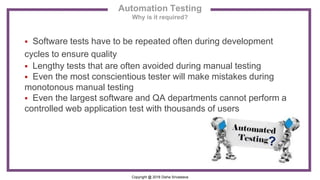
 Software tests have to be repeated often during development
cycles to ensure quality
 Lengthy tests that are often avoided during manual testing
 Even the most conscientious tester will make mistakes during
monotonous manual testing
 Even the largest software and QA departments cannot perform a
controlled web application test with thousands of users
Automation Testing
Why is it required?
Copyright @ 2016 Disha Srivastava
Automation Testing
Definition
Software Test automation makes use of specialized tools
to control the execution of tests and compares the actual
results against the expected result.
Copyright @ 2016 Disha Srivastava
Automation testing involves :
 Creating automation Framework
 Writing automation scripts
 Setting-up or configuring preconditions
 Executing automation scripts
 configuring post conditions
 Comparing Actual result against expected results
 Creating statistical reports
Automation Testing
Definition
Copyright @ 2016 Disha Srivastava
Automation Testing
Advantages
Advantages of Automation testing :
 Automated Software Testing Saves Time and Money
• Running tests 24/7
• Fewer Human resources
 Automation Does What Manual Testing Cannot
• Volume
• Reusable
 Vastly Increases Your Test Coverage
 Testing Improves Accuracy
• Reliability
Copyright @ 2016 Disha Srivastava
Automation Testing
Myths
Myth: Automation replaces testers
Reality: Manual Testing can never be eliminated
Myth: Automation training is a lengthy process
Reality: Learning curve can be reduced by following a correct methodology
Myth: Automation tool is difficult to use
Reality: With adequate training the testers can be easily migrated to any new
testing tool
Myth: A single tester can easily perform a dual role of manual and automation
Reality: A set of resources dedicated only to test automation is imperative for
avoiding dilemma situations
Copyright @ 2016 Disha Srivastava
Selenium
Copyright @ 2016 Disha Srivastava
Selenium : Overview
Definition
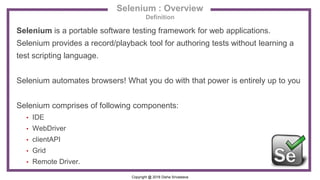
Selenium is a portable software testing framework for web applications.
Selenium provides a record/playback tool for authoring tests without learning a
test scripting language.
Selenium automates browsers! What you do with that power is entirely up to you
Selenium comprises of following components:
• IDE
• WebDriver
• clientAPI
• Grid
• Remote Driver.
Copyright @ 2016 Disha Srivastava
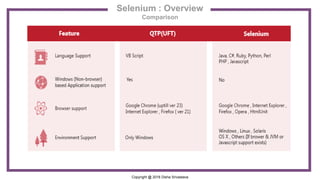
Selenium : Overview
Comparison
Copyright @ 2016 Disha Srivastava
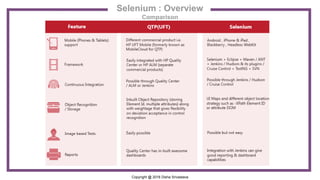
Selenium : Overview
Comparison
Copyright @ 2016 Disha Srivastava
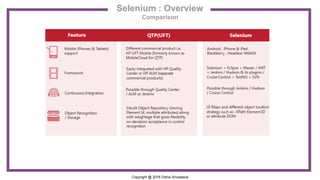
Selenium : Overview
Comparison
Copyright @ 2016 Disha Srivastava
Selenium : Overview
Selenium IDE
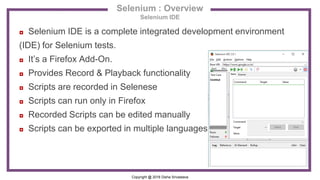
◘ Selenium IDE is a complete integrated development environment
(IDE) for Selenium tests.
◘ It’s a Firefox Add-On.
◘ Provides Record & Playback functionality
◘ Scripts are recorded in Selenese
◘ Scripts can run only in Firefox
◘ Recorded Scripts can be edited manually
◘ Scripts can be exported in multiple languages
Copyright @ 2016 Disha Srivastava
Selenium : Overview
Selenium WebDriver
◘ Selenium WebDriver was introduced as part of Selenium 2.0 release
◘ It’s simple and better way for automation of web applications
◘ Uses browser native commands to drive browser like a manual test
◘ Overcomes Selenium 1.0 /RC limitations
◘ Supports/can run Selenium RC code
◘ Allows coding in multiple languages like Java, C#, Python…
◘ Supports multiple browsers and operating systems
Copyright @ 2016 Disha Srivastava
Selenium : Overview
Selenium RC and client API
♦ Selenium RC is predecessor of Selenium WebDriver
♦ Selenium Remote Control (RC) is a server, written in Java, that
accepts commands for the browser via HTTP
♦ RC makes it possible to write automated tests for a web application
in any programming language, which allows for better integration of
Selenium in existing unit test frameworks.
♦ Selenium RC is depericated
Copyright @ 2016 Disha Srivastava
Selenium : Overview
Selenium Grid
 Selenium Grid is a server that allows tests to use web browser
instances running on remote machines.
 With Selenium Grid, one server acts as the hub. Tests contact the hub
to obtain access to browser instances. The hub has a list of servers
that provide access to browser instances (WebDriver nodes), and lets
tests use these instances.
Selenium Grid allows running tests in parallel on multiple machines,
and to manage different browser versions and browser configurations
centrally (instead of in each individual test).
Copyright @ 2016 Disha Srivastava
Selenium : Overview
Selenese
Selenese is the set of selenium commands which are used to test
your web application. Tester can test the broken links, existence of
some object on the UI, Ajax functionality, Alerts, window, list options
and lot more using selenese.
Selenium commands are classified into 3 basic categories:
o Actions
o Accessors
o Assertions
Copyright @ 2016 Disha Srivastava
Selenium is a set of different software tools each with a different approach to
supporting test automation.
Most Selenium QA Engineers focus on the one or two tools that most meet the
needs of their project, however learning all the tools will give you many different
options for approaching different test automation problems.
The entire suite of tools results in a rich set of testing functions specifically
geared to the needs of testing of web applications of all types.
These operations are highly flexible, allowing many options for locating UI
elements and comparing expected test results against actual application
behavior.
Selenium : Overview
Testing with Selenium
Copyright @ 2016 Disha Srivastava
“
If you don’t like testing your Product,most
likely your customers won’t like to test it either.

Introduction to Automation Testing and Selenium overiew

  • 1.
    Copyright @ 2016Disha Srivastava Selenium Automation Testing Tool : Overview
  • 2.
    Copyright @ 2016Disha Srivastava Selenium : Overview Automation Testing Tool  Why Automation Testing?  Some Myths n Realities About Test Automation  What is Selenium?  Components of Selenium  Selenium Features comparing to QTP  Selenium IDE  Selenium RC  Selenium Grid  Selenese  Testing With Selenium
  • 3.
    Copyright @ 2016Disha Srivastava Automation Testing
  • 4.
    Copyright @ 2016Disha Srivastava  Software tests have to be repeated often during development cycles to ensure quality  Lengthy tests that are often avoided during manual testing  Even the most conscientious tester will make mistakes during monotonous manual testing  Even the largest software and QA departments cannot perform a controlled web application test with thousands of users Automation Testing Why is it required?
  • 5.
    Copyright @ 2016Disha Srivastava Automation Testing Definition Software Test automation makes use of specialized tools to control the execution of tests and compares the actual results against the expected result.
  • 6.
    Copyright @ 2016Disha Srivastava Automation testing involves :  Creating automation Framework  Writing automation scripts  Setting-up or configuring preconditions  Executing automation scripts  configuring post conditions  Comparing Actual result against expected results  Creating statistical reports Automation Testing Definition
  • 7.
    Copyright @ 2016Disha Srivastava Automation Testing Advantages Advantages of Automation testing :  Automated Software Testing Saves Time and Money • Running tests 24/7 • Fewer Human resources  Automation Does What Manual Testing Cannot • Volume • Reusable  Vastly Increases Your Test Coverage  Testing Improves Accuracy • Reliability
  • 8.
    Copyright @ 2016Disha Srivastava Automation Testing Myths Myth: Automation replaces testers Reality: Manual Testing can never be eliminated Myth: Automation training is a lengthy process Reality: Learning curve can be reduced by following a correct methodology Myth: Automation tool is difficult to use Reality: With adequate training the testers can be easily migrated to any new testing tool Myth: A single tester can easily perform a dual role of manual and automation Reality: A set of resources dedicated only to test automation is imperative for avoiding dilemma situations
  • 9.
    Copyright @ 2016Disha Srivastava Selenium
  • 10.
    Copyright @ 2016Disha Srivastava Selenium : Overview Definition Selenium is a portable software testing framework for web applications. Selenium provides a record/playback tool for authoring tests without learning a test scripting language. Selenium automates browsers! What you do with that power is entirely up to you Selenium comprises of following components: • IDE • WebDriver • clientAPI • Grid • Remote Driver.
  • 11.
    Copyright @ 2016Disha Srivastava Selenium : Overview Comparison
  • 12.
    Copyright @ 2016Disha Srivastava Selenium : Overview Comparison
  • 13.
    Copyright @ 2016Disha Srivastava Selenium : Overview Comparison
  • 14.
    Copyright @ 2016Disha Srivastava Selenium : Overview Selenium IDE ◘ Selenium IDE is a complete integrated development environment (IDE) for Selenium tests. ◘ It’s a Firefox Add-On. ◘ Provides Record & Playback functionality ◘ Scripts are recorded in Selenese ◘ Scripts can run only in Firefox ◘ Recorded Scripts can be edited manually ◘ Scripts can be exported in multiple languages
  • 15.
    Copyright @ 2016Disha Srivastava Selenium : Overview Selenium WebDriver ◘ Selenium WebDriver was introduced as part of Selenium 2.0 release ◘ It’s simple and better way for automation of web applications ◘ Uses browser native commands to drive browser like a manual test ◘ Overcomes Selenium 1.0 /RC limitations ◘ Supports/can run Selenium RC code ◘ Allows coding in multiple languages like Java, C#, Python… ◘ Supports multiple browsers and operating systems
  • 16.
    Copyright @ 2016Disha Srivastava Selenium : Overview Selenium RC and client API ♦ Selenium RC is predecessor of Selenium WebDriver ♦ Selenium Remote Control (RC) is a server, written in Java, that accepts commands for the browser via HTTP ♦ RC makes it possible to write automated tests for a web application in any programming language, which allows for better integration of Selenium in existing unit test frameworks. ♦ Selenium RC is depericated
  • 17.
    Copyright @ 2016Disha Srivastava Selenium : Overview Selenium Grid  Selenium Grid is a server that allows tests to use web browser instances running on remote machines.  With Selenium Grid, one server acts as the hub. Tests contact the hub to obtain access to browser instances. The hub has a list of servers that provide access to browser instances (WebDriver nodes), and lets tests use these instances. Selenium Grid allows running tests in parallel on multiple machines, and to manage different browser versions and browser configurations centrally (instead of in each individual test).
  • 18.
    Copyright @ 2016Disha Srivastava Selenium : Overview Selenese Selenese is the set of selenium commands which are used to test your web application. Tester can test the broken links, existence of some object on the UI, Ajax functionality, Alerts, window, list options and lot more using selenese. Selenium commands are classified into 3 basic categories: o Actions o Accessors o Assertions
  • 19.
    Copyright @ 2016Disha Srivastava Selenium is a set of different software tools each with a different approach to supporting test automation. Most Selenium QA Engineers focus on the one or two tools that most meet the needs of their project, however learning all the tools will give you many different options for approaching different test automation problems. The entire suite of tools results in a rich set of testing functions specifically geared to the needs of testing of web applications of all types. These operations are highly flexible, allowing many options for locating UI elements and comparing expected test results against actual application behavior. Selenium : Overview Testing with Selenium
  • 20.
    Copyright @ 2016Disha Srivastava “ If you don’t like testing your Product,most likely your customers won’t like to test it either.