Presented By:
Himanshu Gupta
Software Consultant
Test Automation Studio
Why Should We Use
Microsoft’s PlayWright
Lack of etiquette and manners is a huge turn off.
KnolX Etiquettes
Punctuality
Join the session 5 minutes prior to
the session start time. We start on
time and conclude on time!
Feedback
Make sure to submit a constructive
feedback for all sessions as it is
very helpful for the presenter.
Silent Mode
Keep your mobile devices in silent
mode, feel free to move out of
session in case you need to attend
an urgent call.
Avoid Disturbance
Avoid unwanted chit chat during
the session.
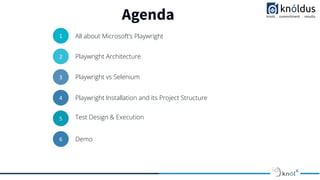
Agenda
1
01
All about Microsoft’s Playwright
2
02
Playwright Architecture
3
03
Playwright vs Selenium
4
04
Playwright Installation and its Project Structure
5
05
Test Design & Execution
6 Demo
Introduction to Microsoftʼs Playwright
● Playwright is an open source test automation
library initially developed by Microsoft
contributors.
● It is a framework for Web Testing and Automation.
● It allows testing Chromium, Firefox and WebKit
with a single API.
● Playwright supports programming languages
such as Java, Python, C# and Node JS with
JavaScript.
● It is built to enable cross-browser web automation
that is reliable, fast and capable.
Playwright Architecture
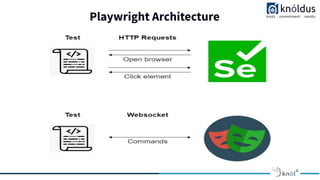
To understand how Playwright's architecture works, we will compare its work with that of
Selenium:
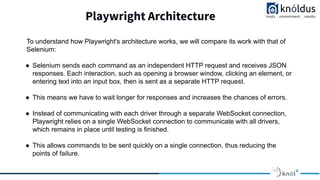
● Selenium sends each command as an independent HTTP request and receives JSON
responses. Each interaction, such as opening a browser window, clicking an element, or
entering text into an input box, then is sent as a separate HTTP request.
● This means we have to wait longer for responses and increases the chances of errors.
● Instead of communicating with each driver through a separate WebSocket connection,
Playwright relies on a single WebSocket connection to communicate with all drivers,
which remains in place until testing is finished.
● This allows commands to be sent quickly on a single connection, thus reducing the
points of failure.
Playwright vs Selenium
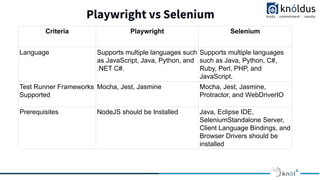
Criteria Playwright Selenium
Language Supports multiple languages such
as JavaScript, Java, Python, and
.NET C#.
Supports multiple languages
such as Java, Python, C#,
Ruby, Perl, PHP, and
JavaScript.
Test Runner Frameworks
Supported
Mocha, Jest, Jasmine Mocha, Jest, Jasmine,
Protractor, and WebDriverIO
Prerequisites NodeJS should be Installed Java, Eclipse IDE,
SeleniumStandalone Server,
Client Language Bindings, and
Browser Drivers should be
installed
Playwright vs Selenium
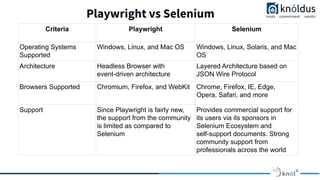
Criteria Playwright Selenium
Operating Systems
Supported
Windows, Linux, and Mac OS Windows, Linux, Solaris, and Mac
OS
Architecture Headless Browser with
event-driven architecture
Layered Architecture based on
JSON Wire Protocol
Browsers Supported Chromium, Firefox, and WebKit Chrome, Firefox, IE, Edge,
Opera, Safari, and more
Support Since Playwright is fairly new,
the support from the community
is limited as compared to
Selenium
Provides commercial support for
its users via its sponsors in
Selenium Ecosystem and
self-support documents. Strong
community support from
professionals across the world
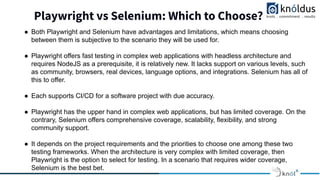
Playwright vs Selenium: Which to Choose?
● Both Playwright and Selenium have advantages and limitations, which means choosing
between them is subjective to the scenario they will be used for.
● Playwright offers fast testing in complex web applications with headless architecture and
requires NodeJS as a prerequisite, it is relatively new. It lacks support on various levels, such
as community, browsers, real devices, language options, and integrations. Selenium has all of
this to offer.
● Each supports CI/CD for a software project with due accuracy.
● Playwright has the upper hand in complex web applications, but has limited coverage. On the
contrary, Selenium offers comprehensive coverage, scalability, flexibility, and strong
community support.
● It depends on the project requirements and the priorities to choose one among these two
testing frameworks. When the architecture is very complex with limited coverage, then
Playwright is the option to select for testing. In a scenario that requires wider coverage,
Selenium is the best bet.
Key Features of the Playwright Framework
● Support for cross-browser platforms built on Chromium, WebKit, and Firefox – which
includes Chrome, Edge, Firefox, Opera, and Safari.
● Auto-wait built-in, smart assertions that retry until the element is found, and test data
tracing – keep track of logs, videos and screenshots easily.
● Support for cross-language, including JavaScript, TypeScript, Python, Java, and .NET –
write tests in the environment that suits you while still covering all areas and formats.
● Support for cross-platform execution on Windows, Linux, and macOS.
● Built with modern architecture and no restrictions – interact with multi-page, multi-tab
websites like a real user, and tackle frames and browser events with ease.
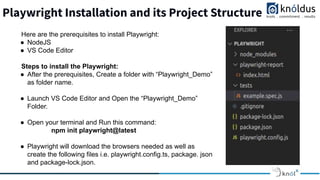
Playwright Installation and its Project Structure
Here are the prerequisites to install Playwright:
● NodeJS
● VS Code Editor
Steps to install the Playwright:
● After the prerequisites, Create a folder with “Playwright_Demo”
as folder name.
● Launch VS Code Editor and Open the “Playwright_Demo”
Folder.
● Open your terminal and Run this command:
npm init playwright@latest
● Playwright will download the browsers needed as well as
create the following files i.e. playwright.config.ts, package. json
and package-lock.json.
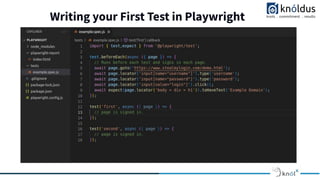
Writing your First Test in Playwright
Delivery
Test execution in Playwright
Delivery
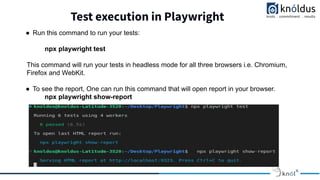
● Run this command to run your tests:
npx playwright test
This command will run your tests in headless mode for all three browsers i.e. Chromium,
Firefox and WebKit.
● To see the report, One can run this command that will open report in your browser.
npx playwright show-report
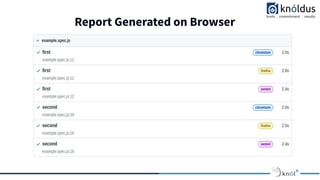
Report Generated on Browser
Delivery
Playwright testing Benefits
● CI/CD Integration Support: Playwright supports CI/CD integration. It even provides docker
images for some language bindings.
● Types of Testing: Playwright supports Functional, End to End, and API Testing. With a
Third-party plugin, Playwright can be integrated with Accessibility Testing.
● Parallel Browser Testing: Playwright also supports the execution of simultaneous tests
through Browser Context and can run parallel tests with multiple browsers.
● Built-in Reporters: Playwright framework, by default, comes with a lot of valuable reporters
like List, Dot, Line, JSON, JUnit, and HTML Reporters.
● Typescript Support out of the box: Zero configuration is required for typescript language
support as it understands your typescript and javascript code.
● Debugging Tools Support: Playwright provides many different debugging options making it
developer-friendly. Some debugging options are Playwright Inspector, VSCode Debugger.
Demo
QA
Thank You !
Get in touch with us:
Knoldus Inc.
India, USA, Canada, Singapore, Netherland, Vietnam

Why Should we use Microsoft's Playwright

  • 1.
    Presented By: Himanshu Gupta SoftwareConsultant Test Automation Studio Why Should We Use Microsoft’s PlayWright
  • 2.
    Lack of etiquetteand manners is a huge turn off. KnolX Etiquettes Punctuality Join the session 5 minutes prior to the session start time. We start on time and conclude on time! Feedback Make sure to submit a constructive feedback for all sessions as it is very helpful for the presenter. Silent Mode Keep your mobile devices in silent mode, feel free to move out of session in case you need to attend an urgent call. Avoid Disturbance Avoid unwanted chit chat during the session.
  • 3.
    Agenda 1 01 All about Microsoft’sPlaywright 2 02 Playwright Architecture 3 03 Playwright vs Selenium 4 04 Playwright Installation and its Project Structure 5 05 Test Design & Execution 6 Demo
  • 4.
    Introduction to MicrosoftʼsPlaywright ● Playwright is an open source test automation library initially developed by Microsoft contributors. ● It is a framework for Web Testing and Automation. ● It allows testing Chromium, Firefox and WebKit with a single API. ● Playwright supports programming languages such as Java, Python, C# and Node JS with JavaScript. ● It is built to enable cross-browser web automation that is reliable, fast and capable.
  • 5.
  • 6.
    Playwright Architecture To understandhow Playwright's architecture works, we will compare its work with that of Selenium: ● Selenium sends each command as an independent HTTP request and receives JSON responses. Each interaction, such as opening a browser window, clicking an element, or entering text into an input box, then is sent as a separate HTTP request. ● This means we have to wait longer for responses and increases the chances of errors. ● Instead of communicating with each driver through a separate WebSocket connection, Playwright relies on a single WebSocket connection to communicate with all drivers, which remains in place until testing is finished. ● This allows commands to be sent quickly on a single connection, thus reducing the points of failure.
  • 7.
    Playwright vs Selenium CriteriaPlaywright Selenium Language Supports multiple languages such as JavaScript, Java, Python, and .NET C#. Supports multiple languages such as Java, Python, C#, Ruby, Perl, PHP, and JavaScript. Test Runner Frameworks Supported Mocha, Jest, Jasmine Mocha, Jest, Jasmine, Protractor, and WebDriverIO Prerequisites NodeJS should be Installed Java, Eclipse IDE, SeleniumStandalone Server, Client Language Bindings, and Browser Drivers should be installed
  • 8.
    Playwright vs Selenium CriteriaPlaywright Selenium Operating Systems Supported Windows, Linux, and Mac OS Windows, Linux, Solaris, and Mac OS Architecture Headless Browser with event-driven architecture Layered Architecture based on JSON Wire Protocol Browsers Supported Chromium, Firefox, and WebKit Chrome, Firefox, IE, Edge, Opera, Safari, and more Support Since Playwright is fairly new, the support from the community is limited as compared to Selenium Provides commercial support for its users via its sponsors in Selenium Ecosystem and self-support documents. Strong community support from professionals across the world
  • 9.
    Playwright vs Selenium:Which to Choose? ● Both Playwright and Selenium have advantages and limitations, which means choosing between them is subjective to the scenario they will be used for. ● Playwright offers fast testing in complex web applications with headless architecture and requires NodeJS as a prerequisite, it is relatively new. It lacks support on various levels, such as community, browsers, real devices, language options, and integrations. Selenium has all of this to offer. ● Each supports CI/CD for a software project with due accuracy. ● Playwright has the upper hand in complex web applications, but has limited coverage. On the contrary, Selenium offers comprehensive coverage, scalability, flexibility, and strong community support. ● It depends on the project requirements and the priorities to choose one among these two testing frameworks. When the architecture is very complex with limited coverage, then Playwright is the option to select for testing. In a scenario that requires wider coverage, Selenium is the best bet.
  • 10.
    Key Features ofthe Playwright Framework ● Support for cross-browser platforms built on Chromium, WebKit, and Firefox – which includes Chrome, Edge, Firefox, Opera, and Safari. ● Auto-wait built-in, smart assertions that retry until the element is found, and test data tracing – keep track of logs, videos and screenshots easily. ● Support for cross-language, including JavaScript, TypeScript, Python, Java, and .NET – write tests in the environment that suits you while still covering all areas and formats. ● Support for cross-platform execution on Windows, Linux, and macOS. ● Built with modern architecture and no restrictions – interact with multi-page, multi-tab websites like a real user, and tackle frames and browser events with ease.
  • 11.
    Playwright Installation andits Project Structure Here are the prerequisites to install Playwright: ● NodeJS ● VS Code Editor Steps to install the Playwright: ● After the prerequisites, Create a folder with “Playwright_Demo” as folder name. ● Launch VS Code Editor and Open the “Playwright_Demo” Folder. ● Open your terminal and Run this command: npm init playwright@latest ● Playwright will download the browsers needed as well as create the following files i.e. playwright.config.ts, package. json and package-lock.json.
  • 12.
    Writing your FirstTest in Playwright Delivery
  • 13.
    Test execution inPlaywright Delivery ● Run this command to run your tests: npx playwright test This command will run your tests in headless mode for all three browsers i.e. Chromium, Firefox and WebKit. ● To see the report, One can run this command that will open report in your browser. npx playwright show-report
  • 14.
    Report Generated onBrowser Delivery
  • 15.
    Playwright testing Benefits ●CI/CD Integration Support: Playwright supports CI/CD integration. It even provides docker images for some language bindings. ● Types of Testing: Playwright supports Functional, End to End, and API Testing. With a Third-party plugin, Playwright can be integrated with Accessibility Testing. ● Parallel Browser Testing: Playwright also supports the execution of simultaneous tests through Browser Context and can run parallel tests with multiple browsers. ● Built-in Reporters: Playwright framework, by default, comes with a lot of valuable reporters like List, Dot, Line, JSON, JUnit, and HTML Reporters. ● Typescript Support out of the box: Zero configuration is required for typescript language support as it understands your typescript and javascript code. ● Debugging Tools Support: Playwright provides many different debugging options making it developer-friendly. Some debugging options are Playwright Inspector, VSCode Debugger.
  • 16.
  • 17.
  • 18.
    Thank You ! Getin touch with us: Knoldus Inc. India, USA, Canada, Singapore, Netherland, Vietnam