Contents
 Meaning
 Types of kiosks
 Application of kiosks
 Advantages
 Disadvantages
Meaning of Kiosks
 An electronic device that provides
information is interactive in nature and
allows for input.
 It can be created using HTML pages and
graphics.
Types of kiosks
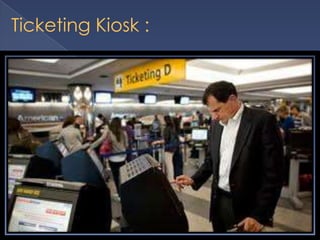
Ticketing Kiosk :
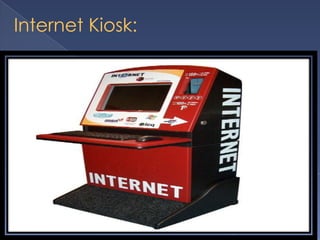
Internet Kiosk:
Financial Services Kiosk:
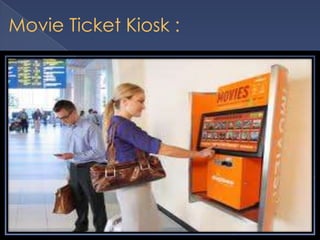
Movie Ticket Kiosk :
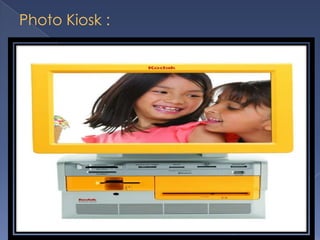
Photo Kiosk :
Other Types Of Kiosk:
 Building directory and way finding kiosks
 Visitor management and security kiosks
Applications
 Kiosks in retail
 Kiosks in E -Government
 Kiosks in corporate/HR
 Kiosks in banking
Kiosk in E-Government:
 Provide controlled access
to e Government
portals/websites
 Increase access to
information about local
government programs &
services
 Publicise new government
websites or initiatives
 Provide local tourist
information
 Help bridging the digital
divide
Kiosk in Corporate HR:
 Provide access to a company's Intranet.
 Provide access to online policies & practices.
 Allow employees to easily change their personal information.
 Highlight internal job postings/openings.
 Improve overall internal customer service.
 Ensure that no employees get left behind.
Kiosk in Banking:
 Promote a bank's website.
 Provide demonstrations of electronic banking.
 Answer frequently-asked customer questions.
 Highlight banking products, interest & loan rates, etc.
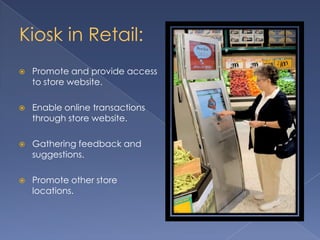
Kiosk in Retail:
 Promote and provide access
to store website.
 Enable online transactions
through store website.
 Gathering feedback and
suggestions.
 Promote other store
locations.
Advantages
 Encourages self service
 Allow easy maintenance
 Reduces work load
 Increases market reach
 Ensure round the clock sales and service
 Limit functionalities, enhances focus
 Advertises
Disadvantages
 Initial hardware cost
 High installation and authorization cost
 Development of custom software
 Not for complex and technical transactions
Kiosk
Kiosk

Kiosk

  • 2.
    Contents  Meaning  Typesof kiosks  Application of kiosks  Advantages  Disadvantages
  • 3.
    Meaning of Kiosks An electronic device that provides information is interactive in nature and allows for input.  It can be created using HTML pages and graphics.
  • 4.
  • 5.
  • 6.
  • 7.
  • 9.
  • 10.
  • 11.
    Other Types OfKiosk:  Building directory and way finding kiosks  Visitor management and security kiosks
  • 12.
    Applications  Kiosks inretail  Kiosks in E -Government  Kiosks in corporate/HR  Kiosks in banking
  • 13.
    Kiosk in E-Government: Provide controlled access to e Government portals/websites  Increase access to information about local government programs & services  Publicise new government websites or initiatives  Provide local tourist information  Help bridging the digital divide
  • 14.
    Kiosk in CorporateHR:  Provide access to a company's Intranet.  Provide access to online policies & practices.  Allow employees to easily change their personal information.  Highlight internal job postings/openings.  Improve overall internal customer service.  Ensure that no employees get left behind.
  • 15.
    Kiosk in Banking: Promote a bank's website.  Provide demonstrations of electronic banking.  Answer frequently-asked customer questions.  Highlight banking products, interest & loan rates, etc.
  • 16.
    Kiosk in Retail: Promote and provide access to store website.  Enable online transactions through store website.  Gathering feedback and suggestions.  Promote other store locations.
  • 17.
    Advantages  Encourages selfservice  Allow easy maintenance  Reduces work load  Increases market reach  Ensure round the clock sales and service  Limit functionalities, enhances focus  Advertises
  • 18.
    Disadvantages  Initial hardwarecost  High installation and authorization cost  Development of custom software  Not for complex and technical transactions