






www.seocertification.org.in


SEO Preparation
  Keywords
Before Getting Started…
           Be Sure You Defined Business Goals

   Answer the following questions:
      What are my business goals?

      What are the basic elements of my Web site that support
       my business goals?
      What is my overall assessment of my Web site in meeting
       business goals?
      Who do I want to visit my Web site?

      What do I want visitors to do on my Web site?

      Which pages do I want my visitors to visit on my Web site?

      How do I get started in marketing my Web site to meet my
       business goals?


                                          www.seocertification.org.in
Keyword Selection

   Keyword (and term) selection is critical to users finding
    your site.
      These are the words or phrases typed into search
       engines.
      They are strategically selected descriptive words or
       phrases that
   Benefits include:
      Increase in click-throughs on search engine results
       because key words are relevant to the site content.
      Higher rate of conversions once user visit your site
       because it is what he or she looking for.


                                       www.seocertification.org.in
To Do List

   Keyword identification.
   Keyword resources to expand and validate your list.
   Keyword data tools.
   Keyword data gathering.
   Your short list.

Note: There is no guarantee that your site will rank in the top based
  on the name of your company. It is a good idea to include it in your
  keyword list.


                                             www.seocertification.org.in
Keywords
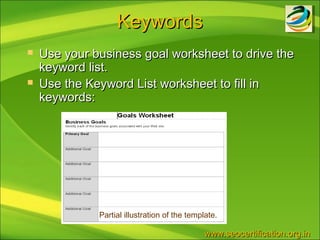
   Use your business goal worksheet to drive the
    keyword list.
   Use the Keyword List worksheet to fill in
    keywords:


              Partial illustration of the template.

                                               www.seocertification.org.in
Keywords
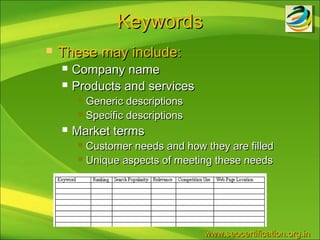
   These may include:
       Company name
       Products and services
          Generic descriptions
          Specific descriptions

       Market terms
          Customer needs and how they are filled
          Unique aspects of meeting these needs


                                   www.seocertification.org.in
Keywords (cont.)
       Fill in seasons, holidays, and other special
        occasions that are serviced by your site:
          Tax time
          Mother’s Day

          Thanksgiving

       Fill in misspellings, slang, and abbreviations
       Fill in Location:
          Variations of company name (Toys RUs, Toys Are Us)
          Variations of company location (St. Cloud, Saint Cloud)


.                                           www.seocertification.org.in
Keyword Tools
   Keyword tools to help you get started:
       SEOBook:
            http://tools.seobook.com/keyword-tools/seobook/
            http://tools.seobook.com/keyword-tools/
       Wordtracker:
            http://freekeywords.wordtracker.com/
       Google:
            https://adwords.google.com/select/KeywordToolExternal
       Search Engine Genie:
            http://www.searchenginegenie.com/google-suggest-scrapper-
             tool/index.php
       Microsoft AdCenter Tools:
            http://adlab.msn.com/KeywordContent.aspx
       WordZ tool (subscription fee):
            http://www.wordze.com/
       Keyword Selector Tool:
            http://www.keyword-selector-tool.com/
                                                     www.seocertification.org.in
Keyword Information

   Trends:
       Google hot trends:
            http://www.google.com/trends/hottrends
       Yahoo! Buzz:
            http://buzz.yahoo.com/overall/
       Microsoft keyword forecast:
            http://adlab.msn.com/ForecastV2/KeywordTrends
             Web.aspx


                                              www.seocertification.org.in
Ranking
   Once you have completed the keyword list, then it is
    important to rank them.
       Use the Rank Tracking Worksheet to identify keyword
        ranks.
       Take each keyword on your Keyword List and search for it
        using a popular search engine site (e.g., Google, Yahoo!).
            Record only listings in the organic ranking area.
            Scroll through a reasonable number to find a listing.
            Look for your competition as you search through the listing.
            Look for any “bad” listing associated with your Web site.
                  Broken links
                  Pieces of information that doesn’t make sense
       Note on your worksheet the rank (if any) of each keyword.

                                                         www.seocertification.org.in
Indexed Pages


       The basic truth is that if your Web page is
        not indexed, then it cannot be found.
           Check how many Web pages are indexed.
           Check how many landing pages are indexed.


.                                    www.seocertification.org.in
Total Pages Indexed
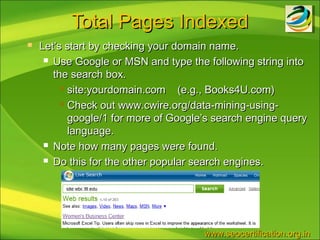
   Let’s start by checking your domain name.
      Use Google or MSN and type the following string into

       the search box.
          site:yourdomain.com    (e.g., Books4U.com)
          Check out www.cwire.org/data-mining-using-

           google/1 for more of Google’s search engine query
           language.
      Note how many pages were found.

      Do this for the other popular search engines.


                                      www.seocertification.org.in
Landing Pages Indexed

       Let’s check each landing page to see if it shows up in
        search engine results.
          Enter the URL into the search box.

          If a listing is displayed for the exact URL, then the

            page is indexed.
          Otherwise, it has not been indexed yet.

       In the previous lesson, we learned how to submit the
        URL to search engines to get it indexed.


.                                           www.seocertification.org.in
Landing Page Notes

   It is often recommended for a Web site to
    have no more than ten landing pages.
   Web sites with lots of products may choose
    to have a large number of landing pages.
   Blogs should have every posting a landing
    page to drive traffic to the site.


                               www.seocertification.org.in
Inbound Links
   You want lots and lots of inbound links to your Web site.
       Improves your search engine ranking.
       Brings users to your site through the link.
   It is worth the effort to get other sites to link to your site.
   Keep in mind link quality is also important.
   Check out article: www.webmasterworld.com/forum3/201
   Check out link popularity tool: http://www.marketleap.com/


.                                             www.seocertification.org.in
Site Assessment
       For each landing page assess:
          Unique HTML page title.

          HTML page title contains target keywords.

          The number of words of HTML text is 200 or more.

          HTML exact on this page contains my exact targeted

           keywords.
          My home page links to this page via HTML text links

           (not pull-downs, logins, or pop-ups).
          HTML text links from other pages on my site to this

           page contain my target keywords.


.                                         www.seocertification.org.in
Competition (To Do List)

   You will perform the following steps in
    assessing your competition:
       Identify your top five competitors.
       Snoop around on your competitor’s site.
       Assess on-page factors.
       Assess off-page factors.
       Check out paid competition.


                                 www.seocertification.org.in
(1) Identify Top Five Competitors
   Try to select the top competitors as follows:
      Business competition – keep on top of your competitors as this

       may change over time.
          Might be a new competitor around the corner.

          Existing competitor adds products or services.

      Search competition – assess top ranked Web sites.

          Take a look at both quality and content of information in the

            listing.
      Pay-per-click competition – you may want to view the competition

       in the sponsored ads.
      Check out listings that are not really competition but share the

       same targeted keywords.
          “Happy days dog kennel” might compete with the TV show

            called “Happy days”


                                               www.seocertification.org.in
(2) Snoop Around
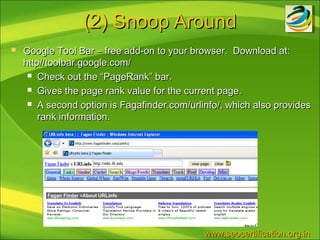
   Google Tool Bar – free add-on to your browser. Download at:
    http//toolbar.google.com/
      Check out the “PageRank” bar.

      Gives the page rank value for the current page.

      A second option is Fagafinder.com/urlinfo/, which also provides

        rank information.


                                             www.seocertification.org.in
(2) Snoop Around

   View Page Source – use browser feature to
    view competitor’s HTML code.
       Internet Explorer – View and then Source
       Firefox – View and then Page Source


                                  www.seocertification.org.in
More Data
   There are several tools that can provide
    additional information about your and your
    competitor’s site.
       Alexa.com
       Compete.com
   Go to the Alexa tool and check out statistics
    on ranking, site traffic, inbound links, site
    owner information and related links.


                                www.seocertification.org.in
(3) Assess On-Page Factors
   Check out your competitor’s site.
   Look for:
           Competitor keywords
                Page content (visible)
                Meta keyword tags (invisible)
   Record the keywords in the Competition Worksheet.
   Basic Optimization:
           Assess competition homepage (and a few landing pages)
            HTML content.
                Competition has its target keywords in HTML page title
                Competition has visible content with target keywords
                Landing page(s) can it be reached from homepage
    .                                                    www.seocertification.org.in
(4) Assess Off-Page Factors


   Check out factors that competition cannot
    control.
       Ranks –assess the ranking of each top
        competitor on Google, Yahoo!, MSN, & Ask.


                                 www.seocertification.org.in
(4) Assess Off-Page Factors

   Inbound links – Use the same tool that you used
    to find the number of inbound links to your site.
      Find the number of inbound links on the homepage and
       a couple of landing pages.
      Record the number of inbound links in the Competition

       Worksheet.
   Google PageRank – Use the Google Toolbar
    (PageRank bar) to find the competitor’s rank.
        Record the rank in the Competition Worksheet.


                                        www.seocertification.org.in
(5) Paid Competition

       Check out the top competition in terms of
        the sponsored advertising.
           Search on company name
           Search on product or service offerings
           Search on general terms
       Fill in the PPC (pay-per-click) assessment
        on the Competition Worksheet.


.                                       www.seocertification.org.in
Thank You!
 www.seocertification.org.in

Keyword seo preparation final steps

  • 1.
  • 2.
    Before Getting Started… Be Sure You Defined Business Goals  Answer the following questions:  What are my business goals?  What are the basic elements of my Web site that support my business goals?  What is my overall assessment of my Web site in meeting business goals?  Who do I want to visit my Web site?  What do I want visitors to do on my Web site?  Which pages do I want my visitors to visit on my Web site?  How do I get started in marketing my Web site to meet my business goals? www.seocertification.org.in
  • 3.
    Keyword Selection  Keyword (and term) selection is critical to users finding your site.  These are the words or phrases typed into search engines.  They are strategically selected descriptive words or phrases that  Benefits include:  Increase in click-throughs on search engine results because key words are relevant to the site content.  Higher rate of conversions once user visit your site because it is what he or she looking for. www.seocertification.org.in
  • 4.
    To Do List  Keyword identification.  Keyword resources to expand and validate your list.  Keyword data tools.  Keyword data gathering.  Your short list. Note: There is no guarantee that your site will rank in the top based on the name of your company. It is a good idea to include it in your keyword list. www.seocertification.org.in
  • 5.
    Keywords  Use your business goal worksheet to drive the keyword list.  Use the Keyword List worksheet to fill in keywords: Partial illustration of the template. www.seocertification.org.in
  • 6.
    Keywords  These may include:  Company name  Products and services  Generic descriptions  Specific descriptions  Market terms  Customer needs and how they are filled  Unique aspects of meeting these needs www.seocertification.org.in
  • 7.
    Keywords (cont.)  Fill in seasons, holidays, and other special occasions that are serviced by your site:  Tax time  Mother’s Day  Thanksgiving  Fill in misspellings, slang, and abbreviations  Fill in Location:  Variations of company name (Toys RUs, Toys Are Us)  Variations of company location (St. Cloud, Saint Cloud) . www.seocertification.org.in
  • 8.
    Keyword Tools  Keyword tools to help you get started:  SEOBook:  http://tools.seobook.com/keyword-tools/seobook/  http://tools.seobook.com/keyword-tools/  Wordtracker:  http://freekeywords.wordtracker.com/  Google:  https://adwords.google.com/select/KeywordToolExternal  Search Engine Genie:  http://www.searchenginegenie.com/google-suggest-scrapper- tool/index.php  Microsoft AdCenter Tools:  http://adlab.msn.com/KeywordContent.aspx  WordZ tool (subscription fee):  http://www.wordze.com/  Keyword Selector Tool:  http://www.keyword-selector-tool.com/ www.seocertification.org.in
  • 9.
    Keyword Information  Trends:  Google hot trends:  http://www.google.com/trends/hottrends  Yahoo! Buzz:  http://buzz.yahoo.com/overall/  Microsoft keyword forecast:  http://adlab.msn.com/ForecastV2/KeywordTrends Web.aspx www.seocertification.org.in
  • 10.
    Ranking  Once you have completed the keyword list, then it is important to rank them.  Use the Rank Tracking Worksheet to identify keyword ranks.  Take each keyword on your Keyword List and search for it using a popular search engine site (e.g., Google, Yahoo!).  Record only listings in the organic ranking area.  Scroll through a reasonable number to find a listing.  Look for your competition as you search through the listing.  Look for any “bad” listing associated with your Web site.  Broken links  Pieces of information that doesn’t make sense  Note on your worksheet the rank (if any) of each keyword. www.seocertification.org.in
  • 11.
    Indexed Pages  The basic truth is that if your Web page is not indexed, then it cannot be found.  Check how many Web pages are indexed.  Check how many landing pages are indexed. . www.seocertification.org.in
  • 12.
    Total Pages Indexed  Let’s start by checking your domain name.  Use Google or MSN and type the following string into the search box.  site:yourdomain.com (e.g., Books4U.com)  Check out www.cwire.org/data-mining-using- google/1 for more of Google’s search engine query language.  Note how many pages were found.  Do this for the other popular search engines. www.seocertification.org.in
  • 13.
    Landing Pages Indexed  Let’s check each landing page to see if it shows up in search engine results.  Enter the URL into the search box.  If a listing is displayed for the exact URL, then the page is indexed.  Otherwise, it has not been indexed yet.  In the previous lesson, we learned how to submit the URL to search engines to get it indexed. . www.seocertification.org.in
  • 14.
    Landing Page Notes  It is often recommended for a Web site to have no more than ten landing pages.  Web sites with lots of products may choose to have a large number of landing pages.  Blogs should have every posting a landing page to drive traffic to the site. www.seocertification.org.in
  • 15.
    Inbound Links  You want lots and lots of inbound links to your Web site.  Improves your search engine ranking.  Brings users to your site through the link.  It is worth the effort to get other sites to link to your site.  Keep in mind link quality is also important.  Check out article: www.webmasterworld.com/forum3/201  Check out link popularity tool: http://www.marketleap.com/ . www.seocertification.org.in
  • 16.
    Site Assessment  For each landing page assess:  Unique HTML page title.  HTML page title contains target keywords.  The number of words of HTML text is 200 or more.  HTML exact on this page contains my exact targeted keywords.  My home page links to this page via HTML text links (not pull-downs, logins, or pop-ups).  HTML text links from other pages on my site to this page contain my target keywords. . www.seocertification.org.in
  • 17.
    Competition (To DoList)  You will perform the following steps in assessing your competition:  Identify your top five competitors.  Snoop around on your competitor’s site.  Assess on-page factors.  Assess off-page factors.  Check out paid competition. www.seocertification.org.in
  • 18.
    (1) Identify TopFive Competitors  Try to select the top competitors as follows:  Business competition – keep on top of your competitors as this may change over time.  Might be a new competitor around the corner.  Existing competitor adds products or services.  Search competition – assess top ranked Web sites.  Take a look at both quality and content of information in the listing.  Pay-per-click competition – you may want to view the competition in the sponsored ads.  Check out listings that are not really competition but share the same targeted keywords.  “Happy days dog kennel” might compete with the TV show called “Happy days” www.seocertification.org.in
  • 19.
    (2) Snoop Around  Google Tool Bar – free add-on to your browser. Download at: http//toolbar.google.com/  Check out the “PageRank” bar.  Gives the page rank value for the current page.  A second option is Fagafinder.com/urlinfo/, which also provides rank information. www.seocertification.org.in
  • 20.
    (2) Snoop Around  View Page Source – use browser feature to view competitor’s HTML code.  Internet Explorer – View and then Source  Firefox – View and then Page Source www.seocertification.org.in
  • 21.
    More Data  There are several tools that can provide additional information about your and your competitor’s site.  Alexa.com  Compete.com  Go to the Alexa tool and check out statistics on ranking, site traffic, inbound links, site owner information and related links. www.seocertification.org.in
  • 22.
    (3) Assess On-PageFactors  Check out your competitor’s site.  Look for:  Competitor keywords  Page content (visible)  Meta keyword tags (invisible)  Record the keywords in the Competition Worksheet.  Basic Optimization:  Assess competition homepage (and a few landing pages) HTML content.  Competition has its target keywords in HTML page title  Competition has visible content with target keywords  Landing page(s) can it be reached from homepage . www.seocertification.org.in
  • 23.
    (4) Assess Off-PageFactors  Check out factors that competition cannot control.  Ranks –assess the ranking of each top competitor on Google, Yahoo!, MSN, & Ask. www.seocertification.org.in
  • 24.
    (4) Assess Off-PageFactors  Inbound links – Use the same tool that you used to find the number of inbound links to your site.  Find the number of inbound links on the homepage and a couple of landing pages.  Record the number of inbound links in the Competition Worksheet.  Google PageRank – Use the Google Toolbar (PageRank bar) to find the competitor’s rank.  Record the rank in the Competition Worksheet. www.seocertification.org.in
  • 25.
    (5) Paid Competition  Check out the top competition in terms of the sponsored advertising.  Search on company name  Search on product or service offerings  Search on general terms  Fill in the PPC (pay-per-click) assessment on the Competition Worksheet. . www.seocertification.org.in
  • 26.