Keeping Up with Facebook’s
Pay-to-Play Model
Heather Gjerde | @LilMsSociable
Scripps Health Social Media Specialist
Tweet along during this presentation: @LilMsSociable | #GeekGirlTechCon
o Scripps Health Social Media Specialist
o Former PR pro, hailing from the Midwest
o Eager to adapt to new digital trends
o Experienced Facebooker, Instagrammer, Tweeter,
Foursquare mayor, Pinner, you get it. ;)
o Loves walking her dog Izzie along the beach
ABOUT ME
Tweet along during this presentation: @LilMsSociable | #GeekGirlTechCon
Why Facebook advertising is no
longer optional for brand pages.
It’s necessary.
Tweet along during this presentation: @LilMsSociable | #GeekGirlTechCon
The harsh truth:
Organic posts are only reaching
2-6% of your fan base.
Tweet along during this presentation: @LilMsSociable | #GeekGirlTechCon
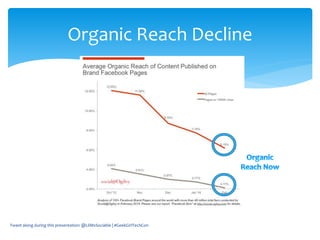
Organic Reach Decline
Tweet along during this presentation: @LilMsSociable | #GeekGirlTechCon
Don’t React Like This
Reconsider Your Strategy for
Maximum Impact
Tweet along during this presentation: @LilMsSociable | #GeekGirlTechCon
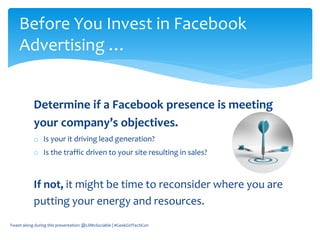
Determine if a Facebook presence is meeting
your company’s objectives.
o Is your it driving lead generation?
o Is the traffic driven to your site resulting in sales?
If not, it might be time to reconsider where you are
putting your energy and resources.
Before You Invest in Facebook
Advertising …
Tweet along during this presentation: @LilMsSociable | #GeekGirlTechCon
That being said, Facebook isn’t
going anywhere, anytime soon.
Let’s get started with advertising!
Tweet along during this presentation: @LilMsSociable | #GeekGirlTechCon
Understand what success
means for your brand.
Sample success measurements:
• Page Like campaign: Increase page likes by X%
• Engagement campaign: Increase likes,
comments and shares by X per post.
• Clicks to Website campaign: Increase clicks to
your website by X%.
Tweet along during this presentation: @LilMsSociable | #GeekGirlTechCon
Before you Dive In, Define Success
Review your Facebook insights. Who is already engaging with
your page? Are they your target audience?
If not, Facebook advertising could be a great way to grow
your fan base with your ideal target audience.
Redefine your target and use as a baseline for content
selection and advertising demographics.
Tweet along during this presentation: @LilMsSociable | #GeekGirlTechCon
Understand Your Audience
Once your target audience is defined, begin with a Facebook “like”
campaign to grow a relevant audience.
Like campaign considerations:
 Budget: Start small, with a set amount of dollars on a daily basis. We
started with just $15 a day.
 Messaging: Include the value of following your page. What will you be
providing for the end user on a regular basis?
 Creative: Use an image that also appears somewhere on your page for
maximum impact. Consider using your cover photo.
Note: While organic reach to fans may be low, you can advertise to this
audience down the line. Don’t discount the power of a vested fan base.
Tweet along during this presentation: @LilMsSociable | #GeekGirlTechCon
Build a Relevant Audience
Target visitors from your website
through Custom Audiences.
Create custom audiences made up of
your email lists and visitors to your site.
Note: Contacts will not know they’ve been added to a
Facebook audience list and won’t be contacted without
your permission.
Tweet along during this presentation: @LilMsSociable | #GeekGirlTechCon
Target Your Customers!
Create a custom audience based on your email
subscribers:
1. Name: My Email List (suggestion).
2. Data type: Emails (email must be .csv or .txt format
with one record per row.
3. Upload your file.
4. Apply: Create an advertising campaign specifically
geared toward this audience since you know they’re
already interested in your brand.
Tweet along during this presentation: @LilMsSociable | #GeekGirlTechCon
Custom Audiences: Email List
Create a Website Custom Audience (WCA):
1. Start in Power Editor. Click on “Manage Ads” drop
down and select “Audiences.”
2. Click “Create Audience” and select “Custom
Audience.”
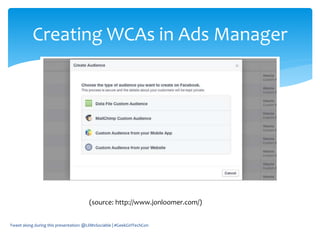
3. Select “Custom Audience from your Website” in the
dialog box that pops up.
Tweet along during this presentation: @LilMsSociable | #GeekGirlTechCon
Website Custom Audiences
Tweet along during this presentation: @LilMsSociable | #GeekGirlTechCon
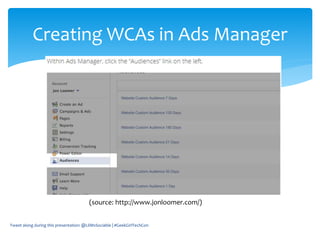
Creating WCAs in Ads Manager
(source: http://www.jonloomer.com/)
Tweet along during this presentation: @LilMsSociable | #GeekGirlTechCon
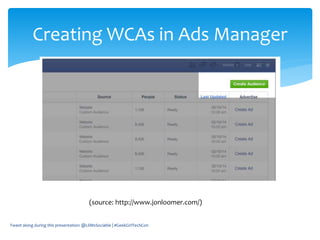
Creating WCAs in Ads Manager
(source: http://www.jonloomer.com/)
Tweet along during this presentation: @LilMsSociable | #GeekGirlTechCon
Creating WCAs in Ads Manager
(source: http://www.jonloomer.com/)
4. Follow the steps to define your WCA. The most common
type of WCA is for visitors to a specific page.
5. Click the “View Remarketing Pixel” the first time you’ve
created a WCA.
6. Install the pixel through your site’s CMS. Paste the code
before the closing /HEADER tag of your website’s
template.
7. Within Power Editor, create a bunch of WCAs to target
users with very specific, timely messages (see next slide).
Tweet along during this presentation: @LilMsSociable | #GeekGirlTechCon
Website Custom Audiences Cont.
Tweet along during this presentation: @LilMsSociable | #GeekGirlTechCon
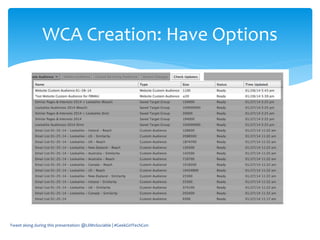
WCA Creation: Have Options
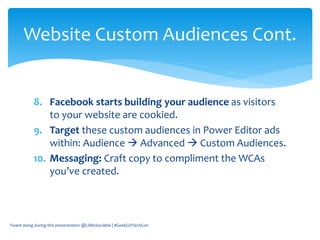
8. Facebook starts building your audience as visitors
to your website are cookied.
9. Target these custom audiences in Power Editor ads
within: Audience  Advanced  Custom Audiences.
10. Messaging: Craft copy to compliment the WCAs
you’ve created.
Tweet along during this presentation: @LilMsSociable | #GeekGirlTechCon
Website Custom Audiences Cont.
Tweet along during this presentation: @LilMsSociable | #GeekGirlTechCon
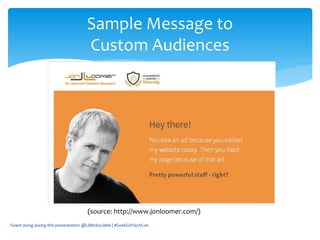
Sample Message to
Custom Audiences
(source: http://www.jonloomer.com/)
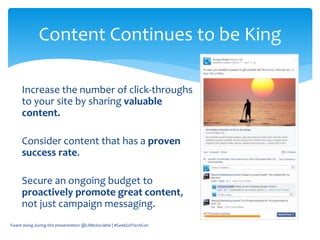
Increase the number of click-throughs
to your site by sharing valuable
content.
Consider content that has a proven
success rate.
Secure an ongoing budget to
proactively promote great content,
not just campaign messaging.
Tweet along during this presentation: @LilMsSociable | #GeekGirlTechCon
Content Continues to be King
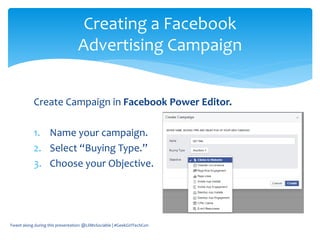
Create Campaign in Facebook Power Editor.
1. Name your campaign.
2. Select “Buying Type.”
3. Choose your Objective.
Tweet along during this presentation: @LilMsSociable | #GeekGirlTechCon
Creating a Facebook
Advertising Campaign
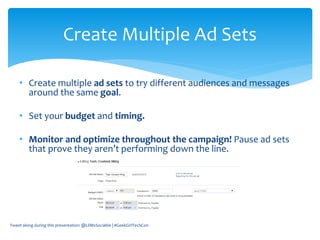
• Create multiple ad sets to try different audiences and messages
around the same goal.
• Set your budget and timing.
• Monitor and optimize throughout the campaign! Pause ad sets
that prove they aren’t performing down the line.
Tweet along during this presentation: @LilMsSociable | #GeekGirlTechCon
Create Multiple Ad Sets
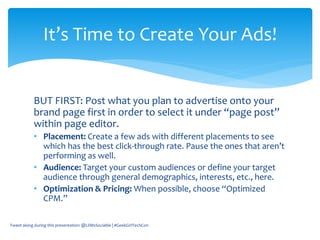
BUT FIRST: Post what you plan to advertise onto your
brand page first in order to select it under “page post”
within page editor.
• Placement: Create a few ads with different placements to see
which has the best click-through rate. Pause the ones that aren’t
performing as well.
• Audience: Target your custom audiences or define your target
audience through general demographics, interests, etc., here.
• Optimization & Pricing: When possible, choose “Optimized
CPM.”
Tweet along during this presentation: @LilMsSociable | #GeekGirlTechCon
It’s Time to Create Your Ads!
Monitor Facebook advertising campaigns you’ve
created while they’re running.
o Pause ad sets and ads that aren’t performing as well.
o Extend campaigns if adjustments are needed.
Emulate successful campaigns! Create new campaigns
based on ones that performed well in the past.
Tweet along during this presentation: @LilMsSociable | #GeekGirlTechCon
Measure and Optimize
Understand Facebook is
RENTED SPACE.
Tweet along during this presentation: @LilMsSociable | #GeekGirlTechCon
It should be just one tool in your
toolkit to drive web traffic and
build your email list!
Tweet along during this presentation: @LilMsSociable | #GeekGirlTechCon
Questions, comments, concerns?
Tweet along during this presentation: @LilMsSociable | #GeekGirlTechCon
Thank you for joining me during:
Keep up with Facebook’s Pay-to-
Play Model
Tweet along during this presentation: @LilMsSociable | #GeekGirlTechCon

Keeping Up With Facebook's Pay-to-Play Model

  • 1.
    Keeping Up withFacebook’s Pay-to-Play Model Heather Gjerde | @LilMsSociable Scripps Health Social Media Specialist Tweet along during this presentation: @LilMsSociable | #GeekGirlTechCon
  • 2.
    o Scripps HealthSocial Media Specialist o Former PR pro, hailing from the Midwest o Eager to adapt to new digital trends o Experienced Facebooker, Instagrammer, Tweeter, Foursquare mayor, Pinner, you get it. ;) o Loves walking her dog Izzie along the beach ABOUT ME Tweet along during this presentation: @LilMsSociable | #GeekGirlTechCon
  • 3.
    Why Facebook advertisingis no longer optional for brand pages. It’s necessary. Tweet along during this presentation: @LilMsSociable | #GeekGirlTechCon
  • 4.
    The harsh truth: Organicposts are only reaching 2-6% of your fan base. Tweet along during this presentation: @LilMsSociable | #GeekGirlTechCon
  • 5.
    Organic Reach Decline Tweetalong during this presentation: @LilMsSociable | #GeekGirlTechCon
  • 6.
    Tweet along duringthis presentation: @LilMsSociable | #GeekGirlTechCon Don’t React Like This
  • 7.
    Reconsider Your Strategyfor Maximum Impact Tweet along during this presentation: @LilMsSociable | #GeekGirlTechCon
  • 8.
    Determine if aFacebook presence is meeting your company’s objectives. o Is your it driving lead generation? o Is the traffic driven to your site resulting in sales? If not, it might be time to reconsider where you are putting your energy and resources. Before You Invest in Facebook Advertising … Tweet along during this presentation: @LilMsSociable | #GeekGirlTechCon
  • 9.
    That being said,Facebook isn’t going anywhere, anytime soon. Let’s get started with advertising! Tweet along during this presentation: @LilMsSociable | #GeekGirlTechCon
  • 10.
    Understand what success meansfor your brand. Sample success measurements: • Page Like campaign: Increase page likes by X% • Engagement campaign: Increase likes, comments and shares by X per post. • Clicks to Website campaign: Increase clicks to your website by X%. Tweet along during this presentation: @LilMsSociable | #GeekGirlTechCon Before you Dive In, Define Success
  • 11.
    Review your Facebookinsights. Who is already engaging with your page? Are they your target audience? If not, Facebook advertising could be a great way to grow your fan base with your ideal target audience. Redefine your target and use as a baseline for content selection and advertising demographics. Tweet along during this presentation: @LilMsSociable | #GeekGirlTechCon Understand Your Audience
  • 12.
    Once your targetaudience is defined, begin with a Facebook “like” campaign to grow a relevant audience. Like campaign considerations:  Budget: Start small, with a set amount of dollars on a daily basis. We started with just $15 a day.  Messaging: Include the value of following your page. What will you be providing for the end user on a regular basis?  Creative: Use an image that also appears somewhere on your page for maximum impact. Consider using your cover photo. Note: While organic reach to fans may be low, you can advertise to this audience down the line. Don’t discount the power of a vested fan base. Tweet along during this presentation: @LilMsSociable | #GeekGirlTechCon Build a Relevant Audience
  • 13.
    Target visitors fromyour website through Custom Audiences. Create custom audiences made up of your email lists and visitors to your site. Note: Contacts will not know they’ve been added to a Facebook audience list and won’t be contacted without your permission. Tweet along during this presentation: @LilMsSociable | #GeekGirlTechCon Target Your Customers!
  • 14.
    Create a customaudience based on your email subscribers: 1. Name: My Email List (suggestion). 2. Data type: Emails (email must be .csv or .txt format with one record per row. 3. Upload your file. 4. Apply: Create an advertising campaign specifically geared toward this audience since you know they’re already interested in your brand. Tweet along during this presentation: @LilMsSociable | #GeekGirlTechCon Custom Audiences: Email List
  • 15.
    Create a WebsiteCustom Audience (WCA): 1. Start in Power Editor. Click on “Manage Ads” drop down and select “Audiences.” 2. Click “Create Audience” and select “Custom Audience.” 3. Select “Custom Audience from your Website” in the dialog box that pops up. Tweet along during this presentation: @LilMsSociable | #GeekGirlTechCon Website Custom Audiences
  • 16.
    Tweet along duringthis presentation: @LilMsSociable | #GeekGirlTechCon Creating WCAs in Ads Manager (source: http://www.jonloomer.com/)
  • 17.
    Tweet along duringthis presentation: @LilMsSociable | #GeekGirlTechCon Creating WCAs in Ads Manager (source: http://www.jonloomer.com/)
  • 18.
    Tweet along duringthis presentation: @LilMsSociable | #GeekGirlTechCon Creating WCAs in Ads Manager (source: http://www.jonloomer.com/)
  • 19.
    4. Follow thesteps to define your WCA. The most common type of WCA is for visitors to a specific page. 5. Click the “View Remarketing Pixel” the first time you’ve created a WCA. 6. Install the pixel through your site’s CMS. Paste the code before the closing /HEADER tag of your website’s template. 7. Within Power Editor, create a bunch of WCAs to target users with very specific, timely messages (see next slide). Tweet along during this presentation: @LilMsSociable | #GeekGirlTechCon Website Custom Audiences Cont.
  • 20.
    Tweet along duringthis presentation: @LilMsSociable | #GeekGirlTechCon WCA Creation: Have Options
  • 21.
    8. Facebook startsbuilding your audience as visitors to your website are cookied. 9. Target these custom audiences in Power Editor ads within: Audience  Advanced  Custom Audiences. 10. Messaging: Craft copy to compliment the WCAs you’ve created. Tweet along during this presentation: @LilMsSociable | #GeekGirlTechCon Website Custom Audiences Cont.
  • 22.
    Tweet along duringthis presentation: @LilMsSociable | #GeekGirlTechCon Sample Message to Custom Audiences (source: http://www.jonloomer.com/)
  • 23.
    Increase the numberof click-throughs to your site by sharing valuable content. Consider content that has a proven success rate. Secure an ongoing budget to proactively promote great content, not just campaign messaging. Tweet along during this presentation: @LilMsSociable | #GeekGirlTechCon Content Continues to be King
  • 24.
    Create Campaign inFacebook Power Editor. 1. Name your campaign. 2. Select “Buying Type.” 3. Choose your Objective. Tweet along during this presentation: @LilMsSociable | #GeekGirlTechCon Creating a Facebook Advertising Campaign
  • 25.
    • Create multiplead sets to try different audiences and messages around the same goal. • Set your budget and timing. • Monitor and optimize throughout the campaign! Pause ad sets that prove they aren’t performing down the line. Tweet along during this presentation: @LilMsSociable | #GeekGirlTechCon Create Multiple Ad Sets
  • 26.
    BUT FIRST: Postwhat you plan to advertise onto your brand page first in order to select it under “page post” within page editor. • Placement: Create a few ads with different placements to see which has the best click-through rate. Pause the ones that aren’t performing as well. • Audience: Target your custom audiences or define your target audience through general demographics, interests, etc., here. • Optimization & Pricing: When possible, choose “Optimized CPM.” Tweet along during this presentation: @LilMsSociable | #GeekGirlTechCon It’s Time to Create Your Ads!
  • 27.
    Monitor Facebook advertisingcampaigns you’ve created while they’re running. o Pause ad sets and ads that aren’t performing as well. o Extend campaigns if adjustments are needed. Emulate successful campaigns! Create new campaigns based on ones that performed well in the past. Tweet along during this presentation: @LilMsSociable | #GeekGirlTechCon Measure and Optimize
  • 28.
    Understand Facebook is RENTEDSPACE. Tweet along during this presentation: @LilMsSociable | #GeekGirlTechCon
  • 29.
    It should bejust one tool in your toolkit to drive web traffic and build your email list! Tweet along during this presentation: @LilMsSociable | #GeekGirlTechCon
  • 30.
    Questions, comments, concerns? Tweetalong during this presentation: @LilMsSociable | #GeekGirlTechCon
  • 31.
    Thank you forjoining me during: Keep up with Facebook’s Pay-to- Play Model Tweet along during this presentation: @LilMsSociable | #GeekGirlTechCon

Editor's Notes

  • #5 By February 2014, according to a Social@Ogilvy analysis of more than 100 brand pages, organic reach hovered at 6 percent, a decline of 49 percent from peak levels in October. For large pages with more than 500,000 Likes, organic reach hit 2 percent in February. And Facebook sources were unofficially advising community managers to expect it to approach zero in the foreseeable future.