pdfcrowd.comopen in browser PRO version Are you a developer? Try out the HTML to PDF API
A Beginner’s Guide to Facebook
Advertising
By Michael Patterson on August 5, 2014
ADVERTISING HOME
Sprout Social Call us at:1.866.878.3231 LO G IN
INSIGHTSFilter: NONE ARTICLES RESOURCES EVENTS
pdfcrowd.comopen in browser PRO version Are you a developer? Try out the HTML to PDF API
Advertising Facebook
Since 2004, Facebook has grown a staggering user base, boasting over 1.23
billion active users at the end of 2013. So unless you’re selling one of the most
niche products on the market, there is a very good chance that your target
audience has a presence on the site.
Facebook has a number of different advertising solutions to help you effectively
engage with your audience, but social marketers sometimes don’t know which of
these solutions will work best for their brand. In this piece, we’ll guide you
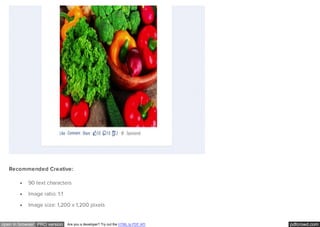
through determining which Facebook advertising solution is ideal for your
situation.
The ideas here are all based on Facebook’s paid advertising solutions, so if
you’re not quite ready for paid social ads, don’t fret; there are plenty of great tools
out there like our own Sprout Social that can help you maximize organic
engagement with your customers.
Create a Facebook Page for your business
Getting started with Facebook ads
Choosing an objective for your Facebook campaigns
Using Ad Sets to create a budget
FREE TOOLS
CONNECT
Visit our social media
channels:
TwitterLinkedInFacebookGoogle+
RSS
FEATURED
Try our free
Engagement
Report
Share jobs on
social with Job
Board
pdfcrowd.comopen in browser PRO version Are you a developer? Try out the HTML to PDF API
Choosing the perfect target audience
Selecting where you want your ad to display
Determining which type of ad you want to create
How to Create Your Facebook Business Page
First and foremost, you need to create a Facebook business page if you’re going
to advertise on the site. Once you’ve created the page, you can then create a
brand persona on the site in order to provide your audience with a resource to
learn more about and engage with your business. You can create the Facebook
page for your brand at this link. The first thing you’ll be prompted to do is choose
a category for your business based on these 6 choices:
1. Local Businesses or Places
2. Companies, Organizations or Institutions
3. Brands or Products
4. Artists, Bands or Public Figures
5. Entertainment
6. Causes or Communities
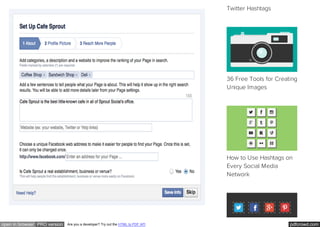
To demonstrate the rest of this process, we will create a page for a fictional
restaurant, Sprout Cafe. Once we’ve selected our category, Facebook will
serve this prompt:
7 Steps in Creating a
Winning Social Media
Marketing Strategy
Social Media in Higher
Education: Strategies to
Make You Best in Class
How to Find the Best
pdfcrowd.comopen in browser PRO version Are you a developer? Try out the HTML to PDF API
Twitter Hashtags
36 Free Tools for Creating
Unique Images
How to Use Hashtags on
Every Social Media
Network
pdfcrowd.comopen in browser PRO version Are you a developer? Try out the HTML to PDF API
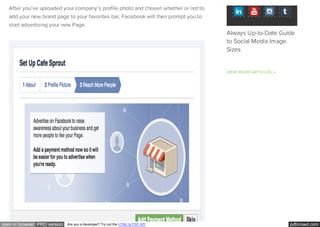
After you’ve uploaded your company’s profile photo and chosen whether or not to
add your new brand page to your favorites bar, Facebook will then prompt you to
start advertising your new Page.
VIEW MORE ARTICLES →
Always Up-to-Date Guide
to Social Media Image
Sizes
pdfcrowd.comopen in browser PRO version Are you a developer? Try out the HTML to PDF API
It’s completely up to you whether or not you want to immediately begin paying to
promote your page. If you decide to wait, you can always go back and start
promoting it at any time. Next step is to click “Skip,” and voila! We have a brand
new Facebook Page for your business.
How To Start Advertising Your Page on Facebook
There are two different options for creating a Facebook advertisement — the
Facebook ads creator and the Power Editor. I would recommend using the Ads
creator if you’re newer to the advertising platform. It lacks some of the
functionality that Power Editor has, but it’s much simpler to get your first
campaign off the ground.
Once you feel comfortable with creating Ads with the Ads creator, it could be
time to move on to Power Editor. This tool has a handful of features not available
in the Ads creator, such as:
Developing and advertising unpublished posts
Filtering your view by campaign, ad set or any tag you create
Creating bulk advertisements with the ability to import and export excel
docs
Using the Audiences selection to make “Saved Target Groups,” “Custom
pdfcrowd.comopen in browser PRO version Are you a developer? Try out the HTML to PDF API
Audiences,” and “Lookalike Audiences”
Choosing a Facebook Campaign Objective
Not all Facebook advertisements are created equal. Some of them are great for
getting people to “like” your Page, some are great for getting your fans to engage
with you on a more personal level, and some are great for prompting your
audience to click a post that will send them to your website. Here’s a full list of
the different campaign objectives Facebook gives you to choose from.
Page Post Engagement: Promote your Page posts
Page Likes: Get Page likes to grow your audience and guild your brand
Clicks to Websites: Get people to visit your website
Website Conversions: Get people to perform certain actions on your site
(requires adding a Facebook pixel to your site)
App Installs: Get people to install your mobile or desktop app
App Engagement: Get people to use your desktop app
Event Responses: Increase attendance at your event
Offer Claims: Create offers for people to redeem in your store
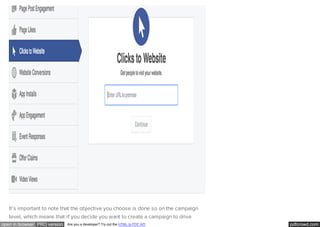
Shown below is how you choose your campaign type once you’re in the Ads
creator.
pdfcrowd.comopen in browser PRO version Are you a developer? Try out the HTML to PDF API
It’s important to note that the objective you choose is done so on the campaign
level, which means that if you decide you want to create a campaign to drive
pdfcrowd.comopen in browser PRO version Are you a developer? Try out the HTML to PDF API
clicks to your site, all of your Ad Sets and advertisements must also target that
same goal.
Choosing Your Campaign Budget
Once you’ve set up your Facebook campaign, you need to set up an “Ad Set.” The
Ad Set lives directly underneath the campaign and is the place where you set the
budget of how much you want to spend. Facebook recently changed it to where
budgeting is done on the Ad Set level so that users can allocate certain amounts
of spend to specific markets or objectives. A budget can be set on a daily or
lifetime basis, and advertisers can also choose to pick their own advertisement
start and end dates.
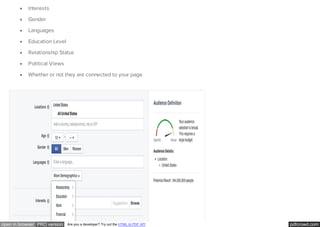
Choosing Your Facebook Audience
You can spend a ton of time and money creating an amazing advertisement with a
beautifully designed image and great copy, but if you aren’t showing it to a
relevant audience, then what’s the point? For this reason, Facebook is one of the
best platforms out there for advertisers. It has a fantastic ability to segment an
audience. The ability to target is done on the individual advertisement level,
which is housed under the ad sets, which are housed under campaigns. Here are
just a few of the ways you can segment an audience on Facebook.
Location
Age
pdfcrowd.comopen in browser PRO version Are you a developer? Try out the HTML to PDF API
Interests
Gender
Languages
Education Level
Relationship Status
Political Views
Whether or not they are connected to your page
pdfcrowd.comopen in browser PRO version Are you a developer? Try out the HTML to PDF API
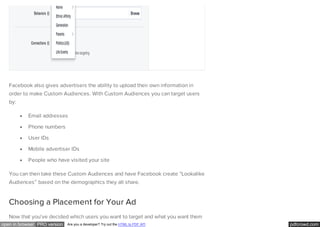
Facebook also gives advertisers the ability to upload their own information in
order to make Custom Audiences. With Custom Audiences you can target users
by:
Email addresses
Phone numbers
User IDs
Mobile advertiser IDs
People who have visited your site
You can then take these Custom Audiences and have Facebook create “Lookalike
Audiences” based on the demographics they all share.
Choosing a Placement for Your Ad
Now that you’ve decided which users you want to target and what you want them
pdfcrowd.comopen in browser PRO version Are you a developer? Try out the HTML to PDF API
to do, it’s best to think of where to place your advertisement. There are three
main locations on the site that you can choose to display your ad, each with their
own pros and cons.
Facebook Newsfeed Advertisement
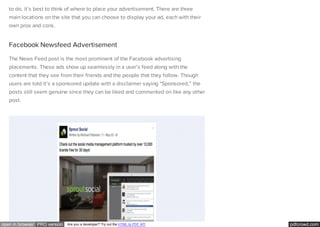
The News Feed post is the most prominent of the Facebook advertising
placements. These ads show up seamlessly in a user’s feed along with the
content that they see from their friends and the people that they follow. Though
users are told it’s a sponsored update with a disclaimer saying “Sponsored,” the
posts still seem genuine since they can be liked and commented on like any other
post.
pdfcrowd.comopen in browser PRO version Are you a developer? Try out the HTML to PDF API
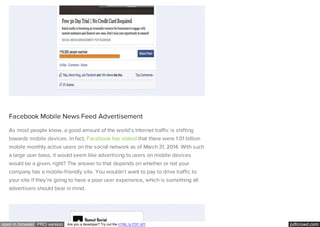
Facebook Mobile News Feed Advertisement
As most people know, a good amount of the world’s Internet traffic is shifting
towards mobile devices. In fact, Facebook has stated that there were 1.01 billion
mobile monthly active users on the social network as of March 31, 2014. With such
a large user base, it would seem like advertising to users on mobile devices
would be a given, right? The answer to that depends on whether or not your
company has a mobile-friendly site. You wouldn’t want to pay to drive traffic to
your site if they’re going to have a poor user experience, which is something all
advertisers should bear in mind.
pdfcrowd.comopen in browser PRO version Are you a developer? Try out the HTML to PDF API
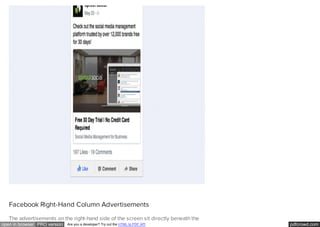
Facebook Right-Hand Column Advertisements
The advertisements on the right-hand side of the screen sit directly beneath the
pdfcrowd.comopen in browser PRO version Are you a developer? Try out the HTML to PDF API
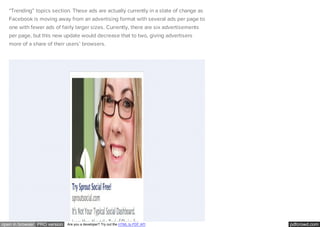
“Trending” topics section. These ads are actually currently in a state of change as
Facebook is moving away from an advertising format with several ads per page to
one with fewer ads of fairly larger sizes. Currently, there are six advertisements
per page, but this new update would decrease that to two, giving advertisers
more of a share of their users’ browsers.
pdfcrowd.comopen in browser PRO version Are you a developer? Try out the HTML to PDF API
Choosing a Facebook Ad Type
Now that we’ve got the finer details out of the way, let’s get to the heart of this
post and talk about all of the different types of posts that are available to you as
an advertiser. Below is a brief description of each type, as well as some
suggestions from Facebook.
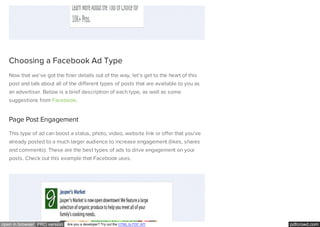
Page Post Engagement
This type of ad can boost a status, photo, video, website link or offer that you’ve
already posted to a much larger audience to increase engagement (likes, shares
and comments). These are the best types of ads to drive engagement on your
posts. Check out this example that Facebook uses.
pdfcrowd.comopen in browser PRO version Are you a developer? Try out the HTML to PDF API
Recommended Creative:
90 text characters
Image ratio: 1:1
Image size: 1,200 x 1,200 pixels
pdfcrowd.comopen in browser PRO version Are you a developer? Try out the HTML to PDF API
Page Likes
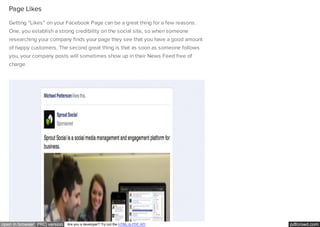
Getting “Likes” on your Facebook Page can be a great thing for a few reasons.
One, you establish a strong credibility on the social site, so when someone
researching your company finds your page they see that you have a good amount
of happy customers. The second great thing is that as soon as someone follows
you, your company posts will sometimes show up in their News Feed free of
charge.
pdfcrowd.comopen in browser PRO version Are you a developer? Try out the HTML to PDF API
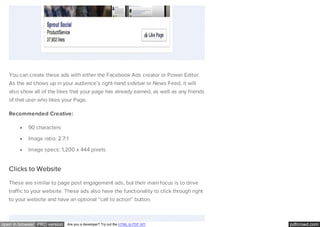
You can create these ads with either the Facebook Ads creator or Power Editor.
As the ad shows up in your audience’s right-hand sidebar or News Feed, it will
also show all of the likes that your page has already earned, as well as any friends
of that user who likes your Page.
Recommended Creative:
90 characters
Image ratio: 2.7:1
Image specs: 1,200 x 444 pixels
Clicks to Website
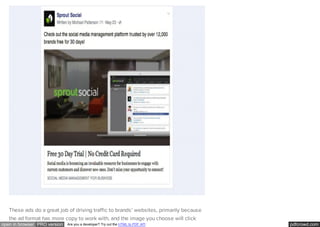
These are similar to page post engagement ads, but their main focus is to drive
traffic to your website. These ads also have the functionality to click through right
to your website and have an optional “call to action” button.
pdfcrowd.comopen in browser PRO version Are you a developer? Try out the HTML to PDF API
These ads do a great job of driving traffic to brands’ websites, primarily because
the ad format has more copy to work with, and the image you choose will click
pdfcrowd.comopen in browser PRO version Are you a developer? Try out the HTML to PDF API
right through to your website.
Recommended Creative:
Title: 500 characters (anything over is truncated)
Linked title: 1 to 2 lines
Domain link: 1 line
Description: 2-3 lines
Image aspect ratio: 1.91:1
Image specs in ad: 470 x 246 pixels
Website Conversions
In order to take full advantage of these particular ads, you need to add the
Facebook Conversion Pixel (can be created in Power Editor) on your website.
Once it’s there, you can tell Facebook what specifically you want to optimize your
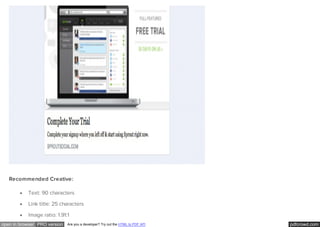
ads for, whether it be checkouts, leads or registrations. Imagine Sprout for
instance: if a Facebook user were to make it all the way to our “Start a Free Trial”
page and not convert, we could serve them an ad like this.
pdfcrowd.comopen in browser PRO version Are you a developer? Try out the HTML to PDF API
Recommended Creative:
Text: 90 characters
Link title: 25 characters
Image ratio: 1.91:1
pdfcrowd.comopen in browser PRO version Are you a developer? Try out the HTML to PDF API
Image specs: 1,200 x 627 pixels
App Installs/App Engagement
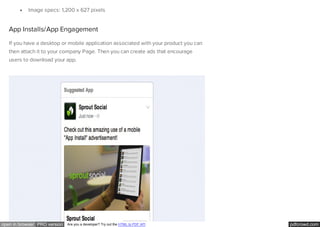
If you have a desktop or mobile application associated with your product you can
then attach it to your company Page. Then you can create ads that encourage
users to download your app.
pdfcrowd.comopen in browser PRO version Are you a developer? Try out the HTML to PDF API
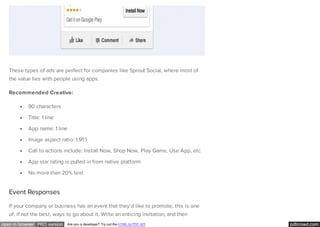
These types of ads are perfect for companies like Sprout Social, where most of
the value lies with people using apps.
Recommended Creative:
90 characters
Title: 1 line
App name: 1 line
Image aspect ratio: 1.91:1
Call to actions include: Install Now, Shop Now, Play Game, Use App, etc
App star rating is pulled in from native platform
No more than 20% text
Event Responses
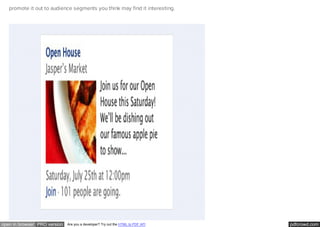
If your company or business has an event that they’d like to promote, this is one
of, if not the best, ways to go about it. Write an enticing invitation, and then
pdfcrowd.comopen in browser PRO version Are you a developer? Try out the HTML to PDF API
promote it out to audience segments you think may find it interesting.
pdfcrowd.comopen in browser PRO version Are you a developer? Try out the HTML to PDF API
Recommended Creative:
Title: 25 characters, maximum
Recommended text: 90 characters
Event details are pulled from the event
Image aspect ratio: 1.39:1
Image specs in ad: 100 x 72 pixels
Offer Claims
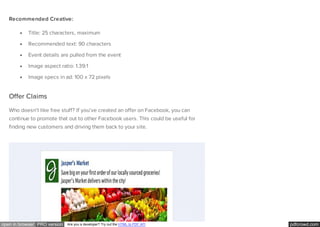
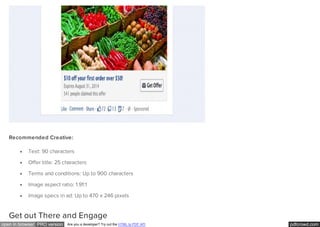
Who doesn’t like free stuff? If you’ve created an offer on Facebook, you can
continue to promote that out to other Facebook users. This could be useful for
finding new customers and driving them back to your site.
pdfcrowd.comopen in browser PRO version Are you a developer? Try out the HTML to PDF API
Recommended Creative:
Text: 90 characters
Offer title: 25 characters
Terms and conditions: Up to 900 characters
Image aspect ratio: 1.91:1
Image specs in ad: Up to 470 x 246 pixels
Get out There and Engage
pdfcrowd.comopen in browser PRO version Are you a developer? Try out the HTML to PDF API
A few parting words for those who have found value in this post. This post is to
help brands and companies establish themselves on Facebook and to take
advantage of the paid advertising aspect of it: but that’s not the only side of
Facebook.
Once you have driven all of these fans to your page, it’s equally as important to
continue to engage with them. While it may be nice to gain some quick sales with
a few advertisements, many sales cycles require more relationship building. If
you need help continuing to grow the organic side of social media, check out all
of our free resources we’ve put together on just that, or even check out how you
can manage your social media with Sprout.
FREE GUIDE
The Community Manager’s Field
Guide
Essential Tools to Becoming a Better Community Manager
youremail@company.com DOWNLOAD
pdfcrowd.comopen in browser PRO version Are you a developer? Try out the HTML to PDF API
UP NEXT
Here's How Brands Are Using
Facebook for Social
Recruiting
pdfcrowd.comopen in browser PRO version Are you a developer? Try out the HTML to PDF API
MICHAEL PATTERSON
Michael began his career at Sprout Social as an intern, but
has since transitioned to the role of Digital Marketing
Specialist. When he isn't researching new ways to drive
online traffic, he can usually be found exploring Chicago's
unique neighborhoods and breweries.
pdfcrowd.comopen in browser PRO version Are you a developer? Try out the HTML to PDF API
Mar 10, 2015
Newest | Oldest | Top Comments
Jwalant Bhandari
Sign in or Post as Guest 31 people listening
Hi,
Any one know how to create scrolling post on facebook
24 COM M ENTS
+ Follow Share Post comment as...
pdfcrowd.comopen in browser PRO version Are you a developer? Try out the HTML to PDF API
Feb 9, 2015MerWol
LIKE REPLY
Mar 10, 2015MPatterson22
@Jwalant Bhandari You can do that in Power Editor!
LIKE REPLY
Excellent article. Will definitely look to use Facebook to advertise my company.
1 LIKE REPLY
pdfcrowd.comopen in browser PRO version Are you a developer? Try out the HTML to PDF API
Jan 8, 2015
Jan 6, 2015
Kelly Rose Keltner
mkendzi
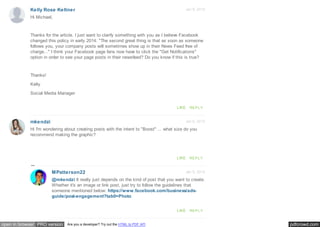
Hi Michael,
Thanks for the article. I just want to clarify something with you as I believe Facebook
changed this policy in early 2014: "The second great thing is that as soon as someone
follows you, your company posts will sometimes show up in their News Feed free of
charge..." I think your Facebook page fans now have to click the "Get Notifications"
option in order to see your page posts in their newsfeed? Do you know if this is true?
Thanks!
Kelly
Social Media Manager
LIKE REPLY
Hi I'm wondering about creating posts with the intent to "Boost" ... what size do you
recommend making the graphic?
LIKE REPLY
Jan 6, 2015MPatterson22
@mkendzi It really just depends on the kind of post that you want to create.
Whether it's an image or link post, just try to follow the guidelines that
someone mentioned below: https://www.facebook.com/business/ads-
guide/post-engagement?tab0=Photo
LIKE REPLY
pdfcrowd.comopen in browser PRO version Are you a developer? Try out the HTML to PDF API
Nov 18, 2014
Nov 12, 2014
Robert
JaymeSchwartz
Michael:
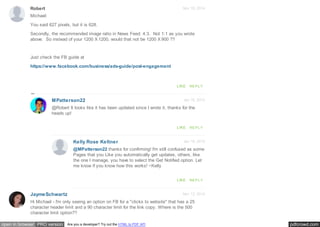
You said 627 pixels, but it is 628.
Secondly, the recommended image ratio in News Feed: 4:3. Not 1:1 as you wrote
above. So instead of your 1200 X 1200, would that not be 1200 X 900 ??
Just check the FB guide at
https://www.facebook.com/business/ads-guide/post-engagement
LIKE REPLY
Jan 16, 2015MPatterson22
@Robert It looks like it has been updated since I wrote it, thanks for the
heads up!
LIKE REPLY
Jan 16, 2015Kelly Rose Keltner
@MPatterson22 thanks for confirming! I'm still confused as some
Pages that you Like you automatically get updates, others, like
the one I manage, you have to select the Get Notified option. Let
me know if you know how this works! ~Kelly
LIKE REPLY
Hi Michael - I'm only seeing an option on FB for a "clicks to website" that has a 25
character header limit and a 90 character limit for the link copy. Where is the 500
character limit option??
pdfcrowd.comopen in browser PRO version Are you a developer? Try out the HTML to PDF API
Oct 29, 2014LeahCassidy
LIKE REPLY
Nov 17, 2014MPatterson22
@JaymeSchwartz Hi Jayme - are you using the Facebook Ads Creation
tool instead of Power Editor? The former does have more limits than the
second.
LIKE REPLY
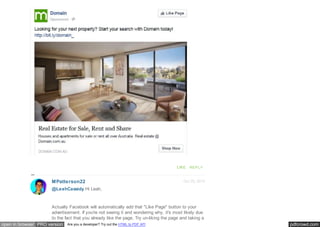
Hi Michael,
many thanks for the information - I am very new to this. I was wondering how you
create an ad like the attached example where it has qualities of both page (i.e. Like
Page) and site promotion (i.e Shop Now)?? I can't figure it out! Is it something that can
only be created in Power Editor?
Many thanks
Leah
pdfcrowd.comopen in browser PRO version Are you a developer? Try out the HTML to PDF API
LIKE REPLY
Oct 29, 2014MPatterson22
@LeahCassidy Hi Leah,
Actually Facebook will automatically add that "Like Page" button to your
advertisement. If you're not seeing it and wondering why, it's most likely due
to the fact that you already like the page. Try un-liking the page and taking a
pdfcrowd.comopen in browser PRO version Are you a developer? Try out the HTML to PDF API
look at your ad in the newsfeed and seeing if it's there.
LIKE REPLY
Oct 29, 2014MPatterson22
@LeahCassidy Also, the advertisement must be connected to
the page of the company in question. The ads creator will give you
the option to choose one if your objective is clicks-to-site.
LIKE REPLY
Oct 30, 2014
Oct 30, 2014
LeahCassidy
LeahCassidy
@MPatterson22 thanks so much Michael! Something
so simple that I was spending quite a bit of time
researching on!
Leah
LIKE REPLY
@MPatterson22 Thanks so much Michael! Something
so simple that I was spending quite a bit of time
researching on!
Leah
LIKE REPLY
pdfcrowd.comopen in browser PRO version Are you a developer? Try out the HTML to PDF API
Oct 27, 2014
Oct 16, 2014
chetztogom
Anthony17
LIKE REPLY
Awesome article! Just what I need to start my first FB ads. Thanks Michael!
Chetz Togom
LIKE REPLY
Good post . .
Just for share, I've a good source too for these guide.
How to Create and Manage Simple Cheap Facebook Ads
https://www.youtube.com/watch?v=V7SC9HsI_DY
pdfcrowd.comopen in browser PRO version Are you a developer? Try out the HTML to PDF API
Sep 29, 2014andra33
How to Create and Manage Simple Cheap Facebook Ads
LIKE REPLY
Excellent post! When paying for ads, is it better to promote your FB page or your
website on Facebook?
LIKE REPLY
Oct 2, 2014MPatterson22
@andra33 I think it really depends what your campaign is looking to
accomplish, and what you're selling. If it's a longer sales cycle, I think
promoting your FB page and growing a relationship with the user is better.
pdfcrowd.comopen in browser PRO version Are you a developer? Try out the HTML to PDF API
Sep 11, 2014MMora88
For something with a shorter sales cycle, like an eCommerce site, I think it's
best to drive them to your site and hopefully make that quick sale. Then you
can also always hit them with retargeting.
LIKE REPLY
good article michael!! more useful than facebook helper.
i'm looking for the way to track an ads conversion (for a simple form in the tab page or
desktop app for example), using the ad type: app engagement (since i can't use the
type click to website with facebook url).
do you know something about it?
it's needed to call particular actions/events?
LIKE REPLY
Sep 15, 2014MPatterson22
Hi @MMora88,
Unfortunately that's not something that I've heard as being used (though I
think it's a great idea). I will say that I don't think it's possible as of yet.
Since the conversions are triggered by a pixel on the page you want to track,
and you don't have access to place a pixel on a site that isn't yours (like a
Facebook page tab), I wouldn't think it as available. I will keep my eyes open
and let you know if I find any new evidence stating otherwise!
LIKE REPLY
pdfcrowd.comopen in browser PRO version Are you a developer? Try out the HTML to PDF API
Aug 18, 2014Rick Noel of eBiz ROI, Inc. - Experienced Digital
Excellent post Michael. Some great advice to help the many businesses who have a
Facebook business page and could seriously benefit from Facebook advertising.
Sometimes its just about knowing where to start.
The stats that I am familiar with are something like 30 million business pages on
Facebook with somewhere between 1-2 million currently advertising. That represents a
lot of opportunity, both for businesses and Facebook.
Some business owners dismiss Facebook and their advertising due to hard feelings of
loosing organic reach of late, but we feel that is a bit like throwing out the baby with the
bath water. Nicely done!
2 LIKE REPLY
Aug 18, 2014MPatterson22
@Rick Noel of eBiz ROI, Inc. - Experienced Digital
Thanks for your comment Rick!
Those stats really point out how much opportunity there is for advertisers to
get in there before their competition. As more companies start to grasp the
potential of Facebook as a paid advertising channel, the cost to reach a
certain audience will only increase with competition.
I can understand the frustration for these companies that are losing a bulk of
their organic reach, but I totally agree with you about not dismissing the
platform. It's comparable to ceasing to advertise on Google because you
don't like a certain update: most companies can't afford to stop driving those
visits.
pdfcrowd.comopen in browser PRO version Are you a developer? Try out the HTML to PDF API
LIKE REPLY
FEATURES
Engagement
Monitoring
Social CRM
Publishing
Analytics
Team Collaboration
HelpDesk
Mobile
SOLUTIONS
Customer Service
Social Management
Social Marketing
Agencies
ABOUT
Pricing
Customers
Company
Careers
Privacy
Legal
Brand Assets
SUPPORT
Email Us
System Status
DOWNLOAD
iPhone/iPad
Android
INSIGHTS
Articles
Resources
Press
Contact Insights
SHARE
TWEET
pdfcrowd.comopen in browser PRO version Are you a developer? Try out the HTML to PDF API
TwitterTwitter Certified Product
Sprout is a Twitter certified partner for
Engagement and Analytics.
FacebookPreferred Marketing Developer
Sprout is a Facebook Preferred Marketing
Developer for Management & Insights.
Google+Google+ Pages API Partner
Sprout is a Google+ Pages certified third-
party management tool.
Sprout Social131 S. Dearborn St., Ste. 1000 Chicago, IL 60603 1.866.878.3231
SHARE
SHARE
PLUS 1
SECURE, RELIABLE and TRUSTED

A Beginner’s Guide to Facebook Advertising

  • 1.
    pdfcrowd.comopen in browserPRO version Are you a developer? Try out the HTML to PDF API A Beginner’s Guide to Facebook Advertising By Michael Patterson on August 5, 2014 ADVERTISING HOME Sprout Social Call us at:1.866.878.3231 LO G IN INSIGHTSFilter: NONE ARTICLES RESOURCES EVENTS
  • 2.
    pdfcrowd.comopen in browserPRO version Are you a developer? Try out the HTML to PDF API Advertising Facebook Since 2004, Facebook has grown a staggering user base, boasting over 1.23 billion active users at the end of 2013. So unless you’re selling one of the most niche products on the market, there is a very good chance that your target audience has a presence on the site. Facebook has a number of different advertising solutions to help you effectively engage with your audience, but social marketers sometimes don’t know which of these solutions will work best for their brand. In this piece, we’ll guide you through determining which Facebook advertising solution is ideal for your situation. The ideas here are all based on Facebook’s paid advertising solutions, so if you’re not quite ready for paid social ads, don’t fret; there are plenty of great tools out there like our own Sprout Social that can help you maximize organic engagement with your customers. Create a Facebook Page for your business Getting started with Facebook ads Choosing an objective for your Facebook campaigns Using Ad Sets to create a budget FREE TOOLS CONNECT Visit our social media channels: TwitterLinkedInFacebookGoogle+ RSS FEATURED Try our free Engagement Report Share jobs on social with Job Board
  • 3.
    pdfcrowd.comopen in browserPRO version Are you a developer? Try out the HTML to PDF API Choosing the perfect target audience Selecting where you want your ad to display Determining which type of ad you want to create How to Create Your Facebook Business Page First and foremost, you need to create a Facebook business page if you’re going to advertise on the site. Once you’ve created the page, you can then create a brand persona on the site in order to provide your audience with a resource to learn more about and engage with your business. You can create the Facebook page for your brand at this link. The first thing you’ll be prompted to do is choose a category for your business based on these 6 choices: 1. Local Businesses or Places 2. Companies, Organizations or Institutions 3. Brands or Products 4. Artists, Bands or Public Figures 5. Entertainment 6. Causes or Communities To demonstrate the rest of this process, we will create a page for a fictional restaurant, Sprout Cafe. Once we’ve selected our category, Facebook will serve this prompt: 7 Steps in Creating a Winning Social Media Marketing Strategy Social Media in Higher Education: Strategies to Make You Best in Class How to Find the Best
  • 4.
    pdfcrowd.comopen in browserPRO version Are you a developer? Try out the HTML to PDF API Twitter Hashtags 36 Free Tools for Creating Unique Images How to Use Hashtags on Every Social Media Network
  • 5.
    pdfcrowd.comopen in browserPRO version Are you a developer? Try out the HTML to PDF API After you’ve uploaded your company’s profile photo and chosen whether or not to add your new brand page to your favorites bar, Facebook will then prompt you to start advertising your new Page. VIEW MORE ARTICLES → Always Up-to-Date Guide to Social Media Image Sizes
  • 6.
    pdfcrowd.comopen in browserPRO version Are you a developer? Try out the HTML to PDF API It’s completely up to you whether or not you want to immediately begin paying to promote your page. If you decide to wait, you can always go back and start promoting it at any time. Next step is to click “Skip,” and voila! We have a brand new Facebook Page for your business. How To Start Advertising Your Page on Facebook There are two different options for creating a Facebook advertisement — the Facebook ads creator and the Power Editor. I would recommend using the Ads creator if you’re newer to the advertising platform. It lacks some of the functionality that Power Editor has, but it’s much simpler to get your first campaign off the ground. Once you feel comfortable with creating Ads with the Ads creator, it could be time to move on to Power Editor. This tool has a handful of features not available in the Ads creator, such as: Developing and advertising unpublished posts Filtering your view by campaign, ad set or any tag you create Creating bulk advertisements with the ability to import and export excel docs Using the Audiences selection to make “Saved Target Groups,” “Custom
  • 7.
    pdfcrowd.comopen in browserPRO version Are you a developer? Try out the HTML to PDF API Audiences,” and “Lookalike Audiences” Choosing a Facebook Campaign Objective Not all Facebook advertisements are created equal. Some of them are great for getting people to “like” your Page, some are great for getting your fans to engage with you on a more personal level, and some are great for prompting your audience to click a post that will send them to your website. Here’s a full list of the different campaign objectives Facebook gives you to choose from. Page Post Engagement: Promote your Page posts Page Likes: Get Page likes to grow your audience and guild your brand Clicks to Websites: Get people to visit your website Website Conversions: Get people to perform certain actions on your site (requires adding a Facebook pixel to your site) App Installs: Get people to install your mobile or desktop app App Engagement: Get people to use your desktop app Event Responses: Increase attendance at your event Offer Claims: Create offers for people to redeem in your store Shown below is how you choose your campaign type once you’re in the Ads creator.
  • 8.
    pdfcrowd.comopen in browserPRO version Are you a developer? Try out the HTML to PDF API It’s important to note that the objective you choose is done so on the campaign level, which means that if you decide you want to create a campaign to drive
  • 9.
    pdfcrowd.comopen in browserPRO version Are you a developer? Try out the HTML to PDF API clicks to your site, all of your Ad Sets and advertisements must also target that same goal. Choosing Your Campaign Budget Once you’ve set up your Facebook campaign, you need to set up an “Ad Set.” The Ad Set lives directly underneath the campaign and is the place where you set the budget of how much you want to spend. Facebook recently changed it to where budgeting is done on the Ad Set level so that users can allocate certain amounts of spend to specific markets or objectives. A budget can be set on a daily or lifetime basis, and advertisers can also choose to pick their own advertisement start and end dates. Choosing Your Facebook Audience You can spend a ton of time and money creating an amazing advertisement with a beautifully designed image and great copy, but if you aren’t showing it to a relevant audience, then what’s the point? For this reason, Facebook is one of the best platforms out there for advertisers. It has a fantastic ability to segment an audience. The ability to target is done on the individual advertisement level, which is housed under the ad sets, which are housed under campaigns. Here are just a few of the ways you can segment an audience on Facebook. Location Age
  • 10.
    pdfcrowd.comopen in browserPRO version Are you a developer? Try out the HTML to PDF API Interests Gender Languages Education Level Relationship Status Political Views Whether or not they are connected to your page
  • 11.
    pdfcrowd.comopen in browserPRO version Are you a developer? Try out the HTML to PDF API Facebook also gives advertisers the ability to upload their own information in order to make Custom Audiences. With Custom Audiences you can target users by: Email addresses Phone numbers User IDs Mobile advertiser IDs People who have visited your site You can then take these Custom Audiences and have Facebook create “Lookalike Audiences” based on the demographics they all share. Choosing a Placement for Your Ad Now that you’ve decided which users you want to target and what you want them
  • 12.
    pdfcrowd.comopen in browserPRO version Are you a developer? Try out the HTML to PDF API to do, it’s best to think of where to place your advertisement. There are three main locations on the site that you can choose to display your ad, each with their own pros and cons. Facebook Newsfeed Advertisement The News Feed post is the most prominent of the Facebook advertising placements. These ads show up seamlessly in a user’s feed along with the content that they see from their friends and the people that they follow. Though users are told it’s a sponsored update with a disclaimer saying “Sponsored,” the posts still seem genuine since they can be liked and commented on like any other post.
  • 13.
    pdfcrowd.comopen in browserPRO version Are you a developer? Try out the HTML to PDF API Facebook Mobile News Feed Advertisement As most people know, a good amount of the world’s Internet traffic is shifting towards mobile devices. In fact, Facebook has stated that there were 1.01 billion mobile monthly active users on the social network as of March 31, 2014. With such a large user base, it would seem like advertising to users on mobile devices would be a given, right? The answer to that depends on whether or not your company has a mobile-friendly site. You wouldn’t want to pay to drive traffic to your site if they’re going to have a poor user experience, which is something all advertisers should bear in mind.
  • 14.
    pdfcrowd.comopen in browserPRO version Are you a developer? Try out the HTML to PDF API Facebook Right-Hand Column Advertisements The advertisements on the right-hand side of the screen sit directly beneath the
  • 15.
    pdfcrowd.comopen in browserPRO version Are you a developer? Try out the HTML to PDF API “Trending” topics section. These ads are actually currently in a state of change as Facebook is moving away from an advertising format with several ads per page to one with fewer ads of fairly larger sizes. Currently, there are six advertisements per page, but this new update would decrease that to two, giving advertisers more of a share of their users’ browsers.
  • 16.
    pdfcrowd.comopen in browserPRO version Are you a developer? Try out the HTML to PDF API Choosing a Facebook Ad Type Now that we’ve got the finer details out of the way, let’s get to the heart of this post and talk about all of the different types of posts that are available to you as an advertiser. Below is a brief description of each type, as well as some suggestions from Facebook. Page Post Engagement This type of ad can boost a status, photo, video, website link or offer that you’ve already posted to a much larger audience to increase engagement (likes, shares and comments). These are the best types of ads to drive engagement on your posts. Check out this example that Facebook uses.
  • 17.
    pdfcrowd.comopen in browserPRO version Are you a developer? Try out the HTML to PDF API Recommended Creative: 90 text characters Image ratio: 1:1 Image size: 1,200 x 1,200 pixels
  • 18.
    pdfcrowd.comopen in browserPRO version Are you a developer? Try out the HTML to PDF API Page Likes Getting “Likes” on your Facebook Page can be a great thing for a few reasons. One, you establish a strong credibility on the social site, so when someone researching your company finds your page they see that you have a good amount of happy customers. The second great thing is that as soon as someone follows you, your company posts will sometimes show up in their News Feed free of charge.
  • 19.
    pdfcrowd.comopen in browserPRO version Are you a developer? Try out the HTML to PDF API You can create these ads with either the Facebook Ads creator or Power Editor. As the ad shows up in your audience’s right-hand sidebar or News Feed, it will also show all of the likes that your page has already earned, as well as any friends of that user who likes your Page. Recommended Creative: 90 characters Image ratio: 2.7:1 Image specs: 1,200 x 444 pixels Clicks to Website These are similar to page post engagement ads, but their main focus is to drive traffic to your website. These ads also have the functionality to click through right to your website and have an optional “call to action” button.
  • 20.
    pdfcrowd.comopen in browserPRO version Are you a developer? Try out the HTML to PDF API These ads do a great job of driving traffic to brands’ websites, primarily because the ad format has more copy to work with, and the image you choose will click
  • 21.
    pdfcrowd.comopen in browserPRO version Are you a developer? Try out the HTML to PDF API right through to your website. Recommended Creative: Title: 500 characters (anything over is truncated) Linked title: 1 to 2 lines Domain link: 1 line Description: 2-3 lines Image aspect ratio: 1.91:1 Image specs in ad: 470 x 246 pixels Website Conversions In order to take full advantage of these particular ads, you need to add the Facebook Conversion Pixel (can be created in Power Editor) on your website. Once it’s there, you can tell Facebook what specifically you want to optimize your ads for, whether it be checkouts, leads or registrations. Imagine Sprout for instance: if a Facebook user were to make it all the way to our “Start a Free Trial” page and not convert, we could serve them an ad like this.
  • 22.
    pdfcrowd.comopen in browserPRO version Are you a developer? Try out the HTML to PDF API Recommended Creative: Text: 90 characters Link title: 25 characters Image ratio: 1.91:1
  • 23.
    pdfcrowd.comopen in browserPRO version Are you a developer? Try out the HTML to PDF API Image specs: 1,200 x 627 pixels App Installs/App Engagement If you have a desktop or mobile application associated with your product you can then attach it to your company Page. Then you can create ads that encourage users to download your app.
  • 24.
    pdfcrowd.comopen in browserPRO version Are you a developer? Try out the HTML to PDF API These types of ads are perfect for companies like Sprout Social, where most of the value lies with people using apps. Recommended Creative: 90 characters Title: 1 line App name: 1 line Image aspect ratio: 1.91:1 Call to actions include: Install Now, Shop Now, Play Game, Use App, etc App star rating is pulled in from native platform No more than 20% text Event Responses If your company or business has an event that they’d like to promote, this is one of, if not the best, ways to go about it. Write an enticing invitation, and then
  • 25.
    pdfcrowd.comopen in browserPRO version Are you a developer? Try out the HTML to PDF API promote it out to audience segments you think may find it interesting.
  • 26.
    pdfcrowd.comopen in browserPRO version Are you a developer? Try out the HTML to PDF API Recommended Creative: Title: 25 characters, maximum Recommended text: 90 characters Event details are pulled from the event Image aspect ratio: 1.39:1 Image specs in ad: 100 x 72 pixels Offer Claims Who doesn’t like free stuff? If you’ve created an offer on Facebook, you can continue to promote that out to other Facebook users. This could be useful for finding new customers and driving them back to your site.
  • 27.
    pdfcrowd.comopen in browserPRO version Are you a developer? Try out the HTML to PDF API Recommended Creative: Text: 90 characters Offer title: 25 characters Terms and conditions: Up to 900 characters Image aspect ratio: 1.91:1 Image specs in ad: Up to 470 x 246 pixels Get out There and Engage
  • 28.
    pdfcrowd.comopen in browserPRO version Are you a developer? Try out the HTML to PDF API A few parting words for those who have found value in this post. This post is to help brands and companies establish themselves on Facebook and to take advantage of the paid advertising aspect of it: but that’s not the only side of Facebook. Once you have driven all of these fans to your page, it’s equally as important to continue to engage with them. While it may be nice to gain some quick sales with a few advertisements, many sales cycles require more relationship building. If you need help continuing to grow the organic side of social media, check out all of our free resources we’ve put together on just that, or even check out how you can manage your social media with Sprout. FREE GUIDE The Community Manager’s Field Guide Essential Tools to Becoming a Better Community Manager youremail@company.com DOWNLOAD
  • 29.
    pdfcrowd.comopen in browserPRO version Are you a developer? Try out the HTML to PDF API UP NEXT Here's How Brands Are Using Facebook for Social Recruiting
  • 30.
    pdfcrowd.comopen in browserPRO version Are you a developer? Try out the HTML to PDF API MICHAEL PATTERSON Michael began his career at Sprout Social as an intern, but has since transitioned to the role of Digital Marketing Specialist. When he isn't researching new ways to drive online traffic, he can usually be found exploring Chicago's unique neighborhoods and breweries.
  • 31.
    pdfcrowd.comopen in browserPRO version Are you a developer? Try out the HTML to PDF API Mar 10, 2015 Newest | Oldest | Top Comments Jwalant Bhandari Sign in or Post as Guest 31 people listening Hi, Any one know how to create scrolling post on facebook 24 COM M ENTS + Follow Share Post comment as...
  • 32.
    pdfcrowd.comopen in browserPRO version Are you a developer? Try out the HTML to PDF API Feb 9, 2015MerWol LIKE REPLY Mar 10, 2015MPatterson22 @Jwalant Bhandari You can do that in Power Editor! LIKE REPLY Excellent article. Will definitely look to use Facebook to advertise my company. 1 LIKE REPLY
  • 33.
    pdfcrowd.comopen in browserPRO version Are you a developer? Try out the HTML to PDF API Jan 8, 2015 Jan 6, 2015 Kelly Rose Keltner mkendzi Hi Michael, Thanks for the article. I just want to clarify something with you as I believe Facebook changed this policy in early 2014: "The second great thing is that as soon as someone follows you, your company posts will sometimes show up in their News Feed free of charge..." I think your Facebook page fans now have to click the "Get Notifications" option in order to see your page posts in their newsfeed? Do you know if this is true? Thanks! Kelly Social Media Manager LIKE REPLY Hi I'm wondering about creating posts with the intent to "Boost" ... what size do you recommend making the graphic? LIKE REPLY Jan 6, 2015MPatterson22 @mkendzi It really just depends on the kind of post that you want to create. Whether it's an image or link post, just try to follow the guidelines that someone mentioned below: https://www.facebook.com/business/ads- guide/post-engagement?tab0=Photo LIKE REPLY
  • 34.
    pdfcrowd.comopen in browserPRO version Are you a developer? Try out the HTML to PDF API Nov 18, 2014 Nov 12, 2014 Robert JaymeSchwartz Michael: You said 627 pixels, but it is 628. Secondly, the recommended image ratio in News Feed: 4:3. Not 1:1 as you wrote above. So instead of your 1200 X 1200, would that not be 1200 X 900 ?? Just check the FB guide at https://www.facebook.com/business/ads-guide/post-engagement LIKE REPLY Jan 16, 2015MPatterson22 @Robert It looks like it has been updated since I wrote it, thanks for the heads up! LIKE REPLY Jan 16, 2015Kelly Rose Keltner @MPatterson22 thanks for confirming! I'm still confused as some Pages that you Like you automatically get updates, others, like the one I manage, you have to select the Get Notified option. Let me know if you know how this works! ~Kelly LIKE REPLY Hi Michael - I'm only seeing an option on FB for a "clicks to website" that has a 25 character header limit and a 90 character limit for the link copy. Where is the 500 character limit option??
  • 35.
    pdfcrowd.comopen in browserPRO version Are you a developer? Try out the HTML to PDF API Oct 29, 2014LeahCassidy LIKE REPLY Nov 17, 2014MPatterson22 @JaymeSchwartz Hi Jayme - are you using the Facebook Ads Creation tool instead of Power Editor? The former does have more limits than the second. LIKE REPLY Hi Michael, many thanks for the information - I am very new to this. I was wondering how you create an ad like the attached example where it has qualities of both page (i.e. Like Page) and site promotion (i.e Shop Now)?? I can't figure it out! Is it something that can only be created in Power Editor? Many thanks Leah
  • 36.
    pdfcrowd.comopen in browserPRO version Are you a developer? Try out the HTML to PDF API LIKE REPLY Oct 29, 2014MPatterson22 @LeahCassidy Hi Leah, Actually Facebook will automatically add that "Like Page" button to your advertisement. If you're not seeing it and wondering why, it's most likely due to the fact that you already like the page. Try un-liking the page and taking a
  • 37.
    pdfcrowd.comopen in browserPRO version Are you a developer? Try out the HTML to PDF API look at your ad in the newsfeed and seeing if it's there. LIKE REPLY Oct 29, 2014MPatterson22 @LeahCassidy Also, the advertisement must be connected to the page of the company in question. The ads creator will give you the option to choose one if your objective is clicks-to-site. LIKE REPLY Oct 30, 2014 Oct 30, 2014 LeahCassidy LeahCassidy @MPatterson22 thanks so much Michael! Something so simple that I was spending quite a bit of time researching on! Leah LIKE REPLY @MPatterson22 Thanks so much Michael! Something so simple that I was spending quite a bit of time researching on! Leah LIKE REPLY
  • 38.
    pdfcrowd.comopen in browserPRO version Are you a developer? Try out the HTML to PDF API Oct 27, 2014 Oct 16, 2014 chetztogom Anthony17 LIKE REPLY Awesome article! Just what I need to start my first FB ads. Thanks Michael! Chetz Togom LIKE REPLY Good post . . Just for share, I've a good source too for these guide. How to Create and Manage Simple Cheap Facebook Ads https://www.youtube.com/watch?v=V7SC9HsI_DY
  • 39.
    pdfcrowd.comopen in browserPRO version Are you a developer? Try out the HTML to PDF API Sep 29, 2014andra33 How to Create and Manage Simple Cheap Facebook Ads LIKE REPLY Excellent post! When paying for ads, is it better to promote your FB page or your website on Facebook? LIKE REPLY Oct 2, 2014MPatterson22 @andra33 I think it really depends what your campaign is looking to accomplish, and what you're selling. If it's a longer sales cycle, I think promoting your FB page and growing a relationship with the user is better.
  • 40.
    pdfcrowd.comopen in browserPRO version Are you a developer? Try out the HTML to PDF API Sep 11, 2014MMora88 For something with a shorter sales cycle, like an eCommerce site, I think it's best to drive them to your site and hopefully make that quick sale. Then you can also always hit them with retargeting. LIKE REPLY good article michael!! more useful than facebook helper. i'm looking for the way to track an ads conversion (for a simple form in the tab page or desktop app for example), using the ad type: app engagement (since i can't use the type click to website with facebook url). do you know something about it? it's needed to call particular actions/events? LIKE REPLY Sep 15, 2014MPatterson22 Hi @MMora88, Unfortunately that's not something that I've heard as being used (though I think it's a great idea). I will say that I don't think it's possible as of yet. Since the conversions are triggered by a pixel on the page you want to track, and you don't have access to place a pixel on a site that isn't yours (like a Facebook page tab), I wouldn't think it as available. I will keep my eyes open and let you know if I find any new evidence stating otherwise! LIKE REPLY
  • 41.
    pdfcrowd.comopen in browserPRO version Are you a developer? Try out the HTML to PDF API Aug 18, 2014Rick Noel of eBiz ROI, Inc. - Experienced Digital Excellent post Michael. Some great advice to help the many businesses who have a Facebook business page and could seriously benefit from Facebook advertising. Sometimes its just about knowing where to start. The stats that I am familiar with are something like 30 million business pages on Facebook with somewhere between 1-2 million currently advertising. That represents a lot of opportunity, both for businesses and Facebook. Some business owners dismiss Facebook and their advertising due to hard feelings of loosing organic reach of late, but we feel that is a bit like throwing out the baby with the bath water. Nicely done! 2 LIKE REPLY Aug 18, 2014MPatterson22 @Rick Noel of eBiz ROI, Inc. - Experienced Digital Thanks for your comment Rick! Those stats really point out how much opportunity there is for advertisers to get in there before their competition. As more companies start to grasp the potential of Facebook as a paid advertising channel, the cost to reach a certain audience will only increase with competition. I can understand the frustration for these companies that are losing a bulk of their organic reach, but I totally agree with you about not dismissing the platform. It's comparable to ceasing to advertise on Google because you don't like a certain update: most companies can't afford to stop driving those visits.
  • 42.
    pdfcrowd.comopen in browserPRO version Are you a developer? Try out the HTML to PDF API LIKE REPLY FEATURES Engagement Monitoring Social CRM Publishing Analytics Team Collaboration HelpDesk Mobile SOLUTIONS Customer Service Social Management Social Marketing Agencies ABOUT Pricing Customers Company Careers Privacy Legal Brand Assets SUPPORT Email Us System Status DOWNLOAD iPhone/iPad Android INSIGHTS Articles Resources Press Contact Insights SHARE TWEET
  • 43.
    pdfcrowd.comopen in browserPRO version Are you a developer? Try out the HTML to PDF API TwitterTwitter Certified Product Sprout is a Twitter certified partner for Engagement and Analytics. FacebookPreferred Marketing Developer Sprout is a Facebook Preferred Marketing Developer for Management & Insights. Google+Google+ Pages API Partner Sprout is a Google+ Pages certified third- party management tool. Sprout Social131 S. Dearborn St., Ste. 1000 Chicago, IL 60603 1.866.878.3231 SHARE SHARE PLUS 1 SECURE, RELIABLE and TRUSTED