Information
skills for research
http://unihub.mdx.ac.uk/your-study/library-and-it-support
BIS3400 Feb 2018
In this workshop we will look at...
• Developing an effective search strategy
• Resources available and how to use them…..now
and in the future
• Evaluating information for quality and relevance
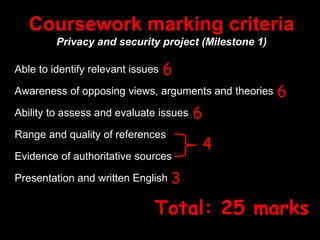
Coursework marking criteria
Privacy and security project (Milestone 1)
Able to identify relevant issues
Awareness of opposing views, arguments and theories
Ability to assess and evaluate issues
Range and quality of references
Evidence of authoritative sources
Presentation and written English
6
6
6
4
3
Total: 25 marks
Using the best information
for your project
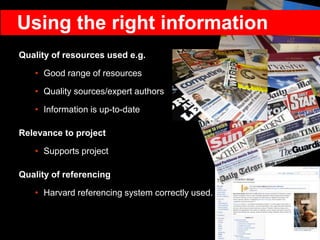
Quality of resources used e.g.
• Good range of resources
• Quality sources/expert authors
• Information is up-to-date
Relevance to project
• Supports project
Quality of referencing
• Harvard referencing system correctly used.
Using the right information
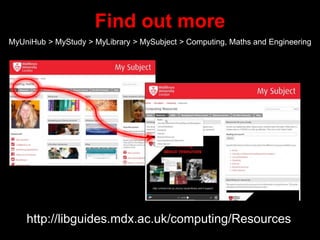
Find out more
MyUniHub > MyStudy > MyLibrary > MySubject > Computing, Maths and Engineering
http://libguides.mdx.ac.uk/computing/Resources
http://www.flickr.com/photos/rossjamesparker/89414788/
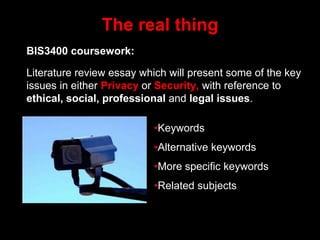
The real thing
BIS3400 coursework:
Literature review essay which will present some of the key
issues in either Privacy or Security, with reference to
ethical, social, professional and legal issues.
•Keywords
•Alternative keywords
•More specific keywords
•Related subjects
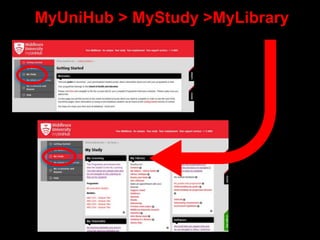
MyUniHub > MyStudy >MyLibrary
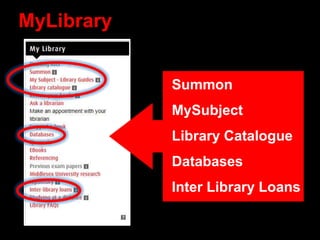
MyLibrary
Summon
MySubject
Library Catalogue
Databases
Inter Library Loans
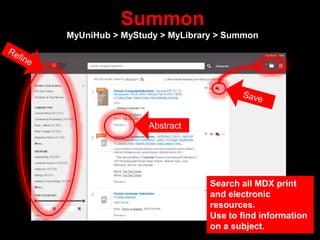
Summon
MyUniHub > MyStudy > MyLibrary > Summon
Abstract
Search all MDX print
and electronic
resources.
Use to find information
on a subject.
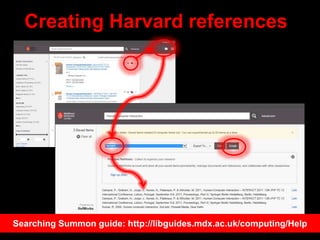
Creating Harvard references
Searching Summon guide: http://libguides.mdx.ac.uk/computing/Help
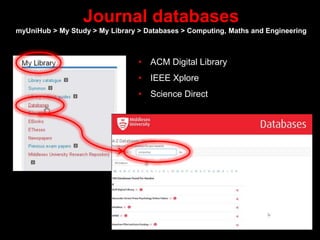
Journal databases
myUniHub > My Study > My Library > Databases > Computing, Maths and Engineering
• ACM Digital Library
• IEEE Xplore
• Science Direct
Summon and journal databases provide:
• Access to quality information
• Information not available elsewhere
• Up-to-date
• Focussed/specific
• Full-text access
• Access on/off campus
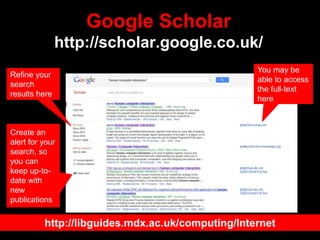
Google Scholar
http://scholar.google.co.uk/
You may be
able to access
the full-text
here
Refine your
search
results here
Create an
alert for your
search, so
you can
keep up-to-
date with
new
publications
http://libguides.mdx.ac.uk/computing/Internet
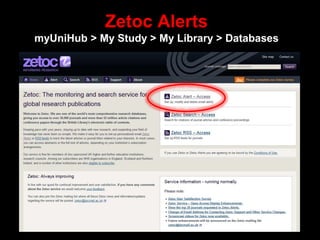
Zetoc Alerts
myUniHub > My Study > My Library > Databases
It’s not in the Library!
• Inter Library Loans http://bit.ly/InterLibraryLoans
• Sconul Access http://www.sconul.ac.uk/sconul-access
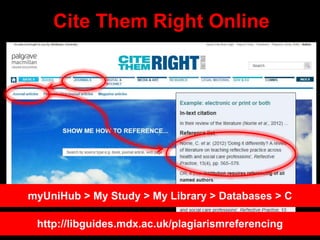
Cite Them Right Online
myUniHub > My Study > My Library > Databases > C
http://libguides.mdx.ac.uk/plagiarismreferencing
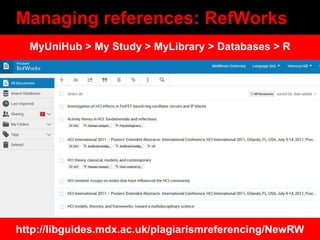
Managing references: RefWorks
http://libguides.mdx.ac.uk/plagiarismreferencing/NewRW
MyUniHub > My Study > MyLibrary > Databases > R
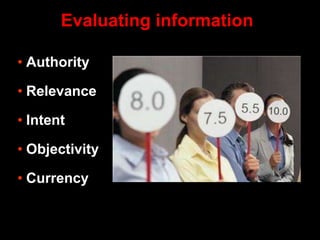
• Authority
• Relevance
• Intent
• Objectivity
• Currency
Evaluating information
Life after Uni
•Accessing academic information
•Using other libraries
•Careers advice
•Preparing for job interviews
•Professional associations
•Keeping up-to-date
•Online communities
•Conferences
More information: http://libguides.mdx.ac.uk/computing/LifeAfterUni
Need further help?
Your Librarian is:
Vanessa Hill v.hill@mdx.ac.uk
http://libguides.mdx.ac.uk/computing/Help

BIS3400 Feb 2018

Editor's Notes

  • #2  Welcome and intros.
  • #3 How to develop an effective search strategy when you need to find information for an essay or project The range of resources available and how to use them to find good quality and relevant information for your essay/project……now and in the future once you leave MDX Evaluating information for quality and relevance Research from Uni of Huddersfield shows that correlation between library usage and good grades.
  • #4  Essay demonstrates ability to identify relevant ethical, social and legal issues, pertaining to a particular topic area, case study or domain of application = 6 ie. need to find relevant books and journals etc Essay shows that the student is aware of opposing perspectives, and/or different arguments/theories in the topic area = 6 ie. need to find a balanced range of resources to get all viewpoints Essay assesses and evaluates relevant ethical and legal issues. Are professional principles applied in order to explain arguments, or recommend courses of action =6 ie. might want to speak to LDU re critical thinking etc Range and quality of references, including evidence of authoritative sources used. Use of correct referencing style, including in-text referencing = 4 ie. need to use good quality resources and reference correctly Presentation and written English, including grammar and spelling = 3 ie. might want to speak to LDU
  • #5 Hand out Reference game: Imagine that you are a lecturer teaching on a computer security module.   You have asked your students to write a report on Computer Security and Malware.   You will award 15% of the total marks for a list of quality references, which are both relevant and correctly given using the Harvard Referencing System. (The other marks will be awarded for content and style).   Look at the 3 reference lists that you have been given, and award a mark out of 5 for each list under the 3 headings (marking criteria): 1 = low mark 5= high mark.
  • #6 List 1 All items relevant Good range of resources: British Standards, encyclopaedia, conference proceedings, academic journals, books Academic quality: reputable sources eg. BSI, Britannica, IEEE....peer reviewed etc Up-to-date Correctly referenced: a couple of mistakes List 2 Some items relevant, some not eg. newspaper article Limited range of resources: mainly websites Academic quality: poor academic quality- local newspapers, wikipedia, webopedia etc Not Up-to-date eg. book 1985 Correctly referenced: Badly referenced eg. don’t know when accessed electronic resources, no publisher details for the book List 3 All items relevant Good range of resources: reasonable range of academic resources eg. academic journal, books, conference proceeding Academic quality: reputable sources eg. IEEE Up-to-date: older edition of Gollman book, article 2004, other books quite old Correctly referenced: a couple of mistakes ie. don’t know when eresources accessed
  • #7 More information about the range of resources available on the Library Subject Guide plus useful online guides eg. how to find information for your project.
  • #8  What can you see in the picture…fruit If type ‘fruit’ into database will get millions of hits, how can you break it down ie. search for something more specific to get more manageable results Can you be more specific ie. Type of fruit: apples, oranges, bananas etc Location: Stall, market, outdoor market, fruit market, Britain Detail: boxes, signs, astroturf, prices, colour of fruit, lights, pound £ signs, special offer etc People in background: old, young, male, female > stall holder, customers, browsers etc Think of related subjects eg. retail, commercial, financial, point-of-sale Shopping, shops, fish/meat/clothes market, shopping centres, high street Town, city, centre, British town Nutrition: vits and mins Also: Orange or Blackberry: fruit NOT telephone Apple: fruit NOT computer Thinking beyond the obvious, looking for the detail that might make a difference.
  • #9 Hand out worksheet. Coursework: 1500-1700 words presenting some of the key issues in either privacy or security. Need to read academic literature in your chosen topic area (minimum of 2 book chapters from different books, 1 academic journal article and one internet article of your choice excluding wikipedia) Sources need to be authoritative sources recognised by experts and need to be referenced correctly in your essay Need to present some of the key issues as discussed in the literature with reference to ethical and social issues, professional issues and legal issues. Issues should be illustrated by focussing on a particular aspect of your topic eg. a particular technology of information system in a specific context of application, or a recent case study Need to think about keywords: Privacy: private, secret, personal, restricted, confidential, confidentiality , individual (antonyms: general, public) Security: secure, secures, safe, safeguard, crime/sabotage/attack prevention, secureness, information security, computer security, risk management, security policy, integrity, authentication, access control Ethical: moral, integrity, accepted principles, ethically, principles of conduct, ethical codes, unethical, honourable, moral behaviour, fair, responsible, principled, correct, decent, honest Social: society, public, Government policy Professional: profession, vocational, occupational, expert, specialist, behavioural ethics/codes, professionalism Legal: legislation, law, lawful, legitimate licit legally, policy, freedom of information, data protection (antonyms: illegal, illigitimate, illicit, lawless, unlawful, wrongful)
  • #10  Click on MyStudy. You can now access library resources from the MyLibrary box……detail on next page.
  • #11 These are the things that might be useful: Summon: Use to search for information (books, journals etc) on your topic. MySubject: Gives you access to our library subject guides. Use these to find what resources are available including websites on a particular subject. Library catalogue: Use to see if we have a specific book in the library or books on the subject that you are researching. Databases: Gives you access to specialist collections of journals and other resources in a particular subject area. You can access most of these through Summon, but searching a specialist resource might save you time. Inter Library Loans: Not a resource, but a way of getting hold of material that the library doesn’t hold or provide access to.
  • #12 Need to carry out a literature search: Finding the information available on a subject Finding information to inform, underpin and shape your research Finding what has already been written on a subject Analyzing, evaluating and making judgements about the info found Identifying the main trends Finding appropriate information: the information needs to be suitable for your need ie. right level, current if important, sufficient breadth or detail etc Explain to students what Summon is. Go to UniHub > Login in to MyUniHub > My Study > My Library > Summon Show the students how to refine their search using: Full text Content type Subject terms Publication date Language etc Also how to create Harvard references. Have another go. Ask students to search for information for their project. Remember to use some of the keywords that we have discussed.
  • #14 Students can also search individual databases.
  • #15 CS £1397 IEEE Xplore £61,000 Summon £16k Access to quality academic information eg. Peer reviewed journal articles, conference proceedings , research etc Information not available elsewhere Up-to-date Focussed/specific....not designed to sell you things, search results not sponsored Full-text access Access on/off campus Personalize eg. In MyEBSCO, once signerd up you can: Save preferences Organise research within folders Share folders Save search history Create email alerts/Rss feeds for searches and subjects Can provide citation and journal impact info > more info on next slide
  • #16 Find journal articles, theses, books, and more, from academic publishers, professional societies, online repositories, universities and other web sites. Search across many disciplines Locate the full-text document through your library or on the web Keep up with recent developments in any area of research Save items in a personal library
  • #17 We are one of the world’s most comprehensive research databases, giving you access to over 30,000 journals and more than 52 million article citations and conference papers through the British Library’s electronic table of contents. Keeping pace with your peers, staying up to date with new research, and expanding your field of knowledge has never been so simple. We make it easy for you to set-up personalised email Zetoc Alerts or RSS feeds to track the latest articles or journal titles related to your interests. In most cases, you can access abstracts or the full text of articles, depending on your institution’s subscription arrangements
  • #18 Inter Library Loan service: request copies of books and journals not held by MDX. £3 charge. Register as DL first. More info on our website. SCONUL Access http://www.access.sconul.ac.uk/ The SCONUL Access Scheme provides reciprocal access and borrowing rights for staff and students to approximately 170 member institutions in the UK. Apply online. Other libraries (specialist, catalogues etc): British Library http://www.bl.uk/ COPAC http://copac.ac.uk/ COPAC is a union catalogue that gives access to the merged online catalogues of members of the Consortium of University Research Libraries (CURL). Twenty  major university libraries currently contribute to COPAC. Search25 http://www.search25.ac.uk/: helps you discover library resources across London and the South East. You can also see where the libraries are and find out how to visit them. SUNCAT http://www.suncat.ac.uk/ SUNCAT, a union catalogue of serials (periodicals) for the UK, is a tool for locating serials held in UK libraries.
  • #21 Hand out ‘Evaluation criteria’ game. Imagine you have searched for information for your current project. Decide what criteria you think are important, not important or very important.
  • #22 Take feedback and discuss. Authority : Who is the author? What is their knowledge base/qualifications? How have they carried out their research? Relevance : Is this what I need? Will it answer my question? Is it at the right level? Intent : What is the purpose of information e.g. financial gain, propaganda, academic etc? Objectivity : Balanced view? Opposing views represented? Links to supporting information? Currency: How old is this information? When was it last updated and by whom?
  • #23 Accessing academic information: once you leave you won’t be able to access our full-text e-books and e-journals, but you can still search Summon and our library catalogue and get information from other sources Using other libraries: British Library and specialist libraries in London Careers advice: careers advice available from the Uni Preparing for job interviews: we have a number of databases which you can use (before you leave) which can help you find company information to impress potential new employers Professional associations: The Library subscribes to several online resources provided by professional organisations, which provide academic quality information. By taking out a personal subscription to a professional organisation, it is possible to maintain partial access to key information sources, as well as professional support and development. Keeping up-to-date: Journal databases:Create email alerts/RSS feeds for searches and subjects Table of Contents Alerts: Zetoc , CituLike, TicToc Google Alerts: Google Alerts are email updates of the latest relevant Google results (web, news, etc.), based on your queries. Simply enter a subject that you wish to monitor and you will be sent regular updates. Blogs: Use Blogsearch to find blogs and blog posts for your subject Online communities: Online communities are a useful tool for professionals to keep up-to-date with the latest news, trends, tools, techniques, as well as sharing best practice and advice. Conferences: Attending conferences is a good way to find the latest information, make contacts with the leading authorities and vendors in the industry, as well as being an opportunity to network with your peers. More information: http://bit.ly/LifeafterUni