Paul Shapiro | @fighto | #TechSEOBoost
Just Enough to Be
Dangerous
–
Programming Basics for SEOs
Paul Shapiro | @fighto | #TechSEOBoost
Why should I bother to learn
to code?
Paul Shapiro | @fighto | #TechSEOBoost
- Self-sufficient, less reliance on software with limitations
- Able to better understand website construction and operation, able to make
more practical recommendation and work better with web developers
- Fewer data limitations
- More efficient and effective work
- Basic literacy
Paul Shapiro | @fighto | #TechSEOBoost
Which programming
language should I learn?
Paul Shapiro | @fighto | #TechSEOBoost
Which programming language should I learn?
- Don’t worry about it so much. There is not really a
“better” programming language to learn and any
programming language will be useful for the most
part.
- Focus on learning the logic!
However if starting from scratch, I do have a
couple of recommendations…
Paul Shapiro | @fighto | #TechSEOBoost
Recommendations
1. JavaScript
2. Python
Paul Shapiro | @fighto | #TechSEOBoost
JavaScript
• An excellent option if you’re
interested in web
development. It’s the
programming language of
front-end web development
and via Node.js one of the
best options for backend
development as well.
Paul Shapiro | @fighto | #TechSEOBoost
Python
• The better option if you’re
interested in a versatile
programming language that
excels in data analysis and
automation tasks.
Note: Is an interpreted programming language, and isn’t
the best option for GUI software or games
Paul Shapiro | @fighto | #TechSEOBoost
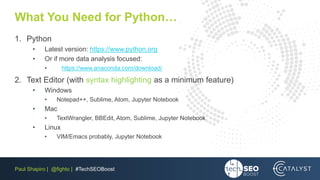
What You Need for Python…
1. Python
• Latest version: https://www.python.org
• Or if more data analysis focused:
• https://www.anaconda.com/download/
2. Text Editor (with syntax highlighting as a minimum feature)
• Windows
• Notepad++, Sublime, Atom, Jupyter Notebook
• Mac
• TextWrangler, BBEdit, Atom, Sublime, Jupyter Notebook
• Linux
• VIM/Emacs probably, Jupyter Notebook
Paul Shapiro | @fighto | #TechSEOBoost
Let’s Use Python as Our Example
The Basics
Paul Shapiro | @fighto | #TechSEOBoost
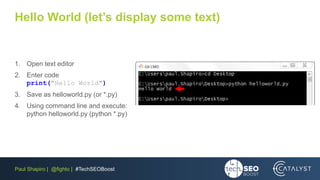
Hello World (let’s display some text)
1. Open text editor
2. Enter code
print("Hello World")
3. Save as helloworld.py (or *.py)
4. Using command line and execute:
python helloworld.py (python *.py)
Paul Shapiro | @fighto | #TechSEOBoost
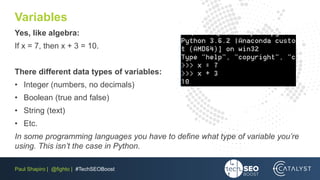
Variables
Yes, like algebra:
If x = 7, then x + 3 = 10.
There different data types of variables:
• Integer (numbers, no decimals)
• Boolean (true and false)
• String (text)
• Etc.
In some programming languages you have to define what type of variable you’re
using. This isn’t the case in Python.
Paul Shapiro | @fighto | #TechSEOBoost
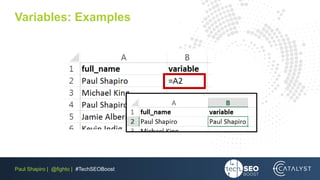
Variables: Examples
full_name = "Paul Shapiro"
age = 29
is_seo = True
boardgames = ["Gaia Project", "Great Western
Trail", "Spirit Island"]
String
Number, Integer
Boolean
List, type of array
Paul Shapiro | @fighto | #TechSEOBoost
Variables: Examples
Paul Shapiro | @fighto | #TechSEOBoost
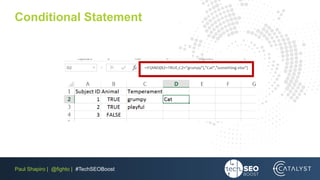
Conditional Statement
• if, else, elif (else if)
• if condition is true, then do something. Else, do something
different.
subject = { "animal": True, "temperament": “grumpy" }
if (subject["animal"] == True and subject["temperament"] == “grumpy"):
print("animal is a cat")
elif (subject["animal"] == True and subject["temperament"] == "playful"):
print("animal is a dog")
else:
print("It is something else")
1
2
3
4
5
6
7
Paul Shapiro | @fighto | #TechSEOBoost
Conditional Statement
Paul Shapiro | @fighto | #TechSEOBoost
Loops
• while Loop: loop while a condition is true
• for Loop: loop a specified number of
times, and in Python, iterating over a
sequence (list, tuple, dictionary, etc.)
Paul Shapiro | @fighto | #TechSEOBoost
Loops – while Loop
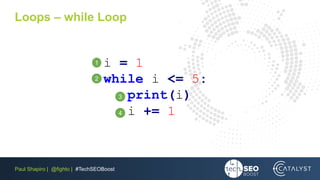
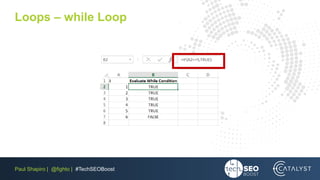
i = 1
while i <= 5:
print(i)
i += 1
1
2
3
4
Paul Shapiro | @fighto | #TechSEOBoost
Loops – while Loop
Paul Shapiro | @fighto | #TechSEOBoost
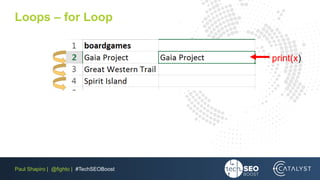
Loops – for Loop
boardgames = ["Gaia Project", "Great
Western Trail", "Spirit Island"]
for x in boardgames:
print(x)
1
2
3
Paul Shapiro | @fighto | #TechSEOBoost
Loops – for Loop
print(x)
Paul Shapiro | @fighto | #TechSEOBoost
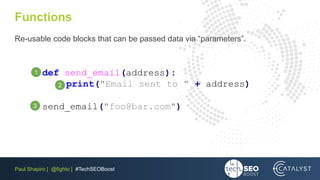
Functions
Re-usable code blocks that can be passed data via “parameters”.
def send_email(address):
print("Email sent to " + address)
send_email("foo@bar.com")
2
3
1
Paul Shapiro | @fighto | #TechSEOBoost
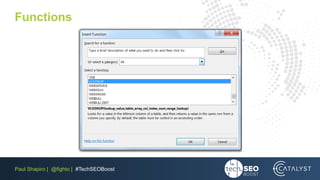
Functions
Paul Shapiro | @fighto | #TechSEOBoost
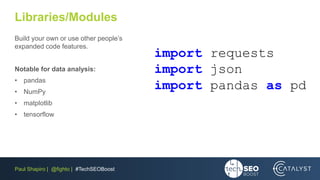
Libraries/Modules
Build your own or use other people’s
expanded code features.
Notable for data analysis:
• pandas
• NumPy
• matplotlib
• tensorflow
import requests
import json
import pandas as pd
Paul Shapiro | @fighto | #TechSEOBoost
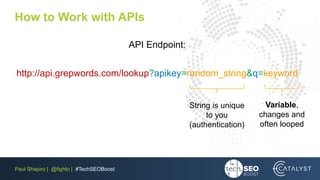
How to Work with APIs
API Endpoint:
http://api.grepwords.com/lookup?apikey=random_string&q=keyword
String is unique
to you
(authentication)
Variable,
changes and
often looped
Paul Shapiro | @fighto | #TechSEOBoost
How to Work with APIs
http://api.grepwords.com/lookup?apikey=random_string&q=board+games
[{"keyword":"board games","updated_cpc":"2018-04-30","updated_cmp":"2018-04-
30","updated_lms":"2018-04-30","updated_history":"2018-04-
30","lms":246000,"ams":246000,"gms":246000,"competition":0.86204091185173,"co
mpetetion":0.86204091185173,"cmp":0.86204091185173,"cpc":0.5,"m1":201000,"m1_
month":"2018-02","m2":246000,"m2_month":"2018-
01","m3":450000,"m3_month":"2017-12","m4":368000,"m4_month":"2017-
11","m5":201000,"m5_month":"2017-10","m6":201000,"m6_month":"2017-
09","m7":201000,"m7_month":"2017-08","m8":201000,"m8_month":"2017-
07","m9":201000,"m9_month":"2017-06","m10":201000,"m10_month":"2017-
05","m11":201000,"m11_month":"2017-04","m12":201000,"m12_month":"2017-03"}]
Paul Shapiro | @fighto | #TechSEOBoost
Bringing Some Concepts Together
import requests
import json
boardgames = ["Gaia Project", "Great Western Trail",
"Spirit Island"]
for x in boardgames:
apiurl =
http://api.grepwords.com/lookup?apikey=key&q= + x
r = requests.get(apiurl)
parsed_json = json.loads(r.text)
print(parsed_json[0]['gms'])
1
2
3
4
5
6
7
8
Paul Shapiro | @fighto | #TechSEOBoost
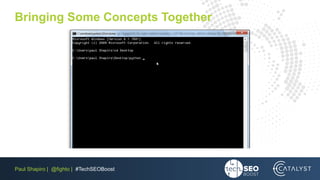
Bringing Some Concepts Together
Paul Shapiro | @fighto | #TechSEOBoost
Learning Resources
Python
• https://www.learnpython.org/
• https://www.codecademy.com/learn/learn-python-3
• https://learnpythonthehardway.org/
• https://www.lynda.com/
JavaScript
• Learn HTML + CSS first
• https://www.codecademy.com/learn/introduction-to-javascript
• https://www.lynda.com/
• https://www.freecodecamp.org/
Free with most library cards!
Paul Shapiro | @fighto | #TechSEOBoost
Thanks a bunch!
–
Paul Shapiro
@fighto
https://searchwilderness.com
Catalyst
@CatalystSEM
https://www.catalystdigital.com

TechSEO Boost 2018: Programming Basics for SEOs

  • 2.
    Paul Shapiro |@fighto | #TechSEOBoost Just Enough to Be Dangerous – Programming Basics for SEOs
  • 3.
    Paul Shapiro |@fighto | #TechSEOBoost
  • 4.
    Paul Shapiro |@fighto | #TechSEOBoost Why should I bother to learn to code?
  • 5.
    Paul Shapiro |@fighto | #TechSEOBoost - Self-sufficient, less reliance on software with limitations - Able to better understand website construction and operation, able to make more practical recommendation and work better with web developers - Fewer data limitations - More efficient and effective work - Basic literacy
  • 6.
    Paul Shapiro |@fighto | #TechSEOBoost
  • 7.
    Paul Shapiro |@fighto | #TechSEOBoost Which programming language should I learn?
  • 8.
    Paul Shapiro |@fighto | #TechSEOBoost Which programming language should I learn? - Don’t worry about it so much. There is not really a “better” programming language to learn and any programming language will be useful for the most part. - Focus on learning the logic! However if starting from scratch, I do have a couple of recommendations…
  • 9.
    Paul Shapiro |@fighto | #TechSEOBoost Recommendations 1. JavaScript 2. Python
  • 10.
    Paul Shapiro |@fighto | #TechSEOBoost JavaScript • An excellent option if you’re interested in web development. It’s the programming language of front-end web development and via Node.js one of the best options for backend development as well.
  • 11.
    Paul Shapiro |@fighto | #TechSEOBoost Python • The better option if you’re interested in a versatile programming language that excels in data analysis and automation tasks. Note: Is an interpreted programming language, and isn’t the best option for GUI software or games
  • 12.
    Paul Shapiro |@fighto | #TechSEOBoost What You Need for Python… 1. Python • Latest version: https://www.python.org • Or if more data analysis focused: • https://www.anaconda.com/download/ 2. Text Editor (with syntax highlighting as a minimum feature) • Windows • Notepad++, Sublime, Atom, Jupyter Notebook • Mac • TextWrangler, BBEdit, Atom, Sublime, Jupyter Notebook • Linux • VIM/Emacs probably, Jupyter Notebook
  • 13.
    Paul Shapiro |@fighto | #TechSEOBoost Let’s Use Python as Our Example The Basics
  • 14.
    Paul Shapiro |@fighto | #TechSEOBoost Hello World (let’s display some text) 1. Open text editor 2. Enter code print("Hello World") 3. Save as helloworld.py (or *.py) 4. Using command line and execute: python helloworld.py (python *.py)
  • 15.
    Paul Shapiro |@fighto | #TechSEOBoost Variables Yes, like algebra: If x = 7, then x + 3 = 10. There different data types of variables: • Integer (numbers, no decimals) • Boolean (true and false) • String (text) • Etc. In some programming languages you have to define what type of variable you’re using. This isn’t the case in Python.
  • 16.
    Paul Shapiro |@fighto | #TechSEOBoost Variables: Examples full_name = "Paul Shapiro" age = 29 is_seo = True boardgames = ["Gaia Project", "Great Western Trail", "Spirit Island"] String Number, Integer Boolean List, type of array
  • 17.
    Paul Shapiro |@fighto | #TechSEOBoost Variables: Examples
  • 18.
    Paul Shapiro |@fighto | #TechSEOBoost Conditional Statement • if, else, elif (else if) • if condition is true, then do something. Else, do something different. subject = { "animal": True, "temperament": “grumpy" } if (subject["animal"] == True and subject["temperament"] == “grumpy"): print("animal is a cat") elif (subject["animal"] == True and subject["temperament"] == "playful"): print("animal is a dog") else: print("It is something else") 1 2 3 4 5 6 7
  • 19.
    Paul Shapiro |@fighto | #TechSEOBoost
  • 20.
    Paul Shapiro |@fighto | #TechSEOBoost Conditional Statement
  • 21.
    Paul Shapiro |@fighto | #TechSEOBoost Loops • while Loop: loop while a condition is true • for Loop: loop a specified number of times, and in Python, iterating over a sequence (list, tuple, dictionary, etc.)
  • 22.
    Paul Shapiro |@fighto | #TechSEOBoost Loops – while Loop i = 1 while i <= 5: print(i) i += 1 1 2 3 4
  • 23.
    Paul Shapiro |@fighto | #TechSEOBoost Loops – while Loop
  • 24.
    Paul Shapiro |@fighto | #TechSEOBoost Loops – for Loop boardgames = ["Gaia Project", "Great Western Trail", "Spirit Island"] for x in boardgames: print(x) 1 2 3
  • 25.
    Paul Shapiro |@fighto | #TechSEOBoost Loops – for Loop print(x)
  • 26.
    Paul Shapiro |@fighto | #TechSEOBoost Functions Re-usable code blocks that can be passed data via “parameters”. def send_email(address): print("Email sent to " + address) send_email("foo@bar.com") 2 3 1
  • 27.
    Paul Shapiro |@fighto | #TechSEOBoost Functions
  • 28.
    Paul Shapiro |@fighto | #TechSEOBoost Libraries/Modules Build your own or use other people’s expanded code features. Notable for data analysis: • pandas • NumPy • matplotlib • tensorflow import requests import json import pandas as pd
  • 29.
    Paul Shapiro |@fighto | #TechSEOBoost How to Work with APIs API Endpoint: http://api.grepwords.com/lookup?apikey=random_string&q=keyword String is unique to you (authentication) Variable, changes and often looped
  • 30.
    Paul Shapiro |@fighto | #TechSEOBoost How to Work with APIs http://api.grepwords.com/lookup?apikey=random_string&q=board+games [{"keyword":"board games","updated_cpc":"2018-04-30","updated_cmp":"2018-04- 30","updated_lms":"2018-04-30","updated_history":"2018-04- 30","lms":246000,"ams":246000,"gms":246000,"competition":0.86204091185173,"co mpetetion":0.86204091185173,"cmp":0.86204091185173,"cpc":0.5,"m1":201000,"m1_ month":"2018-02","m2":246000,"m2_month":"2018- 01","m3":450000,"m3_month":"2017-12","m4":368000,"m4_month":"2017- 11","m5":201000,"m5_month":"2017-10","m6":201000,"m6_month":"2017- 09","m7":201000,"m7_month":"2017-08","m8":201000,"m8_month":"2017- 07","m9":201000,"m9_month":"2017-06","m10":201000,"m10_month":"2017- 05","m11":201000,"m11_month":"2017-04","m12":201000,"m12_month":"2017-03"}]
  • 31.
    Paul Shapiro |@fighto | #TechSEOBoost Bringing Some Concepts Together import requests import json boardgames = ["Gaia Project", "Great Western Trail", "Spirit Island"] for x in boardgames: apiurl = http://api.grepwords.com/lookup?apikey=key&q= + x r = requests.get(apiurl) parsed_json = json.loads(r.text) print(parsed_json[0]['gms']) 1 2 3 4 5 6 7 8
  • 32.
    Paul Shapiro |@fighto | #TechSEOBoost Bringing Some Concepts Together
  • 33.
    Paul Shapiro |@fighto | #TechSEOBoost Learning Resources Python • https://www.learnpython.org/ • https://www.codecademy.com/learn/learn-python-3 • https://learnpythonthehardway.org/ • https://www.lynda.com/ JavaScript • Learn HTML + CSS first • https://www.codecademy.com/learn/introduction-to-javascript • https://www.lynda.com/ • https://www.freecodecamp.org/ Free with most library cards! Free with most library cards!
  • 34.
    Paul Shapiro |@fighto | #TechSEOBoost Thanks a bunch! – Paul Shapiro @fighto https://searchwilderness.com Catalyst @CatalystSEM https://www.catalystdigital.com