











Enterprise Software Development
Eric Phan | Chief Architect @ SSW
Performance Tuning
from the Trenches
Join the Conversation #NetUG @EricPhan
Case Study
Optimizing .NET
Optimizing SQL
Optimizing Web Front End
Summary – Lesson’s Learnt
False Start
Agenda
B.E. - Software Engineering, Certified Scrum Master
Eric Phan
@EricPhan
 Chief Architect @ SSW
 MCTS TFS, MCP
 Loves playing with the latest
technology
Case Study
Optimizing .NET
Optimizing SQL
Optimizing Web Front End
Summary – Lesson’s Learnt
False Start
Agenda
Case Study – A large retailer
• Problems with their existing online shopping site
• Old, outdated, running on classic ASP
• Website crashed every time they had sales events
• Losing $$$$
• Volume starts increasing in the lead up to Xmas (from about late august)
• Physical shop + website closes after Xmas
• Massive reopening sale mid January (this is usually when the website crashes)
Join the Conversation #NetUG @EricPhan
Case Study – A large retailer
• SSW was engaged to:
• Upgrade their site to a later version of their eCommerce platform
• Develop a few new features (gift registry, gift cards, integration with
their inventory tracking system)
• Ensure the site stays up during sales
Join the Conversation #NetUG @EricPhan
Dev dev dev
• As Jan approaches, get ready for go live
• Sprint just focussed on performance
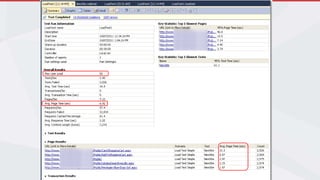
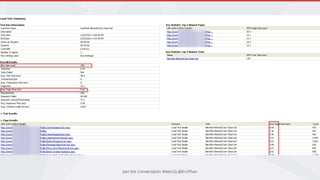
• Run MS web + load tests then optimize
Join the Conversation #NetUG @EricPhan
Tweaking performance
• Run .NET profilers (ANTS, JetBrains)
• Run SQL Profiler
• Add caching
Join the Conversation #NetUG @EricPhan
Send it live!
Join the Conversation #NetUG @EricPhan
Crash and burn
• Roll back to old site (still crashes)
• Restart IIS constantly
• Now that we’ve missed this date, there’s more time to
dig deeper
Join the Conversation #NetUG @EricPhan
Post Mortem
We concluded that:
• The web tests didn’t accurately reflect how users would use the
site
• There were a lot more users hitting the site than the initial
target (due to it being the big sale)
• The tests also didn’t accurately represent the production
environment
Join the Conversation #NetUG @EricPhan
Case Study
Optimizing .NET
Optimizing SQL
Optimizing Web Front End
Summary – Lesson’s Learnt
False Start
Agenda
Then we embarked on a journey…
• Fix tests to more accurately represent the load
• Identify bottle necks
• Optimize!
Join the Conversation #NetUG @EricPhan
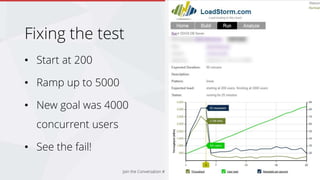
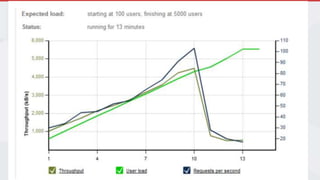
Fixing the test
• Start at 200
• Ramp up to 5000
• New goal was 4000
concurrent users
• See the fail!
Join the Conversation #NetUG @EricPhan
Identify bottlenecks
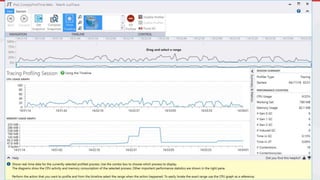
• Code profiling
• SQL profiling
• Hardware
Join the Conversation #NetUG @EricPhan
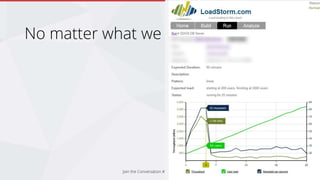
No matter what we did
Join the Conversation #NetUG @EricPhan
So we suspected something to do with
the Hardware and Hosting
• Simplified test to pull 1 image from the web server
(no DB, no .NET)
• Same problem!
Join the Conversation #NetUG @EricPhan
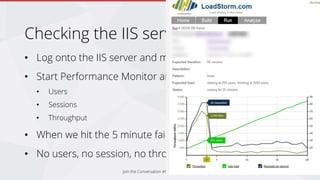
Checking the IIS server
• Log onto the IIS server and monitor CPU
• Start Performance Monitor and add stats for:
• Users
• Sessions
• Throughput
• When we hit the 5 minute fail mark…
• No users, no session, no throughput logged in IIS…
Join the Conversation #NetUG @EricPhan
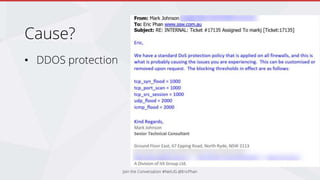
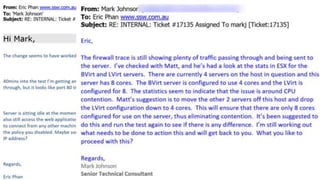
Cause?
• DDOS protection
Join the Conversation #NetUG @EricPhan
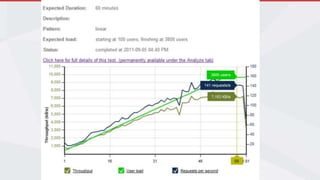
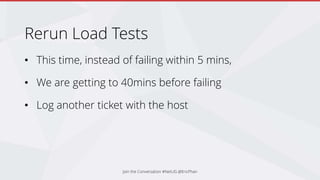
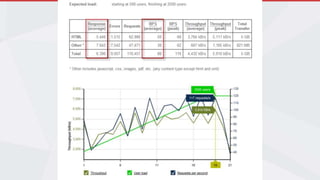
Rerun Load Tests
• This time, instead of failing within 5 mins,
• We are getting to 40mins before failing
• Log another ticket with the host
Join the Conversation #NetUG @EricPhan
Progress!
Join the Conversation #NetUG @EricPhan
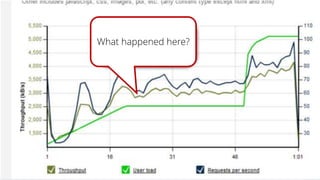
What happened here?
Join the Conversation #NetUG @EricPhan
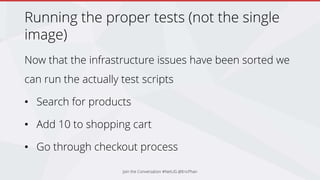
Running the proper tests (not the single
image)
Now that the infrastructure issues have been sorted we
can run the actually test scripts
• Search for products
• Add 10 to shopping cart
• Go through checkout process
Join the Conversation #NetUG @EricPhan
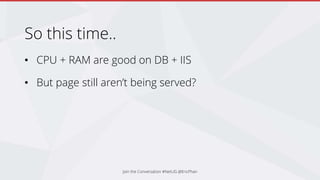
So this time..
• CPU + RAM are good on DB + IIS
• But page still aren’t being served?
Join the Conversation #NetUG @EricPhan
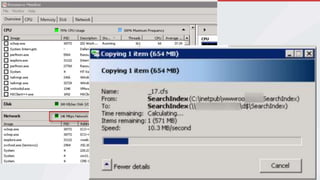
Network saturation
• Hitting the max capacity of the network cards
between the web and SQL server
• Switching to gigabit fixed the issue
• But it’s still a lot of chatter!
Join the Conversation #NetUG @EricPhan
Identifying Bottlenecks
• Now that we know our
infrastructure is good….
• How do we find where our
app is slow?
Join the Conversation #NetUG @EricPhan
Identifying Bottlenecks
• User feedback
• Glimpse
• IntelliTrace
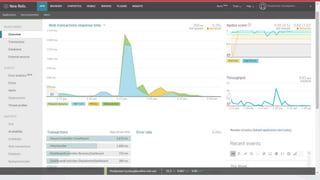
• APM tools
• Profiling
Join the Conversation #NetUG @EricPhan
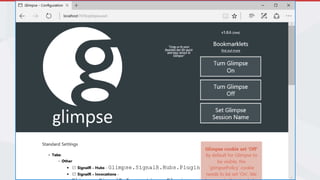
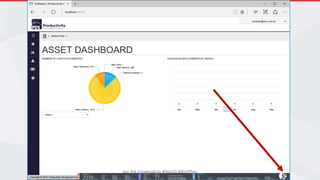
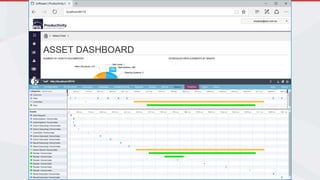
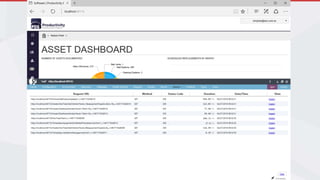
Glimpse
• Install-Package Glimpse
• F5
• ~/glimpse.axd
• g
Join the Conversation #NetUG @EricPhan
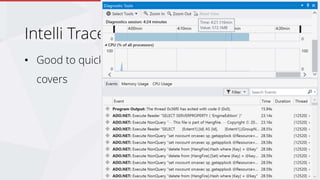
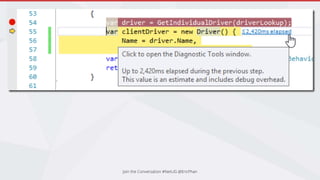
Intelli Trace
• Good to quickly eyeball what’s going on under the
covers
Join the Conversation #NetUG @EricPhan
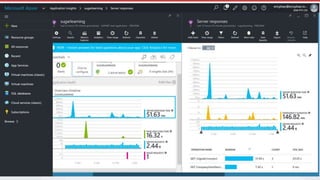
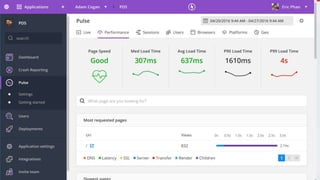
Application Insights
https://rules.ssw.com.au/rules-to-better-application-
insights
Join the Conversation #NetUG @EricPhan
Case Study
Optimizing .NET
Optimizing SQL
Optimizing Web Front End
Summary – Lesson’s Learnt
False Start
Agenda
Optimize SQL
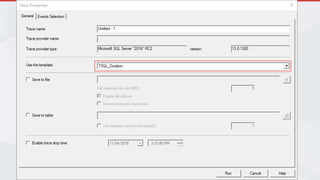
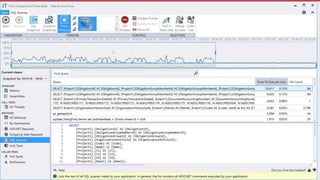
1. Run SQL Profiler
2. Use the Duration template
3. Identify slow running queries
Join the Conversation #NetUG @EricPhan
Analyse profile results
1. Look for anything that takes over 100ms to execute
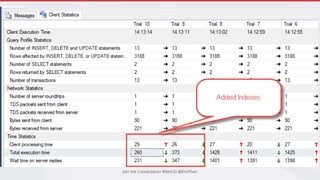
2. Drill into each query and manually run it in SSMS
1. Use the Execution Plans and Client statistics to help
3. See if you can speed it up by
1. Adding an index
2. Rewriting the query
Join the Conversation #NetUG @EricPhan
Remember this when tuning SQL
CHECKPOINT;
GO
DBCC DROPCLEANBUFFERS;
GO
Join the Conversation #NetUG @EricPhan
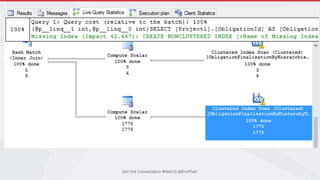
SQL Execution Plans
Tells you where the bottlenecks are
• Fat pipes
• Scan vs Seek
• Estimated Rows vs Actual Rows
• Warnings
Join the Conversation #NetUG @EricPhan
Execution Plan Resources
• https://www.simple-
talk.com/sql/performance/execution-plan-basics/
• https://www.simple-talk.com/sql/performance/why-
developers-need-to-understand-execution-plans/
Join the Conversation #NetUG @EricPhan
Other things to look out for…
1. Excessive calls
• SQL profiler showed that to load the search page, it would make
300+ SQL calls
2. Stuff that doesn’t make sense
• What’s worse is that the search triggered 1 insert and 1 update
• This was one of the causes of the high network traffic
Join the Conversation #NetUG @EricPhan
Parameter Sniffing
• exec procGetComplicatedStuff 1
• exec procGetComplicatedStuff 15
• Execution plan is cached
• Problem when there is uneven distribution of results based on the parameters
• https://www.brentozar.com/blitzcache/parameter-sniffing/
• https://www.brentozar.com/archive/2013/11/why-parameter-sniffing-can-slow-down-queries-video/
• https://www.brentozar.com/archive/2013/06/the-elephant-and-the-mouse-or-parameter-sniffing-in-sql-server/
Join the Conversation #NetUG @EricPhan
Indexes and Index Usage
https://www.simple-talk.com/sql/performance/tune-
your-indexing-strategy-with-sql-server-dmvs/
Join the Conversation #NetUG @EricPhan
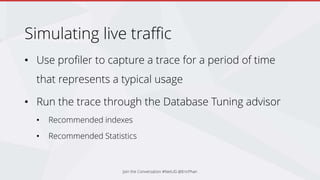
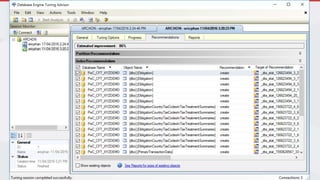
Simulating live traffic
• Use profiler to capture a trace for a period of time
that represents a typical usage
• Run the trace through the Database Tuning advisor
• Recommended indexes
• Recommended Statistics
Join the Conversation #NetUG @EricPhan
DB Optimization Summary
Find bottlenecks:
• SQL Profiler
Fix bottlenecks:
• Execution Plans
• Database Tuning Advisor
Join the Conversation #NetUG @EricPhan
Optimize Queries
• SELECT only the columns you need
• Use JOINs effectively
• AVOID cursors like the plague
• Watch for Parameter Sniffing
• Keep database statistics up to date
Join the Conversation #NetUG @EricPhan
Other tips
• Denomalize heavily accessed tables
• SSDs
• More RAM
• Separate physical drives for data and logs
Join the Conversation #NetUG @EricPhan
Case Study
Optimizing .NET
Optimizing SQL
Optimizing Web Front End
Summary – Lesson’s Learnt
False Start
Finding bottlenecks
• Use profiling tools
• RedGate ANTZ
• Telerik JustTrace
• Visual Studio Performance Wizard
• Use APM tools on production
• NewRelic
• App Insights
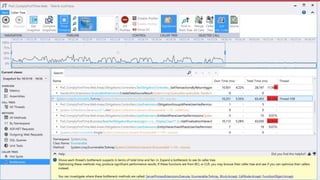
Find the hotspots with Just Trace
Drill into the code identified by the profiling tool
Join the Conversation #NetUG @EricPhan
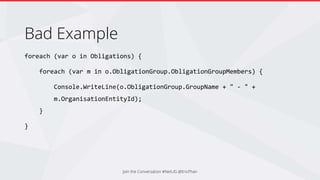
Bad Example
foreach (var o in Obligations) {
foreach (var m in o.ObligationGroup.ObligationGroupMembers) {
Console.WriteLine(o.ObligationGroup.GroupName + " - " +
m.OrganisationEntityId);
}
}
Join the Conversation #NetUG @EricPhan
What’s wrong with this code?
Join the Conversation #NetUG @EricPhan
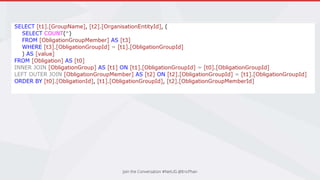
Watch out for LINQ Queries
• Easy to write
• Generates some nasty SQL
• Watch out for loops
• Does a SELECT * if you’re not projecting
Join the Conversation #NetUG @EricPhan
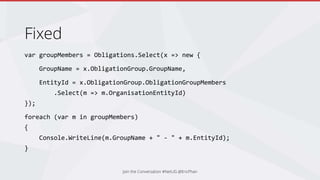
Fixed
var groupMembers = Obligations.Select(x => new {
GroupName = x.ObligationGroup.GroupName,
EntityId = x.ObligationGroup.ObligationGroupMembers
.Select(m => m.OrganisationEntityId)
});
foreach (var m in groupMembers)
{
Console.WriteLine(m.GroupName + " - " + m.EntityId);
}
Join the Conversation #NetUG @EricPhan
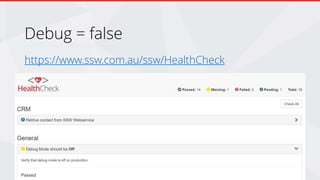
Debug = false
https://www.ssw.com.au/ssw/HealthCheck
Join the Conversation #NetUG @EricPhan
Caching
• Cache data that doesn’t change often
• E.g. Product descriptions, product categories, menus
• Expire the cache when the data changes
• Why cache?
• Reduce calls to SQL
• Reduce CPU used for complicated calculations that don’t change often
• (It’s like giving your application a cheat sheet with the answers)
Join the Conversation #NetUG @EricPhan
Output Caching
• You can also cache entire pages if they are static by
using the [OutputCache] attribute
• http://www.asp.net/mvc/overview/older-versions-
1/controllers-and-routing/improving-performance-
with-output-caching-cs
Join the Conversation #NetUG @EricPhan
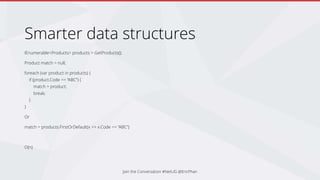
Smarter data structures
IEnumerable<Products> products = GetProducts();
Product match = null;
foreach (var product in products) {
if (product.Code == “ABC”) {
match = product;
break;
}
}
Or
match = products.FirstOrDefault(x => x.Code == “ABC”)
O(n)
Join the Conversation #NetUG @EricPhan
Smarter Data Structures
IDictionary<string, Product> products = GetProducts()
.ToDictionary(x => x.Code, x => x);
Product match = products[“ABC”];
O(1)
Join the Conversation #NetUG @EricPhan
Improving the search
• Searching for keyword “red”
• Check product name, description, attributes like
category, brand and colour
• Can you imagine the SQL?
Join the Conversation #NetUG @EricPhan
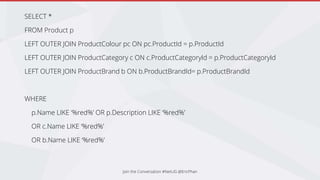
SELECT *
FROM Product p
LEFT OUTER JOIN ProductColour pc ON pc.ProductId = p.ProductId
LEFT OUTER JOIN ProductCategory c ON c.ProductCategoryId = p.ProductCategoryId
LEFT OUTER JOIN ProductBrand b ON b.ProductBrandId= p.ProductBrandId
WHERE
p.Name LIKE ‘%red%’ OR p.Description LIKE ‘%red%’
OR c.Name LIKE ‘%red%’
OR b.Name LIKE ‘%red%’
Improving the search
• You could use SQL Full Text Indexes
Join the Conversation #NetUG @EricPhan
SELECT p.*
FROM CONTAINSTABLE(Products, *, ‘red') pi
INNER JOIN Products p on pi.[KEY] = p.ProductId
LEFT OUTER JOIN ProductColour pc ON pc.ProductId = p.ProductId
INNER JOIN CONTAINSTABLE(ProductColour, *, ‘red') pci ON pci.[KEY] = pc.ProductColourId
LEFT OUTER JOIN ProductCategory c ON c.ProductCategoryId = p.ProductCategoryId
INNER JOIN CONTAINSTABLE(ProductCategory, *, ‘red') ci ON ci.[KEY] = c.ProductCategoryId
LEFT OUTER JOIN ProductBrand b ON b.ProductBrandId= p.ProductBrandId
INNER JOIN CONTAINSTABLE(ProductBrand, *, ‘red') bi ON bi.[KEY] = b. ProductBrandId
Improving the Search
• We opted to use Lucene.NET
• http://stackoverflow.com/questions/37059/lucene-net-and-sql-
server
• http://tilt.carr.no/Post/1/full-text-searching-with-lucene-net
• http://people.apache.org/~mikemccand/lucenebench/
• As a bonus, you can add Solr to Lucene.NET and get a free
REST API for querying your indexes
Join the Conversation #NetUG @EricPhan
Other coding tips
• Consider using parallel task library for large data sets
• https://msdn.microsoft.com/en-us/library/dd997392(v=vs.110).aspx
• http://www.codeproject.com/Articles/362996/Multi-core-
programming-using-Task-Parallel-Library
• Start using the Async Await pattern
• http://www.tugberkugurlu.com/archive/how-and-where-concurrent-
asynchronous-io-with-asp-net-web-api
Join the Conversation #NetUG @EricPhan
Keep up to date
• Move From .NET 4.0 to .NET Framework 4.5 (30%
faster startup, 30% lower memory usage)
• Move to ASP.NET Core
• http://web.ageofascent.com/asp-net-core-exeeds-1-15-million-
requests-12-6-gbps/
Join the Conversation #NetUG @EricPhan
Optimizing .NET
For the shopping site, we added caching and improved
the code behind heavily accessed pages like the
shopping cart.
• Searching for products went from:
• 300-500ms and 300 database reads, 1 insert, 1 update to,
• 28ms and 0 database calls
Join the Conversation #NetUG @EricPhan
Case Study
Optimizing .NET
Optimizing SQL
Optimizing Web Front End
Summary – Lesson’s Learnt
False Start
Optimizing the front end
• All about reducing the time from a user action to
when they see something happen
• First load
• Navigation
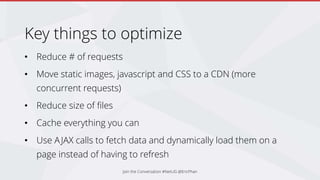
Key things to optimize
• Reduce # of requests
• Move static images, javascript and CSS to a CDN (more
concurrent requests)
• Reduce size of files
• Cache everything you can
• Use AJAX calls to fetch data and dynamically load them on a
page instead of having to refresh
Join the Conversation #NetUG @EricPhan
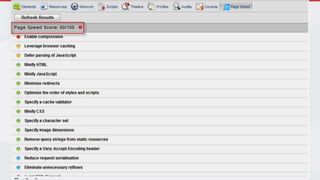
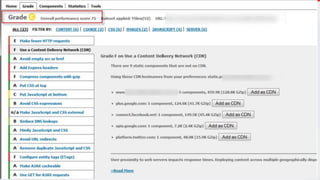
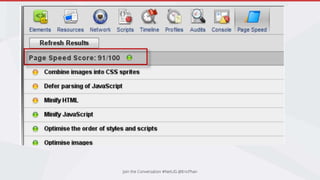
Find bottlenecks
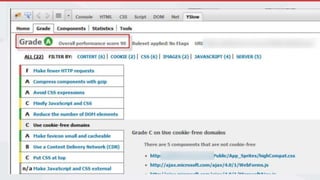
• Google Page Speed (built into chrome)
• Yslow
• Pingdom
Join the Conversation #NetUG @EricPhan
More info
Mads Kristensen
https://channel9.msdn.com/Events/TechEd/NorthAmeri
ca/2014/DEV-B418
Join the Conversation #NetUG @EricPhan
Case Study
Optimizing .NET
Optimizing SQL
Optimizing Web Front End
Summary – Lesson’s Learnt
False Start
Summary
Where did we end up?
Join the Conversation #NetUG @EricPhan
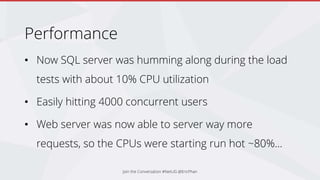
Performance
• Now SQL server was humming along during the load
tests with about 10% CPU utilization
• Easily hitting 4000 concurrent users
• Web server was now able to server way more
requests, so the CPUs were starting run hot ~80%...
Join the Conversation #NetUG @EricPhan
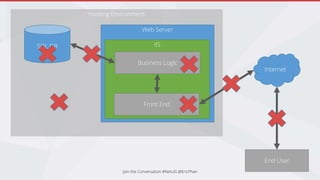
Hosting Environment
Join the Conversation #NetUG @EricPhan
SQL DB
Web Server
IIS
Business Logic
Front End
Internet
End User
Lesson’s learnt
• Know what you’re target is (100 users? 1000 users?)
• Have Load tests setup and ready to go early in the
development cycle
• Ensure the infrastructure is good before starting
• Sometimes you don’t get what you expect (100MB network vs 1000MB)
• Sometimes you can’t see what’s happening (resource contention from
other VMs)
Join the Conversation #NetUG @EricPhan
Lesson’s learnt
• Sometimes throwing more hardware at the problem is a quick and
easy fix
• CPUs running @ 100% update CPU architecture and now 20%
• CPU architecture changes every 2 years
• Caching – cache all the things!
• Session state and View State are bad
• Chatty SQL is bad, sometimes a stored procedure will do the trick
Join the Conversation #NetUG @EricPhan
Lesson’s Learnt
• Don’t launch a new site when you know it’s going to be
smashed
• Give it some breathing room to make adjustments
• Constantly have performance in mind when coding
• Constantly run load tests to know when performance
changes
Join the Conversation #NetUG @EricPhan
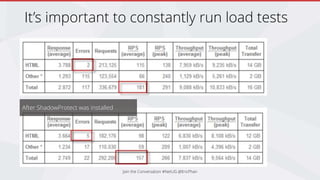
It’s important to constantly run load tests
Join the Conversation #NetUG @EricPhan
After ShadowProtect was installed
Optimizing Database
• Indexes
• Denormalise
• Watch out for parameter sniffing/snooping
• Move complex logic from business layer into stored
procedures
• Good DB practices
Join the Conversation #NetUG @EricPhan
Optimizing Software
• Data Caching
• Caution when using loops
• Parallel
• Move long running tasks to background/other
threads or use async
Join the Conversation #NetUG @EricPhan
Optimizing Web UIs
• Reduce Size
• Compression
• Minification
• Reduce Requests
• Bundling
• Caching
Optimizing Hardware
• Load balancers
• Murphy’s Law
• More RAM
• More CPUs
• Update processor architecture
• Network connections between front end and db
Join the Conversation #NetUG @EricPhan
Preventing this sort of thing
• Monitor & Be Proative!
• Run load tests regularly (daily, weekly, at the end of the
sprint, as part of your CI)
• Load Storm
• Loader.io
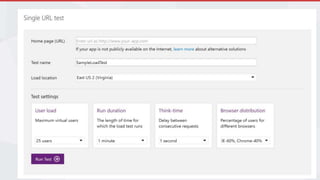
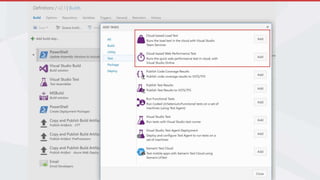
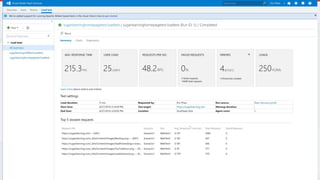
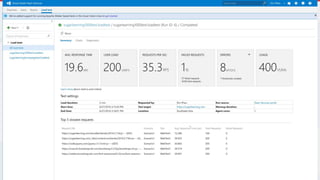
• Azure Load Tests (20,000 free virtual user minutes per month = users x
duration)
Join the Conversation #NetUG @EricPhan
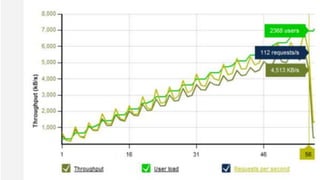
Azure Load Tests
Join the Conversation #NetUG @EricPhan
Preventing this sort of thing
• Use a APM tool see performance in real time!
• New Relic
• Stackify – prefix.io
• App Insights
• In Visual Studio use the Intelli Trace Diagnostic Window while coding
• Make performance part of the DOD
• Look at APM tools before scrum or during the sprint planning to see if there’s an issue
that needs to be added to the backlog
• Gated check-ins that run load tests
Join the Conversation #NetUG @EricPhan
Remember
• Performance tuning is a fine art that you can spend days on
just to improve a few hundred milliseconds of performance.
• Always measure performance before and after
• Weigh up the $$$ sometimes it’s cheaper to throw more
hardware at the problem
• http://www.slideshare.net/EricPhan6/performance-tuning-
61030451
Join the Conversation #NetUG @EricPhan
Stuff for next time
Deep Dive – Optimizing the Front End
Deep Dive – Optimizing SQL Queries
Scaling in Azure
Join the Conversation #NetUG @EricPhan
2 things...
@EricPhan #NetUG
https://www.slideshare.net/EricPhan6/performance-
tuning-61030451
Tweet your favourite tip
Join the Conversation #DevOps @AdamCogan @DanijelMalik @EricPhan
Tweet your favourite video @SSWTV
Check out tv.ssw.com
Join the Conversation #DevOps @AdamCogan @DanijelMalik @EricPhan
Thank you!
info@ssw.com.au
www.ssw.com.au
Sydney | Melbourne | Brisbane | Adelaide

Performance tuning

  • 1.
  • 2.
    Eric Phan |Chief Architect @ SSW Performance Tuning from the Trenches Join the Conversation #NetUG @EricPhan
  • 3.
    Case Study Optimizing .NET OptimizingSQL Optimizing Web Front End Summary – Lesson’s Learnt False Start Agenda
  • 4.
    B.E. - SoftwareEngineering, Certified Scrum Master Eric Phan @EricPhan  Chief Architect @ SSW  MCTS TFS, MCP  Loves playing with the latest technology
  • 5.
    Case Study Optimizing .NET OptimizingSQL Optimizing Web Front End Summary – Lesson’s Learnt False Start Agenda
  • 6.
    Case Study –A large retailer • Problems with their existing online shopping site • Old, outdated, running on classic ASP • Website crashed every time they had sales events • Losing $$$$ • Volume starts increasing in the lead up to Xmas (from about late august) • Physical shop + website closes after Xmas • Massive reopening sale mid January (this is usually when the website crashes) Join the Conversation #NetUG @EricPhan
  • 7.
    Case Study –A large retailer • SSW was engaged to: • Upgrade their site to a later version of their eCommerce platform • Develop a few new features (gift registry, gift cards, integration with their inventory tracking system) • Ensure the site stays up during sales Join the Conversation #NetUG @EricPhan
  • 8.
    Dev dev dev •As Jan approaches, get ready for go live • Sprint just focussed on performance • Run MS web + load tests then optimize Join the Conversation #NetUG @EricPhan
  • 9.
    Join the Conversation#NetUG @EricPhan
  • 10.
    Tweaking performance • Run.NET profilers (ANTS, JetBrains) • Run SQL Profiler • Add caching Join the Conversation #NetUG @EricPhan
  • 11.
    Join the Conversation#NetUG @EricPhan
  • 12.
    Join the Conversation#NetUG @EricPhan Send it live!
  • 13.
    Join the Conversation#NetUG @EricPhan
  • 14.
    Crash and burn •Roll back to old site (still crashes) • Restart IIS constantly • Now that we’ve missed this date, there’s more time to dig deeper Join the Conversation #NetUG @EricPhan
  • 15.
    Post Mortem We concludedthat: • The web tests didn’t accurately reflect how users would use the site • There were a lot more users hitting the site than the initial target (due to it being the big sale) • The tests also didn’t accurately represent the production environment Join the Conversation #NetUG @EricPhan
  • 16.
    Case Study Optimizing .NET OptimizingSQL Optimizing Web Front End Summary – Lesson’s Learnt False Start Agenda
  • 17.
    Then we embarkedon a journey… • Fix tests to more accurately represent the load • Identify bottle necks • Optimize! Join the Conversation #NetUG @EricPhan
  • 18.
    Fixing the test •Start at 200 • Ramp up to 5000 • New goal was 4000 concurrent users • See the fail! Join the Conversation #NetUG @EricPhan
  • 19.
    Identify bottlenecks • Codeprofiling • SQL profiling • Hardware Join the Conversation #NetUG @EricPhan
  • 20.
    No matter whatwe did Join the Conversation #NetUG @EricPhan
  • 21.
    So we suspectedsomething to do with the Hardware and Hosting • Simplified test to pull 1 image from the web server (no DB, no .NET) • Same problem! Join the Conversation #NetUG @EricPhan
  • 22.
    Checking the IISserver • Log onto the IIS server and monitor CPU • Start Performance Monitor and add stats for: • Users • Sessions • Throughput • When we hit the 5 minute fail mark… • No users, no session, no throughput logged in IIS… Join the Conversation #NetUG @EricPhan
  • 23.
    Cause? • DDOS protection Jointhe Conversation #NetUG @EricPhan
  • 24.
    Join the Conversation#NetUG @EricPhan
  • 25.
    Rerun Load Tests •This time, instead of failing within 5 mins, • We are getting to 40mins before failing • Log another ticket with the host Join the Conversation #NetUG @EricPhan
  • 26.
    Join the Conversation#NetUG @EricPhan
  • 27.
  • 28.
    Join the Conversation#NetUG @EricPhan What happened here?
  • 29.
    Join the Conversation#NetUG @EricPhan
  • 30.
    Running the propertests (not the single image) Now that the infrastructure issues have been sorted we can run the actually test scripts • Search for products • Add 10 to shopping cart • Go through checkout process Join the Conversation #NetUG @EricPhan
  • 31.
    Join the Conversation#NetUG @EricPhan
  • 32.
    So this time.. •CPU + RAM are good on DB + IIS • But page still aren’t being served? Join the Conversation #NetUG @EricPhan
  • 33.
    Join the Conversation#NetUG @EricPhan
  • 34.
    Network saturation • Hittingthe max capacity of the network cards between the web and SQL server • Switching to gigabit fixed the issue • But it’s still a lot of chatter! Join the Conversation #NetUG @EricPhan
  • 35.
    Identifying Bottlenecks • Nowthat we know our infrastructure is good…. • How do we find where our app is slow? Join the Conversation #NetUG @EricPhan
  • 36.
    Identifying Bottlenecks • Userfeedback • Glimpse • IntelliTrace • APM tools • Profiling Join the Conversation #NetUG @EricPhan
  • 37.
    Glimpse • Install-Package Glimpse •F5 • ~/glimpse.axd • g Join the Conversation #NetUG @EricPhan
  • 38.
    Join the Conversation#NetUG @EricPhan
  • 39.
    Join the Conversation#NetUG @EricPhan
  • 40.
    Join the Conversation#NetUG @EricPhan
  • 41.
    Join the Conversation#NetUG @EricPhan
  • 42.
    Intelli Trace • Goodto quickly eyeball what’s going on under the covers Join the Conversation #NetUG @EricPhan
  • 43.
    Join the Conversation#NetUG @EricPhan
  • 44.
    Join the Conversation#NetUG @EricPhan
  • 45.
    Join the Conversation#NetUG @EricPhan
  • 46.
  • 47.
    Join the Conversation#NetUG @EricPhan
  • 48.
    Case Study Optimizing .NET OptimizingSQL Optimizing Web Front End Summary – Lesson’s Learnt False Start Agenda
  • 49.
    Optimize SQL 1. RunSQL Profiler 2. Use the Duration template 3. Identify slow running queries Join the Conversation #NetUG @EricPhan
  • 50.
    Join the Conversation#NetUG @EricPhan
  • 51.
    Analyse profile results 1.Look for anything that takes over 100ms to execute 2. Drill into each query and manually run it in SSMS 1. Use the Execution Plans and Client statistics to help 3. See if you can speed it up by 1. Adding an index 2. Rewriting the query Join the Conversation #NetUG @EricPhan
  • 52.
    Remember this whentuning SQL CHECKPOINT; GO DBCC DROPCLEANBUFFERS; GO Join the Conversation #NetUG @EricPhan
  • 53.
    Join the Conversation#NetUG @EricPhan
  • 54.
    Join the Conversation#NetUG @EricPhan
  • 55.
    SQL Execution Plans Tellsyou where the bottlenecks are • Fat pipes • Scan vs Seek • Estimated Rows vs Actual Rows • Warnings Join the Conversation #NetUG @EricPhan
  • 56.
    Execution Plan Resources •https://www.simple- talk.com/sql/performance/execution-plan-basics/ • https://www.simple-talk.com/sql/performance/why- developers-need-to-understand-execution-plans/ Join the Conversation #NetUG @EricPhan
  • 57.
    Other things tolook out for… 1. Excessive calls • SQL profiler showed that to load the search page, it would make 300+ SQL calls 2. Stuff that doesn’t make sense • What’s worse is that the search triggered 1 insert and 1 update • This was one of the causes of the high network traffic Join the Conversation #NetUG @EricPhan
  • 58.
    Parameter Sniffing • execprocGetComplicatedStuff 1 • exec procGetComplicatedStuff 15 • Execution plan is cached • Problem when there is uneven distribution of results based on the parameters • https://www.brentozar.com/blitzcache/parameter-sniffing/ • https://www.brentozar.com/archive/2013/11/why-parameter-sniffing-can-slow-down-queries-video/ • https://www.brentozar.com/archive/2013/06/the-elephant-and-the-mouse-or-parameter-sniffing-in-sql-server/ Join the Conversation #NetUG @EricPhan
  • 59.
    Indexes and IndexUsage https://www.simple-talk.com/sql/performance/tune- your-indexing-strategy-with-sql-server-dmvs/ Join the Conversation #NetUG @EricPhan
  • 60.
    Simulating live traffic •Use profiler to capture a trace for a period of time that represents a typical usage • Run the trace through the Database Tuning advisor • Recommended indexes • Recommended Statistics Join the Conversation #NetUG @EricPhan
  • 61.
    Join the Conversation#NetUG @EricPhan
  • 62.
    DB Optimization Summary Findbottlenecks: • SQL Profiler Fix bottlenecks: • Execution Plans • Database Tuning Advisor Join the Conversation #NetUG @EricPhan
  • 63.
    Optimize Queries • SELECTonly the columns you need • Use JOINs effectively • AVOID cursors like the plague • Watch for Parameter Sniffing • Keep database statistics up to date Join the Conversation #NetUG @EricPhan
  • 64.
    Other tips • Denomalizeheavily accessed tables • SSDs • More RAM • Separate physical drives for data and logs Join the Conversation #NetUG @EricPhan
  • 65.
    Join the Conversation#NetUG @EricPhan
  • 66.
    Case Study Optimizing .NET OptimizingSQL Optimizing Web Front End Summary – Lesson’s Learnt False Start
  • 67.
    Finding bottlenecks • Useprofiling tools • RedGate ANTZ • Telerik JustTrace • Visual Studio Performance Wizard • Use APM tools on production • NewRelic • App Insights
  • 68.
    Find the hotspotswith Just Trace Drill into the code identified by the profiling tool Join the Conversation #NetUG @EricPhan
  • 69.
    Join the Conversation#NetUG @EricPhan
  • 70.
    Join the Conversation#NetUG @EricPhan
  • 71.
    Join the Conversation#NetUG @EricPhan
  • 72.
    Bad Example foreach (varo in Obligations) { foreach (var m in o.ObligationGroup.ObligationGroupMembers) { Console.WriteLine(o.ObligationGroup.GroupName + " - " + m.OrganisationEntityId); } } Join the Conversation #NetUG @EricPhan
  • 73.
    What’s wrong withthis code? Join the Conversation #NetUG @EricPhan
  • 74.
    Join the Conversation#NetUG @EricPhan
  • 75.
    Watch out forLINQ Queries • Easy to write • Generates some nasty SQL • Watch out for loops • Does a SELECT * if you’re not projecting Join the Conversation #NetUG @EricPhan
  • 76.
    Fixed var groupMembers =Obligations.Select(x => new { GroupName = x.ObligationGroup.GroupName, EntityId = x.ObligationGroup.ObligationGroupMembers .Select(m => m.OrganisationEntityId) }); foreach (var m in groupMembers) { Console.WriteLine(m.GroupName + " - " + m.EntityId); } Join the Conversation #NetUG @EricPhan
  • 77.
    Join the Conversation#NetUG @EricPhan
  • 78.
  • 79.
    Caching • Cache datathat doesn’t change often • E.g. Product descriptions, product categories, menus • Expire the cache when the data changes • Why cache? • Reduce calls to SQL • Reduce CPU used for complicated calculations that don’t change often • (It’s like giving your application a cheat sheet with the answers) Join the Conversation #NetUG @EricPhan
  • 80.
    Output Caching • Youcan also cache entire pages if they are static by using the [OutputCache] attribute • http://www.asp.net/mvc/overview/older-versions- 1/controllers-and-routing/improving-performance- with-output-caching-cs Join the Conversation #NetUG @EricPhan
  • 81.
    Smarter data structures IEnumerable<Products>products = GetProducts(); Product match = null; foreach (var product in products) { if (product.Code == “ABC”) { match = product; break; } } Or match = products.FirstOrDefault(x => x.Code == “ABC”) O(n) Join the Conversation #NetUG @EricPhan
  • 82.
    Smarter Data Structures IDictionary<string,Product> products = GetProducts() .ToDictionary(x => x.Code, x => x); Product match = products[“ABC”]; O(1) Join the Conversation #NetUG @EricPhan
  • 83.
    Improving the search •Searching for keyword “red” • Check product name, description, attributes like category, brand and colour • Can you imagine the SQL? Join the Conversation #NetUG @EricPhan
  • 84.
    Join the Conversation#NetUG @EricPhan SELECT * FROM Product p LEFT OUTER JOIN ProductColour pc ON pc.ProductId = p.ProductId LEFT OUTER JOIN ProductCategory c ON c.ProductCategoryId = p.ProductCategoryId LEFT OUTER JOIN ProductBrand b ON b.ProductBrandId= p.ProductBrandId WHERE p.Name LIKE ‘%red%’ OR p.Description LIKE ‘%red%’ OR c.Name LIKE ‘%red%’ OR b.Name LIKE ‘%red%’
  • 85.
    Improving the search •You could use SQL Full Text Indexes Join the Conversation #NetUG @EricPhan
  • 86.
    Join the Conversation#NetUG @EricPhan SELECT p.* FROM CONTAINSTABLE(Products, *, ‘red') pi INNER JOIN Products p on pi.[KEY] = p.ProductId LEFT OUTER JOIN ProductColour pc ON pc.ProductId = p.ProductId INNER JOIN CONTAINSTABLE(ProductColour, *, ‘red') pci ON pci.[KEY] = pc.ProductColourId LEFT OUTER JOIN ProductCategory c ON c.ProductCategoryId = p.ProductCategoryId INNER JOIN CONTAINSTABLE(ProductCategory, *, ‘red') ci ON ci.[KEY] = c.ProductCategoryId LEFT OUTER JOIN ProductBrand b ON b.ProductBrandId= p.ProductBrandId INNER JOIN CONTAINSTABLE(ProductBrand, *, ‘red') bi ON bi.[KEY] = b. ProductBrandId
  • 87.
    Improving the Search •We opted to use Lucene.NET • http://stackoverflow.com/questions/37059/lucene-net-and-sql- server • http://tilt.carr.no/Post/1/full-text-searching-with-lucene-net • http://people.apache.org/~mikemccand/lucenebench/ • As a bonus, you can add Solr to Lucene.NET and get a free REST API for querying your indexes Join the Conversation #NetUG @EricPhan
  • 88.
    Other coding tips •Consider using parallel task library for large data sets • https://msdn.microsoft.com/en-us/library/dd997392(v=vs.110).aspx • http://www.codeproject.com/Articles/362996/Multi-core- programming-using-Task-Parallel-Library • Start using the Async Await pattern • http://www.tugberkugurlu.com/archive/how-and-where-concurrent- asynchronous-io-with-asp-net-web-api Join the Conversation #NetUG @EricPhan
  • 89.
    Keep up todate • Move From .NET 4.0 to .NET Framework 4.5 (30% faster startup, 30% lower memory usage) • Move to ASP.NET Core • http://web.ageofascent.com/asp-net-core-exeeds-1-15-million- requests-12-6-gbps/ Join the Conversation #NetUG @EricPhan
  • 90.
    Optimizing .NET For theshopping site, we added caching and improved the code behind heavily accessed pages like the shopping cart. • Searching for products went from: • 300-500ms and 300 database reads, 1 insert, 1 update to, • 28ms and 0 database calls Join the Conversation #NetUG @EricPhan
  • 91.
    Case Study Optimizing .NET OptimizingSQL Optimizing Web Front End Summary – Lesson’s Learnt False Start
  • 92.
    Optimizing the frontend • All about reducing the time from a user action to when they see something happen • First load • Navigation
  • 93.
    Key things tooptimize • Reduce # of requests • Move static images, javascript and CSS to a CDN (more concurrent requests) • Reduce size of files • Cache everything you can • Use AJAX calls to fetch data and dynamically load them on a page instead of having to refresh Join the Conversation #NetUG @EricPhan
  • 94.
    Find bottlenecks • GooglePage Speed (built into chrome) • Yslow • Pingdom Join the Conversation #NetUG @EricPhan
  • 95.
    Join the Conversation#NetUG @EricPhan
  • 96.
    Join the Conversation#NetUG @EricPhan
  • 97.
    Join the Conversation#NetUG @EricPhan
  • 98.
    Join the Conversation#NetUG @EricPhan
  • 99.
  • 100.
    Case Study Optimizing .NET OptimizingSQL Optimizing Web Front End Summary – Lesson’s Learnt False Start Summary
  • 101.
    Where did weend up? Join the Conversation #NetUG @EricPhan
  • 102.
    Join the Conversation#NetUG @EricPhan
  • 103.
    Performance • Now SQLserver was humming along during the load tests with about 10% CPU utilization • Easily hitting 4000 concurrent users • Web server was now able to server way more requests, so the CPUs were starting run hot ~80%... Join the Conversation #NetUG @EricPhan
  • 104.
    Hosting Environment Join theConversation #NetUG @EricPhan SQL DB Web Server IIS Business Logic Front End Internet End User
  • 105.
    Lesson’s learnt • Knowwhat you’re target is (100 users? 1000 users?) • Have Load tests setup and ready to go early in the development cycle • Ensure the infrastructure is good before starting • Sometimes you don’t get what you expect (100MB network vs 1000MB) • Sometimes you can’t see what’s happening (resource contention from other VMs) Join the Conversation #NetUG @EricPhan
  • 106.
    Lesson’s learnt • Sometimesthrowing more hardware at the problem is a quick and easy fix • CPUs running @ 100% update CPU architecture and now 20% • CPU architecture changes every 2 years • Caching – cache all the things! • Session state and View State are bad • Chatty SQL is bad, sometimes a stored procedure will do the trick Join the Conversation #NetUG @EricPhan
  • 107.
    Lesson’s Learnt • Don’tlaunch a new site when you know it’s going to be smashed • Give it some breathing room to make adjustments • Constantly have performance in mind when coding • Constantly run load tests to know when performance changes Join the Conversation #NetUG @EricPhan
  • 108.
    It’s important toconstantly run load tests Join the Conversation #NetUG @EricPhan After ShadowProtect was installed
  • 109.
    Optimizing Database • Indexes •Denormalise • Watch out for parameter sniffing/snooping • Move complex logic from business layer into stored procedures • Good DB practices Join the Conversation #NetUG @EricPhan
  • 110.
    Optimizing Software • DataCaching • Caution when using loops • Parallel • Move long running tasks to background/other threads or use async Join the Conversation #NetUG @EricPhan
  • 111.
    Optimizing Web UIs •Reduce Size • Compression • Minification • Reduce Requests • Bundling • Caching
  • 112.
    Optimizing Hardware • Loadbalancers • Murphy’s Law • More RAM • More CPUs • Update processor architecture • Network connections between front end and db Join the Conversation #NetUG @EricPhan
  • 113.
    Preventing this sortof thing • Monitor & Be Proative! • Run load tests regularly (daily, weekly, at the end of the sprint, as part of your CI) • Load Storm • Loader.io • Azure Load Tests (20,000 free virtual user minutes per month = users x duration) Join the Conversation #NetUG @EricPhan
  • 114.
    Azure Load Tests Jointhe Conversation #NetUG @EricPhan
  • 115.
    Join the Conversation#NetUG @EricPhan
  • 116.
    Join the Conversation#NetUG @EricPhan
  • 117.
    Join the Conversation#NetUG @EricPhan
  • 118.
    Preventing this sortof thing • Use a APM tool see performance in real time! • New Relic • Stackify – prefix.io • App Insights • In Visual Studio use the Intelli Trace Diagnostic Window while coding • Make performance part of the DOD • Look at APM tools before scrum or during the sprint planning to see if there’s an issue that needs to be added to the backlog • Gated check-ins that run load tests Join the Conversation #NetUG @EricPhan
  • 119.
    Remember • Performance tuningis a fine art that you can spend days on just to improve a few hundred milliseconds of performance. • Always measure performance before and after • Weigh up the $$$ sometimes it’s cheaper to throw more hardware at the problem • http://www.slideshare.net/EricPhan6/performance-tuning- 61030451 Join the Conversation #NetUG @EricPhan
  • 120.
    Stuff for nexttime Deep Dive – Optimizing the Front End Deep Dive – Optimizing SQL Queries Scaling in Azure Join the Conversation #NetUG @EricPhan
  • 121.
  • 122.
    @EricPhan #NetUG https://www.slideshare.net/EricPhan6/performance- tuning-61030451 Tweet yourfavourite tip Join the Conversation #DevOps @AdamCogan @DanijelMalik @EricPhan
  • 123.
    Tweet your favouritevideo @SSWTV Check out tv.ssw.com Join the Conversation #DevOps @AdamCogan @DanijelMalik @EricPhan
  • 124.

Editor's Notes

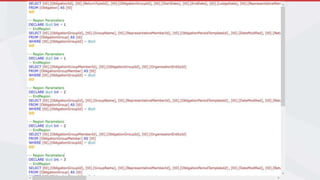
  • #51 exec sp_executesql N'SELECT [Project1].[ObligationId] AS [ObligationId], [Project1].[ObligationGroupMemberId] AS [ObligationGroupMemberId], [Project1].[ObligationGroupId] AS [ObligationGroupId], [Project1].[OrganisationEntityId] AS [OrganisationEntityId], [Project1].[Code] AS [Code], [Project1].[Name] AS [Name], [Project1].[C1] AS [C1], [Project1].[C2] AS [C2], [Project1].[Id] AS [Id], [Project1].[Email] AS [Email], [Project1].[FullName] AS [FullName], [Project1].[Role] AS [Role], [Project1].[FinalizationDate] AS [FinalizationDate], [Project1].[Username] AS [Username] FROM ( SELECT [Extent1].[ObligationId] AS [ObligationId], [Join1].[ObligationGroupMemberId] AS [ObligationGroupMemberId], [Join1].[ObligationGroupId] AS [ObligationGroupId], [Join1].[OrganisationEntityId1] AS [OrganisationEntityId], [Join1].[Name] AS [Name], [Join1].[Code] AS [Code], cast(1 as bit) AS [C1], [Join3].[Id1] AS [Id], [Join3].[Username] AS [Username], [Join3].[FullName] AS [FullName], [Join3].[Email] AS [Email], [Join3].[Role] AS [Role], [Join3].[FinalizationDate] AS [FinalizationDate], CASE WHEN ([Join3].[Id1] IS NULL) THEN CAST(NULL AS int) ELSE 1 END AS [C2] FROM [dbo].[Obligation] AS [Extent1] INNER JOIN (SELECT [Extent2].[ObligationGroupMemberId] AS [ObligationGroupMemberId], [Extent2].[ObligationGroupId] AS [ObligationGroupId], [Extent3].[OrganisationEntityId] AS [OrganisationEntityId1], [Extent3].[Name] AS [Name], [Extent3].[Code] AS [Code] FROM [dbo].[ObligationGroupMember] AS [Extent2] INNER JOIN [dbo].[OrganisationEntity] AS [Extent3] ON [Extent2].[OrganisationEntityId] = [Extent3].[OrganisationEntityId] ) AS [Join1] ON [Extent1].[ObligationGroupId] = [Join1].[ObligationGroupId] LEFT OUTER JOIN (SELECT [Extent4].[Id] AS [Id1], [Extent4].[ObligationId] AS [ObligationId], [Extent4].[OrganisationEntityId] AS [OrganisationEntityId], [Extent4].[OrganisationHierarchyId] AS [OrganisationHierarchyId], [Extent5].[Username] AS [Username], [Extent5].[FullName] AS [FullName], [Extent5].[Email] AS [Email], [Extent5].[Role] AS [Role], [Extent5].[FinalizationDate] AS [FinalizationDate] FROM [dbo].[ObligationFinalizationByHierarchies] AS [Extent4] INNER JOIN [dbo].[ObligationFinalizationByHierarchyUsers] AS [Extent5] ON [Extent4].[Id] = [Extent5].[ObligationFinalizationByHierarchyId] ) AS [Join3] ON ([Join1].[OrganisationEntityId1] = [Join3].[OrganisationEntityId]) AND ([Join3].[ObligationId] = @p__linq__1) AND ([Join3].[OrganisationHierarchyId] IS NULL) WHERE [Extent1].[ObligationId] = @p__linq__0 ) AS [Project1] ORDER BY [Project1].[ObligationId] ASC, [Project1].[ObligationGroupMemberId] ASC, [Project1].[ObligationGroupId] ASC, [Project1].[OrganisationEntityId] ASC, [Project1].[C2] ASC',N'@p__linq__1 int,@p__linq__0 int',@p__linq__1=64,@p__linq__0=64
  • #53 exec procCleanGhostTestResults
  • #54 exec procCleanGhostTestResults CREATE NONCLUSTERED INDEX IX_1 ON [dbo].[TestGroupResult] ([Status]) INCLUDE ([Id], [DateCreated]) CREATE NONCLUSTERED INDEX IX_2 ON [dbo].[TestResultComment] ([TestResultId]) INCLUDE ([Id]) CREATE NONCLUSTERED INDEX IX_3 ON [dbo].[TestResult] ([TestType]) INCLUDE ([Id],[TestId]) DROP INDEX IX_3 ON [dbo].[TestResult] DROP INDEX IX_2 ON [TestResultComment] DROP INDEX IX_1 ON [TestGroupResult]
  • #84 SELECT * FROM Product p LEFT OUTER JOIN ProductColour pc ON pc.ProductId = p.ProductId LEFT OUTER JOIN ProductCategory c ON c.ProductCategoryId = p.ProductCategoryId LEFT OUTER JOIN ProductBrand b ON b.ProductBrandId= p.ProductBrandId WHERE p.Name LIKE ‘%red%’ OR p.Description LIKE ‘%red%’ OR c.Name LIKE ‘%red%’ OR b.Name LIKE ‘%red%’