Avoiding software fails
Few metrics to improve application reliability
slawomir.michalik@omnilogy.pl
Poznań, 2017/01/31
2 COMPANY CONFIDENTIAL – DO NOT DISTRIBUTE #Dynatrace
What to do with the fastest car …
3 COMPANY CONFIDENTIAL – DO NOT DISTRIBUTE #Dynatrace
… if it fails to reach the finish line
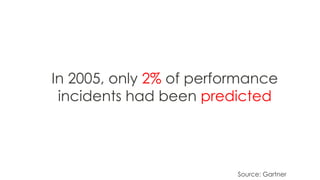
In 2005, only 2% of performance
incidents had been predicted
Source: Gartner
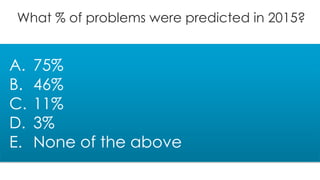
What % of problems were predicted in 2015?
A. 75%
B. 46%
C. 11%
D. 3%
E. None of the above
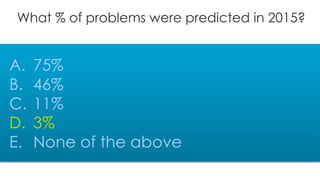
What % of problems were predicted in 2015?
A. 75%
B. 46%
C. 11%
D. 3%
E. None of the above
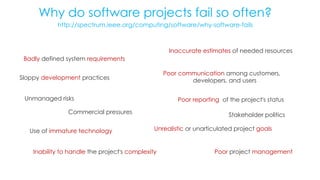
Why do software projects fail so often?
http://spectrum.ieee.org/computing/software/why-software-fails
Unrealistic or unarticulated project goals
Inaccurate estimates of needed resources
Badly defined system requirements
Poor reporting of the project's statusUnmanaged risks
Poor communication among customers,
developers, and users
Commercial pressures Stakeholder politics
Poor project management
Sloppy development practices
Inability to handle the project's complexity
Use of immature technology
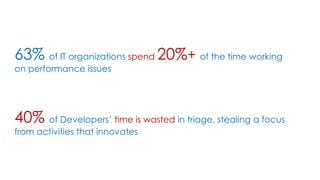
Performance issues increase costs
63% of IT organizations spend 20%+ of the time working
on performance issues
Inability to Innovate
40% of Developers’ time is wasted in triage, stealing a focus
from activities that innovates
The good thing is
80:20
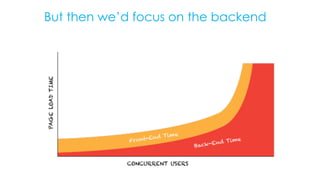
Lets start on the frontend
80/20 rule from Steve
But then we’d focus on the backend
5 Use cases
&
metrics that really pay off…
#1
Pushing without a Plan
Web Site: this shoudn’t happen
Some Ad Company during American Super-Bowl
Total size ~ 20MB
434 Resources in on that page
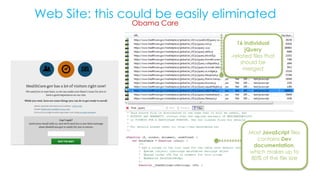
Web Site: this could be easily eliminated
Obama Care
16 individual
jQuery
-related files that
should be
merged
Most JavaScript files
contains Dev
documentation,
which makes up to
80% of the file size
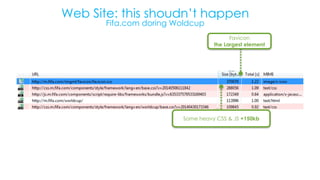
Web Site: this shoudn’t happen
Fifa.com doring Woldcup
Favicon
the Largest element
Some heavy CSS & JS +150kb
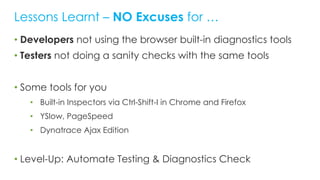
• Developers not using the browser built-in diagnostics tools
• Testers not doing a sanity checks with the same tools
• Some tools for you
• Built-in Inspectors via Ctrl-Shift-I in Chrome and Firefox
• YSlow, PageSpeed
• Dynatrace Ajax Edition
• Level-Up: Automate Testing & Diagnostics Check
Lessons Learnt – NO Excuses for …
# Resources
# of Domains
Usage of CDNs
Page Load & Size
#2
Not every Architect makes
good decisions
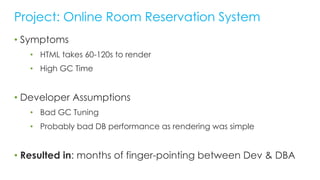
• Symptoms
• HTML takes 60-120s to render
• High GC Time
• Developer Assumptions
• Bad GC Tuning
• Probably bad DB performance as rendering was simple
• Resulted in: months of finger-pointing between Dev & DBA
Project: Online Room Reservation System
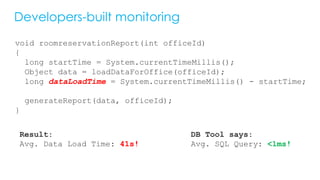
Developers-built monitoring
void roomreservationReport(int officeId)
{
long startTime = System.currentTimeMillis();
Object data = loadDataForOffice(officeId);
long dataLoadTime = System.currentTimeMillis() - startTime;
generateReport(data, officeId);
}
Result:
Avg. Data Load Time: 41s!
DB Tool says:
Avg. SQL Query: <1ms!
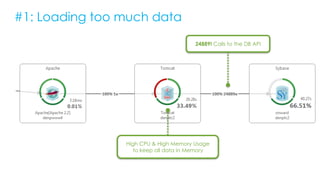
#1: Loading too much data
24889! Calls to the DB API
High CPU & High Memory Usage
to keep all data in Memory
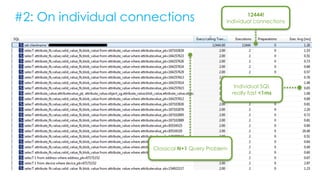
#2: On individual connections 12444!
individual connections
Individual SQL
really fast <1ms
Classical N+1 Query Problem
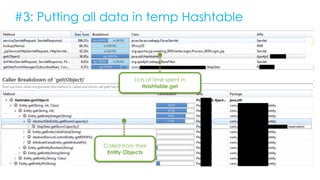
#3: Putting all data in temp Hashtable
Lots of time spent in
Hashtable.get
Called from their
Entity Objects
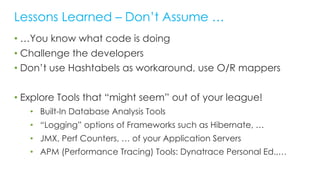
• …You know what code is doing
• Challenge the developers
• Don’t use Hashtabels as workaround, use O/R mappers
• Explore Tools that “might seem” out of your league!
• Built-In Database Analysis Tools
• “Logging” options of Frameworks such as Hibernate, …
• JMX, Perf Counters, … of your Application Servers
• APM (Performance Tracing) Tools: Dynatrace Personal Ed.,…
Lessons Learned – Don’t Assume …
# SQL Executions
# of Same SQLs
Conn. Acquisition Time
Root Cause: Deployment Considerations
Log Service provides a Synchronized File
across all JVMs
1M Log exceptions
over 30 min
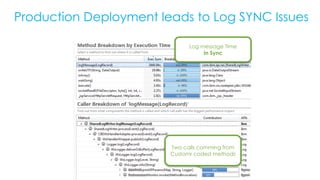
Production Deployment leads to Log SYNC Issues
Log message Time
In Sync
Two calls comming from
Customr coded methods
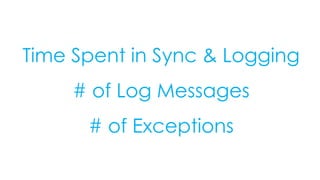
Time Spent in Sync & Logging
# of Log Messages
# of Exceptions
#3
Deployment Gone Bad
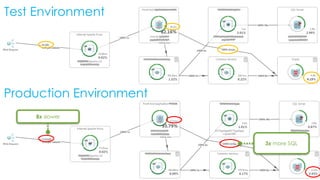
Test Environment
Production Environment
8x slower
3x more SQL
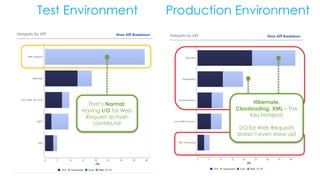
Test Environment Production Environment
That’s Normal:
Having I/O for Web
Request as main
contributor
Hibernate,
Classloading, XML – The
Key Hotspots
I/O for Web Requests
doesn’t even show up!
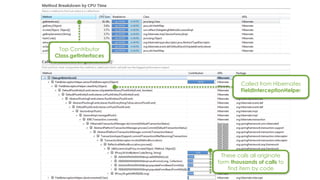
These calls all originate
form thousands of calls to
find item by code
Top Contributor
Class.getInterfaces
Called from Hibernates
FieldInterceptionHelper
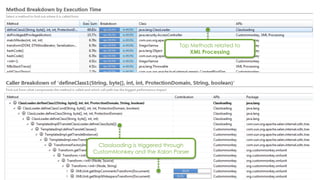
Top Methods related to
XML Processing
Classloading is triggered through
CustomMonkey and the Xalan Parser
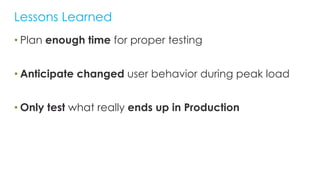
• Plan enough time for proper testing
• Anticipate changed user behavior during peak load
• Only test what really ends up in Production
Lessons Learned
Time Spent in API
# Calls to API
#4
Incorrect Sizing of Pools and
Queues
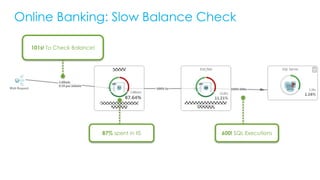
Online Banking: Slow Balance Check
101s! To Check Balance!
600! SQL Executions87% spent in IIS
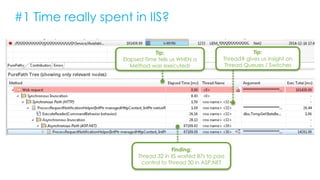
#1 Time really spent in IIS?
Tip:
Elapsed Time tells us WHEN a
Method was executed!
Tip:
Thread# gives us insight on
Thread Queues / Switches
Finding:
Thread 32 in IIS waited 87s to pass
control to Thread 30 in ASP.NET
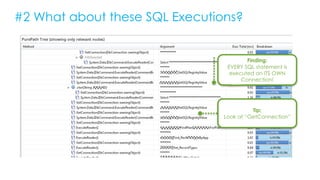
#2 What about these SQL Executions?
Finding:
EVERY SQL statement is
executed on ITS OWN
Connection!
Tip:
Look at “GetConnection”
#2 SQL Executions! continued …
#1: Same SQL is
executed 67! times
#2: NO PREPARATION
because everything
executed on new
Connection
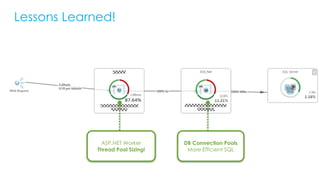
Lessons Learned!
ASP.NET Worker
Thread Pool Sizing!
DB Connection Pools
More Efficient SQL
Idle vs. Busy Threads
# SQLs / Request
# GetConnection
%CPU Starvation
#5
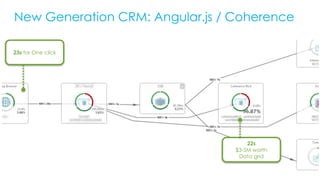
Do know what you Test
23s for One click
22s
$3-5M worth
Data grid
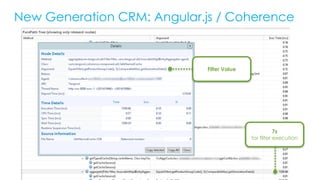
New Generation CRM: Angular.js / Coherence
7s
for filter execution
Filter Value
Talk to Architects, and
Trace argument’s values 4 performance sensitive methods
# of unique invocations
Response Time
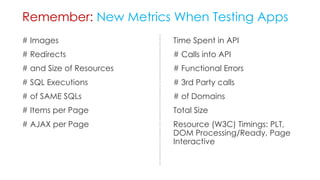
# Images
# Redirects
# and Size of Resources
# SQL Executions
# of SAME SQLs
# Items per Page
# AJAX per Page
Remember: New Metrics When Testing Apps
Time Spent in API
# Calls into API
# Functional Errors
# 3rd Party calls
# of Domains
Total Size
Resource (W3C) Timings: PLT,
DOM Processing/Ready, Page
Interactive
Online Performance Clinics
Every week @
bit.ly/onlineperfclinic
bit.ly/dttrial
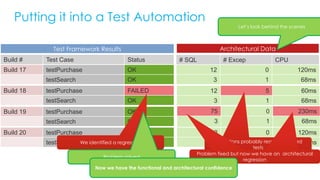
Putting it into a Test Automation
12 0 120ms
3 1 68ms
Build 20 testPurchase OK
testSearch OK
Build 17 testPurchase OK
testSearch OK
Build 18 testPurchase FAILED
testSearch OK
Build 19 testPurchase OK
testSearch OK
Build # Test Case Status # SQL # Excep CPU
12 0 120ms
3 1 68ms
12 5 60ms
3 1 68ms
75 0 230ms
3 1 68ms
Test Framework Results Architectural Data
We identified a regression
Problem solved
Exceptions probably reason for failed
tests
Problem fixed but now we have an architectural
regression
Problem fixed but now we have an architectural
regression
Now we have the functional and architectural confidence
Let’s look behind the scenes

JUG Poznan - 2017.01.31

  • 1.
    Avoiding software fails Fewmetrics to improve application reliability slawomir.michalik@omnilogy.pl Poznań, 2017/01/31
  • 2.
    2 COMPANY CONFIDENTIAL– DO NOT DISTRIBUTE #Dynatrace What to do with the fastest car …
  • 3.
    3 COMPANY CONFIDENTIAL– DO NOT DISTRIBUTE #Dynatrace … if it fails to reach the finish line
  • 4.
    In 2005, only2% of performance incidents had been predicted Source: Gartner
  • 5.
    What % ofproblems were predicted in 2015? A. 75% B. 46% C. 11% D. 3% E. None of the above
  • 6.
    What % ofproblems were predicted in 2015? A. 75% B. 46% C. 11% D. 3% E. None of the above
  • 7.
    Why do softwareprojects fail so often? http://spectrum.ieee.org/computing/software/why-software-fails Unrealistic or unarticulated project goals Inaccurate estimates of needed resources Badly defined system requirements Poor reporting of the project's statusUnmanaged risks Poor communication among customers, developers, and users Commercial pressures Stakeholder politics Poor project management Sloppy development practices Inability to handle the project's complexity Use of immature technology
  • 8.
    Performance issues increasecosts 63% of IT organizations spend 20%+ of the time working on performance issues Inability to Innovate 40% of Developers’ time is wasted in triage, stealing a focus from activities that innovates
  • 9.
  • 10.
    Lets start onthe frontend 80/20 rule from Steve
  • 11.
    But then we’dfocus on the backend
  • 12.
    5 Use cases & metricsthat really pay off…
  • 13.
  • 14.
    Web Site: thisshoudn’t happen Some Ad Company during American Super-Bowl Total size ~ 20MB 434 Resources in on that page
  • 15.
    Web Site: thiscould be easily eliminated Obama Care 16 individual jQuery -related files that should be merged Most JavaScript files contains Dev documentation, which makes up to 80% of the file size
  • 16.
    Web Site: thisshoudn’t happen Fifa.com doring Woldcup Favicon the Largest element Some heavy CSS & JS +150kb
  • 17.
    • Developers notusing the browser built-in diagnostics tools • Testers not doing a sanity checks with the same tools • Some tools for you • Built-in Inspectors via Ctrl-Shift-I in Chrome and Firefox • YSlow, PageSpeed • Dynatrace Ajax Edition • Level-Up: Automate Testing & Diagnostics Check Lessons Learnt – NO Excuses for …
  • 18.
    # Resources # ofDomains Usage of CDNs Page Load & Size
  • 19.
    #2 Not every Architectmakes good decisions
  • 20.
    • Symptoms • HTMLtakes 60-120s to render • High GC Time • Developer Assumptions • Bad GC Tuning • Probably bad DB performance as rendering was simple • Resulted in: months of finger-pointing between Dev & DBA Project: Online Room Reservation System
  • 21.
    Developers-built monitoring void roomreservationReport(intofficeId) { long startTime = System.currentTimeMillis(); Object data = loadDataForOffice(officeId); long dataLoadTime = System.currentTimeMillis() - startTime; generateReport(data, officeId); } Result: Avg. Data Load Time: 41s! DB Tool says: Avg. SQL Query: <1ms!
  • 23.
    #1: Loading toomuch data 24889! Calls to the DB API High CPU & High Memory Usage to keep all data in Memory
  • 24.
    #2: On individualconnections 12444! individual connections Individual SQL really fast <1ms Classical N+1 Query Problem
  • 25.
    #3: Putting alldata in temp Hashtable Lots of time spent in Hashtable.get Called from their Entity Objects
  • 26.
    • …You knowwhat code is doing • Challenge the developers • Don’t use Hashtabels as workaround, use O/R mappers • Explore Tools that “might seem” out of your league! • Built-In Database Analysis Tools • “Logging” options of Frameworks such as Hibernate, … • JMX, Perf Counters, … of your Application Servers • APM (Performance Tracing) Tools: Dynatrace Personal Ed.,… Lessons Learned – Don’t Assume …
  • 27.
    # SQL Executions #of Same SQLs Conn. Acquisition Time
  • 28.
    Root Cause: DeploymentConsiderations Log Service provides a Synchronized File across all JVMs 1M Log exceptions over 30 min
  • 29.
    Production Deployment leadsto Log SYNC Issues Log message Time In Sync Two calls comming from Customr coded methods
  • 30.
    Time Spent inSync & Logging # of Log Messages # of Exceptions
  • 31.
  • 32.
  • 33.
    Test Environment ProductionEnvironment That’s Normal: Having I/O for Web Request as main contributor Hibernate, Classloading, XML – The Key Hotspots I/O for Web Requests doesn’t even show up!
  • 34.
    These calls alloriginate form thousands of calls to find item by code Top Contributor Class.getInterfaces Called from Hibernates FieldInterceptionHelper
  • 35.
    Top Methods relatedto XML Processing Classloading is triggered through CustomMonkey and the Xalan Parser
  • 36.
    • Plan enoughtime for proper testing • Anticipate changed user behavior during peak load • Only test what really ends up in Production Lessons Learned
  • 37.
    Time Spent inAPI # Calls to API
  • 38.
    #4 Incorrect Sizing ofPools and Queues
  • 39.
    Online Banking: SlowBalance Check 101s! To Check Balance! 600! SQL Executions87% spent in IIS
  • 40.
    #1 Time reallyspent in IIS? Tip: Elapsed Time tells us WHEN a Method was executed! Tip: Thread# gives us insight on Thread Queues / Switches Finding: Thread 32 in IIS waited 87s to pass control to Thread 30 in ASP.NET
  • 41.
    #2 What aboutthese SQL Executions? Finding: EVERY SQL statement is executed on ITS OWN Connection! Tip: Look at “GetConnection”
  • 42.
    #2 SQL Executions!continued … #1: Same SQL is executed 67! times #2: NO PREPARATION because everything executed on new Connection
  • 43.
    Lessons Learned! ASP.NET Worker ThreadPool Sizing! DB Connection Pools More Efficient SQL
  • 44.
    Idle vs. BusyThreads # SQLs / Request # GetConnection %CPU Starvation
  • 45.
  • 46.
    23s for Oneclick 22s $3-5M worth Data grid New Generation CRM: Angular.js / Coherence
  • 47.
    New Generation CRM:Angular.js / Coherence 7s for filter execution Filter Value
  • 48.
    Talk to Architects,and Trace argument’s values 4 performance sensitive methods # of unique invocations Response Time
  • 49.
    # Images # Redirects #and Size of Resources # SQL Executions # of SAME SQLs # Items per Page # AJAX per Page Remember: New Metrics When Testing Apps Time Spent in API # Calls into API # Functional Errors # 3rd Party calls # of Domains Total Size Resource (W3C) Timings: PLT, DOM Processing/Ready, Page Interactive
  • 50.
    Online Performance Clinics Everyweek @ bit.ly/onlineperfclinic bit.ly/dttrial
  • 51.
    Putting it intoa Test Automation 12 0 120ms 3 1 68ms Build 20 testPurchase OK testSearch OK Build 17 testPurchase OK testSearch OK Build 18 testPurchase FAILED testSearch OK Build 19 testPurchase OK testSearch OK Build # Test Case Status # SQL # Excep CPU 12 0 120ms 3 1 68ms 12 5 60ms 3 1 68ms 75 0 230ms 3 1 68ms Test Framework Results Architectural Data We identified a regression Problem solved Exceptions probably reason for failed tests Problem fixed but now we have an architectural regression Problem fixed but now we have an architectural regression Now we have the functional and architectural confidence Let’s look behind the scenes