Play with Jena Semantic Web Framework on Java Umi Laili Yuhana Master Candidate of Computer Science and Information Engineering National Taiwan University  December 2007 http://yuhanaresearch.wordpress.com
Goal Provide material for beginner who want deal with JENA API This work support lab material given in Advanced AI class on May 17, 2007 Complete lab material can be found in Jena Lecture by  C.F.Liao ( 廖峻鋒 ) on Advanced AI class on May 17,2007 in CSIE Department, National Taiwan University http://yuhanaresearch.wordpress.com
Outline RDF (Resource Description Framework) JENA Installing and Running Jena http://yuhanaresearch.wordpress.com
RDF http://yuhanaresearch.wordpress.com
RDF Example Example : CD list RDF Document for CD list http://yuhanaresearch.wordpress.com RDF JENA Installing and Running Jena
RDF Stand for  Resource Description Framework W3C standard  for  describing resources on the web   Is designed to provide common way to describe information so it can be read and understood by computer application  http://yuhanaresearch.wordpress.com RDF JENA Installing and Running Jena
RDF RDF descriptions  are not designed  to be  displayed on the web   Written in XML Example : Describing properties for  shopping items , such as price and availability  Describing  information about web pages , such as content, author, created and modified date  http://yuhanaresearch.wordpress.com RDF JENA Installing and Running Jena
RDF Model Model is a set of Statement RDF statement :  combination of  a resource ,  a property , and a  property value   Known as  subject ,  predicate  and  object RDF use web identifier (URI) to identify resources http://yuhanaresearch.wordpress.com RDF JENA Installing and Running Jena
RDF Statement and RDF Model Triple:  T (subject, attribute, values)  Example : The artist   of  Empire  Burlesque  is  Bob Dylan The artist   of  http://www.recshop.fake/cd/ Empire  Burlesque  is  Bob Dylan     (identify with resource/URI) http://yuhanaresearch.wordpress.com RDF JENA Installing and Running Jena Subject Object predicate
RDF Graph of Data Model Example  http://yuhanaresearch.wordpress.com RDF JENA Installing and Running Jena
RDF Element Root element defines  the  XML document  to be an  RDF document.  contains a reference to the  RDF namespace   Description element identifies a resource with the  about attribute   contains  elements  that  describe the resource   http://yuhanaresearch.wordpress.com RDF JENA Installing and Running Jena
RDF Element (cont.) Root element Description Element http://yuhanaresearch.wordpress.com RDF JENA Installing and Running Jena
RDF Element (cont.) Define XML document  To be RDF Document RDF namespace About Attribut elements  that  describe  the resource http://yuhanaresearch.wordpress.com RDF JENA Installing and Running Jena
RDFS (RDF Schema) Extension of RDF Describes resources  with  classes ,  properties , and  values  P rovides the framework to describe application-specific classes and properties  http://yuhanaresearch.wordpress.com RDF JENA Installing and Running Jena
RDFS Example :  the resource "horse" is  a subclass of the class "animal"  http://yuhanaresearch.wordpress.com RDF JENA Installing and Running Jena
RDF OWL Stand for RDF Web Ontology Language OWL : Language for processing Web Information Build on top of RDF stronger language with greater machine interpretability than RDF Written in XML  http://yuhanaresearch.wordpress.com RDF JENA Installing and Running Jena
JENA Java API for semantic web applications http://yuhanaresearch.wordpress.com
Jena Java API for semantic web applications Can be used to create and manipulate RDF graphs Jena has : Resource interface    represent resources Property interface    represent properties Literal interface    represent literals Model interface    represent graph http://yuhanaresearch.wordpress.com RDF JENA Installing and Running Jena
Example code to create graph with jena // some definitions  static String personURI = "http://somewhere/JohnSmith"; static String fullName = "John Smith";  // create an empty Model  Model model = ModelFactory.createDefaultModel();  // create the resource  Resource johnSmith = model.createResource(personURI);  // add the property  johnSmith.addProperty(VCARD.FN, fullName); http://yuhanaresearch.wordpress.com RDF JENA Installing and Running Jena
JENA RDF Package Key RDF package for the application developer is com.hp.jena.rdf.model Package contain interfaces for representing: Models Resources Properties Literals Statements All other key concept of RDF ModelFactory for creating models http://yuhanaresearch.wordpress.com RDF JENA Installing and Running Jena
Installing and Running Jena http://yuhanaresearch.wordpress.com
Installing and Running Jena Download JDK 5 Download and install Eclipse Download Jena Tuning your Eclipse Create a java project Append Jena libraries to your classpath Use Jena API to create some RDFs http://yuhanaresearch.wordpress.com RDF JENA Installing and Running Jena
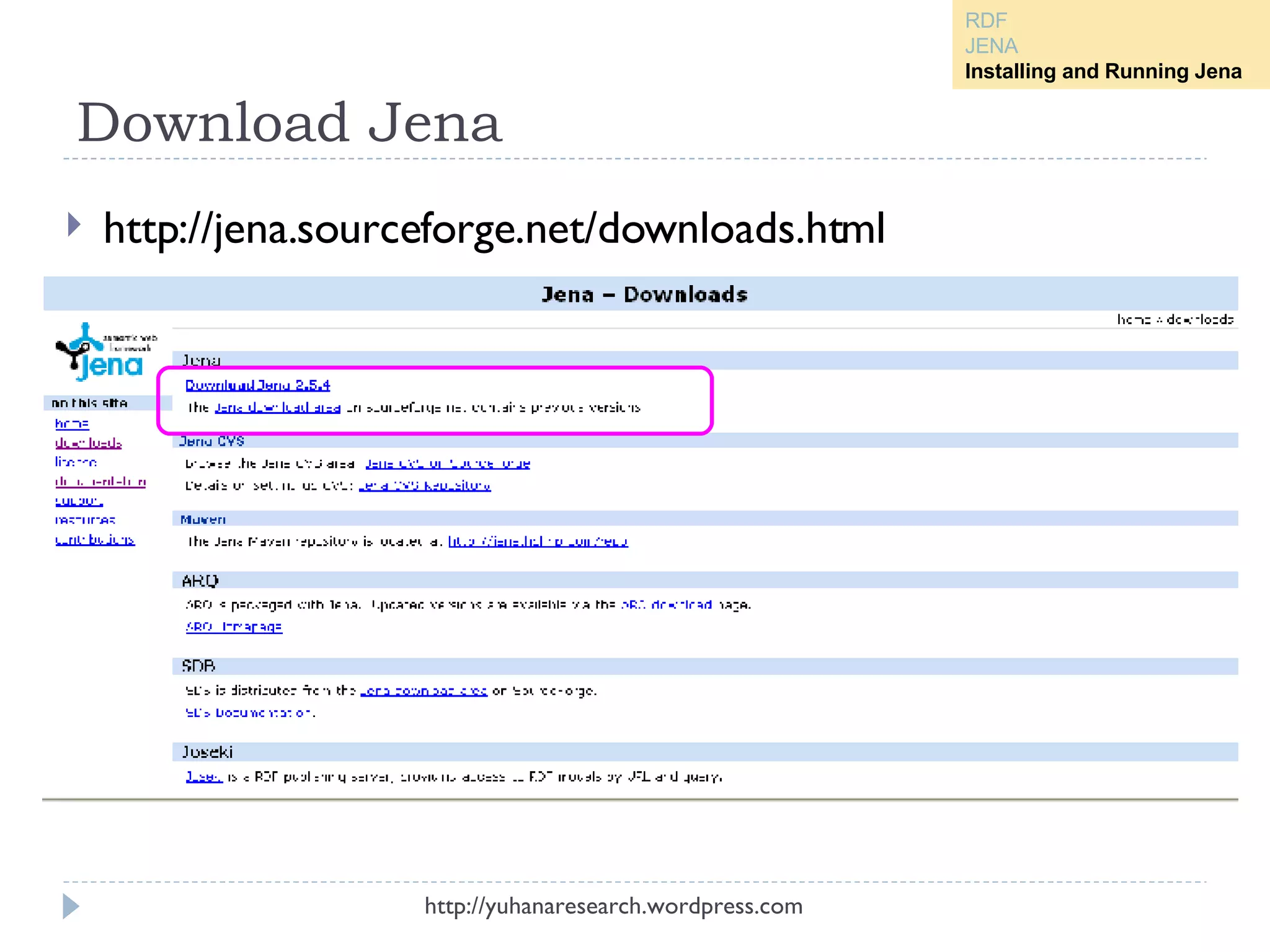
Preparation the tools Download JDK 5 from  http://java.sun.com/javase/downloads/index_jdk5.jsp Download and Install Eclipse from  http://www.eclipse.org/downloads/ Download Jena from  http://jena.sourceforge.net/downloads.html Download  2007-05-17-jenademo.rar  from this site and extract it in your directory (optional) http://yuhanaresearch.wordpress.com RDF JENA Installing and Running Jena
Download Jena http://yuhanaresearch.wordpress.com http://jena.sourceforge.net/downloads.html RDF JENA Installing and Running Jena
Create New Java Project in Eclipse Open Eclipse Create New Project by select  File Menu   New    Project  In the next dialog,  choose Java    Java Project  and click  Next http://yuhanaresearch.wordpress.com RDF JENA Installing and Running Jena
Define Project Name Write  “JenaDemo”  as a name, click  Next  button Click  Finish  in the next dialog http://yuhanaresearch.wordpress.com RDF JENA Installing and Running Jena
Create Source Folder Righ click on  JenaDemo  Project  Select  New    Source Folder given  src  as name and click  Finish  button http://yuhanaresearch.wordpress.com RDF JENA Installing and Running Jena
Append Jena libraries to classpath Righ click on the project, choose  Properties Click “ Java Build Path ” section, choose “ library ” tab Click “ Add External Library ” button, and find  jena/lib source  and  choose all library , and click  open http://yuhanaresearch.wordpress.com RDF JENA Installing and Running Jena
Append Jena libraries to classpath Choose  Order and Export Tab , check all the library by click “ Select All ” button Make sure  all Jena Library are checked , and click  OK  button http://yuhanaresearch.wordpress.com RDF JENA Installing and Running Jena
Import Source Folder This step is optional if we want to import source folder from another folder To do it, follow these steps: Suppose we have source folder that is extracted from  2007-05-17-jenademo.rar Right click in src and choose “import” , choose General    File System and Click Next Then Choose “browse” on Import dialog Choose the folder where we put the source and click OK After done this part we can running jena API in Java for semantic web application http://yuhanaresearch.wordpress.com RDF JENA Installing and Running Jena
http://yuhanaresearch.wordpress.com Right click in src and choose “import”  choose General    File System and click Next Then Choose “browse” on Import dialog Choose the folder where we put the source and click OK RDF JENA Installing and Running Jena
Thanks http://yuhanaresearch.wordpress.com

Jena

  • 1.
    Play with JenaSemantic Web Framework on Java Umi Laili Yuhana Master Candidate of Computer Science and Information Engineering National Taiwan University December 2007 http://yuhanaresearch.wordpress.com
  • 2.
    Goal Provide materialfor beginner who want deal with JENA API This work support lab material given in Advanced AI class on May 17, 2007 Complete lab material can be found in Jena Lecture by C.F.Liao ( 廖峻鋒 ) on Advanced AI class on May 17,2007 in CSIE Department, National Taiwan University http://yuhanaresearch.wordpress.com
  • 3.
    Outline RDF (ResourceDescription Framework) JENA Installing and Running Jena http://yuhanaresearch.wordpress.com
  • 4.
  • 5.
    RDF Example Example: CD list RDF Document for CD list http://yuhanaresearch.wordpress.com RDF JENA Installing and Running Jena
  • 6.
    RDF Stand for Resource Description Framework W3C standard for describing resources on the web Is designed to provide common way to describe information so it can be read and understood by computer application http://yuhanaresearch.wordpress.com RDF JENA Installing and Running Jena
  • 7.
    RDF RDF descriptions are not designed to be displayed on the web Written in XML Example : Describing properties for shopping items , such as price and availability Describing information about web pages , such as content, author, created and modified date http://yuhanaresearch.wordpress.com RDF JENA Installing and Running Jena
  • 8.
    RDF Model Modelis a set of Statement RDF statement : combination of a resource , a property , and a property value Known as subject , predicate and object RDF use web identifier (URI) to identify resources http://yuhanaresearch.wordpress.com RDF JENA Installing and Running Jena
  • 9.
    RDF Statement andRDF Model Triple: T (subject, attribute, values) Example : The artist of Empire Burlesque is Bob Dylan The artist of http://www.recshop.fake/cd/ Empire Burlesque is Bob Dylan  (identify with resource/URI) http://yuhanaresearch.wordpress.com RDF JENA Installing and Running Jena Subject Object predicate
  • 10.
    RDF Graph ofData Model Example http://yuhanaresearch.wordpress.com RDF JENA Installing and Running Jena
  • 11.
    RDF Element Rootelement defines the XML document to be an RDF document. contains a reference to the RDF namespace Description element identifies a resource with the about attribute contains elements that describe the resource http://yuhanaresearch.wordpress.com RDF JENA Installing and Running Jena
  • 12.
    RDF Element (cont.)Root element Description Element http://yuhanaresearch.wordpress.com RDF JENA Installing and Running Jena
  • 13.
    RDF Element (cont.)Define XML document To be RDF Document RDF namespace About Attribut elements that describe the resource http://yuhanaresearch.wordpress.com RDF JENA Installing and Running Jena
  • 14.
    RDFS (RDF Schema)Extension of RDF Describes resources with classes , properties , and values P rovides the framework to describe application-specific classes and properties http://yuhanaresearch.wordpress.com RDF JENA Installing and Running Jena
  • 15.
    RDFS Example : the resource "horse" is a subclass of the class "animal" http://yuhanaresearch.wordpress.com RDF JENA Installing and Running Jena
  • 16.
    RDF OWL Standfor RDF Web Ontology Language OWL : Language for processing Web Information Build on top of RDF stronger language with greater machine interpretability than RDF Written in XML http://yuhanaresearch.wordpress.com RDF JENA Installing and Running Jena
  • 17.
    JENA Java APIfor semantic web applications http://yuhanaresearch.wordpress.com
  • 18.
    Jena Java APIfor semantic web applications Can be used to create and manipulate RDF graphs Jena has : Resource interface  represent resources Property interface  represent properties Literal interface  represent literals Model interface  represent graph http://yuhanaresearch.wordpress.com RDF JENA Installing and Running Jena
  • 19.
    Example code tocreate graph with jena // some definitions static String personURI = "http://somewhere/JohnSmith"; static String fullName = "John Smith"; // create an empty Model Model model = ModelFactory.createDefaultModel(); // create the resource Resource johnSmith = model.createResource(personURI); // add the property johnSmith.addProperty(VCARD.FN, fullName); http://yuhanaresearch.wordpress.com RDF JENA Installing and Running Jena
  • 20.
    JENA RDF PackageKey RDF package for the application developer is com.hp.jena.rdf.model Package contain interfaces for representing: Models Resources Properties Literals Statements All other key concept of RDF ModelFactory for creating models http://yuhanaresearch.wordpress.com RDF JENA Installing and Running Jena
  • 21.
    Installing and RunningJena http://yuhanaresearch.wordpress.com
  • 22.
    Installing and RunningJena Download JDK 5 Download and install Eclipse Download Jena Tuning your Eclipse Create a java project Append Jena libraries to your classpath Use Jena API to create some RDFs http://yuhanaresearch.wordpress.com RDF JENA Installing and Running Jena
  • 23.
    Preparation the toolsDownload JDK 5 from http://java.sun.com/javase/downloads/index_jdk5.jsp Download and Install Eclipse from http://www.eclipse.org/downloads/ Download Jena from http://jena.sourceforge.net/downloads.html Download 2007-05-17-jenademo.rar from this site and extract it in your directory (optional) http://yuhanaresearch.wordpress.com RDF JENA Installing and Running Jena
  • 24.
    Download Jena http://yuhanaresearch.wordpress.comhttp://jena.sourceforge.net/downloads.html RDF JENA Installing and Running Jena
  • 25.
    Create New JavaProject in Eclipse Open Eclipse Create New Project by select File Menu  New  Project In the next dialog, choose Java  Java Project and click Next http://yuhanaresearch.wordpress.com RDF JENA Installing and Running Jena
  • 26.
    Define Project NameWrite “JenaDemo” as a name, click Next button Click Finish in the next dialog http://yuhanaresearch.wordpress.com RDF JENA Installing and Running Jena
  • 27.
    Create Source FolderRigh click on JenaDemo Project Select New  Source Folder given src as name and click Finish button http://yuhanaresearch.wordpress.com RDF JENA Installing and Running Jena
  • 28.
    Append Jena librariesto classpath Righ click on the project, choose Properties Click “ Java Build Path ” section, choose “ library ” tab Click “ Add External Library ” button, and find jena/lib source and choose all library , and click open http://yuhanaresearch.wordpress.com RDF JENA Installing and Running Jena
  • 29.
    Append Jena librariesto classpath Choose Order and Export Tab , check all the library by click “ Select All ” button Make sure all Jena Library are checked , and click OK button http://yuhanaresearch.wordpress.com RDF JENA Installing and Running Jena
  • 30.
    Import Source FolderThis step is optional if we want to import source folder from another folder To do it, follow these steps: Suppose we have source folder that is extracted from 2007-05-17-jenademo.rar Right click in src and choose “import” , choose General  File System and Click Next Then Choose “browse” on Import dialog Choose the folder where we put the source and click OK After done this part we can running jena API in Java for semantic web application http://yuhanaresearch.wordpress.com RDF JENA Installing and Running Jena
  • 31.
    http://yuhanaresearch.wordpress.com Right clickin src and choose “import” choose General  File System and click Next Then Choose “browse” on Import dialog Choose the folder where we put the source and click OK RDF JENA Installing and Running Jena
  • 32.