

JEE - WebSockets
Fahad R. Golra
ECE Paris Ecole d'Ingénieurs - FRANCE
Lecture 6 - WebSockets
• Web communications technologies
• Web Socket methodology
• Web Socket APIs
• JavaScript API
• Java API for WebSockets
2 JEE - WebSockets
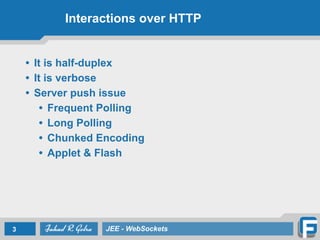
Interactions over HTTP
• It is half-duplex
• It is verbose
• Server push issue
• Frequent Polling
• Long Polling
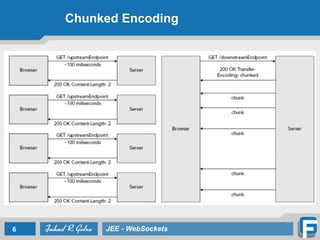
• Chunked Encoding
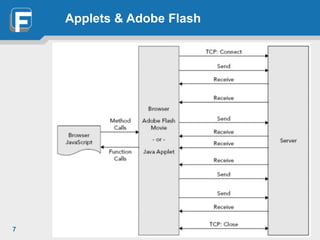
• Applet & Flash
3 JEE - WebSockets
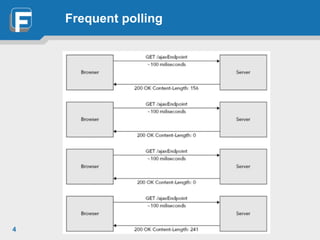
Frequent polling
4
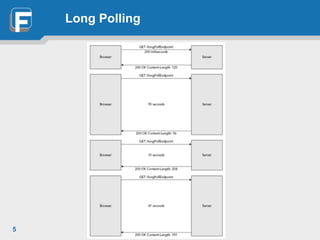
Long Polling
5
Chunked Encoding
6 JEE - WebSockets
Applets & Adobe Flash
7
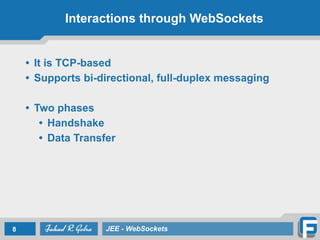
Interactions through WebSockets
• It is TCP-based
• Supports bi-directional, full-duplex messaging
• Two phases
• Handshake
• Data Transfer
8 JEE - WebSockets
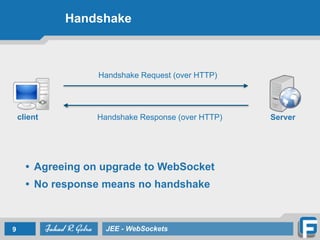
Handshake
9 JEE - WebSockets
client Server
• Agreeing on upgrade to WebSocket
• No response means no handshake
Handshake Request (over HTTP)
Handshake Response (over HTTP)
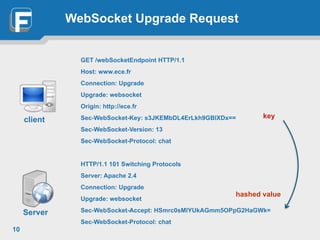
WebSocket Upgrade Request
GET /webSocketEndpoint HTTP/1.1
Host: www.ece.fr
Connection: Upgrade
Upgrade: websocket
Origin: http://ece.fr
Sec-WebSocket-Key: s3JKEMbDL4ErLkh9GBlXDx==
Sec-WebSocket-Version: 13
Sec-WebSocket-Protocol: chat
HTTP/1.1 101 Switching Protocols
Server: Apache 2.4
Connection: Upgrade
Upgrade: websocket
Sec-WebSocket-Accept: HSmrc0sMlYUkAGmm5OPpG2HaGWk=
Sec-WebSocket-Protocol: chat
10
client key
hashed value
Server
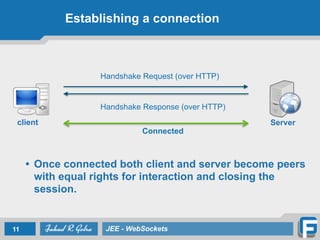
Establishing a connection
• Once connected both client and server become peers
with equal rights for interaction and closing the
session.
11 JEE - WebSockets
client Server
Handshake Request (over HTTP)
Handshake Response (over HTTP)
Connected
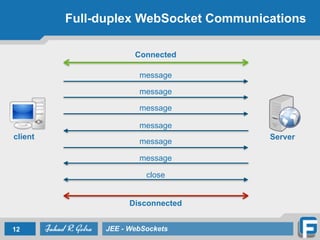
Full-duplex WebSocket Communications
12 JEE - WebSockets
client Server
message
Connected
message
message
message
message
message
Disconnected
close
Where is it used?
• Chat
• Online games
• Live stock/News tickers
• HD Video Streaming
• Bulk transactional data transfer
• Real time monitoring for remote systems
13 JEE - WebSockets
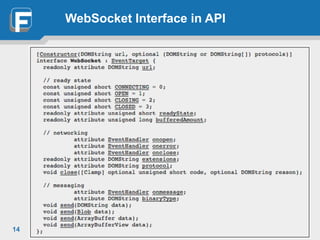
WebSocket Interface in API
14
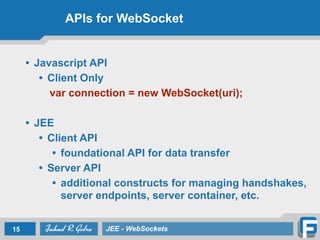
APIs for WebSocket
• Javascript API
• Client Only
var connection = new WebSocket(uri);
• JEE
• Client API
• foundational API for data transfer
• Server API
• additional constructs for managing handshakes,
server endpoints, server container, etc.
15 JEE - WebSockets
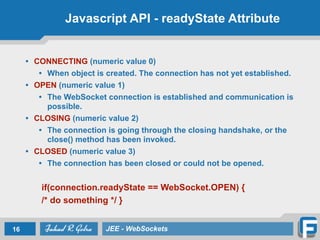
Javascript API - readyState Attribute
• CONNECTING (numeric value 0)
• When object is created. The connection has not yet established.
• OPEN (numeric value 1)
• The WebSocket connection is established and communication is
possible.
• CLOSING (numeric value 2)
• The connection is going through the closing handshake, or the
close() method has been invoked.
• CLOSED (numeric value 3)
• The connection has been closed or could not be opened.
if(connection.readyState == WebSocket.OPEN) {
/* do something */ }
16 JEE - WebSockets
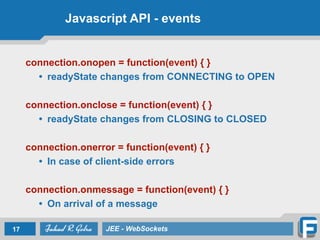
Javascript API - events
connection.onopen = function(event) { }
• readyState changes from CONNECTING to OPEN
connection.onclose = function(event) { }
• readyState changes from CLOSING to CLOSED
connection.onerror = function(event) { }
• In case of client-side errors
connection.onmessage = function(event) { }
• On arrival of a message
17 JEE - WebSockets
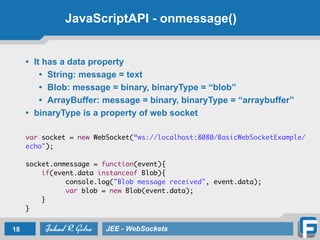
JavaScriptAPI - onmessage()
• It has a data property
• String: message = text
• Blob: message = binary, binaryType = “blob”
• ArrayBuffer: message = binary, binaryType = “arraybuffer”
• binaryType is a property of web socket
var socket = new WebSocket(“ws://localhost:8080/BasicWebSocketExample/
echo");
socket.onmessage = function(event){
if(event.data instanceof Blob){
console.log("Blob message received", event.data);
var blob = new Blob(event.data);
}
}
18 JEE - WebSockets
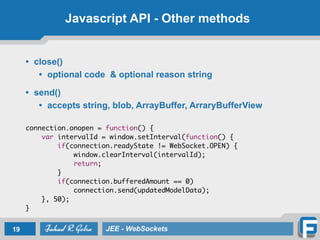
Javascript API - Other methods
• close()
• optional code & optional reason string
• send()
• accepts string, blob, ArrayBuffer, ArraryBufferView
connection.onopen = function() {
var intervalId = window.setInterval(function() {
if(connection.readyState != WebSocket.OPEN) {
window.clearInterval(intervalId);
return;
}
if(connection.bufferedAmount == 0)
connection.send(updatedModelData);
}, 50);
}
19 JEE - WebSockets
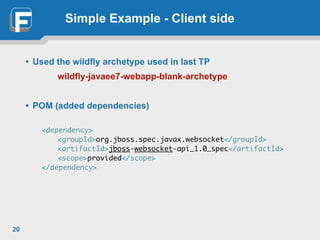
Simple Example - Client side
• Used the wildfly archetype used in last TP
wildfly-javaee7-webapp-blank-archetype
• POM (added dependencies)
<dependency>
<groupId>org.jboss.spec.javax.websocket</groupId>
<artifactId>jboss-websocket-api_1.0_spec</artifactId>
<scope>provided</scope>
</dependency>
20
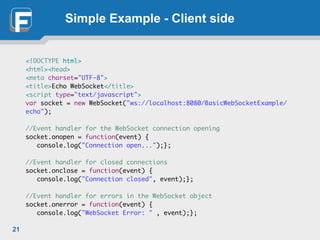
Simple Example - Client side
<!DOCTYPE html>
<html><head>
<meta charset="UTF-8">
<title>Echo WebSocket</title>
<script type="text/javascript">
var socket = new WebSocket("ws://localhost:8080/BasicWebSocketExample/
echo");
//Event handler for the WebSocket connection opening
socket.onopen = function(event) {
console.log("Connection open...");};
//Event handler for closed connections
socket.onclose = function(event) {
console.log("Connection closed", event);};
//Event handler for errors in the WebSocket object
socket.onerror = function(event) {
console.log("WebSocket Error: " , event);};
21
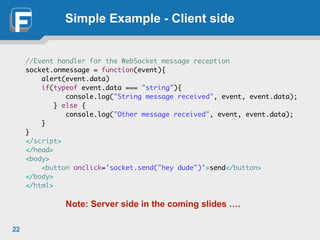
Simple Example - Client side
//Event handler for the WebSocket message reception
socket.onmessage = function(event){
alert(event.data)
if(typeof event.data === "string"){
console.log("String message received", event, event.data);
} else {
console.log("Other message received", event, event.data);
}
}
</script>
</head>
<body>
<button onclick='socket.send("hey dude")'>send</button>
</body>
</html>
Note: Server side in the coming slides ….
22
JEE Client API - The Process
• The process for creating and deploying a WebSocket
endpoint follows.
• Create an endpoint class.
• Implement the lifecycle methods of the endpoint.
• Add your business logic to the endpoint.
• Deploy the endpoint inside a web application.
• Two ways to create endpoints
• Programmatic endpoints
• Annotated endpoints
23 JEE - WebSockets
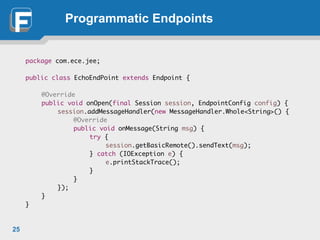
Programmatic Endpoints
• Endpoint is created by extending Endpoint class
• Three methods to override
• onOpen, onClose and onError
• onOpen is an abstract method (must implement)
• onOpen has session parameter which is
responsible for communication
• getBasicRemote give the remote end
• addMessageHandler method of the session parameter
is used to register message handlers
• message handler is implemented as anonymous class
24 JEE - WebSockets
Programmatic Endpoints
package com.ece.jee;
public class EchoEndPoint extends Endpoint {
@Override
public void onOpen(final Session session, EndpointConfig config) {
session.addMessageHandler(new MessageHandler.Whole<String>() {
@Override
public void onMessage(String msg) {
try {
session.getBasicRemote().sendText(msg);
} catch (IOException e) {
e.printStackTrace();
}
}
});
}
}
25
Annotated Endpoints
• Deployment is easy through annotations
• Annotations mark the respective methods for each
event in the lifecycle
• onOpen
• onMessage
• onError
• onClose
26 JEE - WebSockets
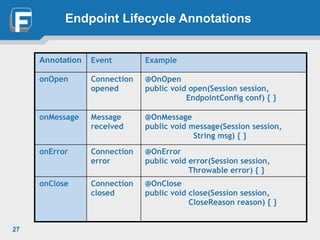
Endpoint Lifecycle Annotations
27
Annotation Event Example
onOpen Connection
opened
@OnOpen
public void open(Session session,
EndpointConfig conf) { }
onMessage Message
received
@OnMessage
public void message(Session session,
String msg) { }
onError Connection
error
@OnError
public void error(Session session,
Throwable error) { }
onClose Connection
closed
@OnClose
public void close(Session session,
CloseReason reason) { }
Sending Messages
• Get session object from the annotated methods
• Get the remoteEndPoint object (either of two)
Session.getBasicRemote
Session.getAsyncRemote
• Send messages
void RemoteEndpoint.Basic.sendText(String text)
void RemoteEndpoint.Basic.sendBinary(ByteBuffer data)
void RemoteEndpoint.sendPing(ByteBuffer appData)
void RemoteEndpoint.sendPong(ByteBuffer appData)
28 JEE - WebSockets
Simple Example - (cntd) Server Side
@ServerEndpoint("/echo")
public class Echo {
private Session session;
@OnOpen
public void connect(Session session) {
this.session = session;
System.out.println("session opened: " + session);
}
@OnClose
public void close() {
this.session = null;
System.out.println("session closed: " + session);
}
@OnMessage
public void onMessage(String msg) {
System.out.println("on message is called");
this.session.getAsyncRemote().sendText("Message from Server:" + msg);
}
}
29
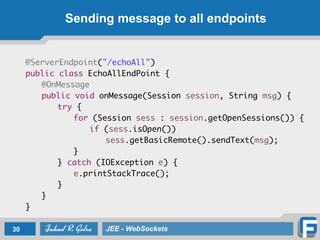
Sending message to all endpoints
@ServerEndpoint("/echoAll")
public class EchoAllEndPoint {
@OnMessage
public void onMessage(Session session, String msg) {
try {
for (Session sess : session.getOpenSessions()) {
if (sess.isOpen())
sess.getBasicRemote().sendText(msg);
}
} catch (IOException e) {
e.printStackTrace();
}
}
}
30 JEE - WebSockets
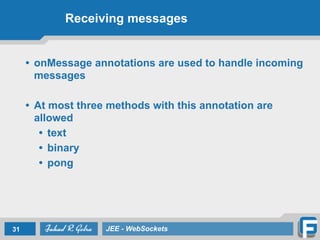
Receiving messages
• onMessage annotations are used to handle incoming
messages
• At most three methods with this annotation are
allowed
• text
• binary
• pong
31 JEE - WebSockets
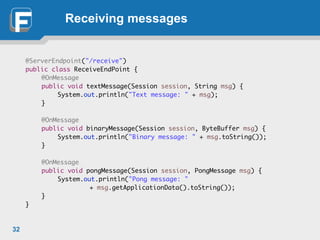
Receiving messages
@ServerEndpoint("/receive")
public class ReceiveEndPoint {
@OnMessage
public void textMessage(Session session, String msg) {
System.out.println("Text message: " + msg);
}
@OnMessage
public void binaryMessage(Session session, ByteBuffer msg) {
System.out.println("Binary message: " + msg.toString());
}
@OnMessage
public void pongMessage(Session session, PongMessage msg) {
System.out.println("Pong message: "
+ msg.getApplicationData().toString());
}
}
32
33 JEE - WebSockets

Lecture 6 Web Sockets

  • 1.
    JEE - WebSockets FahadR. Golra ECE Paris Ecole d'Ingénieurs - FRANCE
  • 2.
    Lecture 6 -WebSockets • Web communications technologies • Web Socket methodology • Web Socket APIs • JavaScript API • Java API for WebSockets 2 JEE - WebSockets
  • 3.
    Interactions over HTTP •It is half-duplex • It is verbose • Server push issue • Frequent Polling • Long Polling • Chunked Encoding • Applet & Flash 3 JEE - WebSockets
  • 4.
  • 5.
  • 6.
  • 7.
  • 8.
    Interactions through WebSockets •It is TCP-based • Supports bi-directional, full-duplex messaging • Two phases • Handshake • Data Transfer 8 JEE - WebSockets
  • 9.
    Handshake 9 JEE -WebSockets client Server • Agreeing on upgrade to WebSocket • No response means no handshake Handshake Request (over HTTP) Handshake Response (over HTTP)
  • 10.
    WebSocket Upgrade Request GET/webSocketEndpoint HTTP/1.1 Host: www.ece.fr Connection: Upgrade Upgrade: websocket Origin: http://ece.fr Sec-WebSocket-Key: s3JKEMbDL4ErLkh9GBlXDx== Sec-WebSocket-Version: 13 Sec-WebSocket-Protocol: chat HTTP/1.1 101 Switching Protocols Server: Apache 2.4 Connection: Upgrade Upgrade: websocket Sec-WebSocket-Accept: HSmrc0sMlYUkAGmm5OPpG2HaGWk= Sec-WebSocket-Protocol: chat 10 client key hashed value Server
  • 11.
    Establishing a connection •Once connected both client and server become peers with equal rights for interaction and closing the session. 11 JEE - WebSockets client Server Handshake Request (over HTTP) Handshake Response (over HTTP) Connected
  • 12.
    Full-duplex WebSocket Communications 12JEE - WebSockets client Server message Connected message message message message message Disconnected close
  • 13.
    Where is itused? • Chat • Online games • Live stock/News tickers • HD Video Streaming • Bulk transactional data transfer • Real time monitoring for remote systems 13 JEE - WebSockets
  • 14.
  • 15.
    APIs for WebSocket •Javascript API • Client Only var connection = new WebSocket(uri); • JEE • Client API • foundational API for data transfer • Server API • additional constructs for managing handshakes, server endpoints, server container, etc. 15 JEE - WebSockets
  • 16.
    Javascript API -readyState Attribute • CONNECTING (numeric value 0) • When object is created. The connection has not yet established. • OPEN (numeric value 1) • The WebSocket connection is established and communication is possible. • CLOSING (numeric value 2) • The connection is going through the closing handshake, or the close() method has been invoked. • CLOSED (numeric value 3) • The connection has been closed or could not be opened. if(connection.readyState == WebSocket.OPEN) { /* do something */ } 16 JEE - WebSockets
  • 17.
    Javascript API -events connection.onopen = function(event) { } • readyState changes from CONNECTING to OPEN connection.onclose = function(event) { } • readyState changes from CLOSING to CLOSED connection.onerror = function(event) { } • In case of client-side errors connection.onmessage = function(event) { } • On arrival of a message 17 JEE - WebSockets
  • 18.
    JavaScriptAPI - onmessage() •It has a data property • String: message = text • Blob: message = binary, binaryType = “blob” • ArrayBuffer: message = binary, binaryType = “arraybuffer” • binaryType is a property of web socket var socket = new WebSocket(“ws://localhost:8080/BasicWebSocketExample/ echo"); socket.onmessage = function(event){ if(event.data instanceof Blob){ console.log("Blob message received", event.data); var blob = new Blob(event.data); } } 18 JEE - WebSockets
  • 19.
    Javascript API -Other methods • close() • optional code & optional reason string • send() • accepts string, blob, ArrayBuffer, ArraryBufferView connection.onopen = function() { var intervalId = window.setInterval(function() { if(connection.readyState != WebSocket.OPEN) { window.clearInterval(intervalId); return; } if(connection.bufferedAmount == 0) connection.send(updatedModelData); }, 50); } 19 JEE - WebSockets
  • 20.
    Simple Example -Client side • Used the wildfly archetype used in last TP wildfly-javaee7-webapp-blank-archetype • POM (added dependencies) <dependency> <groupId>org.jboss.spec.javax.websocket</groupId> <artifactId>jboss-websocket-api_1.0_spec</artifactId> <scope>provided</scope> </dependency> 20
  • 21.
    Simple Example -Client side <!DOCTYPE html> <html><head> <meta charset="UTF-8"> <title>Echo WebSocket</title> <script type="text/javascript"> var socket = new WebSocket("ws://localhost:8080/BasicWebSocketExample/ echo"); //Event handler for the WebSocket connection opening socket.onopen = function(event) { console.log("Connection open...");}; //Event handler for closed connections socket.onclose = function(event) { console.log("Connection closed", event);}; //Event handler for errors in the WebSocket object socket.onerror = function(event) { console.log("WebSocket Error: " , event);}; 21
  • 22.
    Simple Example -Client side //Event handler for the WebSocket message reception socket.onmessage = function(event){ alert(event.data) if(typeof event.data === "string"){ console.log("String message received", event, event.data); } else { console.log("Other message received", event, event.data); } } </script> </head> <body> <button onclick='socket.send("hey dude")'>send</button> </body> </html> Note: Server side in the coming slides …. 22
  • 23.
    JEE Client API- The Process • The process for creating and deploying a WebSocket endpoint follows. • Create an endpoint class. • Implement the lifecycle methods of the endpoint. • Add your business logic to the endpoint. • Deploy the endpoint inside a web application. • Two ways to create endpoints • Programmatic endpoints • Annotated endpoints 23 JEE - WebSockets
  • 24.
    Programmatic Endpoints • Endpointis created by extending Endpoint class • Three methods to override • onOpen, onClose and onError • onOpen is an abstract method (must implement) • onOpen has session parameter which is responsible for communication • getBasicRemote give the remote end • addMessageHandler method of the session parameter is used to register message handlers • message handler is implemented as anonymous class 24 JEE - WebSockets
  • 25.
    Programmatic Endpoints package com.ece.jee; publicclass EchoEndPoint extends Endpoint { @Override public void onOpen(final Session session, EndpointConfig config) { session.addMessageHandler(new MessageHandler.Whole<String>() { @Override public void onMessage(String msg) { try { session.getBasicRemote().sendText(msg); } catch (IOException e) { e.printStackTrace(); } } }); } } 25
  • 26.
    Annotated Endpoints • Deploymentis easy through annotations • Annotations mark the respective methods for each event in the lifecycle • onOpen • onMessage • onError • onClose 26 JEE - WebSockets
  • 27.
    Endpoint Lifecycle Annotations 27 AnnotationEvent Example onOpen Connection opened @OnOpen public void open(Session session, EndpointConfig conf) { } onMessage Message received @OnMessage public void message(Session session, String msg) { } onError Connection error @OnError public void error(Session session, Throwable error) { } onClose Connection closed @OnClose public void close(Session session, CloseReason reason) { }
  • 28.
    Sending Messages • Getsession object from the annotated methods • Get the remoteEndPoint object (either of two) Session.getBasicRemote Session.getAsyncRemote • Send messages void RemoteEndpoint.Basic.sendText(String text) void RemoteEndpoint.Basic.sendBinary(ByteBuffer data) void RemoteEndpoint.sendPing(ByteBuffer appData) void RemoteEndpoint.sendPong(ByteBuffer appData) 28 JEE - WebSockets
  • 29.
    Simple Example -(cntd) Server Side @ServerEndpoint("/echo") public class Echo { private Session session; @OnOpen public void connect(Session session) { this.session = session; System.out.println("session opened: " + session); } @OnClose public void close() { this.session = null; System.out.println("session closed: " + session); } @OnMessage public void onMessage(String msg) { System.out.println("on message is called"); this.session.getAsyncRemote().sendText("Message from Server:" + msg); } } 29
  • 30.
    Sending message toall endpoints @ServerEndpoint("/echoAll") public class EchoAllEndPoint { @OnMessage public void onMessage(Session session, String msg) { try { for (Session sess : session.getOpenSessions()) { if (sess.isOpen()) sess.getBasicRemote().sendText(msg); } } catch (IOException e) { e.printStackTrace(); } } } 30 JEE - WebSockets
  • 31.
    Receiving messages • onMessageannotations are used to handle incoming messages • At most three methods with this annotation are allowed • text • binary • pong 31 JEE - WebSockets
  • 32.
    Receiving messages @ServerEndpoint("/receive") public classReceiveEndPoint { @OnMessage public void textMessage(Session session, String msg) { System.out.println("Text message: " + msg); } @OnMessage public void binaryMessage(Session session, ByteBuffer msg) { System.out.println("Binary message: " + msg.toString()); } @OnMessage public void pongMessage(Session session, PongMessage msg) { System.out.println("Pong message: " + msg.getApplicationData().toString()); } } 32
  • 33.
    33 JEE -WebSockets