Making dynamic pages with
javascript

            Lecture 1
Java script
    java versus javascript
    Javascript is a scripting language that will
    allow you to add real programming to your
    webpages.
     Its not stand alone language as java.
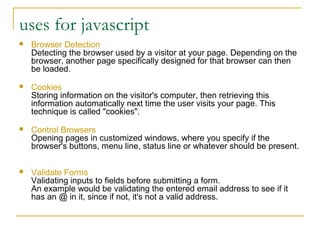
uses for javascript
   Browser Detection
    Detecting the browser used by a visitor at your page. Depending on the
    browser, another page specifically designed for that browser can then
    be loaded.
   Cookies
    Storing information on the visitor's computer, then retrieving this
    information automatically next time the user visits your page. This
    technique is called "cookies".
   Control Browsers
    Opening pages in customized windows, where you specify if the
    browser's buttons, menu line, status line or whatever should be present.

   Validate Forms
    Validating inputs to fields before submitting a form.
    An example would be validating the entered email address to see if it
    has an @ in it, since if not, it's not a valid address.
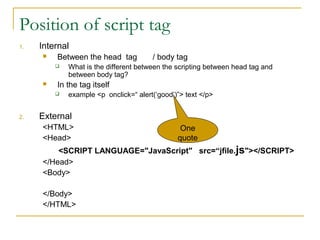
Position of script tag
1.   Internal
        Between the head tag          / body tag
            What is the different between the scripting between head tag and
             between body tag?
        In the tag itself
            example <p onclick=“ alert(‘good’)”> text </p>


2.   External
     <HTML>                                     One
     <Head>                                    quote
         <SCRIPT LANGUAGE="JavaScript" src=“jfile.js"></SCRIPT>
     </Head>
     <Body>

     </Body>
     </HTML>
Components of javascript
1.   <script> tag
2.   Objects
           ( window, document, form)
1.   Properties
           document.color
1.   Methods
          document.write( )
          document.write( string)
1.   Variables
         var name=“ ali”
         var age=30
1.   Operators and expression
        + ,- , % ,/ …..
.Cont
6.   Statements
            If - If … else
            For
            while
7.   Event handlers.
            KB events: onkeydown – onkeyup- onkeypress
            Mouse events : onmousemove – onmouseover-
             onmousedown- onmouseout- onmouseup- onclick-
             ondblclick
            Load & unload
              Its specified in the <body> tag.
              <body onload=“……”>
Script tag
 <SCRIPT LANGUAGE="JavaScript">
    <!--           Comment tag

         document.write ("Hello World");
     //-->                            code
 </SCRIPT>
Notes:
 Its necessary to but the code between
  comment tag. Why?
 Case sensitive write (ex. document.Write <> document.write)
   Comment statement            (//    or /*      */)
output methods
1.   alert
2.   Write
3.   Print
alert
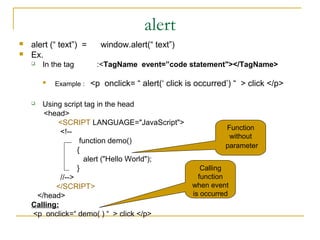
   alert (“ text”) =      window.alert(“ text”)
   Ex.
       In the tag       :<TagName event=”code statement"></TagName>

           Example :   <p onclick= “ alert(‘ click is occurred’) “ > click </p>

      Using script tag in the head
       <head>
            <SCRIPT LANGUAGE="JavaScript">
                                                               Function
             <!--
                                                                without
                    function demo()
                                                               parameter
                   {
                     alert ("Hello World");
                   }                                    Calling
             //-->                                     function
           </SCRIPT>                                 when event
     </head>                                         is occurred
    Calling:
    <p onclick=“ demo( ) “ > click </p>
Write method
   Examples:
       documet.write(“hello”)
       document.write("<font color=ff0000>
        red text </font>”)
       document.write("<font color=ff0000>
        red text </font> <br> <font
        color=00ff00> green text </font>”)


       Notes:
         Use tags within document
( )Newline in write( ) and alert


document.write(" ppu <br> graphics")
 alert(" are you sure n press OK" )
Print
    window.print()
Input methods
1.       Confirm
2.       Prompt

        confirm
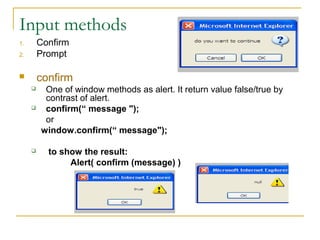
         One of window methods as alert. It return value false/true by
          contrast of alert.
         confirm(“ message ");
          or
         window.confirm(“ message");

          to show the result:
                Alert( confirm (message) )
prompt
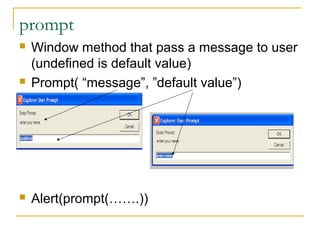
   Window method that pass a message to user
    (undefined is default value)
   Prompt( “message”, ”default value”)


   Alert(prompt(…….))
variables
   Types of variables:
       String
       Numbers
       Boolean
       Null
   Naming variables
       Ex    these variable names are correct
            Address1
            A4xb5
            lastName
            _firstName
            parent_Name
       Not correct
            1stName
            ?subName
            last name
            @ userID
Declaration/assignment
   var firstName;
   var firstName, lastName, userID;
   var firstName, lastName = “ali", userID = 13;

   assignment
       var stname;
        stname = "Ahmed“;
cont.

<script>
 function demo( )
{
    var username = ”ali";
    alert("welcomen"+username);
  }
</script>

- improve this code in order to accept your name from
the KB.
Conditional statement
   If (condition) {…..}
   If (condition)
            {……}
       Else
            { ……}
   If (condition)
            {……}
       Else if ( )
              { ……}
example
<HEAD>
<SCRIPT LANGUAGE="JavaScript">
<!--
var age, name;
name = prompt(“what’s your name”,”enter your name here");
age=prompt(“what’s your age?”,”enter your age here");
document.write( "<b> welcome : </b>" + name + "<br>" );

If ( age<40)
document.write( "<b> you still youth : </b>" + age+ "<br>"
     +”is your age”);
document.write( "<b> you are experienced person : </b>" + age +
     "<br>" + ”is your age”);

//-->
</SCRIPT>
</HEAD>
switch
switch(value/expression) {
case " val1" :

break;
case " val2 " :

break;
case " val3 " :
break;
.
.
default :
example
var num = 4;
switch( num )
  { case 1 :
           alert( " num is n one " );
           break;
    case 2 :
           alert( " num is n two " );
             break;
    case 3 :
          alert( ” num is n three " );
          break;
default :
         alert( " num is " + num );
break;
}
Iteration
   For
   While

   Print your name four times, each one in a
    separate line.
    var x = 0;
     for( i=1; i<5 ; i++ )
      {
      document.write( “ali” <br> )
      }
while
1- var i = 0;
   while( i<5 )
   {
     document.write( “ali” + "<br>" );
     i++;
  }
2-
var userPassword = "123";
var password = prompt(“enter password", “password ");
while( password != userPassword )
{
   alert( “ wrong try again " );
  password = prompt(“enter password", “password ");
}
Alert (“its correct”);
Good site
   http://www.jsmadeeasy.com/javascripts/Pull%20Down%20Su
   http://www.yourhtmlsource.com/javascript/
   http://www.webteacher.com/javascript/ch01.html

Javascript1

  • 1.
    Making dynamic pageswith javascript Lecture 1
  • 2.
    Java script  java versus javascript Javascript is a scripting language that will allow you to add real programming to your webpages. Its not stand alone language as java.
  • 3.
    uses for javascript  Browser Detection Detecting the browser used by a visitor at your page. Depending on the browser, another page specifically designed for that browser can then be loaded.  Cookies Storing information on the visitor's computer, then retrieving this information automatically next time the user visits your page. This technique is called "cookies".  Control Browsers Opening pages in customized windows, where you specify if the browser's buttons, menu line, status line or whatever should be present.  Validate Forms Validating inputs to fields before submitting a form. An example would be validating the entered email address to see if it has an @ in it, since if not, it's not a valid address.
  • 4.
    Position of scripttag 1. Internal  Between the head tag / body tag  What is the different between the scripting between head tag and between body tag?  In the tag itself  example <p onclick=“ alert(‘good’)”> text </p> 2. External <HTML> One <Head> quote <SCRIPT LANGUAGE="JavaScript" src=“jfile.js"></SCRIPT> </Head> <Body> </Body> </HTML>
  • 5.
    Components of javascript 1. <script> tag 2. Objects ( window, document, form) 1. Properties document.color 1. Methods document.write( ) document.write( string) 1. Variables var name=“ ali” var age=30 1. Operators and expression  + ,- , % ,/ …..
  • 6.
    .Cont 6. Statements  If - If … else  For  while 7. Event handlers.  KB events: onkeydown – onkeyup- onkeypress  Mouse events : onmousemove – onmouseover- onmousedown- onmouseout- onmouseup- onclick- ondblclick  Load & unload  Its specified in the <body> tag.  <body onload=“……”>
  • 7.
    Script tag  <SCRIPTLANGUAGE="JavaScript"> <!-- Comment tag document.write ("Hello World"); //--> code </SCRIPT> Notes:  Its necessary to but the code between comment tag. Why?  Case sensitive write (ex. document.Write <> document.write)  Comment statement (// or /* */)
  • 8.
    output methods 1. alert 2. Write 3. Print
  • 9.
    alert  alert (“ text”) = window.alert(“ text”)  Ex.  In the tag :<TagName event=”code statement"></TagName>  Example : <p onclick= “ alert(‘ click is occurred’) “ > click </p>  Using script tag in the head <head> <SCRIPT LANGUAGE="JavaScript"> Function <!-- without function demo() parameter { alert ("Hello World"); } Calling //--> function </SCRIPT> when event </head> is occurred Calling: <p onclick=“ demo( ) “ > click </p>
  • 10.
    Write method  Examples:  documet.write(“hello”)  document.write("<font color=ff0000> red text </font>”)  document.write("<font color=ff0000> red text </font> <br> <font color=00ff00> green text </font>”)  Notes:  Use tags within document
  • 11.
    ( )Newline inwrite( ) and alert document.write(" ppu <br> graphics")  alert(" are you sure n press OK" )
  • 12.
    Print  window.print()
  • 13.
    Input methods 1. Confirm 2. Prompt  confirm  One of window methods as alert. It return value false/true by contrast of alert.  confirm(“ message "); or window.confirm(“ message");  to show the result: Alert( confirm (message) )
  • 14.
    prompt  Window method that pass a message to user (undefined is default value)  Prompt( “message”, ”default value”)  Alert(prompt(…….))
  • 15.
    variables  Types of variables:  String  Numbers  Boolean  Null  Naming variables  Ex these variable names are correct  Address1  A4xb5  lastName  _firstName  parent_Name  Not correct  1stName  ?subName  last name  @ userID
  • 16.
    Declaration/assignment  var firstName;  var firstName, lastName, userID;  var firstName, lastName = “ali", userID = 13;  assignment  var stname;  stname = "Ahmed“;
  • 17.
    cont. <script> function demo() { var username = ”ali"; alert("welcomen"+username); } </script> - improve this code in order to accept your name from the KB.
  • 18.
    Conditional statement  If (condition) {…..}  If (condition) {……} Else { ……}  If (condition) {……} Else if ( ) { ……}
  • 19.
    example <HEAD> <SCRIPT LANGUAGE="JavaScript"> <!-- var age,name; name = prompt(“what’s your name”,”enter your name here"); age=prompt(“what’s your age?”,”enter your age here"); document.write( "<b> welcome : </b>" + name + "<br>" ); If ( age<40) document.write( "<b> you still youth : </b>" + age+ "<br>" +”is your age”); document.write( "<b> you are experienced person : </b>" + age + "<br>" + ”is your age”); //--> </SCRIPT> </HEAD>
  • 20.
    switch switch(value/expression) { case "val1" : break; case " val2 " : break; case " val3 " : break; . . default :
  • 21.
    example var num =4; switch( num ) { case 1 : alert( " num is n one " ); break; case 2 : alert( " num is n two " ); break; case 3 : alert( ” num is n three " ); break; default : alert( " num is " + num ); break; }
  • 22.
    Iteration  For  While  Print your name four times, each one in a separate line. var x = 0; for( i=1; i<5 ; i++ ) { document.write( “ali” <br> ) }
  • 23.
    while 1- var i= 0; while( i<5 ) { document.write( “ali” + "<br>" ); i++; } 2- var userPassword = "123"; var password = prompt(“enter password", “password "); while( password != userPassword ) { alert( “ wrong try again " ); password = prompt(“enter password", “password "); } Alert (“its correct”);
  • 24.
    Good site  http://www.jsmadeeasy.com/javascripts/Pull%20Down%20Su  http://www.yourhtmlsource.com/javascript/  http://www.webteacher.com/javascript/ch01.html