Thierry Wasylczenko
@twasyl
#JavaFX.forReal()
martine fait du code
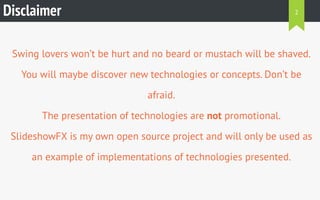
Disclaimer
Swing lovers won’t be hurt and no beard or mustach will be shaved.
You will maybe discover new technologies or concepts. Don’t be
afraid.
The presentation of technologies are not promotional.
SlideshowFX is my own open source project and will only be used as
an example of implementations of technologies presented.
2
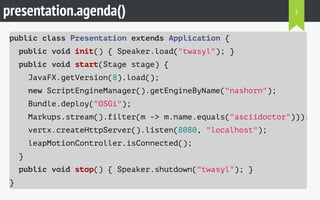
presentation.agenda()
public class Presentation extends Application {
public void init() { Speaker.load("twasyl"); }
public void start(Stage stage) {
JavaFX.getVersion(8).load();
new ScriptEngineManager().getEngineByName("nashorn");
Bundle.deploy("OSGi");
Markups.stream().filter(m -> m.name.equals("asciidoctor")));
vertx.createHttpServer().listen(8080, "localhost");
leapMotionController.isConnected();
}
public void stop() { Speaker.shutdown("twasyl"); }
}
3
4
5
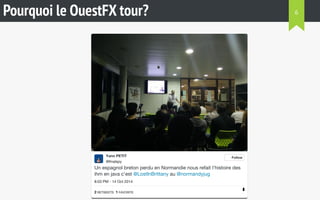
Pourquoi le OuestFX tour?
Un espagnol breton perdu en Normandie nous refait l'histoire des
ihm en java c'est @LostInBrittany au @normandyjug
8:03 PM - 14 Oct 2014
Yann PETIT
@finalspy
Follow
2 RETWEETS 1 FAVORITE
6
Pourquoi le OuestFX tour?
@finalspy @LostInBrittany @normandyjug Il a parlé #JavaFX au moins?
Thierry Wasylczenko @twasyl
@twasyl @finalspy @normandyjug #javafx ? Moi j'ai fait
du vrai client lourd, j'ai fait du #swing :p
9:33 AM - 15 Oct 2014 Paris, Ile-de-France, France
Horacio Gonzalez
@LostInBrittany
Follow
1 RETWEET
15 Oct
7
8
#JavaFX 8
9
<2 />
<8>
FXML
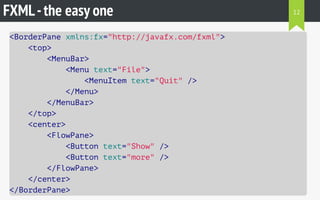
FXML-the easy one
<BorderPane xmlns:fx="http://javafx.com/fxml">
<top>
<MenuBar>
<Menu text="File">
<MenuItem text="Quit" />
</Menu>
</MenuBar>
</top>
<center>
<FlowPane>
<Button text="Show" />
<Button text="more" />
</FlowPane>
</center>
</BorderPane>
12
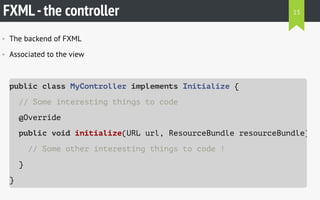
FXML-the controller
• The backend of FXML
• Associated to the view
public class MyController implements Initializable {
// Some interesting things to code
@Override
public void initialize(URL url, ResourceBundle resourceBundle)
// Some other interesting things to code !
}
}
13
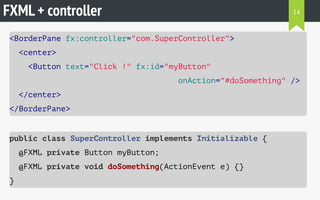
FXML + controller
<BorderPane fx:controller="com.SuperController">
<center>
<Button text="Click !" fx:id="myButton"
onAction="#doSomething" />
</center>
</BorderPane>
public class SuperController implements Initializable {
@FXML private Button myButton;
@FXML private void doSomething(ActionEvent e) {}
}
14
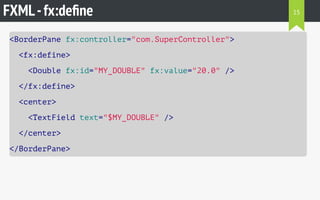
FXML-fx:define
<BorderPane fx:controller="com.SuperController">
<fx:define>
<Double fx:id="MY_DOUBLE" fx:value="20.0" />
</fx:define>
<center>
<TextField text="$MY_DOUBLE" />
</center>
</BorderPane>
15
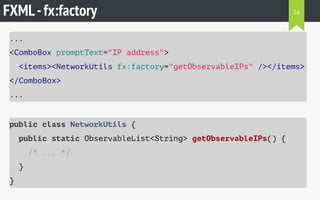
FXML-fx:factory
...
<ComboBox promptText="IP address">
<items><NetworkUtils fx:factory="getObservableIPs" /></items>
</ComboBox>
...
public class NetworkUtils {
public static ObservableList<String> getObservableIPs() {
/* ... */
}
}
16
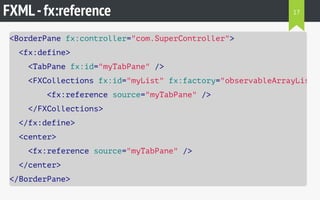
FXML-fx:reference
<BorderPane fx:controller="com.SuperController">
<fx:define>
<TabPane fx:id="myTabPane" />
<FXCollections fx:id="myList" fx:factory="observableArrayList"
<fx:reference source="myTabPane" />
</FXCollections>
</fx:define>
<center>
<fx:reference source="myTabPane" />
</center>
</BorderPane>
17
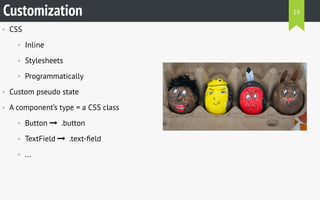
Customization
• CSS
• Inline
• Stylesheets
• Programmatically
• Custom pseudo state
• A component’s type = a CSS class
• Button   .button
• TextField   .text-field
• ...
Customization 19
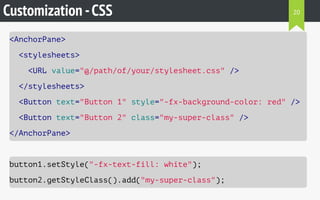
Customization -CSS
<AnchorPane>
<stylesheets>
<URL value="@/path/of/your/stylesheet.css" />
</stylesheets>
<Button text="Button 1" style="-fx-background-color: red" />
<Button text="Button 2" class="my-super-class" />
</AnchorPane>
button1.setStyle("-fx-text-fill: white");
button2.getStyleClass().add("my-super-class");
20
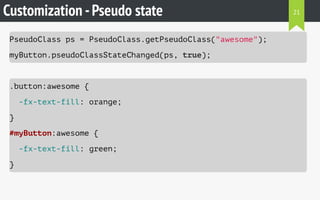
Customization -Pseudo state
PseudoClass ps = PseudoClass.getPseudoClass("awesome");
myButton.pseudoClassStateChanged(ps, true);
.button:awesome {
-fx-text-fill: orange;
}
#myButton:awesome {
-fx-text-fill: green;
}
21
• Fully customized UI
• CSS already known
• Specifities
• Not always that easy
Customization
REX
22
Properties
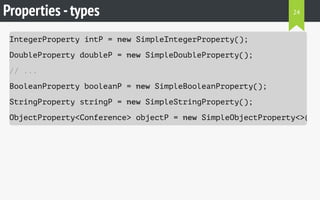
Properties -types
IntegerProperty intP = new SimpleIntegerProperty();
DoubleProperty doubleP = new SimpleDoubleProperty();
// ...
BooleanProperty booleanP = new SimpleBooleanProperty();
StringProperty stringP = new SimpleStringProperty();
ObjectProperty<Conference> objectP = new SimpleObjectProperty<>();
24
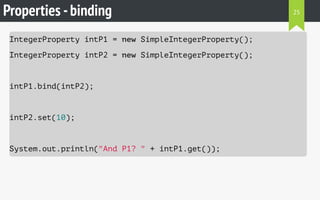
Properties -binding
IntegerProperty intP1 = new SimpleIntegerProperty();
IntegerProperty intP2 = new SimpleIntegerProperty();
intP1.bind(intP2);
intP2.set(10);
System.out.println("And P1? " + intP1.get());
25
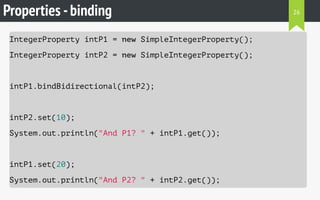
Properties -binding
IntegerProperty intP1 = new SimpleIntegerProperty();
IntegerProperty intP2 = new SimpleIntegerProperty();
intP1.bindBidirectional(intP2);
intP2.set(10);
System.out.println("And P1? " + intP1.get());
intP1.set(20);
System.out.println("And P2? " + intP2.get());
26
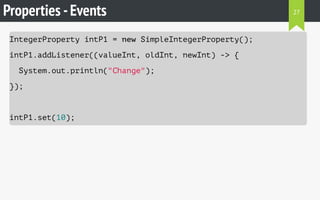
Properties -Events
IntegerProperty intP1 = new SimpleIntegerProperty();
intP1.addListener((valueInt, oldInt, newInt) -> {
System.out.println("Change");
});
intP1.set(10);
27
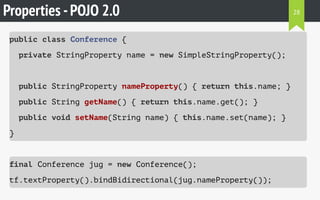
Properties -POJO 2.0
public class Conference {
private StringProperty name = new SimpleStringProperty();
public StringProperty nameProperty() { return this.name; }
public String getName() { return this.name.get(); }
public void setName(String name) { this.name.set(name); }
}
final Conference jug = new Conference();
tf.textProperty().bindBidirectional(jug.nameProperty());
28
Not serializable
Properties -POJO 1.5
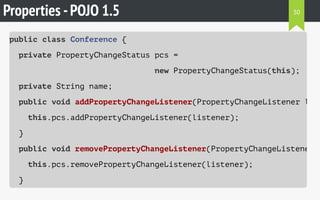
public class Conference {
private PropertyChangeStatus pcs =
new PropertyChangeStatus(this);
private String name;
public void addPropertyChangeListener(PropertyChangeListener list
this.pcs.addPropertyChangeListener(listener);
}
public void removePropertyChangeListener(PropertyChangeListener l
this.pcs.removePropertyChangeListener(listener);
}
30
Properties -POJO 1.5
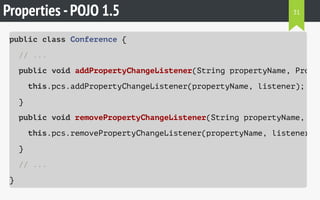
public class Conference {
// ...
public void addPropertyChangeListener(String propertyName, Proper
this.pcs.addPropertyChangeListener(propertyName, listener);
}
public void removePropertyChangeListener(String propertyName, Pro
this.pcs.removePropertyChangeListener(propertyName, listener);
}
// ...
}
31
Properties -POJO 1.5
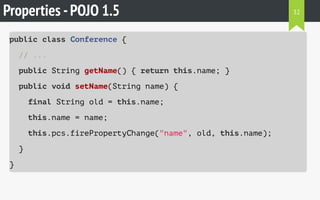
public class Conference {
// ...
public String getName() { return this.name; }
public void setName(String name) {
final String old = this.name;
this.name = name;
this.pcs.firePropertyChange("name", old, this.name);
}
}
32
Properties -POJO 1.5
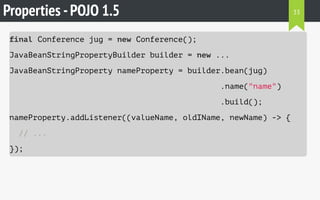
final Conference jug = new Conference();
JavaBeanStringPropertyBuilder builder = new ...
JavaBeanStringProperty nameProperty = builder.bean(jug)
.name("name")
.build();
nameProperty.addListener((valueName, oldIName, newName) -> {
// ...
});
33
Controls
ImageView
ImageView-FXML
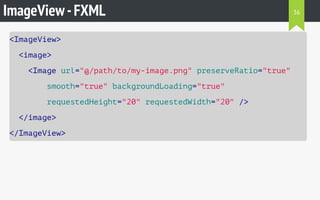
<ImageView>
<image>
<Image url="@/path/to/my-image.png" preserveRatio="true"
smooth="true" backgroundLoading="true"
requestedHeight="20" requestedWidth="20" />
</image>
</ImageView>
36
ImageView-Java
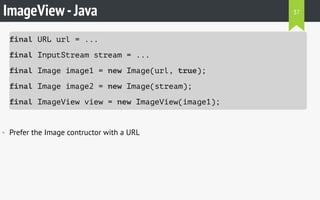
final URL url = ...
final InputStream stream = ...
final Image image1 = new Image(url, true);
final Image image2 = new Image(stream);
final ImageView view = new ImageView(image1);
• Prefer the Image contructor with a URL
37
WebView
WebView-the State
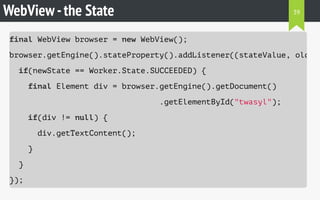
final WebView browser = new WebView();
browser.getEngine().stateProperty().addListener((stateValue, oldSta
if(newState == Worker.State.SUCCEEDED) {
final Element div = browser.getEngine().getDocument()
.getElementById("twasyl");
if(div != null) {
div.getTextContent();
}
}
});
39
WebView-interact with events
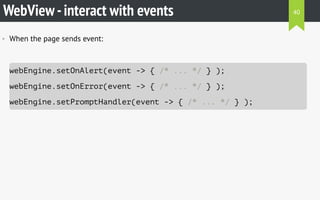
• When the page sends event:
webEngine.setOnAlert(event -> { /* ... */ } );
webEngine.setOnError(event -> { /* ... */ } );
webEngine.setPromptHandler(event -> { /* ... */ } );
40
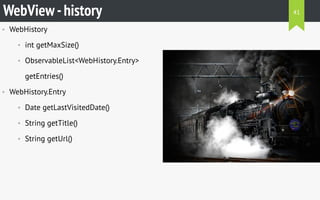
• WebHistory
• int getMaxSize()
• ObservableList<WebHistory.Entry>
getEntries()
• WebHistory.Entry
• Date getLastVisitedDate()
• String getTitle()
• String getUrl()
WebView-history 41
• Stylesheet inheritance
• HTML buttons inherit from JavaFX
buttons
• ...
• Performance
WebView
REX
42
TableView
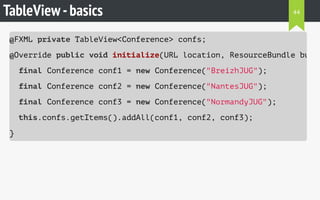
TableView-basics
@FXML private TableView<Conference> confs;
@Override public void initialize(URL location, ResourceBundle bundl
final Conference conf1 = new Conference("BreizhJUG");
final Conference conf2 = new Conference("NantesJUG");
final Conference conf3 = new Conference("NormandyJUG");
this.confs.getItems().addAll(conf1, conf2, conf3);
}
44
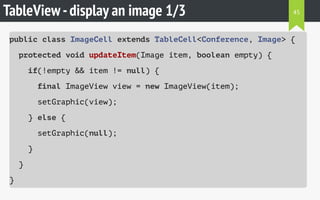
TableView-display an image 1/3
public class ImageCell extends TableCell<Conference, Image> {
protected void updateItem(Image item, boolean empty) {
if(!empty && item != null) {
final ImageView view = new ImageView(item);
setGraphic(view);
} else {
setGraphic(null);
}
}
}
45
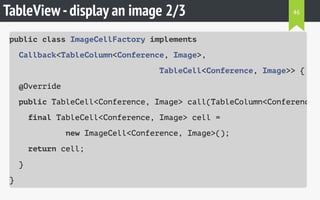
TableView-display an image 2/3
public class ImageCellFactory implements
Callback<TableColumn<Conference, Image>,
TableCell<Conference, Image>> {
@Override
public TableCell<Conference, Image> call(TableColumn<Conference,
final TableCell<Conference, Image> cell =
new ImageCell<Conference, Image>();
return cell;
}
}
46
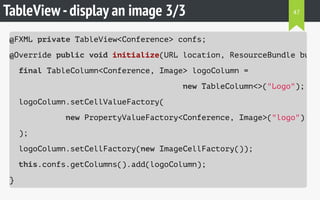
TableView-display an image 3/3
@FXML private TableView<Conference> confs;
@Override public void initialize(URL location, ResourceBundle bundl
final TableColumn<Conference, Image> logoColumn =
new TableColumn<>("Logo");
logoColumn.setCellValueFactory(
new PropertyValueFactory<Conference, Image>("logo")
);
logoColumn.setCellFactory(new ImageCellFactory());
this.confs.getColumns().add(logoColumn);
}
47
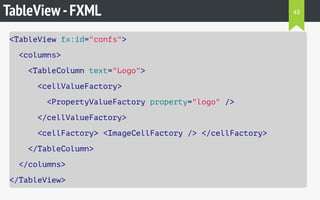
TableView-FXML
<TableView fx:id="confs">
<columns>
<TableColumn text="Logo">
<cellValueFactory>
<PropertyValueFactory property="logo" />
</cellValueFactory>
<cellFactory> <ImageCellFactory /> </cellFactory>
</TableColumn>
</columns>
</TableView>
48
Concurrency
• Questions:
1. How to not block my UI when I
download a file ?
2. How to work with the file when
download is done ?
• javafx.concurrent
• Worker
• Task
• Service
• ScheduledService
concurrency.setTricky(true) 50
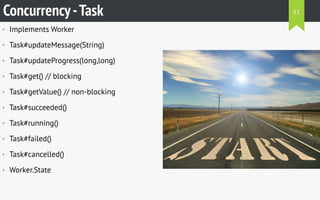
• Implements Worker
• Task#updateMessage(String)
• Task#updateProgress(long,long)
• Task#get() // blocking
• Task#getValue() // non-blocking
• Task#succeeded()
• Task#running()
• Task#failed()
• Task#cancelled()
• Worker.State
Concurrency-Task 51
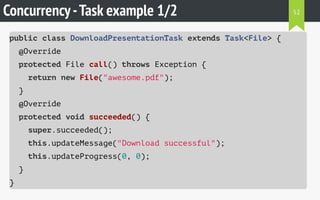
Concurrency-Task example 1/2
public class DownloadPresentationTask extends Task<File> {
@Override
protected File call() throws Exception {
return new File("awesome.pdf");
}
@Override
protected void succeeded() {
super.succeeded();
this.updateMessage("Download successful");
this.updateProgress(0, 0);
}
}
52
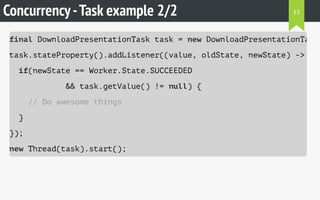
Concurrency-Task example 2/2
final DownloadPresentationTask task = new DownloadPresentationTask(
task.stateProperty().addListener((value, oldState, newState) -> {
if(newState == Worker.State.SUCCEEDED
&& task.getValue() != null) {
// Do awesome things
}
});
new Thread(task).start();
53
Packaging
• Native applications
• Embed a JRE
• No need to download a JRE
• javafxpackager tool
• Ant tasks
Packaging 55
UI testing
• Automaton
• Support both Swing and JavaFX 2
• Works with JavaFX 8
• Tests can be written in groovy
• TestFX
• Very fluent API
UI testing 57
Tooling
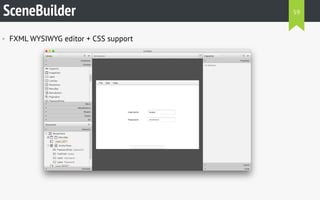
SceneBuilder
• FXML WYSIWYG editor + CSS support
59
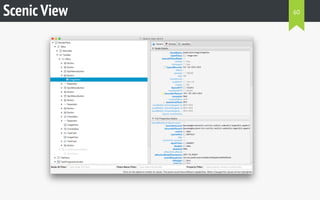
Scenic View 60
#JavaScript
61
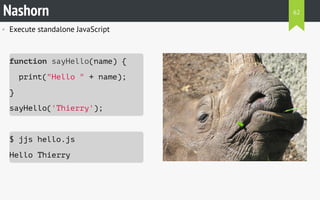
• Execute standalone JavaScript
function sayHello(name) {
print("Hello " + name);
}
sayHello('Thierry');
$ jjs hello.js
Hello Thierry
Nashorn 62
• Execute Java from JavaScript
$ jjs java.js
[Hello, world]
Nashorn
function displayList() {
var ArrayList = Java.type('java.util.ArrayList'
var lst = new ArrayList();
lst.add("Hello");
lst.add("world");
print(lst);
}
63
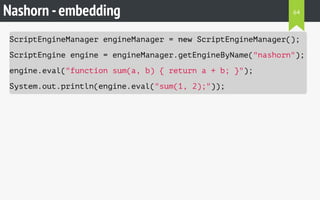
Nashorn -embedding
ScriptEngineManager engineManager = new ScriptEngineManager();
ScriptEngine engine = engineManager.getEngineByName("nashorn");
engine.eval("function sum(a, b) { return a + b; }");
System.out.println(engine.eval("sum(1, 2);"));
64
• Useful ?
• Web-based app
• One browser to test
• Web developer for front
• Java deveveloper for back
• SlideshowFX
• Polyglotism
Nashorn -JavaFX 65
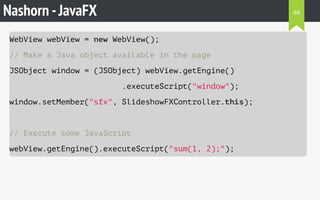
Nashorn -JavaFX
WebView webView = new WebView();
// Make a Java object available in the page
JSObject window = (JSObject) webView.getEngine()
.executeScript("window");
window.setMember("sfx", SlideshowFXController.this);
// Execute some JavaScript
webView.getEngine().executeScript("sum(1, 2);");
66
• What’s done:
• DOM manipulation
• Get current slide
• Inject custom JS libraries
• Advantages
• JavaFX – HTML communication
• Tip
• Use Base64 strings for interopability
Nashorn -SlideshowFX
REX
67
#OSGi
68
• Jigsaw will bring modularity
• Penrose : explore interoperability between
Jigsaw & OSGi
• For now: modularity = OSGi
In Jigsaw's shadow 69
• The Dynamic Module System for Java
• June 2014
• OSGi Release 6
• ClassPath
• Handle it or die
OSGi -Huh? 70
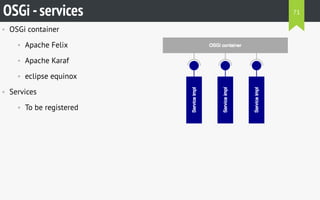
• OSGi container
• Apache Felix
• Apache Karaf
• eclipse equinox
• Services
• To be registered
OSGi -services 71
OSGi -embedding
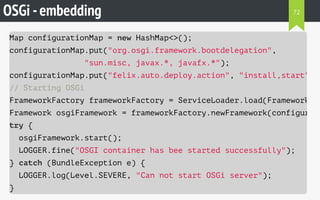
Map configurationMap = new HashMap<>();
configurationMap.put("org.osgi.framework.bootdelegation",
"sun.misc, javax.*, javafx.*");
configurationMap.put("felix.auto.deploy.action", "install,start"
// Starting OSGi
FrameworkFactory frameworkFactory = ServiceLoader.load(FrameworkFac
Framework osgiFramework = frameworkFactory.newFramework(configurati
try {
osgiFramework.start();
LOGGER.fine("OSGI container has bee started successfully");
} catch (BundleException e) {
LOGGER.log(Level.SEVERE, "Can not start OSGi server");
}
72
OSGi -deploy services
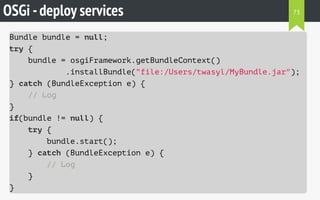
Bundle bundle = null;
try {
bundle = osgiFramework.getBundleContext()
.installBundle("file:/Users/twasyl/MyBundle.jar");
} catch (BundleException e) {
// Log
}
if(bundle != null) {
try {
bundle.start();
} catch (BundleException e) {
// Log
}
}
73
OSGi -JavaFX tips
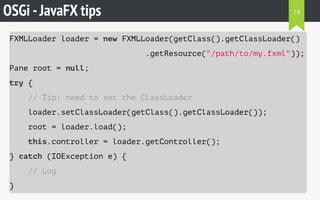
FXMLLoader loader = new FXMLLoader(getClass().getClassLoader()
.getResource("/path/to/my.fxml"));
Pane root = null;
try {
// Tip: need to set the ClassLoader
loader.setClassLoader(getClass().getClassLoader());
root = loader.load();
this.controller = loader.getController();
} catch (IOException e) {
// Log
}
74
• What’s done
• Embed Felix
• Support new syntax
• Add extensions
• Add hosting connectors
• Advantage
• Extend the app without modifying the
app
• Tips
• Think ClassLoader
• Think boot delegation
OSGi -SlideshowFX
REX
75
#asciidoctor
76
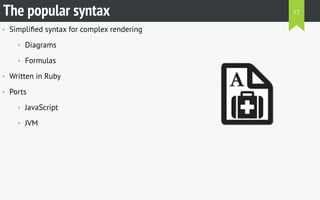
• Simplified syntax for complex rendering
• Diagrams
• Formulas
• Written in Ruby
• Ports
• JavaScript
• JVM
The popular syntax 77
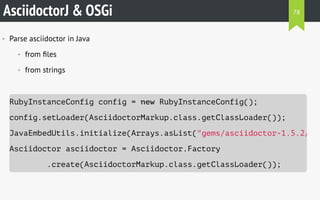
AsciidoctorJ & OSGi
• Parse asciidoctor in Java
• from files
• from strings
RubyInstanceConfig config = new RubyInstanceConfig();
config.setLoader(AsciidoctorMarkup.class.getClassLoader());
JavaEmbedUtils.initialize(Arrays.asList("gems/asciidoctor-1.5.2/lib
Asciidoctor asciidoctor = Asciidoctor.Factory
.create(AsciidoctorMarkup.class.getClassLoader());
78
Asciidoctor -Parsing
• From strings
String html = asciidoctor.convert("I'm a hero",
new HashMap<String, Object>());
• From files
File myFile = new File("myFile.adoc");
List<File> myFiles = new ArrayList<>(); // Add files then
Map<String, Object> options = new HashMap<>();
String html = asciidoctor.convertFile(myFile, options);
String[] htmls = asciidoctor.convertFiles(myFiles, options);
79
• Markup syntax
• OSGi context
• Advantage
• Trendy way to define slides' content
• Tip
• Usage in an OSGi context requires a
lot of attention
Asciidoctor -SlideshowFX
REX
80
#Vert.x
81
• Lightweight for the JVM
• Polyglot components
• Java
• JavaScript
• Groovy
• CoffeeScript
• Python
• Ruby
• ...
Innovative JVM server 82
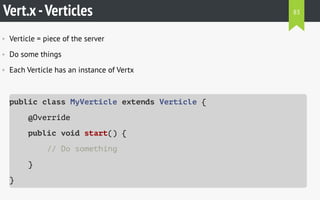
Vert.x-Verticles
• Verticle = piece of the server
• Do some things
• Each Verticle has an instance of Vertx
public class MyVerticle extends Verticle {
@Override
public void start() {
// Do something
}
}
83
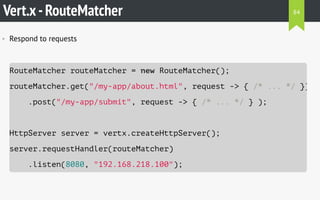
Vert.x-RouteMatcher
• Respond to requests
RouteMatcher routeMatcher = new RouteMatcher();
routeMatcher.get("/my-app/about.html", request -> { /* ... */ })
.post("/my-app/submit", request -> { /* ... */ } );
HttpServer server = vertx.createHttpServer();
server.requestHandler(routeMatcher)
.listen(8080, "192.168.218.100");
84
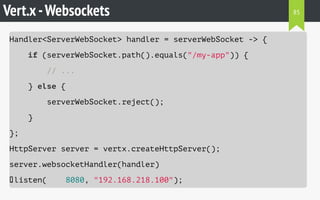
Vert.x-Websockets
Handler<ServerWebSocket> handler = serverWebSocket -> {
if (serverWebSocket.path().equals("/my-app")) {
// ...
} else {
serverWebSocket.reject();
}
};
HttpServer server = vertx.createHttpServer();
server.websocketHandler(handler)
.listen( 8080, "192.168.218.100");
85
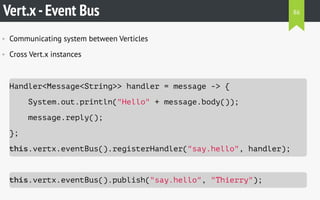
Vert.x-Event Bus
• Communicating system between Verticles
• Cross Vert.x instances
Handler<Message<String>> handler = message -> {
System.out.println("Hello" + message.body());
message.reply();
};
this.vertx.eventBus().registerHandler("say.hello", handler);
this.vertx.eventBus().publish("say.hello", "Thierry");
86
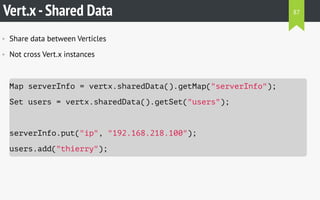
Vert.x-Shared Data
• Share data between Verticles
• Not cross Vert.x instances
Map serverInfo = vertx.sharedData().getMap("serverInfo");
Set users = vertx.sharedData().getSet("users");
serverInfo.put("ip", "192.168.218.100");
users.add("thierry");
87
• What’s done
• Chat using websockets
• Quizz feature
• Twitter integration
• Advantages
• Embed a web server easily
• No installation for the client
• Tip
• Store HttpServer instances as
singleton for re-usage
Vert.x-SlideshowFX
REX
88
#LeapMotion
89
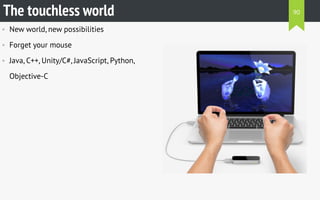
• New world, new possibilities
• Forget your mouse
• Java, C++, Unity/C#, JavaScript, Python,
Objective-C
The touchless world 90
• -Djava.library.path
• By
• platform
• architecture
• Packaging = warning
  
LeapMotion -Native libraries 91
LeapMotion -The controller
• Main interface with the device
• Access
• Frames
• Configuration information
• Use listeners
Controller leapController = new Controller();
92
LeapMotion -The listener
• Respond to events
• onInit
• onExit
• onConnect
• onDisconnect
• onFrame
Listener wonderfulListener = new WonderfulListener();
controller.addListener(listener);
93
• What’s done
• Change slides
• Show a pointer
• Perform clicks
• Advantage
• Bring interactivity
• Tip
• Think gestures
LeapMotion -SlideshowFX
REX
94
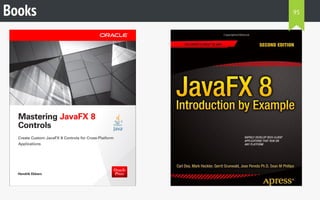
Books 95
96

#JavaFX.forReal()

  • 1.
  • 2.
    Disclaimer Swing lovers won’tbe hurt and no beard or mustach will be shaved. You will maybe discover new technologies or concepts. Don’t be afraid. The presentation of technologies are not promotional. SlideshowFX is my own open source project and will only be used as an example of implementations of technologies presented. 2
  • 3.
    presentation.agenda() public class Presentationextends Application { public void init() { Speaker.load("twasyl"); } public void start(Stage stage) { JavaFX.getVersion(8).load(); new ScriptEngineManager().getEngineByName("nashorn"); Bundle.deploy("OSGi"); Markups.stream().filter(m -> m.name.equals("asciidoctor"))); vertx.createHttpServer().listen(8080, "localhost"); leapMotionController.isConnected(); } public void stop() { Speaker.shutdown("twasyl"); } } 3
  • 4.
  • 5.
  • 6.
    Pourquoi le OuestFXtour? Un espagnol breton perdu en Normandie nous refait l'histoire des ihm en java c'est @LostInBrittany au @normandyjug 8:03 PM - 14 Oct 2014 Yann PETIT @finalspy Follow 2 RETWEETS 1 FAVORITE 6
  • 7.
    Pourquoi le OuestFXtour? @finalspy @LostInBrittany @normandyjug Il a parlé #JavaFX au moins? Thierry Wasylczenko @twasyl @twasyl @finalspy @normandyjug #javafx ? Moi j'ai fait du vrai client lourd, j'ai fait du #swing :p 9:33 AM - 15 Oct 2014 Paris, Ile-de-France, France Horacio Gonzalez @LostInBrittany Follow 1 RETWEET 15 Oct 7
  • 8.
  • 9.
  • 10.
  • 11.
  • 12.
    FXML-the easy one <BorderPanexmlns:fx="http://javafx.com/fxml"> <top> <MenuBar> <Menu text="File"> <MenuItem text="Quit" /> </Menu> </MenuBar> </top> <center> <FlowPane> <Button text="Show" /> <Button text="more" /> </FlowPane> </center> </BorderPane> 12
  • 13.
    FXML-the controller • Thebackend of FXML • Associated to the view public class MyController implements Initializable { // Some interesting things to code @Override public void initialize(URL url, ResourceBundle resourceBundle) // Some other interesting things to code ! } } 13
  • 14.
    FXML + controller <BorderPanefx:controller="com.SuperController"> <center> <Button text="Click !" fx:id="myButton" onAction="#doSomething" /> </center> </BorderPane> public class SuperController implements Initializable { @FXML private Button myButton; @FXML private void doSomething(ActionEvent e) {} } 14
  • 15.
    FXML-fx:define <BorderPane fx:controller="com.SuperController"> <fx:define> <Double fx:id="MY_DOUBLE"fx:value="20.0" /> </fx:define> <center> <TextField text="$MY_DOUBLE" /> </center> </BorderPane> 15
  • 16.
    FXML-fx:factory ... <ComboBox promptText="IP address"> <items><NetworkUtilsfx:factory="getObservableIPs" /></items> </ComboBox> ... public class NetworkUtils { public static ObservableList<String> getObservableIPs() { /* ... */ } } 16
  • 17.
    FXML-fx:reference <BorderPane fx:controller="com.SuperController"> <fx:define> <TabPane fx:id="myTabPane"/> <FXCollections fx:id="myList" fx:factory="observableArrayList" <fx:reference source="myTabPane" /> </FXCollections> </fx:define> <center> <fx:reference source="myTabPane" /> </center> </BorderPane> 17
  • 18.
  • 19.
    • CSS • Inline •Stylesheets • Programmatically • Custom pseudo state • A component’s type = a CSS class • Button   .button • TextField   .text-field • ... Customization 19
  • 20.
    Customization -CSS <AnchorPane> <stylesheets> <URL value="@/path/of/your/stylesheet.css"/> </stylesheets> <Button text="Button 1" style="-fx-background-color: red" /> <Button text="Button 2" class="my-super-class" /> </AnchorPane> button1.setStyle("-fx-text-fill: white"); button2.getStyleClass().add("my-super-class"); 20
  • 21.
    Customization -Pseudo state PseudoClassps = PseudoClass.getPseudoClass("awesome"); myButton.pseudoClassStateChanged(ps, true); .button:awesome { -fx-text-fill: orange; } #myButton:awesome { -fx-text-fill: green; } 21
  • 22.
    • Fully customizedUI • CSS already known • Specifities • Not always that easy Customization REX 22
  • 23.
  • 24.
    Properties -types IntegerProperty intP= new SimpleIntegerProperty(); DoubleProperty doubleP = new SimpleDoubleProperty(); // ... BooleanProperty booleanP = new SimpleBooleanProperty(); StringProperty stringP = new SimpleStringProperty(); ObjectProperty<Conference> objectP = new SimpleObjectProperty<>(); 24
  • 25.
    Properties -binding IntegerProperty intP1= new SimpleIntegerProperty(); IntegerProperty intP2 = new SimpleIntegerProperty(); intP1.bind(intP2); intP2.set(10); System.out.println("And P1? " + intP1.get()); 25
  • 26.
    Properties -binding IntegerProperty intP1= new SimpleIntegerProperty(); IntegerProperty intP2 = new SimpleIntegerProperty(); intP1.bindBidirectional(intP2); intP2.set(10); System.out.println("And P1? " + intP1.get()); intP1.set(20); System.out.println("And P2? " + intP2.get()); 26
  • 27.
    Properties -Events IntegerProperty intP1= new SimpleIntegerProperty(); intP1.addListener((valueInt, oldInt, newInt) -> { System.out.println("Change"); }); intP1.set(10); 27
  • 28.
    Properties -POJO 2.0 publicclass Conference { private StringProperty name = new SimpleStringProperty(); public StringProperty nameProperty() { return this.name; } public String getName() { return this.name.get(); } public void setName(String name) { this.name.set(name); } } final Conference jug = new Conference(); tf.textProperty().bindBidirectional(jug.nameProperty()); 28
  • 29.
  • 30.
    Properties -POJO 1.5 publicclass Conference { private PropertyChangeStatus pcs = new PropertyChangeStatus(this); private String name; public void addPropertyChangeListener(PropertyChangeListener list this.pcs.addPropertyChangeListener(listener); } public void removePropertyChangeListener(PropertyChangeListener l this.pcs.removePropertyChangeListener(listener); } 30
  • 31.
    Properties -POJO 1.5 publicclass Conference { // ... public void addPropertyChangeListener(String propertyName, Proper this.pcs.addPropertyChangeListener(propertyName, listener); } public void removePropertyChangeListener(String propertyName, Pro this.pcs.removePropertyChangeListener(propertyName, listener); } // ... } 31
  • 32.
    Properties -POJO 1.5 publicclass Conference { // ... public String getName() { return this.name; } public void setName(String name) { final String old = this.name; this.name = name; this.pcs.firePropertyChange("name", old, this.name); } } 32
  • 33.
    Properties -POJO 1.5 finalConference jug = new Conference(); JavaBeanStringPropertyBuilder builder = new ... JavaBeanStringProperty nameProperty = builder.bean(jug) .name("name") .build(); nameProperty.addListener((valueName, oldIName, newName) -> { // ... }); 33
  • 34.
  • 35.
  • 36.
    ImageView-FXML <ImageView> <image> <Image url="@/path/to/my-image.png" preserveRatio="true" smooth="true"backgroundLoading="true" requestedHeight="20" requestedWidth="20" /> </image> </ImageView> 36
  • 37.
    ImageView-Java final URL url= ... final InputStream stream = ... final Image image1 = new Image(url, true); final Image image2 = new Image(stream); final ImageView view = new ImageView(image1); • Prefer the Image contructor with a URL 37
  • 38.
  • 39.
    WebView-the State final WebViewbrowser = new WebView(); browser.getEngine().stateProperty().addListener((stateValue, oldSta if(newState == Worker.State.SUCCEEDED) { final Element div = browser.getEngine().getDocument() .getElementById("twasyl"); if(div != null) { div.getTextContent(); } } }); 39
  • 40.
    WebView-interact with events •When the page sends event: webEngine.setOnAlert(event -> { /* ... */ } ); webEngine.setOnError(event -> { /* ... */ } ); webEngine.setPromptHandler(event -> { /* ... */ } ); 40
  • 41.
    • WebHistory • intgetMaxSize() • ObservableList<WebHistory.Entry> getEntries() • WebHistory.Entry • Date getLastVisitedDate() • String getTitle() • String getUrl() WebView-history 41
  • 42.
    • Stylesheet inheritance •HTML buttons inherit from JavaFX buttons • ... • Performance WebView REX 42
  • 43.
  • 44.
    TableView-basics @FXML private TableView<Conference>confs; @Override public void initialize(URL location, ResourceBundle bundl final Conference conf1 = new Conference("BreizhJUG"); final Conference conf2 = new Conference("NantesJUG"); final Conference conf3 = new Conference("NormandyJUG"); this.confs.getItems().addAll(conf1, conf2, conf3); } 44
  • 45.
    TableView-display an image1/3 public class ImageCell extends TableCell<Conference, Image> { protected void updateItem(Image item, boolean empty) { if(!empty && item != null) { final ImageView view = new ImageView(item); setGraphic(view); } else { setGraphic(null); } } } 45
  • 46.
    TableView-display an image2/3 public class ImageCellFactory implements Callback<TableColumn<Conference, Image>, TableCell<Conference, Image>> { @Override public TableCell<Conference, Image> call(TableColumn<Conference, final TableCell<Conference, Image> cell = new ImageCell<Conference, Image>(); return cell; } } 46
  • 47.
    TableView-display an image3/3 @FXML private TableView<Conference> confs; @Override public void initialize(URL location, ResourceBundle bundl final TableColumn<Conference, Image> logoColumn = new TableColumn<>("Logo"); logoColumn.setCellValueFactory( new PropertyValueFactory<Conference, Image>("logo") ); logoColumn.setCellFactory(new ImageCellFactory()); this.confs.getColumns().add(logoColumn); } 47
  • 48.
    TableView-FXML <TableView fx:id="confs"> <columns> <TableColumn text="Logo"> <cellValueFactory> <PropertyValueFactoryproperty="logo" /> </cellValueFactory> <cellFactory> <ImageCellFactory /> </cellFactory> </TableColumn> </columns> </TableView> 48
  • 49.
  • 50.
    • Questions: 1. Howto not block my UI when I download a file ? 2. How to work with the file when download is done ? • javafx.concurrent • Worker • Task • Service • ScheduledService concurrency.setTricky(true) 50
  • 51.
    • Implements Worker •Task#updateMessage(String) • Task#updateProgress(long,long) • Task#get() // blocking • Task#getValue() // non-blocking • Task#succeeded() • Task#running() • Task#failed() • Task#cancelled() • Worker.State Concurrency-Task 51
  • 52.
    Concurrency-Task example 1/2 publicclass DownloadPresentationTask extends Task<File> { @Override protected File call() throws Exception { return new File("awesome.pdf"); } @Override protected void succeeded() { super.succeeded(); this.updateMessage("Download successful"); this.updateProgress(0, 0); } } 52
  • 53.
    Concurrency-Task example 2/2 finalDownloadPresentationTask task = new DownloadPresentationTask( task.stateProperty().addListener((value, oldState, newState) -> { if(newState == Worker.State.SUCCEEDED && task.getValue() != null) { // Do awesome things } }); new Thread(task).start(); 53
  • 54.
  • 55.
    • Native applications •Embed a JRE • No need to download a JRE • javafxpackager tool • Ant tasks Packaging 55
  • 56.
  • 57.
    • Automaton • Supportboth Swing and JavaFX 2 • Works with JavaFX 8 • Tests can be written in groovy • TestFX • Very fluent API UI testing 57
  • 58.
  • 59.
    SceneBuilder • FXML WYSIWYGeditor + CSS support 59
  • 60.
  • 61.
  • 62.
    • Execute standaloneJavaScript function sayHello(name) { print("Hello " + name); } sayHello('Thierry'); $ jjs hello.js Hello Thierry Nashorn 62
  • 63.
    • Execute Javafrom JavaScript $ jjs java.js [Hello, world] Nashorn function displayList() { var ArrayList = Java.type('java.util.ArrayList' var lst = new ArrayList(); lst.add("Hello"); lst.add("world"); print(lst); } 63
  • 64.
    Nashorn -embedding ScriptEngineManager engineManager= new ScriptEngineManager(); ScriptEngine engine = engineManager.getEngineByName("nashorn"); engine.eval("function sum(a, b) { return a + b; }"); System.out.println(engine.eval("sum(1, 2);")); 64
  • 65.
    • Useful ? •Web-based app • One browser to test • Web developer for front • Java deveveloper for back • SlideshowFX • Polyglotism Nashorn -JavaFX 65
  • 66.
    Nashorn -JavaFX WebView webView= new WebView(); // Make a Java object available in the page JSObject window = (JSObject) webView.getEngine() .executeScript("window"); window.setMember("sfx", SlideshowFXController.this); // Execute some JavaScript webView.getEngine().executeScript("sum(1, 2);"); 66
  • 67.
    • What’s done: •DOM manipulation • Get current slide • Inject custom JS libraries • Advantages • JavaFX – HTML communication • Tip • Use Base64 strings for interopability Nashorn -SlideshowFX REX 67
  • 68.
  • 69.
    • Jigsaw willbring modularity • Penrose : explore interoperability between Jigsaw & OSGi • For now: modularity = OSGi In Jigsaw's shadow 69
  • 70.
    • The DynamicModule System for Java • June 2014 • OSGi Release 6 • ClassPath • Handle it or die OSGi -Huh? 70
  • 71.
    • OSGi container •Apache Felix • Apache Karaf • eclipse equinox • Services • To be registered OSGi -services 71
  • 72.
    OSGi -embedding Map configurationMap= new HashMap<>(); configurationMap.put("org.osgi.framework.bootdelegation", "sun.misc, javax.*, javafx.*"); configurationMap.put("felix.auto.deploy.action", "install,start" // Starting OSGi FrameworkFactory frameworkFactory = ServiceLoader.load(FrameworkFac Framework osgiFramework = frameworkFactory.newFramework(configurati try { osgiFramework.start(); LOGGER.fine("OSGI container has bee started successfully"); } catch (BundleException e) { LOGGER.log(Level.SEVERE, "Can not start OSGi server"); } 72
  • 73.
    OSGi -deploy services Bundlebundle = null; try { bundle = osgiFramework.getBundleContext() .installBundle("file:/Users/twasyl/MyBundle.jar"); } catch (BundleException e) { // Log } if(bundle != null) { try { bundle.start(); } catch (BundleException e) { // Log } } 73
  • 74.
    OSGi -JavaFX tips FXMLLoaderloader = new FXMLLoader(getClass().getClassLoader() .getResource("/path/to/my.fxml")); Pane root = null; try { // Tip: need to set the ClassLoader loader.setClassLoader(getClass().getClassLoader()); root = loader.load(); this.controller = loader.getController(); } catch (IOException e) { // Log } 74
  • 75.
    • What’s done •Embed Felix • Support new syntax • Add extensions • Add hosting connectors • Advantage • Extend the app without modifying the app • Tips • Think ClassLoader • Think boot delegation OSGi -SlideshowFX REX 75
  • 76.
  • 77.
    • Simplified syntaxfor complex rendering • Diagrams • Formulas • Written in Ruby • Ports • JavaScript • JVM The popular syntax 77
  • 78.
    AsciidoctorJ & OSGi •Parse asciidoctor in Java • from files • from strings RubyInstanceConfig config = new RubyInstanceConfig(); config.setLoader(AsciidoctorMarkup.class.getClassLoader()); JavaEmbedUtils.initialize(Arrays.asList("gems/asciidoctor-1.5.2/lib Asciidoctor asciidoctor = Asciidoctor.Factory .create(AsciidoctorMarkup.class.getClassLoader()); 78
  • 79.
    Asciidoctor -Parsing • Fromstrings String html = asciidoctor.convert("I'm a hero", new HashMap<String, Object>()); • From files File myFile = new File("myFile.adoc"); List<File> myFiles = new ArrayList<>(); // Add files then Map<String, Object> options = new HashMap<>(); String html = asciidoctor.convertFile(myFile, options); String[] htmls = asciidoctor.convertFiles(myFiles, options); 79
  • 80.
    • Markup syntax •OSGi context • Advantage • Trendy way to define slides' content • Tip • Usage in an OSGi context requires a lot of attention Asciidoctor -SlideshowFX REX 80
  • 81.
  • 82.
    • Lightweight forthe JVM • Polyglot components • Java • JavaScript • Groovy • CoffeeScript • Python • Ruby • ... Innovative JVM server 82
  • 83.
    Vert.x-Verticles • Verticle =piece of the server • Do some things • Each Verticle has an instance of Vertx public class MyVerticle extends Verticle { @Override public void start() { // Do something } } 83
  • 84.
    Vert.x-RouteMatcher • Respond torequests RouteMatcher routeMatcher = new RouteMatcher(); routeMatcher.get("/my-app/about.html", request -> { /* ... */ }) .post("/my-app/submit", request -> { /* ... */ } ); HttpServer server = vertx.createHttpServer(); server.requestHandler(routeMatcher) .listen(8080, "192.168.218.100"); 84
  • 85.
    Vert.x-Websockets Handler<ServerWebSocket> handler =serverWebSocket -> { if (serverWebSocket.path().equals("/my-app")) { // ... } else { serverWebSocket.reject(); } }; HttpServer server = vertx.createHttpServer(); server.websocketHandler(handler) .listen( 8080, "192.168.218.100"); 85
  • 86.
    Vert.x-Event Bus • Communicatingsystem between Verticles • Cross Vert.x instances Handler<Message<String>> handler = message -> { System.out.println("Hello" + message.body()); message.reply(); }; this.vertx.eventBus().registerHandler("say.hello", handler); this.vertx.eventBus().publish("say.hello", "Thierry"); 86
  • 87.
    Vert.x-Shared Data • Sharedata between Verticles • Not cross Vert.x instances Map serverInfo = vertx.sharedData().getMap("serverInfo"); Set users = vertx.sharedData().getSet("users"); serverInfo.put("ip", "192.168.218.100"); users.add("thierry"); 87
  • 88.
    • What’s done •Chat using websockets • Quizz feature • Twitter integration • Advantages • Embed a web server easily • No installation for the client • Tip • Store HttpServer instances as singleton for re-usage Vert.x-SlideshowFX REX 88
  • 89.
  • 90.
    • New world,new possibilities • Forget your mouse • Java, C++, Unity/C#, JavaScript, Python, Objective-C The touchless world 90
  • 91.
    • -Djava.library.path • By •platform • architecture • Packaging = warning    LeapMotion -Native libraries 91
  • 92.
    LeapMotion -The controller •Main interface with the device • Access • Frames • Configuration information • Use listeners Controller leapController = new Controller(); 92
  • 93.
    LeapMotion -The listener •Respond to events • onInit • onExit • onConnect • onDisconnect • onFrame Listener wonderfulListener = new WonderfulListener(); controller.addListener(listener); 93
  • 94.
    • What’s done •Change slides • Show a pointer • Perform clicks • Advantage • Bring interactivity • Tip • Think gestures LeapMotion -SlideshowFX REX 94
  • 95.
  • 96.