ЛАБОРАТОРНАЯ РАБОТА 1
<ФАБРИКА BLOCKLY>
Выполнил: ст. группы ПОС-10а
Белов Евгений
Работа с SVG файлами
Исходный код изображения
<svg width="48" height="48" xmlns="http://www.w3.org/2000/svg">
<metadata id="metadata3031">image/svg+xml</metadata>
<g>
<title>Layer 1</title>
<path fill="#ffff56" stroke-width="null" stroke-dasharray="null" stroke-linejoin="null" stroke-linecap="null"
d="m369,223c18,1 18,1 18,1c0,0 -18,-1 -18,-1z" id="svg_6"/>
<g id="svg_11">
<path fill="#009df4" stroke-width="null" stroke-dasharray="null" stroke-linejoin="null" stroke-linecap="null"
d="m20.4632,14.6762c-6.8533,9.6088 -6.6769,12.0453 5.0783,12.373799c11.7551,0.3286 7.805401,-
3.285 4.3258,-8.431599c-1.7397,-2.5734 -2.2805,-13.16771 2.997599,-9.0888c5.278103,4.079
4.901901,1.4783 8.475502,-3.28502c0.893398,-1.19084 2.885998,3.0866
4.478798,7.25372c1.5928,4.1671 -0.505497,10.742301 -3.467899,11.738101c-5.924599,1.991499 -
2.7976,3.6752 -2.7976,14.734898c0,11.0597 -4.326,-5.2561 -7.147198,0.219002c-2.821302,5.475101 -
4.043802,5.584599 -2.821302,-0.9856c1.2225,-6.57 -5.736399,0 -13.542,4.708698c-7.805369,4.708603 -
2.5814,-16.772099 -1.739699,-20.148399c0.8418,-3.3764 0.649,-16.06043 -7.53718,-7.720098c-
8.18623,8.340399 -5.55326,-4.9659 -1.36443,-10.477811c2.09441,-2.75598 6.65611,-3.70216 11.060209,-
1.66322c4.404001,2.03893 7.4277,5.96793 4.001101,10.77233z" id="svg_2"/>
<ellipse fill="#ffff56" stroke-width="null" stroke-dasharray="null" stroke-linejoin="null" stroke-linecap="null"
cx="35.1337" cy="15.881577" id="svg_3" rx="1.098846" ry="1.485842"/>
<ellipse fill="#ffff56" stroke-width="null" stroke-dasharray="null" stroke-linejoin="null" stroke-linecap="null"
cx="40.877668" cy="13.424222" id="svg_5" rx="1.198741" ry="1.600138"/>
<path fill="#ffff56" stroke-width="null" stroke-dasharray="null" stroke-linejoin="null" stroke-linecap="null"
d="m38.68,21.5392c1.7981,1.600201 6.593102,-1.4858 1.7981,1.600201c-4.794998,3.085899 -3.596199,-
2.971701 -3.596199,-2.971701c0,0 1.7981,1.3715 1.7981,1.3715z" id="svg_8"/>
</g>
</g>
</svg>
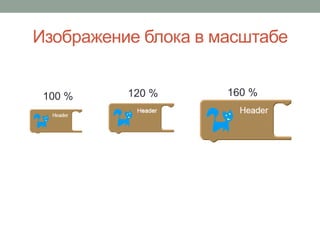
Изображение блока в масштабе
100 % 120 % 160 %
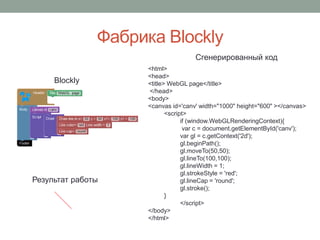
Фабрика Blockly
<html>
<head>
<title> WebGL page</title>
</head>
<body>
<canvas id='canv' width="1000" height="600" ></canvas>
<script>
if (window.WebGLRenderingContext){
var c = document.getElementById('canv');
var gl = c.getContext('2d');
gl.beginPath();
gl.moveTo(50,50);
gl.lineTo(100,100);
gl.lineWidth = 1;
gl.strokeStyle = 'red';
gl.lineCap = 'round';
gl.stroke();
}
</script>
</body>
</html>
Результат работы
Blockly
Cгенерированный код
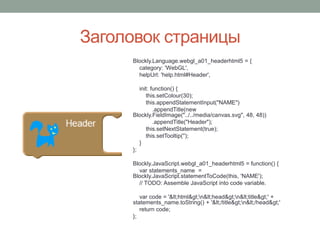
Заголовок страницы
Blockly.Language.webgl_a01_headerhtml5 = {
category: 'WebGL',
helpUrl: 'help.html#Header',
init: function() {
this.setColour(30);
this.appendStatementInput("NAME")
.appendTitle(new
Blockly.FieldImage("../../media/canvas.svg", 48, 48))
.appendTitle("Header");
this.setNextStatement(true);
this.setTooltip('');
}
};
Blockly.JavaScript.webgl_a01_headerhtml5 = function() {
var statements_name =
Blockly.JavaScript.statementToCode(this, 'NAME');
// TODO: Assemble JavaScript into code variable.
var code = '&lt;html&gt;n&lt;head&gt;n&lt;title&gt;' +
statements_name.toString() + '&lt;/title&gt;n&lt;/head&gt;'
return code;
};
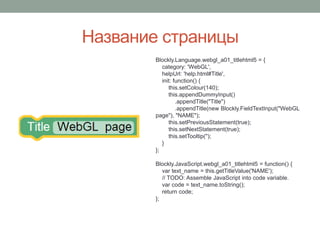
Название страницы
Blockly.Language.webgl_a01_titlehtml5 = {
category: 'WebGL',
helpUrl: 'help.html#Title',
init: function() {
this.setColour(140);
this.appendDummyInput()
.appendTitle("Title")
.appendTitle(new Blockly.FieldTextInput("WebGL
page"), "NAME");
this.setPreviousStatement(true);
this.setNextStatement(true);
this.setTooltip('');
}
};
Blockly.JavaScript.webgl_a01_titlehtml5 = function() {
var text_name = this.getTitleValue('NAME');
// TODO: Assemble JavaScript into code variable.
var code = text_name.toString();
return code;
};
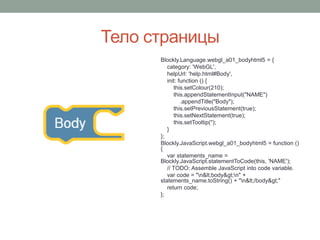
Тело страницы
Blockly.Language.webgl_a01_bodyhtml5 = {
category: 'WebGL',
helpUrl: 'help.html#Body',
init: function () {
this.setColour(210);
this.appendStatementInput("NAME")
.appendTitle("Body");
this.setPreviousStatement(true);
this.setNextStatement(true);
this.setTooltip('');
}
};
Blockly.JavaScript.webgl_a01_bodyhtml5 = function ()
{
var statements_name =
Blockly.JavaScript.statementToCode(this, 'NAME');
// TODO: Assemble JavaScript into code variable.
var code = "n&lt;body&gt;n" +
statements_name.toString() + "n&lt;/body&gt;"
return code;
};
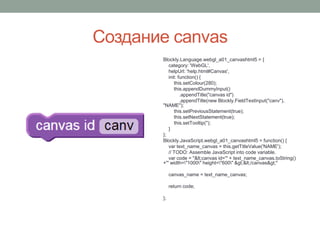
Создание canvas
Blockly.Language.webgl_a01_canvashtml5 = {
category: 'WebGL',
helpUrl: 'help.html#Canvas',
init: function() {
this.setColour(280);
this.appendDummyInput()
.appendTitle("canvas id")
.appendTitle(new Blockly.FieldTextInput("canv"),
"NAME");
this.setPreviousStatement(true);
this.setNextStatement(true);
this.setTooltip('');
}
};
Blockly.JavaScript.webgl_a01_canvashtml5 = function() {
var text_name_canvas = this.getTitleValue('NAME');
// TODO: Assemble JavaScript into code variable.
var code = "&lt;canvas id='" + text_name_canvas.toString()
+"' width="1000" height="600" &gt;&lt;/canvas&gt;"
canvas_name = text_name_canvas;
return code;
};
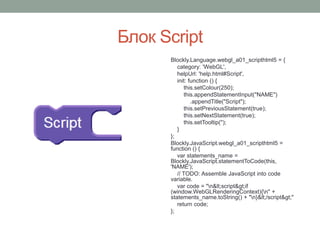
Блок Script
Blockly.Language.webgl_a01_scripthtml5 = {
category: 'WebGL',
helpUrl: 'help.html#Script',
init: function () {
this.setColour(250);
this.appendStatementInput("NAME")
.appendTitle("Script");
this.setPreviousStatement(true);
this.setNextStatement(true);
this.setTooltip('');
}
};
Blockly.JavaScript.webgl_a01_scripthtml5 =
function () {
var statements_name =
Blockly.JavaScript.statementToCode(this,
'NAME');
// TODO: Assemble JavaScript into code
variable.
var code = "n&lt;script&gt;if
(window.WebGLRenderingContext){n" +
statements_name.toString() + "n}&lt;/script&gt;"
return code;
};
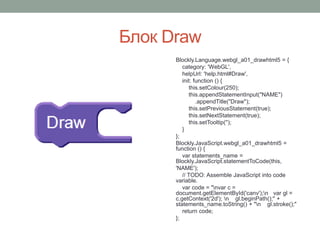
Блок Draw
Blockly.Language.webgl_a01_drawhtml5 = {
category: 'WebGL',
helpUrl: 'help.html#Draw',
init: function () {
this.setColour(250);
this.appendStatementInput("NAME")
.appendTitle("Draw");
this.setPreviousStatement(true);
this.setNextStatement(true);
this.setTooltip('');
}
};
Blockly.JavaScript.webgl_a01_drawhtml5 =
function () {
var statements_name =
Blockly.JavaScript.statementToCode(this,
'NAME');
// TODO: Assemble JavaScript into code
variable.
var code = "nvar c =
document.getElementById('canv');n var gl =
c.getContext('2d'); n gl.beginPath();" +
statements_name.toString() + "n gl.stroke();"
return code;
};
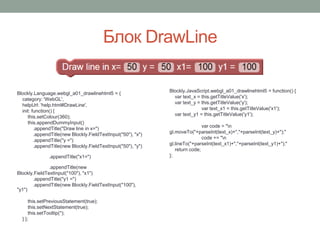
Блок DrawLine
Blockly.Language.webgl_a01_drawlinehtml5 = {
category: 'WebGL',
helpUrl: 'help.html#DrawLine',
init: function() {
this.setColour(360);
this.appendDummyInput()
.appendTitle("Draw line in x=")
.appendTitle(new Blockly.FieldTextInput("50"), "x")
.appendTitle("y =")
.appendTitle(new Blockly.FieldTextInput("50"), "y")
.appendTitle("x1=")
.appendTitle(new
Blockly.FieldTextInput("100"), "x1")
.appendTitle("y1 =")
.appendTitle(new Blockly.FieldTextInput("100"),
"y1")
this.setPreviousStatement(true);
this.setNextStatement(true);
this.setTooltip('');
} };
Blockly.JavaScript.webgl_a01_drawlinehtml5 = function() {
var text_x = this.getTitleValue('x');
var text_y = this.getTitleValue('y');
var text_x1 = this.getTitleValue('x1');
var text_y1 = this.getTitleValue('y1');
var code = "n
gl.moveTo("+parseInt(text_x)+","+parseInt(text_y)+");"
code += "n
gl.lineTo("+parseInt(text_x1)+","+parseInt(text_y1)+");"
return code;
};
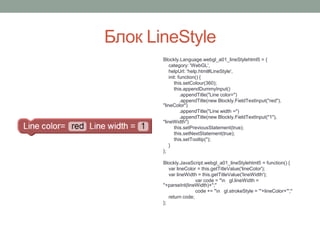
Блок LineStyle
Blockly.Language.webgl_a01_lineStylehtml5 = {
category: 'WebGL',
helpUrl: 'help.html#LineStyle',
init: function() {
this.setColour(360);
this.appendDummyInput()
.appendTitle("Line color=")
.appendTitle(new Blockly.FieldTextInput("red"),
"lineColor")
.appendTitle("Line width =")
.appendTitle(new Blockly.FieldTextInput("1"),
"lineWidth")
this.setPreviousStatement(true);
this.setNextStatement(true);
this.setTooltip('');
}
};
Blockly.JavaScript.webgl_a01_lineStylehtml5 = function() {
var lineColor = this.getTitleValue('lineColor');
var lineWidth = this.getTitleValue('lineWidth');
var code = "n gl.lineWidth =
"+parseInt(lineWidth)+";"
code += "n gl.strokeStyle = '"+lineColor+"';"
return code;
};
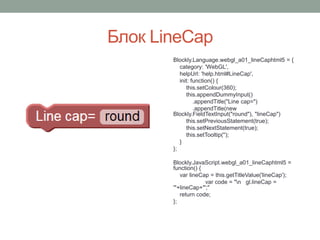
Блок LineCap
Blockly.Language.webgl_a01_lineCaphtml5 = {
category: 'WebGL',
helpUrl: 'help.html#LineCap',
init: function() {
this.setColour(360);
this.appendDummyInput()
.appendTitle("Line cap=")
.appendTitle(new
Blockly.FieldTextInput("round"), "lineCap")
this.setPreviousStatement(true);
this.setNextStatement(true);
this.setTooltip('');
}
};
Blockly.JavaScript.webgl_a01_lineCaphtml5 =
function() {
var lineCap = this.getTitleValue('lineCap');
var code = "n gl.lineCap =
'"+lineCap+"';"
return code;
};
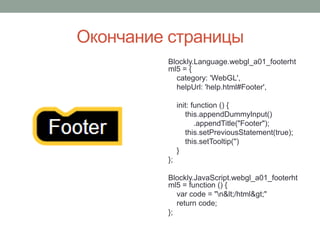
Окончание страницы
Blockly.Language.webgl_a01_footerht
ml5 = {
category: 'WebGL',
helpUrl: 'help.html#Footer',
init: function () {
this.appendDummyInput()
.appendTitle("Footer");
this.setPreviousStatement(true);
this.setTooltip('')
}
};
Blockly.JavaScript.webgl_a01_footerht
ml5 = function () {
var code = "n&lt;/html&gt;"
return code;
};
Спасибо за внимание

фабрика Blockly

  • 1.
    ЛАБОРАТОРНАЯ РАБОТА 1 <ФАБРИКАBLOCKLY> Выполнил: ст. группы ПОС-10а Белов Евгений
  • 2.
    Работа с SVGфайлами
  • 3.
    Исходный код изображения <svgwidth="48" height="48" xmlns="http://www.w3.org/2000/svg"> <metadata id="metadata3031">image/svg+xml</metadata> <g> <title>Layer 1</title> <path fill="#ffff56" stroke-width="null" stroke-dasharray="null" stroke-linejoin="null" stroke-linecap="null" d="m369,223c18,1 18,1 18,1c0,0 -18,-1 -18,-1z" id="svg_6"/> <g id="svg_11"> <path fill="#009df4" stroke-width="null" stroke-dasharray="null" stroke-linejoin="null" stroke-linecap="null" d="m20.4632,14.6762c-6.8533,9.6088 -6.6769,12.0453 5.0783,12.373799c11.7551,0.3286 7.805401,- 3.285 4.3258,-8.431599c-1.7397,-2.5734 -2.2805,-13.16771 2.997599,-9.0888c5.278103,4.079 4.901901,1.4783 8.475502,-3.28502c0.893398,-1.19084 2.885998,3.0866 4.478798,7.25372c1.5928,4.1671 -0.505497,10.742301 -3.467899,11.738101c-5.924599,1.991499 - 2.7976,3.6752 -2.7976,14.734898c0,11.0597 -4.326,-5.2561 -7.147198,0.219002c-2.821302,5.475101 - 4.043802,5.584599 -2.821302,-0.9856c1.2225,-6.57 -5.736399,0 -13.542,4.708698c-7.805369,4.708603 - 2.5814,-16.772099 -1.739699,-20.148399c0.8418,-3.3764 0.649,-16.06043 -7.53718,-7.720098c- 8.18623,8.340399 -5.55326,-4.9659 -1.36443,-10.477811c2.09441,-2.75598 6.65611,-3.70216 11.060209,- 1.66322c4.404001,2.03893 7.4277,5.96793 4.001101,10.77233z" id="svg_2"/> <ellipse fill="#ffff56" stroke-width="null" stroke-dasharray="null" stroke-linejoin="null" stroke-linecap="null" cx="35.1337" cy="15.881577" id="svg_3" rx="1.098846" ry="1.485842"/> <ellipse fill="#ffff56" stroke-width="null" stroke-dasharray="null" stroke-linejoin="null" stroke-linecap="null" cx="40.877668" cy="13.424222" id="svg_5" rx="1.198741" ry="1.600138"/> <path fill="#ffff56" stroke-width="null" stroke-dasharray="null" stroke-linejoin="null" stroke-linecap="null" d="m38.68,21.5392c1.7981,1.600201 6.593102,-1.4858 1.7981,1.600201c-4.794998,3.085899 -3.596199,- 2.971701 -3.596199,-2.971701c0,0 1.7981,1.3715 1.7981,1.3715z" id="svg_8"/> </g> </g> </svg>
  • 4.
    Изображение блока вмасштабе 100 % 120 % 160 %
  • 5.
    Фабрика Blockly <html> <head> <title> WebGLpage</title> </head> <body> <canvas id='canv' width="1000" height="600" ></canvas> <script> if (window.WebGLRenderingContext){ var c = document.getElementById('canv'); var gl = c.getContext('2d'); gl.beginPath(); gl.moveTo(50,50); gl.lineTo(100,100); gl.lineWidth = 1; gl.strokeStyle = 'red'; gl.lineCap = 'round'; gl.stroke(); } </script> </body> </html> Результат работы Blockly Cгенерированный код
  • 6.
    Заголовок страницы Blockly.Language.webgl_a01_headerhtml5 ={ category: 'WebGL', helpUrl: 'help.html#Header', init: function() { this.setColour(30); this.appendStatementInput("NAME") .appendTitle(new Blockly.FieldImage("../../media/canvas.svg", 48, 48)) .appendTitle("Header"); this.setNextStatement(true); this.setTooltip(''); } }; Blockly.JavaScript.webgl_a01_headerhtml5 = function() { var statements_name = Blockly.JavaScript.statementToCode(this, 'NAME'); // TODO: Assemble JavaScript into code variable. var code = '&lt;html&gt;n&lt;head&gt;n&lt;title&gt;' + statements_name.toString() + '&lt;/title&gt;n&lt;/head&gt;' return code; };
  • 7.
    Название страницы Blockly.Language.webgl_a01_titlehtml5 ={ category: 'WebGL', helpUrl: 'help.html#Title', init: function() { this.setColour(140); this.appendDummyInput() .appendTitle("Title") .appendTitle(new Blockly.FieldTextInput("WebGL page"), "NAME"); this.setPreviousStatement(true); this.setNextStatement(true); this.setTooltip(''); } }; Blockly.JavaScript.webgl_a01_titlehtml5 = function() { var text_name = this.getTitleValue('NAME'); // TODO: Assemble JavaScript into code variable. var code = text_name.toString(); return code; };
  • 8.
    Тело страницы Blockly.Language.webgl_a01_bodyhtml5 ={ category: 'WebGL', helpUrl: 'help.html#Body', init: function () { this.setColour(210); this.appendStatementInput("NAME") .appendTitle("Body"); this.setPreviousStatement(true); this.setNextStatement(true); this.setTooltip(''); } }; Blockly.JavaScript.webgl_a01_bodyhtml5 = function () { var statements_name = Blockly.JavaScript.statementToCode(this, 'NAME'); // TODO: Assemble JavaScript into code variable. var code = "n&lt;body&gt;n" + statements_name.toString() + "n&lt;/body&gt;" return code; };
  • 9.
    Создание canvas Blockly.Language.webgl_a01_canvashtml5 ={ category: 'WebGL', helpUrl: 'help.html#Canvas', init: function() { this.setColour(280); this.appendDummyInput() .appendTitle("canvas id") .appendTitle(new Blockly.FieldTextInput("canv"), "NAME"); this.setPreviousStatement(true); this.setNextStatement(true); this.setTooltip(''); } }; Blockly.JavaScript.webgl_a01_canvashtml5 = function() { var text_name_canvas = this.getTitleValue('NAME'); // TODO: Assemble JavaScript into code variable. var code = "&lt;canvas id='" + text_name_canvas.toString() +"' width="1000" height="600" &gt;&lt;/canvas&gt;" canvas_name = text_name_canvas; return code; };
  • 10.
    Блок Script Blockly.Language.webgl_a01_scripthtml5 ={ category: 'WebGL', helpUrl: 'help.html#Script', init: function () { this.setColour(250); this.appendStatementInput("NAME") .appendTitle("Script"); this.setPreviousStatement(true); this.setNextStatement(true); this.setTooltip(''); } }; Blockly.JavaScript.webgl_a01_scripthtml5 = function () { var statements_name = Blockly.JavaScript.statementToCode(this, 'NAME'); // TODO: Assemble JavaScript into code variable. var code = "n&lt;script&gt;if (window.WebGLRenderingContext){n" + statements_name.toString() + "n}&lt;/script&gt;" return code; };
  • 11.
    Блок Draw Blockly.Language.webgl_a01_drawhtml5 ={ category: 'WebGL', helpUrl: 'help.html#Draw', init: function () { this.setColour(250); this.appendStatementInput("NAME") .appendTitle("Draw"); this.setPreviousStatement(true); this.setNextStatement(true); this.setTooltip(''); } }; Blockly.JavaScript.webgl_a01_drawhtml5 = function () { var statements_name = Blockly.JavaScript.statementToCode(this, 'NAME'); // TODO: Assemble JavaScript into code variable. var code = "nvar c = document.getElementById('canv');n var gl = c.getContext('2d'); n gl.beginPath();" + statements_name.toString() + "n gl.stroke();" return code; };
  • 12.
    Блок DrawLine Blockly.Language.webgl_a01_drawlinehtml5 ={ category: 'WebGL', helpUrl: 'help.html#DrawLine', init: function() { this.setColour(360); this.appendDummyInput() .appendTitle("Draw line in x=") .appendTitle(new Blockly.FieldTextInput("50"), "x") .appendTitle("y =") .appendTitle(new Blockly.FieldTextInput("50"), "y") .appendTitle("x1=") .appendTitle(new Blockly.FieldTextInput("100"), "x1") .appendTitle("y1 =") .appendTitle(new Blockly.FieldTextInput("100"), "y1") this.setPreviousStatement(true); this.setNextStatement(true); this.setTooltip(''); } }; Blockly.JavaScript.webgl_a01_drawlinehtml5 = function() { var text_x = this.getTitleValue('x'); var text_y = this.getTitleValue('y'); var text_x1 = this.getTitleValue('x1'); var text_y1 = this.getTitleValue('y1'); var code = "n gl.moveTo("+parseInt(text_x)+","+parseInt(text_y)+");" code += "n gl.lineTo("+parseInt(text_x1)+","+parseInt(text_y1)+");" return code; };
  • 13.
    Блок LineStyle Blockly.Language.webgl_a01_lineStylehtml5 ={ category: 'WebGL', helpUrl: 'help.html#LineStyle', init: function() { this.setColour(360); this.appendDummyInput() .appendTitle("Line color=") .appendTitle(new Blockly.FieldTextInput("red"), "lineColor") .appendTitle("Line width =") .appendTitle(new Blockly.FieldTextInput("1"), "lineWidth") this.setPreviousStatement(true); this.setNextStatement(true); this.setTooltip(''); } }; Blockly.JavaScript.webgl_a01_lineStylehtml5 = function() { var lineColor = this.getTitleValue('lineColor'); var lineWidth = this.getTitleValue('lineWidth'); var code = "n gl.lineWidth = "+parseInt(lineWidth)+";" code += "n gl.strokeStyle = '"+lineColor+"';" return code; };
  • 14.
    Блок LineCap Blockly.Language.webgl_a01_lineCaphtml5 ={ category: 'WebGL', helpUrl: 'help.html#LineCap', init: function() { this.setColour(360); this.appendDummyInput() .appendTitle("Line cap=") .appendTitle(new Blockly.FieldTextInput("round"), "lineCap") this.setPreviousStatement(true); this.setNextStatement(true); this.setTooltip(''); } }; Blockly.JavaScript.webgl_a01_lineCaphtml5 = function() { var lineCap = this.getTitleValue('lineCap'); var code = "n gl.lineCap = '"+lineCap+"';" return code; };
  • 15.
    Окончание страницы Blockly.Language.webgl_a01_footerht ml5 ={ category: 'WebGL', helpUrl: 'help.html#Footer', init: function () { this.appendDummyInput() .appendTitle("Footer"); this.setPreviousStatement(true); this.setTooltip('') } }; Blockly.JavaScript.webgl_a01_footerht ml5 = function () { var code = "n&lt;/html&gt;" return code; };
  • 16.