Introducción
ASP.NET MVC.
Mauricio Alfonso Prieto
Contenido
▪ Que es MVC.
▪ ASP.NET MVC.
▪ Web Pages Applications
▪ Web Forms Applications.
▪ MVC Applications.
▪ MVC Models (Entity Framework).
▪ MVC Controllers.
▪ MVC Views.
Modelo–vista–controlador
▪ El modelo–vista–controlador (MVC) es un patrón de arquitectura de software que
separa los datos y la lógica de negocio de una aplicación de la interfaz de
usuario y el módulo encargado de gestionar los eventos y las comunicaciones.
ASP.NET MVC
▪ El ASP.NET MVC Framework es un framework de aplicaciones web que
implementa el patrón modelo-vista-controlador (MVC).
Browser
Controller
View Model
Database
Web Server HTTP
SQL
Modelos, Vistas y Controladores
▪ Web Matrix ó Visual Studio
▪ Código en archivos .CSHTML (.VBHTML) *Razor
▪ Control Preciso del HTML
Web Pages Applications
<h2>Special Offers</h2>
<p>Get the best possible value on Northwind specialty
foods by taking advantage of these offers:</p>
@foreach (var item in offers) {
<div class="offer-card">
<div class="offer-picture">
@if (!String.IsNullOrEmpty(item.PhotoUrl)){
<img src="@Href(item.PhotoUrl) alt="@item.Title" />
}
</div>
</div>
}
Web Forms Applications
▪ Unicamente Visual Studio
▪ Código en archivos .aspx y archivos code-behind **
▪ Crear una interfaz de usuario arrastrando los controles en una página
▪ Controles proporcionan muchas propiedades y eventos
▪ Bind controls para data
MVC Applications
▪ Modelos encapsulan objetos y datos
▪ Vistas generan la interfaz de usuario
▪ Controladores interactúan con las acciones del usuario
▪ Sólo Visual Studio
▪ Código en archivos .cshtml y .cs
▪ El control preciso de HTML y direcciones URL
MVC Models
Desarrollando Modelos
-PhotoID : int
-Title : string
-PhotoFile : byte
-Description : string
-CreatedDate : object
-Owner : string
Photo
-CommentID : int
-User : string
-Subject : string
-Body : string
-PhotoID : int
Comment
1 0..*
public class Photo
{
public int PhotoID { get; set; }
public string Title { get; set; }
public byte[] PhotoFile { get; set; }
public string Description { get; set; }
public DateTime CreatedDate { get; set; }
public string Owner { get; set; }
public virtual List<Comment> Comments { get; set; }
}
Data Annotations
public class Photo
{
// other properties excluded
[DisplayName("Picture")]
public byte[] PhotoFile { get; set; }
[DataType(DataType.MultilineText)]
public string Description { get; set; }
[DataType(DataType.DateTime)]
[DisplayName("Created Date")]
[DisplayFormat(DataFormatString =
"{0:dd/MM/yy}"]
public DateTime CreatedDate { get; set; }
}
Validaciones de usuario con Data Annotations
public class Person
{
public int PersonID { get; set; }
[Required(ErrorMessage="Please enter a name.")]
public string Name { get; set; }
[Range(0, 400)]
public int Height { get; set; }
[Required]
[DataType(DataType.EmailAddress)]
public string EmailAddress { get; set; }
}
Acceso a datos en modelos y repositorios
Model
Database
Model
Database
Repository
MVC Controller
▪ Crear método público
▪ Devuelve una clase que deriva de ActionResult
▪ Agregar parámetros al método
▪ Escribe el código para realizar la operación y devolver el resultado
Escribir una acción de controlador incluye :
public ActionResult GetSessionByTitle(string title){
var query = from s in context.Sessions
where s.Title == title
select s
Photo session = query.FirstOrDefault();
return View("Details", session);
}
http://www.adventureworks.com/session/getsessionbytitle?title=MVC101
DefaultModelBinder
Pasando datos a la Vista
▪ Modelo
▪ Ver (datos )
▪ Inflexible de tipos , puede ser más flexible
▪ Más complejo
▪ ViewBag
▪ Objeto dinámico para el almacenamiento de piezas básicas de información
▪ Alias para ViewData
▪ Perfecto para el envío de mensajes a la vista
▪ Sólo está disponible para que la acción
▪ Redirecciones causar la ViewBag que ser vaciado
▪ TempData
▪ Al igual que el ViewBag , pero también está disponible en la siguiente página
MVC Views
Ejemplo de vista con Razor
@* Some more Razor examples *@
<span>
Price including Sale Tax: @Model.Price * 1.2
</span>
<span>
Price including Sale Tax: @(Model.Price * 1.2)
</span>
@if (Model.Count > 5)
{
<ol>
@foreach(var item in Model)
{
<li>@item.Name</li>
}
</ol>
}
Direnenciar código del server desde HTML
▪ Razor identifica el código del lado del servidor , buscando el símbolo @ .
▪ En sintaxis Razor , el símbolo @ tiene varios usos . Usted puede :
▪ Use @ para identificar el lado del servidor de C # código
▪ Use @@para rendir un símbolo @ en una página HTML .
▪ Utilice @ : declarar explícitamente una línea de texto como el contenido y no el código .
▪ Utilice < texto > para declarar explícitamente varias líneas de texto como el
contenido y no el código .
▪ Para hacer que el texto sin codificación HTML , puede utilizar el helper Html.Raw
( ) .
HTML Helpers
▪ Action Helpers
▪ Display Helpers
▪ The Begin Form Helper
▪ Editor Helpers
▪ Validation Helpers
Action Helpers
• Html.ActionLink()
• Url.Action()
@Html.ActionLink("Click here to view photo 1",
"Display", new { id = 1 })
<a href="/photo/display/1">
Click here to view photo 1
</a>
<img alt="This image came from an action"
src="@Url.Action("GetImage", new { id = 1 })" />
<img
alt="This image came from an action"
src="/photo/getimage/1" })"
/>
Display Helpers
• Html.DisplayNameFor()
• Html.DisplayFor()
@Html.DisplayNameFor(model => model.CreatedDate)
@Html.DisplayFor(model => model.CreatedDate)
Created Date
03/12/2012
The Begin Form Helper
Html.BeginForm()
@using (Html.BeginForm("Create", "Photo",
FormMethod.Post,
new { enctype = "multipart/form-data" }))
{
@* Place input controls here *@
}
<form action="/Photo/Create" method="post“
enctype="multipart/form-data">
</form>
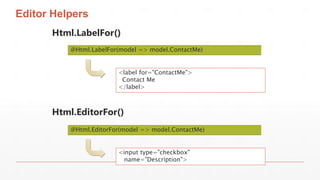
Editor Helpers
Html.LabelFor()
Html.EditorFor()
@Html.LabelFor(model => model.ContactMe)
@Html.EditorFor(model => model.ContactMe)
<label for="ContactMe">
Contact Me
</label>
<input type="checkbox"
name="Description">
Validation Helpers
Html.ValidationSummary()
Html.ValidationMessageFor()
@Html.ValidationSummary()
@Html.ValidationMessageFor(model => model.Email)
<ul>
<li>Please enter your last name</li>
<li>Please enter a valid email address</li>
</ul>
Please enter a valid email address

Introducción mvc

  • 1.
  • 2.
    Contenido ▪ Que esMVC. ▪ ASP.NET MVC. ▪ Web Pages Applications ▪ Web Forms Applications. ▪ MVC Applications. ▪ MVC Models (Entity Framework). ▪ MVC Controllers. ▪ MVC Views.
  • 3.
    Modelo–vista–controlador ▪ El modelo–vista–controlador(MVC) es un patrón de arquitectura de software que separa los datos y la lógica de negocio de una aplicación de la interfaz de usuario y el módulo encargado de gestionar los eventos y las comunicaciones. ASP.NET MVC ▪ El ASP.NET MVC Framework es un framework de aplicaciones web que implementa el patrón modelo-vista-controlador (MVC).
  • 4.
    Browser Controller View Model Database Web ServerHTTP SQL Modelos, Vistas y Controladores
  • 5.
    ▪ Web Matrixó Visual Studio ▪ Código en archivos .CSHTML (.VBHTML) *Razor ▪ Control Preciso del HTML Web Pages Applications <h2>Special Offers</h2> <p>Get the best possible value on Northwind specialty foods by taking advantage of these offers:</p> @foreach (var item in offers) { <div class="offer-card"> <div class="offer-picture"> @if (!String.IsNullOrEmpty(item.PhotoUrl)){ <img src="@Href(item.PhotoUrl) alt="@item.Title" /> } </div> </div> }
  • 6.
    Web Forms Applications ▪Unicamente Visual Studio ▪ Código en archivos .aspx y archivos code-behind ** ▪ Crear una interfaz de usuario arrastrando los controles en una página ▪ Controles proporcionan muchas propiedades y eventos ▪ Bind controls para data
  • 7.
    MVC Applications ▪ Modelosencapsulan objetos y datos ▪ Vistas generan la interfaz de usuario ▪ Controladores interactúan con las acciones del usuario ▪ Sólo Visual Studio ▪ Código en archivos .cshtml y .cs ▪ El control preciso de HTML y direcciones URL
  • 8.
  • 9.
    Desarrollando Modelos -PhotoID :int -Title : string -PhotoFile : byte -Description : string -CreatedDate : object -Owner : string Photo -CommentID : int -User : string -Subject : string -Body : string -PhotoID : int Comment 1 0..* public class Photo { public int PhotoID { get; set; } public string Title { get; set; } public byte[] PhotoFile { get; set; } public string Description { get; set; } public DateTime CreatedDate { get; set; } public string Owner { get; set; } public virtual List<Comment> Comments { get; set; } }
  • 10.
    Data Annotations public classPhoto { // other properties excluded [DisplayName("Picture")] public byte[] PhotoFile { get; set; } [DataType(DataType.MultilineText)] public string Description { get; set; } [DataType(DataType.DateTime)] [DisplayName("Created Date")] [DisplayFormat(DataFormatString = "{0:dd/MM/yy}"] public DateTime CreatedDate { get; set; } }
  • 11.
    Validaciones de usuariocon Data Annotations public class Person { public int PersonID { get; set; } [Required(ErrorMessage="Please enter a name.")] public string Name { get; set; } [Range(0, 400)] public int Height { get; set; } [Required] [DataType(DataType.EmailAddress)] public string EmailAddress { get; set; } }
  • 12.
    Acceso a datosen modelos y repositorios Model Database Model Database Repository
  • 13.
  • 14.
    ▪ Crear métodopúblico ▪ Devuelve una clase que deriva de ActionResult ▪ Agregar parámetros al método ▪ Escribe el código para realizar la operación y devolver el resultado Escribir una acción de controlador incluye :
  • 15.
    public ActionResult GetSessionByTitle(stringtitle){ var query = from s in context.Sessions where s.Title == title select s Photo session = query.FirstOrDefault(); return View("Details", session); } http://www.adventureworks.com/session/getsessionbytitle?title=MVC101 DefaultModelBinder
  • 16.
    Pasando datos ala Vista ▪ Modelo ▪ Ver (datos ) ▪ Inflexible de tipos , puede ser más flexible ▪ Más complejo ▪ ViewBag ▪ Objeto dinámico para el almacenamiento de piezas básicas de información ▪ Alias para ViewData ▪ Perfecto para el envío de mensajes a la vista ▪ Sólo está disponible para que la acción ▪ Redirecciones causar la ViewBag que ser vaciado ▪ TempData ▪ Al igual que el ViewBag , pero también está disponible en la siguiente página
  • 17.
  • 18.
    Ejemplo de vistacon Razor @* Some more Razor examples *@ <span> Price including Sale Tax: @Model.Price * 1.2 </span> <span> Price including Sale Tax: @(Model.Price * 1.2) </span> @if (Model.Count > 5) { <ol> @foreach(var item in Model) { <li>@item.Name</li> } </ol> }
  • 19.
    Direnenciar código delserver desde HTML ▪ Razor identifica el código del lado del servidor , buscando el símbolo @ . ▪ En sintaxis Razor , el símbolo @ tiene varios usos . Usted puede : ▪ Use @ para identificar el lado del servidor de C # código ▪ Use @@para rendir un símbolo @ en una página HTML . ▪ Utilice @ : declarar explícitamente una línea de texto como el contenido y no el código . ▪ Utilice < texto > para declarar explícitamente varias líneas de texto como el contenido y no el código . ▪ Para hacer que el texto sin codificación HTML , puede utilizar el helper Html.Raw ( ) .
  • 20.
    HTML Helpers ▪ ActionHelpers ▪ Display Helpers ▪ The Begin Form Helper ▪ Editor Helpers ▪ Validation Helpers
  • 21.
    Action Helpers • Html.ActionLink() •Url.Action() @Html.ActionLink("Click here to view photo 1", "Display", new { id = 1 }) <a href="/photo/display/1"> Click here to view photo 1 </a> <img alt="This image came from an action" src="@Url.Action("GetImage", new { id = 1 })" /> <img alt="This image came from an action" src="/photo/getimage/1" })" />
  • 22.
    Display Helpers • Html.DisplayNameFor() •Html.DisplayFor() @Html.DisplayNameFor(model => model.CreatedDate) @Html.DisplayFor(model => model.CreatedDate) Created Date 03/12/2012
  • 23.
    The Begin FormHelper Html.BeginForm() @using (Html.BeginForm("Create", "Photo", FormMethod.Post, new { enctype = "multipart/form-data" })) { @* Place input controls here *@ } <form action="/Photo/Create" method="post“ enctype="multipart/form-data"> </form>
  • 24.
    Editor Helpers Html.LabelFor() Html.EditorFor() @Html.LabelFor(model =>model.ContactMe) @Html.EditorFor(model => model.ContactMe) <label for="ContactMe"> Contact Me </label> <input type="checkbox" name="Description">
  • 25.
    Validation Helpers Html.ValidationSummary() Html.ValidationMessageFor() @Html.ValidationSummary() @Html.ValidationMessageFor(model =>model.Email) <ul> <li>Please enter your last name</li> <li>Please enter a valid email address</li> </ul> Please enter a valid email address

Editor's Notes

  • #22 The action helpers described in this topic examine the routes defined in your web application to render the correct URLs. Students have not yet learned about the routing engine or how to modify routes. They will learn about routing in Module 7. Question: You want to render an HTML5 <audio> tag to play a sound file from an action. Would you use the Html.ActionLink() helper or the Url.Action() helper? Answer: You would use the Url.Action() helper because you are rendering an attribute within the <audio> tag, and not a complete <a> element.
  • #23 Question: You want to ensure that a view displays “This product was last changed on” before the ModifiedDate property. This text is declared in the class with the DisplayName annotation. What code would you write in the view? Answer: @Html.DisplayNameFor(model => model.ModifiedDate)
  • #24 Question: You have created a form with a file selector control that uses the GET method. You have set the enctype attribute to multipart/form-data but when you try to access the file in the action method, an exception is thrown. What have you possibly done incorrectly? Answer: You must use the POST method to upload files.
  • #25 Question: You have a property in the Product model class named ProductID. You want to include this in the HTML page so that client-side script can use the ProductID value. However, you do not want the value to be displayed to users. In the model class, you have annotated the ProductID property with the [HiddenInput(DisplayValue=false)] attribute. How will the Html.EditorFor() helper render this property? Answer: The Html.EditorFor() helper renders the following HTML: <input name="ProductID" type="hidden" value="id">
  • #26 Remind the students that they learned how to set validation requirements in model classes by using validation data annotations such as [Required] in Module 3. They have also learned how to check the validity of user data in a controller action by testing the ModelState.IsValid property in Module 4.