Java object has a State and Behavior
State (Variables)
Variable or Field is nothing but the property of the class
class “computer” may have property like :
– Model
– mem_size
– hd_size
– os_type etc
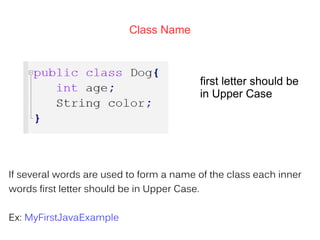
Class Name
first letter should be
in Upper Case
If several words are used to form a name of the class each inner
words first letter should be in Upper Case.
Ex: MyFirstJavaExample
Behavior (Methods)
Method is nothing but the operation that an object can perform
It tells How an object can interact with outside world
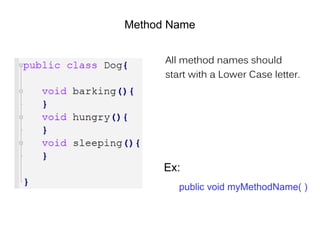
Method Name
All method names should
start with a Lower Case letter.
Ex:
public void myMethodName( )
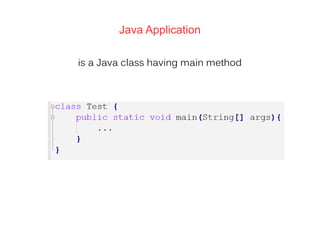
Java Application
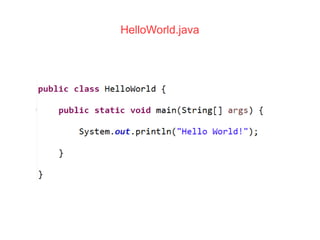
is a Java class having main method
main method
should be public
– Class loader need to access this method
should be static
– method would be executed without an object
HelloWorld.java
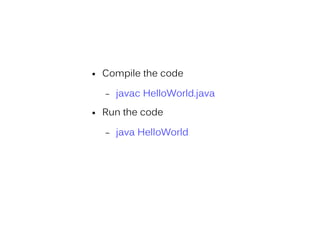
● Compile the code
– javac HelloWorld.java
● Run the code
– java HelloWorld
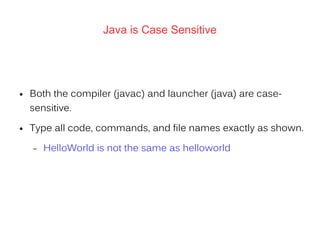
Java is Case Sensitive
● Both the compiler (javac) and launcher (java) are case-
sensitive.
● Type all code, commands, and file names exactly as shown.
– HelloWorld is not the same as helloworld
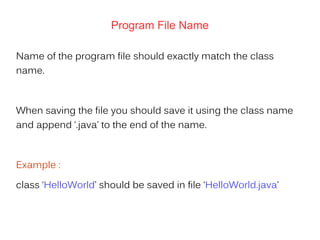
Program File Name
Name of the program file should exactly match the class
name.
When saving the file you should save it using the class name
and append ‘.java’ to the end of the name.
Example :
class ‘HelloWorld’ should be saved in file ‘HelloWorld.java’
Java Identifiers
All java components require names.
Names used for classes, variables and methods
are called identifiers.
Java Keywords
These are reserved words and may not be used as
constant or variable or any other identifier names.
Examples:
abstract, boolean, break, byte, class, package etc.
Comments in Java
Java supports single line and multi-line comments very similar
to c and c++.
All characters available inside any comment are ignored by
Java compiler.
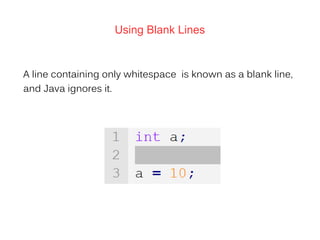
Using Blank Lines
A line containing only whitespace is known as a blank line,
and Java ignores it.

Java basic-syntax

  • 1.
    Java object hasa State and Behavior
  • 2.
    State (Variables) Variable orField is nothing but the property of the class class “computer” may have property like : – Model – mem_size – hd_size – os_type etc
  • 3.
    Class Name first lettershould be in Upper Case If several words are used to form a name of the class each inner words first letter should be in Upper Case. Ex: MyFirstJavaExample
  • 4.
    Behavior (Methods) Method isnothing but the operation that an object can perform It tells How an object can interact with outside world
  • 5.
    Method Name All methodnames should start with a Lower Case letter. Ex: public void myMethodName( )
  • 6.
    Java Application is aJava class having main method
  • 7.
    main method should bepublic – Class loader need to access this method should be static – method would be executed without an object
  • 8.
  • 9.
    ● Compile thecode – javac HelloWorld.java ● Run the code – java HelloWorld
  • 10.
    Java is CaseSensitive ● Both the compiler (javac) and launcher (java) are case- sensitive. ● Type all code, commands, and file names exactly as shown. – HelloWorld is not the same as helloworld
  • 11.
    Program File Name Nameof the program file should exactly match the class name. When saving the file you should save it using the class name and append ‘.java’ to the end of the name. Example : class ‘HelloWorld’ should be saved in file ‘HelloWorld.java’
  • 12.
    Java Identifiers All javacomponents require names. Names used for classes, variables and methods are called identifiers.
  • 13.
    Java Keywords These arereserved words and may not be used as constant or variable or any other identifier names. Examples: abstract, boolean, break, byte, class, package etc.
  • 14.
    Comments in Java Javasupports single line and multi-line comments very similar to c and c++. All characters available inside any comment are ignored by Java compiler.
  • 15.
    Using Blank Lines Aline containing only whitespace is known as a blank line, and Java ignores it.