JAVA API FOR XML DOM
Introduction
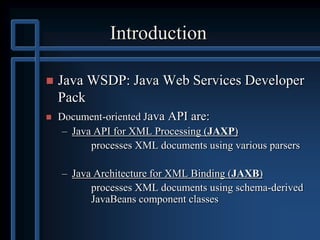
 Java WSDP: Java Web Services Developer
Pack
 Document-oriented Java API are:
– Java API for XML Processing (JAXP)
processes XML documents using various parsers
– Java Architecture for XML Binding (JAXB)
processes XML documents using schema-derived
JavaBeans component classes
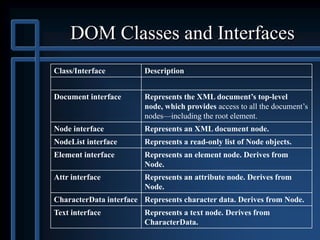
DOM Classes and Interfaces
Class/Interface Description
Document interface Represents the XML document’s top-level
node, which provides access to all the document’s
nodes—including the root element.
Node interface Represents an XML document node.
NodeList interface Represents a read-only list of Node objects.
Element interface Represents an element node. Derives from
Node.
Attr interface Represents an attribute node. Derives from
Node.
CharacterData interface Represents character data. Derives from Node.
Text interface Represents a text node. Derives from
CharacterData.
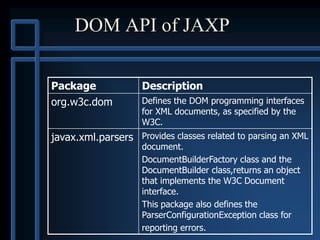
DOM API of JAXP
Package Description
org.w3c.dom Defines the DOM programming interfaces
for XML documents, as specified by the
W3C.
javax.xml.parsers Provides classes related to parsing an XML
document.
DocumentBuilderFactory class and the
DocumentBuilder class,returns an object
that implements the W3C Document
interface.
This package also defines the
ParserConfigurationException class for
reporting errors.
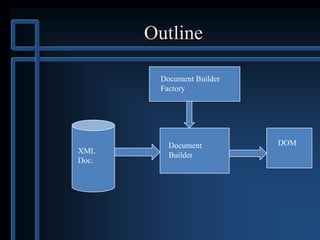
Outline
XML
Doc.
Document
Builder
Document Builder
Factory
DOM
Simple DOM program, I
import javax.xml.parsers.*;
import org.w3c.dom.*;
public class SecondDom {
public static void main(String args[]) {
try {
...Main part of program goes here...
} catch (Exception e) {
e.printStackTrace(System.out);
}
}
}
Simple DOM program, II
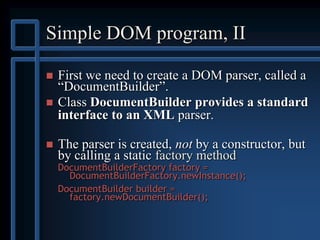
 First we need to create a DOM parser, called a
―DocumentBuilder‖.
 Class DocumentBuilder provides a standard
interface to an XML parser.
 The parser is created, not by a constructor, but
by calling a static factory method
DocumentBuilderFactory factory =
DocumentBuilderFactory.newInstance();
DocumentBuilder builder =
factory.newDocumentBuilder();
Simple DOM program, III
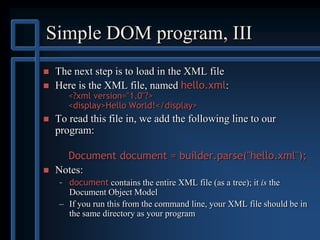
 The next step is to load in the XML file
 Here is the XML file, named hello.xml:
<?xml version="1.0"?>
<display>Hello World!</display>
 To read this file in, we add the following line to our
program:
Document document = builder.parse("hello.xml");
 Notes:
– document contains the entire XML file (as a tree); it is the
Document Object Model
– If you run this from the command line, your XML file should be in
the same directory as your program
Simple DOM program, IV
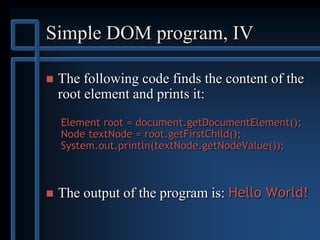
 The following code finds the content of the
root element and prints it:
Element root = document.getDocumentElement();
Node textNode = root.getFirstChild();
System.out.println(textNode.getNodeValue());
 The output of the program is: Hello World!
Reading in the tree
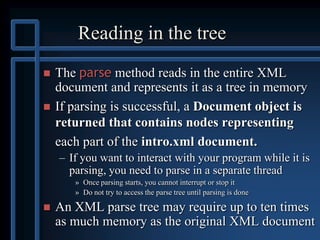
 The parse method reads in the entire XML
document and represents it as a tree in memory
 If parsing is successful, a Document object is
returned that contains nodes representing
each part of the intro.xml document.
– If you want to interact with your program while it is
parsing, you need to parse in a separate thread
» Once parsing starts, you cannot interrupt or stop it
» Do not try to access the parse tree until parsing is done
 An XML parse tree may require up to ten times
as much memory as the original XML document
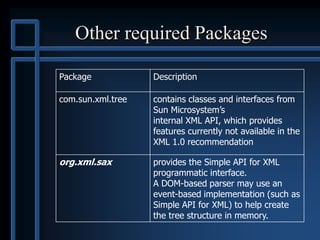
Other required Packages
Package Description
com.sun.xml.tree contains classes and interfaces from
Sun Microsystem’s
internal XML API, which provides
features currently not available in the
XML 1.0 recommendation
org.xml.sax provides the Simple API for XML
programmatic interface.
A DOM-based parser may use an
event-based implementation (such as
Simple API for XML) to help create
the tree structure in memory.
intro.xml
<?xml version = "1.0"?>
<!-- Fig. 8.12 : intro.xml -->
<!-- Simple introduction to XML markup -->
<!DOCTYPE myMessage [
<!ELEMENT myMessage ( message )>
<!ELEMENT message ( #PCDATA )>
]>
<myMessage>
<message>Welcome to XML!</message>
</myMessage>
MODIFYING XML
DOCUMENT WITH DOM
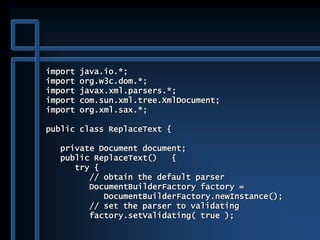
import java.io.*;
import org.w3c.dom.*;
import javax.xml.parsers.*;
import com.sun.xml.tree.XmlDocument;
import org.xml.sax.*;
public class ReplaceText {
private Document document;
public ReplaceText() {
try {
// obtain the default parser
DocumentBuilderFactory factory =
DocumentBuilderFactory.newInstance();
// set the parser to validating
factory.setValidating( true );
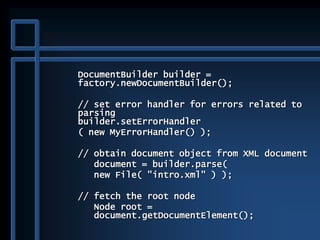
DocumentBuilder builder =
factory.newDocumentBuilder();
// set error handler for errors related to
parsing
builder.setErrorHandler
( new MyErrorHandler() );
// obtain document object from XML document
document = builder.parse(
new File( "intro.xml" ) );
// fetch the root node
Node root =
document.getDocumentElement();
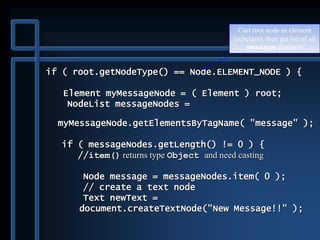
if ( root.getNodeType() == Node.ELEMENT_NODE ) {
Element myMessageNode = ( Element ) root;
NodeList messageNodes =
myMessageNode.getElementsByTagName( "message" );
if ( messageNodes.getLength() != 0 ) {
//item() returns type Object and need casting
Node message = messageNodes.item( 0 );
// create a text node
Text newText =
document.createTextNode("New Message!!" );
Cast root node as element
(subclass), then get list of all
message elements
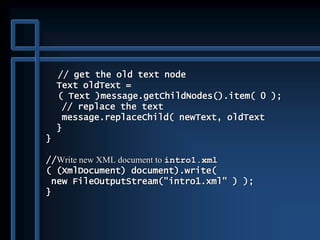
// get the old text node
Text oldText =
( Text )message.getChildNodes().item( 0 );
// replace the text
message.replaceChild( newText, oldText
}
}
//Write new XML document to intro1.xml
( (XmlDocument) document).write(
new FileOutputStream("intro1.xml" ) );
}
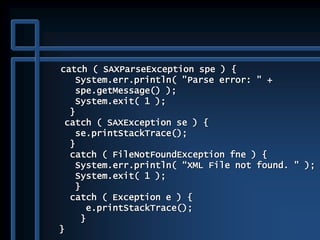
catch ( SAXParseException spe ) {
System.err.println( "Parse error: " +
spe.getMessage() );
System.exit( 1 );
}
catch ( SAXException se ) {
se.printStackTrace();
}
catch ( FileNotFoundException fne ) {
System.err.println( “XML File not found. " );
System.exit( 1 );
}
catch ( Exception e ) {
e.printStackTrace();
}
}
public static void main( String args[] )
{
ReplaceText d = new ReplaceText();
}
}
Building an XML Document
with DOM
 Desired Output
<root>
<!--This is a simple contact list-->
<contact gender="F">
<FirstName>Sue</FirstName>
<LastName>Green</LastName>
</contact>
<?myInstruction action silent?>
<![CDATA[I can add <, >, and ?]]>
</root>
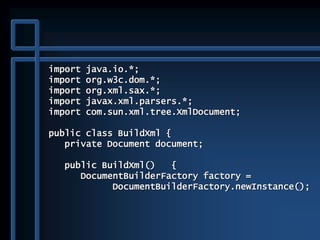
import java.io.*;
import org.w3c.dom.*;
import org.xml.sax.*;
import javax.xml.parsers.*;
import com.sun.xml.tree.XmlDocument;
public class BuildXml {
private Document document;
public BuildXml() {
DocumentBuilderFactory factory =
DocumentBuilderFactory.newInstance();
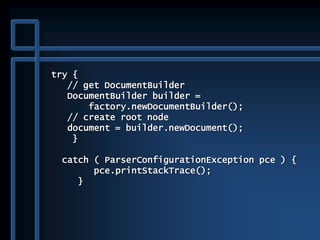
try {
// get DocumentBuilder
DocumentBuilder builder =
factory.newDocumentBuilder();
// create root node
document = builder.newDocument();
}
catch ( ParserConfigurationException pce ) {
pce.printStackTrace();
}
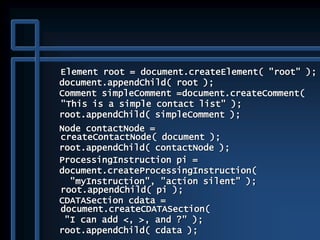
Element root = document.createElement( "root" );
document.appendChild( root );
Comment simpleComment =document.createComment(
"This is a simple contact list" );
root.appendChild( simpleComment );
Node contactNode =
createContactNode( document );
root.appendChild( contactNode );
ProcessingInstruction pi =
document.createProcessingInstruction(
"myInstruction", "action silent" );
root.appendChild( pi );
CDATASection cdata =
document.createCDATASection(
"I can add <, >, and ?" );
root.appendChild( cdata );
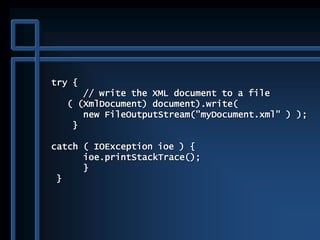
try {
// write the XML document to a file
( (XmlDocument) document).write(
new FileOutputStream("myDocument.xml" ) );
}
catch ( IOException ioe ) {
ioe.printStackTrace();
}
}
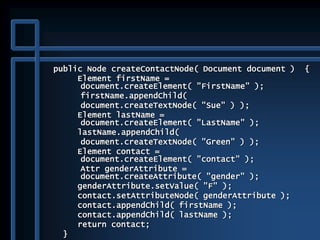
public Node createContactNode( Document document ) {
Element firstName =
document.createElement( "FirstName" );
firstName.appendChild(
document.createTextNode( "Sue" ) );
Element lastName =
document.createElement( "LastName" );
lastName.appendChild(
document.createTextNode( "Green" ) );
Element contact =
document.createElement( "contact" );
Attr genderAttribute =
document.createAttribute( "gender" );
genderAttribute.setValue( "F" );
contact.setAttributeNode( genderAttribute );
contact.appendChild( firstName );
contact.appendChild( lastName );
return contact;
}
public static void main( String args[] )
{
BuildXml buildXml = new BuildXml();
}
}
Traversing the DOM
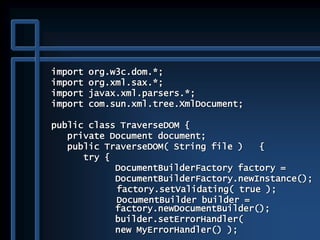
import org.w3c.dom.*;
import org.xml.sax.*;
import javax.xml.parsers.*;
import com.sun.xml.tree.XmlDocument;
public class TraverseDOM {
private Document document;
public TraverseDOM( String file ) {
try {
DocumentBuilderFactory factory =
DocumentBuilderFactory.newInstance();
factory.setValidating( true );
DocumentBuilder builder =
factory.newDocumentBuilder();
builder.setErrorHandler(
new MyErrorHandler() );
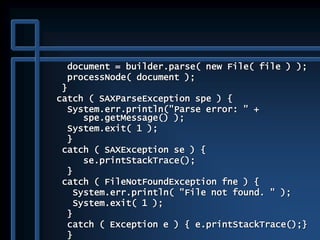
document = builder.parse( new File( file ) );
processNode( document );
}
catch ( SAXParseException spe ) {
System.err.println("Parse error: " +
spe.getMessage() );
System.exit( 1 );
}
catch ( SAXException se ) {
se.printStackTrace();
}
catch ( FileNotFoundException fne ) {
System.err.println( "File not found. " );
System.exit( 1 );
}
catch ( Exception e ) { e.printStackTrace();}
}
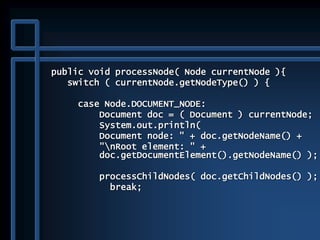
public void processNode( Node currentNode ){
switch ( currentNode.getNodeType() ) {
case Node.DOCUMENT_NODE:
Document doc = ( Document ) currentNode;
System.out.println(
Document node: " + doc.getNodeName() +
"nRoot element: " +
doc.getDocumentElement().getNodeName() );
processChildNodes( doc.getChildNodes() );
break;
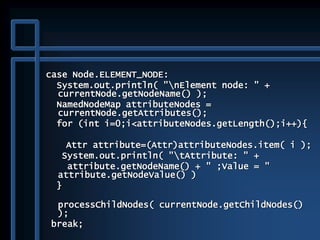
case Node.ELEMENT_NODE:
System.out.println( "nElement node: " +
currentNode.getNodeName() );
NamedNodeMap attributeNodes =
currentNode.getAttributes();
for (int i=0;i<attributeNodes.getLength();i++){
Attr attribute=(Attr)attributeNodes.item( i );
System.out.println( "tAttribute: " +
attribute.getNodeName() + " ;Value = "
attribute.getNodeValue() )
}
processChildNodes( currentNode.getChildNodes()
);
break;
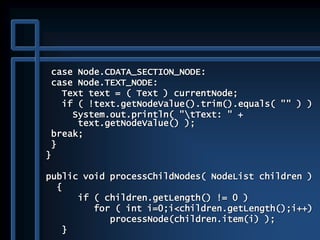
case Node.CDATA_SECTION_NODE:
case Node.TEXT_NODE:
Text text = ( Text ) currentNode;
if ( !text.getNodeValue().trim().equals( "" ) )
System.out.println( "tText: " +
text.getNodeValue() );
break;
}
}
public void processChildNodes( NodeList children )
{
if ( children.getLength() != 0 )
for ( int i=0;i<children.getLength();i++)
processNode(children.item(i) );
}
public static void main( String args[] ) {
if ( args.length < 1 ) {
System.err.println("Usage: java
TraverseDOM <filename>" );
System.exit( 1 );
}
TraverseDOM traverseDOM = new
TraverseDOM( args[ 0 ] );
}
}

java API for XML DOM

  • 1.
    JAVA API FORXML DOM
  • 2.
    Introduction  Java WSDP:Java Web Services Developer Pack  Document-oriented Java API are: – Java API for XML Processing (JAXP) processes XML documents using various parsers – Java Architecture for XML Binding (JAXB) processes XML documents using schema-derived JavaBeans component classes
  • 3.
    DOM Classes andInterfaces Class/Interface Description Document interface Represents the XML document’s top-level node, which provides access to all the document’s nodes—including the root element. Node interface Represents an XML document node. NodeList interface Represents a read-only list of Node objects. Element interface Represents an element node. Derives from Node. Attr interface Represents an attribute node. Derives from Node. CharacterData interface Represents character data. Derives from Node. Text interface Represents a text node. Derives from CharacterData.
  • 4.
    DOM API ofJAXP Package Description org.w3c.dom Defines the DOM programming interfaces for XML documents, as specified by the W3C. javax.xml.parsers Provides classes related to parsing an XML document. DocumentBuilderFactory class and the DocumentBuilder class,returns an object that implements the W3C Document interface. This package also defines the ParserConfigurationException class for reporting errors.
  • 5.
  • 6.
    Simple DOM program,I import javax.xml.parsers.*; import org.w3c.dom.*; public class SecondDom { public static void main(String args[]) { try { ...Main part of program goes here... } catch (Exception e) { e.printStackTrace(System.out); } } }
  • 7.
    Simple DOM program,II  First we need to create a DOM parser, called a ―DocumentBuilder‖.  Class DocumentBuilder provides a standard interface to an XML parser.  The parser is created, not by a constructor, but by calling a static factory method DocumentBuilderFactory factory = DocumentBuilderFactory.newInstance(); DocumentBuilder builder = factory.newDocumentBuilder();
  • 8.
    Simple DOM program,III  The next step is to load in the XML file  Here is the XML file, named hello.xml: <?xml version="1.0"?> <display>Hello World!</display>  To read this file in, we add the following line to our program: Document document = builder.parse("hello.xml");  Notes: – document contains the entire XML file (as a tree); it is the Document Object Model – If you run this from the command line, your XML file should be in the same directory as your program
  • 9.
    Simple DOM program,IV  The following code finds the content of the root element and prints it: Element root = document.getDocumentElement(); Node textNode = root.getFirstChild(); System.out.println(textNode.getNodeValue());  The output of the program is: Hello World!
  • 10.
    Reading in thetree  The parse method reads in the entire XML document and represents it as a tree in memory  If parsing is successful, a Document object is returned that contains nodes representing each part of the intro.xml document. – If you want to interact with your program while it is parsing, you need to parse in a separate thread » Once parsing starts, you cannot interrupt or stop it » Do not try to access the parse tree until parsing is done  An XML parse tree may require up to ten times as much memory as the original XML document
  • 11.
    Other required Packages PackageDescription com.sun.xml.tree contains classes and interfaces from Sun Microsystem’s internal XML API, which provides features currently not available in the XML 1.0 recommendation org.xml.sax provides the Simple API for XML programmatic interface. A DOM-based parser may use an event-based implementation (such as Simple API for XML) to help create the tree structure in memory.
  • 12.
    intro.xml <?xml version ="1.0"?> <!-- Fig. 8.12 : intro.xml --> <!-- Simple introduction to XML markup --> <!DOCTYPE myMessage [ <!ELEMENT myMessage ( message )> <!ELEMENT message ( #PCDATA )> ]> <myMessage> <message>Welcome to XML!</message> </myMessage>
  • 13.
  • 14.
    import java.io.*; import org.w3c.dom.*; importjavax.xml.parsers.*; import com.sun.xml.tree.XmlDocument; import org.xml.sax.*; public class ReplaceText { private Document document; public ReplaceText() { try { // obtain the default parser DocumentBuilderFactory factory = DocumentBuilderFactory.newInstance(); // set the parser to validating factory.setValidating( true );
  • 15.
    DocumentBuilder builder = factory.newDocumentBuilder(); //set error handler for errors related to parsing builder.setErrorHandler ( new MyErrorHandler() ); // obtain document object from XML document document = builder.parse( new File( "intro.xml" ) ); // fetch the root node Node root = document.getDocumentElement();
  • 16.
    if ( root.getNodeType()== Node.ELEMENT_NODE ) { Element myMessageNode = ( Element ) root; NodeList messageNodes = myMessageNode.getElementsByTagName( "message" ); if ( messageNodes.getLength() != 0 ) { //item() returns type Object and need casting Node message = messageNodes.item( 0 ); // create a text node Text newText = document.createTextNode("New Message!!" ); Cast root node as element (subclass), then get list of all message elements
  • 17.
    // get theold text node Text oldText = ( Text )message.getChildNodes().item( 0 ); // replace the text message.replaceChild( newText, oldText } } //Write new XML document to intro1.xml ( (XmlDocument) document).write( new FileOutputStream("intro1.xml" ) ); }
  • 18.
    catch ( SAXParseExceptionspe ) { System.err.println( "Parse error: " + spe.getMessage() ); System.exit( 1 ); } catch ( SAXException se ) { se.printStackTrace(); } catch ( FileNotFoundException fne ) { System.err.println( “XML File not found. " ); System.exit( 1 ); } catch ( Exception e ) { e.printStackTrace(); } }
  • 19.
    public static voidmain( String args[] ) { ReplaceText d = new ReplaceText(); } }
  • 20.
    Building an XMLDocument with DOM
  • 21.
     Desired Output <root> <!--Thisis a simple contact list--> <contact gender="F"> <FirstName>Sue</FirstName> <LastName>Green</LastName> </contact> <?myInstruction action silent?> <![CDATA[I can add <, >, and ?]]> </root>
  • 22.
    import java.io.*; import org.w3c.dom.*; importorg.xml.sax.*; import javax.xml.parsers.*; import com.sun.xml.tree.XmlDocument; public class BuildXml { private Document document; public BuildXml() { DocumentBuilderFactory factory = DocumentBuilderFactory.newInstance();
  • 23.
    try { // getDocumentBuilder DocumentBuilder builder = factory.newDocumentBuilder(); // create root node document = builder.newDocument(); } catch ( ParserConfigurationException pce ) { pce.printStackTrace(); }
  • 24.
    Element root =document.createElement( "root" ); document.appendChild( root ); Comment simpleComment =document.createComment( "This is a simple contact list" ); root.appendChild( simpleComment ); Node contactNode = createContactNode( document ); root.appendChild( contactNode ); ProcessingInstruction pi = document.createProcessingInstruction( "myInstruction", "action silent" ); root.appendChild( pi ); CDATASection cdata = document.createCDATASection( "I can add <, >, and ?" ); root.appendChild( cdata );
  • 25.
    try { // writethe XML document to a file ( (XmlDocument) document).write( new FileOutputStream("myDocument.xml" ) ); } catch ( IOException ioe ) { ioe.printStackTrace(); } }
  • 26.
    public Node createContactNode(Document document ) { Element firstName = document.createElement( "FirstName" ); firstName.appendChild( document.createTextNode( "Sue" ) ); Element lastName = document.createElement( "LastName" ); lastName.appendChild( document.createTextNode( "Green" ) ); Element contact = document.createElement( "contact" ); Attr genderAttribute = document.createAttribute( "gender" ); genderAttribute.setValue( "F" ); contact.setAttributeNode( genderAttribute ); contact.appendChild( firstName ); contact.appendChild( lastName ); return contact; }
  • 27.
    public static voidmain( String args[] ) { BuildXml buildXml = new BuildXml(); } }
  • 28.
  • 29.
    import org.w3c.dom.*; import org.xml.sax.*; importjavax.xml.parsers.*; import com.sun.xml.tree.XmlDocument; public class TraverseDOM { private Document document; public TraverseDOM( String file ) { try { DocumentBuilderFactory factory = DocumentBuilderFactory.newInstance(); factory.setValidating( true ); DocumentBuilder builder = factory.newDocumentBuilder(); builder.setErrorHandler( new MyErrorHandler() );
  • 30.
    document = builder.parse(new File( file ) ); processNode( document ); } catch ( SAXParseException spe ) { System.err.println("Parse error: " + spe.getMessage() ); System.exit( 1 ); } catch ( SAXException se ) { se.printStackTrace(); } catch ( FileNotFoundException fne ) { System.err.println( "File not found. " ); System.exit( 1 ); } catch ( Exception e ) { e.printStackTrace();} }
  • 31.
    public void processNode(Node currentNode ){ switch ( currentNode.getNodeType() ) { case Node.DOCUMENT_NODE: Document doc = ( Document ) currentNode; System.out.println( Document node: " + doc.getNodeName() + "nRoot element: " + doc.getDocumentElement().getNodeName() ); processChildNodes( doc.getChildNodes() ); break;
  • 32.
    case Node.ELEMENT_NODE: System.out.println( "nElementnode: " + currentNode.getNodeName() ); NamedNodeMap attributeNodes = currentNode.getAttributes(); for (int i=0;i<attributeNodes.getLength();i++){ Attr attribute=(Attr)attributeNodes.item( i ); System.out.println( "tAttribute: " + attribute.getNodeName() + " ;Value = " attribute.getNodeValue() ) } processChildNodes( currentNode.getChildNodes() ); break;
  • 33.
    case Node.CDATA_SECTION_NODE: case Node.TEXT_NODE: Texttext = ( Text ) currentNode; if ( !text.getNodeValue().trim().equals( "" ) ) System.out.println( "tText: " + text.getNodeValue() ); break; } } public void processChildNodes( NodeList children ) { if ( children.getLength() != 0 ) for ( int i=0;i<children.getLength();i++) processNode(children.item(i) ); }
  • 34.
    public static voidmain( String args[] ) { if ( args.length < 1 ) { System.err.println("Usage: java TraverseDOM <filename>" ); System.exit( 1 ); } TraverseDOM traverseDOM = new TraverseDOM( args[ 0 ] ); } }